Quick answer
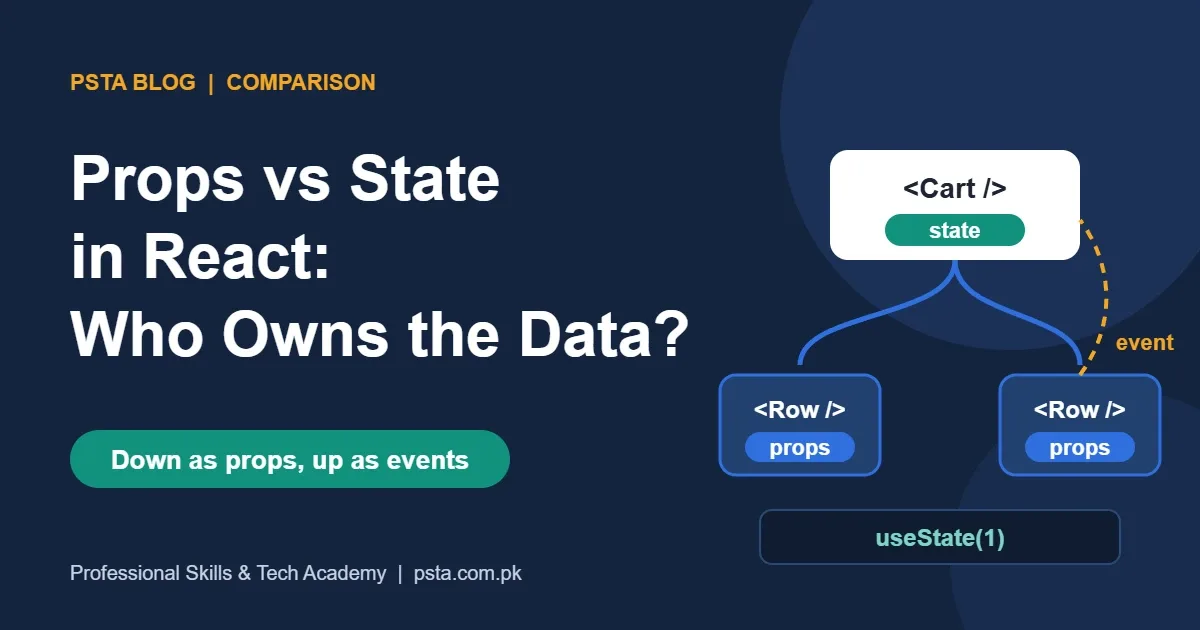
Props are read-only values a parent component passes to a child, much like function arguments. State is data a component keeps with useState and updates through its setter, which triggers a re-render. Use props for data coming from outside, state for data that changes inside, and calculate anything you can derive.
Key takeaways
- • Props flow from parent to child and are read-only inside the child.
- • State is private memory created with useState; calling its setter re-renders the component.
- • If a value never changes, arrives as a prop or can be calculated, it should not be state.
- • When two components need the same data, lift the state to their closest shared parent.
- • Copying a prop into state freezes its first value, so name such props initialX or defaultX.
Table of contents 18 sections
- What Are Props in React?
- What Is State in React?
- Props vs State: The Side-by-Side Comparison
- How Do Props and State Work Together?
- Worked Example: A Cart Row for a Small Online Shop
- Answer Key to the Self-Test
- Is It State or a Prop? Three Questions to Ask
- Lifting State Up When Two Components Need the Same Data
- Five Mix-Ups That Cause Real Bugs
- 1. Trying to Edit a Prop
- 2. Copying a Prop Into State
- 3. Storing Values You Could Calculate
- 4. Expecting State to Change Immediately
- 5. Calling useState Inside a Condition
- What About Context, Redux and Prop Drilling?
- Why Does This Matter for React Jobs in Pakistan?
- Practising Props and State in PSTA's React Course
- Build One Small Component Tonight
Before you read any definitions, try this quick self-test on props vs state in React. Look at five pieces of data from a small shopping cart and decide, for each one, whether it should be a prop or state:
- The product name, "Peshawari Chappal", sent from the cart list to one cart row.
- The quantity a shopper changes with the + and - buttons.
- The unit price of Rs. 3,500 that comes from the product data.
- Whether the "Apply coupon" box is open or closed.
- The row total, which is quantity times price.
Hold on to your answers. The answer key is in the worked example further down, and item 5 trips up most beginners we teach. Here is the short version: props are values a parent hands to a child, and the child can't change them. State is data a component remembers and updates itself, which makes React draw the screen again.
This guide covers:
- What props and state each do, using the wording of the official React docs
- A comparison table you can revise from before an interview
- One worked component that uses both, with the code explained line by line
- Three questions that tell you whether a value belongs in state at all
- Lifting state up, prop drilling and when Context or Redux enters the picture
What Are Props in React?
React props are the inputs of a component. A parent component passes them through JSX, the same way you write attributes on an HTML tag. The React documentation on passing props compares them to function arguments: your component receives a single object, and you usually destructure it to read each value.
You can pass almost anything as a prop. Strings and numbers are common, but so are arrays, objects and functions. Passing a function is how a child tells its parent that something happened, such as a button click.
function ProductCard({ name, price, inStock = true }) {
  return (
    <div className="card">
      <h3>{name}</h3>
      <p>Rs. {price}</p>
      {!inStock && <span>Out of stock</span>}
    </div>
  );
}

<ProductCard name="Lawn Suit" price={4200} />
Three details from the docs are worth remembering:
- Props are read-only. The docs call them immutable and say a component should ask its parent for new props instead of editing the ones it got.
- Props can still change over time. Each render receives a fresh copy, so when the parent sends a new value, the child shows it.
- Defaults apply only when a value is missing. In the code above,
inStock = trueis used if the prop is left out or isundefined. Passingnullor0will not trigger the default.
There is also a special prop called children. Anything you nest between a component's opening and closing tags arrives as children, which is how wrapper components like cards, modals and layouts work.
What Is State in React?
React state is a component's memory. The React page titled State: A Component's Memory explains why an ordinary variable can't do this job. First, a local variable resets on every render, because React runs your component function from the top each time. Second, changing a local variable doesn't tell React to redraw anything.
The useState hook fixes both problems. It returns a pair: the current value and a setter function. Calling the setter stores the new value and asks React to render the component again.
import { useState } from "react";

function LikeButton() {
  const [likes, setLikes] = useState(0);
  return (
    <button onClick={() => setLikes(likes + 1)}>
      Likes: {likes}
    </button>
  );
}
Two rules from the docs shape how you use state. State is private: if you render LikeButton twice, each copy keeps its own count, and a parent can't reach in and change it. And hooks must be called at the top level of a component, never inside a condition, a loop or a nested function, so React can match each call to the right piece of memory on every render.
Props vs State: The Side-by-Side Comparison
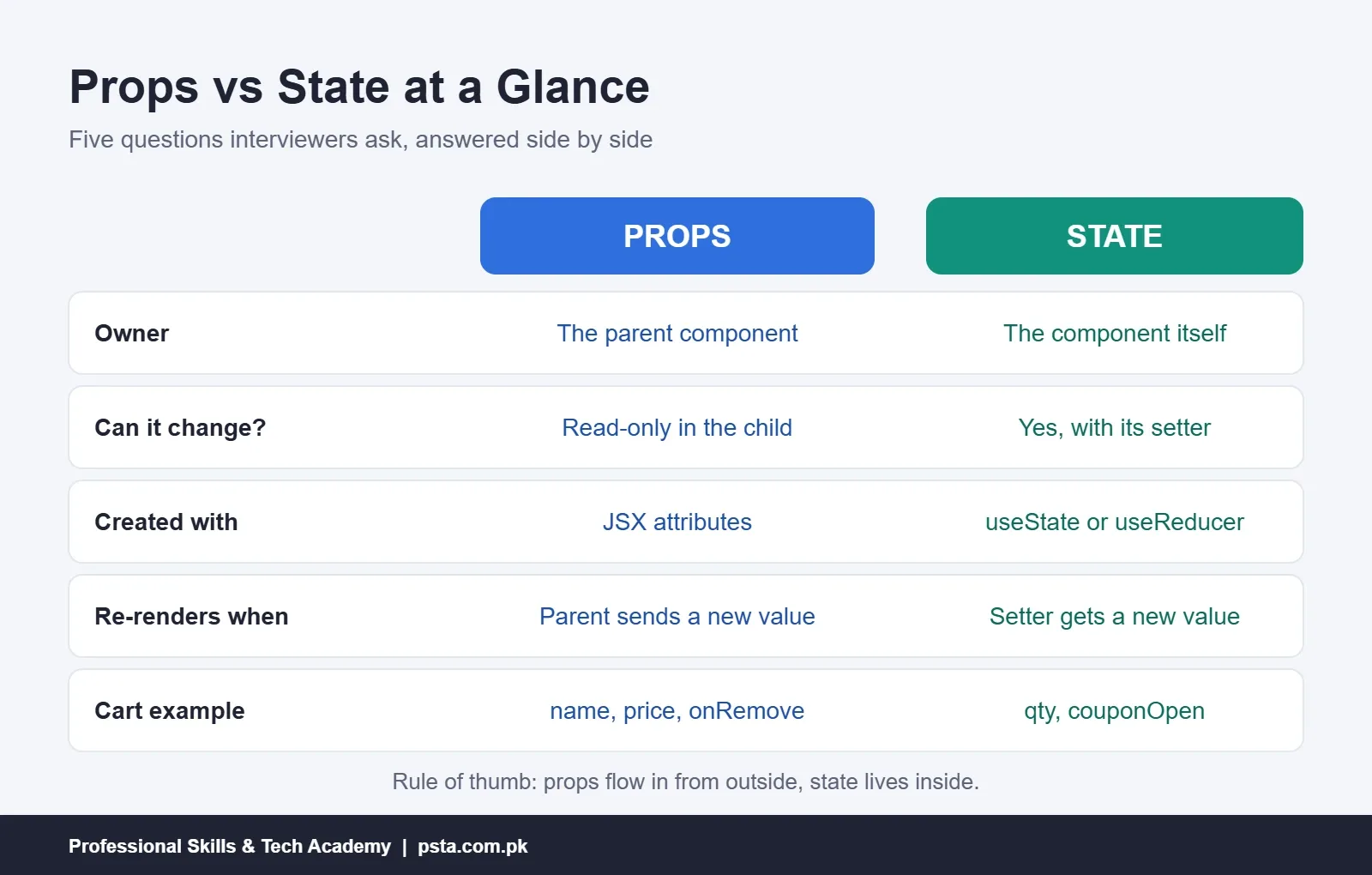
The official Thinking in React tutorial sums up the split neatly: props work like arguments passed into a function, while state acts as the component's memory. The table below expands that into the props vs state points interviewers and exam papers usually ask about.
| Question | Props | State |
|---|---|---|
| Who owns the data? | The parent component | The component that declares it |
| Can the component change it? | No, it's read-only | Yes, through its setter function |
| How is it created? | Written as JSX attributes by the parent | With useState or useReducer |
| What causes a re-render? | The parent sending a new value | Calling the setter with a new value |
| Who can see it? | The child that receives it | Only its owner, unless passed down as props |
| Typical examples | Product name, price, button label, an onClick handler | Form input text, quantity, open or closed menu, fetched data |
| Rough analogy | Ingredients handed to a cook | The cook's notepad of what is done so far |
A quick way to read the table: props flow in from outside, state lives inside. Both trigger re-renders, but from different directions.
How Do Props and State Work Together?
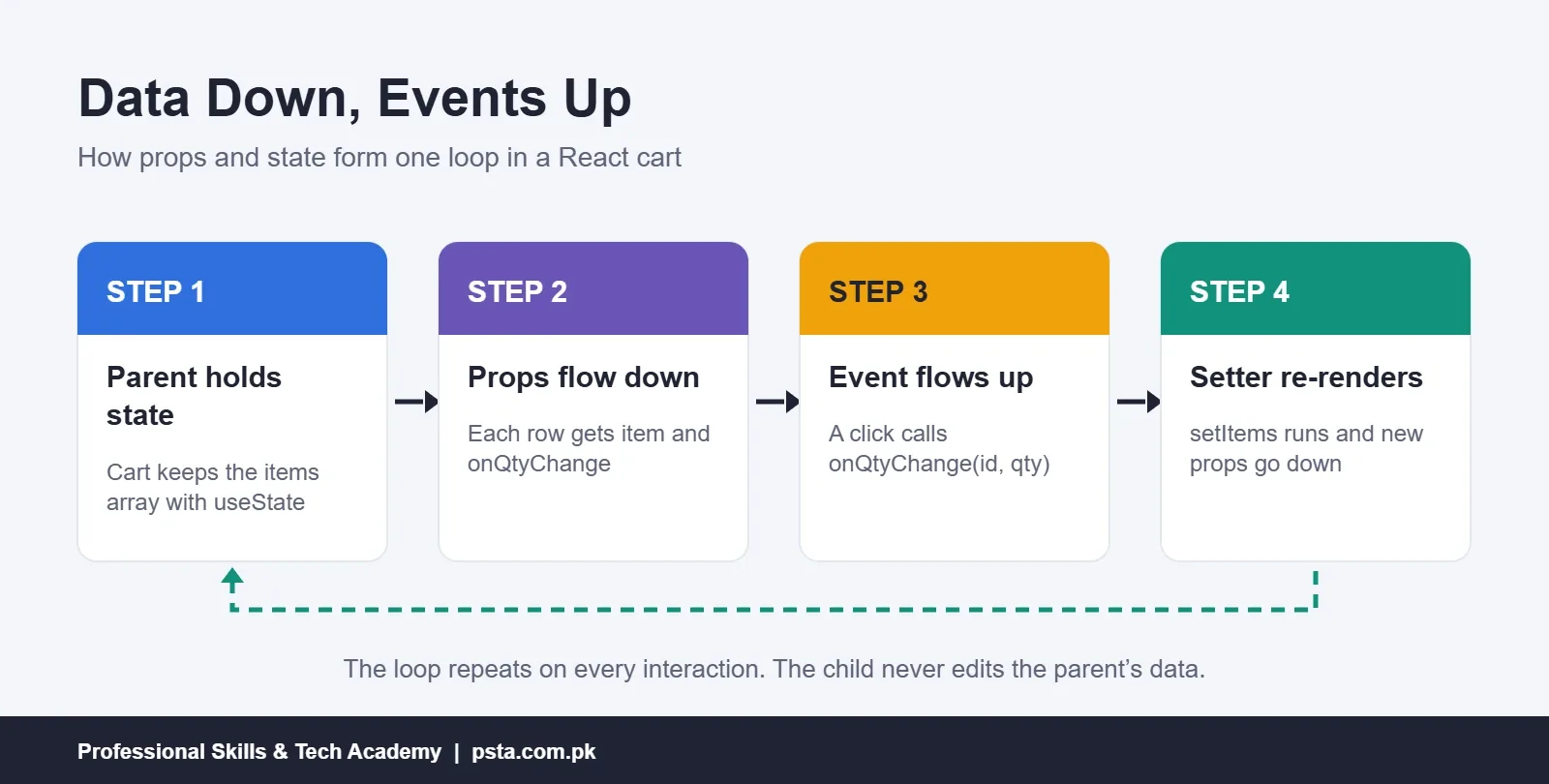
Beginners often treat props vs state as a contest between rivals. In real apps they form one loop. A parent keeps a value in state, passes it to a child as a prop, and also passes a function the child can call. When the user acts, the child calls that function, the parent updates its state, and the new value flows back down.
The React team calls the upward half of this loop "inverse data flow" in Thinking in React. Data travels down through props. Events travel up through callback props. The child never edits the parent's data directly; it only reports what happened.
Worked Example: A Cart Row for a Small Online Shop
Here is a made-up example of the kind our students build in class: a cart row for a small online shoe store in Pakistan. It answers the self-test from the top of this page.
import { useState } from "react";

function CartRow({ name, price, onRemove }) {
  const [qty, setQty] = useState(1);
  const [couponOpen, setCouponOpen] = useState(false);
  const rowTotal = qty * price;

  return (
    <div className="cart-row">
      <h4>{name}</h4>
      <p>Rs. {price} x {qty} = Rs. {rowTotal}</p>
      <button onClick={() => setQty(qty + 1)}>+</button>
      <button onClick={() => qty > 1 && setQty(qty - 1)}>-</button>
      <button onClick={() => setCouponOpen(!couponOpen)}>Coupon</button>
      {couponOpen && <input placeholder="Enter code" />}
      <button onClick={onRemove}>Remove</button>
    </div>
  );
}
Answer Key to the Self-Test
- Product name: a prop. The parent list already knows it and passes it down.
- Quantity: state. It changes when the shopper clicks, and the row must remember it.
- Unit price: a prop. It comes from product data and the row should never edit it.
- Coupon box open or closed: state. It's a small piece of interface memory that only this row cares about.
- Row total: neither. It's calculated from
qtyandpriceduring render, so storing it would create a second copy that can fall out of sync.
Notice onRemove as well. It's a function prop. The row doesn't know how removal works; it only calls the function, and the parent that owns the cart list decides what to do.
Is It State or a Prop? Three Questions to Ask
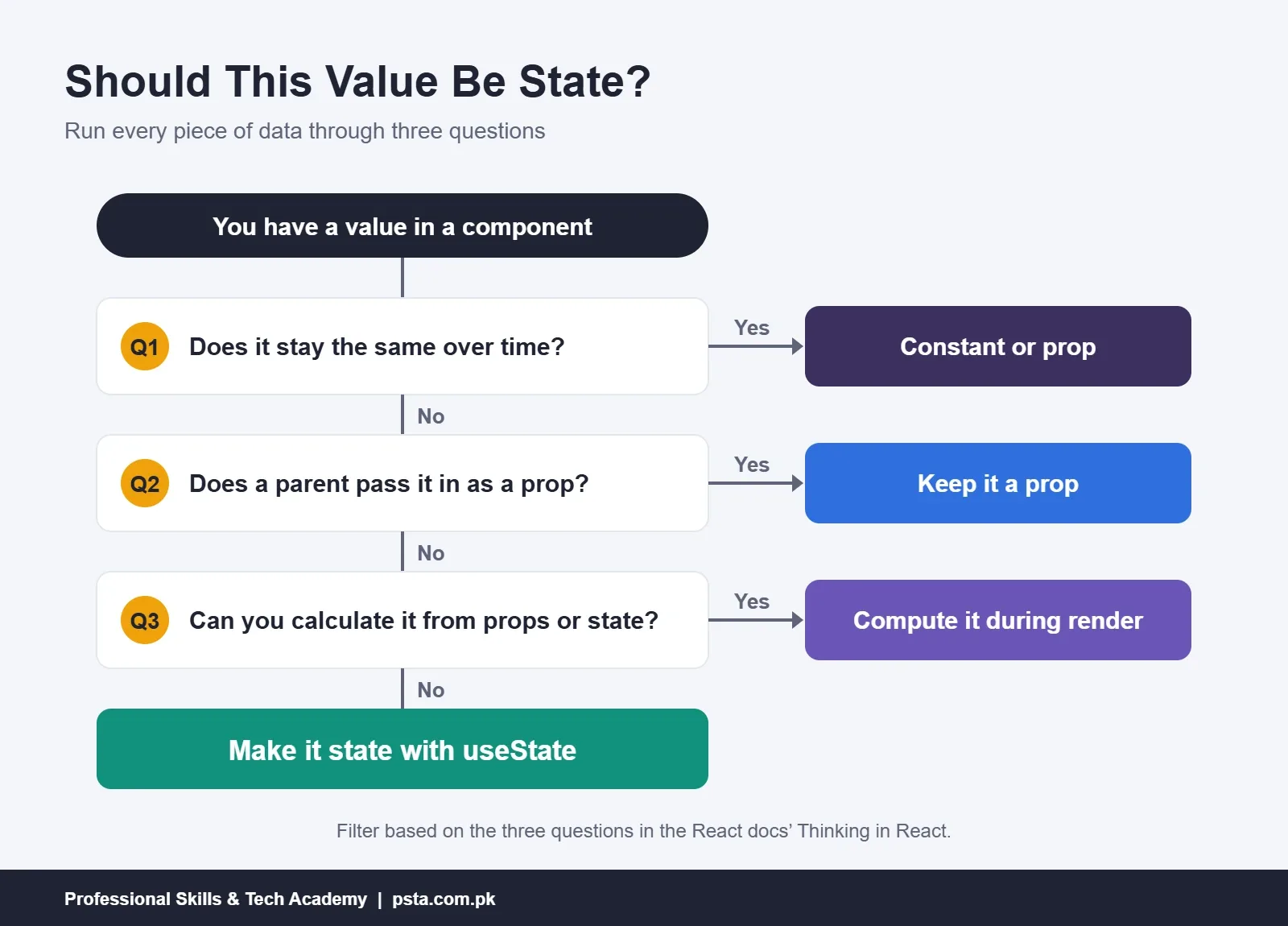
When you're unsure, Thinking in React gives a three-question filter. Run every piece of data through it:
- Does it stay the same over time? Then it isn't state. A shop's name or a fixed list of cities can be a constant or a prop.
- Does a parent pass it in through props? Then it isn't state in this component.
- Can you calculate it from existing props or state? Then it definitely isn't state. Totals, counts, filtered lists and "is the form valid" flags all belong here.
Whatever survives all three questions is state. The same tutorial calls this keeping state DRY: store the smallest set of values you need and compute the rest. Its own example is a shopping list where you store the items and read the array's length instead of keeping a separate count.
The React page on choosing the state structure adds five principles that build on this: group related state, avoid contradictions, avoid redundant state, avoid duplication and avoid deeply nested state.
Lifting State Up When Two Components Need the Same Data
Sooner or later two sibling components need the same value. Say the cart rows and a summary box at the top both need to know the quantities. If each row keeps its own qty state, the summary can't see it.
The fix is called lifting state up. The React guide on sharing state describes three moves:
- Remove the state from the child components.
- Pass the values down from their closest shared parent as props.
- Add the state to that parent and pass event handlers down with it.
After the move, each row becomes a controlled component: the parent's props drive what it shows. The docs describe the goal as one source of truth for each unique piece of state. That doesn't mean all state sits in one giant component. It means every value has exactly one owner.
function Cart() {
  const [items, setItems] = useState([
    { id: 1, name: "Peshawari Chappal", price: 3500, qty: 1 },
    { id: 2, name: "Khussa", price: 2800, qty: 2 },
  ]);
  const itemCount = items.reduce((sum, i) => sum + i.qty, 0);

  function changeQty(id, qty) {
    setItems(items.map(i => (i.id === id ? { ...i, qty } : i)));
  }

  return (
    <>
      <Summary count={itemCount} />
      {items.map(i => (
        <CartRow key={i.id} item={i} onQtyChange={changeQty} />
      ))}
    </>
  );
}
Now items is the only state. The count is derived, and each row receives its data and a callback as props.
Five Mix-Ups That Cause Real Bugs
These are the mistakes we see most often when students first build forms and carts.
1. Trying to Edit a Prop
Writing props.price = 3000 inside a child breaks the read-only rule and won't update the screen reliably. Ask the parent to change it by calling a callback prop.
2. Copying a Prop Into State
useState(price) stores only the first value. If the parent later sends a new price, the child keeps showing the old one. The React docs say mirroring a prop like this only makes sense when you want to ignore later updates, and suggest naming the prop initialPrice or defaultPrice to make that clear.
3. Storing Values You Could Calculate
Keeping total in state next to qty and price means three values must stay in step. Forget to update one and the cart shows the wrong amount. Calculate it during render instead.
4. Expecting State to Change Immediately
After setQty(qty + 1), the variable qty still holds the old number until the next render. If you need the updated value right away, calculate it into a local constant first. When the new value depends on the old one, pass an updater function: setQty(q => q + 1).
5. Calling useState Inside a Condition
Putting a hook inside an if block breaks the top-level rule, and React will warn you. Declare every hook at the top of the component and put the condition inside your JSX or logic instead. Our post on React hooks mistakes covers more bugs of this type.
What About Context, Redux and Prop Drilling?
Once state is lifted high enough, you may find yourself passing the same prop through four or five components that don't use it, just to reach one at the bottom. Developers call this prop drilling. It works, but it makes components harder to move and test.
React's built-in Context lets a parent make a value available to any component below it without passing it level by level. Libraries such as Redux Toolkit go further and keep app-wide data in a central store. Both are tools for sharing state, not replacements for props and state. Inside every component you'll still read props and keep local state.
A practical rule for beginners: start with local state, lift it when two components need it, and reach for Context only when drilling becomes painful. Global stores make sense for larger apps with logged-in users, carts and dashboards.
Why Does This Matter for React Jobs in Pakistan?
React is widely used, so these basics come up constantly. In the Stack Overflow Developer Survey 2025, 44.7% of all respondents said they had worked with React, and the figure was 46.9% among professional developers. Next.js, which is built on React, was at 20.8% of all respondents.
For a fresh graduate applying to software houses in Islamabad, Lahore or Karachi, that means "explain props vs state" is one of the most likely opening questions in a frontend interview. Interviewers usually follow it with a small task: build a counter, a to-do list or a search filter, and explain where each value lives. If you can talk through the three-question filter and the lifting-state pattern, you'll handle most of those follow-ups. Our list of React interview questions has more practice answers.
The same skill shows up in freelance work. Clients on Fiverr and Upwork often ask for fixes to forms that don't update or totals that show stale numbers, and most of those bugs trace back to a value stored in the wrong place.
Practising Props and State in PSTA's React Course
If you'd like guided practice, PSTA's Advanced React.js Mastery course runs for 12 weeks and is listed at beginner level. Its modules start with React patterns and hooks, then move on to shared state with Context and Redux Toolkit, page routing, calling APIs, speed tuning, testing and login security, and finish with a scalable e-commerce project. The current fee shown on the course page is Rs. 30,000.
You can join at the Mandian campus on Old College Road, opposite FIMS College, in Abbottabad, attend live from another city, or mix the two. If plain JavaScript still feels shaky, the JavaScript course that runs from beginner to React is a gentler first step, and the Full-Stack Web Development course adds the backend side. Every PSTA program is listed on the courses page, and the admission form is short whenever you decide. Prefer to check the next batch date before applying? Our WhatsApp line, +92 314 5424399, answers those questions.
Build One Small Component Tonight
Reading about props vs state helps, but the difference sticks once you've written it yourself. Tonight, build a single FeeCalculator component: take the course fee as a prop, keep the number of installments in state, and calculate the monthly amount during render. Then lift the installment count into a parent and show it in a second component. If both parts update together, you've understood the core idea. For your next step, pick one app from our React projects for beginners list.
Frequently asked questions
Can a child component change the props it receives?
No. Props are read-only inside the component that receives them. If a child needs a different value, the parent must send one. The usual pattern is for the parent to pass a function as a prop, such as onChange, which the child calls. The parent then updates its own state, and React passes the new value back down as a fresh prop.
How do I send data from a child component to its parent in React?
Pass a callback function from the parent to the child as a prop. When something happens in the child, such as a click or a typed value, it calls that function with the data as an argument. The parent receives it, usually stores it in state with a setter, and re-renders. React calls this pattern inverse data flow.
Is useState the only way to create state in React?
No. useState is the simplest and most common hook for local state. useReducer suits state with many related updates, such as a form with several fields or a cart with add, remove and clear actions. For data many components share, you can use Context or a library like Redux Toolkit, but each of these still builds on the same idea of owned, updatable data.
What is the difference between state and a normal variable in a React component?
A normal variable is recreated every time the component renders, so its value resets. Changing it also does not tell React to update the screen. State survives between renders because React stores it for you, and calling its setter schedules a new render. Use plain variables for values you calculate during render, and state for values that must be remembered.
Should I copy props into state?
Usually not. useState only reads its starting value once, so if you write useState(price) and the parent later sends a new price, your component keeps the old one. Read the prop directly instead. The only reasonable case is when you want to ignore later updates on purpose, and then name the prop initialPrice or defaultPrice so other developers understand.
Does updating state in a parent re-render its child components?
Yes, by default. When a component re-renders, React also renders the components nested inside it, and they receive the latest props. In small apps this is fast enough to ignore. In larger apps, tools like React.memo and useMemo can skip work for children whose props have not changed, but beginners should get the data flow right before optimizing.
Do I need Redux to manage state as a React beginner?
No. Most beginner and small business projects work well with useState, lifting state up and, where needed, Context. Redux Toolkit becomes useful in bigger apps with many screens sharing the same data, such as a store with a cart, user accounts and an admin dashboard. Learn props and local state well first, then add a global store when prop drilling becomes painful.
Sources & references
- Passing Props to a Component (React docs) react.dev
- State: A Component's Memory (React docs) react.dev
- Thinking in React (React docs) react.dev
- Sharing State Between Components (React docs) react.dev
- Choosing the State Structure (React docs) react.dev
- Stack Overflow Developer Survey 2025: Technology survey.stackoverflow.co
Last reviewed & updated on by Umar Qureshi. Written by the PSTA team in Abbottabad, Pakistan.

Umar Qureshi

Advanced React.js Mastery: Build Scalable Real-World Applications
Turn this guide into a career: hands-on training with real projects, online across Pakistan or on-campus in Abbottabad · 12 Weeks.



Comments
No comments yet — ask a question or share your experience.