Quick answer
Most React hooks mistakes come from treating state as if it changes instantly. Each render gets a snapshot, so use updater functions, never mutate arrays, calculate derived values during render, keep click logic in handlers, return cleanup from effects, guard fetches with an ignore flag, list every dependency and call hooks only at the top level.
Key takeaways
- • A setter asks React for a new render; it doesn't change the variable in the current one.
- • Use setCount(c => c + 1) when the next value depends on the previous one, and never push into state arrays.
- • If a value can be calculated during render, it doesn't need state or an effect.
- • Every effect that starts a timer, listener or request should return a cleanup function.
- • React Compiler 1.0 handles memoization, but it doesn't fix logic bugs like stale state or race conditions.
Table of contents 22 sections
- Why Do React Hooks Mistakes Happen So Often?
- All 10 Bugs at a Glance
- useState Mistakes: Snapshots, Updaters and Mutation
- Mistake 1: Reading State Right After You Set It
- Mistake 2: Stacking Setter Calls With the Same Value
- Mistake 3: Changing an Array or Object in Place
- Two Effects You Can Usually Delete
- Mistake 4: Copying Props or State Into More State
- Mistake 5: Running Click Logic From an Effect
- useEffect Mistakes That Loop, Leak or Race
- Mistake 6: Setting State in an Effect With No Dependency Array
- Mistake 7: Forgetting the Cleanup Function
- Mistake 8: Letting an Old Request Overwrite a New One
- Dependency and Rule-Breaking Mistakes
- Mistake 9: Leaving Out or Faking Dependencies
- Mistake 10: Calling Hooks Conditionally
- Which Hook Should You Use Instead?
- How Do You Track Down a Hook Bug Quickly?
- Do React Compiler and useEffectEvent Change These Rules?
- Where These Bugs Show Up in Pakistani Projects
- Fixing Hook Bugs With Your Trainer at PSTA
- Tonight's Practice: Break One Component on Purpose
Most React hooks mistakes come from one wrong belief: that a state variable changes the moment you call its setter. It doesn't. React hands each render a fixed snapshot of state, and effects run only after the screen has updated. With 44% of developers in the 2025 Stack Overflow survey saying they used React, these bugs turn up in a lot of real code, including the code you'll write in your first job.
I've collected the 10 React hooks mistakes I correct most often when students move from tutorials to their own projects. Each one comes with the symptom you'll notice, the reason it happens and the fix React's own documentation recommends.
What you'll find on this page:
- A single table of all 10 bugs, their symptoms and their fixes
- Short before-and-after code for each mistake
- A six-step routine for tracking down a hook bug
- What useEffectEvent and React Compiler 1.0 change, and what they leave alone
- A practice exercise you can finish in one evening
Why Do React Hooks Mistakes Happen So Often?
Hooks look like ordinary function calls, so beginners read them like ordinary JavaScript: top to bottom, with values changing in place. React works differently. It calls your component function again on every render, and each call sees its own copy of props and state.
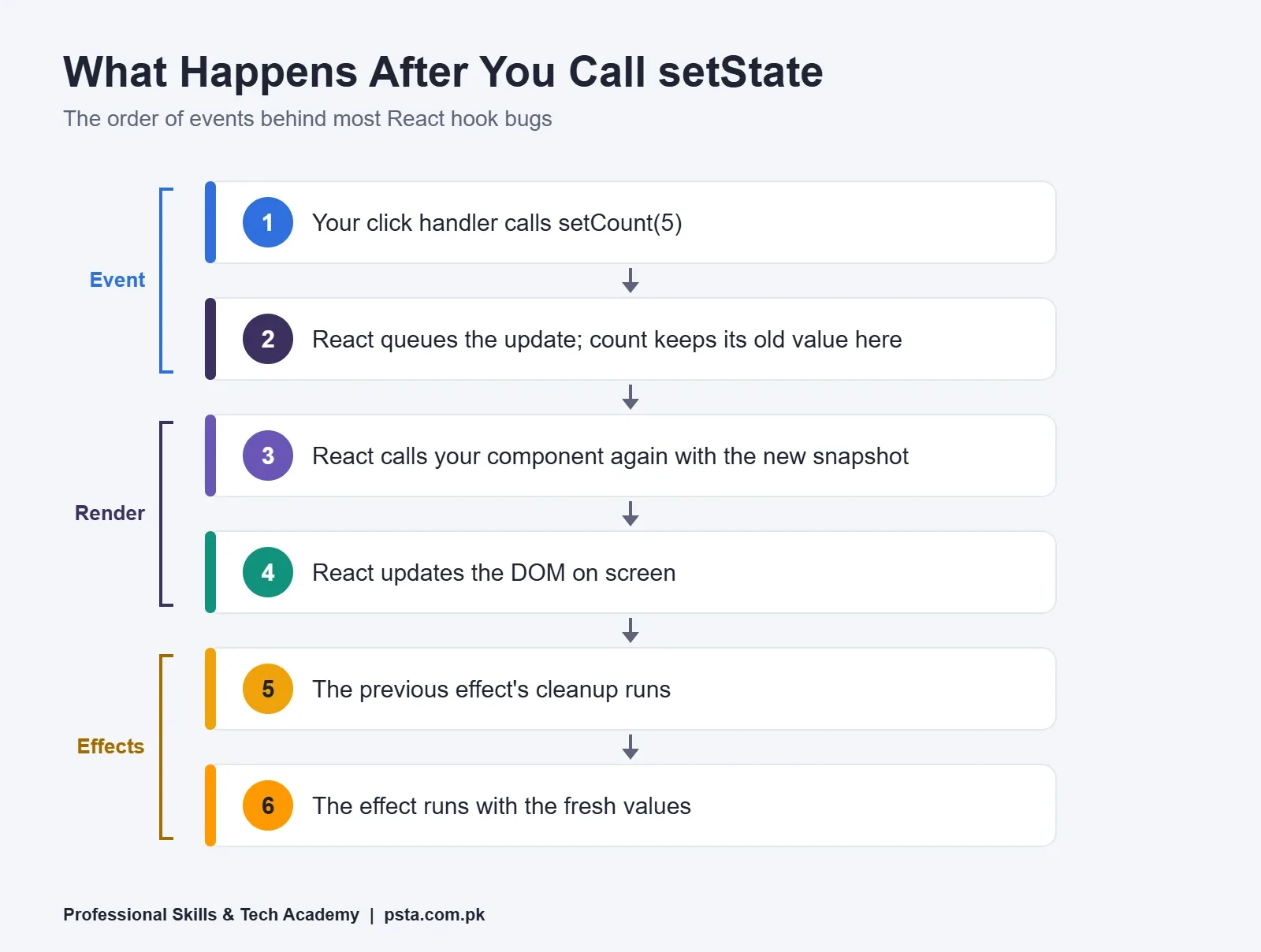
Here is the order of events after a button click:
- Your click handler calls a setter such as setCount(5).
- React queues the update. The count variable inside that handler keeps its old value.
- React calls your component again, this time with the new value.
- React updates the DOM so the screen matches.
- React runs the cleanup from the previous effect, then runs the effect again with fresh values.
Keep this order in your head and most of the bugs below explain themselves. React's guide to synchronizing with effects puts the key idea plainly: effects run because rendering happened, while event handlers run because a user did something.
All 10 Bugs at a Glance
Use this table of React hooks mistakes as a quick lookup when something breaks. The sections that follow explain each row.
| # | Mistake | What You Notice | Fix |
|---|---|---|---|
| 1 | Reading state right after setting it | console.log prints the old value | Keep the new value in a local variable |
| 2 | Calling setCount(count + 1) several times | Counter rises by 1, not 3 | Pass an updater: setCount(c => c + 1) |
| 3 | Changing an array or object in place | Screen doesn't update | Create a new array or object |
| 4 | Copying props into state with an effect | Extra render, values lag behind | Calculate the value during render |
| 5 | Running click logic from an effect | Requests or toasts fire at odd times | Move the logic into the event handler |
| 6 | Setting state in an effect with no dependency array | Endless renders, frozen tab | Add correct dependencies or remove the effect |
| 7 | Forgetting the cleanup function | Duplicate listeners, timers that never stop | Return a function that undoes the work |
| 8 | Ignoring fetch race conditions | Old results replace newer ones | Set an ignore flag in cleanup |
| 9 | Leaving out or faking dependencies | Stale values inside the effect | List every reactive value the effect reads |
| 10 | Calling hooks inside if, loops or after a return | Hook order errors, wrong values | Call hooks at the top level only |
useState Mistakes: Snapshots, Updaters and Mutation
Mistake 1: Reading State Right After You Set It
You write setQuantity(quantity + 1) and log quantity on the next line. The console shows the old number. Most "useState not updating" complaints I hear from students turn out to be this, and nothing is actually broken. React's page on state as a snapshot explains that a setter requests a new render; it doesn't rewrite the variable in the render you're already in.
function addItem() {
  const next = quantity + 1;
  setQuantity(next);
  console.log(next); // the value you just asked for
}
If you need the new value straight away, compute it into a local variable first. If you need to act on it after the screen changes, that work belongs to the next render, not the next line.
Mistake 2: Stacking Setter Calls With the Same Value
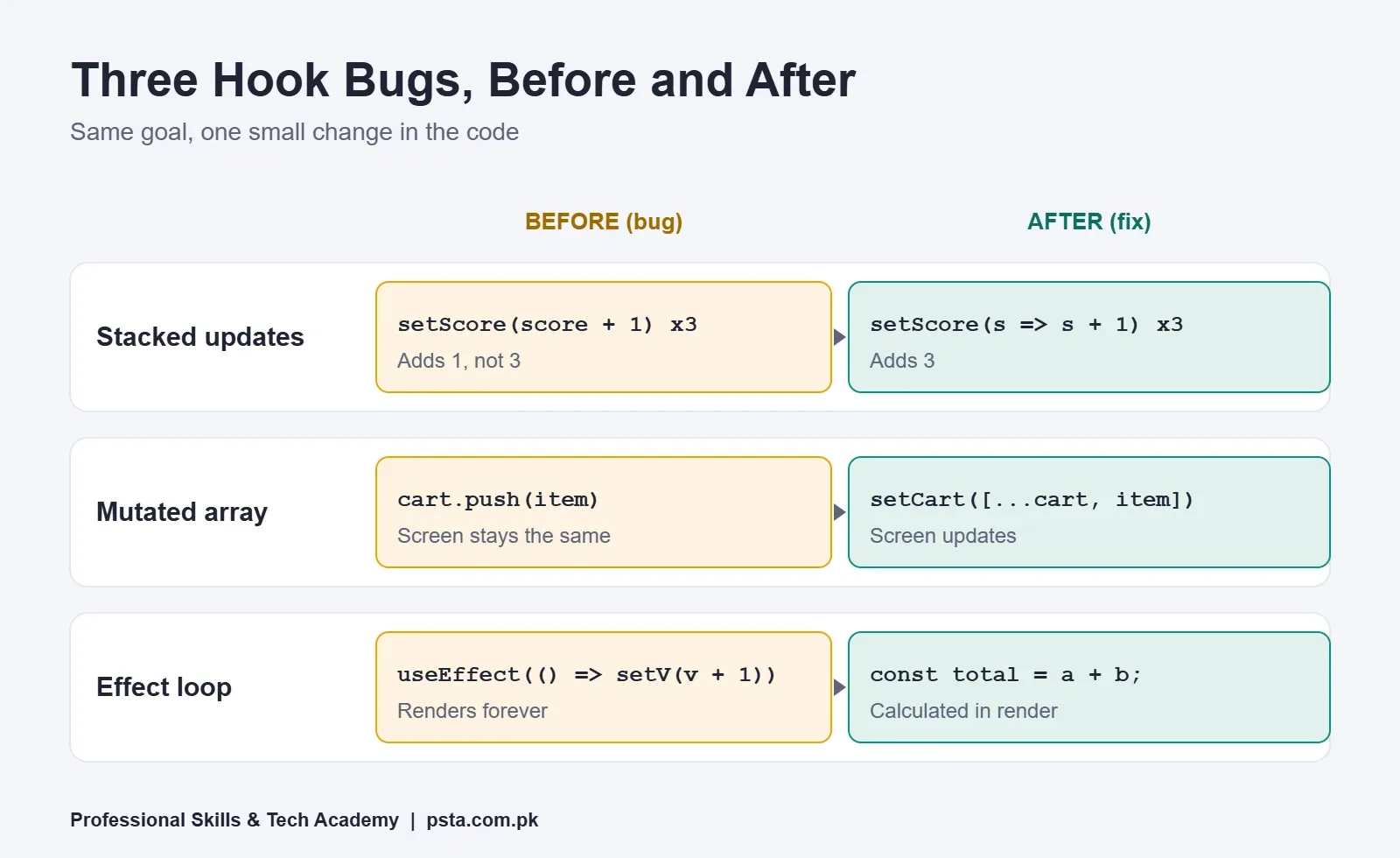
Three calls to setScore(score + 1) in one click add 1, not 3, because all three read the same snapshot. An updater function fixes it, since each one receives the latest queued value:
setScore(s => s + 1);
setScore(s => s + 1);
setScore(s => s + 1); // score goes up by 3
Use the updater form whenever the next state depends on the previous one. Counters, toggles and cart quantities are the usual suspects.
Mistake 3: Changing an Array or Object in Place
cart.push(item) does change the array, but React compares the old and new state by reference. It's the same array, so React sees no change and skips the re-render. Build a new value instead:
setCart([...cart, item]);
setUser({ ...user, city: 'Abbottabad' });
I tell students to treat state like a printed fee receipt. You never write on the old one; you print a fresh copy with the new amount.
Two Effects You Can Usually Delete
React's guide You Might Not Need an Effect makes a point beginners resist: if nothing outside React is involved, you probably don't need an effect at all. Two patterns account for most of the unnecessary effects, and most of the React hooks mistakes, I see in student code.
Mistake 4: Copying Props or State Into More State
A product card receives price and discount, then uses an effect to store finalPrice in state. That costs an extra render, and for a moment the card shows an outdated total. Work it out while rendering instead:
const finalPrice = price - discount;If the calculation is slow, such as filtering a long product list on every keystroke, wrap it in useMemo. To reset a form when the user picks a different item, give the component a key like key={productId} rather than clearing each field inside an effect.
Mistake 5: Running Click Logic From an Effect
Picture a Place Order button that sets submitted to true, while an effect watches submitted to send the order and show a toast. It works until something else flips that flag, or the component mounts again and repeats the request. Ask why the code needs to run. If the honest answer is "because the user clicked", it belongs in the click handler:
async function handlePlaceOrder() {
  await sendOrder(cart);
  showToast('Order received');
}
useEffect Mistakes That Loop, Leak or Race
Mistake 6: Setting State in an Effect With No Dependency Array
An effect with no array runs after every render. If it sets state, that update causes another render, which runs the effect again. The tab freezes, or the laptop fan starts working hard. This is the classic useEffect infinite loop.
// Loops forever
useEffect(() => {
  setVisits(visits + 1);
});
Learn the three forms of the useEffect dependency array by heart. No array means the effect runs after every render. An empty array means it runs once when the component appears. An array such as [userId] means it runs again only when userId changes. Often the real fix is mistake 4: the value never needed an effect.
Mistake 7: Forgetting the Cleanup Function
Whatever an effect starts, it should stop. That covers event listeners, intervals, sockets and subscriptions. Return a function that undoes the work. React calls this useEffect cleanup before the effect runs again and when the component is removed.
useEffect(() => {
  const id = setInterval(refreshRates, 60000);
  return () => clearInterval(id);
}, []);
In development, Strict Mode deliberately runs setup, then cleanup, then setup again, so a missing cleanup shows itself early. React's documentation warns against blocking the second run with a ref check. Fix the cleanup instead, because production users will hit the same leak later.
Mistake 8: Letting an Old Request Overwrite a New One
Say you build a city search for a property listings site. Typing "Lah" and then "Lahore" fires two requests. If the first one answers last, its results replace the correct ones. The documented fix is an ignore flag that cleanup switches on:
useEffect(() => {
  let ignore = false;
  fetchListings(city).then(data => {
    if (!ignore) setListings(data);
  });
  return () => { ignore = true; };
}, [city]);
React's docs also suggest moving repeated fetching into a custom hook or using your framework's built-in data loading, so you write fewer raw effects. If promises still feel shaky, read our guide to JavaScript async await before going further.
Dependency and Rule-Breaking Mistakes
Mistake 9: Leaving Out or Faking Dependencies
The linter asks you to list every prop, state value and function your effect reads. Many students silence the warning with an eslint-disable comment. The effect then keeps values from the render that created it, and you get stale data that's painful to trace.
React's position is firm: you don't choose dependencies, your code does. If an effect re-runs too often, change the code so it no longer needs that value. Objects and functions created during render are brand new each time, so move them inside the effect or outside the component.
The React 19.2 release on October 1, 2025 added useEffectEvent for one narrow case: logic inside an effect that should read the latest value without causing a re-run. React's example is a chat room that reconnects when roomId changes but not when the theme changes. The React team also warns against using it simply to quiet the linter.
Mistake 10: Calling Hooks Conditionally
React matches hooks to their state by call order. Put one inside an if, a loop, a try/catch block or after an early return, and that order can shift between renders. The Rules of Hooks say hooks belong at the top of a component body or a custom hook body, before any early return.
// Wrong: the hook is skipped when user is missing
if (!user) return <Login />;
const [tab, setTab] = useState('orders');

// Right: hooks first, early return after
const [tab, setTab] = useState('orders');
if (!user) return <Login />;
Install eslint-plugin-react-hooks and your editor flags this before you even run the app.
Which Hook Should You Use Instead?
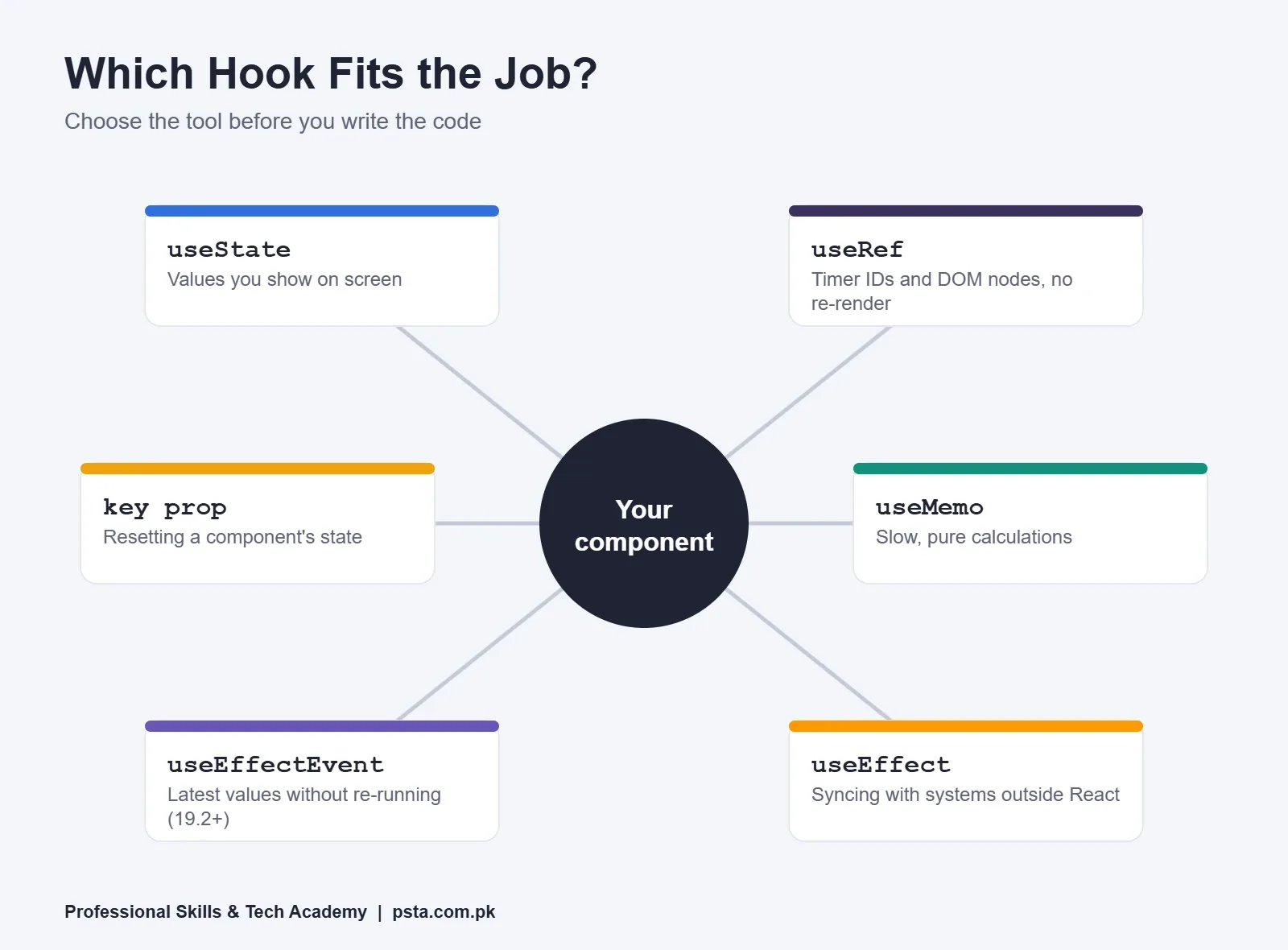
Many of these bugs start with the wrong tool rather than wrong syntax. Before writing a hook, decide what the value is for.
- useState for anything the user sees on screen.
- useRef for values that shouldn't trigger a re-render, such as a timer ID or a DOM node. The useRef reference says changing ref.current never re-renders, and you shouldn't read or write it during rendering.
- useMemo for slow calculations that are pure.
- useEffect only for syncing with something outside React: the network, a browser API or a third-party widget.
- A key prop when you want a component to start fresh.
How Do You Track Down a Hook Bug Quickly?
When a component misbehaves, work through these steps in order rather than changing code at random:
- Read the lint warnings first. Dependency and hook-order problems are usually already flagged.
- Reproduce the bug with a single action, such as one click or one keystroke, and write down what you expected.
- Open React Developer Tools and watch the component's props and state while you repeat that action.
- Add a console.log at the top of the component and inside each effect to see how often each one runs.
- Question every effect: does it talk to something outside React, and does it clean up after itself?
- Remove code until the bug disappears. The last piece you removed is your main suspect.
Do React Compiler and useEffectEvent Change These Rules?
Only partly. React Compiler 1.0, released on October 7, 2025, is a build-time tool that memoizes components for you. The announcement says new code can lean on it and keep useMemo and useCallback for spots that need precise control, such as effect dependencies. It also reports initial loads up to 12% faster in the Meta Quest Store, and new Vite and Next.js projects can pick compiler-enabled templates.
The compiler doesn't fix React hooks mistakes in your logic. Snapshots, mutation, missing cleanup, race conditions and conditional hooks are still your responsibility. The compiler-powered lint rules in eslint-plugin-react-hooks catch more of them, but you still need to know why the code is wrong. The current release line, React 19.3, arrived on September 9, 2026, and its announcement introduces no new hooks, so everything in this guide still applies.
Where These Bugs Show Up in Pakistani Projects
The examples below show how React hooks mistakes appear in typical student and freelance work here. They are illustrations, not case studies:
- A school fee portal where the Paid badge never appears because the payments array was changed with push (mistake 3).
- A marketplace-style product filter showing the previous category's results because two requests finished out of order (mistake 8).
- An order dashboard that adds a fresh message listener every time the page opens, so each WhatsApp order appears twice (mistake 7).
- A clinic booking form that sends two confirmation emails during development because the request lives in an effect instead of the submit handler (mistake 5).
Clients rarely describe a bug in React terms. They say "it shows the old price" or "my phone gets hot on that page". Matching a symptom to the table near the top of this guide is a skill worth practicing before you take freelance work.
Fixing Hook Bugs With Your Trainer at PSTA
In PSTA's Advanced React.js Mastery course, Module 1 is a deep dive into patterns and hooks, including useReducer, useMemo and custom hooks. Module 4 covers API integration and asynchronous data, which is where most effect bugs live, so you fix real React hooks mistakes with a trainer checking your code. The course page lists 12 weeks at beginner level and the current fee as Rs. 30,000, with Rs. 35,000 shown as the regular price. You can sit in class at our Mandian campus opposite FIMS College, join the same sessions online from another city, or combine the two, and a fresh batch begins every month.
If plain JavaScript still slows you down, the JavaScript course builds up to React step by step. The Full-Stack Web Development course adds a backend, so your React app has real data to fetch. You can compare everything on our courses page, read the admission details, or send a question about batch timings on WhatsApp to +92 314 5424399.
Need something to practice on? Pick an app from our list of React projects for beginners, and when interviews come closer, work through these React interview questions.
Tonight's Practice: Break One Component on Purpose
Build a small page with a counter, a ticking clock and a search box. Then plant three bugs from this list: a missing cleanup, a stacked setter and a mutated array. Note the symptom each one produces, then fix them one at a time. Spotting React hooks mistakes you planted yourself is the quickest way to recognize them when they turn up in someone else's code.
Frequently asked questions
Why is my useEffect running in an infinite loop?
Usually the effect sets state and has no dependency array, or one of its dependencies is an object or function created fresh on every render. Each state update causes a render, and the render runs the effect again. Add the correct dependency array, move that object inside the effect, or calculate the value during render so you can delete the effect.
Why does console.log show the old state after I call the setter?
A setter asks React to render again with a new value. It doesn't change the variable in the render you're currently in, so a log on the next line still prints the old snapshot. Store the new value in a local variable if you need it straight away, or read it in the next render.
Is it safe to disable the exhaustive-deps lint warning?
Almost never. When you hide that warning, the effect keeps reading values from the render that created it, which leads to stale data. Fix the cause instead: move objects and functions inside the effect, remove values the effect doesn't need, or, from React 19.2, wrap non-reactive logic in useEffectEvent.
Why doesn't my component re-render when I add an item to an array?
Methods like push and splice change the existing array, and React compares old and new state by reference. Because the reference stays the same, React assumes nothing changed. Create a new array instead, for example setItems([...items, newItem]), and use map or filter for edits and deletions.
Should I still fetch data inside useEffect in 2026?
You can, as long as you add cleanup with an ignore flag so a slow old response can't replace a newer one. React's docs recommend wrapping repeated fetching in a custom hook or using your framework's built-in data loading, which means fewer raw effects to debug in larger apps.
When should I use useEffectEvent instead of adding a dependency?
Use it when part of an effect needs the latest value of something but changing that value shouldn't restart the effect. A chat connection that should not reconnect when the theme changes is React's own example. Don't use it just to silence the linter, and don't list it in the dependency array.
How can I practice finding hook bugs on my own?
Build a small page with a counter, a timer and a search box, then add bugs on purpose: a missing cleanup, a stacked setter and a mutated array. Write down the symptom each one causes before fixing it. Repeating this a few times makes the same symptoms easy to spot in real projects.
Sources & references
- Synchronizing with Effects (React docs) react.dev
- You Might Not Need an Effect (React docs) react.dev
- State as a Snapshot (React docs) react.dev
- Rules of Hooks (React docs) react.dev
- useRef reference (React docs) react.dev
- React 19.2 release post react.dev
- React Compiler v1.0 announcement react.dev
- Stack Overflow 2025: React and Next.js usage (Pagepro) pagepro.co
Last reviewed & updated on by Umar Qureshi. Written by the PSTA team in Abbottabad, Pakistan.

Umar Qureshi

Advanced React.js Mastery: Build Scalable Real-World Applications
Turn this guide into a career: hands-on training with real projects, online across Pakistan or on-campus in Abbottabad · 12 Weeks.


Comments
No comments yet — ask a question or share your experience.