Quick answer
Build seven small React apps in order: a shop price list, a bill splitter, a weather card, an expense tracker, a clinic website, a COD cart and a dashboard. Use Vite to start, since Create React App is deprecated. Give each project a live link, a clear README and clean commits.
Key takeaways
- • Build in order: lists and props first, then forms, effects, routing, shared state and a dashboard.
- • Start with Vite (Node.js 20.19+ or 22.12+); Create React App was deprecated for new apps in February 2025.
- • Show loading and error states in every project that fetches data.
- • Give each project a live link, a README and small, clear commits.
- • Plan about 10 to 12 weeks at two hours a day, including fixes and deployment.
Table of contents 18 sections
- Why Do React Projects Matter More Than Certificates?
- Before You Start: Your React Setup in 2026
- The 7 React Projects for Beginners at a Glance
- Projects 1 and 2: Lists, Props and Forms
- Project 1: Mobile Shop Price List
- Project 2: Hostel Bill Splitter
- Projects 3 and 4: Effects, APIs and Saving Data
- Project 3: City Weather Card
- Project 4: Monthly Expense Tracker
- Projects 5 to 7: Routing, Shared State and a Dashboard
- Project 5: Clinic Appointment Website
- Project 6: Cash-on-Delivery Cart
- Project 7: Tuition Academy Dashboard
- How Should You Present Projects to Pakistani Employers?
- Habits That Make Beginner React Code Look Junior
- How Long Will All Seven Take?
- Building These Projects in PSTA's React Classes
- Start Project 1 Tonight
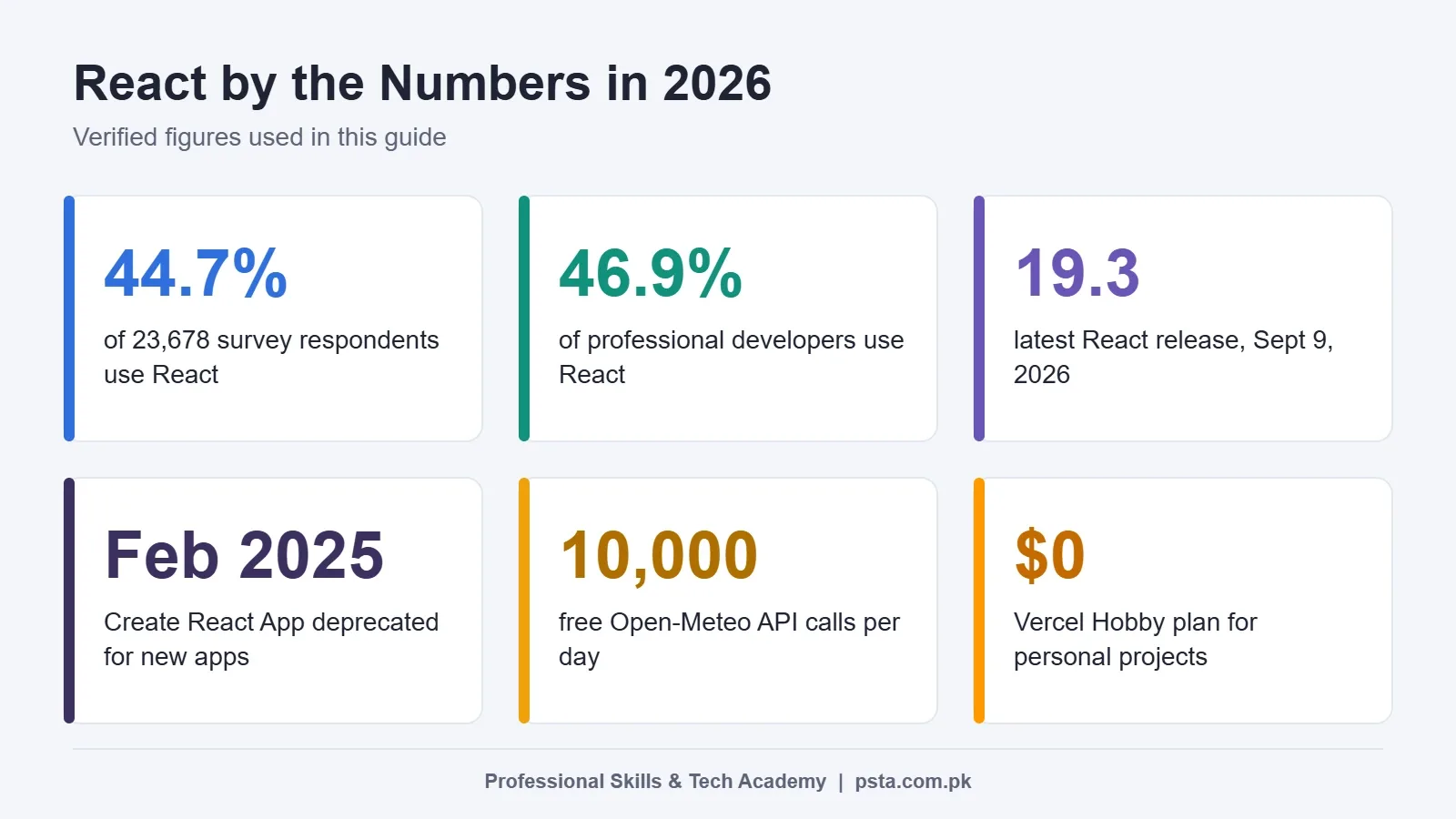
Seven React projects for beginners, built in a fixed order, will teach you nearly every skill a junior job ad asks for: props, state, forms, effects, API calls, routing and shared state. That matters because React is used by 44.7% of the 23,678 developers who answered the web frameworks question in the 2025 Stack Overflow Developer Survey. With that many people listing React on a CV, finished projects are what help yours stand out.
Each project below is small enough to finish in a few evenings and uses a realistic Pakistani example instead of a generic demo. In this guide you'll get:
- A 2026 setup that matches what the official React docs recommend now
- Seven project briefs, each with the skills it proves and a stretch goal
- A build order that moves from simple lists to a deployed dashboard
- Advice on presenting your work to software houses in Lahore, Karachi and Islamabad
- A realistic weekly schedule if you study after college or work
Why Do React Projects Matter More Than Certificates?
A certificate tells an employer you sat through a course. A working project shows you can turn a vague request into a screen that behaves correctly. Interviewers at software houses often open your live link, read your code and ask why you made certain choices.
To see what local employers want, we checked the first page of junior React developer jobs on Indeed Pakistan. Of the 16 listings shown, six were in Lahore, five in Karachi, two in Rawalpindi and one in Islamabad.
The recurring skills were JavaScript, HTML, CSS, responsive design, React and Next.js, and one ad listed the Context API and Redux as nice-to-have skills. Only one listing showed pay: Rs. 30,000 to Rs. 50,000 a month for a junior React Native role. Treat that as a single snapshot, not a salary survey.
Among professional developers in the same Stack Overflow survey, the figure was 46.9%. Knowing React is common, so showing what you have built with it is what carries weight.
Before You Start: Your React Setup in 2026
Older tutorials tell you to run Create React App. Skip that advice. The React team deprecated Create React App for new apps on February 14, 2025, and new installs now print a warning.
For production apps, the official React docs point you toward a framework, naming Next.js and React Router first. They also say that building from scratch suits you if you want to learn the basics. That is exactly your situation, so use Vite for projects 1 to 6.
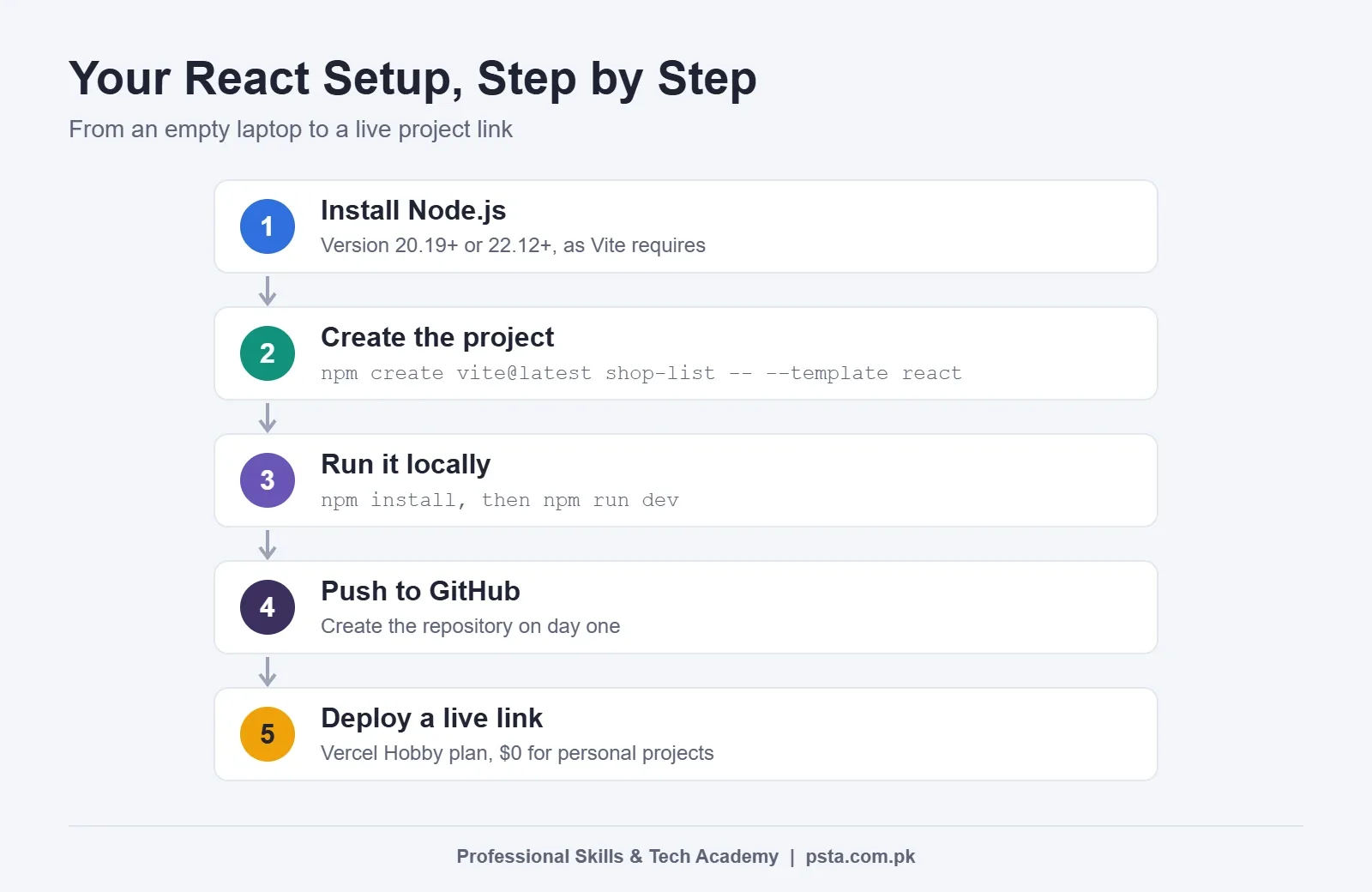
- Install Node.js. Vite's guide requires Node.js 20.19 or newer, or 22.12 or newer.
- Open a terminal and run
npm create vite@latest shop-list -- --template react. - Move into the folder, run
npm install, thennpm run dev. - Open the local address it prints. Edit
src/App.jsxand watch the page update. - Create a GitHub repository for the project on day one, not at the end.
React 19.3 came out on September 9, 2026, and is the newest version on the React versions page. You don't need to chase every release. Learn function components and Hooks well, and version changes will feel small.
The 7 React Projects for Beginners at a Glance
When people search for React projects for beginners, they usually find long lists with no order. Here, the order matters more than the ideas themselves. Each project adds one or two new concepts and reuses everything before it. If you skip ahead, you'll spend your time fighting state bugs instead of learning.
| # | Project | Main Skill It Proves | Suggested Time |
|---|---|---|---|
| 1 | Mobile shop price list with search | Components, props, rendering lists | 2 to 3 evenings |
| 2 | Hostel bill splitter | Controlled forms, derived values | 2 to 3 evenings |
| 3 | City weather card | useEffect, fetch, loading and error states | 3 evenings |
| 4 | Monthly expense tracker | localStorage, a custom Hook | 4 evenings |
| 5 | Clinic appointment website | React Router, URL parameters | 4 to 5 evenings |
| 6 | Cash-on-delivery (COD) cart | useReducer, Context API, validation | 1 week |
| 7 | Tuition academy dashboard | Data fetching, tables, deployment | 1 to 2 weeks |
The times are guidance for someone studying two hours a day. Go slower if you need to. Finishing well beats finishing fast.
Projects 1 and 2: Lists, Props and Forms
Project 1: Mobile Shop Price List
Picture a phone shop in Saddar that wants customers to check prices before visiting. Store 15 to 20 phones in a JavaScript array with name, brand, storage and price in rupees. Show each one in a PhoneCard component, then add a search box and a brand filter.
What it proves: you can split a page into components, pass data through props and use map() with a stable key. The search box gives you your first piece of state.
Stretch goal: add a "sort by price" dropdown and show "No phones match" when the filter returns nothing.
Project 2: Hostel Bill Splitter
Four roommates share electricity, gas, internet and a cook's salary. Build a form where users enter each bill and the number of people, and the app shows each person's share. Add a toggle for someone who was away half the month.
What it proves: controlled inputs, converting text to numbers safely, and calculating totals from state instead of storing them twice. Interviewers often ask about derived state, so this project gives you a concrete answer.
Stretch goal: let users copy a neat summary to send in the hostel WhatsApp group.
Projects 3 and 4: Effects, APIs and Saving Data
Project 3: City Weather Card
Build a card that shows today's temperature and a three-day forecast for Abbottabad, Lahore or any city the user picks. The Open-Meteo API is free for non-commercial use, needs no API key, and allows up to 10,000 calls a day. Its data is licensed under CC BY 4.0, so add a small credit line in your footer.
What it proves: fetching data inside useEffect, showing a loading message, handling a failed request, and cleaning up when the city changes quickly. Many beginners show only the happy path. Showing all three states is what makes this project look professional.
Stretch goal: remember the last city the user chose.
Project 4: Monthly Expense Tracker
Track daily spending on food, transport, mobile load and utilities. Show a monthly total and a simple breakdown by category. Data must survive a page refresh, so save it in the browser's localStorage.
What it proves: you understand React Hooks well enough to write your own. Here's the core idea in a few lines:
function useLocalStorage(key, startValue) {
  const [value, setValue] = useState(() => {
    const saved = localStorage.getItem(key);
    return saved ? JSON.parse(saved) : startValue;
  });
  useEffect(() => {
    localStorage.setItem(key, JSON.stringify(value));
  }, [key, value]);
  return [value, setValue];
}
Stretch goal: add an edit button for each entry and a monthly budget warning.
Projects 5 to 7: Routing, Shared State and a Dashboard
Project 5: Clinic Appointment Website
Build a small site for a family clinic with Home, Doctors, Doctor Profile and Book pages. Each doctor's profile lives at its own URL, such as /doctors/3. The booking form picks up the doctor from the URL.
What it proves: client-side routing with React Router, URL parameters, a shared layout, and a proper "page not found" screen. The React team's Create React App post makes the same point: routing gives you shareable URLs, which plain state can't.
Stretch goal: block bookings for Sundays and past dates.
Project 6: Cash-on-Delivery Cart
Many small Pakistani stores sell through Instagram and take orders on cash on delivery. Build a product grid, a cart that updates quantities, and a checkout form that asks for name, phone number, city and address. Validate the phone format before the order can be placed.
What it proves: useReducer for cart actions and the Context API to share the cart between pages. The Context API also appeared as a nice-to-have in our Indeed check, so be ready to explain why you chose it over passing props down.
Stretch goal: add a delivery charge that changes by city and a free-delivery threshold.
Project 7: Tuition Academy Dashboard
This is your showcase, and the one that turns a set of React projects for beginners into a real portfolio. Build an admin screen for a tuition academy: a students table with search, sort and pages, a fee status column, and summary cards for total students and unpaid fees. Use a mock API such as a local JSON file or JSON Server.
What it proves: working with larger data, splitting a screen into reusable parts, and keeping a page fast. For this one, try a framework. The React docs list Next.js and React Router as their main recommendations, and a framework-based project shows you can follow current practice.
Stretch goal: add a login screen with fake credentials and protected routes.
How Should You Present Projects to Pakistani Employers?
A good project hidden in a messy repository adds little to your React portfolio. Give every project the same three things:
- A live link. Vercel's Hobby plan costs $0 and is meant for personal, non-commercial use, which fits a portfolio. If you later build a site for a paying client, its Pro plan is $20 a month.
- A clear README. Write what the app does, a screenshot, the tools you used, how to run it, and one problem you solved.
- Clean commit history. Small commits with plain messages show how you work. Our Git commands guide covers the 20 commands you'll use most.
On your CV, list two or three of your strongest projects with one line each about the result. A line like "Cart with city-based delivery charges and phone validation" says more than "E-commerce app." Before interviews, practice explaining one project end to end, then work through our React interview questions.
Habits That Make Beginner React Code Look Junior
Reviewers spot these quickly. Fixing them costs little and makes every project above look more mature.
- Copying state you can calculate. If a total comes from a list, calculate it during render.
- Using array index as the key. It causes odd bugs when items move or get deleted. Use an id.
- Ignoring errors. Every fetch needs a loading message and a failure message.
- One giant component. If a file passes about 150 lines, look for a piece to pull out.
- No mobile check. People often open a shared link on their phone, so test at phone width before you send it.
- Tutorial clones only. Change the data, the design and at least one feature so the project is yours.
How Long Will All Seven Take?
At about two hours a day, plan for roughly 10 to 12 weeks to finish all seven React projects for beginners. That's guidance, not a promise. Your pace depends on how solid your JavaScript is before you begin. If arrays, objects and promises still confuse you, spend two weeks on them first. Our JavaScript interview questions guide is a quick way to test yourself.
The weekly plan is slower than the table above because it leaves room for READMEs, bug fixes and deployment:
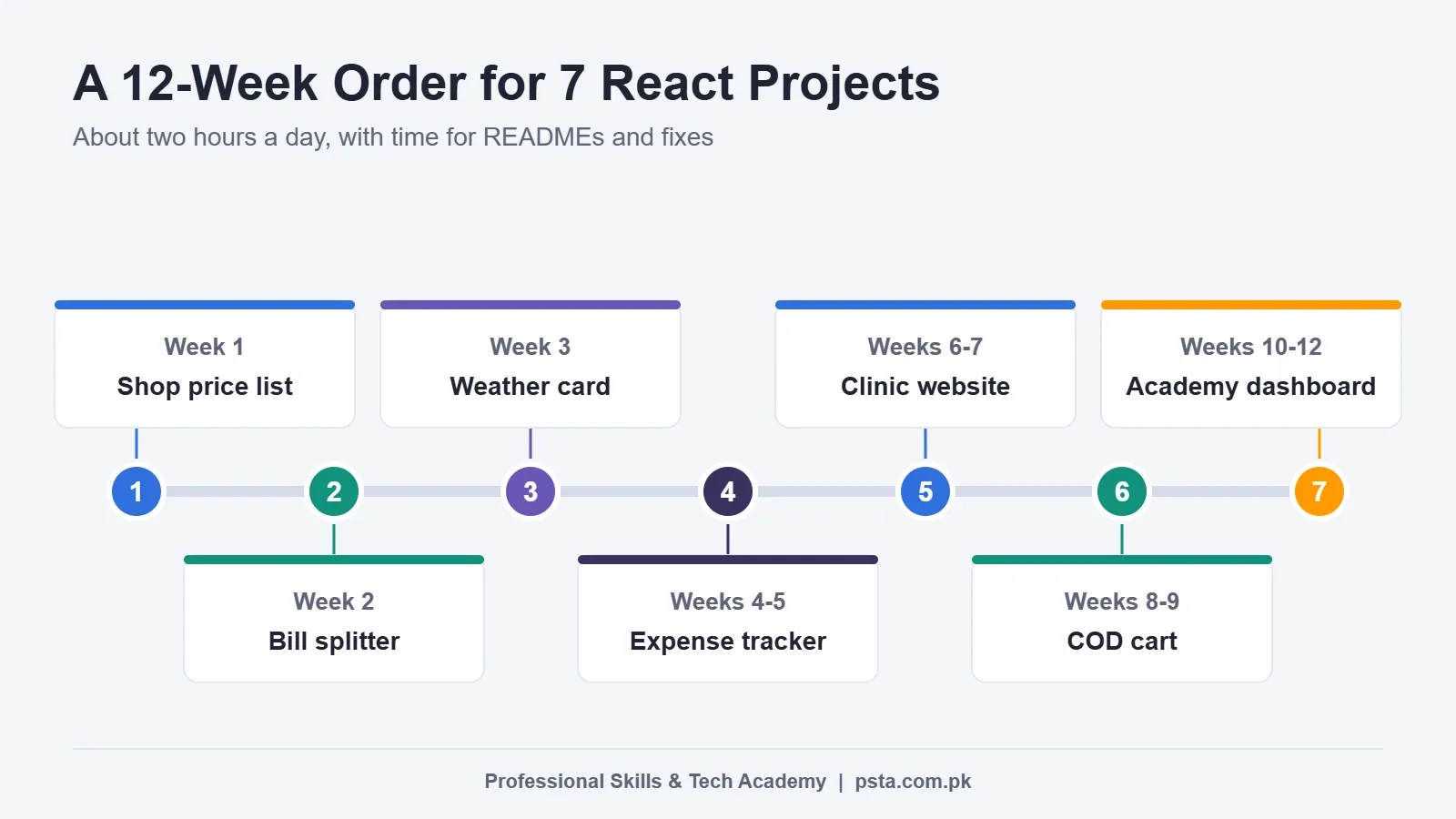
- Week 1: project 1. Week 2: project 2. Week 3: project 3.
- Weeks 4 and 5: project 4. Weeks 6 and 7: project 5.
- Weeks 8 and 9: project 6. Weeks 10 to 12: project 7, deployed with a live link.
A simple rhythm works well. Spend weekdays building, Saturday fixing bugs and writing the README, and Sunday deploying and resting. Keep a short notes file of every error you solved. Those notes become your interview answers.
Building These Projects in PSTA's React Classes
If you'd rather build with feedback than alone, PSTA's Advanced React.js Mastery course runs for 12 weeks and is listed at the Beginner level. The course page shows the fee as Rs. 30,000, reduced from Rs. 35,000. The eight modules move from advanced Hooks and state management (Context API, Redux Toolkit) to routing, working with APIs, speed tuning, clean architecture and testing, authentication, and a final e-commerce build.
You can join at the Abbottabad campus on Old College Road in Mandian, opposite FIMS College, study online in live sessions wherever you live, or mix campus and online days. Fresh batches begin each month, and class slots run from 9:00 AM to 9:30 PM, Monday to Saturday.
New to JavaScript? Start with the JavaScript course that leads into React. If you also want back-end skills, the full-stack program with AI tools adds them. You can see every option on the courses page.
Start Project 1 Tonight
Pick 15 phones from a local shop's page, put them in an array, and get them on screen as cards. That's one evening of work, and it gets you past the hardest part, which is starting. When you want a teacher reviewing your code, ask questions on WhatsApp at +92 314 5424399 or fill in the admission form for the next batch.
Frequently asked questions
What are good React projects for beginners?
Start with apps that each teach one new idea. A searchable price list covers props and lists. A bill splitter covers forms. A weather card teaches useEffect and API calls. After that, try an expense tracker with localStorage, a multi-page site with React Router, a cart using Context, and finally a dashboard you deploy with a live link.
Do I need JavaScript before starting React projects?
Yes. React is a JavaScript library, so weak basics turn every bug into a mystery. Be comfortable with arrays, objects, array methods like map and filter, modules, and promises with async and await. If those still feel shaky, spend two weeks on plain JavaScript first. You will move through the React projects much faster afterward.
Should beginners use Vite or Next.js in 2026?
Use Vite for your first six projects. The React docs say building from scratch suits people who want to learn the basics, and Vite keeps the setup small. For your final dashboard, try a framework such as Next.js or React Router, which the docs recommend for production apps. That mix shows you understand both.
Is Create React App still okay to use?
Not for new projects. The React team deprecated Create React App for new apps on February 14, 2025, and new installs show a warning. Older tutorials still use it, so translate their steps to a Vite project instead. The component code stays almost the same, and only the setup and start commands change.
Where can I host React projects for free?
Vercel's Hobby plan costs $0 and is meant for personal, non-commercial work, which suits a student portfolio. Put the live link at the top of your README and CV so reviewers can open it in one click. If you later build a paid site for a client, check the commercial plans, since Vercel's Pro plan costs $20 a month.
How many React projects do I need for a junior job?
There is no fixed number. Three or four finished, deployed projects with clean code usually say more than 10 half-done tutorial copies. Pick ones that show different skills, such as forms, API calls, routing and shared state. Be ready to explain every line of your strongest project, because interviewers often ask you to walk through it.
Can I use free APIs in portfolio projects?
Yes, as long as you follow each API's terms. Open-Meteo, for example, is free for non-commercial use without an API key and allows up to 10,000 calls a day. Its data uses the CC BY 4.0 license, so add a credit line. Always handle slow responses and failures so your app still looks finished.
Sources & references
- 2025 Stack Overflow Developer Survey: Technology survey.stackoverflow.co
- React Versions react.dev
- Creating a React App (React docs) react.dev
- Sunsetting Create React App (React blog) react.dev
- Vite: Getting Started vite.dev
- Open-Meteo Free Weather API open-meteo.com
- Vercel Pricing vercel.com
- Junior React Developer Jobs (Indeed Pakistan) pk.indeed.com
Last reviewed & updated on by Umar Qureshi. Written by the PSTA team in Abbottabad, Pakistan.

Umar Qureshi
Advanced React.js Mastery: Build Scalable Real-World Applications
Turn this guide into a career: hands-on training with real projects, online across Pakistan or on-campus in Abbottabad · 12 Weeks.
Comments
No comments yet — ask a question or share your experience.