Quick answer
The best free AI coding tools for students in 2026 are GitHub Copilot Free (2,000 completions and 50 chats a month), Google Antigravity's $0 plan and Cursor Hobby. New Copilot Student sign-ups are paused, so don't plan around them. Use chat tools to explain errors first, and add autocomplete only once you can write the code yourself.
Key takeaways
- • GitHub's FAQ says new Copilot Student, Pro and Pro+ sign-ups are paused, with no end date announced.
- • Copilot Free includes 2,000 code completions and 50 chat requests a month at $0.
- • Google replaced its free Gemini Code Assist extensions with Antigravity on June 18, 2026.
- • Cursor's Hobby plan is free with limited agent requests; paid plans start at $20 a month plus taxes.
- • In the Stack Overflow 2025 survey, 84% of respondents use or plan to use AI tools, but only about 33% trust their accuracy.
- • Learn fundamentals first, then autocomplete, then agent tools for portfolio and client work.
Table of contents 16 sections
- What Changed With AI Coding Tools in 2026?
- How Many Developers Actually Use AI Tools?
- The Five AI Coding Tools for Students Worth Testing
- 1. GitHub Copilot Free
- 2. Google Antigravity
- 3. Cursor Hobby
- 4. ChatGPT
- 5. Claude and Claude Code
- Free vs Paid: AI Coding Tools at a Glance
- Is GitHub Copilot Still Free for Students in Pakistan?
- Which Tool Fits Your Learning Stage?
- Myths That Slow Down New Programmers
- Paying in Dollars From Pakistan: What to Check First
- How to Use AI on Assignments Without Hurting Your Learning
- Where AI Tools Fit in PSTA's Full-Stack Course
- Install One Free Tool and Test It on Old Code
Many students in Pakistan assume a student card automatically gets them GitHub Copilot for free. That used to work, but it isn't a safe plan in 2026. GitHub's own FAQ says new Copilot Student sign-ups are paused with no end date, so the smarter move is to choose AI coding tools for students that you can actually activate today, at zero cost, from Pakistan.
I teach web development every day, and the question I hear most now is not "should I use AI?" but "which tool, and how much should I lean on it?" This review answers both.
In this review, you'll find:
- What changed in 2026 for Copilot, Gemini and other coding assistants
- Five tools you can start on a free plan, with honest limits for each
- The exact GitHub Education requirements if you still want Copilot Student
- Which tool suits a beginner, a project builder and a freelancer
- A simple routine for using AI on assignments without weakening your skills
What Changed With AI Coding Tools in 2026?
Three changes matter if you're comparing AI coding tools for students this year.
First, GitHub reorganized its plans. Since March 12, 2026, verified students use a separate Copilot Student plan instead of the old Pro access. Then, in an April 2026 announcement, GitHub paused new sign-ups for Copilot Student, Pro and Pro+. Its Student Developer Pack FAQ still says there is no timeframe for the pause to end.
Second, billing moved to usage. A June 2026 update in the same FAQ says usage-based billing went live for all Copilot users on June 1, 2026. Paid plans now come with a monthly pool of GitHub AI Credits rather than a flat count of chats.
Third, Google replaced its free coding extension. According to the Gemini Code Assist page, the unpaid individual tier's IDE extensions and CLI were replaced by Antigravity and Antigravity CLI on June 18, 2026. Older YouTube tutorials that show the Gemini Code Assist free setup are now out of date.
The lesson is simple. Pricing pages for AI coding tools for students change every few months, so check the official page on the day you sign up, not a blog post from last year.
How Many Developers Actually Use AI Tools?
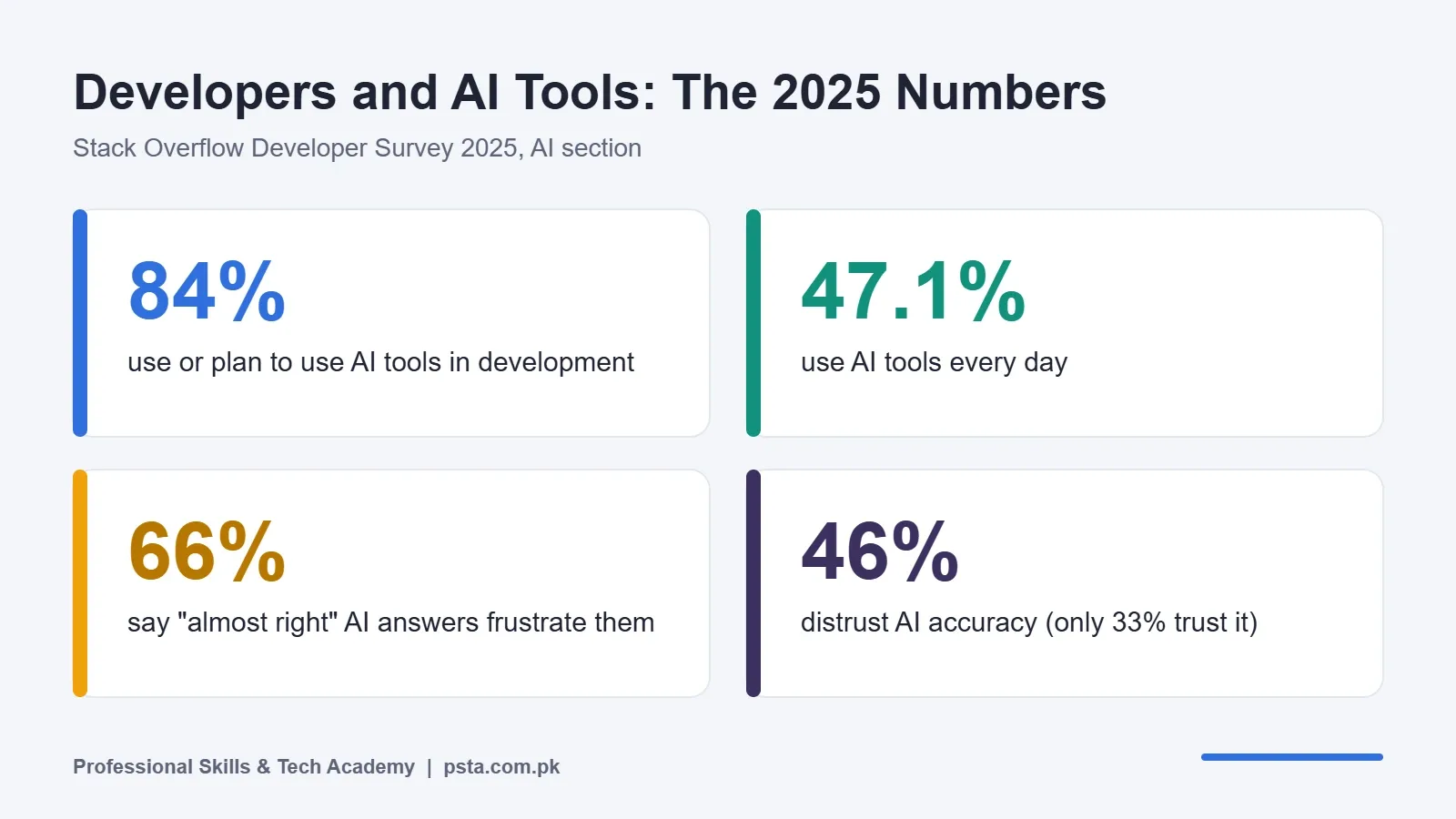
Most of them. The Stack Overflow Developer Survey 2025 found that 84% of respondents use or plan to use AI tools in their development work, and 47.1% use them every day.
The same survey shows why you still need real skills. Only about 33% of respondents trust the accuracy of AI output, while 46% distrust it. The most common frustration, named by 66%, is AI answers that are "almost right, but not quite."
That "almost right" problem is the whole reason employers still test you on fundamentals. A software house in Lahore or Islamabad won't hire you because you can prompt a chatbot. It hires you because you can spot the bug the chatbot missed.
The Five AI Coding Tools for Students Worth Testing
I picked these five because each has a free entry point and covers a different style of help. Prices below come from each company's official pricing page, checked in October 2026.
1. GitHub Copilot Free
Copilot works inside VS Code and other editors, suggesting code as you type. The Copilot plans page lists the Free plan at $0 with 2,000 code completions and 50 chat requests per month. Pro costs $10 a month and Pro+ costs $39.
Best for: students who already use VS Code and GitHub. Watch out for: 50 chats run out quickly if you ask about every error. Treat chat as a last resort, not a first reflex.
2. Google Antigravity
Antigravity is Google's AI-first code editor. The Antigravity pricing page lists the individual plan at $0 a month, with unlimited tab completions, unlimited command requests and access to several agent models. The catch is "basic weekly rate limits," and Google doesn't publish exact numbers for them.
Best for: students who want generous autocomplete without paying. Watch out for: agent features can rewrite many files at once, which is risky when you're still learning what each file does.
3. Cursor Hobby
Cursor is a popular editor built on the same base as VS Code, so most of your VS Code habits carry over. The Cursor pricing page shows a free Hobby plan that needs no credit card and includes limited agent requests. Paid individual plans start at $20 a month, and the page notes that prices exclude taxes.
Best for: students building a full project who want an editor that understands the whole codebase. Watch out for: Cursor has no formal student discount right now. Its student page only mentions promotions at campus and online events.
4. ChatGPT
Most students already have ChatGPT on their phone. The ChatGPT pricing page shows that even the Free plan includes limited access to Codex, OpenAI's coding agent, while paid plans expand that usage.
Best for: explaining concepts, error messages and code you didn't write. Watch out for: copying code from a chat window into your project skips the context an editor tool has, so mismatched variable names and missing imports are common.
5. Claude and Claude Code
Claude is strong at reading long files and explaining structure. According to the Claude pricing page, the Free plan costs $0, while Pro costs $20 a month billed monthly or $17 a month on an annual plan ($200 upfront). Claude Code, the terminal-based coding agent, is included in paid plans only.
Best for: reviewing your code and explaining why something works. Watch out for: the coding agent isn't part of the free plan, so budget for it only once you're working on paid projects.
Free vs Paid: AI Coding Tools at a Glance
Here are the same AI coding tools for students side by side. "Free plan" means what the $0 tier includes.
| Tool | Free plan | Main free limit | Cheapest paid plan | Works inside your editor? |
|---|---|---|---|---|
| GitHub Copilot | Yes | 2,000 completions and 50 chats a month | $10/month (Pro) | Yes (VS Code and other editors) |
| Google Antigravity | Yes | Weekly rate limits (no published numbers) | Google AI Pro (price not shown on page) | Yes (its own editor) |
| Cursor | Yes (Hobby) | Limited agent requests | $20/month plus taxes | Yes (its own editor) |
| ChatGPT | Yes | Limited Codex access | See official page | Mostly in browser or app |
| Claude | Yes | No Claude Code on free plan | $17 to $20/month (Pro) | Claude Code runs in terminal (paid) |
If you only install one tool this week, start with Copilot Free or Antigravity. Both work inside a code editor and cost nothing.
Is GitHub Copilot Still Free for Students in Pakistan?
Copilot Student is still free for students who already have it, and GitHub's FAQ says it stays free for verified students. The problem is new activations. At the time of writing, the official FAQ says new Copilot Student sign-ups are paused, and GitHub hasn't given a date for reopening.
It's still worth getting verified on GitHub Education, because the Student Developer Pack includes other free offers and you'll be ready if sign-ups reopen. According to the FAQ, you need to:
- Be at least 13 and enrolled in a degree or diploma program. Short courses and bootcamps don't qualify on their own.
- Add and verify your university email on GitHub, if your institution gives you one.
- Otherwise, upload proof of enrollment, such as a student card, transcript, enrollment letter or class schedule, showing your full name, the full school name and a current date.
- Make sure the school name you select matches your document exactly.
- Apply from near your campus with browser location turned on and any VPN switched off.
Approved benefits usually activate within 72 hours. Note that the Free and Student plans use automatic model selection only, so you can't pick a specific premium model.
A practical tip: if your student card shows only a session year and no current date, an enrollment letter from your university is clearer evidence, since GitHub asks for a date showing current affiliation.
Which Tool Fits Your Learning Stage?
Choosing between AI coding tools for students depends less on features and more on where you are as a programmer. Here's how I place students in our classes.
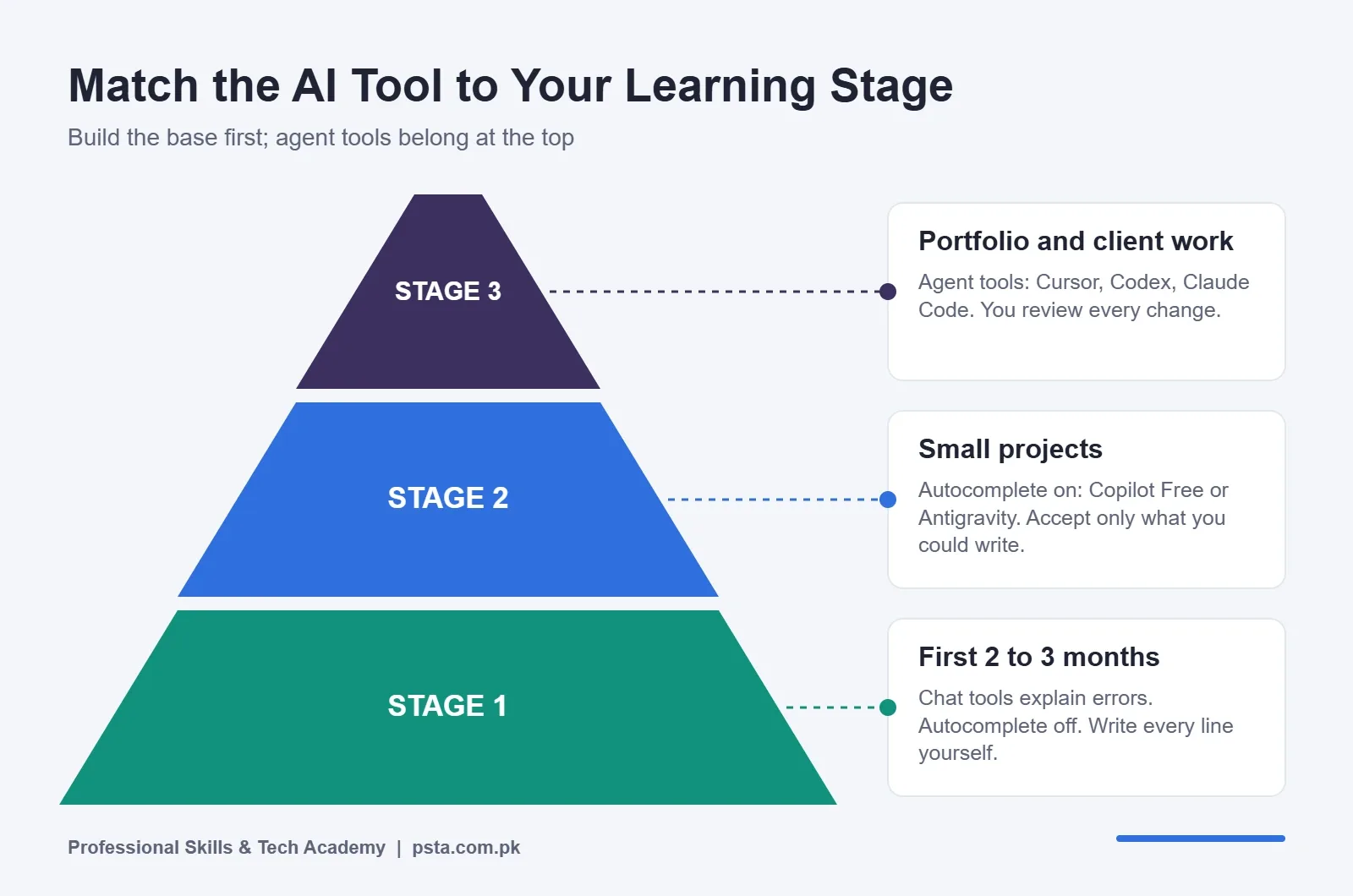
Stage 1, first 2 to 3 months: you're learning HTML, CSS and basic JavaScript. Use ChatGPT or Claude's free plan to explain errors in plain English, but turn off autocomplete in your editor. You need to feel every missing bracket yourself.
Stage 2, building small projects: you can build a to-do app or a REST API with a tutorial open. Now switch on Copilot Free or Antigravity autocomplete. Accept a suggestion only when you could have written it yourself.
Stage 3, portfolio and client work: you're building a full MERN app or a WordPress site for a real client. This is where agent tools like Cursor, Codex or Claude Code start paying off, because they handle repetitive work across many files while you review.
Skipping straight to Stage 3 is the most common mistake I see. Students finish a "project" in two days and then can't explain a single function in an interview.
Myths That Slow Down New Programmers
A few beliefs about AI coding tools for students come up again and again in class. Each one sounds reasonable, and each one costs students time.
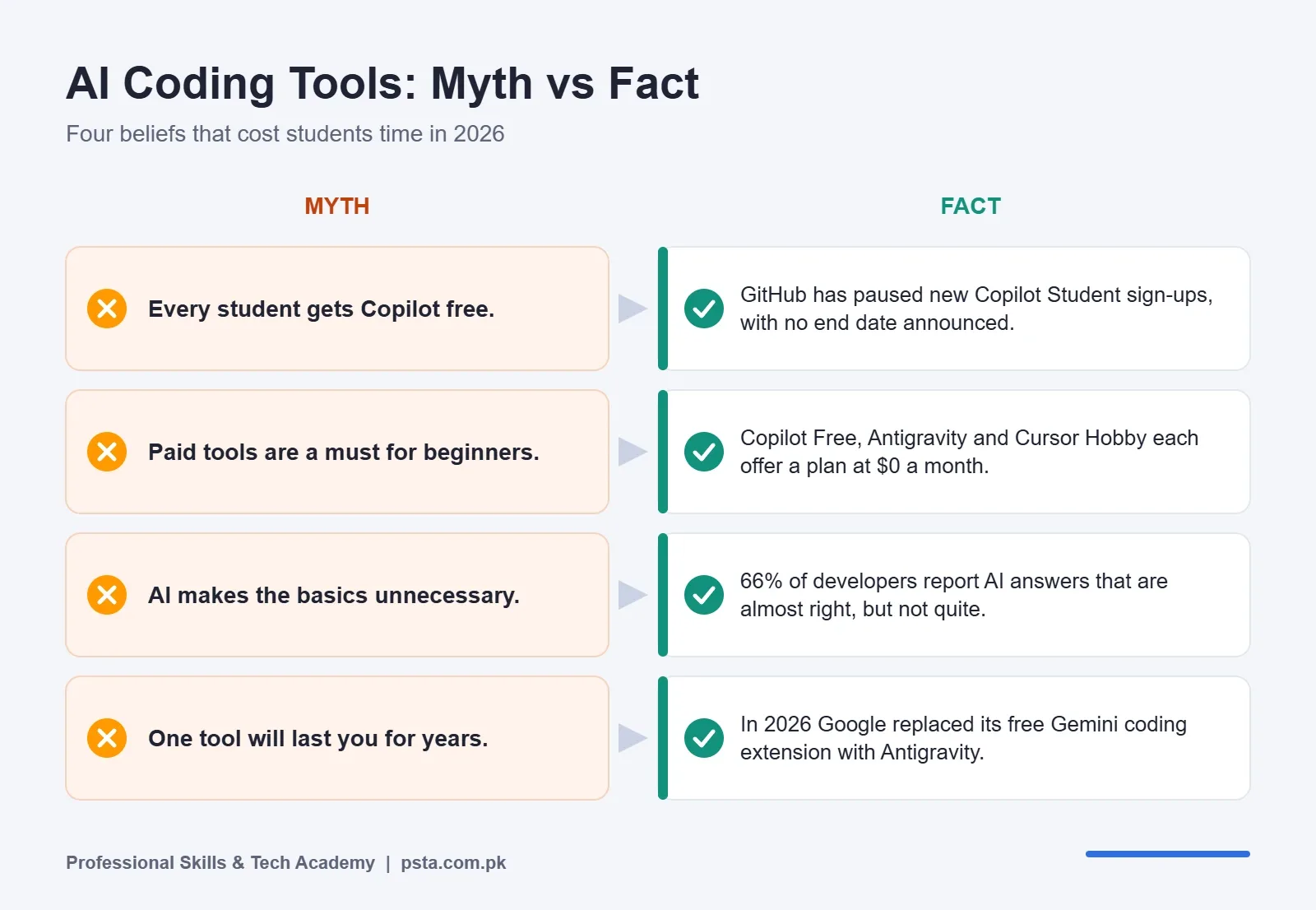
Myth: Paid tools write better code for beginners. The model quality gap matters far less at beginner level than your ability to read the output. A free plan is plenty while you learn.
Myth: Using AI counts as cheating. It depends on your teacher's rules, and those differ between universities and even between courses. Ask before every assignment, and keep a note of which parts AI helped with.
Myth: AI makes learning the basics unnecessary. The Stack Overflow figure above says the opposite. If two out of three developers struggle with "almost right" answers, you need fundamentals to catch the errors.
Myth: One tool is enough forever. In 2026 alone, GitHub paused sign-ups and Google replaced a free extension. Learn the workflow, not just one product, so a pricing change doesn't stop your work.
Paying in Dollars From Pakistan: What to Check First
Most AI coding tools for students start free, but sooner or later a freelance project may justify a paid plan. Before you enter a card, check these points:
- International transactions: check whether your debit card allows online international payments. Many banking apps let you switch this on for a purchase and off again afterward.
- Taxes and charges: Cursor's page says its prices exclude taxes, and your bank may add its own foreign transaction charges. Expect the final rupee amount to be higher than the listed dollar price.
- Monthly before annual: Claude's annual plan is cheaper per month, but $200 upfront is a big bet before you know you'll use it. Pay monthly for the first two months.
- Usage-based limits: with Copilot's move to AI Credits, heavy agent use can drain your monthly pool. Check your usage page weekly in the first month.
- Student offers: ProPakistani reported in August 2026 that Pakistani students can claim a free one-year Google AI subscription after verifying student status. Offer terms change, so confirm the details on Google's own student page before you rely on it.
How to Use AI on Assignments Without Hurting Your Learning
This is the routine I ask students to follow on every practice task. It keeps AI useful without letting it do the thinking for you.
- Write a first attempt yourself. Even a broken version tells you what you don't understand yet.
- Read the error message out loud. Try to fix it for at least 10 minutes before asking any tool.
- Ask AI to explain, not to fix. A prompt like "Explain why this line throws undefined" teaches you more than "Fix my code."
- Type the fix yourself. Don't paste. Typing forces you to notice each change.
- Test it properly. Run the code with an empty input, a wrong input and a large input.
- Explain it back. If you can't explain the final code to a classmate in two minutes, you aren't done.
Students who follow this for a few weeks usually find they need AI less often, which is exactly the point.
Where AI Tools Fit in PSTA's Full-Stack Course
Our Full-Stack Web Development Course with AI Tools runs for 6 months and is designed for beginners with no coding background. You learn HTML, CSS, JavaScript, React, Node.js, Express, MongoDB, MySQL, PHP and WordPress first. Module 7, AI for Developers, then covers ChatGPT, GitHub Copilot and prompt engineering, once you can judge the code these tools produce.
The course ends with a capstone MERN application that you build, test and deploy for your portfolio. The current fee is Rs. 45,000 (regular Rs. 60,000), payable in 2 installments. Classes run on campus on Old College Road in Mandian, Abbottabad (opposite FIMS College), or you can join the same live classes from any city with recordings for revision.
If you'd rather go deeper in one area first, look at our JavaScript course, the React.js course or Advanced Python. Our frontend developer roadmap shows how these skills connect over six months, and the React interview questions guide shows what employers test once your portfolio is ready.
Every PSTA program is listed side by side on our courses page. To reserve a seat, fill in the admission form, or ask our team on WhatsApp (+92 314 5424399) which batch and time slot would suit you.
Install One Free Tool and Test It on Old Code
Don't sign up for five tools tonight. Pick one, either Copilot Free or Antigravity, and open a small project you wrote a month ago. Ask the tool to explain one function you remember struggling with, then compare its explanation with what you thought at the time.
That 20-minute test tells you more about whether a tool suits you than any review, this one included.
Frequently asked questions
Is GitHub Copilot free for students in Pakistan?
Copilot Student stays free for students who already have it, but GitHub's official FAQ says new Copilot Student sign-ups are paused with no end date announced. You can still use Copilot Free, which includes 2,000 code completions and 50 chat requests a month, and get verified on GitHub Education so you're ready if sign-ups reopen.
Which free AI coding tool is best for a complete beginner?
In the first two to three months, a chat tool such as ChatGPT or Claude's free plan is usually enough. Use it to explain error messages and concepts, and keep editor autocomplete switched off. Once you can build small projects alone, add Copilot Free or Antigravity autocomplete.
Do I need a credit card to use Cursor?
No. Cursor's pricing page says the free Hobby plan needs no credit card. It includes limited agent requests. Paid individual plans start at $20 a month, and the page notes that prices exclude taxes, so your final bill in rupees may be higher than the listed figure.
What replaced Gemini Code Assist for individuals?
Google's Gemini Code Assist page says the unpaid individual tier's IDE extensions and Gemini CLI were replaced by Antigravity and Antigravity CLI on June 18, 2026. Antigravity's individual plan costs $0 a month and includes unlimited tab completions, with weekly rate limits.
What documents does GitHub Education accept from Pakistani students?
If your university gives you an academic email, add and verify it on GitHub. Otherwise, upload a student ID, transcript, enrollment letter or class schedule showing your full name, the full school name and a current date. Apply near campus with location on and any VPN off.
Will using AI tools stop me from learning to code properly?
It can, if AI writes code you can't explain. Write a first attempt yourself, ask AI to explain errors rather than fix them, and type every fix by hand. Employers still test fundamentals, because AI answers are often almost right but not quite.
Does PSTA teach AI tools in its web development course?
Yes. The 6-month Full-Stack Web Development Course with AI Tools covers HTML, CSS, JavaScript, React, Node.js, databases and WordPress first. Module 7 then teaches ChatGPT, GitHub Copilot and prompt engineering for development, and the course ends with a deployed capstone project.
Sources & references
- Stack Overflow Developer Survey 2025: AI survey.stackoverflow.co
- GitHub Copilot Plans and Pricing github.com
- GitHub Student Developer Pack and Copilot Student FAQ github.com
- Gemini Code Assist (Antigravity transition notice) codeassist.google
- Google Antigravity Pricing antigravity.google
- Cursor Pricing cursor.com
- Claude Plans and Pricing claude.com
- ProPakistani: Free Gemini Subscription for Pakistani Students propakistani.pk
Last reviewed & updated on by Umar Qureshi. Written by the PSTA team in Abbottabad, Pakistan.

Umar Qureshi

Full-Stack Web Development Course with AI Tools
Turn this guide into a career: hands-on training with real projects, online across Pakistan or on-campus in Abbottabad · 6 Months.

Comments
No comments yet — ask a question or share your experience.