Quick answer
To create a Fiverr gig, use a desktop browser and complete six screens: overview, pricing, description and FAQ, requirements, gallery and publish. Choose one narrow service, finish the "I will" title with phrases buyers search, price from $5 upward with the 20% fee in mind, and upload one to three 1280 × 769 px images.
Key takeaways
- • Fiverr gigs can only be created and edited on a desktop browser, and new sellers can run up to four active gigs.
- • Finish the "I will" title with one service and one type of buyer, and use all five search tags on close variations.
- • Every package needs at least one revision; the minimum price is $5, and Fiverr keeps 20% of each order.
- • The description allows 1,200 characters and must never include a phone number, email or WhatsApp.
- • Gallery images work best at 1280 × 769 px with no more than 10 words of text and no Fiverr badges.
- • Level 1 needs 5 orders, 3 unique clients, $400 earned, a 4.4+ rating and an 80% response rate.
Table of contents 12 sections
- Before You Create a Fiverr Gig: What Fiverr Checks
- Which Service Should Your First Gig Sell?
- Step 1: Write a Gig Title Buyers Search For
- Step 2: Choose a Category, Tags and Descriptive Words
- Step 3: How Should You Price Your Packages?
- Step 4: Write a Description and FAQ in 1,200 Characters
- Step 5: Set Buyer Requirements That Save You Revisions
- Step 6: Build a Gallery That Passes Review
- What Happens After You Click Publish?
- Mistakes That Get a New Gig Ignored or Removed
- Where PSTA's Courses Fit Before Your First Gig
- Write Three Titles Before You Open Fiverr
How do you create a Fiverr gig that a buyer can actually find when you have zero reviews? New freelancers in my classes ask some version of this almost every week. The answer is less about tricks and more about filling six screens with care, because each one either helps a buyer pick you or sends them to the next seller.
The effort is worth it. State Bank of Pakistan figures reported by ProPakistani show Pakistani freelancers earned $175.44 million in July 2026 alone, up 45.5% from July 2025. If you're serious about freelancing in Pakistan, your first gig is where you start competing for a piece of that.
In this guide, you'll learn:
- What Fiverr checks before it lets you publish anything
- How to write a title, tags and description that match what buyers type
- A simple way to price three packages without underselling yourself
- The gallery image sizes and the rules that get gigs removed
- What the level system expects from you after the first few orders
Before You Create a Fiverr Gig: What Fiverr Checks
Fiverr only lets you create and edit gigs on a desktop browser. Its Creating a Gig help article says the mobile app and mobile browsers aren't supported for this. So plan to sit at a laptop or a lab computer, not your phone.
Before the Publish button works, Fiverr wants to see:
- A display name on your profile
- A verified email address and phone number
- Identity and business verification, which Fiverr calls KYC
- At least one gallery image
- Your answer on whether you are a US person (most Pakistani sellers aren't, so the US W-9 tax form won't apply to them)
There's also a cap on how many gigs you can run. New sellers can keep up to four active gigs. That rises to 10 at Level 1 and Level 2, and to 30 for Top Rated sellers. Fiverr's gig requirements page also recommends starting with a single gig. I agree with that advice. One carefully built gig teaches you more than four rushed ones.
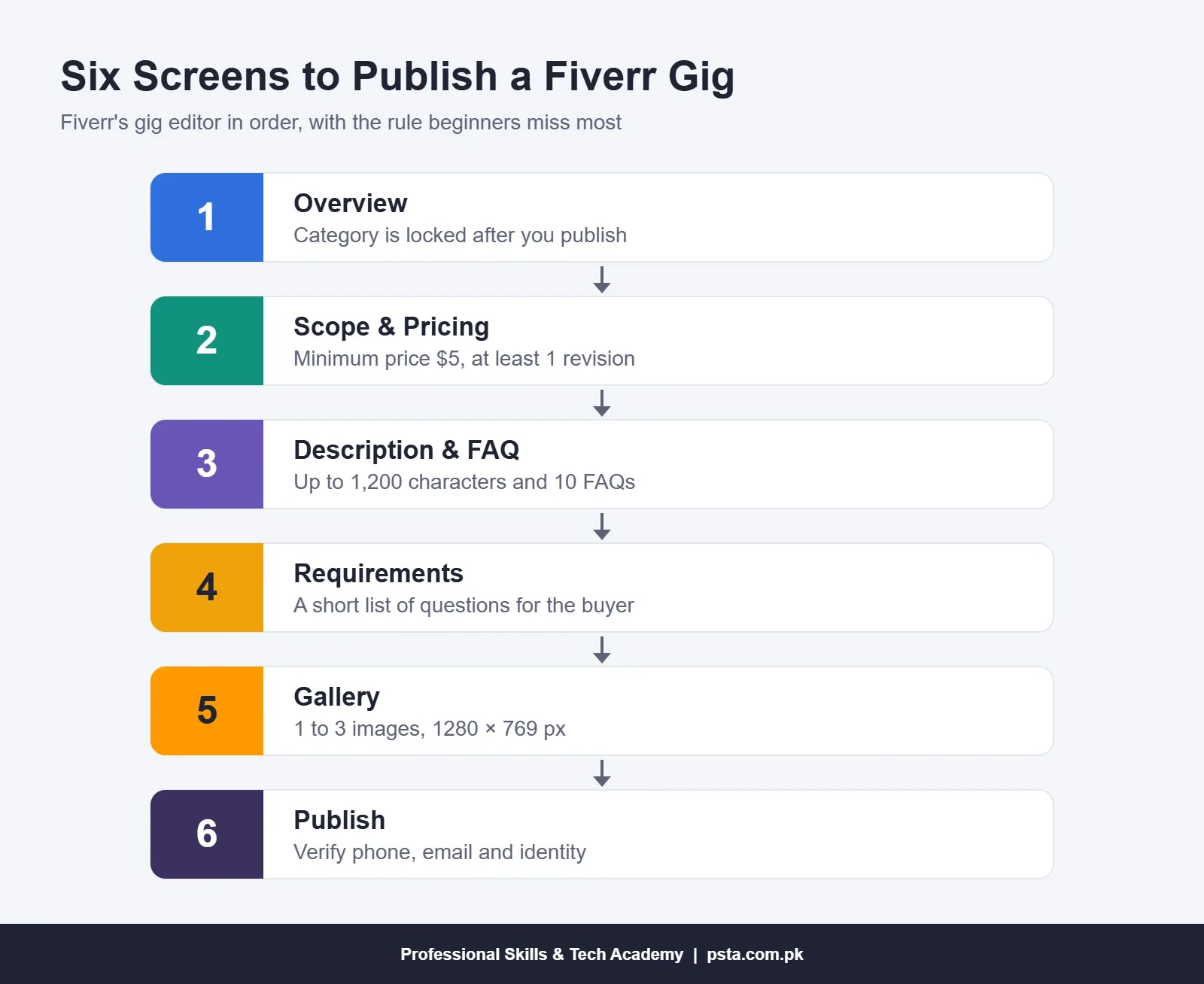
The gig editor walks you through six screens in a fixed order. Here's the whole route on one page, with the rule that trips up beginners most on each screen.
Which Service Should Your First Gig Sell?
Before you create a Fiverr gig, pick a service you can deliver this week, to a standard you'd happily show a stranger. Don't pick the one a YouTube video says pays the most. If you've only watched tutorials and never finished a real piece of work, build two or three samples first.
A Fiverr gig for beginners works best when it sells one narrow service, because narrow gigs are easier to rank and easier to sell. "Graphic design" competes with every designer on the site. "Instagram posts for restaurants" competes with far fewer and tells the buyer exactly what they'll get. Here are beginner-friendly examples, matched to skills you may already have:
| Skill You Have | Narrow Gig Idea | What to Show in the Gallery |
|---|---|---|
| Canva or Photoshop basics | Social media posts for restaurants and cafes | Three posts for a made-up cafe brand |
| Premiere Pro or DaVinci Resolve | Editing short vertical videos for Reels | A still frame from a clip you cut yourself |
| WordPress | Fixing layout problems on WordPress sites | Screenshots of a site you built in class |
| MS Excel | Cleaning and formatting messy spreadsheets | A messy sheet next to its tidy version |
| Strong written English | Proofreading CVs and cover letters | A marked-up sample CV with fake details |
Whatever you choose, the samples must be your own. Fiverr warns that gigs using copyrighted images may be removed, and design categories require original images.
Step 1: Write a Gig Title Buyers Search For
When you create a Fiverr gig, the title box already starts with "I will", so your job is to finish the sentence. A good Fiverr gig title names the service, who it's for, and one useful detail. Fiverr also asks you to avoid the characters &, /, " and + in titles.
- Type your service into Fiverr's search bar and note the suggestions that drop down. Those are phrases real buyers type.
- Open the first page of results and read 10 titles. Write down the words that keep repeating.
- Draft three versions of your title with the main phrase near the start.
- Read each draft aloud. If it sounds like a pile of keywords, rewrite it as a normal sentence.
Here's an example of the difference a rewrite makes, using the restaurant idea from the table above:
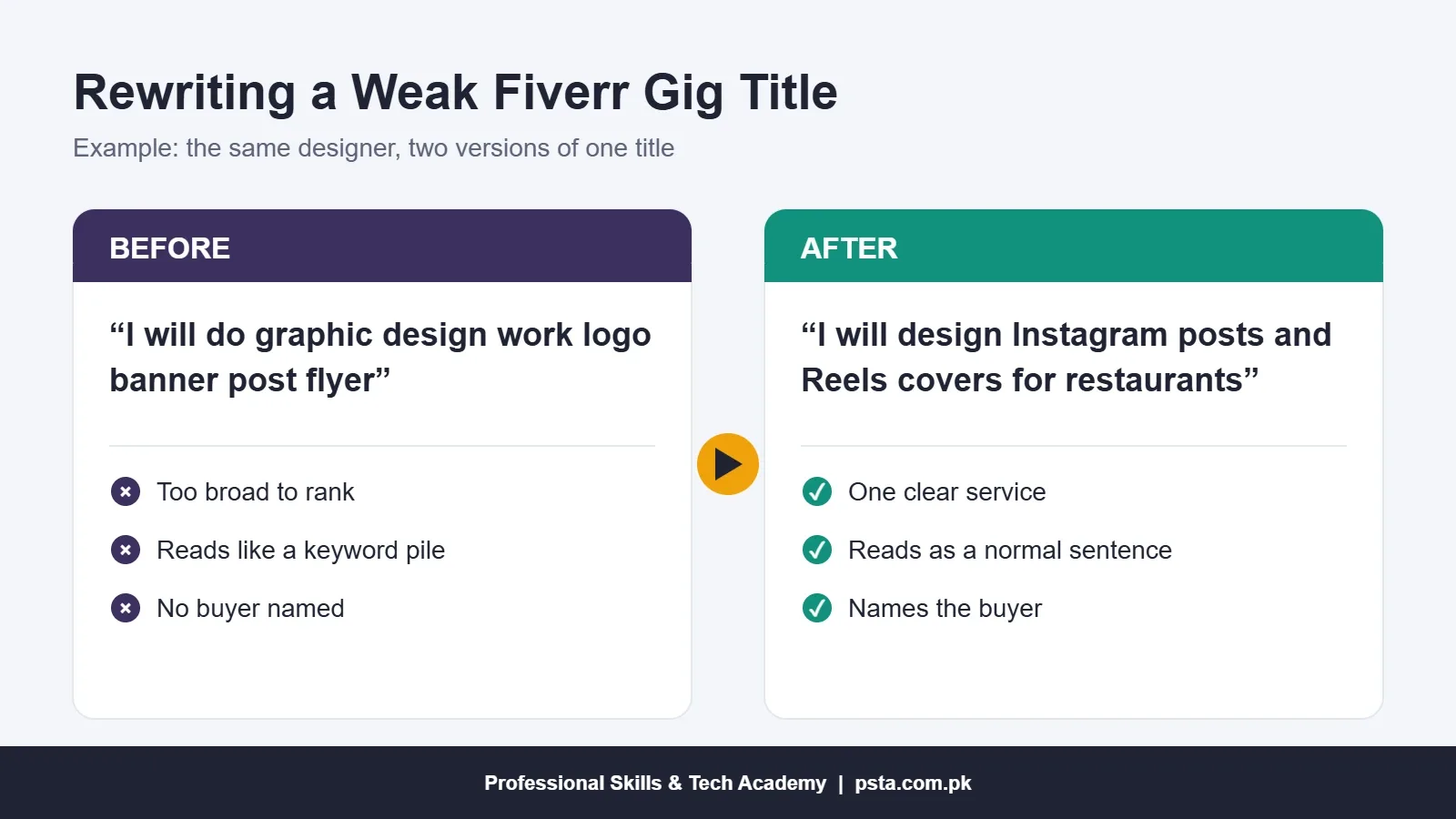
The stronger version is shorter, but it carries more meaning. A cafe owner in Lahore or a pizza shop in Texas can tell in two seconds whether you're the right seller.
Step 2: Choose a Category, Tags and Descriptive Words
Take your time on the category. It's the one setting you can't fix after you create a Fiverr gig and publish it. Some categories are vetted-only, which means Fiverr has to approve you before you can sell there.
Next come up to five search tags and up to five descriptive words or phrases. A few habits help:
- Use phrases a buyer would type, such as "restaurant social media", rather than single words like "design".
- Don't spend all five tags repeating words already in your title. Cover close variations instead.
- Match tags to what you actually deliver. A tag that brings the wrong buyers only wastes your replies.
Step 3: How Should You Price Your Packages?
You can offer up to three packages, called Basic, Standard and Premium, or a single flat price. Each package needs a delivery time in days, at least one revision, and a price in US dollars. The minimum starting price is $5, and some categories set a higher floor. Extra Fast Delivery is an optional add-on, and its delivery time must be shorter than your normal one.
Sensible Fiverr gig pricing starts with Fiverr's cut. Wise's guide to getting paid on Fiverr says Fiverr keeps a 20% service fee from each order. The same guide says earnings stay pending for 14 days for standard sellers. The table below is an example only, for the restaurant posts gig:
| Package | What's Included | Delivery | Revisions | Price | You Keep After 20% |
|---|---|---|---|---|---|
| Basic | 3 static posts | 3 days | 1 | $15 | $12 |
| Standard | 6 posts and 1 Reels cover | 4 days | 2 | $30 | $24 |
| Premium | 12 posts, 3 Reels covers and source files | 6 days | 3 | $60 | $48 |
Think of Basic as a low-risk way for a new buyer to try you, and Standard as the package you want most people to choose. Avoid unlimited revisions. They sound generous, but one difficult buyer can turn a $15 order into a week of work. Once you have five or six good reviews, raise your prices a step at a time.
Withdrawal costs come later, after the 20%. Our guide to Fiverr withdrawal in Pakistan covers that part, from Payoneer to your bank account.
Step 4: Write a Description and FAQ in 1,200 Characters
Fiverr gives you up to 1,200 characters for the description. That's roughly 200 words, so every line has to earn its place. This order works for most beginner gigs:
- One sentence on what you deliver and who it's for.
- Two or three lines on what's different between the packages.
- What you need from the buyer to start.
- How you work: file formats, revisions and delivery.
- A short line inviting the buyer to message you before ordering.
The description must be in English. Other languages are allowed only if the same information also appears in English. Proofread it twice, because a typo in a writing or design gig makes buyers doubt the rest.
Never put your phone number, email address or WhatsApp in the description. Fiverr's rules ban sharing contact details to move business off the platform, and repeated violations can lead to permanent suspension. If you're used to closing local deals on WhatsApp, leave that habit outside Fiverr.
You can also add up to 10 FAQs. Use four or five to answer what buyers actually ask: which file formats you send, whether you can rush an order, what happens if they dislike the first draft, and whether they can use the work commercially.
Step 5: Set Buyer Requirements That Save You Revisions
Requirements are the questions a buyer answers after placing an order. You can mark any of them as required, and Fiverr advises keeping the list short. Good questions remove guesswork, so the first draft lands closer to what the buyer wanted.
For the restaurant posts example, five questions are enough:
- Your business name and logo file
- Brand colors and fonts, if you have them
- The menu items, offers or prices each post should show
- Two or three accounts whose style you like
- The date you plan to start posting
Step 6: Build a Gallery That Passes Review
Your first gallery image is usually what buyers see on your gig card in search results, so it does more selling than anything else on the page. Fiverr's gig image guidelines set out the rules, including the recommended Fiverr gig image size:
| Item | Fiverr's Rule |
|---|---|
| Number of images | At least 1 to publish, up to 3 |
| Image size | 1280 × 769 px recommended at 72 DPI; minimum 712 × 430 px; maximum 4000 × 2416 px |
| Text on the image | No more than 10 words, high contrast |
| Logos and graphics | Up to 5 relevant platform logos, only with permission |
| Video | Optional in most categories; the gig guide suggests 20 to 60 seconds |
| PDFs | Up to 2; only the first three pages are shown |
| Not allowed | Fiverr logos, ratings or level badges, contact details, images you have no right to use |
Show the actual deliverable in the first image, not a laptop mockup with your name on it. If a JPEG refuses to upload, Fiverr suggests trying a PNG instead. When you're done, click Publish Gig and the gig goes through an automatic review.
What Happens After You Click Publish?
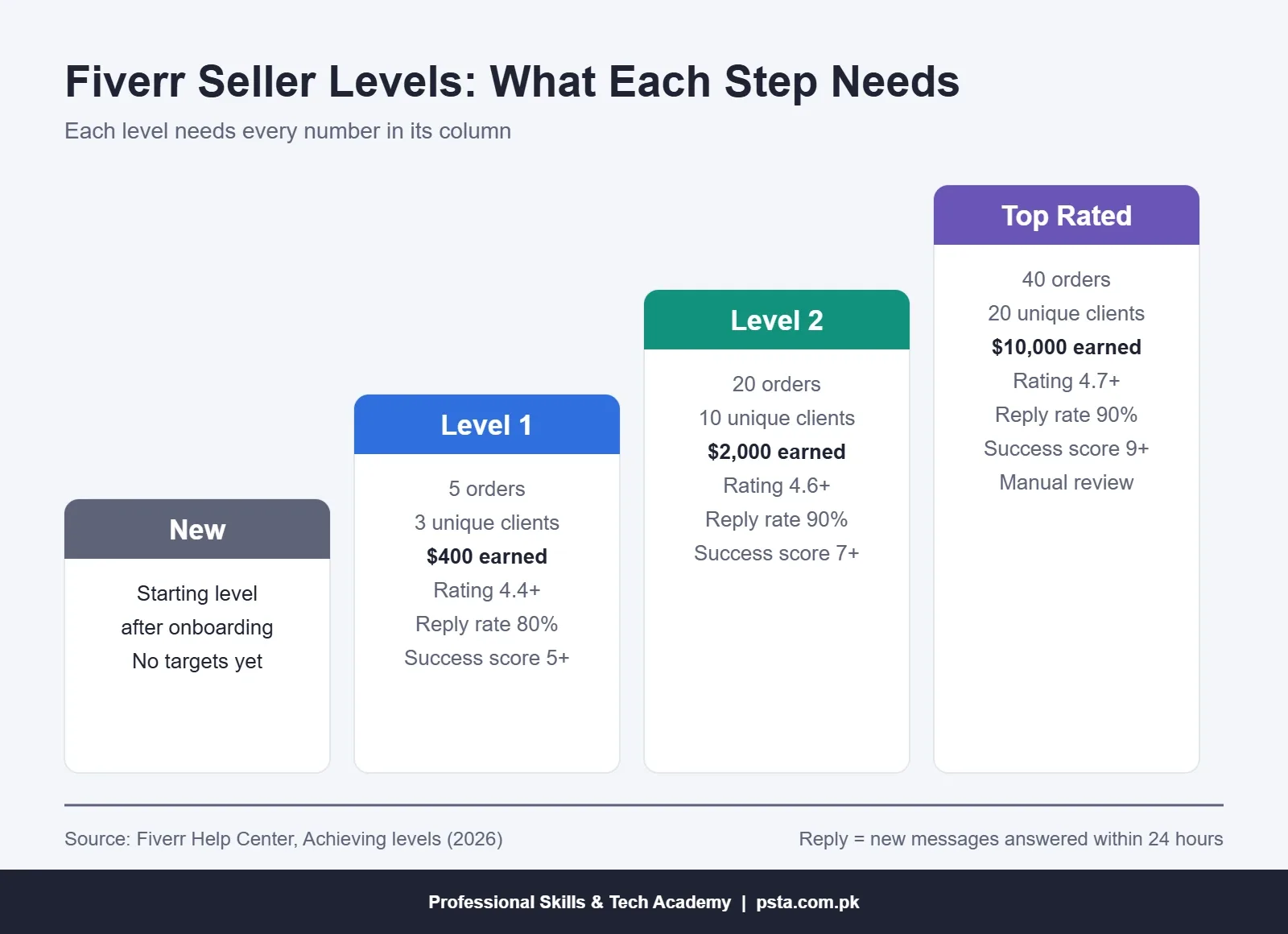
Fiverr seller levels begin at New, where every seller starts. After that, levels depend on your results, not on how long your account has existed. According to Fiverr's Achieving levels page, Level 1 and Level 2 are granted automatically once you meet the criteria, usually within 24 hours. Top Rated also needs a manual review.
Level 1 asks for a success score of 5 or more, a rating of 4.4 or higher, an 80% response rate, 5 orders from 3 unique clients and $400 in earnings. Level 2 raises those to 7, 4.6, 90%, 20 orders, 10 clients and $2,000. Top Rated needs 9, 4.7, 90%, 40 orders, 20 clients and $10,000.
Most of these numbers take months. Response rate is different, because you control it from day one. Fiverr measures how often you reply to new messages within 24 hours, over the last 90 days. If your buyers are in the US or Europe, their working day falls in your evening or night, so switch on app notifications and check messages before you sleep.
Your rating counts the past two years of reviews, while your public profile shows your all-time rating. Each early review carries a lot of weight, so overdeliver a little on your first five orders.
Mistakes That Get a New Gig Ignored or Removed
- Contact details anywhere. A phone number in an image or description is a policy breach, not a shortcut.
- Fake badges. Adding a Fiverr logo, star rating or level badge to your image gets the gig flagged. Fiverr adds these itself.
- Borrowed work. Using someone else's portfolio pieces or another company's logo without permission can get the gig taken down.
- A copied description. Buyers read several gigs in a row and notice identical wording.
- The wrong category. You can't move the gig later, so a rushed choice means starting over.
- Five-dollar forever. A permanent $5 price with unlimited revisions attracts the hardest buyers and the smallest margins.
Getting gig settings right won't make up for a weak skill, though. Buyers come back for the quality of the work, which is where a structured course helps.
Where PSTA's Courses Fit Before Your First Gig
If you're still deciding which skill to sell before you create a Fiverr gig, the Diploma in Information Technology (DIT) at PSTA is a broad starting point. It runs for one year over two semesters. The second semester covers graphic design in Photoshop, Illustrator and Canva, video editing in Premiere Pro, web pages in HTML, CSS and JavaScript, and how Shopify, Daraz and Amazon businesses work. The fee is Rs. 2,000 per month (regular Rs. 2,500), paid monthly.
If you already know your direction, a specialist course goes deeper:
- Graphic Designing for logo, social media and print gigs
- Video Editing and VFX for Reels, YouTube and ad editing gigs
- WordPress Website Development for site building and fixing gigs
Classes run on campus in Mandian, Old College Road, opposite FIMS College in Abbottabad, and live online for students anywhere in Pakistan. No course can promise you orders. What it can give you is finished samples for your gallery and an instructor to review them. You can compare options on the courses page, apply through the admission page, or ask about batch timings on WhatsApp at +92 314 5424399.
When you're ready to try a second platform, our Upwork for beginners guide walks through profiles and proposals there.
Write Three Titles Before You Open Fiverr
Take a notebook and write three possible titles for your first gig, each finishing the words "I will". Then search each one on Fiverr and look at who you'd be competing with. Keep the title where your samples look as good as the first page of results. Then create a Fiverr gig around that one title, screen by screen, using the steps above.
Frequently asked questions
Can I create a Fiverr gig from my phone?
No. Fiverr says gigs can only be created and edited on a desktop browser, and the mobile app and mobile browsers are not supported for this. You can still reply to buyers and manage orders on your phone, but plan to build the gig itself on a laptop or a computer in a lab or cafe.
How many gigs can a new Fiverr seller have?
A new seller can keep up to four active gigs. The limit rises to 10 at Level 1 and Level 2 and to 30 for Top Rated sellers. Fiverr counts every gig status except deleted ones toward this limit, and it recommends starting with one gig, which is good advice for most beginners.
What is the minimum price for a Fiverr gig?
The minimum starting price is $5, and some categories set a higher minimum. Each package also needs a delivery time and at least one revision. Remember that Fiverr keeps a 20% service fee from each order, so a $5 order leaves you $4 before any withdrawal charges.
What size should Fiverr gig images be?
Fiverr recommends 1280 × 769 pixels at 72 DPI. The minimum is 712 × 430 pixels and the maximum is 4000 × 2416 pixels. You can upload up to three images, and Fiverr suggests keeping text on each image to 10 words or fewer, with strong contrast so it stays readable at small sizes.
Can I add my WhatsApp number to my Fiverr gig?
No. Fiverr does not allow email addresses, phone numbers or third-party messaging apps in gig descriptions or media. Its rules exist to keep communication and payment on the platform, and repeated violations can lead to gig removal or permanent account suspension. Keep every conversation inside Fiverr messages.
How long does it take to reach Level 1 on Fiverr?
There is no fixed time. Level 1 depends on results: 5 completed orders, 3 unique clients, $400 in earnings, a success score of 5 or more, a 4.4+ rating and an 80% response rate. Once you meet all of these, Fiverr usually applies the new level automatically within 24 hours.
Can I change my Fiverr gig category later?
No. Once a gig is published, its category cannot be changed. If you chose the wrong one, you would need to create a new gig in the right category. Read the subcategory options carefully before publishing, and check whether your category is vetted-only, which needs Fiverr approval first.
Sources & references
- Fiverr Help Center: Creating a Gig help.fiverr.com
- Fiverr Help Center: Requirements and guidelines for your Gig help.fiverr.com
- Fiverr Help Center: Guidelines for selecting Gig images help.fiverr.com
- Fiverr Help Center: Achieving levels help.fiverr.com
- ProPakistani: Pakistani freelancers earn $175 million in July 2026 propakistani.pk
- Wise: How to get paid on Fiverr wise.com
Last reviewed & updated on by Umar Qureshi. Written by the PSTA team in Abbottabad, Pakistan.

Umar Qureshi

Diploma in Information Technology (DIT) – 1 Year Certified Program
Turn this guide into a career: hands-on training with real projects, online across Pakistan or on-campus in Abbottabad · 1 Year.


Comments
No comments yet — ask a question or share your experience.