Quick answer
A strong graphic design portfolio shows six to eight focused projects, each with a short case study, exported at the right size for Fiverr (1280 x 769 px) and Behance. Avoid selling Canva template logos as originals, showing client work without permission and adding other brands' logos to gig images. Order projects by strength, not date.
Key takeaways
- • Keep six to eight projects and put your strongest piece first.
- • Give every project a five-part case study: client, brief, process, final design and a confirmed result.
- • Export Fiverr images at 1280 x 769 px and Behance covers at 808 x 632 px or larger.
- • Canva logo templates are non-exclusive and can't be registered as trademarks, so build client logos from scratch.
- • Get the client's permission before showing delivered work on any platform.
Table of contents 21 sections
- Take the Five-Question Portfolio Self-Test
- What Do Clients Check in a Graphic Design Portfolio?
- Selection Mistakes: Too Much, Too Similar, Too Old
- Mistake 1: Showing Everything You Have Ever Made
- Mistake 2: Ten Logos and Nothing Else
- Mistake 3: Leaving Weak Early Work at the Top
- Presentation Mistakes That Hide Good Work
- Mistake 4: Mockups Without Context
- Mistake 5: Using the Wrong Size for Each Platform
- Mistake 6: Vague Titles and Thin Descriptions
- Ownership Mistakes That Can Get You Flagged
- Mistake 7: Presenting Canva Template Logos as Original Work
- Mistake 8: Showing Client Work Without Permission
- Mistake 9: Putting Other Brands' Logos in Gig Images
- Market Mistakes: Who Is the Portfolio For?
- Mistake 10: One Portfolio for Every Kind of Client
- How Should You Write a Short Case Study?
- Where Should You Host Your Portfolio: Behance, Fiverr or a PDF?
- A Four-Week Plan to Fix Your Portfolio
- Building Your Portfolio in PSTA's Graphic Designing Course
- Pick One Project and Rewrite It Tonight
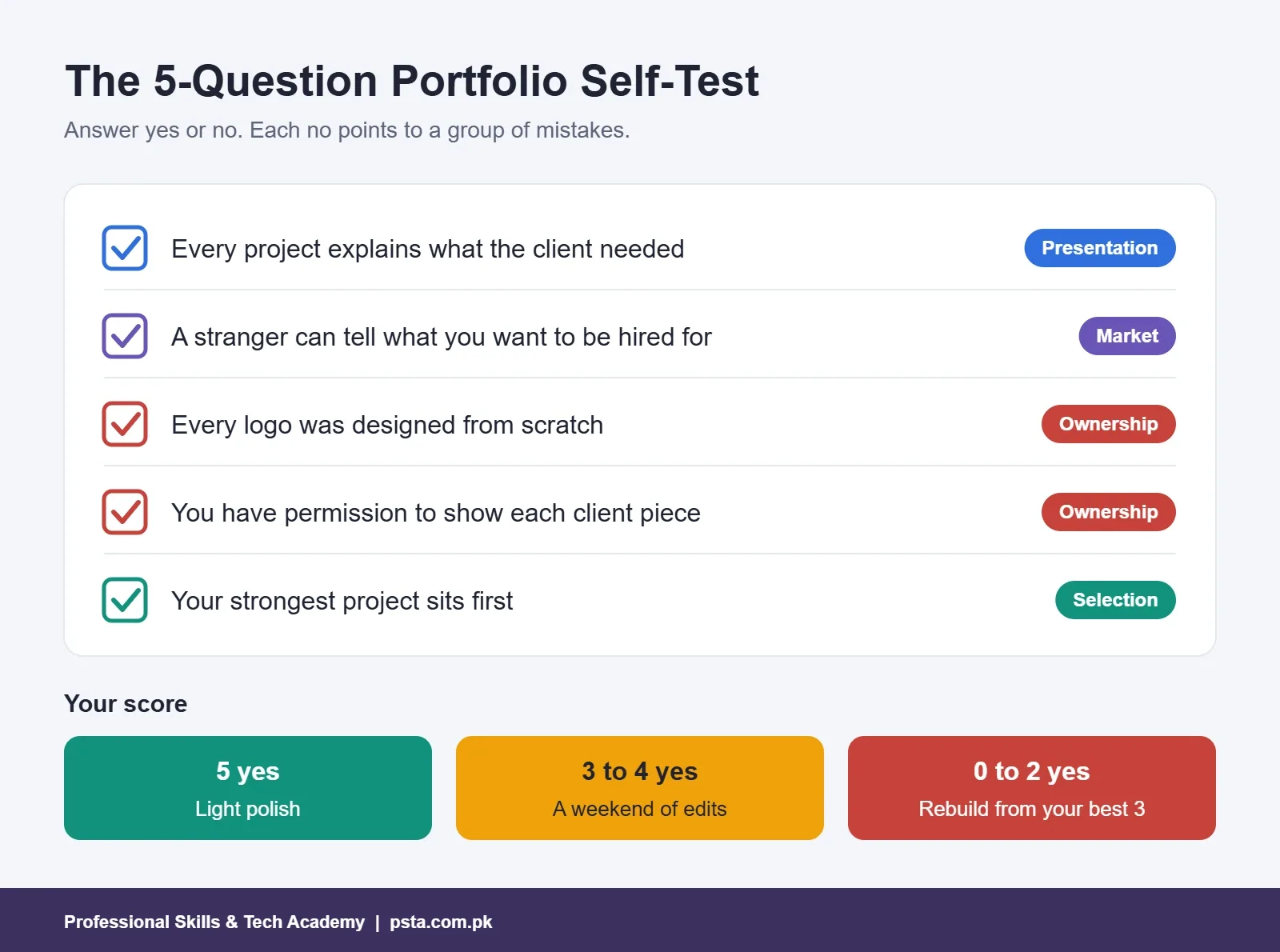
Before you read any further, open your graphic design portfolio and answer five quick questions with a plain yes or no. Does every project explain what the client needed? Could a stranger tell which kind of work you want to be hired for? Did you design every logo from scratch? Do you have written permission to show each client piece? Does your best project sit first? If you said no even once, your portfolio is costing you replies, and each of those problems has a simple fix.
Beginners show me their Behance pages, Fiverr profiles and PDF folders every week. This guide to the graphic design portfolio for beginners covers the 10 mistakes I see most often and how to correct each one. Here is what you will take away:
- A five-question self-test you can repeat every month
- Which pieces to cut and which to keep
- The exact image sizes Fiverr and Behance ask for
- The licensing and permission traps that can get a gig flagged
- A four-week plan to rebuild your portfolio around paid work
Take the Five-Question Portfolio Self-Test
The five questions above aren't random. Each one maps to a group of graphic design portfolio mistakes later in this guide. Missing context points to presentation mistakes. An unclear focus points to selection and market mistakes. Template logos and unapproved client work point to ownership mistakes, the ones most likely to get a gig removed.
Score yourself honestly. Five yeses means you only need light polish. Three or four means a weekend of editing. Two or fewer means you should rebuild from your three strongest pieces, and the plan near the end of this article shows you how.
Repeat the test after every new project you add. It takes two minutes and stops old habits from creeping back.
What Do Clients Check in a Graphic Design Portfolio?
Clients rarely study a portfolio closely. Picture a shop owner in Abbottabad who needs a menu, or a marketing manager in Dubai hiring for social media posts. Both usually check three things in under a minute before contacting a freelance graphic designer.
- Relevance. Have you done work like the job they have in mind?
- Quality. Are the spacing, type and color handled with care?
- Reliability. Do your descriptions show that you understand briefs, deadlines and printing or posting requirements?
Notice that quantity isn't on the list. A graphic design portfolio with six focused projects beats one with 40 unrelated images, because the client can see the match quickly. Keep that filter in mind as you read the mistakes below.
Selection Mistakes: Too Much, Too Similar, Too Old
Mistake 1: Showing Everything You Have Ever Made
Beginners often upload every class exercise, every practice poster and every logo attempt. The result is a long scroll where the strong work is buried. Clients judge you by your weakest visible piece, not your best one.
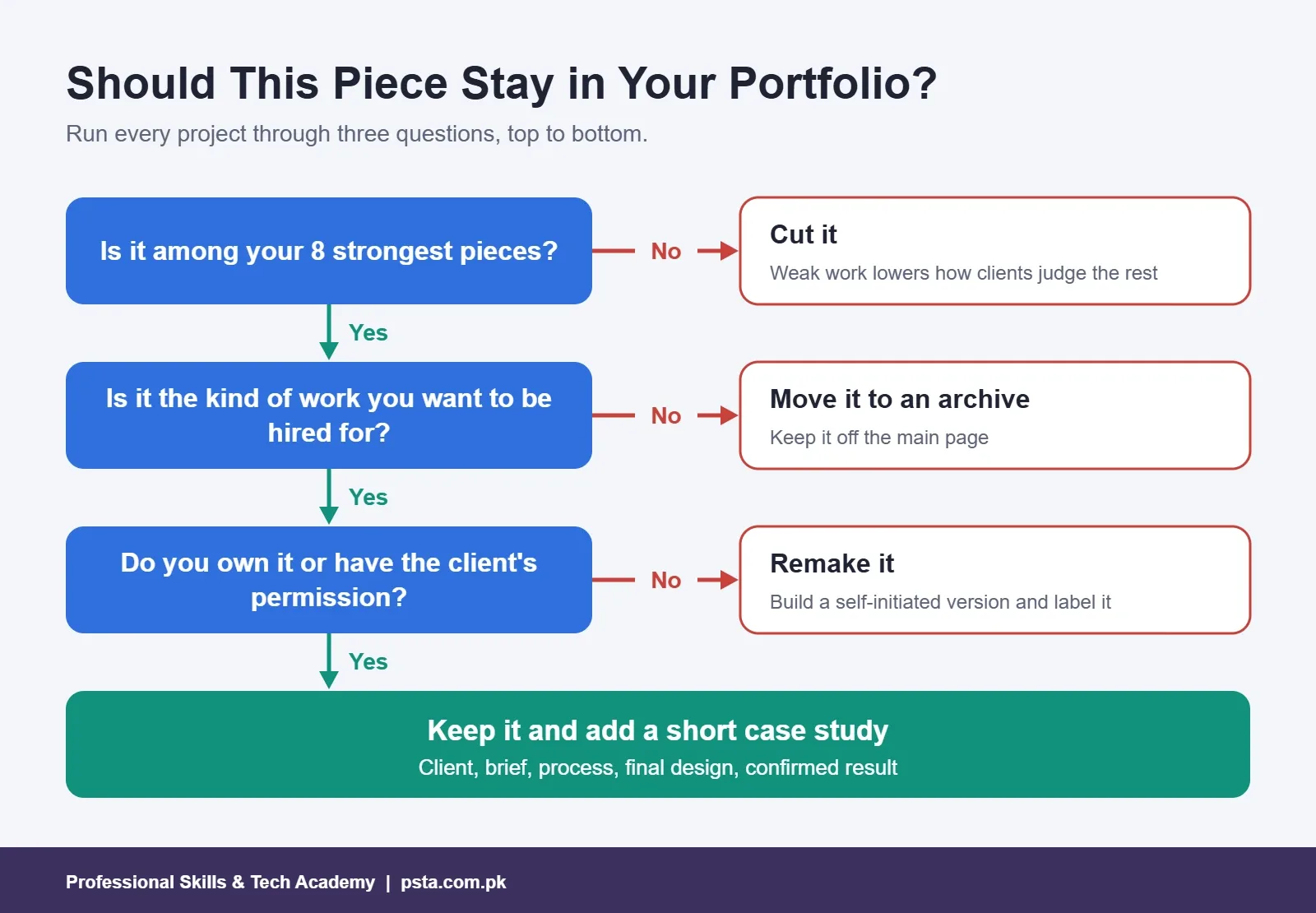
Fix: Choose six to eight projects for your graphic design portfolio. If a piece makes you want to explain "this was just practice," remove it.
Mistake 2: Ten Logos and Nothing Else
Logos are fun to make, so many portfolios contain nothing else. But most paid work in Pakistan is broader: social media packs, brochures, packaging, wedding cards, Urdu flyers and banners. A logo-only graphic design portfolio tells a client you can do one narrow task. A strong logo design portfolio still shows each mark in use.
Fix: Show complete brand projects. A logo plus its business card, social post and shop sign tells a richer story than three extra logos.
Mistake 3: Leaving Weak Early Work at the Top
People see the first two or three projects and often stop there. If your first upload from months ago still sits at the top, it sets the impression for everything below it.
Fix: Order projects by strength, not by date. Put the piece closest to the work you want next in first place.
Presentation Mistakes That Hide Good Work
Mistake 4: Mockups Without Context
A logo on a coffee cup mockup looks polished, but it says nothing about your thinking. Who was the business? What problem did the design solve? Without that, a client can't tell your work apart from a downloaded template.
Fix: Add a short case study to every project. The section on case studies below gives you a five-part structure.
Mistake 5: Using the Wrong Size for Each Platform
Every platform crops images differently. Upload the wrong ratio and your headline gets cut off or your logo appears tiny. These are the current numbers from each platform's help pages:
| Platform and item | Recommended or minimum size | Other limits |
|---|---|---|
| Fiverr gig image | 1280 x 769 px recommended (minimum 712 x 430 px) | Maximum 4000 x 2416 px; up to three images per gig |
| Fiverr portfolio project | 1,280 x 769 px recommended (5:3) | 1 to 5 files per project, up to 50 MB each |
| Behance project cover | At least 808 x 632 px | Shown at 202 x 158 px in feeds |
| Behance project image | No fixed size | Under 32 million pixels; reduce below 50 MB if uploads fail |
According to Fiverr's gig image guidelines, a gig gallery can also hold one video and two PDFs, and any text on the image should stay at 10 words or fewer. Behance's cover image guide explains that covers are standardized so every project gets equal space in the feed, which is why a cluttered cover reads poorly at that small size.
Fix: Make a template file for each size once, then export every project into it.
Mistake 6: Vague Titles and Thin Descriptions
Titles like "Logo 3" or "Final Design" waste the first line a client reads. Fiverr's portfolio help page suggests a title of 15 to 50 characters in the format "[Client or brand name] – [Project focus or type]" and a description of 120 to 1,400 characters covering the client's needs, your approach and the outcome.
Fix: Rename every project. "Hazara Bakers – Packaging and Shop Sign" tells a client far more than "Branding Project."
Ownership Mistakes That Can Get You Flagged
These three mistakes matter most, because they can lead to removed gigs, upset clients or a logo the client can't protect.
Mistake 7: Presenting Canva Template Logos as Original Work
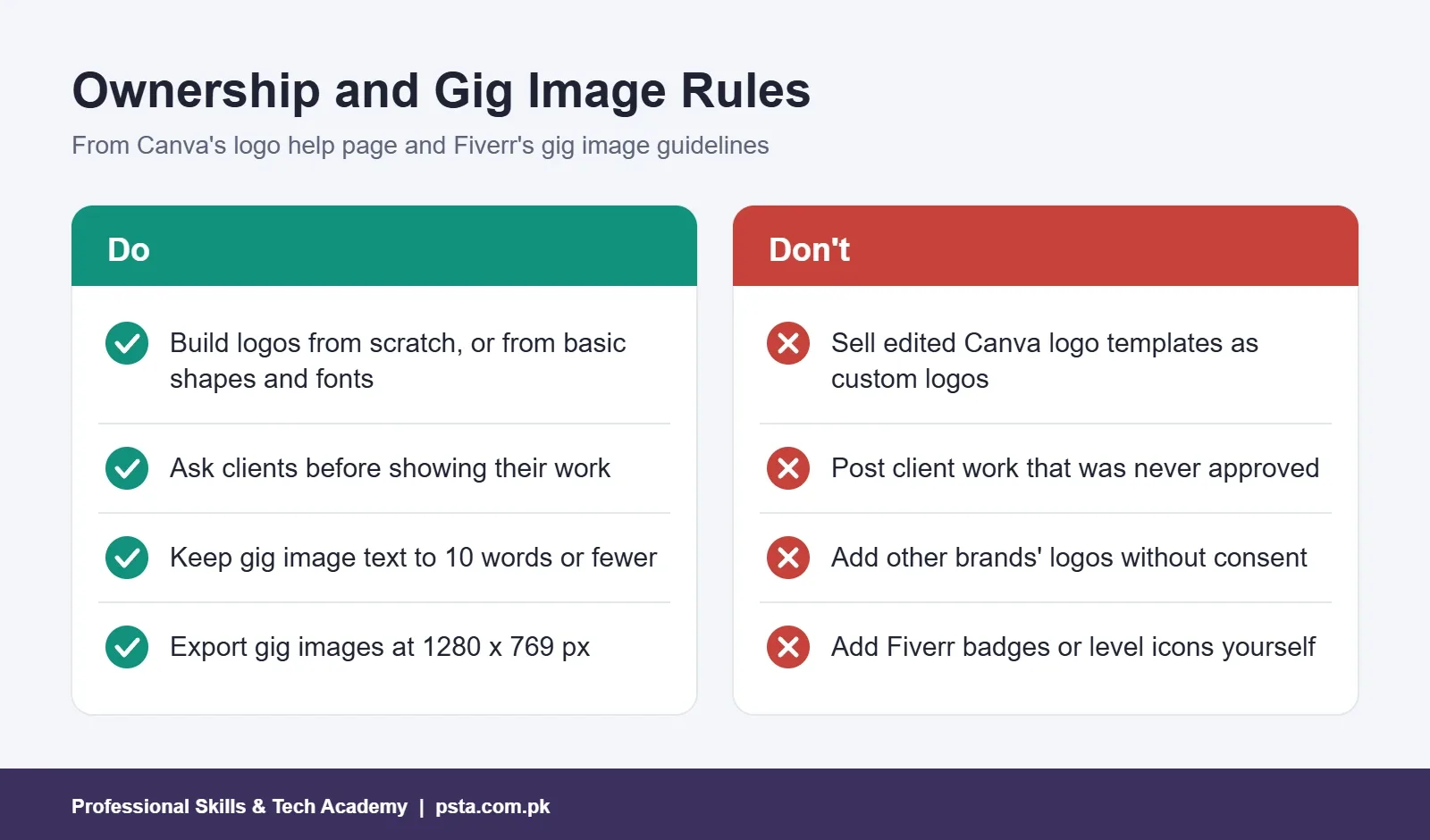
Canva is a useful tool, and PSTA teaches it. The problem starts when a beginner edits a logo template and sells it as a custom logo. Canva's own help page on logos says its logo templates can be used by anyone, that your rights to a template-based logo are non-exclusive, and that you can't register it as a trademark. The same page says stock photos and graphics can't be used in a logo meant for trademark use.
Fix: Build portfolio logos from scratch in Illustrator, or in Canva using only simple lines, shapes and fonts, which Canva says is allowed. Keep template-based social posts in your portfolio if you like, but label them honestly.
Mistake 8: Showing Client Work Without Permission
Many clients don't want their designs shown publicly, especially before a launch. Fiverr's portfolio rules say Live Portfolio only displays delivery files when the client approves, and you need the client's explicit permission to use delivered work as a sample on other platforms.
Fix: Ask at the end of every order: "May I show this design in my portfolio?" Save the reply. If the answer is no, create a similar self-initiated project for a fictional brand and say so in the description.
Mistake 9: Putting Other Brands' Logos in Gig Images
It's tempting to fill a gig image with famous logos to look established. Fiverr's guidelines say you shouldn't use other companies' logos without the owner's consent, and you shouldn't add Fiverr badges or level icons yourself, since gigs with fake badges get flagged and removed.
Fix: Show your own work in gig images. Your best design is a stronger signal than any borrowed logo.
Market Mistakes: Who Is the Portfolio For?
Mistake 10: One Portfolio for Every Kind of Client
A local print shop and an overseas startup want different things. The print shop wants Urdu posters, visiting cards and panaflex banners that print correctly. The startup wants clean brand systems and social media sets in English. One mixed graphic design portfolio confuses both.
Fix: Keep two short collections. Here is an example of how a beginner might split the same skills:
| Collection | Best projects to include | Where to show it |
|---|---|---|
| Local clients | Urdu event poster, tri-fold brochure, visiting card, shop sign | PDF on WhatsApp, printed samples |
| International clients | Brand identity kit, social media pack, packaging concept | Behance and Fiverr portfolio |
Both collections can share one or two strong brand projects. The point is that each client sees work that looks like their job.
How Should You Write a Short Case Study?
A portfolio case study doesn't need to be long. Four or five short paragraphs under each project is enough. Use this order:
- The client. One line on the business and its audience. Use a fictional brand if the work is self-initiated, and say so.
- The brief. What did they need, and what limits applied, such as budget, print method or deadline?
- Your process. Show two or three early sketches or rejected directions. Clients like seeing how you think.
- The final design. Show it in use: on a mockup, a printed sample or a phone screen.
- The result. What happened after delivery? Only state results you can confirm, such as "the client approved it in the first round."
Avoid invented numbers like "sales rose 300%." A client who asks for proof will lose trust fast.
Where Should You Host Your Portfolio: Behance, Fiverr or a PDF?
You don't need to keep your graphic design portfolio in only one place. Each format suits a different moment in finding work, and many designers keep a Behance portfolio and a Fiverr portfolio side by side.
| Option | Best for | Trade-off |
|---|---|---|
| Behance | Long case studies and being discovered by searchers | Takes time to build presentation pages well |
| Fiverr portfolio | Buyers already browsing your gigs | Limited to 20 projects and short descriptions |
| PDF portfolio | Job applications and local clients on WhatsApp | Goes out of date unless you update it |
The Behance about page describes a community of over 50 million members and a Hire page where clients post jobs and search for designers. That reach is useful, but it also means your project must stand out in a crowded feed, which brings us back to strong covers and clear titles.
If you plan to sell on Fiverr, read our guide on Fiverr withdrawal in Pakistan before your first order, so payment setup doesn't slow you down. Our Upwork guide for beginners covers the other major platform.
A Four-Week Plan to Fix Your Portfolio
Spread the work over four weeks so you can keep taking orders or attending classes at the same time.
- Week 1: Cut and order. Retake the self-test. Remove weak pieces and reorder the rest by strength.
- Week 2: Rewrite. Rename every project and add a five-part case study to your top three.
- Week 3: Resize and check ownership. Export to each platform's size. Replace any template logo or unapproved client piece.
- Week 4: Fill the gap. Add one new project in the area your target clients want most, such as an Urdu poster for local work or a social media pack for overseas buyers.
If you're still choosing tools, our guide to graphic design software for beginners compares the main options and their costs.
Building Your Portfolio in PSTA's Graphic Designing Course
Your graphic design portfolio is built during our Graphic Designing Course, not left for the end. The course runs for 12 weeks, is designed for beginners, and is available on campus in Abbottabad, live online or in hybrid mode. The fee is Rs. 18,000 (regular fee Rs. 20,000), payable in two installments.
You cover Photoshop, Illustrator, CorelDRAW, Canva and Urdu design in InPage, then spend Week 10 on freelance portfolio creation and Week 11 on Fiverr, Behance and design briefs. The projects you finish match the mix described above: a brand identity kit, a print brochure, an Urdu event poster, a social media pack and a book cover, with your final portfolio presented in Week 12.
Many designers also add motion to their portfolio later. Our Video Editing and VFX course and Digital Marketing course pair well with design if your clients want posts, reels and ads from one person. To see every program side by side, browse the full course list. When you feel ready, the admission form takes a few minutes, and our team answers batch-timing questions on WhatsApp (+92 314 5424399).
Pick One Project and Rewrite It Tonight
You don't have to fix everything at once. Choose your strongest project, give it a clear title, write the five-part case study and export the cover at the right size. That single change makes the rest of your graphic design portfolio easier to judge, and it shows you how much the other projects need. Then take the self-test again next month.
Frequently asked questions
How many projects should a beginner graphic design portfolio have?
Six to eight is a good range for most beginners. That is enough to show variety without burying your best work. Choose pieces that match the jobs you want next, put the strongest one first, and give each a short case study. Fiverr lets you upload up to 20 portfolio projects, but more projects only help if every one of them is strong.
Can I build a graphic design portfolio with no clients?
Yes. Create self-initiated projects for fictional brands, such as a bakery identity, a school brochure or an Urdu event poster, and say clearly in each description that the brand is fictional. Clients mainly want to see your thinking and finish quality. A well-explained practice project is far more convincing than a client piece shown without context.
Can I use Canva templates to make logos for clients?
Not if the client expects an original logo. Canva says its logo templates can be used by anyone, rights to a template-based logo are non-exclusive, and such a logo can't be registered as a trademark. Canva allows logos built from scratch with simple lines, shapes and fonts. For client work, designing the mark yourself in Illustrator is the safer choice.
What image size should I use for Fiverr gig images?
Fiverr recommends 1280 x 769 px at 72 DPI, with a minimum of 712 x 430 px and a maximum of 4000 x 2416 px. A gig gallery holds up to three images, one video and two PDFs. Keep any text on the image to 10 words or fewer, and never add Fiverr badges or other companies' logos yourself.
Do I need permission to show client work in my portfolio?
You should always ask. Many clients prefer their designs stay private, especially before a launch. On Fiverr, Live Portfolio only shows delivery files when the client approves, and you need the client's explicit permission to use delivered work on other platforms. Ask at the end of each order and keep the written reply.
Should I put my portfolio on Behance, Fiverr or a PDF?
Use more than one. Behance suits longer case studies and being found by people searching for designers. Your Fiverr portfolio helps buyers who are already looking at your gigs. A PDF works well for job applications and for local clients who prefer WhatsApp. Keep the same strong projects across all three and update them together.
Should my portfolio include Urdu designs?
If you want local clients, yes. Print shops and businesses in Pakistan regularly need Urdu posters, flyers, wedding cards and banners, so showing one or two clean Urdu projects tells them you can handle that work. For overseas clients, keep a separate collection focused on English brand identities and social media packs.
Sources & references
- Fiverr Help: Guidelines for selecting Gig images help.fiverr.com
- Fiverr Help: Using your Fiverr Portfolio help.fiverr.com
- Canva Help: Trademarks and logos canva.com
- Behance Help: Project cover image guide help.behance.net
- Behance Help: Trouble uploading content help.behance.net
- Behance: About behance.net
Last reviewed & updated on by Umar Qureshi. Written by the PSTA team in Abbottabad, Pakistan.

Umar Qureshi
Ultimate Graphic Designing Course in Pakistan: Master Photoshop, Illustrator, CorelDRAW & AI Tools (Practical & Beginner Friendly)
Turn this guide into a career: hands-on training with real projects, online across Pakistan or on-campus in Abbottabad · 12 Weeks.
Comments
No comments yet — ask a question or share your experience.