Quick answer
Pick a C++ project that uses only what your course has covered. In Programming Fundamentals, build a bill calculator, result card or seat booking system, then a file-based shop inventory. In your OOP semester, build a library or bank simulator. After that, try an expense splitter with vector and map, or a Snake game in raylib.
Key takeaways
- • Match the project to your semester: loops and arrays first, files next, classes after that.
- • A small program you can explain line by line beats a large copied one in any viva.
- • Visual Studio Community is free for students; choose the Desktop development with C++ workload.
- • Save data to a text file with fstream so your program remembers it after closing.
- • C++ ranks third in the TIOBE Index for October 2026, and C++26 finished technical work in March 2026.
Table of contents 19 sections
- What Should a First C++ Project Prove?
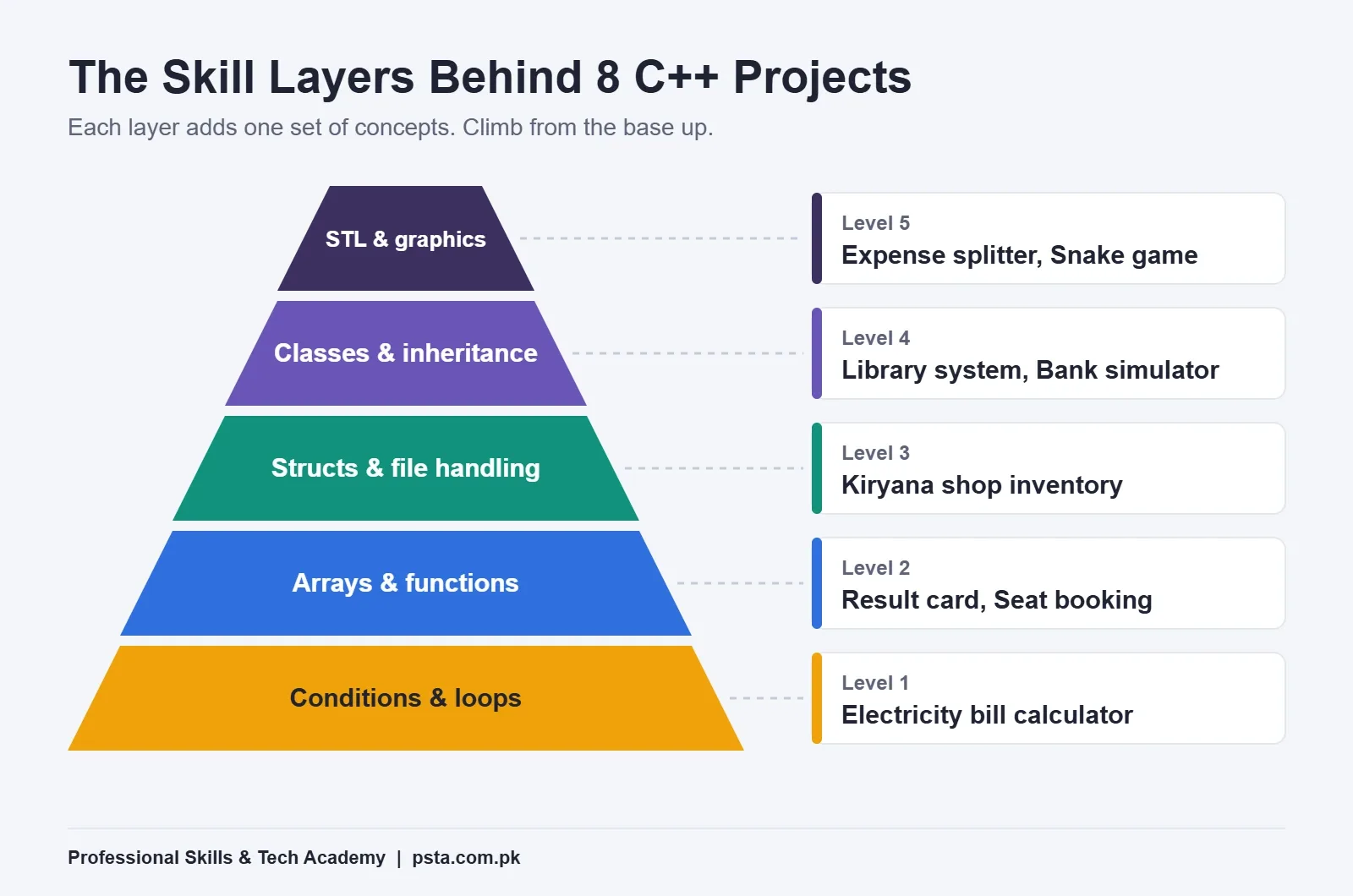
- C++ Projects for Beginners at a Glance
- Projects for Your Programming Fundamentals Semester
- 1. Electricity Bill Calculator
- 2. Student Result Card
- 3. Coaster Seat Booking
- 4. Kiryana Shop Inventory
- Projects for Your OOP Semester
- 5. Library Management System
- 6. Bank Account Simulator
- Projects That Use the STL and Graphics
- 7. Hostel Expense Splitter
- 8. Snake Game With raylib
- Which Project Fits Your Semester?
- Free Tools You Need on a Windows Laptop
- What Do Teachers Ask in a Project Viva?
- Is C++ Still Worth Learning in 2026?
- Building Your First Projects in PSTA's C++ Course
- Write the Menu Before You Write the Code
Here's an example many first-semester students will recognize. Ayesha, a BSCS student in Abbottabad, has two weeks to submit her Programming Fundamentals project. She has watched hours of C++ tutorials, yet she freezes when the teacher says, "Build something that works and explain it in the viva." A bigger idea won't fix that. A small project that uses only the concepts her course has covered so far will.
That's the approach in this guide. The C++ projects for beginners below are grouped by the topics you actually study in each semester, so you can pick one you can finish, understand and defend.
Read on and you'll come away with:
- Eight project ideas that match loops, arrays, file handling, classes and the STL
- Which project suits your current semester and skill level
- The free tools you need on a normal Windows laptop
- The questions teachers usually ask in a project viva, and how to prepare
- Whether C++ is still worth your time in 2026
What Should a First C++ Project Prove?
A good first project proves three things. You can break a problem into steps, you can turn those steps into working code, and you can explain every line you wrote. Size doesn't matter much. A 150-line program you fully understand beats a 2,000-line game copied from YouTube.
When I review student projects, I look for a clear menu, input checks, sensible function names and data that survives after the program closes. Those four habits show a teacher or an interviewer that you think like a programmer.
Your project should also match your course outline. Many Pakistani universities place Programming Fundamentals in Semester I and Object Oriented Programming in Semester II. The BSCS 2024 scheme of studies at GC Women University Sialkot, for example, lists both as 4-credit-hour courses with lab work, followed by Data Structures in Semester III. If your C++ semester project is due in Semester I, don't force classes and inheritance into your project just to look advanced.
C++ Projects for Beginners at a Glance
If you searched for C++ project ideas or C++ mini projects for a lab assignment, the table below lists all eight. Time estimates assume about one to two hours of work a day.
| Project | Main Concepts | Best Semester | Rough Time |
|---|---|---|---|
| Electricity Bill Calculator | if/else, loops, input checks | Semester I | 3 to 4 days |
| Student Result Card | Arrays, functions | Semester I | 4 to 5 days |
| Coaster Seat Booking | 2D arrays, menus | Semester I | 5 to 7 days |
| Kiryana Shop Inventory | Structs, file handling | End of Semester I | 1 to 2 weeks |
| Library Management System | Classes, constructors, encapsulation | Semester II | 2 weeks |
| Bank Account Simulator | Inheritance, virtual functions | Semester II | 2 weeks |
| Hostel Expense Splitter | vector, map, sorting | Semester II or III | 1 to 2 weeks |
| Snake Game With raylib | Game loop, structs, a graphics library | Semester III | 2 to 3 weeks |
Each of these C++ projects for beginners builds on the one before it. You can treat the list as a ladder and climb it across your first year.
Projects for Your Programming Fundamentals Semester
These four ideas need only what a first course covers: variables, conditions, loops, functions, arrays and, at the end, simple file handling.
1. Electricity Bill Calculator
Ask the user for units consumed, then calculate the bill using slab rates. Pick up a recent bill at home and use the slab rates printed on it, so your numbers reflect reality. Add a fixed charge and a tax line as separate steps.
What makes it a good project is the input checking. Reject negative units, letters and absurd values. Then wrap the whole thing in a loop so the user can calculate several bills without restarting the program.
2. Student Result Card
Store marks for five subjects in an array, then calculate the total, percentage and grade. Write one function per job: readMarks(), calculateTotal() and assignGrade(). Print a neat result card with aligned columns using setw from the iomanip header.
To stretch it, handle a whole class of 30 students and show the topper and the class average.
3. Coaster Seat Booking
Picture a 20-seat coaster on the Abbottabad to Islamabad route. Represent the seats as a 2D array of rows and columns. Show the layout with X for booked seats, let the user book or cancel one, and refuse double bookings.
This project teaches you to think in grids, which helps later with games, matrices and image work.
4. Kiryana Shop Inventory
Many shops in Pakistan still track stock in a register. Your program replaces that register. Use a struct for each item with a name, quantity and price, then add, search, update and list items.
This is a classic C++ file handling project. The key step is saving data to a text file with fstream, so the stock list is still there tomorrow. Here is the core of the save function:
void saveItems(Item items[], int count) {
    ofstream file("stock.txt");
    for (int i = 0; i < count; i++) {
        file << items[i].name << ","
             << items[i].qty << ","
             << items[i].price << "\n";
    }
}
Write the matching load function yourself. If you can explain both in your viva, you've understood file handling properly.
Projects for Your OOP Semester
Once your course reaches classes, objects and inheritance, move to projects where those ideas solve a real design problem.
5. Library Management System
Create a Book class with private data members and public functions to issue and return a copy. Add a Member class that stores which books someone has borrowed. Keep all data members private and let functions do the work, which is encapsulation in practice.
Add a fine calculation for late returns and save the records to a file. This project appears on many teachers' lists, so make yours stand out with clean validation and a short README.
6. Bank Account Simulator
Start with a base class Account and derive SavingsAccount and CurrentAccount. Give each its own withdrawal rule through a virtual function. Store accounts as base-class pointers in one list, then call the same function and watch each type behave differently.
Either of these two makes a solid OOP project in C++. That last step in the bank simulator is polymorphism, and it's the concept OOP teachers ask about most. Keep the money logic simple. The goal is to show the class design, not to build a real banking system.
Projects That Use the STL and Graphics
These two C++ projects for beginners suit students who've finished OOP basics and want something closer to how C++ is written at work.
7. Hostel Expense Splitter
Four roommates share groceries, gas and internet. Your program records who paid what and calculates who owes whom. Use std::vector to store expenses and std::map to keep each person's balance. Sort the final balances so the biggest debts appear first.
This one shows you can use the Standard Library instead of writing everything with raw arrays. Employers notice that.
8. Snake Game With raylib
raylib is a free, open source library for simple games. Version 5.5, released in November 2024, added C++ math operators for vectors, according to the official raylib 5.5 release notes. The same notes mention a ready-made Windows package, which saves beginners a lot of setup trouble.
A Snake game teaches the game loop: read input, update positions, check collisions, then draw. Store the snake's body in a vector of positions. Start with a moving square, then add food, growth and a score.
Which Project Fits Your Semester?
Pick based on what you've already studied, not what sounds impressive. Ask yourself three questions. Has your course covered file handling yet? Have you written a class with a constructor? Are you comfortable with vector and map?
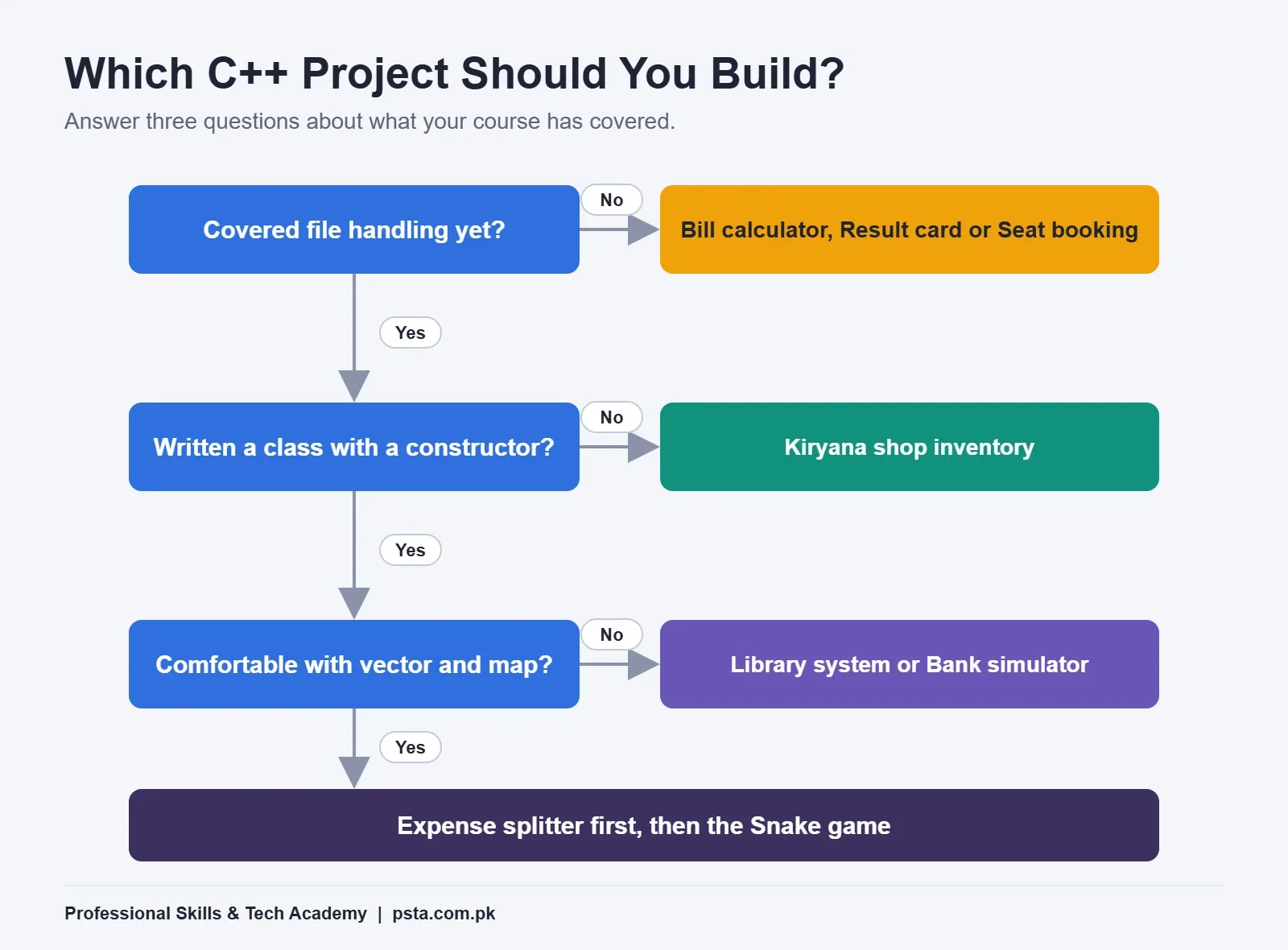
If the answer to the first is no, choose the bill calculator, result card or seat booking. If you know files but not classes, build the shop inventory. If you're in your OOP semester, choose the library system or the bank simulator. If you're comfortable with vectors and want something visual, try the expense splitter first, then the Snake game.
Still unsure whether C++ should be your main language at all? Our C++ vs Python comparison for beginners walks through that choice by goal.
Free Tools You Need on a Windows Laptop
You don't need to buy anything. Here's a simple setup that works on most student laptops:
- Install a compiler and editor. Visual Studio Community is free for individual developers and classroom learning, according to Microsoft's C++ installation guide. During setup, choose the "Desktop development with C++" workload.
- Create one folder per project. Keep source files, a data folder and a README together, and give each project a clear name.
- Set up Git and GitHub. Commit after every working feature. A history of small commits shows your teacher the work was really yours.
- Write a README. Explain what the program does, how to run it and which concepts it uses. Add one screenshot of the output.
- Test with bad input. Type letters where numbers are expected, enter zero and enter huge values. Fix every crash you find.
If your laptop is old or low on storage, a lighter editor with the MinGW-w64 g++ compiler also works well. AI assistants can help you understand an error message, but they shouldn't write your project for you. We compared a few free options in our guide to AI coding tools for students.
What Do Teachers Ask in a Project Viva?
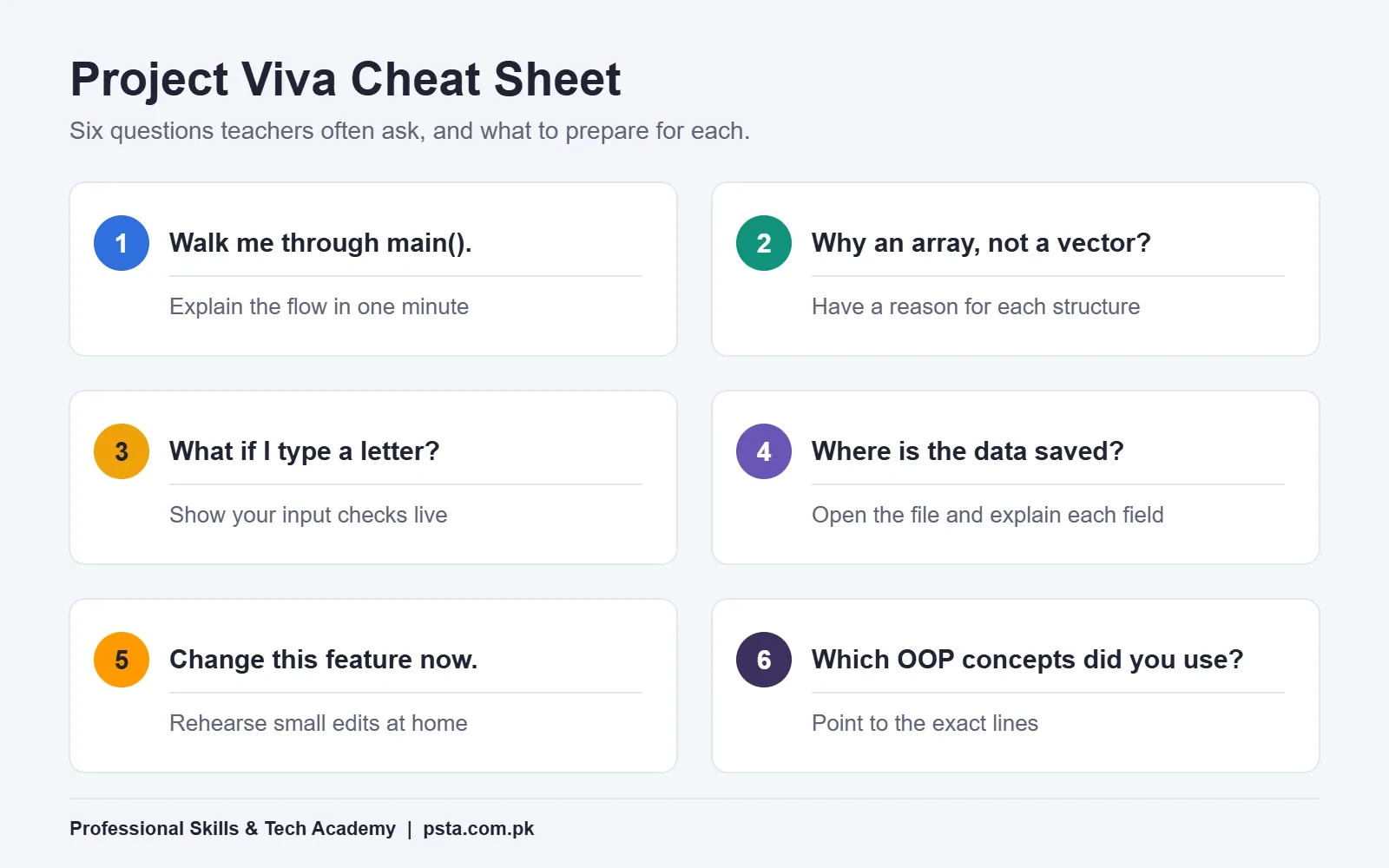
A viva checks whether you understand your own code. For most C++ projects for beginners, it is where you win or lose marks. In my experience, the same handful of questions come up again and again, whatever the project.
- "Walk me through your main function." Practice explaining the program flow in under a minute.
- "Why did you use an array here instead of a vector?" Have a reason for each data structure you chose.
- "What happens if I enter a letter here?" Show your input checks working, live.
- "Where is your data saved, and in what format?" Open the text file and explain each field.
- "Change this feature right now." Teachers often ask for a small live edit, such as adding a new grade or a new menu option.
- "Which OOP concepts did you use?" Point to the exact lines that show encapsulation, inheritance or polymorphism.
The live-edit question worries students most. The only real preparation is writing the code yourself, then rehearsing small changes at home the night before.
Is C++ Still Worth Learning in 2026?
Yes, especially if you study computer science, electrical engineering or want to work on games, embedded systems or performance-heavy software. C++ ranks third in the TIOBE Index for October 2026 with a rating of 8.87%, behind Python and C. In the Stack Overflow Developer Survey 2025, 23.5% of respondents said they had used C++.
The language is also still evolving. In March 2026, the ISO C++ committee finished technical work on C++26, according to committee chair Herb Sutter's trip report. The new standard adds compile-time reflection, contracts and safer defaults, such as making reads of uninitialized local variables no longer undefined behavior.
You won't use those features in your first C++ projects for beginners. Still, it's reassuring to know the skills you build on these beginner projects lead somewhere current. The habits carry over to Python, Java and JavaScript too, as you'll see if you later try our Python project ideas.
Building Your First Projects in PSTA's C++ Course
If you'd like guided practice, PSTA's C++ programming course for beginners runs for 12 weeks and starts from zero. The modules move from variables and cin/cout through if/else, loops, functions, arrays and strings, then an introduction to classes and objects. Module 8 is a final project you build from scratch, with an instructor reviewing your code.
The listed fee is Rs. 12,000, reduced from Rs. 16,000 at the time of writing. Classes run at the PSTA campus opposite FIMS College on Old College Road, Mandian, Abbottabad, and live online for students elsewhere in Pakistan. New batches start every month.
If you want a broader programming path after C++, compare our Advanced Python course or the one-year DIT diploma, or browse all PSTA courses. Enrollment steps are listed on our admission page. For a quick answer about batch timings, send a message to +92 314 5424399 on WhatsApp.
Write the Menu Before You Write the Code
Pick one project from the table that matches your semester. Before opening your editor, write its menu on paper: every option the user will see, and what each one should do. That one page becomes your plan, your function list and your viva script. Then build the first menu option tonight and commit it to GitHub.
Frequently asked questions
Which C++ project is best for a first-semester student?
Choose a project that uses only conditions, loops, functions and arrays, because that is what most first courses cover. An electricity bill calculator or a student result card works well. Both are small enough to finish in a week, and both let you show input checking and clean functions, which teachers look for in a viva.
How big should a beginner C++ project be?
Size matters less than understanding. A project of a few hundred lines that you wrote yourself and can explain is better than a long program copied from a video. Aim for a clear menu, input checks, separate functions for each task and data saved to a file. Add features only after the basic version works.
Can I make a C++ project with graphics as a beginner?
Yes, once you are comfortable with loops, structs and vectors. raylib is a free, open source library made for simple games, and version 5.5 includes a ready-made Windows package that reduces setup trouble. Start with a moving square, then build up to a full Snake game with food, growth and a score.
Do I need Visual Studio for C++ projects, or can I use another compiler?
Visual Studio Community is free for students and includes everything through the Desktop development with C++ workload. If your laptop is older or short on storage, a lighter editor with the MinGW-w64 g++ compiler also works. Check which compiler your university lab uses, so your code behaves the same way during the viva.
How do I save data in a C++ project without a database?
Use file handling with the fstream header. Write each record as one line in a text file, with fields separated by commas, and read the file back when the program starts. This keeps data after the program closes, and it gives you something concrete to show when a teacher asks where your data lives.
Should I use ChatGPT or other AI tools to write my C++ project?
Use AI tools to explain error messages or concepts, not to write the project. Teachers often ask for a live change during the viva, such as adding a menu option, and you can only do that quickly if you wrote the code. Keep small Git commits, too, so your progress is visible.
What should I put in the README of a C++ project?
Explain in a few lines what the program does, how to compile and run it, and which concepts it uses, such as arrays, file handling or inheritance. Add one screenshot of the output and a short list of features. A clear README helps teachers, classmates and future employers understand your work in under a minute.
How long is PSTA's C++ course and what does it cost?
PSTA's C++ programming course for beginners runs for 12 weeks and starts from zero, covering variables through to an introduction to classes, with a final project in Module 8. The listed fee is Rs. 12,000, reduced from Rs. 16,000 at the time of writing. You can study on campus in Abbottabad or live online.
Sources & references
- TIOBE Index for October 2026 tiobe.com
- Stack Overflow Developer Survey 2025: Technology survey.stackoverflow.co
- Herb Sutter: C++26 Is Done, March 2026 ISO C++ Meeting Trip Report herbsutter.com
- Microsoft Learn: Install C++ Support in Visual Studio learn.microsoft.com
- raylib 5.5 Release Notes raysan5.itch.io
- GC Women University Sialkot: BSCS Scheme of Studies 2024 gcwus.edu.pk
Last reviewed & updated on by Umar Qureshi. Written by the PSTA team in Abbottabad, Pakistan.

Umar Qureshi
Best C++ Programming Course for Beginners in Pakistan
Turn this guide into a career: hands-on training with real projects, online across Pakistan or on-campus in Abbottabad · 12 Weeks.
Comments
No comments yet — ask a question or share your experience.