Quick answer
JavaScript async await lets you write code that waits for slow work, like a server request, without freezing the page. An async function always returns a promise, and await pauses only that function until the promise settles. Wrap awaits in try/catch, check response.ok after fetch(), and use Promise.all for independent requests.
Key takeaways
- • Promise callbacks run before timer callbacks, which is why code can print out of order.
- • An async function always returns a promise; await pauses only that function, not the page.
- • fetch() does not reject on a 404 or 500, so check response.ok and throw your own error.
- • Use try/catch/finally with AbortSignal.timeout() for clean error and timeout handling.
- • Start independent requests together with Promise.all instead of awaiting them one by one.
Table of contents 17 sections
- Why Does the Self-Test Print 1, 4, 3, 2?
- What Is Asynchronous JavaScript, in Plain Words?
- Callbacks, Promises and Async Await: One Job, Three Styles
- The Three Promise States You Need to Know
- How JavaScript Async Await Works, Line by Line
- Fetching Real Data With the Fetch API
- How Do You Handle Errors With Async Await?
- Running Requests Together: Promise.all, allSettled, race and any
- Five Async Mistakes That Break Beginner Code
- Forgetting await
- Using await Inside forEach
- Awaiting Independent Requests One by One
- Trusting fetch() to Reject on a 404
- Leaving Rejections Unhandled
- Where Will You Use Async Code in Real Web Jobs?
- Practising Async JavaScript in PSTA's JavaScript Course
- Try This in Your Browser Console Tonight
Here is a quick JavaScript async await self-test before you read anything else. Run this snippet in your head and write down the order of the four lines it prints.
console.log("1: order placed");
setTimeout(function () {
  console.log("2: timer finished");
}, 0);
Promise.resolve().then(function () {
  console.log("3: promise settled");
});
console.log("4: page ready");
The real output is 1, 4, 3, 2. Guessing 1, 2, 3, 4 is the most natural mistake a beginner can make, and the reason behind the correct answer is the key to promises, the Fetch API and async functions.
Work through this explainer and you will be able to:
- Say why JavaScript prints that snippet in the order 1, 4, 3, 2
- Read callbacks, promise chains and async/await as three versions of one idea
- Load data with fetch() and handle slow or failed requests calmly
- Choose between Promise.all, allSettled, race and any
- Spot the five habits behind most beginner async bugs
Why Does the Self-Test Print 1, 4, 3, 2?
A browser runs your JavaScript on one main thread. It always finishes the script it is running before it looks at anything else. Lines 1 and 4 are ordinary synchronous calls, so they print first, in the order you wrote them.
Lines 2 and 3 are different. They don't run now; they are scheduled. The timer callback waits in the task queue. The promise callback waits in the microtask queue. According to MDN's guide to microtasks, when a task finishes, the event loop empties the whole microtask queue before it starts the next task. So the promise line beats the timer line, even though the timer delay is 0.
| Line | Kind of code | Where it waits | When it runs |
|---|---|---|---|
| 1: order placed | Synchronous | Nowhere | Immediately |
| 2: timer finished | Timer callback | Task queue | After the script and all microtasks |
| 3: promise settled | Promise callback | Microtask queue | As soon as the script ends |
| 4: page ready | Synchronous | Nowhere | Immediately |
You don't need to memorize queue names to write good code. Keep one rule in mind: plain code first, promise callbacks next, timers and events after that.
What Is Asynchronous JavaScript, in Plain Words?
Asynchronous code starts a slow job, lets the rest of the program carry on, and deals with the result later. Typical slow jobs are a request to a server, reading a file in Node.js, a timer, or waiting for a user to click.
Picture a busy dhaba counter. You order a karahi, take a token, and step aside. The cook keeps serving other customers while yours cooks, and your number is called when it's ready. A promise is that token. It proves a result is coming and gives you a way to be told when it arrives.
Why not simply wait? If the browser stopped everything while a slow server replied, the page would freeze. Buttons wouldn't respond and scrolling would stick. Asynchronous code keeps the page alive while the data travels.
This matters for your career too. Stack Overflow's 2025 Developer Survey found JavaScript in use by 66% of respondents, the highest share of any language it listed. Asynchronous patterns sit inside a large share of that code.
Callbacks, Promises and Async Await: One Job, Three Styles
Here is the same small job written three ways: load a shop's orders, then load the customer for the first order, then show a summary. First, the older callback style:
getOrders(function (error, orders) {
  if (error) { showError(error); return; }
  getCustomer(orders[0].customerId, function (error, customer) {
    if (error) { showError(error); return; }
    showSummary(orders, customer);
  });
});
Each step lives inside the previous one, and every level repeats its own error check. Add three more steps and the code drifts to the right. Promises flatten that shape into a chain:
let savedOrders;
getOrders()
  .then(function (orders) {
    savedOrders = orders;
    return getCustomer(orders[0].customerId);
  })
  .then(function (customer) {
    showSummary(savedOrders, customer);
  })
  .catch(showError);
Now one .catch() handles a failure at any step. The async/await version reads like normal top-to-bottom code:
async function loadSummary() {
  try {
    const orders = await getOrders();
    const customer = await getCustomer(orders[0].customerId);
    showSummary(orders, customer);
  } catch (error) {
    showError(error);
  }
}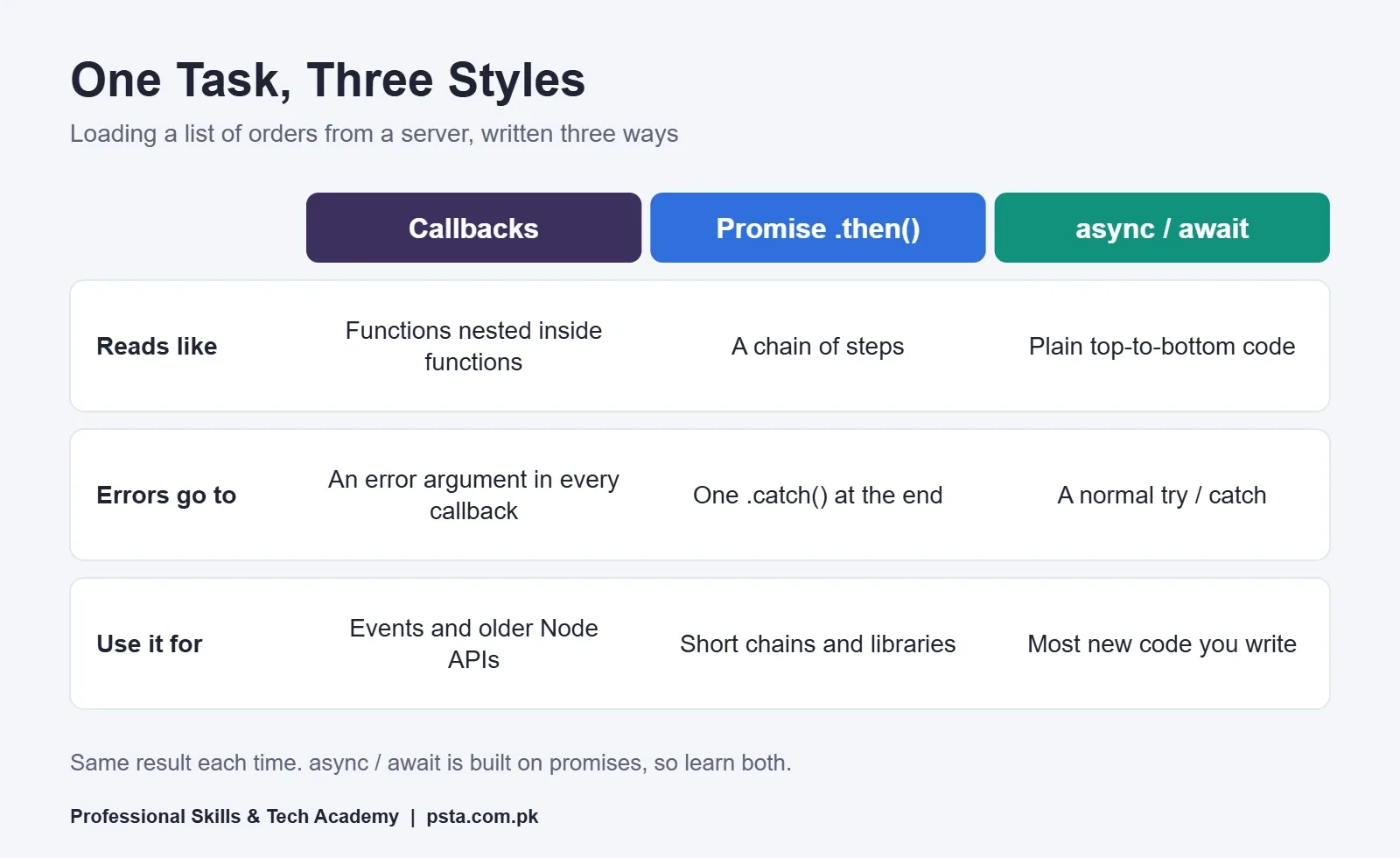
Notice that JavaScript async await doesn't replace promises. It's a cleaner way to write code that uses them. You will still meet .then() chains in libraries and older projects, so learn to read both.
The Three Promise States You Need to Know
Every promise is in exactly one state at a time. The MDN Promise reference lists three:
| State | What it means | What your code sees |
|---|---|---|
| Pending | The job has started but has no result yet | Nothing yet; await keeps waiting |
| Fulfilled | The job finished successfully | await returns the value; .then() runs |
| Rejected | The job failed | await throws the error; .catch() runs |
A promise that is fulfilled or rejected is called settled, and it never changes state again. MDN marks promises as widely available across browsers since July 2015, so you can use them in any modern project without extra setup.
How JavaScript Async Await Works, Line by Line
Two keywords do all the work. Putting async before a function changes what it returns. As the MDN async function page explains, an async function always returns a promise. If you return a plain value such as 5, the caller receives a promise that fulfils with 5.
The await keyword pauses that one function until a promise settles. It does not pause the page. When you call loadSummary() from the example above, this is what happens:
- Code before the first await runs straight away, like normal code.
- At await getOrders(), the function pauses and hands the caller a pending promise.
- The rest of the page keeps running: clicks, scrolling and other scripts.
- When the orders promise fulfils, the function resumes and orders receives the value.
- If any awaited promise rejects, the error is thrown at that line and lands in catch.
- When the function ends, its own promise fulfils with whatever it returned.
One rule trips people up. In a classic script, await is only allowed inside an async function; anywhere else it's a SyntaxError. JavaScript modules are the exception, because they allow await at the top level of the file.
Fetching Real Data With the Fetch API
Most async code you write at work will load data from a server. Say you are building a product page for a small clothing store. The products live in a JSON endpoint, and you load them with fetch():
async function loadProducts() {
  const response = await fetch("/api/products");
  if (!response.ok) {
    throw new Error("Server replied with status " + response.status);
  }
  const products = await response.json();
  return products;
}
There are two awaits here, and both are needed. The first waits for the server's response. The second waits for the body, because json() and the other body readers are also asynchronous.
The if check is the line beginners skip. The MDN guide to using fetch points out that fetch() does not reject when the server answers with an error status such as 404. It rejects on network failures. A 404 or 500 still counts as a response, so you check response.ok, which is true only for statuses in the 200 range, and throw your own error.
How Do You Handle Errors With Async Await?
Error handling is where JavaScript async await feels most natural. Use an ordinary try/catch around your awaits, and a finally block for clean-up that must always run, such as hiding a loading spinner. Add a timeout too, because some users browse on weak mobile signals and a spinner that never stops is worse than a clear message.
async function loadProductsSafely() {
  showSpinner();
  try {
    const response = await fetch("/api/products", {
      signal: AbortSignal.timeout(8000)
    });
    if (!response.ok) throw new Error("Status " + response.status);
    return await response.json();
  } catch (error) {
    if (error.name === "TimeoutError") {
      showMessage("The server is slow. Please try again.");
    } else {
      showMessage("We couldn't load products right now.");
    }
    return [];
  } finally {
    hideSpinner();
  }
}
AbortSignal.timeout() creates a signal that aborts the request after the number of milliseconds you give it. On timeout, the error's name is TimeoutError. MDN lists it as widely available since April 2024.
Notice the function returns an empty array on failure. The calling code always gets a list it can render, and the user gets a message instead of a blank page.
Running Requests Together: Promise.all, allSettled, race and any
Suppose your product page also needs the category list. The two requests don't depend on each other, so awaiting them one after another wastes time. Start both at once and wait for the pair:
const [products, categories] = await Promise.all([
  loadProducts(),
  loadCategories()
]);
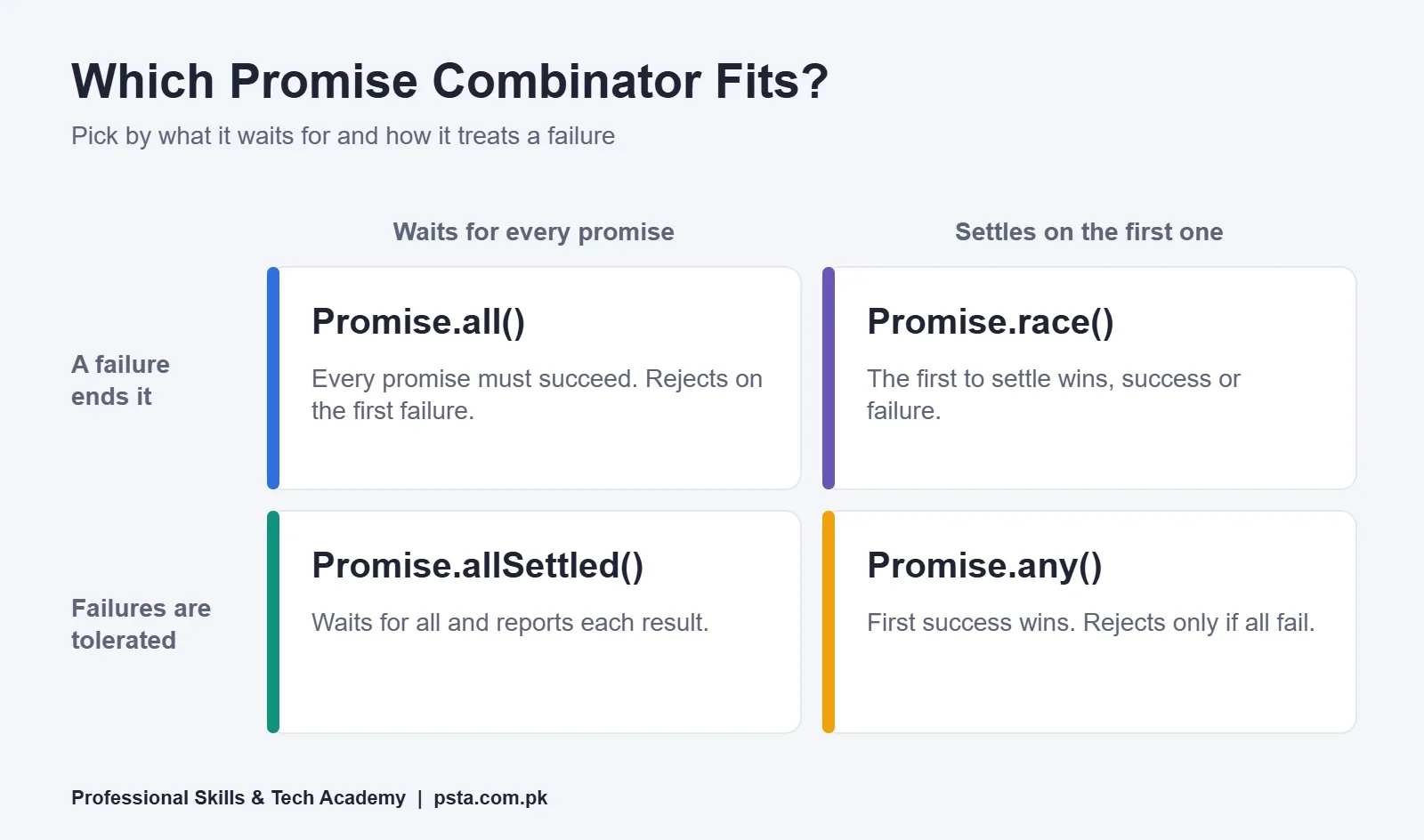
Promise.all is one of four static methods that combine promises. They differ in two ways: whether they wait for every promise, and how they treat a failure.
| Method | Fulfils when | Rejects when | Good fit |
|---|---|---|---|
| Promise.all() | Every promise fulfils (array of values) | Any one rejects | A page that needs every piece of data |
| Promise.allSettled() | Every promise settles (array of outcomes) | Not because an input failed | Sending fee reminders to a list and reporting each result |
| Promise.race() | The first promise to settle fulfils | The first promise to settle rejects | A hand-made timeout around an older API |
| Promise.any() | The first promise fulfils | Every promise rejects (AggregateError) | Asking two mirror servers and using the quicker one |
MDN's async function page adds a useful warning. Starting two promises and then awaiting them one by one can produce an unhandled rejection if the second fails first. Promise.all or Promise.allSettled avoids that problem.
Five Async Mistakes That Break Beginner Code
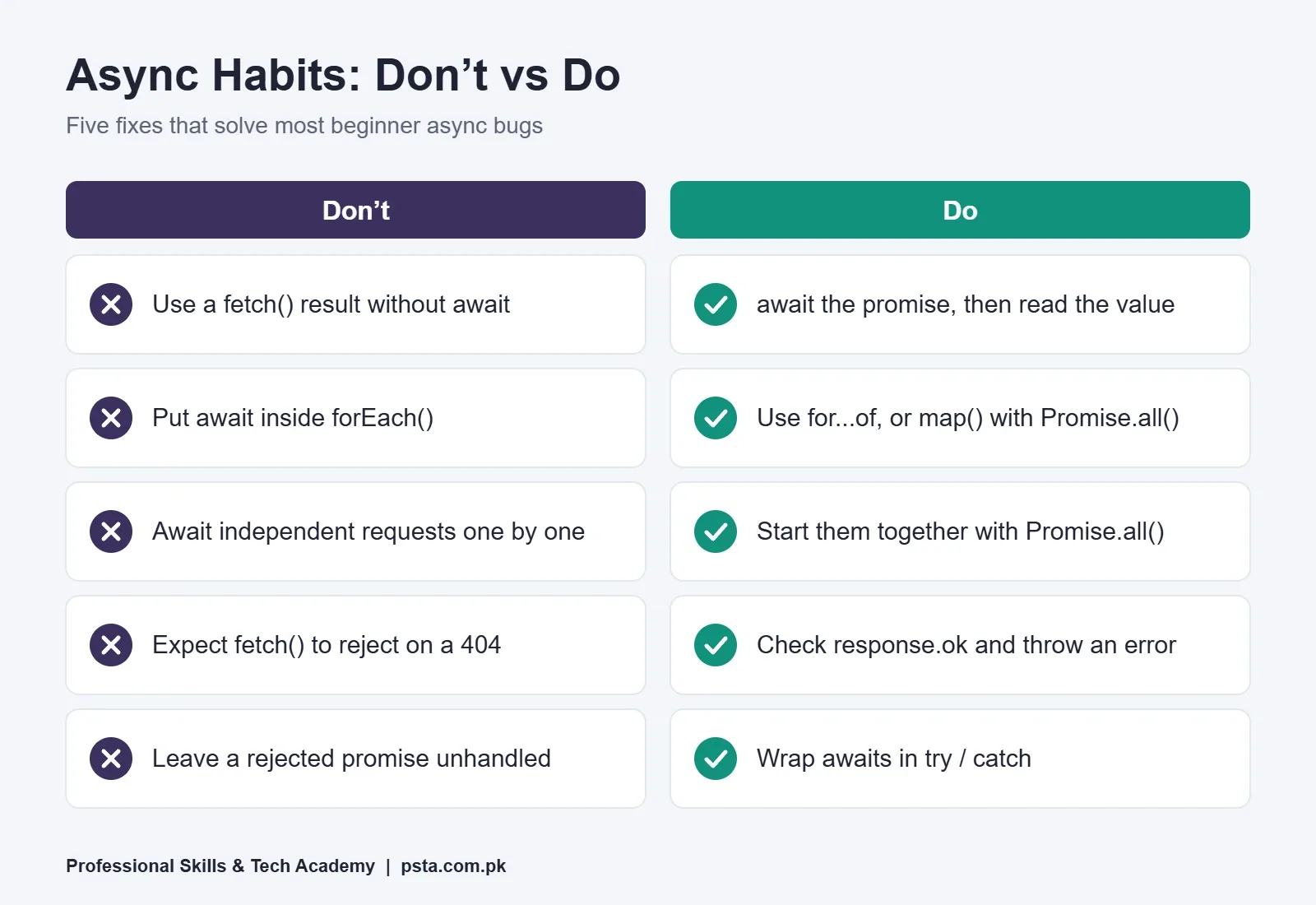
These five come up again and again when students review each other's code. Each one has a short, reliable fix.
Forgetting await
Write const data = fetch(url) and data holds a promise, not the response. Logging it shows Promise { pending }. Add await, or chain .then().
Using await Inside forEach
The MDN forEach page warns that forEach expects a synchronous function and does not wait for promises. Your loop finishes before the work does. Use a for...of loop when order matters:
for (const id of orderIds) {
  await markAsShipped(id);
}
When order doesn't matter, run them together with await Promise.all(orderIds.map(function (id) { return markAsShipped(id); })).
Awaiting Independent Requests One by One
Three separate awaits for three unrelated requests means the user waits for all three delays added together. Group them with Promise.all, as shown above.
Trusting fetch() to Reject on a 404
It won't. Check response.ok every time, and throw an error that includes the status code so your logs are useful.
Leaving Rejections Unhandled
An async function with no try/catch passes its error to whoever called it. If nobody catches it, the browser reports an unhandled rejection and the user sees nothing. Catch errors at the level where you can show a message.
Where Will You Use Async Code in Real Web Jobs?
Almost every interactive page loads something after it opens, so JavaScript async await shows up in most frontend work. A few typical examples from projects Pakistani developers build for local clients:
- A store's product grid that loads items and filters from an API
- A school portal that fetches results after a student enters a roll number
- A checkout page that waits for a payment gateway's reply before showing a receipt
- An order form that posts to a server and shows a confirmation without reloading
- A Node.js backend that queries a database before sending a response
Expect interviewers to test this. A common format is a snippet like the self-test at the top, where you predict the output order. Our list of JavaScript interview questions for freshers has more practice of that kind, and the JavaScript array methods guide covers map() and the other methods you'll pair with Promise.all.
React uses the same ideas. When a component loads data, you write an async function, call fetch(), and update state with the result. Once async code feels natural, the React projects for beginners list becomes much easier to work through.
Practising Async JavaScript in PSTA's JavaScript Course
JavaScript async await clicks fastest when someone reviews your mistakes as you make them. In the JavaScript Programming Course: Beginner to React, two modules focus on this topic. The first covers callbacks, promises and how asynchronous code behaves. The second moves to the Fetch API, await and error handling with real APIs.
Around those modules you study DOM work, events, ES6+ features and modules, then React basics, and finish with portfolio projects deployed on GitHub. Expect 12 weeks of classes, pitched for beginners. When this guide was published, the listed fee was Rs. 24,000, down from a regular Rs. 28,000. Classes happen in person at the Abbottabad campus or over live video for students elsewhere in the country, with a hybrid option between them. Fresh batches open monthly.
Already comfortable with JavaScript? The Advanced React.js course and our full-stack course with AI tools build on these skills. Browse fees and durations side by side on the courses list, send your details through the admission page, or message the team on WhatsApp (+92 314 5424399) if anything is unclear. To visit, head to Mandian and look for the academy opposite FIMS College on Old College Road.
Try This in Your Browser Console Tonight
Open any web page, press F12 and choose the Console tab. Paste the self-test from the top of this guide and run it. Then change one thing at a time and predict the output before you press Enter:
- Add a second .then() after the first one.
- Wrap the promise line in an async function that uses await.
- Change the timer delay from 0 to 100.
Write each prediction on paper first. When your guesses start matching the console, you understand the event loop well enough to debug real JavaScript async await code.
Frequently asked questions
Is async await better than using .then()?
Neither one is faster, because async/await is built on promises and both run the same way underneath. Most teams prefer async/await for new code since it reads from top to bottom and works with try/catch. You will still meet .then() chains in libraries and older projects, so learn to read and write both styles.
Does await freeze the whole web page?
No. await pauses only the async function it sits in. The browser keeps handling clicks, scrolling and other scripts while the promise is pending. When the promise settles, the function continues from where it stopped. Long synchronous loops are what freeze a page, not await itself.
Can I use await without an async function?
In a classic script, no. Using await outside an async function causes a SyntaxError. JavaScript modules work differently because they allow await at the top level of the file. If you load your script as a module, with type set to module on the script tag, top-level await is available.
Why does fetch() not throw an error on a 404 page?
fetch() treats any reply from the server as a response, including 404 and 500 statuses. It rejects only on network problems, such as a lost connection. Check response.ok, which is true for statuses in the 200 range, and throw your own error with the status code when it is false.
What is the difference between Promise.all and Promise.allSettled?
Promise.all fulfils with an array of values only if every promise succeeds, and it rejects as soon as one fails. Promise.allSettled waits for every promise to finish and gives you one object per promise showing whether it fulfilled or rejected. Choose allSettled when partial success is still useful to you.
How long does it take to learn async JavaScript?
If you are already comfortable with functions, arrays and objects, two to three weeks of daily practice is a realistic target for the basics: promises, async/await, fetch() and error handling. Real confidence comes from building a few small projects that load live data and handle failures, so plan practice time beyond reading.
Do I need async JavaScript before learning React?
Yes, at least the basics. React components often load data from an API, which means writing an async function, calling fetch() and storing the result in state. If you learn promises and async/await first, React tutorials make far more sense and you spend your time on components instead of debugging data loading.
Sources & references
- MDN: async function developer.mozilla.org
- MDN: Promise developer.mozilla.org
- MDN: Using the Fetch API developer.mozilla.org
- MDN: Using microtasks in JavaScript developer.mozilla.org
- MDN: AbortSignal.timeout() developer.mozilla.org
- MDN: Array.prototype.forEach() developer.mozilla.org
- Stack Overflow Developer Survey 2025: Technology survey.stackoverflow.co
Last reviewed & updated on by Umar Qureshi. Written by the PSTA team in Abbottabad, Pakistan.

Umar Qureshi

JavaScript Programming Course in Abbottabad: Beginner to React
Turn this guide into a career: hands-on training with real projects, online across Pakistan or on-campus in Abbottabad · 12 Weeks.
Comments
No comments yet — ask a question or share your experience.