Quick answer
Learn React first if you are new to coding. Next.js is a framework built on React, so every Next.js page is made of React components. Spend a few weeks on components, props, state and hooks with Vite, then move to Next.js for routing, server rendering and search-friendly public websites.
Key takeaways
- • Next.js is a framework built on React, so learning it means learning React too.
- • The official React docs recommend a framework such as Next.js for new apps, and Vite for learning React on its own.
- • Create React App was retired for new apps in February 2025; use Vite or create-next-app instead.
- • Pick Next.js for public websites that need search traffic and plain React for dashboards behind a login.
- • Vercel's free Hobby plan is for personal, non-commercial projects only.
Table of contents 15 sections
- What Is the Difference Between React and Next.js?
- React vs Next.js at a Glance
- What Next.js Adds on Top of React
- Why the Official React Docs Now Point to Frameworks
- How Popular Are React and Next.js With Developers?
- Can You Learn Next.js Without Knowing React?
- A Learning Order That Works for Most Beginners
- Starting Straight With Next.js: Pros and Cons
- Pros
- Cons
- Which Projects Suit React and Which Suit Next.js?
- What Does Hosting Cost for Student Projects?
- How Fast Do React and Next.js Change?
- Studying React and Next.js at PSTA
- Build the Same Page Twice This Weekend
A common belief among new web students is that React vs Next.js is a contest, and that picking Next.js means skipping React. That isn't how it works. Next.js is a framework built on top of React, so every Next.js page you write is made of React components. The real decision is about order: learn plain React first, or start inside Next.js and pick up React as you go.
I get this question from almost every batch, usually after a student watches a tutorial that opens with create-next-app and gets lost by the second video. This guide gives you a clear answer based on what the official React and Next.js teams publish today, not on forum opinions.
Here is what this comparison covers:
- What React does on its own and what Next.js adds to it
- A side-by-side table of setup, routing, rendering, SEO and hosting
- Whether you can learn Next.js without knowing React
- A learning order with realistic weekly milestones
- Which projects in the Pakistani market suit each option, and what hosting costs
What Is the Difference Between React and Next.js?
React is a JavaScript library for building user interfaces out of components. A component is a function that returns a piece of UI, such as a product card, a login form or a navbar. React handles how that UI updates when data changes. It does not decide how your pages are routed, where your data comes from or how your site is served.
Next.js fills those gaps. It gives you a folder-based router, server rendering, a build system, image and font handling, and a way to run server code next to your components. You still write React, but Next.js makes many project-level decisions for you.
A simple way to picture it: React is the engine, and Next.js is a complete car built around that engine. You can buy the engine alone and build your own car, which teaches you a lot. Or you can drive the finished car and learn the engine later. Both paths are valid, but they feel very different in your first month.
React vs Next.js at a Glance
The table below compares a plain React project created with Vite against a new Next.js project. The setup commands and version requirements come from the official Vite guide and the Next.js installation docs.
| Point | React (with Vite) | Next.js |
|---|---|---|
| What it is | UI library plus a separate build tool | Full-stack framework that uses React |
| Start command | npm create vite@latest my-react-app -- --template react |
npx create-next-app@latest |
| Minimum Node.js | 20.19 or 22.12 and above (Vite 8) | 20.9 and above |
| Routing | Add a library such as React Router | Built in: folders inside app become URLs |
| Where pages render | Mostly in the browser | On the server, at build time or in the browser, chosen per component |
| SEO for public pages | Needs extra setup | HTML arrives ready for search engines |
| Backend code | Separate server (for example Node.js with Express) | Route handlers and server functions in the same project |
| Default extras | Pick your own | TypeScript, Tailwind CSS, ESLint, App Router and Turbopack |
| Concepts in week one | Components, props, state | The same, plus server vs client components and caching |
Notice the last row. That is the real cost of starting with Next.js. You face more ideas at once, and when something breaks, it is harder to tell whether React, the router or the server caused it.
What Next.js Adds on Top of React
Each feature Next.js adds solves a problem you would otherwise solve yourself with extra libraries and configuration. Here are the six that matter most to a beginner:
- File-based routing. A file at
app/about/page.tsxbecomes the/aboutpage. No router setup. - Server rendering. Pages can be built on the server, so visitors and search engines receive real HTML.
- Static pages. Content that rarely changes can be built ahead of time and served quickly.
- Server code in the project. Route handlers and server functions let you read a database or send a form without a separate backend.
- Image and font optimization. The built-in Image component resizes and lazy-loads pictures for you.
- Caching controls. Next.js 16.4 turned on its Cache Components model for every new
create-next-appproject, according to the Next.js 16.4 release post.
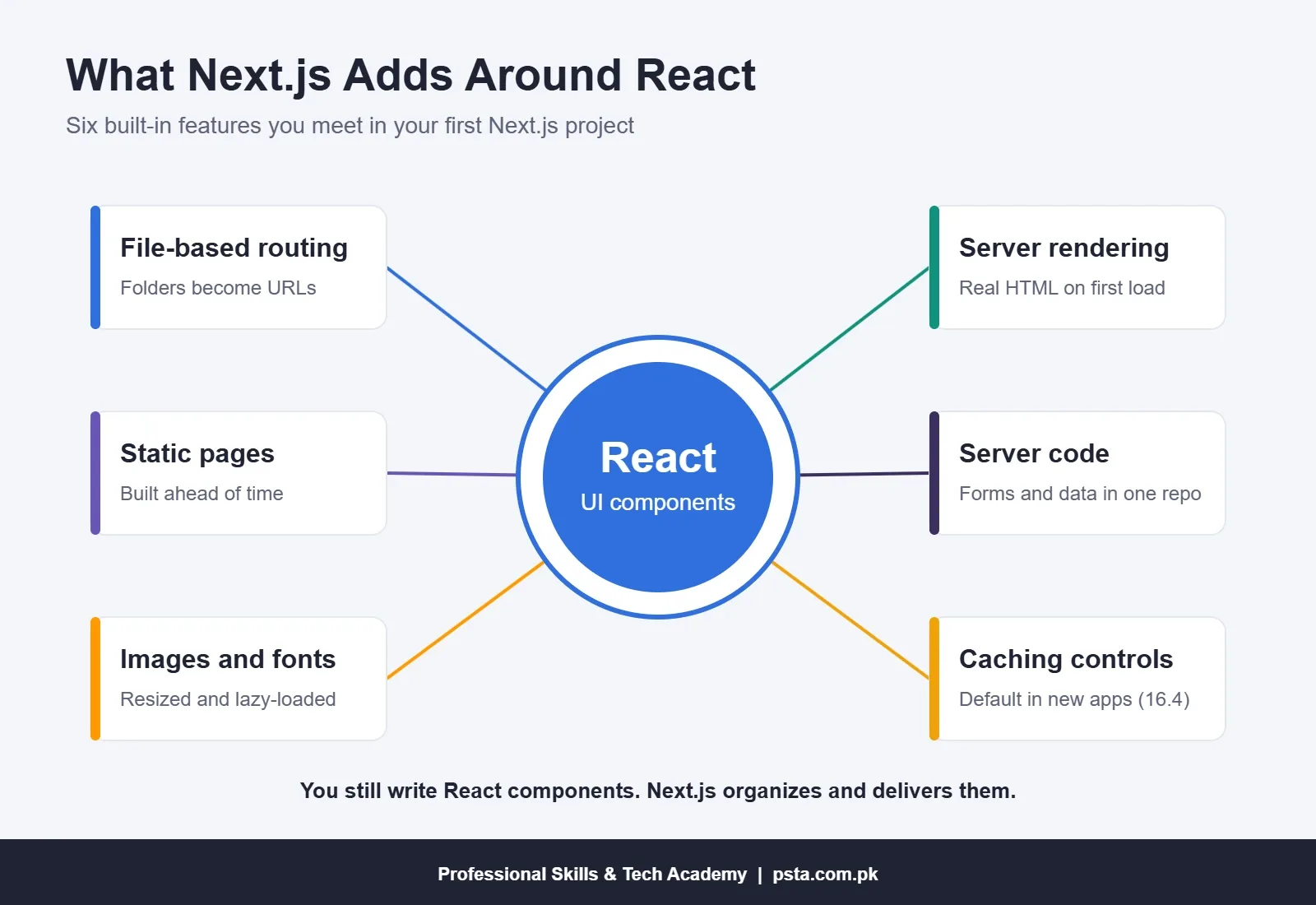
None of these features change how you write a button or a form. They change how the whole app is organized and delivered. That is why a solid grip on React makes Next.js far easier to read.
Why the Official React Docs Now Point to Frameworks
If you open the React documentation today, the advice is direct. The Creating a React App page recommends starting new apps with a framework and lists Next.js (App Router), React Router v7 and Expo. It also explains how to build from scratch with a build tool like Vite, Parcel or Rsbuild if you want to learn the basics or have special needs.
This changed in early 2025. The React team announced on 14 February 2025 that Create React App was being retired for new apps, as listed on the React blog. Many YouTube courses filmed before then still start with create-react-app. If your tutorial does, switch to Vite or Next.js instead of fighting old tooling.
So the docs push you toward a framework for real apps, yet they also keep a clear path for learners who want to see React alone. Both statements are true at once, and they shape the learning order below.
How Popular Are React and Next.js With Developers?
In the 2025 Stack Overflow Developer Survey, 44.7% of respondents to the web frameworks question said they had used React in the past year, and 20.8% said the same for Next.js. That question had 23,678 respondents.
Read those figures with care when you weigh React vs Next.js. Next.js users are also React users, so the two numbers overlap rather than compete. The gap simply shows that many teams use React without Next.js: admin panels, mobile apps with React Native, and older projects built before frameworks became the default advice.
For you, the takeaway is practical. React knowledge transfers to every one of those jobs. Next.js knowledge is a strong extra, especially for public websites, but it sits on the same foundation.
Can You Learn Next.js Without Knowing React?
You can, but you will be learning React anyway, just with more noise around it. Every Next.js page is a React component. Props, state, hooks and lists with keys all appear on day one. If those ideas are new, a Next.js error message gives you two unknowns to untangle instead of one.
The bigger issue is the split between server components and client components. In the App Router, components run on the server by default. The moment you add a click handler or useState, you need the 'use client' directive. Beginners who skip plain React often can't tell why a hook "doesn't work" in one file and works in another.
Students who already know JavaScript well, including async/await, fetch and array methods like map, handle this faster. Students who are shaky on JavaScript struggle with both tools, and the fix is the same: go back one level.
A Learning Order That Works for Most Beginners
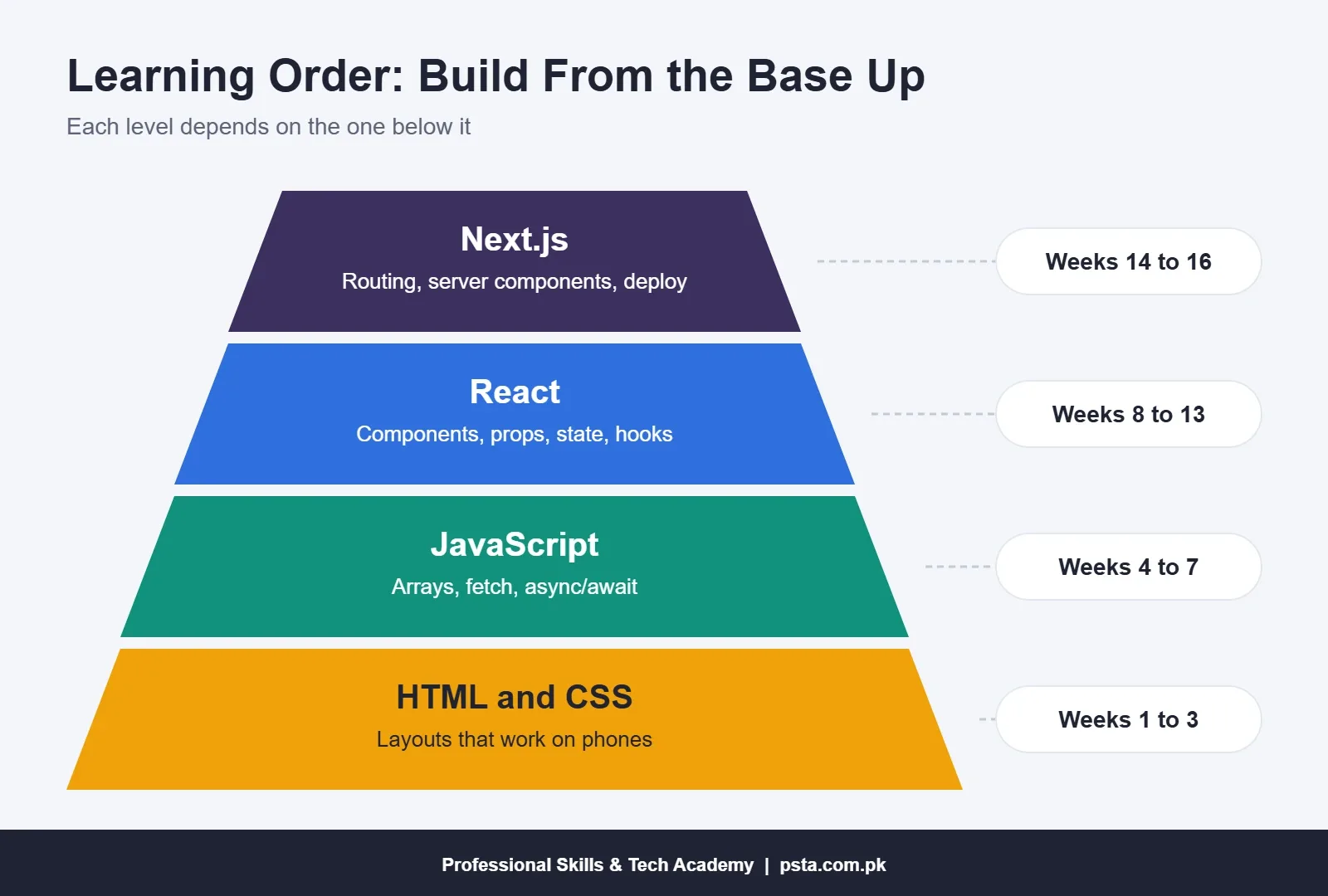
This is the sequence I recommend to students who study around one to two hours a day. Adjust the weeks to your pace; the order matters more than the speed.
- Weeks 1 to 3: HTML and CSS. Build two static pages with Flexbox and Grid that work on a phone.
- Weeks 4 to 7: JavaScript. Practice functions, arrays, objects, DOM events,
fetchandasync/await. Finish a small to-do app without any framework. - Weeks 8 to 11: React with Vite. Learn components, props,
useState,useEffect, forms and lists. Rebuild the to-do app in React and compare the two versions. - Weeks 12 to 13: Routing and data. Add React Router and load data from a public API. This is where you feel the problem Next.js solves.
- Weeks 14 to 16: Next.js. Create a project with
create-next-app, move one React app into theappfolder, and learn server vs client components. - Week 17 onward: Deploy and polish. Put both projects online, write a short README for each, and add them to your portfolio.
If you want project ideas for step 3, our list of React projects for beginners puts seven apps in order of difficulty. For the wider path from HTML to your first job, see the frontend developer roadmap for Pakistan.
Starting Straight With Next.js: Pros and Cons
Some students have a good reason to start with Next.js, such as a client who needs a fast public website or a final-year project that needs server code. If that is you, weigh these points first.
Pros
- One command creates a working project with routing, TypeScript and Tailwind already set up.
- Public pages arrive as HTML, which helps search engines read them.
- Frontend and simple backend code live in one repository.
- Personal projects can be hosted free on Vercel's Hobby plan.
Cons
- You learn React, routing, server rendering and caching at the same time.
- Errors can come from the server or the browser, which slows debugging.
- Releases move fast, so tutorials from even a year ago may show older patterns.
- Free Hobby hosting is for non-commercial use, so client work needs a paid plan or another host.
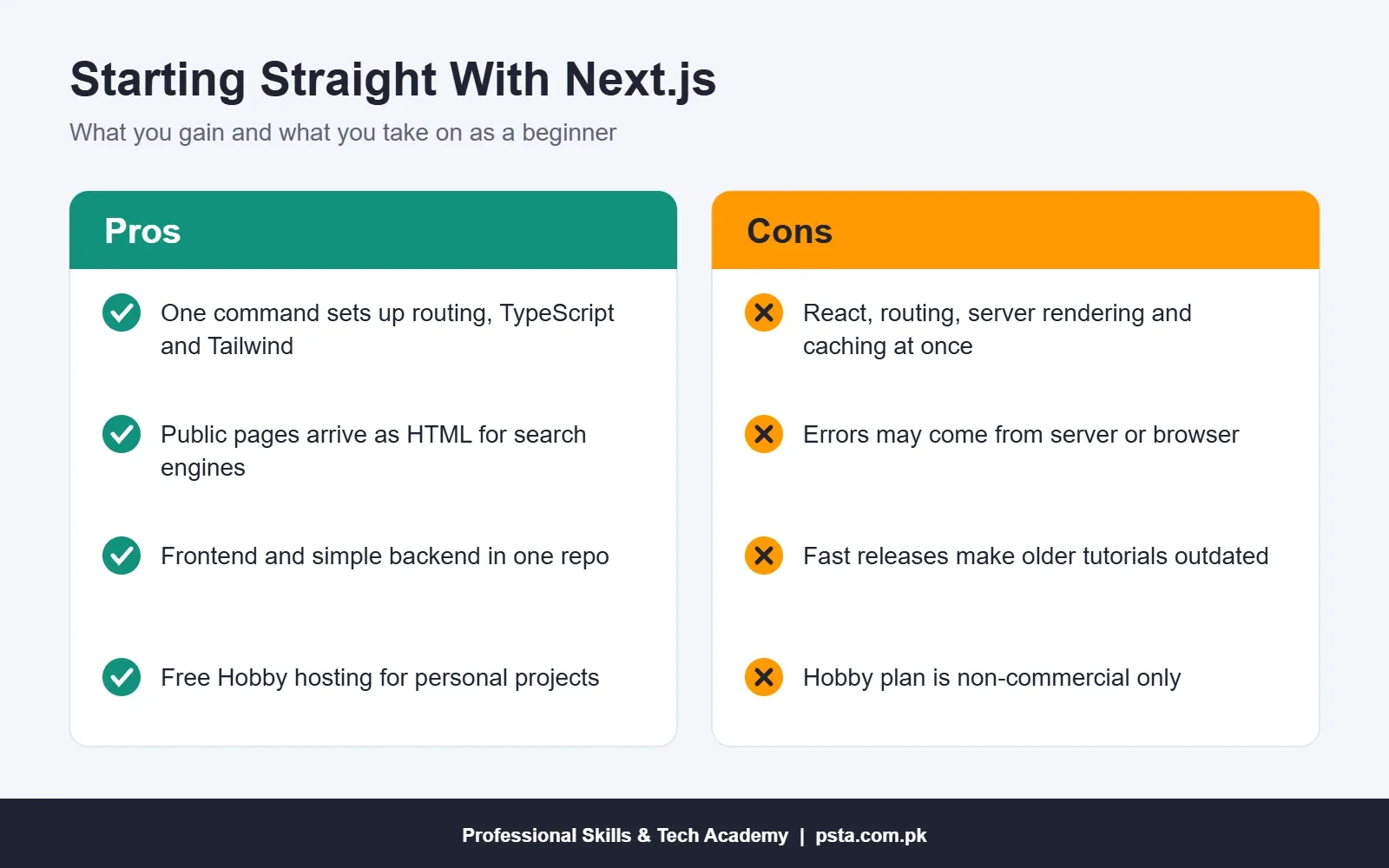
For most beginners, the React vs Next.js question is settled by this list. If the cons look heavier for your situation, spend four weeks on plain React first. You lose very little time, and Next.js will make more sense when you arrive.
Which Projects Suit React and Which Suit Next.js?
In real client work, React vs Next.js is a question about who will visit the page. A useful rule: if strangers must find the page on Google, lean toward Next.js. If logged-in users work inside the app all day, plain React is often enough. Here are a few realistic examples from the kind of work Pakistani freelancers and software houses take on:
| Project | Better fit | Why |
|---|---|---|
| Website for a clinic or school in Abbottabad | Next.js | Public pages need search visibility and fast loading on mobile data |
| Product catalogue for a small online clothing brand | Next.js | Many product pages that should appear in search results |
| Inventory dashboard used by shop staff | React with Vite | Behind a login, so SEO doesn't matter |
| Admin panel for an existing Laravel or Django backend | React with Vite | The backend already exists, so you only need the interface |
| Final-year project with login and a database | Either | Next.js keeps it in one repo; React plus Express shows clearer separation |
When you read frontend job posts, check the exact wording. "React developer" usually means the role touches React daily, with or without a framework. "Next.js developer" usually means the company ships public websites or full-stack apps and expects you to know server rendering.
What Does Hosting Cost for Student Projects?
Both tools can be hosted for free while you learn. A plain React build is just static files, so any static host works. Our guide to free web hosting for students compares seven options.
Next.js apps that use server features need a host that can run them. Vercel, the company behind Next.js, offers a free Hobby plan. Its Hobby plan documentation states that the plan is for non-commercial, personal use only. Paid Pro developer seats cost $20 per user per month. That rule matters if you plan to host a paying client's site on your free account. Read the terms before you deliver.
A practical approach: host portfolio projects on the free tier, and for client work either quote the hosting cost in your price or deploy to the client's own server.
How Fast Do React and Next.js Change?
Quickly. React 19.3 was released on 9 September 2026, according to the React blog. Next.js 16.4 followed on 6 October 2026 and ships with React 19.3. The Next.js team also says Cache Components will become the default in Next.js 17.
Security updates are frequent too. The Next.js blog lists security releases in July, August, September and October 2026, including an out-of-band update on 14 October 2026. Upgrading is part of the job, not an optional extra.
For a beginner comparing React vs Next.js, this means two habits. First, check the date on any tutorial and prefer ones that use the App Router. Second, learn the ideas that stay stable: components, props, state and data flow. Those have barely changed in years, while the framework layer keeps moving.
Studying React and Next.js at PSTA
At PSTA, we teach in the same order this guide recommends. If you are new to coding, the JavaScript Programming Course covers ES6+, DOM work, asynchronous code and an introduction to React components, props and hooks over 12 weeks.
Once your JavaScript is steady, the Advanced React.js Mastery course runs for 12 weeks across eight modules: advanced hooks, Context API and Redux Toolkit, routing with React Router, API integration, performance and code splitting, testing and debugging, authentication, and a final e-commerce project. It also introduces Next.js concepts. The listed fee is Rs. 30,000 (regular Rs. 35,000).
If you want the full stack, including Node.js, Express, MongoDB and deployment, the 6-month Full-Stack Web Development Course with AI Tools covers React as one part of a larger program. Classes run at our Mandian campus on Old College Road, Abbottabad, opposite FIMS College, as well as live online and hybrid.
You can compare all programs on the courses page, see the steps on the admission page, or ask a quick question about batch timings on WhatsApp at +92 314 5424399.
Build the Same Page Twice This Weekend
The quickest way to settle React vs Next.js for yourself is to try both. Make a single page that lists five products from a JavaScript array. Build it once with Vite and React, then again with create-next-app. Add an "about" page to each. Note which steps felt clear and which felt confusing. That one exercise will tell you more about which tool to learn first than any comparison article, including this one.
Frequently asked questions
Is Next.js harder than React?
Next.js is harder at the start because you learn React plus routing, server rendering and caching together. Once React basics feel natural, Next.js is mostly a set of conventions on top. Most students find it easier to learn the two in sequence than to start with Next.js and untangle every error at once.
How long should I learn React before moving to Next.js?
For a student studying one to two hours a day, about four to six weeks of plain React is usually enough. You should be comfortable with components, props, useState, useEffect, forms and lists, and you should have built at least one small app on your own before opening create-next-app.
Do I need JavaScript before learning React or Next.js?
Yes. Both tools are written in JavaScript, and React code uses modern features such as arrow functions, destructuring, array methods, modules and async/await every day. If those feel shaky, spend more time on JavaScript first. Gaps there turn into confusing React and Next.js errors later.
Is Create React App still used in 2026?
The React team retired Create React App for new apps in February 2025. Older projects still run on it, but new projects should start with a framework such as Next.js or with a build tool such as Vite. If a tutorial begins with create-react-app, look for a newer one.
Can I build a complete website with only React?
Yes. React with Vite and a router library can power a full single-page app, and many dashboards and admin panels are built this way. You will need a separate backend for data, and public pages need extra work to rank well in search, which is where Next.js helps.
Is Next.js free to use?
Next.js itself is open source and free. Hosting is a separate cost. Vercel offers a free Hobby plan, but its documentation limits that plan to personal, non-commercial use. For client websites, budget for a paid plan or deploy to another host or the client's own server.
Which is better for SEO, React or Next.js?
Next.js is usually the easier choice for SEO because pages can be rendered on the server or built ahead of time, so search engines receive ready HTML. A plain React app renders mostly in the browser, which needs extra setup for good search results on public pages.
Sources & references
- Creating a React App (react.dev) react.dev
- React Blog: React 19.3 and Sunsetting Create React App react.dev
- Next.js 16.4 Release Notes nextjs.org
- Next.js Installation Docs nextjs.org
- Vite Getting Started Guide vite.dev
- Stack Overflow Developer Survey 2025: Technology survey.stackoverflow.co
- Vercel Hobby Plan Documentation vercel.com
Last reviewed & updated on by Umar Qureshi. Written by the PSTA team in Abbottabad, Pakistan.

Umar Qureshi

Advanced React.js Mastery: Build Scalable Real-World Applications
Turn this guide into a career: hands-on training with real projects, online across Pakistan or on-campus in Abbottabad · 12 Weeks.


Comments
No comments yet — ask a question or share your experience.