Quick answer
Learn JavaScript first if you are new to programming, because TypeScript is JavaScript plus type annotations and its own handbook assumes you know JavaScript. Once you can use functions, arrays, the DOM and async/await comfortably, add TypeScript before React. Experienced programmers or students joining a TypeScript team can start with it sooner.
Key takeaways
- • TypeScript adds type checks to JavaScript and compiles back to plain JavaScript for the browser.
- • In the 2025 Stack Overflow survey, 66% of respondents used JavaScript and 43.6% used TypeScript.
- • By monthly contributors, GitHub ranked TypeScript first in August 2025.
- • TypeScript 7, announced on July 8, 2026, builds the VS Code codebase 11.9 times faster.
- • Node.js 22.18.0 and later can run simple .ts files directly but doesn't check types.
- • Beginners should learn JavaScript basics, the DOM and async code before adding TypeScript.
Table of contents 14 sections
- What Is the Difference Between TypeScript and JavaScript?
- The Same Bug in Both Languages
- TypeScript vs JavaScript Side by Side
- What Do the Latest Numbers Say?
- What Changed in 2026: TypeScript 7 and Node.js
- TypeScript 7 Is Much Faster
- Node.js Can Run .ts Files Directly
- Should a Beginner in Pakistan Learn TypeScript First?
- When Is Plain JavaScript Enough, and When Do Types Pay Off?
- A Week-by-Week Learning Order
- How Do You Convert a JavaScript Project to TypeScript?
- Do Pakistani Job Ads Ask for TypeScript?
- How PSTA's JavaScript Course Prepares You for TypeScript
- Rename One File to .ts This Weekend
Answer three honest questions first. Can you write a JavaScript function that loops over an array of objects? Do you know what a Promise is? Have you built a page that reacts to a button click? If you answered no to two or more, the TypeScript vs JavaScript question already has an answer for you: learn JavaScript first, then add TypeScript once the basics feel easy. If you answered yes to all three, you're ready for TypeScript now, and waiting longer will only slow you down.
This TypeScript vs JavaScript guide explains why, with current numbers and a plan you can follow. Here's what you'll be able to decide after reading:
- How TypeScript and JavaScript differ, using one small example you can test yourself
- What the 2025 developer surveys and the July 2026 TypeScript 7 release mean for beginners
- When plain JavaScript is enough and when types start saving you real time
- A week-by-week learning order and a safe way to convert your first project
- What employers in Pakistan tend to list in their job ads
What Is the Difference Between TypeScript and JavaScript?
JavaScript is the language browsers run. Every website with a dropdown menu, a live search box or a checkout form uses it. Node.js also runs it on servers, so the same language can power the back end of a web app.
TypeScript is JavaScript with one addition: you can describe what kind of value each variable, parameter and return value should hold. A price is a number. A customer name is a string. An order has an id, a total and a status. You write those rules once, and the TypeScript compiler checks your code against them before it runs.
The key point for beginners is that TypeScript doesn't replace JavaScript. When you build a TypeScript project, the type annotations are removed and plain JavaScript comes out the other end. Browsers never see your types. That's why the official TypeScript Handbook says it doesn't fully teach core JavaScript basics such as functions, classes and closures, and points readers without a JavaScript background to a JavaScript guide first.
So the real choice is rarely one language or the other. It's about order: which one you learn first, and when you switch.
The Same Bug in Both Languages
Here's a mistake that happens in real shop websites. A price comes from a form field, and form fields always give you text. You pass that text to a function that adds a delivery fee.
// app.js
function addFee(price, fee) {
  return price + fee;
}
addFee("500", 50); // "50050"
JavaScript doesn't complain. It joins the text "500" and the number 50 into "50050", and your checkout page shows the wrong total. You might only hear about it when a customer sends a confused WhatsApp message.
Now the same function in TypeScript:
// app.ts
function addFee(price: number, fee: number) {
  return price + fee;
}
addFee("500", 50); // error: string is not assignable to number
Your editor underlines the call in red as you type. You convert the input with Number() and move on. Nothing broken reaches a customer.
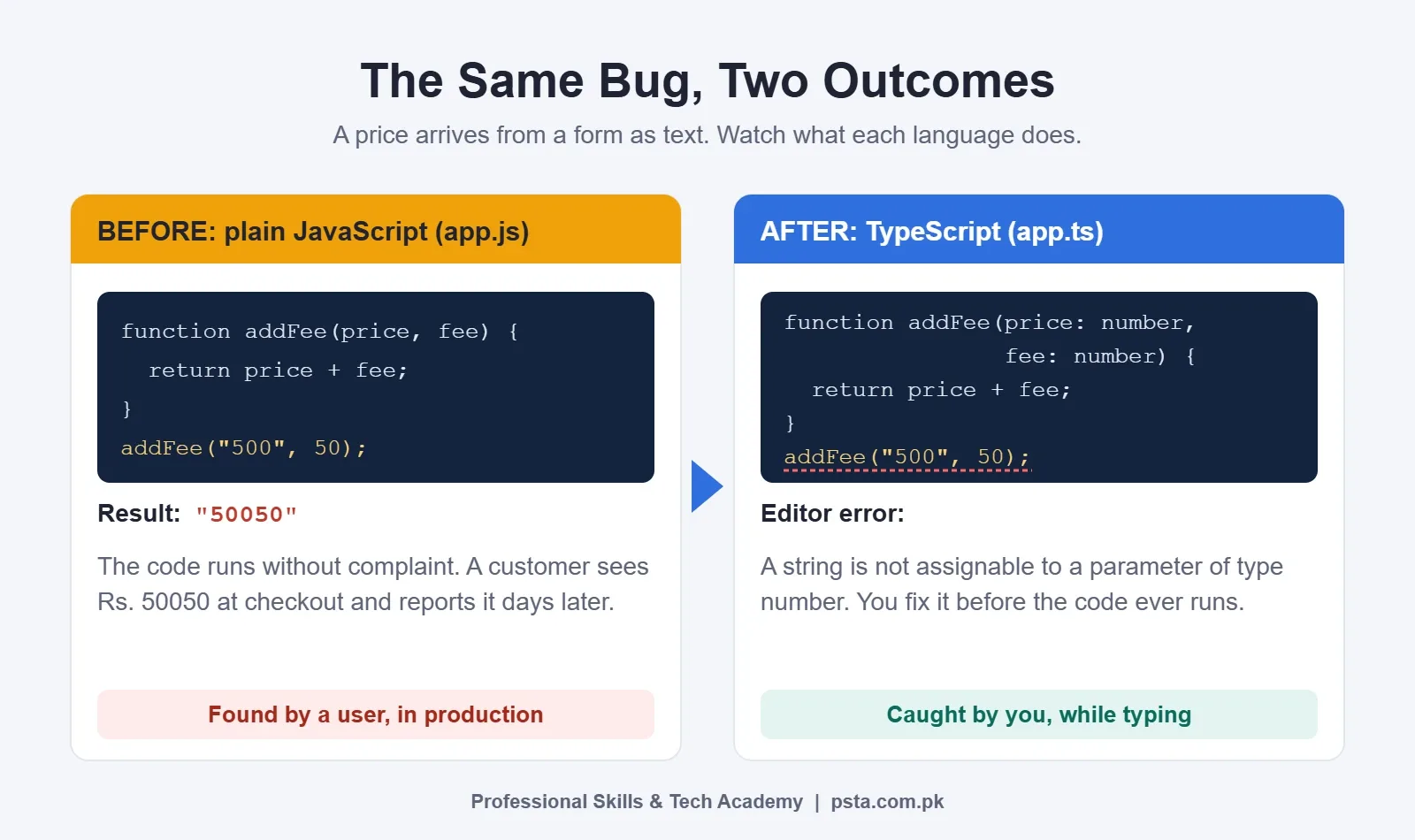
Notice what this example also shows. You can only understand the TypeScript error if you already know why "500" + 50 gives "50050" in JavaScript. That's type coercion, a JavaScript concept. TypeScript catches the bug, but JavaScript knowledge explains it.
TypeScript vs JavaScript Side by Side
This table compares the two on the points that matter most when you're starting out.
| Point | JavaScript | TypeScript |
|---|---|---|
| Runs in the browser directly | Yes | No, it becomes JavaScript first |
| Runs in Node.js | Yes | Yes in v22.18.0 and later, for simple type syntax |
| Catches type mistakes | When the code runs | While you type, before it runs |
| Setup for a first program | A browser and a text editor | Node.js, the typescript package and a config file |
| Learning curve | Gentler for complete beginners | Extra syntax on top of JavaScript |
| Best fit | Learning, small scripts, quick prototypes | Team projects, larger apps, long-lived code |
| Cost | Free | Free and open source |
What Do the Latest Numbers Say?
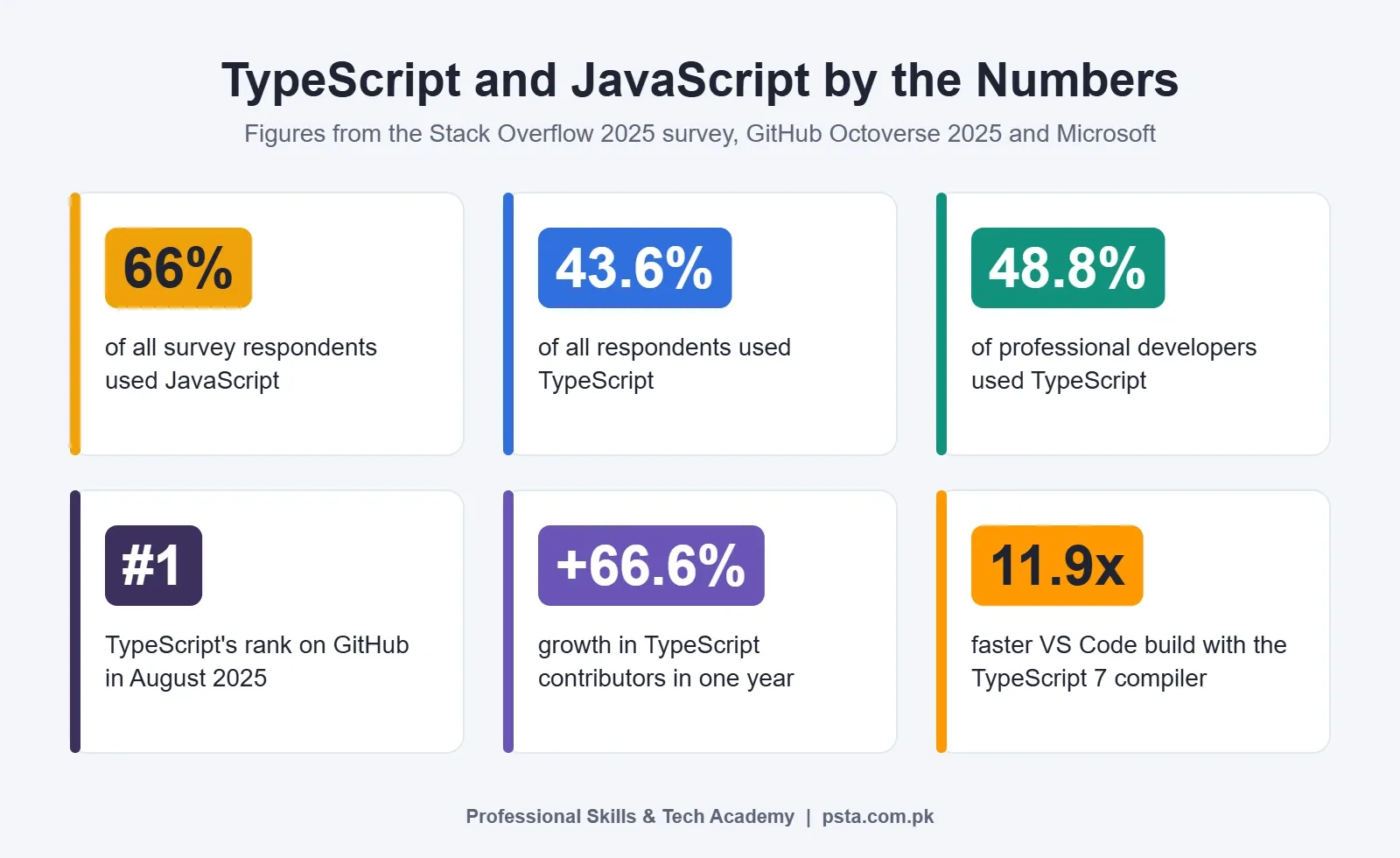
When it comes to TypeScript vs JavaScript usage, two large data sources point in the same direction. JavaScript remains the most widely used of the two, while TypeScript has grown fast among working developers.
Of everyone who answered the 2025 Stack Overflow Developer Survey, 66% said they used JavaScript and 43.6% used TypeScript. Among professional developers, the figures were 68.8% and 48.8%. Among people still learning to code, they were 62.8% and 31.9%. In other words, learners lean toward JavaScript, and professionals use TypeScript far more often.
GitHub's Octoverse 2025 report ranked TypeScript as GitHub's most used language in August 2025, measured by monthly contributors. It had 2,636,006 contributors that month, up 66.6% in a year. JavaScript had about 2.15 million. GitHub links part of this rise to AI coding tools, noting that type systems catch errors in AI-generated code before it reaches production.
That AI point matters if you use tools like Copilot or Cursor while learning. Typed code gives you a quick way to check whether a suggestion fits the rest of your project. We covered those tools in our guide to free AI coding tools for students.
What Changed in 2026: TypeScript 7 and Node.js
Two changes have made TypeScript easier to adopt this year.
TypeScript 7 Is Much Faster
Microsoft announced TypeScript 7 on July 8, 2026, according to Visual Studio Magazine. The compiler was ported to Go, and Microsoft reports that full builds typically run 8 to 12 times faster. On the VS Code codebase, a full build dropped from 125.7 seconds to 10.6 seconds. You still install it the usual way, with npm install -D typescript.
InfoQ's coverage adds a detail beginners should know: strict mode is now on by default. Strict mode means stricter checks from day one. That's good for learning habits, but expect more red underlines at first.
Node.js Can Run .ts Files Directly
According to the Node.js documentation, version 22.18.0 and later can run a .ts file with a plain node command, as long as it only uses type syntax that can be erased. Node simply strips the types out. Two limits are worth knowing:
- Node doesn't check your types. Run npx tsc --noEmit to see type errors.
- Some features, such as enum, aren't supported by type stripping and need a build step.
For a student, this removes one setup hurdle. You can write a small .ts script and run it the same way you run a .js file.
Should a Beginner in Pakistan Learn TypeScript First?
For most beginners, no. Here's the reasoning we use with our own students.
When you start, every error message is new. In JavaScript, an error usually means one thing: your logic or syntax is wrong. In TypeScript, it can also mean your types are wrong, your config is wrong, or a library's type definitions don't match. A beginner can't easily tell these apart, and that slows learning down.
The Handbook's own advice backs this up. It's written for people who already know JavaScript and sends newcomers to a JavaScript guide first.
There are exceptions. TypeScript first can work well if:
- You already program in Java, C# or C++ and are used to declaring types
- You're joining a team or internship where the codebase is already TypeScript
- You're a BSCS student who has finished an object-oriented programming course
Even then, spend at least a week on plain JavaScript behavior such as truthy values, == vs ===, and how this works. TypeScript won't explain those to you.
When Is Plain JavaScript Enough, and When Do Types Pay Off?
Many TypeScript vs JavaScript debates online skip this part: types have a cost. You write more code, and you spend time on config. For some jobs, that cost isn't worth it.
Plain JavaScript for beginners and small jobs is usually enough. It works well for:
- A small script that tidies a CSV file or renames images
- Adding a slider or form check to a WordPress site
- Your first 20 to 30 practice exercises
- A quick prototype you'll throw away after a client demo
TypeScript starts paying for itself when:
- The project has more than a handful of files that call each other
- Two or more people work on the same code
- Your app handles money, orders or user accounts
- You'll maintain the code for months, not days
- You use React, where typed props catch many common mistakes
The React documentation describes TypeScript as a popular way to add type definitions to JavaScript codebases and has a dedicated page on using it with React. If React is your goal, plan to learn React with TypeScript early rather than years later.
A Week-by-Week Learning Order
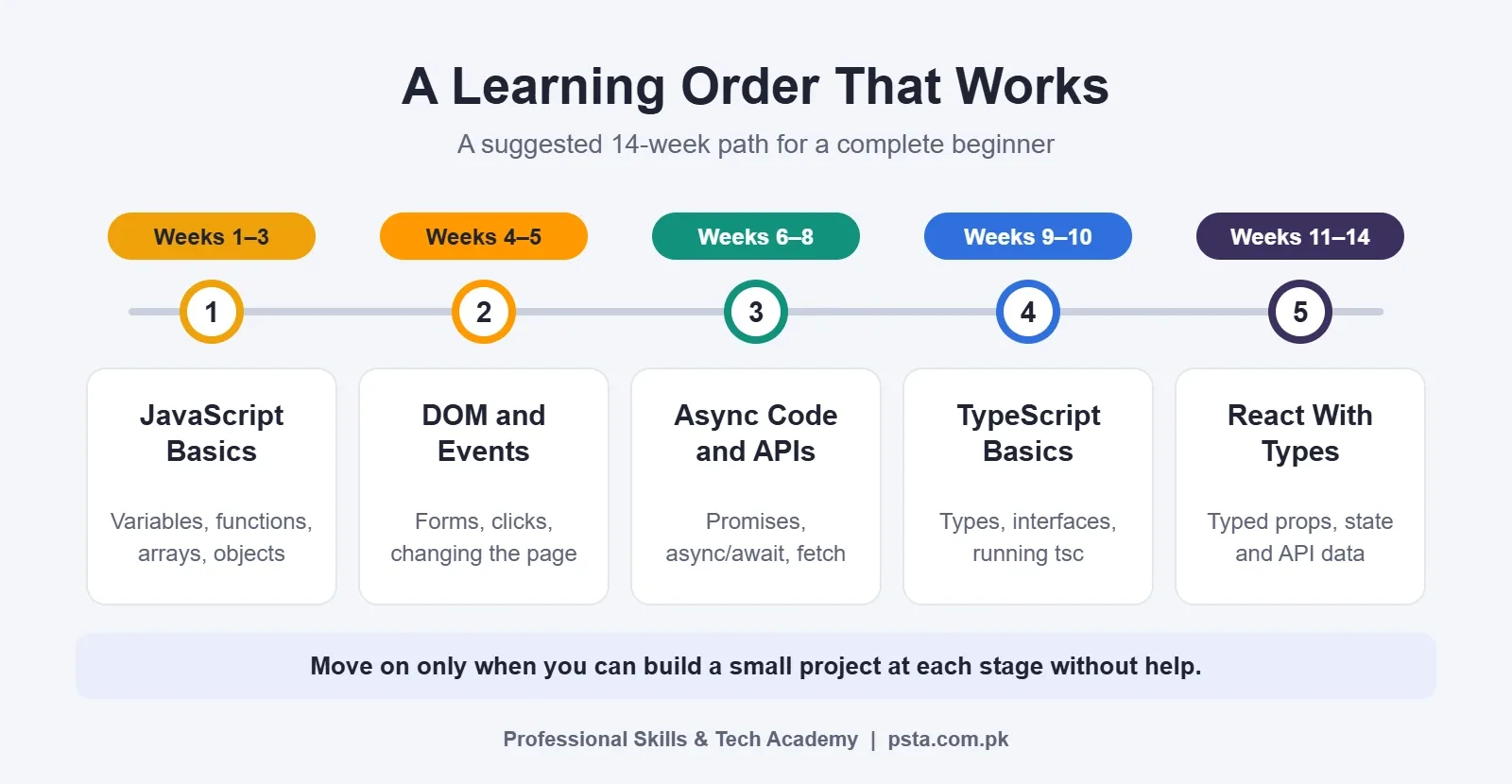
This is a suggested 14-week path for someone starting from zero and studying around 10 to 12 hours a week. It settles the TypeScript vs JavaScript order for you. Adjust it to your pace. The rule that matters is at the bottom of the graphic.
- Weeks 1 to 3, JavaScript basics: variables, conditions, loops, functions, arrays and objects. Build a marks calculator for a class of 30 students.
- Weeks 4 and 5, the DOM and events: select elements, handle clicks and form input, and update the page. Build a to-do list that saves to the browser.
- Weeks 6 to 8, async code and APIs: callbacks, Promises, async/await and fetch. Build a weather or currency rate page that calls a public API.
- Weeks 9 and 10, TypeScript basics: type annotations, interfaces, union types and running tsc. Convert your weeks 6 to 8 project to TypeScript.
- Weeks 11 to 14, React with types: components, typed props, state and typed API responses. Build one portfolio project and deploy it.
If you want the bigger picture beyond these 14 weeks, our six-month frontend developer roadmap covers HTML, CSS, testing and job hunting as well.
How Do You Convert a JavaScript Project to TypeScript?
Don't rewrite everything at once. The safest way to convert JavaScript to TypeScript is one file at a time, so the project keeps working throughout.
- Make sure the project runs and is committed to Git, so you can undo anything.
- Install TypeScript in the project with npm install -D typescript.
- Create a config file with npx tsc --init. Keep strict mode on.
- Rename your smallest, simplest file from .js to .ts.
- Run npx tsc --noEmit and read each error slowly. Most will ask you to add a type to a function parameter.
- Add an interface for the main data shape, such as a Product with name, price and stock.
- Fix every error in that file, run the app again, then commit.
- Repeat with the next file. Leave the most complex file for last.
Avoid the any type as a shortcut. It switches checking off for that value, which defeats the purpose. If you're stuck, use unknown and narrow it with a check instead.
Do Pakistani Job Ads Ask for TypeScript?
Some do, mostly for React, Next.js and Node.js roles. For example, an Islamabad backend developer listing on Rozee.pk from August 2025 asked for at least two years of backend work with TypeScript, plus Node.js and Express.
We haven't found a reliable public count of how many TypeScript jobs in Pakistan are advertised, so treat this as a pattern to check yourself. Search your target job title on Rozee.pk or LinkedIn and read 15 to 20 recent ads. Note how many list TypeScript as required and how many list it as a plus. That small exercise will tell you more about your local market than any global survey.
Whatever the TypeScript vs JavaScript split in your city, one thing stays the same across these ads: JavaScript fundamentals are assumed. Interviewers still ask about closures, the event loop and array methods. Our React interview questions guide shows how often those basics come up.
How PSTA's JavaScript Course Prepares You for TypeScript
To be clear about what we offer: PSTA doesn't run a separate TypeScript course, and TypeScript isn't a listed module in our current JavaScript syllabus. What our JavaScript Programming Course does is build the foundation that TypeScript sits on.
- Length and level: 12 weeks, designed for beginners
- Fee: Rs. 24,000 at the time of writing, listed against a regular fee of Rs. 28,000
- Format: classes in person in Mandian, Abbottabad, over live video for students elsewhere in Pakistan, or a blend of both
- Topics: functions and closures, arrays and objects, the DOM, events, Promises and async/await, the Fetch API, ES6+ modules and classes, React basics with hooks, and Git with GitHub
That list maps closely to weeks 1 to 8 of the plan above, plus an introduction to React. Students who finish it are in a good position to learn TypeScript from the official Handbook, because they already understand what the types describe. If you want to go further into React afterwards, the Advanced React.js course is the natural next step.
You can compare fees and schedules on the all courses page, or see how enrollment works on the admission page. For the start date of the next batch, our WhatsApp line (+92 314 5424399) has the current schedule.
Rename One File to .ts This Weekend
If you already have a small JavaScript project, pick its shortest file and rename it to .ts. Install TypeScript, run npx tsc --noEmit, and fix the errors it shows you. You'll learn more about types from that one hour than from a week of reading about them.
If you don't have a project yet, that's your answer to the TypeScript vs JavaScript question. Start with JavaScript, build three small things, and come back to this page when you do.
Frequently asked questions
Is TypeScript harder than JavaScript?
TypeScript has more to learn because it includes all of JavaScript plus the type system. The extra syntax isn't difficult on its own, but beginners often struggle to tell type errors from logic errors. Once you're comfortable with JavaScript, most people find basic TypeScript quick to pick up, and many say it makes larger projects easier to manage.
Can I learn TypeScript without knowing JavaScript?
You can, but it's not the easiest path. The official TypeScript Handbook says it doesn't fully cover core JavaScript basics such as functions, classes and closures, and it sends newcomers to a JavaScript guide first. If you already know Java, C# or C++, starting with TypeScript is more realistic because typed code will feel familiar.
Do browsers run TypeScript files?
No. Browsers only run JavaScript, so TypeScript code is compiled or stripped into JavaScript first. Build tools such as Vite or the tsc compiler handle this for you. On the server side, Node.js 22.18.0 and later can run simple .ts files directly by removing the types, but it doesn't check them for errors.
Is TypeScript free to use?
Yes. TypeScript is free and open source, and you install it from npm with npm install -D typescript. Editors such as VS Code support it without paid add-ons. You don't need a licence for personal projects, client work or commercial apps, so cost shouldn't be a factor when you decide whether to learn it.
Should I learn React with JavaScript or TypeScript?
Learn your first few React components in plain JavaScript so you understand props, state and hooks without extra syntax. Then switch to TypeScript for anything you plan to show employers. Typed props catch many common React mistakes, and the React documentation includes a dedicated guide for using TypeScript in React projects.
Will TypeScript replace JavaScript?
TypeScript can't replace JavaScript, because it turns into JavaScript before it runs. Browsers and Node.js still execute JavaScript underneath. What's changing is how teams write code: many new projects start in TypeScript, and GitHub reported it as the most used language by monthly contributors in August 2025. Learning JavaScript well remains the foundation.
Does PSTA teach TypeScript?
PSTA doesn't currently offer a separate TypeScript course, and TypeScript isn't a listed module in the JavaScript course. The 12-week JavaScript Programming Course covers the foundations TypeScript depends on, including functions, the DOM, async/await, ES6+ modules and React basics. Students can then learn TypeScript from the official Handbook with that base in place.
Sources & references
- Stack Overflow Developer Survey 2025: Technology survey.stackoverflow.co
- GitHub Octoverse 2025: AI leads TypeScript to #1 github.blog
- Visual Studio Magazine: TypeScript 7 Arrives visualstudiomagazine.com
- InfoQ: Microsoft Releases TypeScript 7.0 infoq.com
- Node.js: Running TypeScript Natively nodejs.org
- The TypeScript Handbook typescriptlang.org
- React Docs: Setup react.dev
- Rozee.pk: Backend Developer - TypeScript, Islamabad rozee.pk
Last reviewed & updated on by Umar Qureshi. Written by the PSTA team in Abbottabad, Pakistan.

Umar Qureshi
JavaScript Programming Course in Abbottabad: Beginner to React
Turn this guide into a career: hands-on training with real projects, online across Pakistan or on-campus in Abbottabad · 12 Weeks.



Comments
No comments yet — ask a question or share your experience.