Quick answer
SQL is the query language you use to read and change data, one statement at a time. PL/SQL is Oracle's procedural extension that wraps SQL in blocks with variables, IF conditions, loops and error handling, and lets you store procedures, functions and triggers in the database. Learn SQL first, then add PL/SQL for Oracle roles.
Key takeaways
- • SQL reads and changes data one statement at a time; PL/SQL wraps SQL in blocks with variables, conditions, loops and error handling.
- • PL/SQL runs only on Oracle Database, while SQL skills carry over to MySQL, SQL Server and PostgreSQL.
- • Use a single SQL statement whenever it can do the job, and a stored procedure for multi-step work that runs again and again.
- • Row-by-row loops cause one context switch per row; set-based SQL, BULK COLLECT and FORALL cut them down.
- • Learn SQL first, then PL/SQL if you are aiming at Oracle developer or DBA roles.
Table of contents 14 sections
- SQL vs PL/SQL at a Glance
- What Does SQL Do on Its Own?
- What Does PL/SQL Add on Top of SQL?
- How Oracle Runs a PL/SQL Block
- Same Task Written Both Ways: A Late-Fee Example
- The SQL Version
- The PL/SQL Version
- SQL vs PL/SQL Syntax Side by Side
- When Should You Use SQL, and When PL/SQL?
- The Row-by-Row Trap and How Bulk Processing Fixes It
- Which Jobs in Pakistan Ask for SQL or PL/SQL?
- A Learning Order That Works
- How PSTA's Oracle Course Covers Both Languages
- Try It: Turn One Query Into a Procedure
Try this quick self-test before you read anything about SQL vs PL/SQL. Which of these four jobs can a single SQL statement do on its own?
- List every student whose fee challan is still unpaid.
- Add a Rs. 500 late fine to every overdue challan.
- Add the fine, record how many challans were fined, and undo everything if one step fails.
- Run that same fine routine every month without anyone retyping it.
Tasks 1 and 2 are plain SQL: one SELECT and one UPDATE. Tasks 3 and 4 need PL/SQL, because they involve several steps, a decision about errors and code that's saved inside the database. That's the whole difference between SQL and PL/SQL in miniature. SQL asks the database for data or changes it. PL/SQL is Oracle's programming language wrapped around SQL, so you can add variables, IF conditions, loops and error handling.
In this comparison, you'll see:
- A side-by-side table of how the two languages differ
- One real task written in SQL and then in PL/SQL
- What happens inside Oracle when a PL/SQL block runs
- The row-by-row habit that makes PL/SQL slow, and the fix
- Which skill Pakistani job ads expect for analyst, developer and DBA roles
SQL vs PL/SQL at a Glance
Keep this table open while you read the rest. Most interview questions on the topic come straight from its rows.
| Point | SQL | PL/SQL |
|---|---|---|
| What it is | A query language for relational databases | Oracle's procedural extension of SQL |
| Style | Declarative: you say what result you want | Procedural: you say the steps, in order |
| Unit of work | One statement at a time | A block of many statements |
| Variables and loops | No | Yes, plus IF, CASE and cursors |
| Error handling | The statement fails and returns an error | An EXCEPTION section can catch and handle it |
| Stored in the database | Views and saved queries, but no program logic | Procedures, functions, packages and triggers |
| Where it works | Oracle, MySQL, SQL Server, PostgreSQL and others, with small dialect changes | Oracle Database only |
| Typical user | Analysts, report writers, backend developers | Oracle developers and DBAs |
What Does SQL Do on Its Own?
SQL is the language you use to read and change data. You describe the result, and the database's optimizer decides how to fetch it. You never tell Oracle which index to open first or how to loop through rows. That's why SQL is called declarative.
SQL statements fall into a few families you'll hear about in class. SELECT reads data. INSERT, UPDATE, DELETE and MERGE change it. CREATE, ALTER and DROP define tables and other objects. COMMIT and ROLLBACK end a transaction.
For a data analyst, this is often enough. A monthly sales report for a Lahore pharmacy chain, a list of overdue invoices for a Peshawar distributor or a dashboard query feeding Power BI are all single SELECT statements, sometimes long ones with joins and GROUP BY. If your goal is reporting, read our Power BI vs Excel comparison to see where SQL fits beside those tools.
What SQL can't do is remember a value between statements, make a decision halfway through, or repeat a step until a condition is met. Each statement stands alone.
What Does PL/SQL Add on Top of SQL?
PL/SQL (Procedural Language extensions to SQL) lets you write programs that contain SQL. Oracle's own Advantages of PL/SQL page says it supports all SQL data manipulation, cursor control and transaction control statements, along with SQL functions and data types. So you don't learn a second way to query. You keep your SQL and add structure around it.
Every PL/SQL program is built from blocks. According to Oracle's PL/SQL overview, a block has up to three parts:
- DECLARE (optional): variables, constants and types the block will use
- BEGIN (required): the statements that do the work
- EXCEPTION (optional): handlers that run when something in BEGIN fails
The block closes with END. A block with no name is an anonymous block. It isn't saved and runs once. Give it a name and store it, and it becomes a procedure, a function, a package or a trigger. Procedures do a job, functions return a value, packages group related code, and triggers fire automatically on events such as an INSERT into a table.
How Oracle Runs a PL/SQL Block
This part explains most performance questions you'll face later. Oracle's overview describes a PL/SQL engine that runs procedural statements itself and sends each SQL statement to the SQL engine inside the database. So two engines share the work.
When your block reaches an IF or an assignment, the PL/SQL engine handles it. When it reaches an UPDATE or a SELECT, it hands that statement to the SQL engine and waits for the result. Each handover is called a context switch. One switch is cheap. Thousands in a loop are not, as you'll see in a later section.
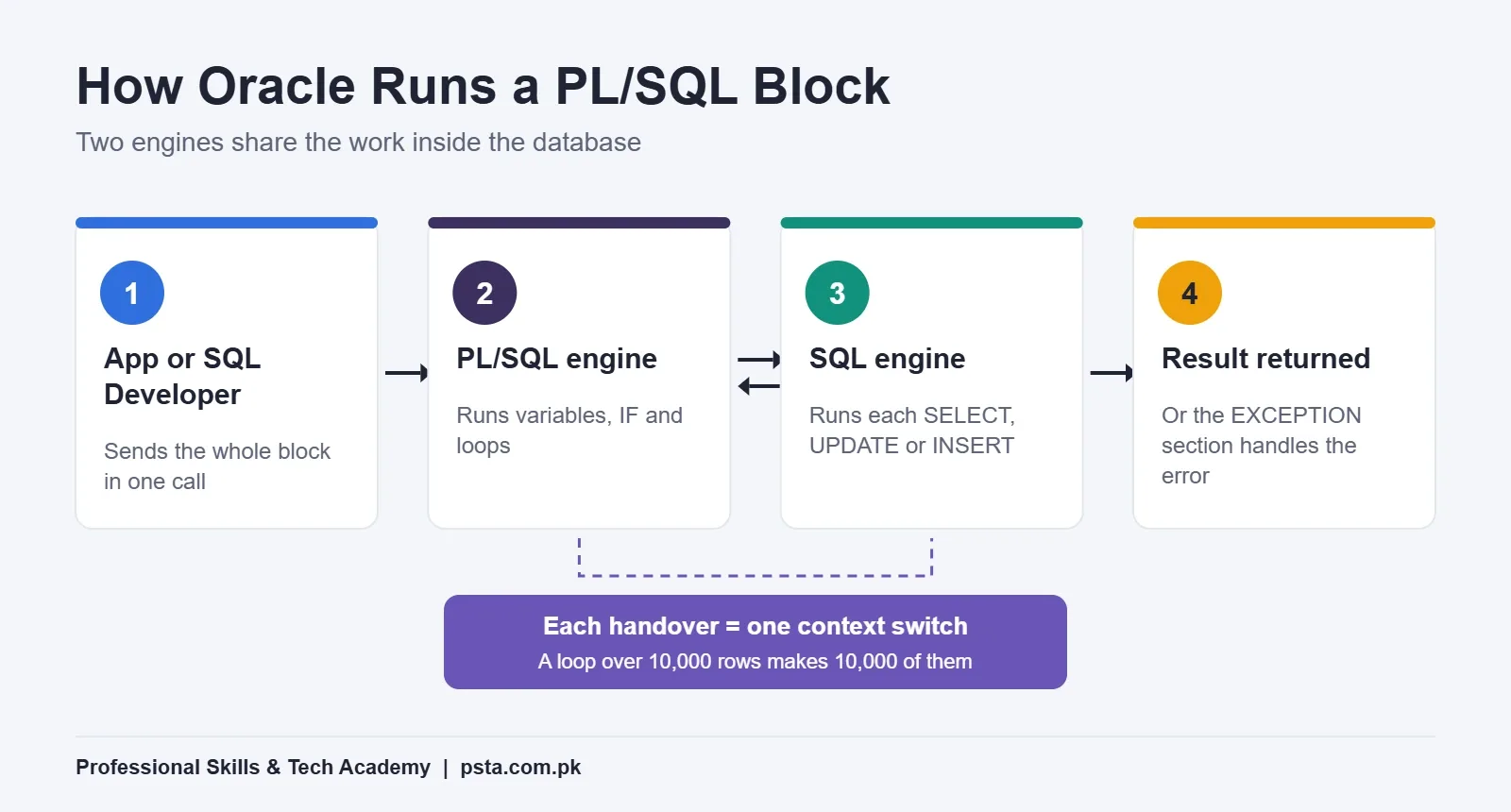
There's a network benefit too. Oracle notes that PL/SQL lets an application send a whole block to the database at once, which cuts traffic between the app and the server. A stored procedure goes further: one call over the network can start a large job that runs entirely on the server.
Same Task Written Both Ways: A Late-Fee Example
Here's a sample case. A training institute keeps its fee records in a table called fee_challans, with columns for the amount, due date, payment date and any late fine. The accounts office wants a Rs. 500 fine added to every unpaid challan that's past its due date.
The SQL Version
One UPDATE does it:
UPDATE fee_challans
   SET late_fine = 500
 WHERE paid_on IS NULL
   AND due_date < TRUNC(SYSDATE)
   AND late_fine = 0;
That's clean and fast. But somebody has to run it by hand each month, nobody knows how many rows it changed unless they check, and the fine amount is typed into the statement.
The PL/SQL Version
Now the office also wants a log entry for each run, a check that the fine isn't zero, and a full rollback if anything breaks. That calls for a stored procedure:
CREATE OR REPLACE PROCEDURE apply_late_fine (p_fine IN NUMBER) AS
  v_rows NUMBER;
BEGIN
  IF p_fine <= 0 THEN
    RAISE_APPLICATION_ERROR(-20001, 'Fine must be more than zero');
  END IF;

  UPDATE fee_challans
     SET late_fine = p_fine
   WHERE paid_on IS NULL
     AND due_date < TRUNC(SYSDATE)
     AND late_fine = 0;

  v_rows := SQL%ROWCOUNT;

  INSERT INTO fine_log (run_date, rows_fined, fine_amount)
  VALUES (SYSDATE, v_rows, p_fine);

  COMMIT;
EXCEPTION
  WHEN OTHERS THEN
    ROLLBACK;
    RAISE;
END apply_late_fine;
/
Notice that the UPDATE in the middle is the same SQL as before. PL/SQL didn't replace it. It added a parameter, a validation rule, a variable that captures the row count, a second statement and an error handler. Anyone with permission can now run EXEC apply_late_fine(500); and get the same, logged result every time.
SQL vs PL/SQL Syntax Side by Side
When students mix up the two languages, it's usually over small syntax details. PL/SQL statements end with a semicolon, and a stored unit in SQL*Plus or SQL Developer also needs a slash on its own line to compile. A SELECT inside PL/SQL must put its result somewhere, so you write SELECT ... INTO a variable. Assignment uses :=, while a plain = is only for comparison.
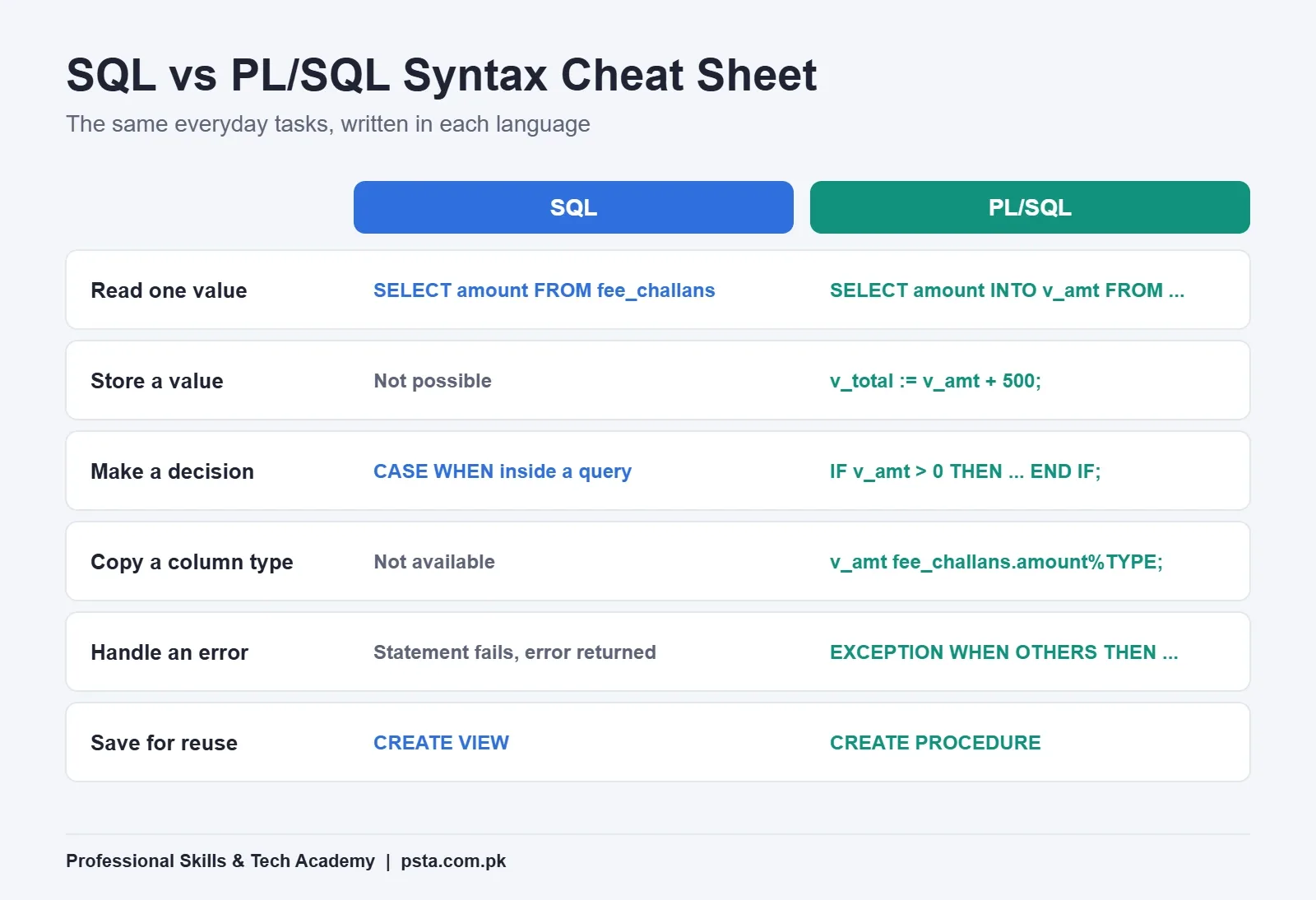
Two features save a lot of typing. %TYPE gives a variable the same data type as a table column, and %ROWTYPE gives a record the shape of a whole row. Oracle's documentation lists both among PL/SQL's links to SQL. If the column type changes later, your code follows it.
When Should You Use SQL, and When PL/SQL?
A simple rule settles most SQL vs PL/SQL decisions. Use plain SQL when one statement can produce the answer. Reach for PL/SQL when the job has several steps, needs a decision or error handling, or must be saved and reused by other people or applications.
Think of two questions. Is it one statement or several? Is it a one-off or something that will run again and again? The four combinations point to four different tools.
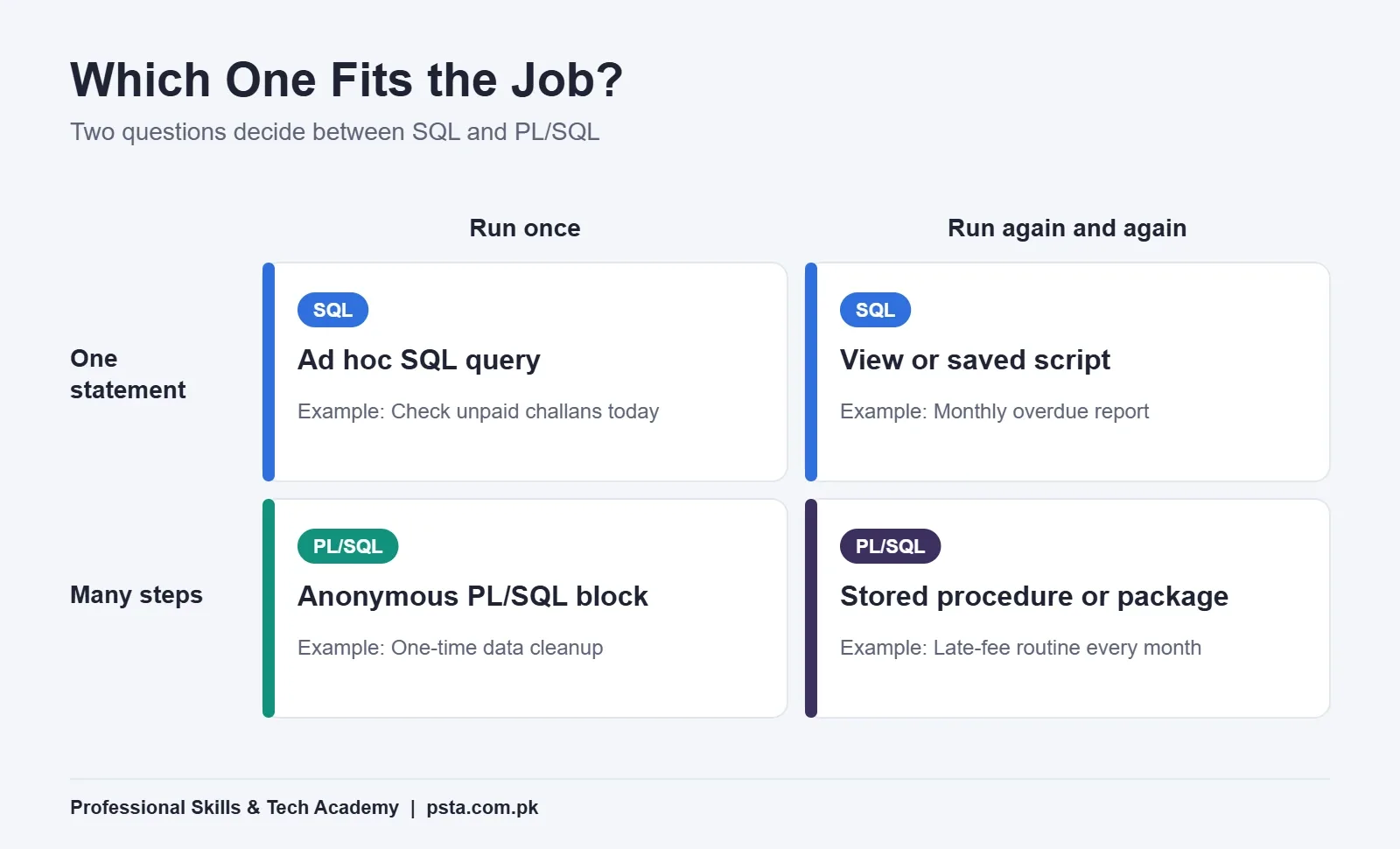
- One statement, run once: an ad hoc query in SQL Developer.
- One statement, run often: a view or a saved SQL script.
- Many steps, run once: an anonymous PL/SQL block, such as a data cleanup.
- Many steps, run often: a stored procedure or package, such as the late-fee routine.
One caution. Don't write PL/SQL just because you can. If a single UPDATE or MERGE does the job, it will usually be shorter, easier to review and faster than a loop.
The Row-by-Row Trap and How Bulk Processing Fixes It
New PL/SQL programmers often write a loop like this, one UPDATE per row:
BEGIN
  FOR r IN (SELECT challan_id
              FROM fee_challans
             WHERE paid_on IS NULL
               AND due_date < TRUNC(SYSDATE)) LOOP
    UPDATE fee_challans
       SET late_fine = 500
     WHERE challan_id = r.challan_id;
  END LOOP;
END;
/
It works, but every pass through the loop is a context switch from the PL/SQL engine to the SQL engine. Steven Feuerstein, Oracle's long-time PL/SQL advocate, calls this "slow-by-slow" processing in his Oracle article on BULK COLLECT and FORALL. In his test on Oracle Database 11g Release 2, inserting 100,000 rows one at a time took 4.94 seconds, while FORALL did the same work in 0.12 seconds. He notes your results will vary by version and workload.
There are two fixes, in this order:
- First ask whether a single set-based SQL statement can do the job. Here it can: the UPDATE from the earlier example.
- If you truly need row-level logic, fetch rows in batches with BULK COLLECT and send the changes back with FORALL, so many rows travel in one switch.
Interviewers who ask about SQL vs PL/SQL for Oracle developer roles like this topic because it shows whether you understand both engines, not just the syntax.
Which Jobs in Pakistan Ask for SQL or PL/SQL?
SQL is the broader skill. In P@SHA's Skills Survey 2025 of 256 IT and ITeS companies, the survey found relational databases (it names Oracle, MySQL and MS SQL) in the highest demand at every experience level, with entry-level roles leading. Our summary of that survey, IT skills in demand in Pakistan, covers the other areas it ranks.
PL/SQL is narrower, because it only runs on Oracle. That's why the SQL vs PL/SQL split shows up so clearly in hiring. It matters when the job ad names Oracle directly. Here's how the two skills usually map to roles. Treat it as a guide for reading job ads, not a fixed rule.
| Role | SQL | PL/SQL | What to show |
|---|---|---|---|
| Data or MIS analyst | Essential | Rarely needed | Joins, GROUP BY, window functions |
| Backend web developer | Essential | Only on Oracle projects | Queries, indexes, transactions |
| Oracle or PL/SQL developer | Essential | Essential | Procedures, packages, triggers, bulk processing |
| Oracle DBA | Essential | Read and debug it | Backups, users, tuning, plus scripting |
Is Oracle still worth learning? Oracle has extended support for Database 19c, the version many companies run, with Premier Support to December 31, 2029 and Extended Support to December 31, 2032, as The Register reported. Systems built on 19c will need people who can maintain their PL/SQL for years.
A Learning Order That Works
You don't need a powerful laptop or a paid license to practice. Oracle's FreeSQL runs SQL and PL/SQL in the browser. For a local setup, Oracle AI Database 26ai Free installs on Windows, Linux or through a container. Its licensing limits are 2 CPU cores, 2 GB of RAM and 12 GB of user data, which is plenty for learning. The PL/SQL in this guide runs the same way on 19c.
Follow this order over about eight to ten weeks of steady practice:
- SELECT basics: filtering, sorting and single-row functions.
- Joins and grouping: inner and outer joins, GROUP BY and HAVING, subqueries.
- Changing data: INSERT, UPDATE, DELETE, MERGE, COMMIT and ROLLBACK.
- Your first blocks: DECLARE, BEGIN and END, variables, SELECT INTO and DBMS_OUTPUT.
- Control and errors: IF, CASE, loops and the EXCEPTION section.
- Stored code: procedures, functions, then packages and triggers.
- Performance: cursors, BULK COLLECT and FORALL.
Don't jump to step 4 early. Weak SQL makes PL/SQL feel hard, because most bugs in a procedure are really bugs in the query inside it. Before any interview, rehearse with our SQL interview questions for freshers.
How PSTA's Oracle Course Covers Both Languages
At PSTA, the Oracle Database 19c Masterclass follows roughly the order above. It's a 12-week, beginner-level program. Module 1 is SQL fundamentals, from SELECT to joins, set operators, subqueries and DDL. The second module turns to PL/SQL, covering cursors, control structures, error handling with exceptions, and stored code such as procedures, functions, packages and triggers. After that, the course covers database architecture, user security, RMAN backups and recovery, tuning, and container and pluggable databases, and it closes with a capstone project.
At the time of writing, the course costs Rs. 33,000, a reduction from its regular Rs. 45,000. You can join in our Abbottabad lab on Mandian, Old College Road, opposite FIMS College, attend live online from another city, or mix both. New batches start every month. If you plan to work on Python apps that talk to Oracle, the Advanced Python course pairs well with it, and Power BI suits students heading toward reporting roles.
Browse all courses to compare options, or fill in the admission form when you're ready. If you'd like to ask about batch timings first, send a message to +92 314 5424399 on WhatsApp.
Try It: Turn One Query Into a Procedure
Pick any UPDATE you've written in class or at work. Open FreeSQL, wrap it in a procedure with one parameter, capture SQL%ROWCOUNT in a variable, and print it with DBMS_OUTPUT.PUT_LINE. Then call it twice with different values. That small exercise covers blocks, parameters, variables and stored code in under an hour, and it makes the SQL vs PL/SQL difference stick far better than a definition.
Frequently asked questions
What is the main difference between SQL and PL/SQL?
SQL is a declarative query language that runs one statement at a time to read or change data. PL/SQL is Oracle's procedural language that groups SQL statements into blocks with variables, conditions, loops and exception handling. You can also store PL/SQL as procedures, functions, packages and triggers inside the database, which plain SQL on its own cannot do.
Can I use PL/SQL with MySQL or SQL Server?
No. PL/SQL runs only on Oracle Database. MySQL has its own stored procedure syntax, and SQL Server uses its own procedural language called T-SQL. The core SQL you write for SELECT, joins and UPDATE carries over with small changes, so the time you spend on SQL still pays off if you later move to another database.
How long does it take to learn PL/SQL after SQL?
If your SQL is already solid, you can usually write basic blocks, procedures and exception handlers after three to four weeks of regular practice. Packages, triggers and bulk processing take longer to use well. Your SQL level matters most: weak joins and grouping slow down PL/SQL learning far more than the new syntax does.
Is PL/SQL still worth learning in 2026?
For Oracle-focused roles, yes. Oracle has extended Premier Support for Database 19c to December 31, 2029 and Extended Support to December 31, 2032, so systems built on it will keep running for years. If you are aiming at data analysis or general web development instead, put SQL first and treat PL/SQL as a useful extra.
Do I need to install Oracle to practice PL/SQL?
No. Oracle's FreeSQL website lets you run SQL and PL/SQL in a browser without installing anything. If you want a local database, Oracle AI Database 26ai Free is a no-cost edition for Windows, Linux and containers. It is limited to 2 CPU cores, 2 GB of RAM and 12 GB of user data, which is enough for practice.
Should a data analyst learn PL/SQL?
Usually not at first. Analysts spend most of their time on SELECT queries, joins, aggregations and window functions, then present results in Excel or Power BI. PL/SQL becomes useful when your company runs Oracle and you need scheduled data loads or reusable logic. Get strong at SQL first, then decide based on the job ads you are targeting.
What is a context switch in PL/SQL?
It is the handover that happens each time the PL/SQL engine passes a SQL statement to the SQL engine and gets a result back. One switch costs very little, but a loop that runs an UPDATE for every row creates thousands of them. Set-based SQL, BULK COLLECT and FORALL reduce the number of switches and speed up the code.
Sources & references
- Oracle: Advantages of PL/SQL docs.oracle.com
- Oracle: Overview of PL/SQL docs.oracle.com
- Oracle Connect: Bulk Processing With BULK COLLECT and FORALL blogs.oracle.com
- The Register: Oracle extends 19c database support to 2032 theregister.com
- P@SHA Skills Survey 2025 pasha.org.pk
- Oracle AI Database Free oracle.com
- Oracle: Licensing Restrictions for Oracle AI Database Free docs.oracle.com
- Oracle FreeSQL freesql.com
Last reviewed & updated on by Umar Qureshi. Written by the PSTA team in Abbottabad, Pakistan.

Umar Qureshi
Oracle Database 19c Masterclass: SQL, PL/SQL & Administration
Turn this guide into a career: hands-on training with real projects, online across Pakistan or on-campus in Abbottabad · 12 Weeks.

Comments
No comments yet — ask a question or share your experience.