Quick answer
Learn Zapier for quick freelance work on existing client accounts, Make for cheap, visual multi-step workflows, and n8n if you're comfortable with code or run long, high-volume workflows. Zapier bills each action, Make bills each module action and n8n bills each full workflow run, so costs shift as workflows grow.
Key takeaways
- • Zapier's free plan allows 100 tasks monthly and is limited to two-step Zaps; Professional starts from $19.99 a month.
- • Make Free gives 1,000 credits a month; Core costs $12 a month for 10,000 credits.
- • Starter on n8n Cloud is €20 a month with yearly billing for 2,500 executions, and the self-hosted Community edition has no license fee.
- • n8n counts one execution per workflow run regardless of steps, so long workflows favor it.
- • Pick the tool your clients already use; triggers, actions and data mapping carry over between all three.
Table of contents 15 sections
- What Do n8n, Zapier and Make Actually Do?
- n8n vs Zapier vs Make at a Glance
- How Does Each Tool Count Your Usage?
- Zapier Counts Tasks
- Make Counts Credits
- n8n Counts Executions
- One Workflow, Three Bills: A Worked Example
- Free Plans and Entry Prices Compared
- Where Zapier Wins
- Where Make Wins
- Where n8n Wins, and What Self-Hosting Asks of You
- Which Tool Should You Learn First?
- What Do Clients in Pakistan Usually Ask For?
- Practicing All Three in PSTA's AI Automation Course
- Build the Same Workflow Twice This Weekend
Many beginners skip Zapier and Make because they assume n8n is free and therefore always the cheapest. That belief is only half right. In the n8n vs Zapier debate, the real cost depends on how each tool counts usage, who maintains the server, and which tool your clients already pay for.
I teach all three platforms in the same classroom, and the choice changes from student to student. This comparison uses prices and limits taken from each company's own pricing page in October 2026, so you can decide with real numbers in front of you.
In this comparison, you'll find:
- What each tool does well, and where each one gets in your way
- How a task, a credit and an execution differ, with one workflow priced three ways
- The free plans and entry prices side by side
- What self-hosting n8n asks of you before it saves you anything
- Which tool to learn first, based on your goal rather than hype
What Do n8n, Zapier and Make Actually Do?
All three are workflow automation tools. You pick a trigger, such as a new Google Form entry, and the tool runs a chain of actions after it: add a row to a sheet, send an email, ask an AI model to draft a reply, post a message to Slack. No one has to copy and paste anything.
The difference lies in how you build and pay. Zapier gives you a guided, step-by-step editor. Make shows your workflow as a visual map of connected circles, called a scenario. n8n uses a node canvas that feels closer to programming, and you can run it on n8n's cloud or on your own server.
Picture a dental clinic in Abbottabad. A patient books through a website form. The clinic wants the booking saved in Google Sheets, a confirmation sent to the patient and a reminder sent to the receptionist the evening before. Any of these three AI automation tools can build that. The question is which one makes sense for you, your budget and your clients.
n8n vs Zapier vs Make at a Glance
Here is the short version before we go deeper. All figures come from the official pricing and integration pages linked in the sources.
| Point | Zapier | Make | n8n |
|---|---|---|---|
| Free option | 100 tasks a month, two-step Zaps only | 1,000 credits a month, 2 active scenarios | Free Community edition if you self-host |
| First paid plan | Professional, from $19.99 a month | Core, $12 a month for 10,000 credits | Starter, €20 a month billed yearly, 2,500 executions |
| What you pay for | Tasks (each successful action) | Credits (each module action) | Executions (each full workflow run) |
| App library | 9,000+ apps | 3,500+ apps | More than 2,300 integrations, plus HTTP Request |
| Fastest schedule on free | Checks every 15 minutes | Every 15 minutes | Depends on your own server |
| Learning curve | Gentle | Moderate | Steeper |
| Best fit | Quick wins, non-technical teams | Visual, branching logic on a budget | High volume, full control, technical users |
The "learning curve" and "best fit" rows are my teaching judgment, not vendor data. Everything else is from the vendors.
How Does Each Tool Count Your Usage?
This is where most beginners get their budget wrong. Each company bills a different unit, and the same workflow can look cheap on one pricing page and expensive on another.
Zapier Counts Tasks
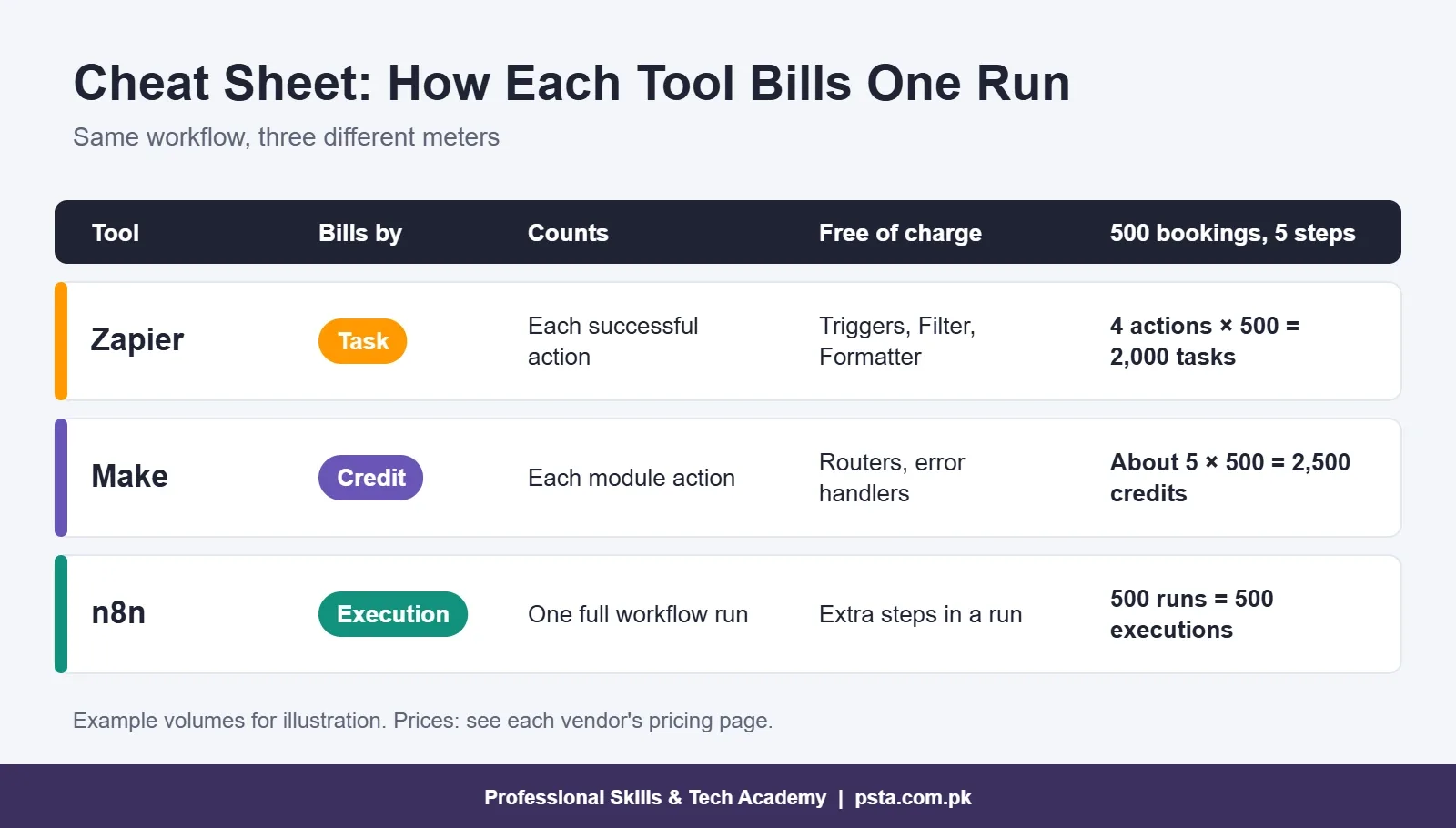
According to Zapier's pricing page, each successful action in a Zap uses one task. Triggers don't count, and neither do failed actions. Built-in helpers such as Filter, Formatter, Paths and Delay also don't use tasks. So a Zap with one trigger and four actions uses four tasks every time it runs.
Make Counts Credits
Make's pricing page says each module action in a scenario counts as one credit. That includes reading, searching, creating, updating and transforming data. Routers and error handlers are free. Running custom code on a paid plan costs 2 credits per second of execution time, so heavy code can drain credits quickly.
n8n Counts Executions
n8n's pricing page defines an execution as one run of your entire workflow. The number of steps and the amount of data don't change the count. A workflow with three nodes and one with 30 nodes both use one execution per run.
One Workflow, Three Bills: A Worked Example
The clearest way to settle n8n vs Zapier on cost is to price one real workflow. Let's use the clinic workflow from earlier. Assume it has one trigger and four actions: save to Sheets, ask an AI model to write a friendly message, send the confirmation email and notify the receptionist. The clinic gets about 500 bookings a month. These numbers are an example to show the method, not a quote.
- Zapier: 4 actions × 500 runs = 2,000 tasks a month. The free plan stops at 100 tasks and two-step Zaps, so you need Professional at the 2,000-task tier. Use the slider on Zapier's pricing page to see the exact price for that tier.
- Make: roughly 5 module actions × 500 runs = about 2,500 credits. That's more than the free plan's 1,000 credits, but well inside the Core plan's 10,000 credits at $12 a month.
- n8n Cloud: 500 runs = 500 executions. That fits inside Starter's 2,500 executions, which costs €20 a month on yearly billing.
- n8n self-hosted: the Community edition has no license fee. You pay for the server instead, and you spend your own time on setup, updates and backups.
Now change one thing. If the clinic adds six more steps, Zapier and Make usage rises with every step. The n8n execution count stays at 500. That's the real reason agencies with long workflows lean toward n8n. For short workflows with two or three steps, the gap is much smaller.
Free Plans and Entry Prices Compared
If you're a student, the free tiers matter more than anything else in the n8n vs Zapier vs Make choice. Here's what each one lets you practice without paying.
Zapier Free gives you 100 tasks a month and unlimited Zaps, but each Zap can only have two steps: one trigger and one action. New data is checked every 15 minutes, and premium apps are locked. It's enough to learn the basic idea, not enough to build a portfolio project with branching logic.
Make Free gives you 1,000 credits a month, two active scenarios and a 15-minute minimum interval. For learning, this is the most generous of the three hosted free plans, because you can build multi-step scenarios with routers.
n8n has no free cloud plan, but its official docs mention a 14-day free trial of Pro features on n8n Cloud. The free route is the self-hosted Community edition, which n8n describes as having "almost the complete feature set." Some features, such as SSO, Git version control and log streaming, need a paid edition.
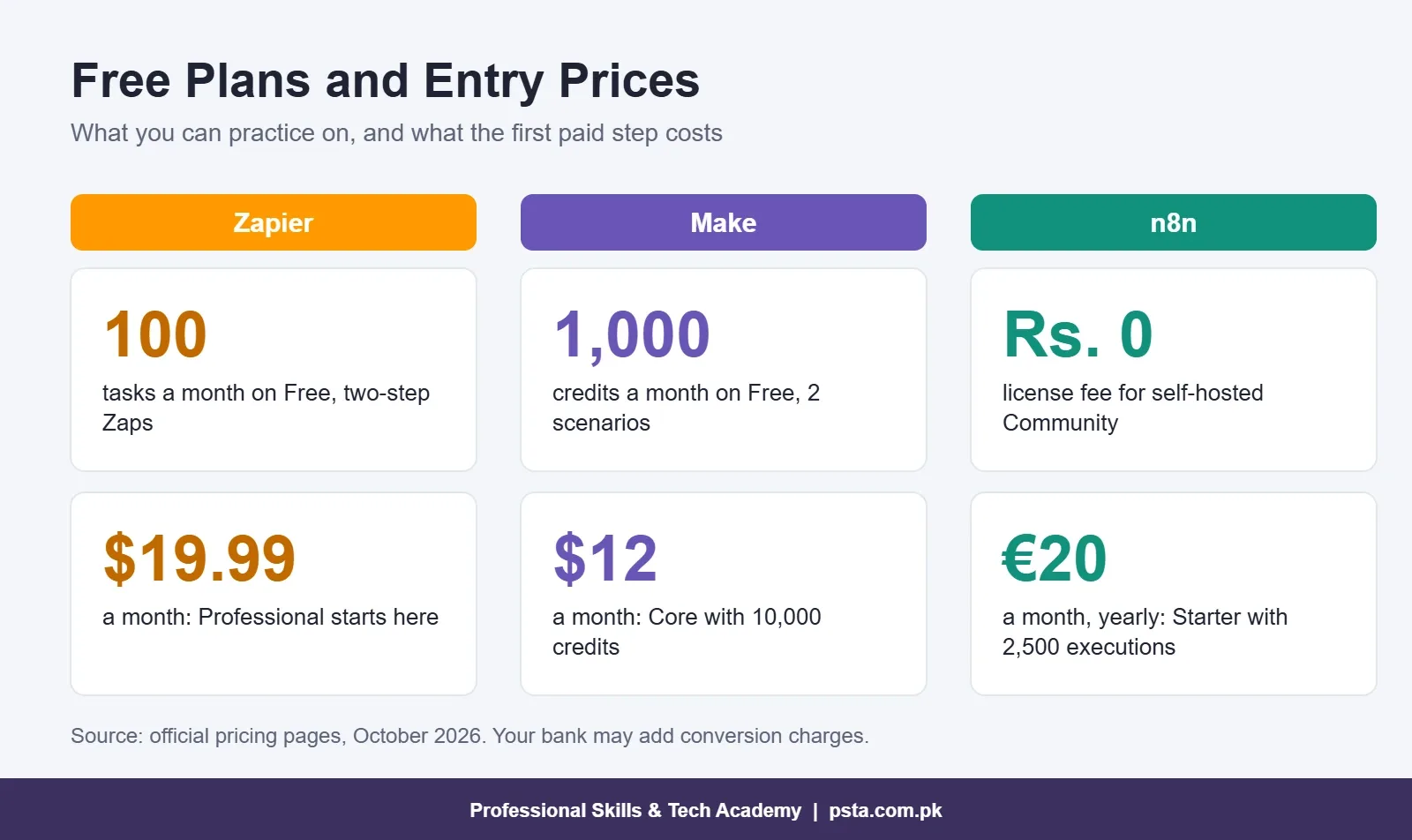
One more point on currency. Zapier and Make list prices in US dollars, while n8n lists them in euros. Your bank converts the amount at its own rate and may add an international transaction charge, so the rupee figure on your statement will move with the exchange rate.
Where Zapier Wins
Zapier is the easiest of the three to start with. The editor asks you plain questions, one step at a time, and its library of 9,000+ apps means almost any SaaS tool a foreign client uses will already be there.
It also matters for freelancing. Many small businesses in the US, UK and Gulf already run their operations on Zapier. When such a client hires you to repair their Zaps, they won't switch platforms because you prefer something else. Knowing Zapier well lets you take those jobs on day one.
The trade-off is cost at volume. Because every action is billed, long workflows that run thousands of times a month get expensive. Zapier also gives you less control over complex data handling than n8n.
Where Make Wins
Make sits between the other two. Its visual canvas shows the whole scenario at once, which helps when a workflow splits into branches. For example, a Lahore clothing store might route orders over a certain value to a manager for approval and send the rest straight to the courier. Seeing that split on screen makes it easier to explain to the owner.
Make's pricing is also friendly for small businesses, and that's where it usually wins the Zapier vs Make argument. The Core plan starts at $12 a month for 10,000 credits, and routers and error handlers don't use credits.
The trade-off is that complex scenarios can become hard to read, and data mapping between modules takes practice. Students who struggle with arrays and JSON usually find Make harder than Zapier in the first two weeks.
Where n8n Wins, and What Self-Hosting Asks of You
n8n gives you the most control. You can drop custom code into a workflow, call almost any API with the HTTP Request node and build AI agents that use several tools in one workflow. Its execution-based billing also means long workflows don't cost more per run. In the n8n vs Make choice, the deciding factor is usually your comfort with code and servers.
n8n self-hosting is the part people romanticize. n8n's documentation lists three ways to install: a one-line setup, Docker Compose for production, and npm for local testing, which is deprecated from n8n 3.0. Running your own server means you handle:
- Server updates and n8n version upgrades
- Backups of your workflows and credentials
- SSL certificates and a domain for webhooks
- Security, because the server stores your clients' API keys
None of this is hard once you've done it twice. But if a client's workflow stops at 2 AM, you're the support team. For a student or a single small business, starting on n8n Cloud or a free trial is often the calmer choice. Move to self-hosting once you can install, back up and restore an instance without a guide open.
There's also a licensing point. According to n8n's hosting docs, a self-hosted install without a license key runs as the free Community edition, while Business and Enterprise need a paid key. Read n8n's license terms before you offer n8n hosting as a paid service to clients.
Which Tool Should You Learn First?
When students ask me to settle n8n vs Zapier for them, I ask what they want in the next six months. Here's how I advise them:
- You want freelance work quickly: start with Zapier for two weeks, then Make. Many existing client accounts use one of these two.
- You run a small shop, clinic or school: start with Make. The free plan is generous and Core is cheap if you need more.
- You're a CS or IT student comfortable with code: start with n8n. You'll learn APIs, JSON and webhooks properly, and that knowledge transfers to the other two.
- You want to build AI agents and chatbots: learn n8n, but understand Make's or Zapier's model too, since clients may already use them.
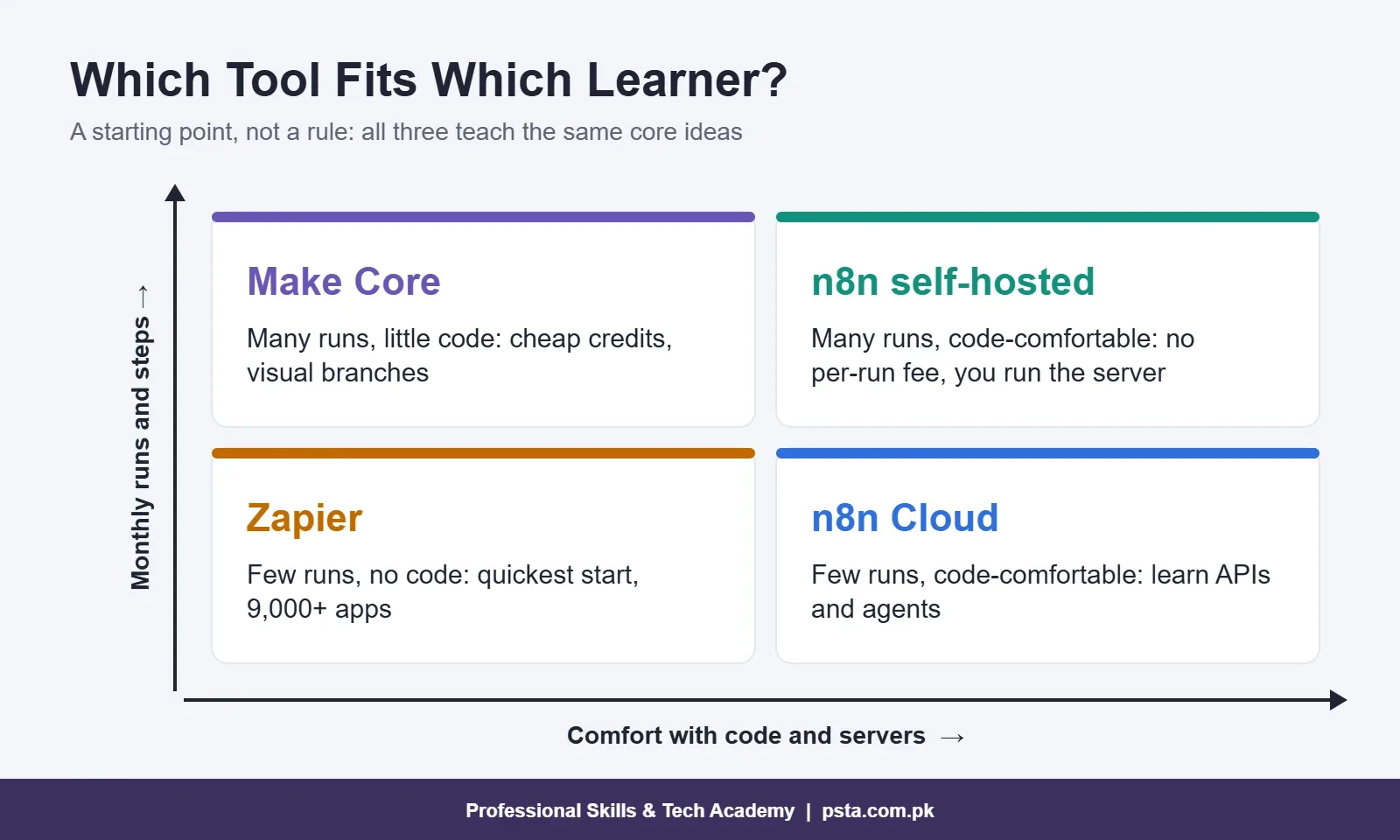
The good news is that the core ideas carry over. Triggers, actions, filters, data mapping and error handling exist in all three. Once you've built the same workflow in two tools, the third takes days to learn, not weeks.
What Do Clients in Pakistan Usually Ask For?
Local requests are usually practical and small. Typical examples are lead capture from Facebook forms into Google Sheets, WhatsApp follow-ups, invoice reading with OCR, and daily sales summaries emailed to the owner. These are also the projects our course is built around.
For these jobs, n8n vs Zapier matters less than the result. A shop owner in Peshawar doesn't care whether you used n8n or Make. They care that the follow-up message goes out within a minute and that nothing breaks when the internet drops. Pick the tool whose monthly cost the client can sustain, and explain that cost to them in rupees before you start.
For foreign clients on Upwork or Fiverr, check the job post first. If it names a tool, use that one. If it doesn't, propose the one that fits their volume, and show them the usage math from the worked example above.
Practicing All Three in PSTA's AI Automation Course
If you're comparing options for an automation course in Pakistan, look for one that teaches more than one tool. Our AI Automation Course is an eight-week, beginner-level program. You build workflows in n8n, Make and Zapier, connect the OpenAI API, read documents with OCR and design WhatsApp chatbots. The final project is a multi-step AI agent built around a real problem from your own work or business.
The fee is Rs. 22,000 (regular Rs. 28,000), payable in two installments. A fresh batch opens monthly, and you choose the mode: the Abbottabad classroom, live online sessions, or a mix of the two. You'll receive a PSTA certificate that employers can verify at psta.com.pk/certificate.
If you want to write more code inside n8n later, our Advanced Python course is the natural next step. For project ideas, see our list of n8n projects for beginners, and if you want a week-by-week plan, follow our eight-week AI automation roadmap. You can compare every program on the courses page.
Build the Same Workflow Twice This Weekend
Don't spend another week reading comparisons. Pick one small task, such as saving a Google Form response to a sheet and emailing yourself a summary. Build it on Make's free plan, then build it again in n8n using the Cloud trial or a local install. Write down how long each took and where you got stuck.
That one exercise will tell you more about n8n vs Zapier vs Make than any article, including this one. If you'd like guided practice and feedback on your workflows, you can apply for admission or ask about batch dates on WhatsApp (+92 314 5424399).
Frequently asked questions
Does a Zapier trigger use up tasks?
No. According to Zapier's pricing page, triggers don't count toward your task limit, and checking for new data doesn't use tasks either. Only successful actions do. Built-in tools such as Filter, Formatter, Paths and Delay are also free of tasks, so adding a filter before an expensive step can lower your monthly usage.
Can I use Zapier for free in Pakistan?
Yes. Zapier's free plan gives 100 tasks a month and unlimited Zaps, but each Zap is limited to two steps and new data is checked every 15 minutes. It works for learning the basics. For multi-step workflows you need Professional, which starts from $19.99 a month and is paid in dollars with an international card.
Which is cheaper for small businesses, Make or Zapier?
For multi-step workflows, Make is usually cheaper because Core costs $12 a month for 10,000 credits and routers don't use credits. Zapier bills every successful action as a task, so long Zaps add up. For a simple two-step workflow running a few times a day, the difference is small, so compare using your own monthly run count.
Can I run n8n on my own laptop for learning?
Yes. n8n's hosting docs list a one-line setup and an npm install for local development or testing, though npm is deprecated from n8n 3.0. A local install is fine for practice, but webhooks from outside services won't reach your laptop easily. For client work, use n8n Cloud or a properly secured server.
Which tool should I mention on my Fiverr or Upwork profile?
List the tools you can actually build with and show one working project for each. Many existing client accounts run on Zapier or Make, so knowing at least one of them helps you take repair and extension jobs. Add n8n once you can show a workflow that calls an API or uses an AI model.
How long does it take to learn workflow automation?
Most beginners can build simple workflows within two to three weeks of regular practice. Becoming confident with branching, error handling, APIs and AI steps takes longer. PSTA's AI Automation Course runs for eight weeks and covers n8n, Make and Zapier along with chatbots, OCR and a multi-step agent project.
Sources & references
- n8n Pricing n8n.io
- Zapier Pricing zapier.com
- Make Pricing make.com
- Make Integrations make.com
- n8n Integrations n8n.io
- n8n Docs: Choose How to Use n8n docs.n8n.io
- n8n Docs: Host n8n docs.n8n.io
Last reviewed & updated on by Umar Qureshi. Written by the PSTA team in Abbottabad, Pakistan.

Umar Qureshi

AI Automation Course: Beginner to Pro (Dominate Workflows)
Turn this guide into a career: hands-on training with real projects, online across Pakistan or on-campus in Abbottabad · 8 Weeks.



Comments
No comments yet — ask a question or share your experience.