Quick answer
AutoCAD interview questions for draftsman jobs focus on judgment more than command lists. Expect questions on drawing setup, layers, blocks and xrefs, model and paper space, annotative scaling, plot styles and fixing damaged files, then a short practical test. Clean, correctly scaled and well-organized files impress more than raw drawing speed.
Key takeaways
- • Interviewers mostly test the seven areas in Autodesk's certification objectives, from standards to output.
- • Know the difference between blocks and xrefs, and between attach and overlay, before any drafting interview.
- • Draw at full size in model space and set scale through layout viewports, not by scaling geometry.
- • PSLTSCALE defaults to 1, and REGENALL refreshes viewports after scale or linetype changes.
- • The practical test is marked by opening your file, so layers and styles count as much as the drawing.
- • The Autodesk certification costs $200 and suits drafters with several hundred hours of real work.
Table of contents 28 sections
- What Do AutoCAD Interview Questions Actually Test?
- The 16 Questions at a Glance
- Setup and Layers: Questions 1 to 4
- 1. How do you start a new drawing properly?
- 2. Explain absolute, relative and polar coordinates.
- 3. Why should objects use ByLayer color and linetype?
- 4. Why do drafters build block geometry on layer 0?
- Blocks and External References: Questions 5 to 8
- 5. What is the difference between a block and an xref?
- 6. Attach or overlay: when do you use each?
- 7. What are the path types for an xref?
- 8. What makes a block dynamic?
- Layouts, Scale and Annotation: Questions 9 to 12
- 9. What is the difference between model space and paper space?
- 10. How do you set and protect a viewport's scale?
- 11. What are annotative objects?
- 12. Your dashed lines look solid in a viewport. Why?
- Plotting and File Health: Questions 13 to 16
- 13. What is the difference between CTB and STB plot styles?
- 14. How do you plot a sheet to PDF at the correct scale?
- 15. A drawing is slow or keeps crashing. What do you do?
- 16. How do you check a drawing before you send it?
- What Does the Practical Test Look Like?
- What If You Don't Know an Answer?
- How Do Junior and Senior Drafting Interviews Differ?
- Is the Autodesk AutoCAD Certification Worth It?
- Preparing With PSTA's AutoCAD Course
- Rehearse Five Answers Out Loud Before Friday
AutoCAD interview questions for a draftsman job rarely test how many commands you know. They test whether your drawing files are clean, correctly scaled and easy for someone else to open, check and print. Autodesk's own AutoCAD Certified Professional exam page lists seven skill areas, and a good interviewer in Lahore, Islamabad or Abbottabad probes almost exactly the same ones.
In drafting interviews, the pattern is steady. A candidate who can explain why a drawing is set up a certain way leaves a stronger impression than one who only draws quickly. If you're preparing for an AutoCAD draftsman interview, this guide gives you 16 questions with model answers you can adapt in your own words.
Here's what this guide covers:
- The seven topic areas behind most AutoCAD interview questions
- 16 questions with short model answers, grouped from basic to advanced
- What the practical drawing test usually looks like and how it is marked
- How junior and senior drafting interviews differ
- Whether the Autodesk certification is worth $200 for a Pakistani drafter
What Do AutoCAD Interview Questions Actually Test?
Most interviewers work from a mental checklist, even when they never write it down. The Autodesk exam objectives give that checklist a clear shape: drafting standards, drawing setup and organization, external references, authoring and editing content, annotation and detailing, collaboration tools, and output.
In a real interview, these areas show up as plain questions. "How do you set up a new drawing?" checks organization. "A consultant sent you a site plan. How do you bring it in?" checks references. "Your dimensions look tiny on the printed sheet. Why?" checks annotation and scale. Once you see the seven areas, you can predict most of what you will be asked.
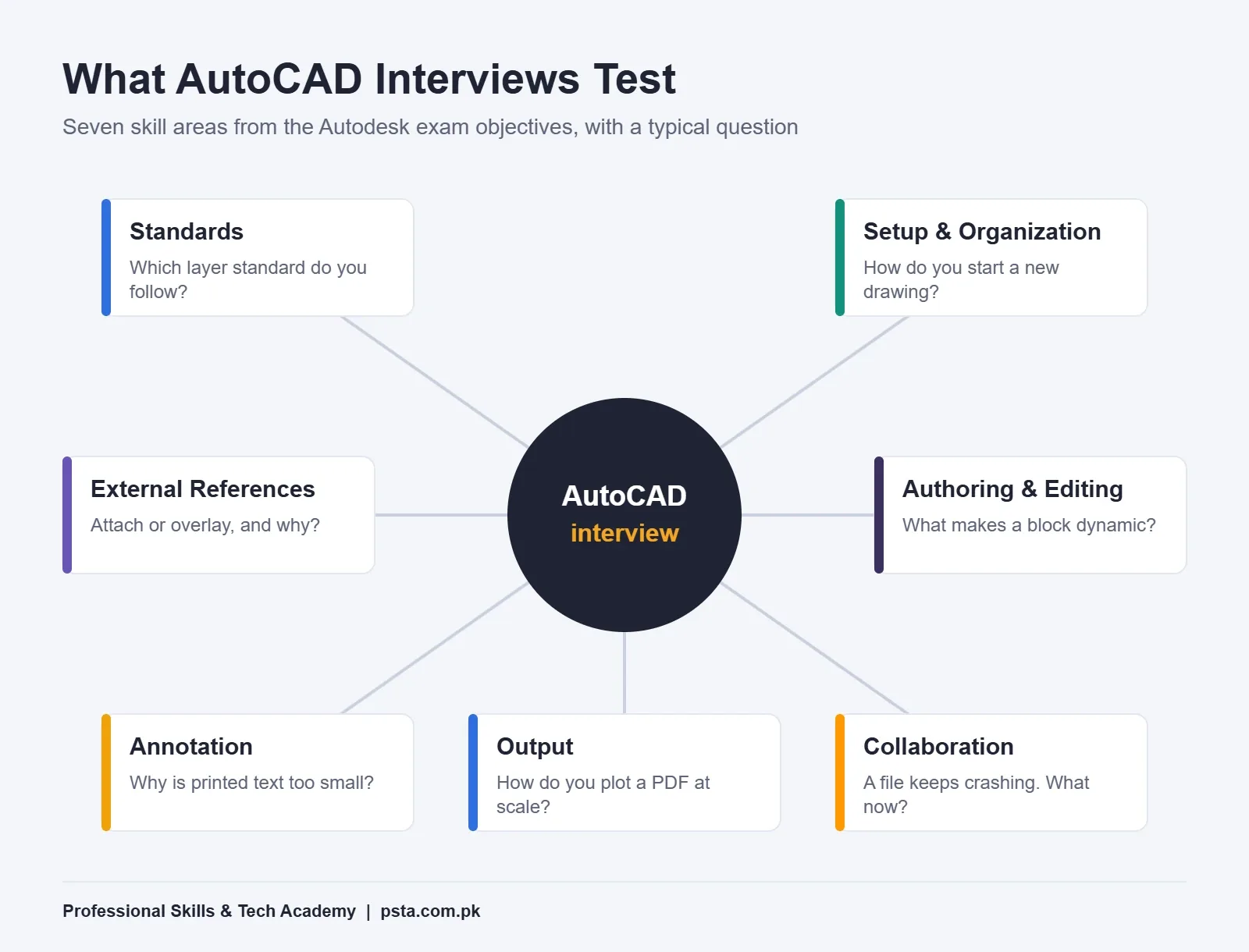
Notice what is missing from that list: memorizing every alias. Speed matters in the practical test, but the spoken questions are about judgment. If you want to work on speed separately, our AutoCAD shortcut keys guide groups the commands by task.
The 16 Questions at a Glance
Use this table of AutoCAD interview questions as a revision sheet. The level column shows where each question usually appears. Fresh candidates should be solid on every "Basic" row and comfortable with most "Core" rows.
| # | Question | Topic Area | Level |
|---|---|---|---|
| 1 | How do you start a new drawing properly? | Setup | Basic |
| 2 | Absolute, relative and polar coordinates | Authoring | Basic |
| 3 | Why draw objects on layers set to ByLayer? | Organization | Basic |
| 4 | Why keep layer 0 for block geometry? | Organization | Core |
| 5 | Block vs external reference | References | Core |
| 6 | Attach vs overlay | References | Core |
| 7 | Full, relative and no path | References | Core |
| 8 | What makes a block dynamic? | Authoring | Advanced |
| 9 | Model space vs paper space | Output | Basic |
| 10 | How do you set and protect a viewport scale? | Output | Core |
| 11 | What are annotative objects? | Annotation | Core |
| 12 | Why do dashed lines look solid? | Annotation | Core |
| 13 | CTB vs STB plot styles | Output | Core |
| 14 | How do you plot a sheet to PDF at scale? | Output | Basic |
| 15 | A drawing is slow or crashes. What do you do? | Collaboration | Advanced |
| 16 | How do you check a drawing before you send it? | Standards | Advanced |
Setup and Layers: Questions 1 to 4
1. How do you start a new drawing properly?
Model answer: "I start from the company template if there is one, because it already holds the layers, text styles, dimension styles and title block. Then I confirm the units with the UNITS command, for example millimeters for a structural drawing or feet and inches if the client wants imperial. I check the project's layer standard before drawing anything."
Why it works: you show that you respect office standards. Interviewers worry most about new hires who invent their own layers on day one.
2. Explain absolute, relative and polar coordinates.
Model answer: "Absolute coordinates are measured from the origin of the current UCS. Relative coordinates are measured from the last point and start with the @ sign, so @3000,0 moves 3,000 units along X. Polar entry uses a distance and an angle separated by the < sign, like @1500<45. Angles run counterclockwise by default, so a negative angle goes clockwise."
Autodesk's help page on polar coordinate entry also notes that with dynamic input turned on, you type # in front of a value to force absolute entry. Mentioning that small detail tends to impress.
3. Why should objects use ByLayer color and linetype?
Model answer: "When color, linetype and lineweight are set to ByLayer, I can change a whole category of objects by editing one layer. If I hard-code a color on individual lines, the next person has to hunt for them one by one, and plotting can go wrong."
4. Why do drafters build block geometry on layer 0?
Model answer: "Geometry drawn on layer 0 inside a block takes on the properties of the layer the block is inserted on. That makes the same door or column block behave correctly on any layer. If the block's lines sit on a named layer, they keep that layer's look wherever I insert them."
Blocks and External References: Questions 5 to 8
This group separates people who have only practiced alone from people who have worked on shared projects. In a Pakistani consultancy, an architect, a structural engineer and an MEP designer often work on the same building at once, so references come up in nearly every interview.
5. What is the difference between a block and an xref?
Model answer: "A block is stored inside my drawing. If the original changes, my copy doesn't update unless I redefine it. An AutoCAD xref is a link to a separate DWG file. When the source file is saved, my drawing shows the latest version after it reloads. I use blocks for symbols like doors and furniture, and xrefs for whole drawings like an architectural base plan."
6. Attach or overlay: when do you use each?
Model answer: "Both link a file, but they behave differently when nested. According to Autodesk's Attach External Reference documentation, an attachment carries through when my drawing is referenced by someone else, while an overlay is ignored at that next level. I overlay files I only need for my own reference, so I don't clutter my colleague's drawing."
7. What are the path types for an xref?
Model answer: "There are three. A full path stores the complete location. A relative path stores the location relative to the host drawing, and it is the default. No path stores only the file name, so AutoCAD looks in the host drawing's folder. I prefer relative paths because the project folder can be zipped or moved to a client's server without breaking links. The REFPATHTYPE system variable controls the default."
8. What makes a block dynamic?
Model answer: "A dynamic block has parameters and actions added in the Block Editor, which opens with BEDIT. A parameter adds a control such as a custom grip. An action decides what happens when that grip is used, like a stretch. Together they form a parameter set. One dynamic door block can replace a whole folder of door blocks in different widths."
Two extra points from the About Dynamic Blocks help page are worth knowing. Dynamic blocks support 2D operations only. And AutoCAD LT can use blocks that contain constraints, but it can't define those constraints itself.
Layouts, Scale and Annotation: Questions 9 to 12
Scale questions trip up more candidates than you might expect. A candidate draws a neat plan, then cannot explain why the printed text is unreadable. Prepare these four answers until you can say them without hesitating.
9. What is the difference between model space and paper space?
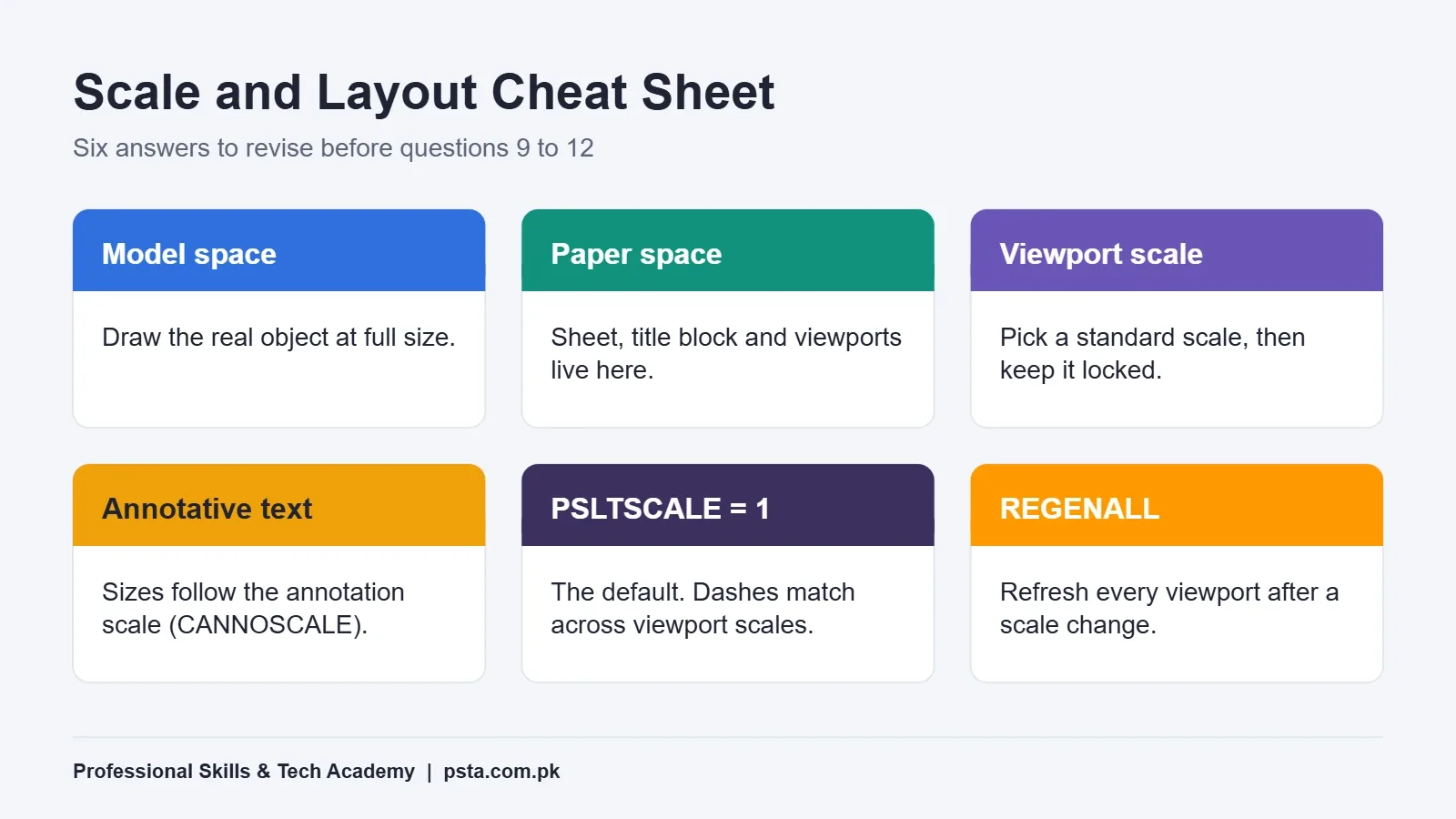
Model answer: "I draw the building or part at full size in model space, one unit to one millimeter or whatever the project uses. Paper space is the layout tab, where I place the title block on a standard sheet and add viewports that show model space at a chosen scale. One layout can hold several viewports at different scales, such as a plan at 1:100 and a detail at 1:20."
Autodesk's getting started guide to layouts describes several ways to handle annotation. It recommends the trans-spatial method: geometry in model space, notes and dimensions in paper space, with the dimension scale set to 1.
10. How do you set and protect a viewport's scale?
Model answer: "I select the viewport and pick a standard scale from the scale list or the triangular grip. Layout viewports are locked by default, and I keep them locked, so a scroll of the mouse wheel inside one can't change the scale by accident. To work inside a viewport, I double-click in it, and I double-click outside to return to paper space."
11. What are annotative objects?
Model answer: "Annotative text, dimensions and hatches adjust their size to the annotation scale of the viewport or model view. The current value is held in the CANNOSCALE system variable. With annotative scaling, I set the text height once, say 2.5 mm on paper, and it appears correctly at 1:50 and 1:100 without making two sets of text."
12. Your dashed lines look solid in a viewport. Why?
Model answer: "It's usually a linetype scale problem. LTSCALE sets the global factor. PSLTSCALE, which defaults to 1, scales linetypes by the viewport so dashes look the same in viewports with different scales. If someone set PSLTSCALE to 0, or the LTSCALE is far too large, dashes can look solid. After changing these, I run REGENALL so every viewport updates."
The behavior of both values is set out on Autodesk's PSLTSCALE reference page.
Plotting and File Health: Questions 13 to 16
13. What is the difference between CTB and STB plot styles?
Model answer: "In a color-dependent CTB table, an object's color decides how it plots, so everything red might plot as a thin black line. A CTB has 256 styles, one per color, and you can edit them but not add or remove them. A named STB table lets me create my own styles and assign them to layers or objects, so two red objects can plot differently."
That 256 figure comes from Autodesk's About Plot Style Tables page. It's worth asking the interviewer which type the firm uses. The question shows you've worked with real print sets.
14. How do you plot a sheet to PDF at the correct scale?
Walk the interviewer through the steps in order:
- Open the layout tab, not the Model tab.
- Choose a PDF plotter such as "DWG To PDF.pc3" in the Plot or Page Setup dialog.
- Pick the sheet size that matches the title block, such as ISO A1 or A3.
- Set the plot area to Layout and the scale to 1:1, since the viewports carry the drawing scale.
- Select the office's plot style table and check lineweights in the preview.
- Save the setup as a named page setup so the next sheet matches.
15. A drawing is slow or keeps crashing. What do you do?
Model answer: "First I save a copy. Then I run AUDIT and answer Yes when it asks whether to fix errors, because the default answer is No. Next I use PURGE to remove unused layers, blocks and styles. The Purge dialog can also delete zero-length geometry and empty text. If the file won't open normally, I try RECOVER. For registered applications, I use -PURGE at the command line."
The Purge options are described on Autodesk's Purge dialog box page. Interviewers like this answer because it shows you protect the file before touching it.
16. How do you check a drawing before you send it?
Model answer: "I check that every layer follows the standard, that all xrefs load with relative paths, and that dimensions are associative and haven't been typed over. I confirm the title block revision and date, and I plot one test PDF to see lineweights. Finally, I purge and audit, then send the files in one folder so nothing is missing."
What Does the Practical Test Look Like?
Many firms follow the spoken questions with a short drawing test on an office computer. Every office sets its own time limit, so ask HR how long you'll have. The task is usually small and easy to mark, for example:
- A ground floor plan of a small house from a hand sketch, with walls, doors and room labels
- A mechanical part, such as a flange, drawn in three orthographic views with dimensions
- A single-line electrical layout with a legend made from blocks
- A section through a staircase showing risers, treads and a handrail
The examiner opens your file afterward, not just the printout. Expect them to check layers, whether dimensions are real dimension objects, whether your text uses a proper style, and whether the layout plots at scale. A plain drawing that is correctly organized beats a detailed one with everything on layer 0.
What If You Don't Know an Answer?
Nobody knows every command, and interviewers know it. Saying "I'm not sure" is fine if you follow it with how you would find out. Try this three-part reply:
- Say what you do know that is close to the question.
- Explain where you would check, such as the Autodesk help pages or the office standard.
- Offer a related example from your own work or practice project.
For example: "I haven't used sheet sets on a live project. I know they organize many layouts from different files into one set. I'd follow the office template and read Autodesk's help before setting one up." That answer is honest and still shows judgment.
How Do Junior and Senior Drafting Interviews Differ?
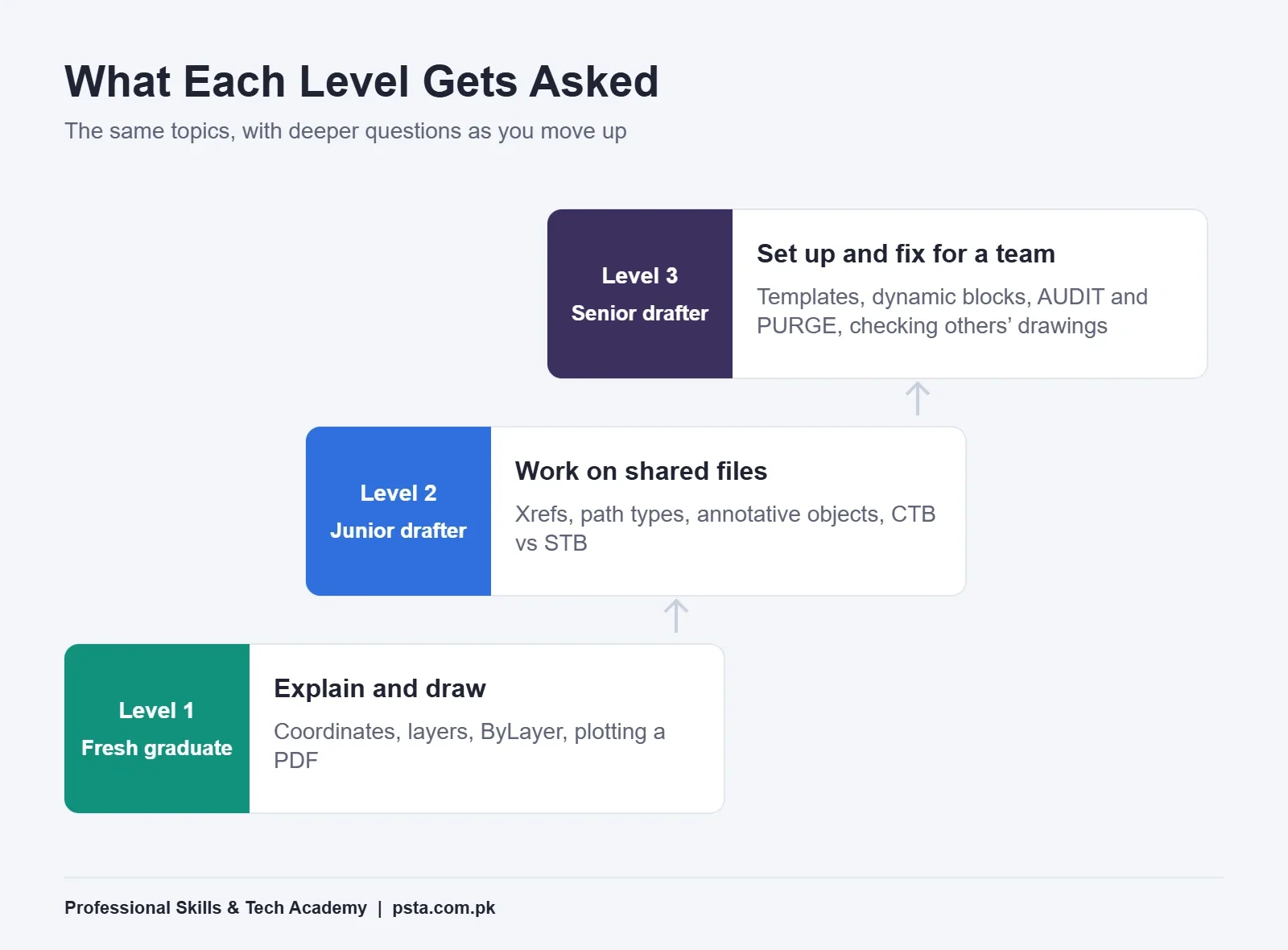
The same AutoCAD interview questions appear at every level, but the depth of answer expected changes. A fresh DAE or B.Tech graduate is asked to explain and draw. A senior drafter is asked to set up and fix files for a whole team.
Pay follows that ladder, though reliable public figures are thin. Payscale's AutoCAD Designer salary page for Pakistan shows an average base of about Rs. 550,000 a year. That figure rests on only 16 salary profiles and was last updated in April 2024. Use it as a rough reference, not a promise, and compare it with current ads for draftsman jobs in Pakistan, especially in your own city.
Is the Autodesk AutoCAD Certification Worth It?
The Autodesk Certified Professional in AutoCAD for Design and Drafting is the vendor's main professional exam. Here are the details listed on its official page:
| Detail | What Autodesk Lists |
|---|---|
| Questions | 45 to 60 |
| Time | 120 minutes |
| Price | $200 standard retail |
| Suggested experience | About 400 to 1,200 hours of real AutoCAD work |
| Question types | Multiple choice, drag-and-drop, hot-area and similar, with no software access |
| Delivery | Pearson test center or online with Pearson OnVUE |
| Validity | 3 years |
My honest view: for a first job in Pakistan, a strong portfolio and a clean practical test matter more than the certificate. The exam becomes more useful once you have several hundred hours of work behind you, or when a job ad asks for it by name. Either way, its objectives make an excellent study list for your interview.
Preparing With PSTA's AutoCAD Course
Our AutoCAD Mastery course covers every topic behind these AutoCAD interview questions across ten modules. Layers, dimensions and text annotation have their own module, and so do blocks, attributes and xrefs. Plotting and publishing to scale are part of the documentation work, and the course ends with a final architectural or mechanical project plus portfolio building.
It's a beginner-level program lasting 45 to 90 days. Classes happen at our Abbottabad campus, through live video if you live elsewhere, or a blend of the two, and fresh batches open monthly. At the time of writing, the course page lists a fee of Rs. 28,000 against an original Rs. 30,000. Fees can change, so confirm the current amount there before applying.
If you're still deciding between tools, read AutoCAD vs Revit first. If you're starting from zero, our beginner guide to learning AutoCAD in Pakistan covers free student access. Civil and electrical students may also like our industrial automation course. You can compare everything on the courses page or go straight to admission.
Rehearse Five Answers Out Loud Before Friday
Pick five AutoCAD interview questions from the table: 5, 6, 9, 11 and 15. Say each answer out loud in under a minute, without notes, then open AutoCAD and show yourself the feature you just described. Spoken practice exposes gaps faster than rereading. If you'd like help preparing, message us on WhatsApp at +92 314 5424399 and ask about the next AutoCAD batch.
Frequently asked questions
What AutoCAD questions are asked in a draftsman interview?
Most questions cover drawing setup, layers, blocks and xrefs, model and paper space, annotative scaling, plot styles and plotting to PDF. Senior roles add templates, dynamic blocks and repairing damaged files with AUDIT, PURGE and RECOVER. Many firms then give a short practical test and open your DWG file to check how it is organized, not just how it looks.
How should a fresher prepare for an AutoCAD interview?
Practice explaining your answers out loud, not just drawing. Rebuild one small plan with clean layers, a proper text style, real dimensions and a layout viewport at a standard scale, then plot it to PDF. Bring that file and its PDF to the interview. Being able to explain why you set it up that way matters more than speed.
What is the difference between attach and overlay in AutoCAD?
Both link an external DWG file. An attached xref carries through when your drawing is itself referenced by another drawing. An overlaid xref is ignored at that next level, so it stays visible only in your drawing. Use overlay for files you only need for your own reference, such as a consultant's background plan.
Why is my AutoCAD text too small when I print?
Usually the text was sized for model space but the drawing is printed through a scaled viewport. Fix it by using annotative text styles, which follow the viewport's annotation scale, or by placing notes and dimensions in paper space. Then plot the layout at 1:1, since the viewport already carries the drawing scale.
Do Pakistani employers ask for the Autodesk AutoCAD certification?
Some job ads mention it, but most drafting interviews focus on your portfolio and the practical test. The Autodesk Certified Professional exam costs $200 and Autodesk suggests about 400 to 1,200 hours of real work before attempting it, so many drafters take it after their first job rather than before.
How long is the practical test in an AutoCAD interview?
There is no fixed standard. Each firm sets its own time limit and task, which is often a small floor plan, a mechanical part in three views, a single-line electrical layout or a staircase section. Ask HR beforehand how long you will have and which AutoCAD version the office computer runs.
Should I mention AutoCAD LT or full AutoCAD in my interview?
Mention whichever you have used and be specific about features. For example, AutoCAD LT can use blocks with constraints made in full AutoCAD but cannot define those constraints itself. Showing that you know such limits tells the interviewer you have worked with real files, not just tutorials.
Sources & references
- AutoCAD Certified Professional in Design and Drafting autodesk.com
- Attach External Reference Dialog Box (AutoCAD LT 2027 Help) help.autodesk.com
- About Dynamic Blocks (AutoCAD LT 2027 Help) help.autodesk.com
- Layouts and Viewports (AutoCAD Getting Started) help.autodesk.com
- About Plot Style Tables (AutoCAD LT 2026 Help) help.autodesk.com
- Purge Dialog Box (AutoCAD LT 2026 Help) help.autodesk.com
- PSLTSCALE System Variable (AutoCAD LT Help) help.autodesk.com
- AutoCAD Designer Salary in Pakistan (Payscale) payscale.com
Last reviewed & updated on by Umar Qureshi. Written by the PSTA team in Abbottabad, Pakistan.

Umar Qureshi

AutoCAD Mastery: 2D, 3D Design & BIM (Complete Professional Course)
Turn this guide into a career: hands-on training with real projects, online across Pakistan or on-campus in Abbottabad · 45 - 90 Days.

Comments
No comments yet — ask a question or share your experience.