Quick answer
Set up LinkedIn before you graduate. Use a clear 400×400 photo, a headline that names your target role and skills, a custom URL, and an About section that makes its point in the first 300 characters. Add your FYP and internships as experience, take skills from real job ads, and connect with short, personal notes.
Key takeaways
- • Pakistan had about 15.05 million LinkedIn users in September 2026, and 25 to 34 year olds were the largest group.
- • Put your target role and main skills in the first 65 characters of the headline.
- • Make your point in the first 300 characters of the About section.
- • List your FYP, internships and freelance work as separate entries that start with a verb and end with an outcome.
- • Choose skills that appear in at least three real job ads, and keep LinkedIn consistent with your CV.
Table of contents 19 sections
- Why Does LinkedIn Matter for Fresh Graduates in Pakistan?
- What Recruiters See First on Your Profile
- LinkedIn for Fresh Graduates: The 9-Step Profile Setup
- Step 1: Choose a Photo and Banner That Look Professional
- Step 2: Write a Headline That Names the Role You Want
- Step 3: Claim a Clean Custom URL
- Step 4: Write an About Section in Four Short Paragraphs
- Step 5: Turn Projects, Internships and FYP Work Into Experience
- Step 6: Add Education With the Details Recruiters Filter On
- Step 7: Pick Skills That Match Real Job Ads
- Step 8: Ask for One or Two Recommendations
- Step 9: Turn On Open to Work, but Choose the Right Visibility
- Before and After: Rewriting a Weak Graduate Profile
- How Should You Connect With People Without Sounding Desperate?
- What Should a Fresh Graduate Post on LinkedIn?
- Profile Errors That Make Recruiters Scroll Past
- Final Check Before You Hit Save
- Where PSTA's English Classes Help With Your Profile
- Spend 45 Minutes on Your Headline and About Section Tonight
A common myth about LinkedIn for fresh graduates is that the site only helps once you have a job title to show. That belief is wrong, and it costs time. Your profile works best when you set it up before the degree ends, because your projects, internships and skills are what recruiters search for when you have no experience yet.
These LinkedIn profile tips walk you through the profile one field at a time, with Pakistani examples and the current limits for each section.
Here is what the guide covers, in order:
- Which parts of your profile a recruiter reads first, and how long each one can be
- How to write a headline and About section when you have no full-time job yet
- How to turn your final year project, internship or freelance work into proper entries
- How to send connection requests and posts that people actually respond to
- Which mistakes make a new profile look careless
Why Does LinkedIn Matter for Fresh Graduates in Pakistan?
The platform is much bigger here than most students assume. NapoleonCat's figures show 15,050,000 LinkedIn users in Pakistan in September 2026, about 6.3% of the population. People aged 25 to 34 were the largest group, at 44.5% of users. That is the age band of team leads, HR officers and hiring managers who will read your profile.
The job market also explains why a profile is worth the effort. A PIDE knowledge brief reports that graduate unemployment rose from 14% in 2018-19 to 16% in 2020-21, and that unemployment among engineers went from 11% to 23.5% over the same two years. For fresh graduate jobs, a degree alone no longer separates you from the next applicant.
What can separate you is visible proof of skill. LinkedIn's own Economic Graph research on skills-based hiring found that skills-based hiring, meaning hiring on skills rather than past job titles, gave a median 6.1x increase in eligible workers for a typical job. For Gen Z, the increase was 6.8x, the largest of any generation. In plain terms, employers who search by skill find more young candidates. Your job is to make your skills easy to find.
What Recruiters See First on Your Profile
A recruiter usually meets you in a search result or a list of applicants. They see your photo, name and the start of your headline. If that looks right, they open the profile and read the top section, then skim the rest. The table below lists the fields in roughly that order, with the limits reported in Eden's 2026 reference on LinkedIn character limits and the image sizes in Linearity's LinkedIn size guide.
| Field | What the recruiter notices | Limit or size |
|---|---|---|
| Profile photo | Whether you look like a serious candidate | 400 × 400 px, JPG or PNG, up to 8 MB |
| Background banner | Your field or city, at a glance | 1584 × 396 px (4:1), under 8 MB |
| Headline | The role you want and your main skill | 220 characters; about the first 65 show in search |
| About | Your story in your own words | 2,600 characters; about 300 show before "See more" |
| Experience and projects | Proof that you have done real work | One entry per role or project |
| Skills | Whether you match their search filters | Pick the ones that appear in job ads |
Eden notes that some of these limits are observed values that LinkedIn can change without notice, so treat them as current guidance rather than fixed rules.
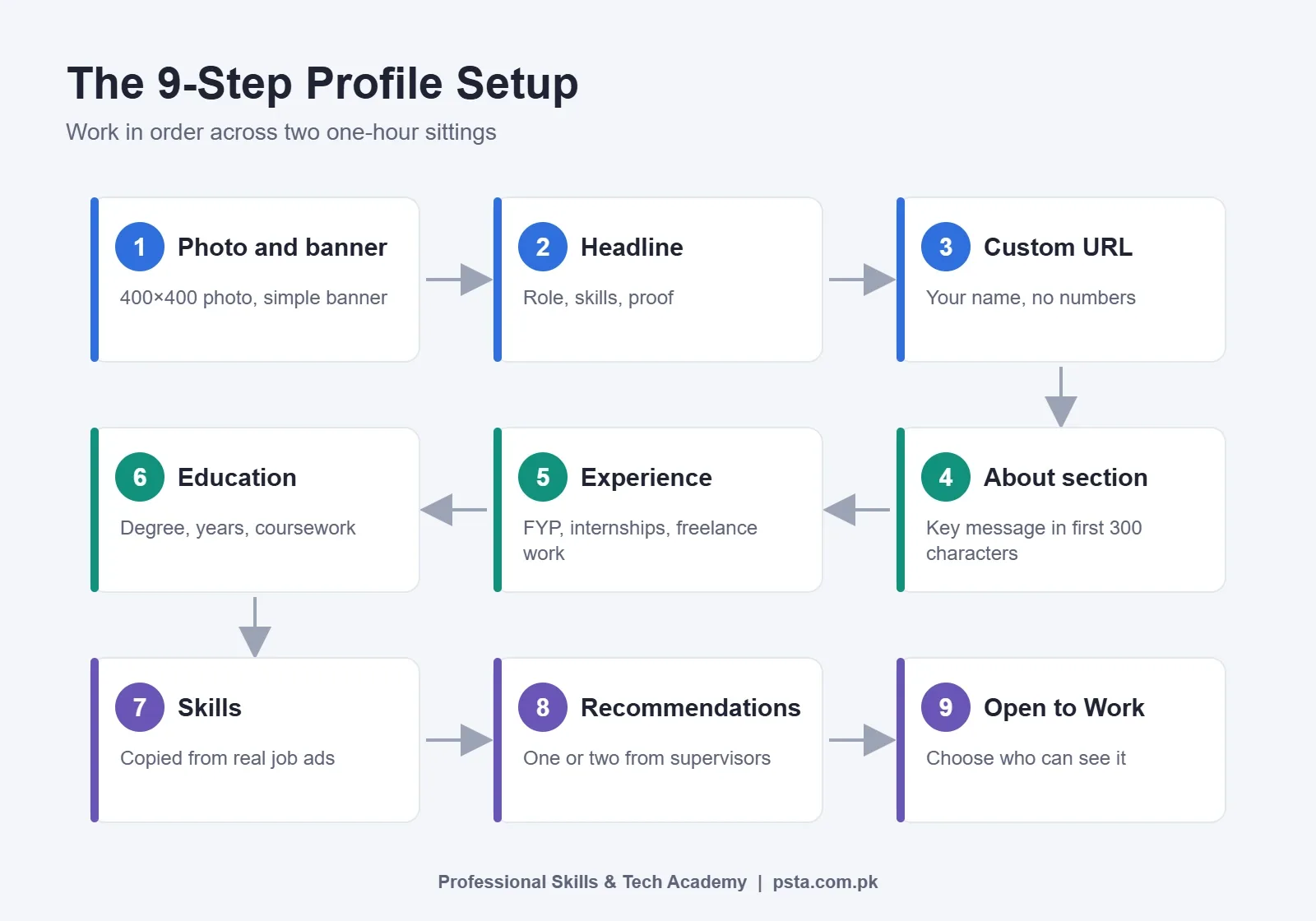
LinkedIn for Fresh Graduates: The 9-Step Profile Setup
Work through these steps in order. The early ones affect whether anyone clicks on you at all, and the later ones affect whether they message you. Plan for two sittings of about an hour each.
Step 1: Choose a Photo and Banner That Look Professional
Most advice on LinkedIn for fresh graduates starts with the photo, and for good reason: it is the first thing anyone sees. Use a clear, recent photo where your face fills most of the frame. Plain wall, daylight from a window, a collared shirt or simple shalwar kameez, and a neutral expression are enough. You don't need a studio. Avoid group photos cropped down, sunglasses and wedding pictures.
For the banner, keep it simple. A clean color with your field and city, such as "Civil Engineer | AutoCAD | Abbottabad", works better than a busy stock image. If you want the exact canvas sizes for other platforms too, see our social media post sizes cheat sheet.
Step 2: Write a Headline That Names the Role You Want
Your LinkedIn headline matters more than any other line on the profile. By default, LinkedIn may fill it with something like "Student at COMSATS University". That tells a recruiter nothing. Replace it with the role you want, two or three skills, and one piece of proof.
A simple formula: Target role | Skill 1, Skill 2 | Proof. For example, "Junior Data Analyst | Excel, SQL, Power BI | FYP: Sales Dashboard for a Local Pharmacy". Put the most important words in the first 65 characters, since that is roughly what shows in search results.
Avoid "aspiring". It reads as unsure. Write the job title you are ready to start in.
Step 3: Claim a Clean Custom URL
New profiles get a web address with random numbers at the end. Open your profile, find the option to edit your public profile and URL, and change it to your name, for example linkedin.com/in/ayesha-khan-analyst. Add this link to your CV, email signature and GitHub or Behance profile. A clean link looks tidy on a printed CV and is easy to type.
Step 4: Write an About Section in Four Short Paragraphs
Only the first 300 characters or so show before a reader clicks "See more", so the opening lines must carry the message. Use this structure:
- Who you are and what you want: one or two lines naming your degree and target role.
- What you can already do: three to five specific skills, tied to tools.
- Proof: one or two projects with a result, even a small one.
- Invitation: what kind of roles or conversations you welcome, and how to reach you.
Write in the first person. "I built" sounds like a person; "Results-driven individual" sounds like a template. Keep it under 1,500 characters. You have room for 2,600, but most readers won't go that far.
Step 5: Turn Projects, Internships and FYP Work Into Experience
This is where most fresh graduates leave the profile empty, and it is the section that matters most when you have no job. Add each serious piece of work as its own entry:
- Internships: even a six-week internship at a bank branch, software house or district office counts. Write what you did, not what the office does.
- Final year project: list it under Projects, link the report or demo, and name the tools you used.
- Freelance or family-business work: if you managed the Facebook page of your uncle's furniture shop or built a website for a local clinic, add it as freelance work.
- Volunteering and societies: organizing a tech week or running a university society shows you can coordinate people.
Under each entry, write two to four lines that start with a verb and end with an outcome where you have one. "Cleaned three years of sales records in Excel and built a monthly summary the owner now uses" is far stronger than "Responsible for data work".
Step 6: Add Education With the Details Recruiters Filter On
Add your university, degree, and start and end years. Add your CGPA only if it helps you. Mention relevant coursework in one line, such as "Database Systems, Data Structures, Web Engineering". If you also hold a diploma, such as a one-year DIT, or short certificates, list them under Licenses and Certifications so they don't crowd your degree.
Step 7: Pick Skills That Match Real Job Ads
Open five job ads for the role you want on LinkedIn, Rozee or a company careers page. Write down the skills that appear in at least three of them. Those go at the top of your Skills section. Add tools by their exact names, such as "Microsoft Excel", "Power BI" or "Adobe Illustrator", because recruiters filter on those terms. Our report on IT skills in demand in Pakistan can help you choose.
Leave out vague items like "hard worker" and "MS Office" if you can name the real tool instead.
Step 8: Ask for One or Two Recommendations
A short note from a supervisor or teacher adds trust that you can't create yourself. Ask your internship manager or FYP supervisor, and make it easy for them: remind them of the project, and mention one thing you would like them to speak about. One honest recommendation is worth more than five copied ones from classmates.
Step 9: Turn On Open to Work, but Choose the Right Visibility
Open to Work lets you list the job titles and locations you want. According to AuthoredUp's guide to the feature, you can show it to all LinkedIn members, which adds a green frame around your photo, or only to people using recruiter accounts, which shows no frame. If you are unemployed and actively applying, the public frame is fine. If you have a part-time job or internship you want to keep, choose recruiters only.
Before and After: Rewriting a Weak Graduate Profile
Here is an example built around a common type of new-graduate profile. Sana is not a real person. She has a BS in Computer Science from a university in Khyber Pakhtunkhwa and wants a junior frontend role.
Before: Her headline reads "Student at University". The About section is one line: "Hardworking and passionate individual seeking opportunities." Experience is empty, and her skills list says "MS Office, Teamwork, Leadership".
After: The headline now says "Junior Frontend Developer | JavaScript, React | Built a Clinic Booking Site". Her About section names her degree, her three main tools and two projects with live links. Her FYP and a two-month internship at a Peshawar software house now appear as separate entries, each with three lines of what she built. Her skills list starts with JavaScript, React, Git and responsive design.
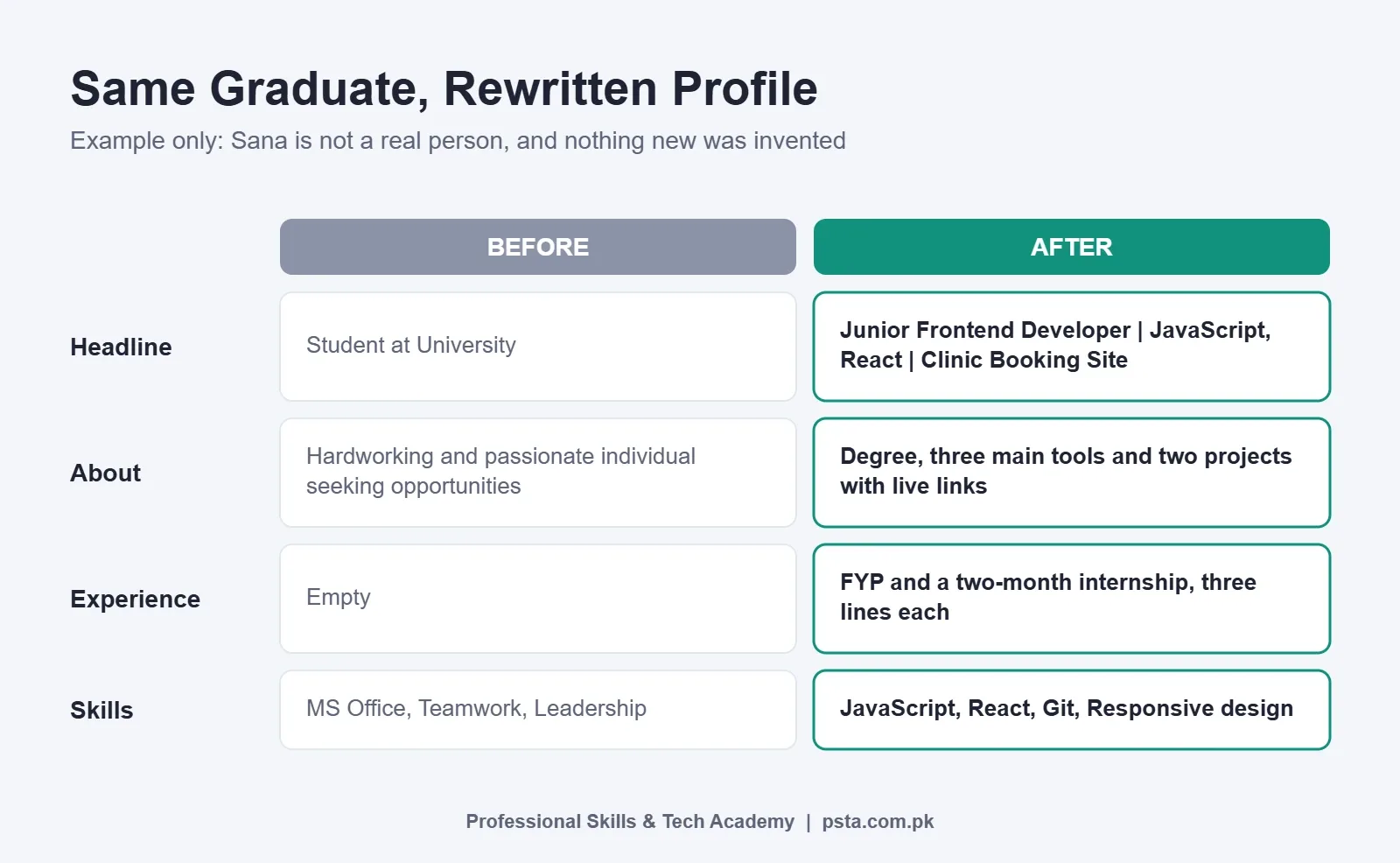
Nothing in the "after" version is invented. It is the same person with the same work, described in the words a recruiter searches for.
How Should You Connect With People Without Sounding Desperate?
Start with the people who already know you: classmates, teachers, internship colleagues and seniors from your university. Then add people in the roles and companies you want. Aim for steady growth, about 10 to 15 thoughtful requests a week, rather than hundreds of random ones.
Personalize requests to strangers. The note has a limit of 300 characters, which is enough for two sentences. A useful pattern is: who you are, why them, no request for a job.
For example: "Assalam o Alaikum Sir, I'm a 2026 Software Engineering graduate from Abbottabad. I read your post on hiring junior QA testers and found the checklist useful. I'd be glad to connect."
Don't send your CV in the first message. If they reply, thank them and ask one specific question, such as which skill their juniors lack most. Good spoken and written English helps here, and our English interview questions guide covers the same polite, direct tone you need in messages.
What Should a Fresh Graduate Post on LinkedIn?
You don't need to post every day. One useful post every week or two is enough to show you are active. Good topics for a new graduate are:
- A short write-up of your FYP: the problem, the tool, one thing that went wrong and how you fixed it
- What you learned from a certificate or workshop, in three or four practical points
- A before-and-after of something you built, such as a dashboard or a logo set
- A thoughtful comment on a post by someone in your field
Posts can run to 3,000 characters and comments to 1,250, but shorter is usually better. Comments are underrated. A clear, polite comment on a hiring manager's post puts your name in front of the same people your request is trying to reach.
Profile Errors That Make Recruiters Scroll Past
These are the errors that most often weaken a new profile:
- Mismatch with the CV: different dates or job titles on LinkedIn and on paper. Recruiters check both. Our list of fresh graduate CV mistakes covers the paper side.
- Spelling and grammar errors in the headline: these are the first words anyone reads.
- Copied About sections: phrases like "dynamic professional with a proven track record" read as copied, especially from someone with no track record yet.
- Skills you can't defend: if you list Python, expect a question on it in the interview.
- Silent profile: a full profile with no activity for a year looks abandoned.
- Casual photos: a selfie from a car seat or a group photo cropped down sends the wrong signal.
Final Check Before You Hit Save
Before you start applying, run through this list once. It takes ten minutes and catches most of the problems above.
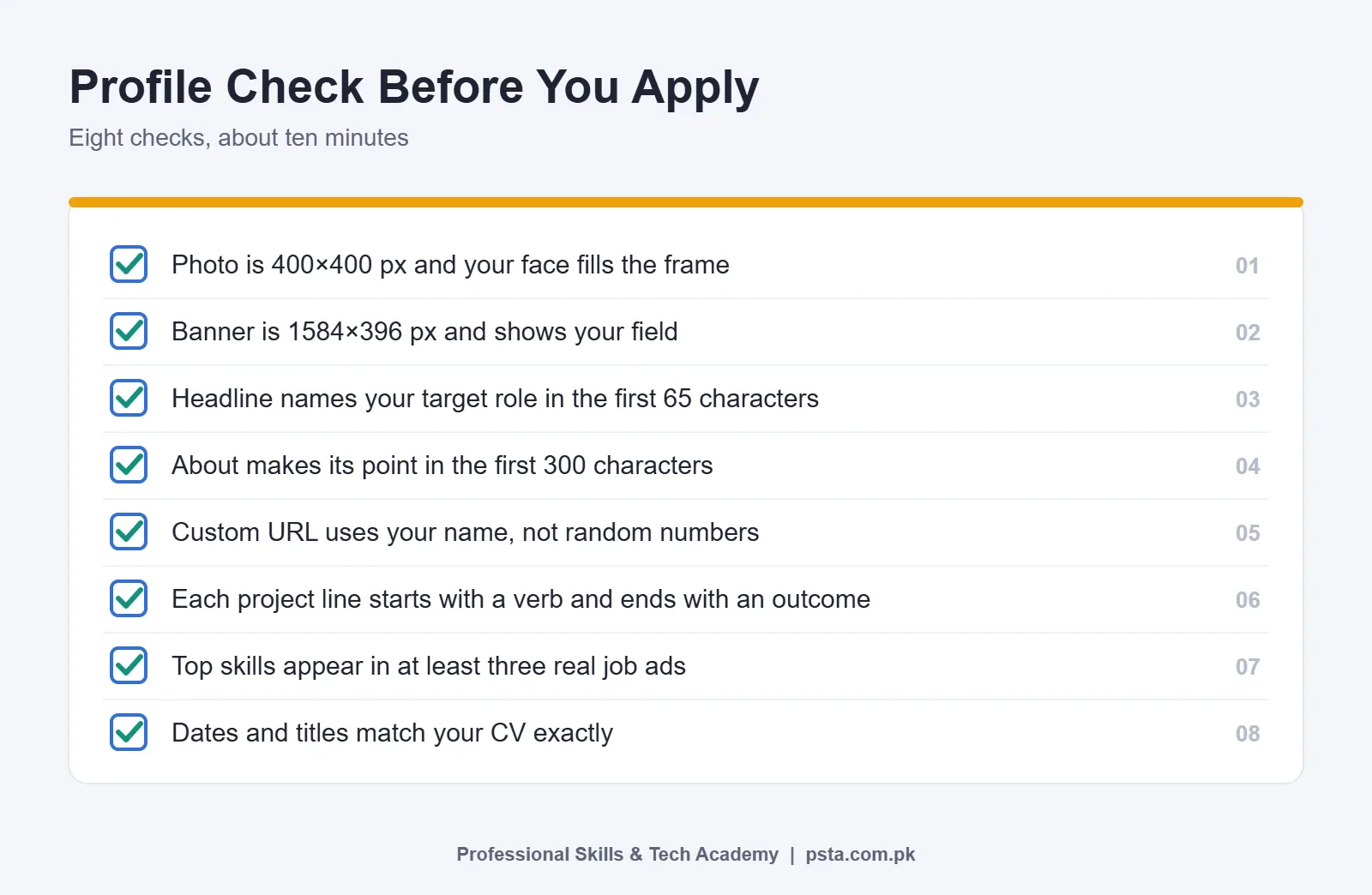
After that, review the profile once a month. Add new projects, update your skills and remove anything that no longer fits the role you want.
Where PSTA's English Classes Help With Your Profile
A lot of strong graduates have good skills but struggle to describe them in clear English. That gap shows in headlines, About sections and connection notes. PSTA's English Spoken & Grammar course is a 12-week, beginner-level program that includes a module on email, CV and message writing, along with interview practice, formal versus informal English and public speaking. The course page currently lists the fee as Rs. 12,000.
You can join on our Abbottabad campus, opposite FIMS College on Old College Road in Mandian, or take the live online classes from anywhere in Pakistan. If you join, the writing module is a sensible place to practice the short, clear lines a profile needs. To see every program, visit all PSTA courses, or go to the admission page when you are ready to choose a batch. Questions are welcome on WhatsApp at +92 314 5424399.
Spend 45 Minutes on Your Headline and About Section Tonight
Setting up LinkedIn for fresh graduates is not a one-evening job, so don't try to finish everything at once. Tonight, open three job ads for your target role, rewrite your headline using the formula from Step 2, and draft the first two paragraphs of your About section. Ask one classmate to read it and tell you what job they think you want. If their answer matches your target, you are on the right track.
Frequently asked questions
Should I make a LinkedIn profile before I graduate?
Yes. Start in your final year, while your FYP, internship and teachers are fresh. Recruiters can find you before you apply, and your supervisor can write a recommendation while they still remember your work. A half-finished profile in your last semester is better than a perfect one six months after the degree ends.
What should a fresh graduate write in the LinkedIn headline?
Write the role you want, two or three skills and one piece of proof, for example "Junior Data Analyst | Excel, SQL, Power BI | Sales Dashboard FYP". Keep the key words in roughly the first 65 characters, since that part shows in search results. Avoid "student at" and "aspiring", which tell a recruiter very little.
Is LinkedIn useful for jobs in Pakistan or only for jobs abroad?
It is useful locally too. NapoleonCat counted about 15.05 million LinkedIn users in Pakistan in September 2026, with people aged 25 to 34 as the largest group. Many software houses, banks, FMCG companies and startups post roles and check candidate profiles there, so a tidy profile helps for local applications as well as remote ones.
Should I turn on the green Open to Work frame?
If you are unemployed and actively applying, the public frame is fine and lets anyone see you are available. If you have a job or internship you want to keep, choose the recruiters-only setting instead, which shows your preferences to recruiter accounts without adding the frame to your photo.
Can I add my final year project to LinkedIn?
Yes, and you should. Add it under Projects with a clear title, two to four lines on what you built and the tools you used, and a link to the report, demo or code. If the project solved a real problem for a business or department, say so. For a new graduate, this is often the strongest proof of skill.
Do I need LinkedIn Premium as a fresh graduate?
No. A free account lets you build a full profile, connect with people, post, comment and apply for jobs. Finish the free profile first: photo, headline, About, projects, skills and a few good connections. Only consider a paid plan later if you have a specific feature in mind and can judge whether it is worth the cost.
How often should a fresh graduate post on LinkedIn?
One useful post every week or two is enough. Share what you built, what you learned from a course or workshop, or a short lesson from your FYP. Thoughtful comments on posts by people in your field also count as activity and are often easier to start with than full posts.
Sources & references
- LinkedIn users in Pakistan, September 2026 – NapoleonCat napoleoncat.com
- Disaggregating the Graduate Unemployment in Pakistan – PIDE pide.org.pk
- Skills-Based Hiring (March 2025) – LinkedIn Economic Graph economicgraph.linkedin.com
- LinkedIn character limits in 2026 – Eden eden.so
- LinkedIn size guide – Linearity linearity.io
- How to announce you are open to work on LinkedIn – AuthoredUp authoredup.com
Last reviewed & updated on by Umar Qureshi. Written by the PSTA team in Abbottabad, Pakistan.

Umar Qureshi
English Spoken & Grammar Course in Pakistan – Build Confidence, Speak Fluently (Online & Campus)
Turn this guide into a career: hands-on training with real projects, online across Pakistan or on-campus in Abbottabad · 12 Weeks.
Comments
No comments yet — ask a question or share your experience.