Quick answer
Most CCTV installation mistakes happen around the camera, not inside it: no site survey, choosing by megapixels instead of pixels per meter, cheap coax, runs past rated distances, overloaded PoE switches, IR glare from nearby walls, desktop hard drives, default passwords and a rushed handover. Each one has a simple, low-cost fix.
Key takeaways
- • Judge each camera position by pixels per meter: 250 px/m is the identify level under IEC EN 62676-4.
- • Use pure copper RG59 or proper Cat6, and keep PoE runs within 100 meters.
- • Add up maximum camera wattage so the PoE switch doesn't overload when IR switches on at night.
- • Keep IR beams clear of eaves and walls, clean domes, and always test after dark.
- • Change default passwords, give staff viewer-only accounts and update firmware before handover.
- • In KP, vulnerable establishments such as banks, hospitals and petrol pumps must arrange security, including CCTV.
Table of contents 23 sections
- Why Does Expensive Equipment Still Record Useless Footage?
- Planning Mistakes Made Before You Drill
- Mistake 1: Skipping the Site Survey
- Mistake 2: Judging Cameras by Megapixels Alone
- Mistake 3: Aiming Into Bright Light
- CCTV Installation Mistakes in Cabling and Power
- Mistake 4: Using Cable TV-Grade Coax
- Mistake 5: Ignoring Distance Limits
- Mistake 6: Overloading the PoE Budget
- Mistake 7: No Plan for Load-Shedding
- Mounting Mistakes That Ruin Night Footage
- Mistake 8: Mounting Next to Eaves and Walls
- Mistake 9: Leaving Cameras Within Easy Reach
- Recording and Storage Mistakes
- Mistake 10: Fitting a Desktop Hard Drive
- Mistake 11: Guessing Retention Days
- Mistake 12: Putting the Recorder in Plain View
- Which Security Settings Do Installers Forget?
- Is CCTV a Legal Requirement for Some Businesses?
- Handover Mistakes That Bring You Back Unpaid
- Mistakes and Fixes at a Glance
- Practicing Installations in PSTA's CCTV Lab
- Audit One System You Already Know
A belief behind many CCTV installation mistakes is that a higher-megapixel camera will always show a clear face. That's a myth. A 4 MP camera covering a wide car park can put fewer usable pixels on a face than a 2 MP camera aimed at a narrow shop door. Placement, cabling, power and setup decide whether footage helps when something goes wrong. The camera's box rarely does.
I see the same errors on student practice sites and on real jobs in shops, clinics and homes. This guide sorts them by the stage where they happen, so you can catch them before the client does. You'll learn:
- How to judge a camera position by pixels per meter instead of megapixels
- Which cable, distance and PoE errors cause video loss and night-time restarts
- Why domes fill with white glare at night and how to stop it
- The security and legal settings installers forget before handover
- A handover checklist you can print and keep in your tool bag
Why Does Expensive Equipment Still Record Useless Footage?
Most complaints from clients sound alike. "The camera was on, but we can't see who it was." "It worked for a week, then the screen went black." "The night picture is a white haze." None of these is a camera fault. Each one traces back to a decision the installer made, or skipped.
A camera system is a chain: the scene, the lens, the cable, the power supply, the recorder, the hard drive and the network. One weak link spoils the rest. A senior technician thinks through every link before quoting a price. A beginner usually thinks about the camera and the DVR, then improvises the rest on the day.
The CCTV installation mistakes below are grouped by stage: planning, cabling and power, mounting, recording, security, legal duties and handover.
Planning Mistakes Made Before You Drill
Mistake 1: Skipping the Site Survey
Every sound CCTV camera installation starts on paper. A proper CCTV site survey means walking the premises with the owner and asking one question per camera: what must this camera prove? "See the cash counter" and "identify the face of anyone at the main door" need very different positions and lenses. Write the answer next to each camera on a rough floor plan. Note mounting heights, cable routes, power points and where the recorder will sit.
Without that list, you end up placing cameras where they're easy to mount, such as high corners, instead of where they're useful.
Mistake 2: Judging Cameras by Megapixels Alone
What matters is how many pixels land on each meter of the scene. The IEC EN 62676-4:2015 standard, as summarized in TP-Link VIGI's DORI explainer, sets four levels:
| DORI Level | Pixels per Meter | What You Can Do With the Footage |
|---|---|---|
| Detect | 25 px/m | Tell that a person or vehicle is present |
| Observe | 62 px/m | Follow what someone is doing, with some detail on clothing |
| Recognize | 125 px/m | Tell whether this is someone you already know |
| Identify | 250 px/m | Identify a stranger beyond reasonable doubt |
Here's the quick check I teach. Divide the camera's horizontal resolution by the width of the scene in meters. A 4 MP camera at 2560 pixels wide, covering a 20-meter-wide car park, gives 128 px/m. That's recognition level, not identification. A 2 MP camera at 1920 pixels wide, aimed at a 6-meter-wide entrance, gives 320 px/m, which clears the identify level. The cheaper camera wins because it was placed for the job.
Mistake 3: Aiming Into Bright Light
A camera inside a shop pointing at a glass front door faces strong daylight behind every visitor. Faces turn into dark outlines. Where you can, mount the camera beside the door so it looks inward across people's faces, not out toward the street. If that's impossible, choose a model with true WDR and test it at midday before you finalize the bracket.
CCTV Installation Mistakes in Cabling and Power
Cabling is where most callback visits come from, and these CCTV installation mistakes are the hardest to fix once ceilings are closed. Problems often stay hidden for weeks, then show up as flickering, video loss or a camera that reboots every evening.
Mistake 4: Using Cable TV-Grade Coax
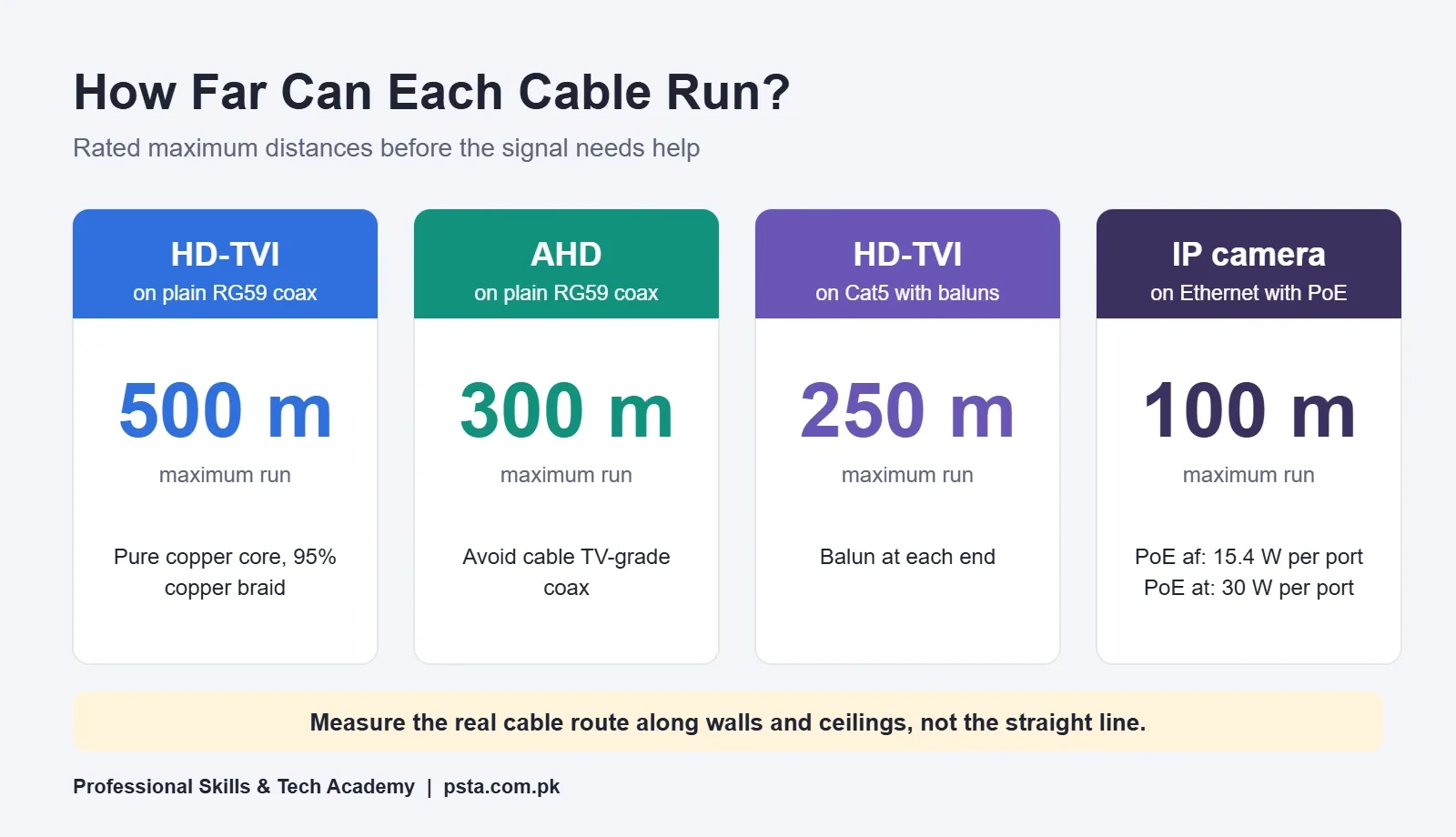
Not all RG59 is the same. CCTV Camera Pros' cable distance guide recommends RG59 with a 100% pure copper center conductor and at least a 95% copper braid shield. It warns against cable TV-grade RG59, which uses copper-clad steel and an aluminum shield. That cheaper roll can look fine on a short test run and fail on a long one.
Mistake 5: Ignoring Distance Limits
Each transmission type has a ceiling. The same guide lists about 500 meters for HD-TVI over plain RG59 and about 300 meters for AHD. With video baluns over Cat5, it gives about 250 meters for HD-TVI and 300 meters for AHD. For IP cameras, every PoE standard listed on this PoE standards reference is specified to 100 meters of Ethernet cable.
Measure the actual cable route, not the straight-line distance. A camera 70 meters away across a factory yard can need 110 meters of cable once you follow walls and ceilings.
Mistake 6: Overloading the PoE Budget
The same reference shows that an IEEE 802.3af port supplies at least 15.4 W at the switch, with 12.95 W guaranteed at the device after 100 meters. An 802.3at port supplies 30 W, with 25.4 W at the device. A switch also has a total power budget shared by all ports.
Add up the maximum power figure from each camera's datasheet, not the typical figure. Cameras often draw more at night when infrared LEDs switch on, so a system can run all day and start rebooting after sunset. Keep at least some spare budget for a future camera.
Mistake 7: No Plan for Load-Shedding
Load-shedding still hits many parts of Pakistan, and outages often come at night when cameras matter most. A system with no backup goes blind exactly when a break-in is likely. Put the recorder, the PoE switch and the router on a UPS or the building's inverter line. Ask the owner which circuits stay live during outages before you choose power points.
Mounting Mistakes That Ruin Night Footage
Mounting errors are the CCTV installation mistakes clients notice first, because the night picture looks wrong from day one.
Mistake 8: Mounting Next to Eaves and Walls
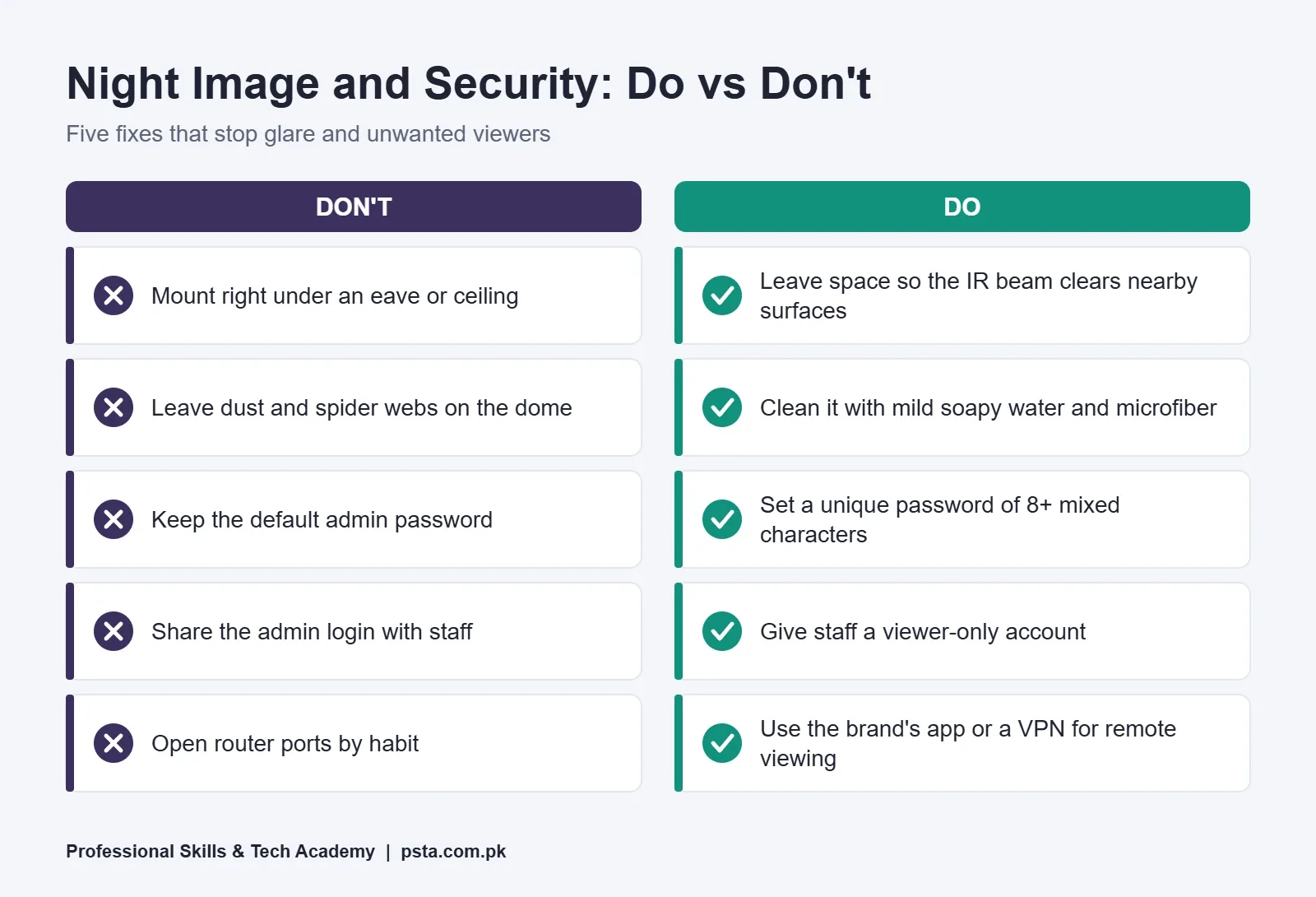
If a dome camera's night image looks washed out, the cause is usually infrared reflection. Axis Communications' white paper on IR reflections explains that IR light bounces back from nearby walls, eaves, ceilings, poles and glossy surfaces into the lens. Dirt, dust, spider webs and water droplets on the dome do the same.
The fixes are practical:
- Move the camera a little away from the eave or ceiling, or tilt it so the IR beam clears nearby surfaces.
- Paint or cover shiny metal or glass close to the lens if you can't move the camera.
- Keep the rubber ring inside the dome intact and avoid tilting the lens further than needed.
- Clean the dome with mild soapy water and a soft microfiber cloth, as Axis suggests.
- Keep outdoor lamps from pointing straight at the lens.
Always check the image after dark before you leave the site. A daytime test hides this problem completely.
Mistake 9: Leaving Cameras Within Easy Reach
A camera at head height can be twisted, covered or sprayed in seconds. Mount it high enough to be out of reach, but not so high that you only capture the tops of heads. For entrances, a moderate height with a slight downward angle catches faces better than a corner near the ceiling.
Recording and Storage Mistakes
Mistake 10: Fitting a Desktop Hard Drive
A recorder writes video around the clock. Western Digital describes its WD Purple surveillance drives as built for 24x7 DVR and NVR recording, with a workload rating of up to 180 TB per year, about three times that of desktop drives. A surveillance hard drive costs more than a spare desktop drive, but it is designed for constant writing. Other makers sell similar surveillance lines.
Mistake 11: Guessing Retention Days
Owners usually discover how many days the system keeps only after they need older footage. Agree on retention in writing, then size the drive with bitrate and recording hours. Our CCTV storage calculation guide walks through the formula with a worked shop example.
Mistake 12: Putting the Recorder in Plain View
If the DVR sits on the shop counter, a thief can simply take the evidence. Place it in a locked cabinet or a back room, with ventilation, and keep the monitor separate if staff need a live view.
Which Security Settings Do Installers Forget?
Security settings are the CCTV installation mistakes that stay invisible until someone else is watching the feed. An internet-connected camera system is a computer on the network. Treat it like one. In April 2026, South Korea's Personal Information Protection Commission urged users to change IP camera passwords, after police arrested four suspects accused of hacking about 120,000 cameras, according to The Asia Business Daily. The commission's advice included changing the default account and password at purchase and using passwords of at least eight characters that mix letters, numbers and symbols.
Before handover, work through this short list:
- Set a strong, unique DVR password for the admin account, and do the same on every camera. Never leave the installer's own password behind.
- Create a separate viewer account for staff, with no right to delete footage or change settings.
- Update recorder and camera firmware from the manufacturer's official site.
- Prefer the brand's cloud app or a VPN for remote viewing over opening router ports to the internet.
- Set the correct time and date so footage is usable as evidence.
These steps belong to network security as much as to CCTV. If this side interests you, our Cyber Security and Ethical Hacking course covers it in depth.
Is CCTV a Legal Requirement for Some Businesses?
For some premises, yes, and installers should know the basics. Khyber Pakhtunkhwa's 2015 security law for sensitive and vulnerable places (Act No. III of 2015) requires vulnerable establishments to make appropriate security arrangements, and its definition of those arrangements includes CCTV cameras. The Act's list of vulnerable establishments includes hospitals, banks, hotels of three stars and above, petrol and CNG stations, and jewelry shops. The owner, lessee or occupant is responsible. The penalty can reach one year's imprisonment, a fine of up to Rs. 40,000, or both, and premises can be sealed for continuing violations.
District police also issue orders of their own. In July 2026, ProPakistani reported that Faisalabad police gave shops, stores, markets and malls one month to install surveillance cameras, warning of legal action and sealing.
The KP Act doesn't set a footage retention period, so ask the client whether their bank, insurer or local police has given them one. Respect privacy too. Never point cameras into washrooms or changing areas, and avoid looking straight into a neighbor's home. I'm not a lawyer, so for a specific site the owner should confirm current rules with the local police station.
Handover Mistakes That Bring You Back Unpaid
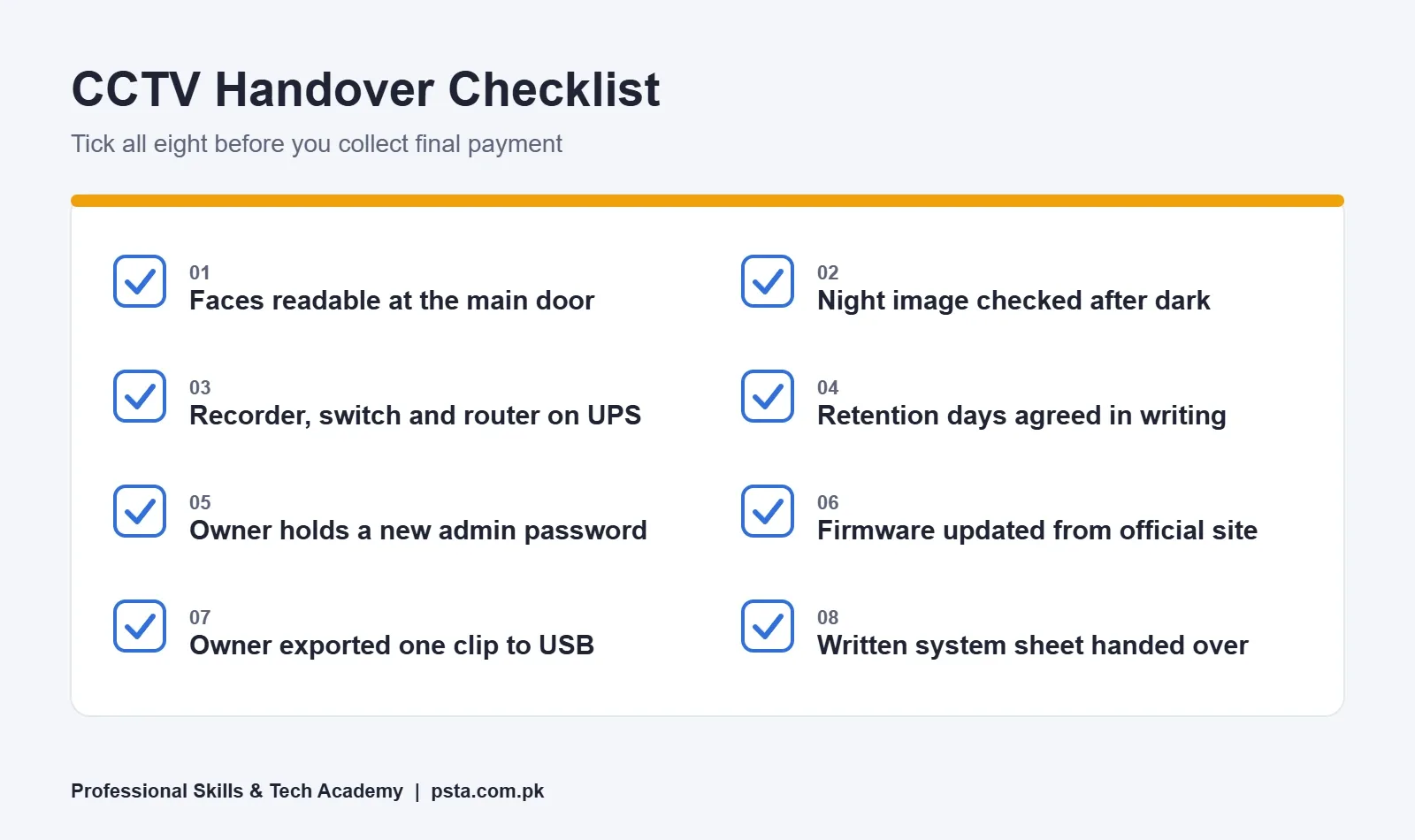
A job isn't finished when the last camera shows a picture. Many callbacks happen because the owner was never shown how to use the system. Spend 20 minutes on a proper handover:
- Show the owner how to play back footage by date and time.
- Export one short clip to a USB drive together, so they know how to hand evidence to police.
- Set up the mobile app on the owner's phone with their own account.
- Hand over a written sheet with camera positions, passwords stored by the owner, and retention days.
- Agree on a maintenance visit for cleaning domes and checking the drive's health.
Mistakes and Fixes at a Glance
| Stage | Common Mistake | Fix |
|---|---|---|
| Planning | No written goal per camera | Survey the site and note what each camera must prove |
| Planning | Choosing by megapixels | Check pixels per meter against the DORI level you need |
| Cabling | Cable TV-grade coax | Pure copper RG59 or proper Cat6 |
| Cabling | Runs beyond the rated distance | Measure the real route; stay within 100 m for PoE |
| Power | PoE budget used up | Add maximum wattage per camera and keep spare budget |
| Power | No backup during outages | Put recorder, switch and router on a UPS |
| Mounting | Glare from IR reflection | Clear eaves and walls; clean the dome; test after dark |
| Recording | Desktop drive, guessed retention | Surveillance-rated drive sized by calculation |
| Security | Default or shared passwords | Unique admin password, separate viewer account, current firmware |
| Handover | Owner can't export footage | Train the owner and leave a written system sheet |
If you're still deciding which kind of system to install in the first place, read our IP camera vs analog camera comparison before you buy cable.
Practicing Installations in PSTA's CCTV Lab
Every one of these CCTV installation mistakes is easier to spot and fix on a lab wall than on a client's ceiling. PSTA's Certified Professional CCTV Surveillance and AI Security Technician (CPCST) course runs for 12 weeks and is set at beginner level. The course page lists the fee at Rs. 22,000, reduced from Rs. 25,000.
Its modules include transmission media (coax, twisted pair and fiber basics), PoE switching and VLANs, NVR deployment with RAID storage, remote access through P2P cloud and VPNs, and a full module on troubleshooting, maintenance and system hardening. There's also a module on site surveys and system design, which is exactly where the planning mistakes above are prevented.
If travel to Abbottabad is hard, the same classes are taught live over the internet, and a hybrid mix is allowed. Batches open every month. To compare other technical programs, browse all PSTA courses, or go straight to the admission page when you're ready.
Audit One System You Already Know
Pick a camera system you can access this week, maybe at home or at a relative's shop. Check five things: whether faces are readable at the main door, whether the night image has glare, whether the recorder runs on backup power, how many days of footage are actually stored, and whether the admin password was ever changed. Write down every gap you find. That short audit of CCTV installation mistakes will teach you more than another hour of product videos.
Frequently asked questions
What is the most common CCTV installation mistake?
Skipping the site survey is the most common one, because every later error grows from it. Without a written goal for each camera, installers mount cameras where they're easy to fix, not where they capture faces or number plates. Walk the premises with the owner first, decide what each camera must prove, and plan lens, height and cable route from that answer.
Why does my CCTV camera show a white haze at night?
A white haze at night usually comes from infrared light bouncing back into the lens. Nearby eaves, walls, ceilings or a dusty, webbed dome cover reflect the camera's own IR. Move or tilt the camera so the beam clears surfaces, clean the dome with mild soapy water and a microfiber cloth, and recheck the image after dark.
How many meters can an IP camera cable run with PoE?
Standard PoE over Ethernet is specified for runs of up to 100 meters between the switch and the camera, for 802.3af, 802.3at and 802.3bt alike. Measure the actual route along walls and ceilings, not the straight line. For longer distances, plan a second switch, a PoE extender or a fiber link instead of stretching the cable.
Can I use a normal computer hard drive in a DVR?
It will work at first, but it isn't designed for constant recording. Surveillance drives such as WD Purple are built for 24x7 writing, and Western Digital rates them for up to 180 TB of workload per year, about three times a desktop drive. For a system clients rely on, fit a surveillance-rated drive.
Why does my PoE camera restart only at night?
Night-time restarts often point to a PoE power budget problem. Many cameras draw more power when their infrared LEDs switch on after dark, so a switch that copes during the day can run short at night. Add up the maximum wattage from each datasheet, compare it with the switch's total budget, and leave spare capacity.
Is CCTV compulsory for shops in Pakistan?
It depends on the province, district and type of business. In Khyber Pakhtunkhwa, a 2015 security law requires vulnerable establishments, such as banks, hospitals, jewelry shops and petrol and CNG stations, to make security arrangements that can include CCTV. Some district police, as in Faisalabad in 2026, have also ordered shops to install cameras. Check with your local police station.
How do I keep my DVR from being hacked?
Change the default admin password to a long, unique one, and give staff a separate viewer-only account. Update the recorder and camera firmware from the maker's official site. Avoid opening router ports out of habit; use the brand's cloud app or a VPN for remote viewing. Review the user list whenever an employee leaves.
Sources & references
- What is DORI? (TP-Link VIGI) vigi.com
- CCTV Camera Video Max Cable Length Guide (CCTV Camera Pros) videos.cctvcamerapros.com
- PoE Standards: 802.3af, 802.3at and 802.3bt poepower.smps.us
- IR Reflections in Dome Cameras (Axis Communications) whitepapers.axis.com
- WD Purple Surveillance Hard Drives (Western Digital) westerndigital.com
- IP Camera Hacking Warning, April 2026 (The Asia Business Daily) view.asiae.co.kr
- KP Sensitive and Vulnerable Establishments and Places (Security) Act 2015 pakp.gov.pk
- CCTV Cameras Made Mandatory for Shops (ProPakistani) propakistani.pk
Last reviewed & updated on by Umar Qureshi. Written by the PSTA team in Abbottabad, Pakistan.

Umar Qureshi

Certified Professional CCTV Surveillance & AI Security Technician (CPCST)
Turn this guide into a career: hands-on training with real projects, online across Pakistan or on-campus in Abbottabad · 12 Weeks.


Comments
No comments yet — ask a question or share your experience.