
Quick answer
A CCTV storage calculation multiplies each camera's main-stream bitrate by recording time. One camera at 1 Mbps writes 10.8 GB a day. Add every camera, multiply by your retention days and add about 10% headroom. Eight cameras at 3 Mbps for 30 days need roughly 8.6 TB. Then choose a surveillance drive rated for the workload.
Key takeaways
- • Storage equals bitrate × time, and 1 Mbps for 24 hours is 10.8 GB.
- • Decide retention days first and write them into the quotation.
- • Read each camera's main-stream bitrate and plan with the VBR maximum.
- • Add about 10% headroom, since a 6 TB drive shows about 5,588 GB on many recorders.
- • Compare yearly writes with the drive's workload rating, such as 180 TB a year for WD Purple.
- • Measure real GB per day after one week and adjust bitrates.
Table of contents 12 sections
- What Does a CCTV Storage Calculation Actually Measure?
- The One Formula You Need
- Step 1: Decide How Many Days You Must Keep Footage
- Step 2: Find the Real Bitrate of Every Camera
- H.265 vs H.264: How Much Does It Save?
- Step 3: Calculate Daily Storage and Add Headroom
- Worked Example: Sizing Storage for an 8-Camera Shop
- Step 4: Pick a Drive Rated for the Workload
- Why Does Your Recorder Show Less Space Than the Label?
- Step 5: Test Your Estimate After One Week
- Learn CCTV System Design With PSTA
- Try It Yourself: Size One Real System
Example: a garment shop owner skips the CCTV storage calculation, buys eight cameras and a 2 TB drive, and assumes it will hold a month of video. Three weeks later a customer disputes a sale from 12 days ago. The recorder kept only about a week, so that footage was overwritten long ago.
A CCTV storage calculation prevents exactly this. It takes about ten minutes and needs only basic multiplication. It also tells you which hard drive to buy before you quote a client. The method below is the same one we use in our lab when students size a system for a real building.
In this guide you will learn:
- The single formula behind every storage calculator, and where its numbers come from
- How to decide on a retention period that a police officer or client will accept
- Where to find the true bitrate of each camera on a DVR or NVR
- A full worked example for an 8-camera shop, with three ways to make it fit
- How to pick a surveillance hard drive and test your estimate after one week
What Does a CCTV Storage Calculation Actually Measure?
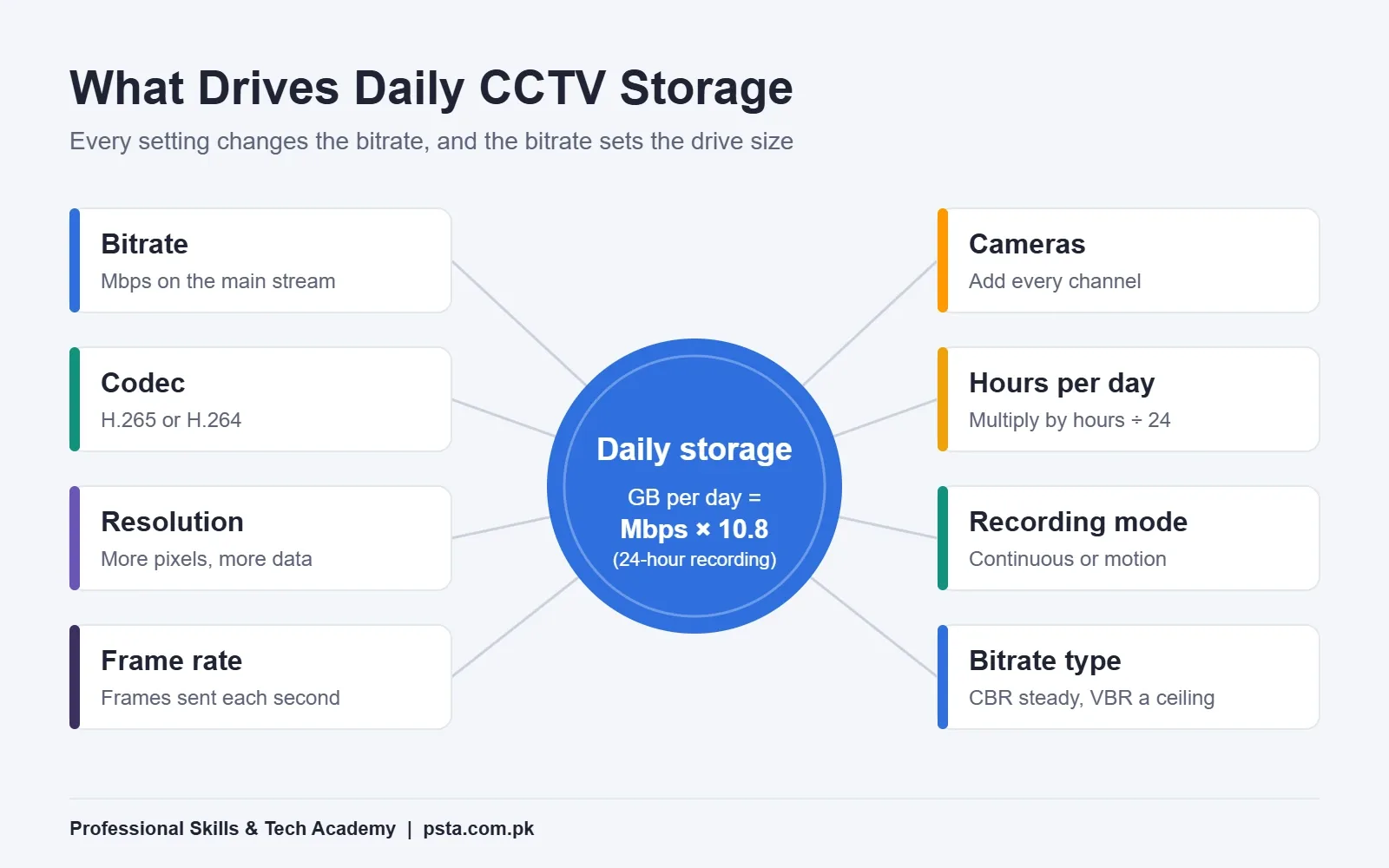
It measures one thing: how many bytes your cameras send to the recorder over the period you need to keep. Resolution, codec and frame rate all matter, but only because they change that flow of data. The recorder doesn't care that a camera is "4MP". It cares how many megabits per second arrive on each channel.
That flow is called the bitrate, and it's measured in Mbps (megabits per second) or Kbps on most Hikvision, Dahua and Uniview menus. Once you know the bitrate, storage becomes simple arithmetic. If you guess the bitrate, every number after it is a guess too.
Every CCTV storage calculation tool asks for the same inputs. Hikvision's own Disk Calculator guide lists them: device type, resolution, frame rate, compression and recording hours per day. You then enter either the disk space you have or the retention you want. Learn the math once and you won't depend on any of them.
The One Formula You Need
Every CCTV storage calculation comes down to bitrate multiplied by time. The only tricky part is converting bits into bytes. There are 8 bits in a byte and 3,600 seconds in an hour, so one camera at 1 Mbps writes 3,600 megabits an hour. Divide by 8 and you get 450 MB, or 0.45 GB per hour.
Over a full day that is 10.8 GB for every 1 Mbps of bitrate. Keep that number in your head. It turns most site surveys into mental math.
GB per day = bitrate in Mbps × 10.8 × (recording hours ÷ 24)
Here is what one camera writes in 24 hours of continuous recording at common bitrates:
| Bitrate per camera | Per hour | Per day (24 h) | Per 30 days |
|---|---|---|---|
| 1 Mbps | 0.45 GB | 10.8 GB | 324 GB |
| 2 Mbps | 0.9 GB | 21.6 GB | 648 GB |
| 3 Mbps | 1.35 GB | 32.4 GB | 972 GB |
| 4 Mbps | 1.8 GB | 43.2 GB | 1,296 GB |
| 6 Mbps | 2.7 GB | 64.8 GB | 1,944 GB |
These figures use decimal units (1 GB = 1 billion bytes), the same units drive makers print on the box.
Step 1: Decide How Many Days You Must Keep Footage
Start your CCTV storage calculation with retention, not cameras. The number of days decides the drive size more than anything else, and it's a business decision, not a technical one.
Ask the client three questions before you promise any DVR recording days:
- How long after an incident do problems usually come to light? Shops often hear about a dispute days later, not the same evening.
- Has any authority asked for a minimum? Local orders are becoming more common.
- Do they need every hour, or only shop hours?
Local rules are tightening. In July 2026, Faisalabad police gave shops, departmental stores, wholesale markets and malls one month to install CCTV, according to ProPakistani. In Khyber Pakhtunkhwa, CCTV appears in the Sensitive and Vulnerable Establishments and Places (Security) Act, 2015. It lists cameras among the security arrangements that covered sites may be asked to provide.
If you plan to work in the Gulf, retention can be written into the rules. Kuwait Times reported in July 2026 that Kuwait's interior ministry wants footage kept for 120 days without alteration. The list covers hotels, malls, banks, gold shops and many other sites. That single requirement multiplies storage four times compared with a 30-day plan.
For a typical small shop in Pakistan with no written rule, 30 days is a sensible default. Write the agreed figure into your quotation so nobody argues about it later.
Step 2: Find the Real Bitrate of Every Camera
Don't take the CCTV bitrate from a brochure. Open the recorder or the camera's web page and check the encoding settings for the main stream. That's the stream most recorders save. The sub stream is the small, low-bitrate version used for phone viewing and grid view.
On most recorders you will find four settings that matter here:
- Video encoding: H.264, H.265, or a vendor variant such as H.265+.
- Bitrate type: constant (CBR) or variable (VBR).
- Max bitrate: the ceiling in Kbps, such as 2048 or 4096.
- Frame rate: frames per second the camera sends.
With CBR, the camera sends close to the set value all the time, so your math will be close. With VBR, the setting is a ceiling. A quiet storeroom may average far less. A busy road, or a scene full of rain and night-time sensor noise, can sit near the maximum. When you can't measure yet, plan with the maximum. You'll have spare space rather than missing days.
H.265 vs H.264: How Much Does It Save?
H.265 (also called HEVC) is the newer codec, and the ITU still maintains it, with the latest edition dated January 2026. The HEVC article on Wikipedia puts the gain at 25% to 50% better compression than H.264 at the same visual quality. Treat that as a range, not a promise.
There are trade-offs. CCTV Camera World notes that H.265 needs more processing power to decode, and that support varies between brands and playback software. Before switching every channel, check that the recorder supports H.265 on all of them and that the client's PC can play the exported clips.
Step 3: Calculate Daily Storage and Add Headroom
Now put the numbers together. A CCTV storage calculation is easy to check when it's written as steps. Follow the same order every time so nothing gets missed:
- Write each camera's main-stream bitrate in Mbps. Convert Kbps by dividing by 1,000 (4096 Kbps is about 4.1 Mbps).
- Multiply each bitrate by 10.8 to get GB per day for 24-hour recording.
- If a camera records fewer hours, multiply by hours ÷ 24.
- Add all the cameras together to get system GB per day.
- Multiply by your retention days.
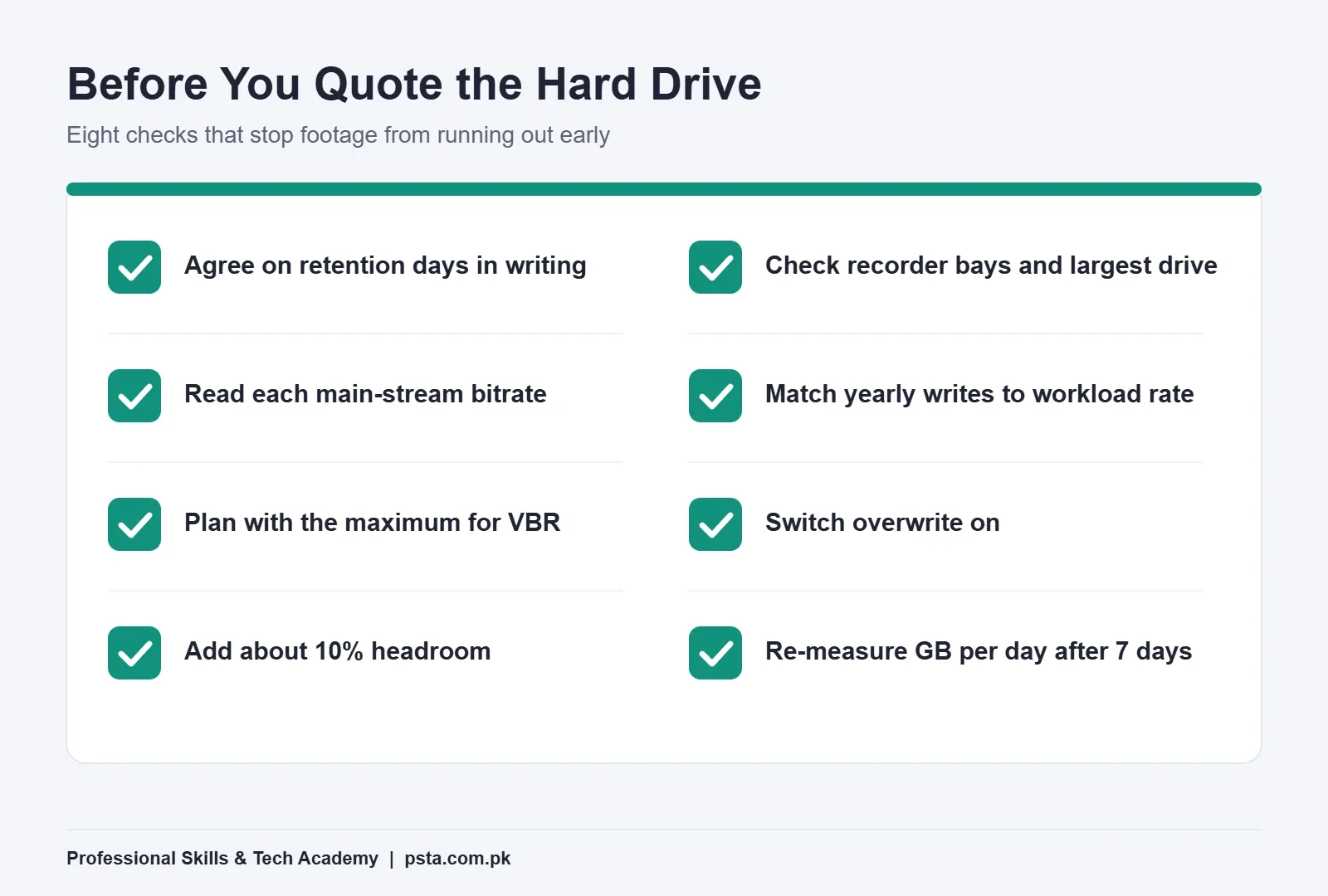
- Add about 10% headroom for file system overhead, VBR peaks and the gap between label capacity and usable space.
Group identical cameras to save time. Eight cameras at the same setting are just one line: 8 × bitrate × 10.8.
Motion-only recording can cut storage sharply in a quiet space, but it's hard to predict on paper. An office corridor at night may barely record, while a shop entrance on a busy road triggers all day. Size for continuous recording first. Then treat motion recording as a bonus you confirm in Step 5.
Worked Example: Sizing Storage for an 8-Camera Shop
This is a realistic example, not a real client. A two-floor shop on a busy road wants eight 4MP cameras recording around the clock, with 30 days of footage. The installer sets every camera to H.265 with a 3 Mbps main stream.
| Line | Calculation | Result |
|---|---|---|
| One camera per day | 3 Mbps × 10.8 | 32.4 GB |
| Eight cameras per day | 32.4 GB × 8 | 259.2 GB |
| 30 days | 259.2 GB × 30 | 7,776 GB |
| Plus 10% headroom | 7,776 GB × 1.1 | about 8.6 TB |
| Same system kept for 120 days | 259.2 GB × 120 | about 31.1 TB before headroom |
So that 2 TB drive from the opening example lasts only about a week at these settings. 8.6 TB isn't a single standard drive size, so you have three honest options to offer the client:
- Lower the bitrate after testing. At 2 Mbps the same system needs 5,184 GB, or about 5.7 TB with headroom, which fits a 6 TB drive. Check playback first. Faces and banknotes must still be clear.
- Use two drives. If the recorder has two bays, two 6 TB drives give room to spare and leave space to add cameras later.
- Agree on fewer days. At 3 Mbps, an 8 TB drive holds about 28 days if you allow 10% headroom. Some clients accept that once they see the cost difference.
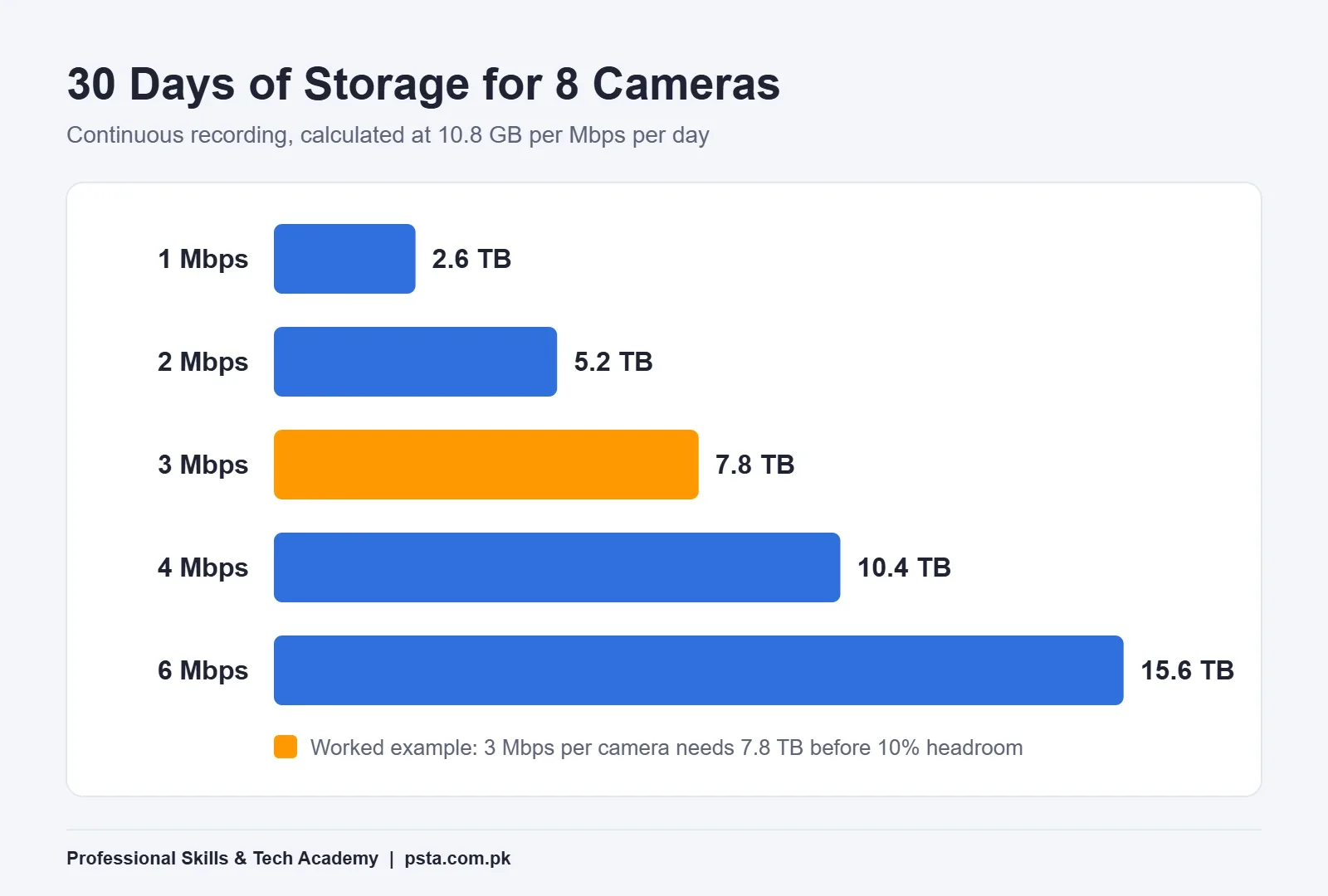
The chart turns this CCTV storage calculation into a picture. Bitrate is the setting to argue about. Doubling it doubles the drive you need. Retention behaves the same way, which is why a 120-day rule moves a small shop system into multi-bay NVR territory.
Step 4: Pick a Drive Rated for the Workload
Getting the NVR hard disk size right is only half the job. A recorder writes all day, every day. Desktop drives are designed for a different pattern, so use a surveillance hard drive made for constant writing from many streams.
Western Digital's WD Purple product page is a good model of what to read on any spec sheet. It lists capacities from 1 TB to 8 TB and support for up to 64 HD cameras. It also gives a workload rate of up to 180 TB per year and a 3-year limited warranty. The page describes it as built for 24x7 surveillance recording.
The workload rate is the number most installers skip. Our 8-camera example writes 259.2 GB a day, which is about 94.6 TB a year. That sits comfortably inside a 180 TB rating. Now picture 32 cameras at 4 Mbps: that's roughly 505 TB a year, far beyond it. Large systems need drives rated for heavier work, more drives sharing the load, or both.
Before you buy, also check the recorder itself:
- How many SATA bays it has
- The largest single drive it supports, listed on its datasheet
- Whether it supports RAID if the client can't afford to lose footage when one drive fails
Why Does Your Recorder Show Less Space Than the Label?
Because drive makers and recorders count differently. Western Digital's page states that 1 TB equals one trillion bytes. Many recorders and computers count in binary units, where one "GB" is 1,073,741,824 bytes.
So a 6 TB drive appears as about 5,588 GB on many recorders, and a 1 TB drive as about 931 GB. Nothing is missing. This gap is one reason the 10% headroom in Step 3 matters. Explain it to clients up front, because "I paid for 6 TB" is a common complaint on handover day.
Step 5: Test Your Estimate After One Week
A CCTV storage calculation on paper gets you close. Real scenes decide the final figure, especially with VBR and motion recording. Seven days after installation, go back and measure:
- Note the used space on the HDD page of the recorder, along with the date and time.
- Divide the used space by the number of days recorded to get your real GB per day.
- Divide the drive's usable capacity by that figure to get real retention days.
- Search the playback timeline for the oldest recording and confirm it matches.
- Make sure overwrite is switched on, so the recorder replaces the oldest footage instead of stopping when the drive fills.
If real retention is short, lower the bitrate on cameras facing quiet areas first, and keep the highest settings on entrances and cash counters.
Learn CCTV System Design With PSTA
A correct CCTV storage calculation is one part of designing a system that holds up in real use. Our CCTV installation course, the Certified Professional CCTV Surveillance & AI Security Technician (CPCST), runs for 12 weeks and starts from the basics, so no prior experience is needed. You can take it online from anywhere in Pakistan or attend classes at our Abbottabad campus. At the time of writing, the fee shown on the course page is Rs. 22,000 (regular price Rs. 25,000).
The modules relevant to this guide include:
- Analog System Architecture: DVR Configuration & Power Management
- NVR Deployment, RAID Storage & Bandwidth Optimization
- Network Infrastructure: PoE Switching, VLANs & Wireless Bridges
- Professional Site Surveys, System Design & AutoCAD Basics
- Business Development: Quotations, Contracts & Freelancing
Practice happens in our lab with IP cameras, NVRs and network tools. If you want to draw site layouts properly, our AutoCAD course pairs well with it. Remote viewing also opens a recorder to the internet, so the Cyber Security & Ethical Hacking course is a useful next step. If you already work with control panels, our guide on industrial automation shows how many of the same wiring and safety habits carry over.
Browse all programs on our courses page, or apply through online admission. Questions are welcome on WhatsApp at +92 314 5424399. To visit in person, our Abbottabad campus sits opposite FIMS College in Mandian, on Old College Road.
Try It Yourself: Size One Real System
Pick a building you know well: your home, a relative's shop, or your college gate. Decide how many cameras it needs and how many days to keep. Assume 2 Mbps per camera, do the CCTV storage calculation, and add 10%. Then repeat with 4 Mbps and compare the two drive sizes.
If you can explain the difference to a client in two sentences, you've learned the most useful skill in CCTV quoting. Bring your numbers to class and we'll check them together.
Frequently asked questions
How many days will a 1 TB drive record for 4 cameras?
It depends on bitrate. At 2 Mbps per camera, four cameras write about 86.4 GB a day with continuous recording. A 1 TB drive holds about 1,000 GB, and after setting aside 10% headroom you get roughly 10 days. Lower the bitrate, record fewer hours or use motion recording and the number goes up. Measure after a week to confirm.
Does a 4MP camera always use more storage than a 2MP camera?
Not always. Storage follows the bitrate, not the megapixel label. A 2MP camera set to a high bitrate can use more space than a 4MP camera set to a modest one with H.265. Resolution matters because higher resolutions usually need a higher bitrate to look sharp, so check the actual encoding settings on each channel.
Is motion recording enough for a shop?
It can save a lot of space in quiet areas, but it is risky as the only plan. A missed trigger means missing footage, and busy entrances may trigger all day anyway. Many installers record continuously on entrances and cash counters, use motion recording on storerooms, and size the drive for continuous recording first.
Can I use a normal desktop hard drive in a DVR or NVR?
It may work at first, but a recorder writes video around the clock. Surveillance drives are built for that pattern. WD Purple, for example, is rated for up to 180 TB of writes a year and 24x7 recording. A desktop drive in a busy recorder may fail sooner, so check the workload rating before you buy.
What happens when the CCTV hard drive is full?
If overwrite is switched on, the recorder deletes the oldest footage and keeps recording, so you always have the latest days. If overwrite is off, recording can stop when the drive fills up. Check this setting during installation and again during your one-week test, because a full drive with overwrite off records nothing new.
Does the sub stream add to storage?
On most recorders the main stream is what gets saved, and the sub stream is used for phone viewing and multi-camera grids. Some recorders can also record the sub stream or a dual stream. If that option is turned on, add the sub-stream bitrate to your calculation as well, then confirm usage after a week.
Do I need RAID for a CCTV system?
Not for most homes and small shops, where one drive with overwrite is normal. RAID becomes worth it when losing footage from a failed drive would cause real problems, such as at banks or larger sites. It needs a recorder that supports RAID and extra drives, so include that cost in the quotation from the start.
Sources & references
- Hikvision Disk Calculator How-To Guide us-legacy.hikvision.com
- WD Purple Surveillance Hard Drive (Western Digital) wdc.com
- ITU-T H.265: High Efficiency Video Coding itu.int
- High Efficiency Video Coding (Wikipedia) en.wikipedia.org
- What Is H.265 and When to Use It With Security Cameras (CCTV Camera World) cctvcameraworld.com
- CCTV Cameras Made Mandatory for Shops (ProPakistani) propakistani.pk
- KP Sensitive and Vulnerable Establishments and Places (Security) Act, 2015 pakp.gov.pk
- Interior Ministry Urges Businesses to Retain Surveillance Recordings for 120 Days (Kuwait Times) kuwaittimes.com
Last reviewed & updated on by Umar Qureshi. Written by the PSTA team in Abbottabad, Pakistan.

Umar Qureshi

Certified Professional CCTV Surveillance & AI Security Technician (CPCST)
Turn this guide into a career: hands-on training with real projects, online across Pakistan or on-campus in Abbottabad · 12 Weeks.



Comments
No comments yet — ask a question or share your experience.