Quick answer
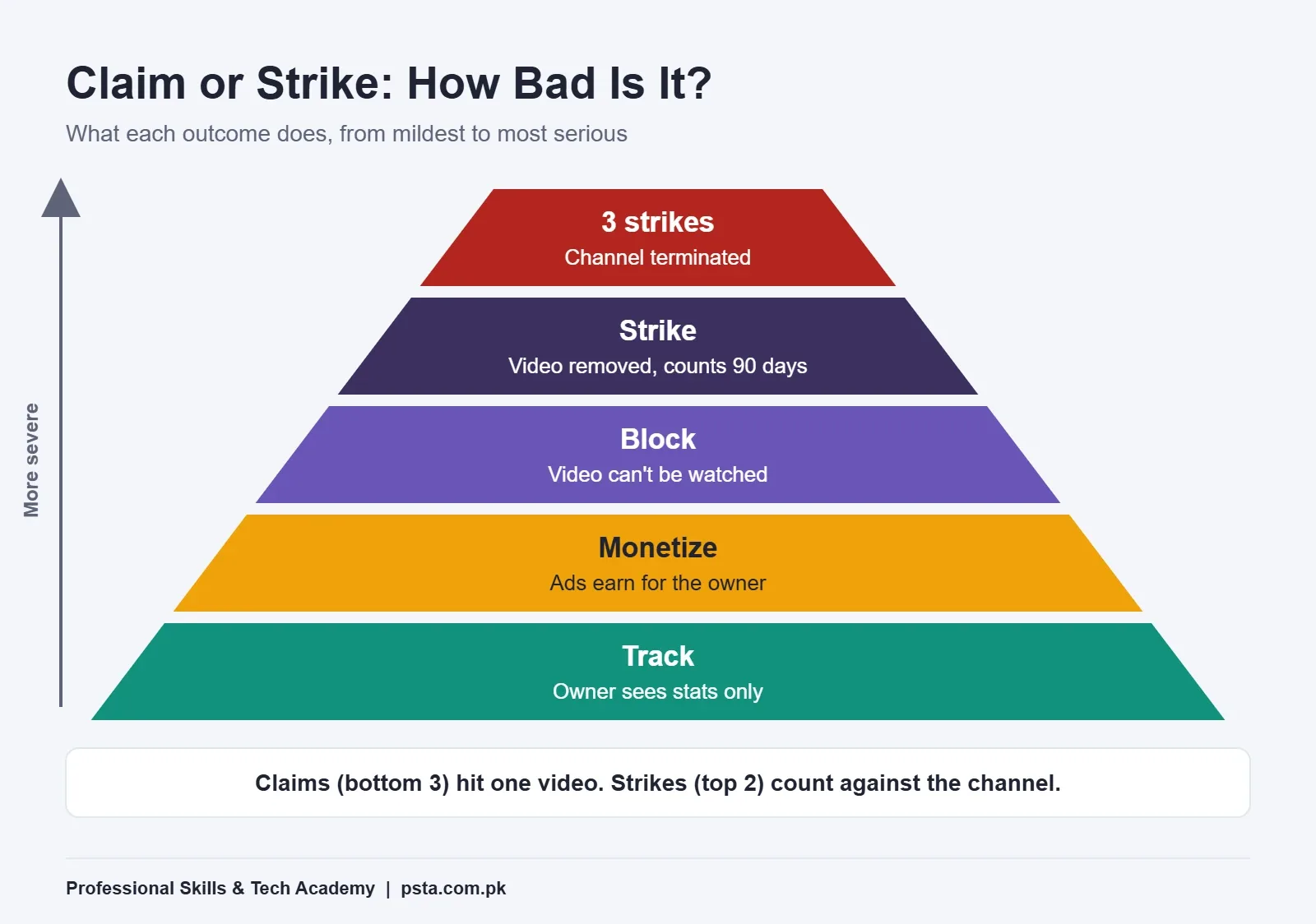
A copyright claim is an automatic Content ID match that lets the owner track, monetize or block one video, and it usually doesn't affect your channel. A copyright strike follows a legal removal request: the video is removed, the strike expires 90 days after Copyright School, and 3 active strikes can end the channel.
Key takeaways
- • Claims come from automatic Content ID matches and affect one video; strikes come from legal removal requests and count against the channel.
- • A strike expires after 90 days once you complete Copyright School, and 3 active strikes put the channel up for termination.
- • Claimants get 30 days to answer a dispute and 7 days to answer an appeal, and they can file a removal request at any stage.
- • Erasing, trimming or replacing claimed music is usually safer than disputing without a license.
- • YouTube Audio Library tracks are copyright-safe, but Creative Commons tracks still need a credit in the description.
Table of contents 13 sections
- Copyright Claim vs Strike: The Short Version
- What Is a Content ID Claim?
- The Shorts Exception
- What Is a YouTube Copyright Strike?
- How Can a Claim Turn Into a Strike?
- Should You Dispute a Claim or Fix the Video?
- How Do You Clear a Copyright Strike?
- Copyright Myths Pakistani Creators Still Believe
- Where Can You Find Copyright Free Music for YouTube?
- Does Fair Use Protect Reaction and Review Videos?
- A Copyright-Safe Workflow for Freelance Video Editors
- Building These Habits in PSTA's Video Editing Course
- Audit Your Last Ten Uploads Today
Picture this example. A home cook in Mansehra uploads a biryani recipe with a hit film song playing quietly in the background. An hour later, YouTube Studio shows a copyright notice, and she assumes her channel is about to be shut down. It isn't. What she has is a claim, and understanding the copyright claim vs strike difference is the most useful piece of copyright knowledge a new creator or video editor in Pakistan can have.
A claim is an automatic match that controls what happens to one video. A strike is a legal takedown that counts against your whole channel. The fixes are different too, and choosing the wrong one can turn a small problem into a serious one.
In this comparison, you will learn:
- How a Content ID claim and a copyright strike differ in cause, effect and expiry
- The exact timelines YouTube gives for disputes, appeals and counter notifications
- When to leave a claim alone, edit it out, or fight it
- Which copyright myths still get Pakistani channels into trouble
- Where to find music that YouTube itself treats as safe
Copyright Claim vs Strike: The Short Version
Both start with someone else's content appearing in your video. After that, they follow separate systems. A claim comes from Content ID, YouTube's automatic matching system. A strike comes from a copyright removal request, which is a legal complaint asking YouTube to take a video down.
| Point | Content ID Claim | Copyright Strike |
|---|---|---|
| Where it comes from | Automatic match against files owners have uploaded | A valid legal removal request from the owner |
| What it affects | One video | Your whole channel |
| Typical result | Owner tracks, monetizes or blocks the video | Video is removed from YouTube |
| Channel standing | Usually no impact | Counts toward the 3-strike limit |
| How it ends | Edit, release, or a successful dispute | Expires after 90 days (with Copyright School), retraction, or counter notification |
| Worst case | Video blocked or ads go to the owner | Channel termination at 3 active strikes |
If you remember one line about copyright claim vs strike, make it this: claims cost you a video's income or reach, while strikes put the channel itself at risk.
What Is a Content ID Claim?
Record labels, TV channels and film studios upload reference files to Content ID. Every new upload gets scanned against those files. When part of your video matches, a claim appears automatically, with no person reviewing it first.
The owner chooses in advance what happens to matching videos. According to YouTube's help page on claims, the owner can:
- Track the video and watch its viewing statistics
- Monetize it by running ads, sometimes sharing revenue with the uploader
- Block it so nobody can watch it, in some or all countries
YouTube says monetize is the most common policy for music claims. That is why many creators see a claim and notice no difference except that the ad money now goes to the label. YouTube also states that claims "usually don't impact your channel or account" and do not cause strikes on their own.
The Shorts Exception
Shorts are stricter. YouTube's claims page says Shorts longer than one minute that carry an active Content ID claim are blocked, whatever the owner's policy is. If you edit long Shorts for clients, treat any claimed music in them as a guaranteed block.
What Is a YouTube Copyright Strike?
A YouTube copyright strike is what your channel receives when an owner files a valid legal removal request and YouTube takes your video down. Nothing automatic is involved here. Someone made a formal complaint.
The rules on YouTube's copyright strike basics page work like this:
- First strike: the video is removed. You must complete Copyright School, a short set of four questions, before the strike can expire.
- Second strike: the same process applies again.
- Third strike: your account and any linked channels are subject to termination. Your uploads become inaccessible, and you can't create new channels.
A strike expires 90 days after it was applied, provided you have completed Copyright School and your channel has fewer than 3 strikes. Live streaming is also restricted, for 7 days after a first strike and 14 days after a later one. A video can carry only one copyright strike at a time.
One detail many creators miss: deleting the video does not remove the strike. The exception is a scheduled removal request, where the owner gives you 7 days to delete the video yourself and avoid the strike. YouTube sends that notice from its official no-reply address, so check your inbox carefully, including the spam folder.
How Can a Claim Turn Into a Strike?
Most claims never become strikes, and the copyright claim vs strike line only blurs at one point. The danger comes from disputing a claim when you don't really hold the rights. YouTube's page on disputing a Content ID claim sets out the path:
- You dispute the claim in YouTube Studio.
- The claimant has 30 days to respond. If they don't, the claim expires.
- If they reinstate the claim, you may appeal. The claimant then has 7 days to respond.
- Instead of releasing the claim, the claimant can file a removal request at any stage. If it's valid, the video comes down and your channel gets a strike.
- If you believe that removal is wrong, you can file a counter notification. The claimant then has 10 US business days to show evidence of legal action.
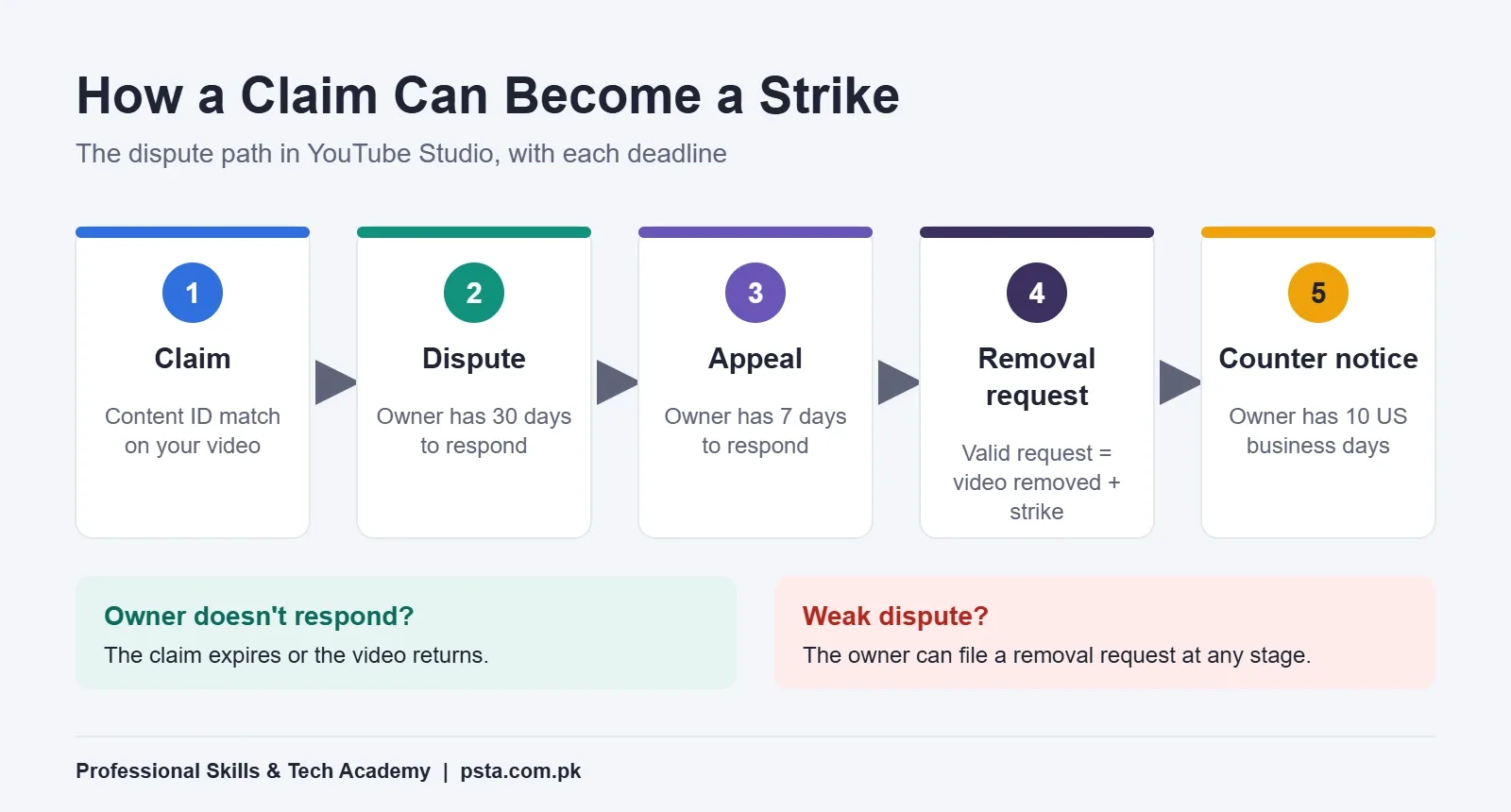
In plain terms, a dispute is a bet, and it is where the copyright claim vs strike gap can close fast. If you win, the claim goes away. If the owner pushes back with a legal request, a 30-second song can cost you a strike. Once submitted, a dispute can't be cancelled, so decide before you click.
Should You Dispute a Claim or Fix the Video?
Knowing the copyright claim vs strike difference should shape this choice. Only dispute a copyright claim when you have a real reason. That means you own the content, you have a written license, the material is in the public domain, or the match is simply wrong. For everything else, YouTube Studio offers safer tools. Open Content, filter by claims, then choose See details and Take action.
| Your Situation | Best Option | What It Does |
|---|---|---|
| The claim only tracks or monetizes, and you don't mind | Leave it | Video stays up. You can act later. |
| A song plays under speech you want to keep | Erase song | Mutes only the song, or all audio in that part |
| The claimed part sits in a short, cuttable section | Trim segment | Cuts that portion out of the video |
| You want music to stay in that spot | Replace song | Swaps in a track from the Audio Library |
| You're in the Partner Program and used claimed music | Share revenue | May let you split earnings with the publisher |
| You own the rights or hold a license | Dispute | Asks the claimant to review and release |
From an editor's point of view, "Erase song" is often the quickest fix for a talking-head video. For a montage or vlog where the music carries the mood, swapping the track usually works better than muting a silent stretch.
How Do You Clear a Copyright Strike?
YouTube gives you three ways out:
- Wait it out. Finish Copyright School and the strike expires after 90 days. This is the right choice when the takedown was fair.
- Ask for a retraction. Contact the person or company that filed the request and ask them to withdraw it. This works well when you later get permission, or when a client's own team filed by mistake.
- File a counter notification. Use this only if the removal was a mistake or your use clearly falls under an exception such as fair use.
Think hard before choosing the third option. YouTube's counter notification page says you must give your full legal name, physical address and phone number, and YouTube is legally required to share the counter notification with the claimant. You also consent to the jurisdiction of a US federal court and make a statement under penalty of perjury. If the claimant doesn't respond within 10 US business days, the video is restored and the related strike may be cleared.
Copyright Myths Pakistani Creators Still Believe
Scroll through comments on local channels and you will see the same assumptions repeated. YouTube's own page of common copyright myths answers most of them directly.
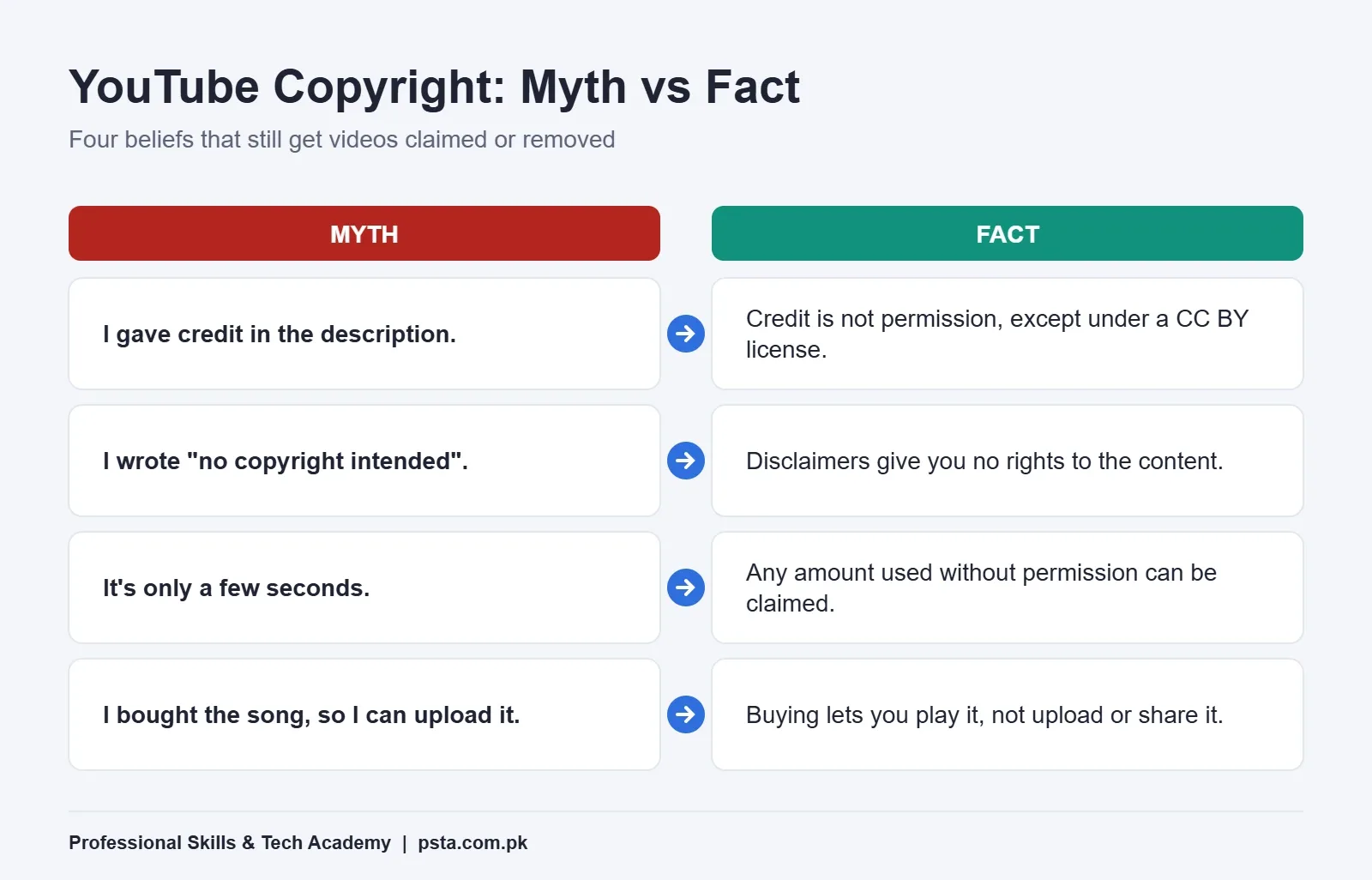
- "I gave credit in the description." Credit is not permission. The exception is content under a Creative Commons Attribution license, which does allow use with credit.
- "No copyright intended." Disclaimers like this give you no rights at all.
- "It's only a few seconds." Any amount used without permission can trigger a claim or a removal.
- "I bought the song." Buying a track or a film lets you play it. It does not let you upload or distribute it.
- "Bigger channels do it." Owners can license some creators and not others, so what you see elsewhere tells you nothing about your own rights.
- "My channel is educational." Purpose is one factor in fair use, but labelling a video educational does not protect it on its own.
Where Can You Find Copyright Free Music for YouTube?
The safest source is the one YouTube runs. The YouTube Audio Library sits inside YouTube Studio, and YouTube describes its music and sound effects as copyright-safe. Items you download from it won't be claimed through Content ID.
There are two license types in the library:
- Standard YouTube Audio Library license: no attribution needed.
- Creative Commons: you must credit the artist in your description. Click the Creative Commons icon in the license column and copy the ready-made credit line.
You can filter tracks by genre, mood, duration and whether attribution is required. That last filter saves time when you're editing a batch of client videos and don't want to manage credit lines.
What about other "royalty-free" websites? YouTube's page is clear that it only knows Audio Library items to be copyright-safe. It gives no such guarantee for tracks from other sites, even ones sold as royalty-free. If you use a paid or free library elsewhere, save the license page or receipt for every track. That proof is what a successful dispute depends on.
Does Fair Use Protect Reaction and Review Videos?
Sometimes, but far less often than creators hope. YouTube's fair use page explains the four US factors: the purpose of your use, the nature of the original, how much you took, and the effect on the owner's market. Adding commentary and new meaning helps. Using the "heart" of a work, even briefly, can count against you.
Two points matter for Pakistani creators. First, fair use is a US doctrine. YouTube notes that exceptions differ around the world, that some regions use "fair dealing" instead, and that it considers local rules when reviewing removal requests. Second, Content ID can't judge fair use. Only a court can decide it, so a review video full of film clips will still get claimed and you would need to dispute it.
A practical rule: if your commentary would still make sense with the clips removed, you're on stronger ground. If the clips are the main reason people watch, expect claims.
A Copyright-Safe Workflow for Freelance Video Editors
If you edit for clients on Fiverr, Upwork or for local businesses, a copyright problem lands on their channel, not yours. Explaining copyright claim vs strike to a client in one message saves arguments later. These habits protect both of you:
- Ask for the music source at the brief stage. If the client wants a trending song, explain the claim risk in writing before you start.
- Default to the Audio Library for background tracks, and note any Creative Commons credit lines in your delivery message.
- Keep a license folder for every project with screenshots or PDFs of each track's license.
- Use the Checks step. When you upload, YouTube's upload Checks scan for copyrighted content so issues can be fixed before publishing. Results aren't final, since a manual claim or strike can still come later.
- Upload as private first and publish only after Checks finish, especially for paid ad videos and Shorts.
Pair this with correct render settings from our guide to export settings for YouTube, and your deliveries will be clean both technically and legally.
Building These Habits in PSTA's Video Editing Course
The copyright claim vs strike rules make more sense once you have handled music on a real timeline. Copyright-safe editing is easier to learn on real projects than from help pages. The Mastering Video Editing & Visual Effects (VFX) course at PSTA runs for 12 weeks, starts from zero, and is taught by Umar Qureshi in Adobe Premiere Pro and After Effects. You pay Rs. 22,000 at present instead of the usual Rs. 25,000, in one go or as 2 parts.
The outline covers sound design and background score integration, export settings for YouTube and social platforms, and a module on freelancing, client acquisition and portfolio building. Projects include a YouTube vlog edit with music and captions and a one-minute capstone showreel. Students sit in the editing lab opposite FIMS College in Mandian, follow the identical sessions live from home, or switch between both as their week allows.
Editors who also design thumbnails or run ads for clients often add the Graphic Designing course or Social Media Marketing training later. All programmes are listed side by side on our courses page, and the admission form is short. Batch dates are confirmed over WhatsApp on +92 314 5424399.
Audit Your Last Ten Uploads Today
Open YouTube Studio, go to Content, and filter your videos by copyright claims. For each one, note whether the owner is tracking, monetizing or blocking it, then pick a fix from the table above. Ten minutes spent sorting copyright claim vs strike issues now is far cheaper than discovering a problem after you apply for monetization. If you haven't checked those requirements yet, our YouTube monetization checklist for Pakistan is a good next read.
Frequently asked questions
Does a copyright claim affect my YouTube channel?
Usually not. YouTube says Content ID claims affect individual videos and usually don't impact your channel or account. The owner may track, monetize or block the claimed video, but a claim on its own never adds a strike. Problems start only if a claimant follows up with a valid legal removal request, which is when a strike is applied.
How long does a YouTube copyright strike last?
A copyright strike expires 90 days after it was applied, as long as you have completed Copyright School and your channel has fewer than 3 active strikes. Copyright School is a short set of four questions that you only need to finish once. You can also clear a strike sooner through a retraction or a valid counter notification.
Will deleting a video remove a copyright strike?
Generally no. Deleting the video does not resolve a strike that has already been applied. The exception is a scheduled removal request, where the owner gives you 7 days to delete the video yourself and avoid the strike. YouTube sends that notice by email from its official no-reply address, so check your inbox and spam folder.
Is music from the YouTube Audio Library safe to use?
Yes. YouTube describes Audio Library music and sound effects as copyright-safe, and items downloaded from it won't be claimed through Content ID. Tracks under the standard Audio Library license need no credit. Creative Commons tracks do, so copy the attribution line from the library and paste it into your video description before publishing.
Can I use a song if I credit the artist?
Not unless the license allows it. YouTube's copyright myths page says giving credit does not give you rights to the content. The exception is material under a Creative Commons Attribution license, which permits use when you credit the creator. For commercial songs, you need permission from the owner, or a track from a licensed library.
What happens if I dispute a claim and lose?
If the claimant rejects your dispute, the claim stays and you may be able to appeal. If they reject the appeal, they can file a copyright removal request. When that request is valid, the video is removed and your channel receives a strike. You can still file a counter notification if you believe the removal was wrong.
Do YouTube Shorts get copyright claims?
Yes. Shorts go through the same Content ID matching as long videos. YouTube's claims page adds a stricter rule: Shorts longer than one minute that carry an active Content ID claim are blocked, whatever policy the owner has chosen. Use Audio Library music or licensed tracks when you edit Shorts longer than a minute.
Sources & references
- Learn about Content ID claims - YouTube Help support.google.com
- Copyright strike basics - YouTube Help support.google.com
- Dispute a Content ID claim - YouTube Help support.google.com
- Submit a copyright counter notification - YouTube Help support.google.com
- Common copyright myths - YouTube Help support.google.com
- Use music and sound effects from the Audio Library - YouTube Help support.google.com
- Fair use on YouTube - YouTube Help support.google.com
Last reviewed & updated on by Umar Qureshi. Written by the PSTA team in Abbottabad, Pakistan.

Umar Qureshi

Mastering Video Editing & Visual Effects (VFX)
Turn this guide into a career: hands-on training with real projects, online across Pakistan or on-campus in Abbottabad · 12 Weeks.
Comments
No comments yet — ask a question or share your experience.