Quick answer
A salary sheet in Excel needs five separate sheets: Staff, Attendance, Advances, Settings and Payroll. Payroll uses NETWORKDAYS.INTL for working days, COUNTIF for absences, XLOOKUP for salaries, a slab lookup for 2026-27 income tax, 1% of the minimum wage for EOBI and SUMIFS for advances, then subtracts all deductions.
Key takeaways
- • Keep staff, attendance, advances and settings on separate sheets, and let one Payroll sheet do the calculating.
- • NETWORKDAYS.INTL with weekend code 11 counts working days for a business that closes on Sunday only.
- • Monthly salary tax comes from the annual 2026-27 slab: multiply gross by 12, apply the slab, divide by 12.
- • The employee EOBI share is 1% of the notified minimum wage, not of the actual salary.
- • XLOOKUP is missing in Excel 2016 and 2019, so use VLOOKUP there instead.
- • Run headcount, negative pay and blank attendance checks before every salary day.
Table of contents 17 sections
- What Should a Salary Sheet in Excel Actually Calculate?
- The Example: A Six-Person Hardware Store in Abbottabad
- Step 1: Build Four Sheets Before Writing Any Formula
- Step 2: Count Working Days and Absences
- How Much Should One Absence Cost?
- Step 3: Pull Names and Salaries With XLOOKUP
- Step 4: How Do You Calculate Income Tax on Salary in Excel?
- Step 5: EOBI, Advances and the Net Pay Formula
- EOBI Contribution
- Advances
- Net Pay
- The Finished Salary Sheet in Excel, Column by Column
- How Do You Make Pay Slips From the Same Workbook?
- Five Checks Before You Pay Anyone
- Where Payroll Skills Lead
- Practising Payroll Sheets in PSTA's Office Automation Course
- A Practice Run With Three Imaginary Employees
Can you really build a salary sheet in Excel that works out absences, tax and net pay by itself, so you only type attendance each month? Yes, and it takes fewer formulas than most people expect. Six functions do nearly all the work, and once the sheet is set up, a small business can run its monthly payroll in under an hour.
This guide builds one complete workbook for a made-up business, step by step, using the tax slabs and minimum wage figures announced for 2026-27. Follow along in a blank file and you'll finish with a template you can reuse every month.
Here is what you will be able to do by the last section:
- Set up a payroll workbook with separate sheets for staff, attendance, advances and settings
- Count working days and absences automatically with NETWORKDAYS.INTL and COUNTIF
- Calculate monthly salary tax from the 2026-27 slabs with a single lookup
- Deduct EOBI and salary advances, then produce a net pay figure you can trust
- Print a pay slip for any employee from the same file
What Should a Salary Sheet in Excel Actually Calculate?
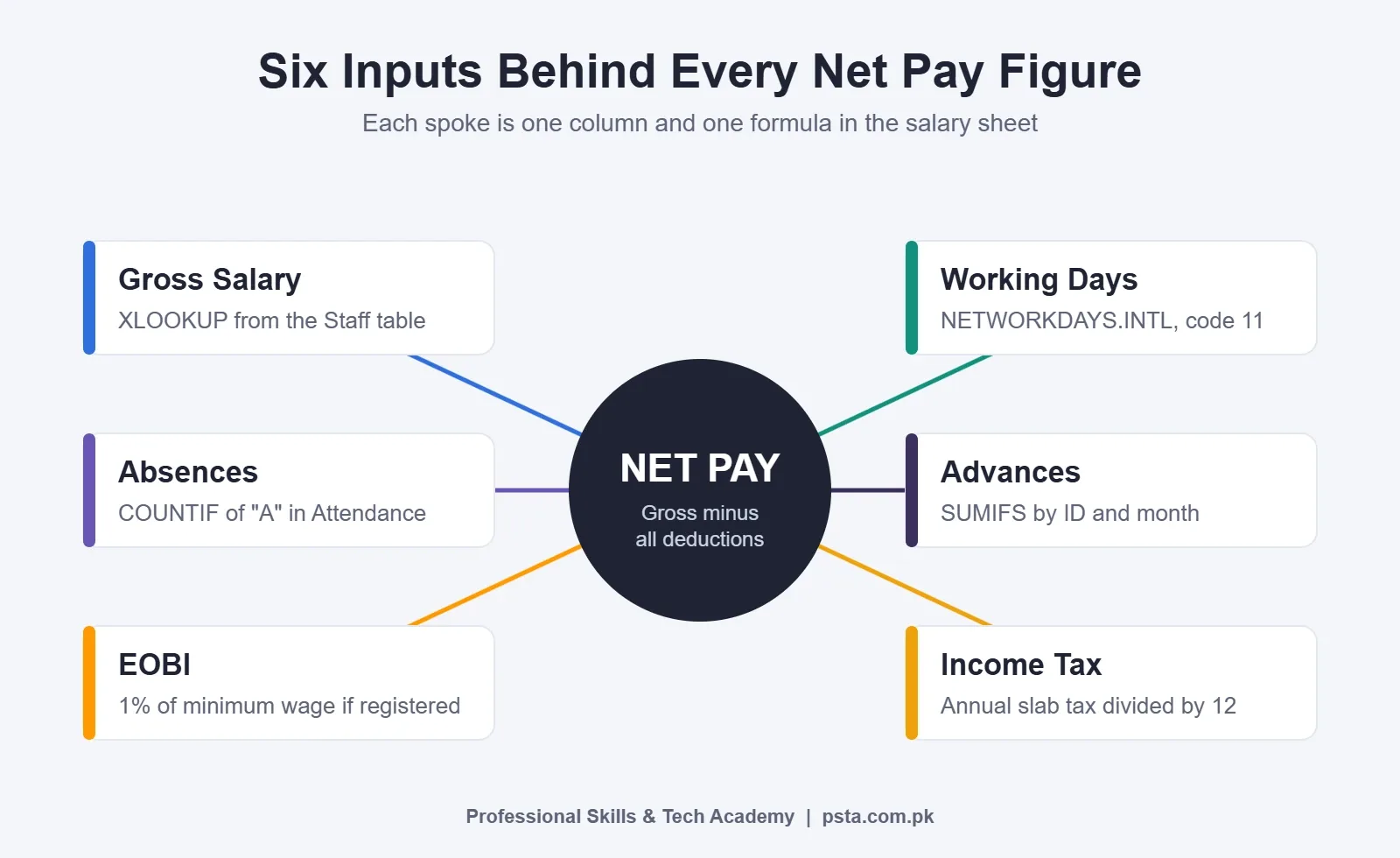
A salary sheet in Excel has one job: turn a fixed monthly salary into the exact amount each person receives, and show how you got there. In a typical Pakistani shop, school or small office, that means five calculations sit between gross salary and net pay.
- Working days in the month, after removing the weekly off day and any holidays.
- Unpaid absences and the money they cost.
- Income tax withheld from salary, based on the annual slab.
- EOBI, the employee's share of the old-age benefit contribution.
- Advances or loans given during the month.
Everything else (overtime, bonuses, fuel allowance) follows the same pattern, so you can add it later. The diagram below shows how each piece feeds the final figure.
The Example: A Six-Person Hardware Store in Abbottabad
To keep the formulas concrete, picture a fictional store called Kohsar Hardware on the Karakoram Highway. It has six employees: two counter staff, a storekeeper, a delivery driver, an accounts clerk and a manager. The shop closes on Sunday only, so it works a six-day week.
Until now, the owner has paid salaries from a notebook. Every month he adds up absences by hand, guesses at tax, and forgets at least one advance. The goal is a salary sheet in Excel where he types attendance codes and advance amounts, and Excel does the rest.
The month we'll calculate is October 2026. It starts on a Thursday and has four Sundays, which leaves 27 working days if there are no other holidays. You'll see Excel arrive at the same number in Step 2.
Step 1: Build Four Sheets Before Writing Any Formula
Most broken salary sheets in Excel fail because everything lives on one crowded sheet. Split the data first. Create these four sheets and turn each block of data into an Excel Table with Ctrl + T, so formulas can refer to column names instead of cell ranges.
| Sheet | What It Holds | Who Edits It |
|---|---|---|
| Staff | Employee ID, name, designation, monthly gross salary, EOBI registered (Y/N) | Owner, when someone joins or gets a raise |
| Attendance | One row per employee, one column per date, with codes P, A, L or H | Clerk, every day |
| Advances | Date, employee ID, month, amount | Clerk, whenever cash is given |
| Settings | Month start and end dates, holiday list, minimum wage, tax slab table | Owner, once a month or once a year |
Name the tables something readable, such as Staff, Advances, Holidays and Slabs. Then add a fifth sheet called Payroll. This is the only sheet with heavy formulas, and nobody types into it except the employee ID column.
On the Settings sheet, give the key cells names through the Name Box (the small box left of the formula bar). Call the first day of the month MonthStart, the last day MonthEnd, and the minimum wage cell MinWage. Named cells make every later formula easier to read and audit.
Step 2: Count Working Days and Absences
Excel's NETWORKDAYS.INTL function counts working days between two dates and lets you choose which day is the weekend. According to Exceljet's reference for the function, weekend code 11 means Sunday only, which suits a six-day business. You can also pass a seven-character string of 1s and 0s, starting with Monday, if your off days are unusual.
In the Payroll sheet, put this in the Working Days column:
=NETWORKDAYS.INTL(MonthStart, MonthEnd, 11, Holidays[Date])
For October 2026 with an empty holiday list, it returns 27. If a public holiday falls in the month, add its date to the Holidays table and the count drops by itself.
Absences come from the Attendance sheet. If row 2 of that sheet belongs to the first employee and the dates run from column C to AG, count the "A" codes with:
=COUNTIF(Attendance!C2:AG2, "A")
Use a separate code, such as L, for paid leave, so it never gets counted as an absence. Then add data validation to the attendance grid (Data > Data Validation > List, with the source P,A,L,H). That one setting stops typos like "a " or "Ab" from slipping past the count.
How Much Should One Absence Cost?
This is a policy decision, not an Excel one. Some employers divide gross salary by the working days in that month. Others divide by a flat 30. Write the rule down, tell staff, and keep it the same every month. The example uses working days:
=ROUND([@Gross] / [@[Working Days]] * [@Absent], 0)
Step 3: Pull Names and Salaries With XLOOKUP
The Payroll sheet should never contain a typed salary. It looks each one up from the Staff table, so a raise entered once flows into every future month.
=XLOOKUP([@[Emp ID]], Staff[Emp ID], Staff[Gross], "Check ID")
Using XLOOKUP for payroll has a practical bonus: the fourth argument shows "Check ID" instead of an error if someone mistypes an ID. Use the same pattern for the name and designation columns.
One catch: Microsoft's XLOOKUP page states that the function is not available in Excel 2016 or Excel 2019. If your office computer runs one of those versions, use VLOOKUP with exact match instead:
=VLOOKUP([@[Emp ID]], Staff, 4, FALSE)
Here, 4 is the position of the Gross column inside the Staff table. Count carefully, because VLOOKUP breaks quietly if someone later inserts a column.
Step 4: How Do You Calculate Income Tax on Salary in Excel?
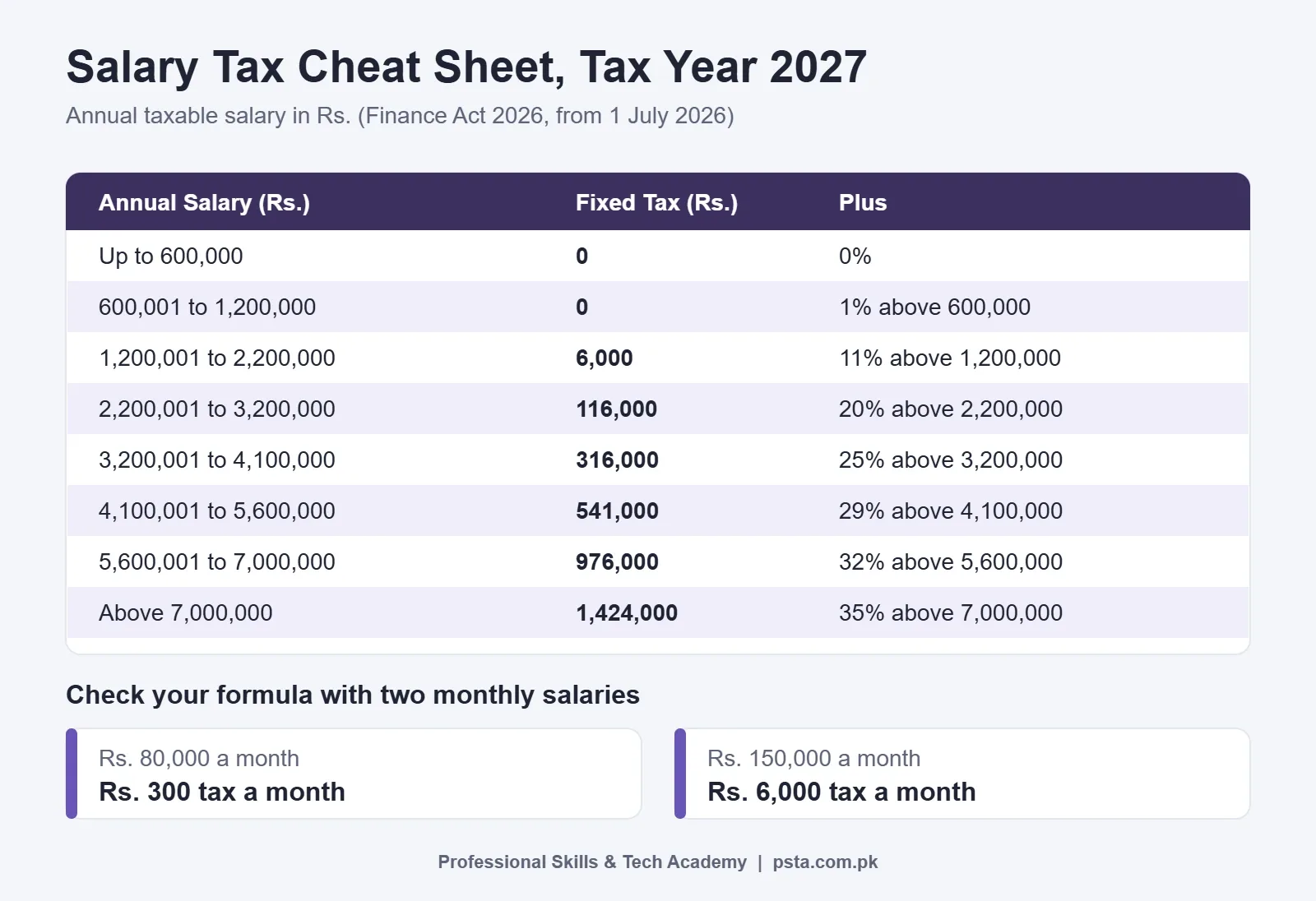
Salary tax in Pakistan is based on annual taxable income, so any salary tax calculation in Excel multiplies monthly gross by 12, finds the slab, and divides the result back by 12. The Finance Act 2026 slabs for tax year 2027 (which began on 1 July 2026) are listed by the payroll firm Mercans, and the same figures appear in a Pakistan Observer report.
| Annual Taxable Salary (Rs.) | Fixed Tax (Rs.) | Plus Rate on Amount Above |
|---|---|---|
| Up to 600,000 | 0 | 0% |
| 600,001 to 1,200,000 | 0 | 1% above 600,000 |
| 1,200,001 to 2,200,000 | 6,000 | 11% above 1,200,000 |
| 2,200,001 to 3,200,000 | 116,000 | 20% above 2,200,000 |
| 3,200,001 to 4,100,000 | 316,000 | 25% above 3,200,000 |
| 4,100,001 to 5,600,000 | 541,000 | 29% above 4,100,000 |
| 5,600,001 to 7,000,000 | 976,000 | 32% above 5,600,000 |
| Above 7,000,000 | 1,424,000 | 35% above 7,000,000 |
Type this into the Settings sheet as a table called Slabs with three columns: From (0, 600000, 1200000 and so on), Fixed and Rate. Keep it sorted from smallest to largest.
Now add a helper column, Annual, with =[@Gross]*12. The monthly tax formula looks up the slab whose starting point is at or just below that annual figure. The -1 match mode in XLOOKUP means "exact match, or the next smaller item":
=ROUND((XLOOKUP([@Annual], Slabs[From], Slabs[Fixed], , -1) + ([@Annual] - XLOOKUP([@Annual], Slabs[From], Slabs[From], , -1)) * XLOOKUP([@Annual], Slabs[From], Slabs[Rate], , -1)) / 12, 0)
Check it against two salaries by hand. A gross of Rs. 80,000 a month is Rs. 960,000 a year. That's 1% of the Rs. 360,000 above 600,000, or Rs. 3,600 a year and Rs. 300 a month. A gross of Rs. 150,000 is Rs. 1,800,000 a year: Rs. 6,000 plus 11% of Rs. 600,000, which totals Rs. 72,000 a year or Rs. 6,000 a month.
On Excel 2016 or 2019, replace each XLOOKUP with an approximate-match VLOOKUP, for example =VLOOKUP([@Annual], Slabs, 2, TRUE) for the fixed amount. The TRUE at the end only works when the slab table is sorted.
A fair warning: this method assumes the salary stays the same all year. If someone joins mid-year, gets a raise or receives a bonus, the correct withholding changes. Treat the sheet as a solid monthly estimate and have your accountant or tax advisor review unusual cases.
Step 5: EOBI, Advances and the Net Pay Formula
EOBI Contribution
EOBI contributions are not a percentage of each person's actual salary. A Vialto Partners update on Pakistan's social security rules explains that the employer pays 5% and the employee pays 1%, both calculated on the statutory minimum wage regardless of the salary actually paid. So every registered employee has the same EOBI deduction.
=IF(XLOOKUP([@[Emp ID]], Staff[Emp ID], Staff[EOBI]) = "Y", ROUND(MinWage * 1%, 0), 0)
Which minimum wage goes in the MinWage cell? The federal budget raised it to Rs. 40,700 a month, as Dunya News reported, which would make the employee share Rs. 407. Khyber Pakhtunkhwa's own 2026-27 budget proposed Rs. 45,000, according to a separate Dunya News report. Confirm with your EOBI office which notified figure applies to your business, then type it once into Settings.
Advances
Advances live in their own table so the clerk can record each payment on the day it happens. SUMIFS adds up everything for one employee in the current month:
=SUMIFS(Advances[Amount], Advances[Emp ID], [@[Emp ID]], Advances[Month], TEXT(MonthStart, "mmm-yyyy"))
For this to work, fill the Month column in the Advances table with the same "Oct-2026" style text. A simple formula in that column, =TEXT([@Date], "mmm-yyyy"), does it automatically.
Net Pay
The last column is the simplest:
=[@Gross] - [@[Absence Deduction]] - [@Advance] - [@Tax] - [@EOBI]
Take the storekeeper at Kohsar Hardware as a worked example. His gross is Rs. 80,000. He was absent 2 of 27 working days, so his deduction is Rs. 5,926. He took a Rs. 5,000 advance, his tax is Rs. 300, and his EOBI share is Rs. 407 at the federal figure. His net pay comes to Rs. 68,367.
The Finished Salary Sheet in Excel, Column by Column
Here is the whole Payroll table in one place. Keep the column order fixed, because pay slips and checks will refer to it.
| Column | Source | Key Formula |
|---|---|---|
| Emp ID | Typed once | None |
| Name, Gross | Staff table | XLOOKUP (or VLOOKUP, FALSE) |
| Working Days | Settings, Holidays | NETWORKDAYS.INTL with code 11 |
| Absent | Attendance sheet | COUNTIF for "A" |
| Absence Deduction | Gross, days | ROUND(Gross / Working Days * Absent, 0) |
| Annual, Tax | Slabs table | XLOOKUP with match mode -1, divided by 12 |
| EOBI | Settings | 1% of MinWage if registered |
| Advance | Advances table | SUMIFS by ID and month |
| Net Pay | This row | Gross minus all deductions |
Add a total row (Table Design > Total Row) so the owner sees the month's full payroll cost at a glance. That figure plus the employer's EOBI share is what he needs in the bank before salary day.
How Do You Make Pay Slips From the Same Workbook?
A pay slip in Excel is just a small, printable sheet that looks up one row of the Payroll table. Create a sheet called Slip, lay out the business name at the top, and put a single input cell for the employee ID. Give it data validation with a list pointing at Staff[Emp ID] so the clerk picks from a dropdown.
Every other cell on the slip is an XLOOKUP against Payroll: name, designation, gross, each deduction and net pay. Add a line for the month using =TEXT(MonthStart, "mmmm yyyy"). Set the print area (Page Layout > Print Area), choose A5 or half an A4, and then print or save to PDF for each person in turn.
If you've already practised clean page setup for documents, this will feel familiar. The same habits appear in our guide to fixing common fresh graduate CV mistakes, where alignment and margins decide whether a page looks professional.
Five Checks Before You Pay Anyone
A salary sheet in Excel that is wrong by Rs. 500 damages trust faster than one that is slow. Run these checks every month before money leaves the account.
- Headcount match. Use
=ROWS(Staff)and=ROWS(Payroll). If the numbers differ, someone is missing or duplicated. - No negative net pay. Add conditional formatting to the Net Pay column that turns any value below zero red. A large advance can push pay below zero, and you want to see that before salary day.
- Attendance complete. Count blank cells in the attendance grid with
=COUNTBLANK()for the month's date range. Blank days usually mean the clerk forgot to mark someone. - Spot-check one person by hand. Pick a different employee each month and redo their figures on a calculator.
- Lock the formulas. Clear the Locked box for input cells only (Format Cells > Protection), then use Review > Protect Sheet. Staff can still type attendance, but nobody can overwrite a formula by accident.
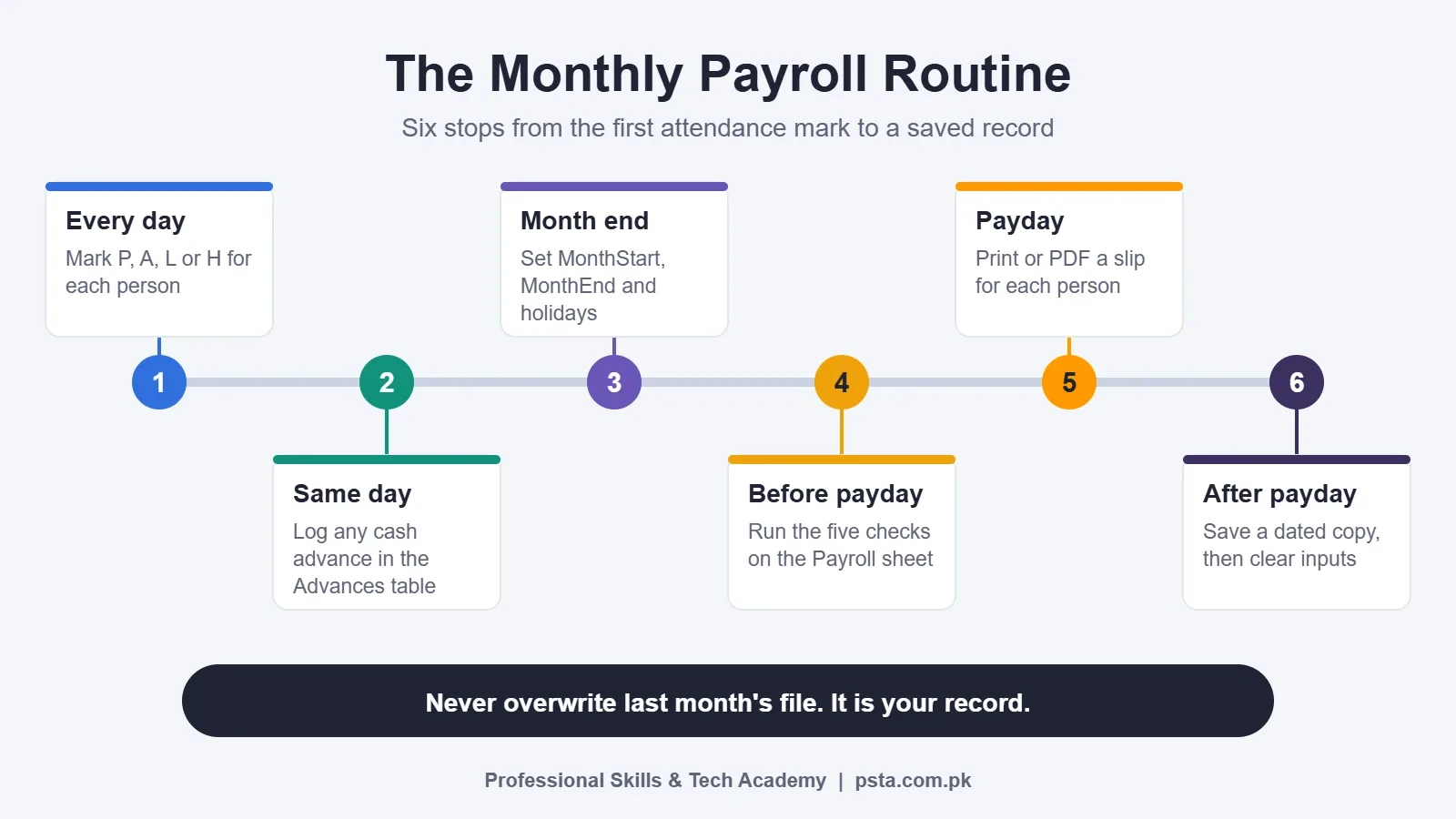
At the end of each month, save a copy of the workbook as "Payroll Oct-2026" and clear the attendance and advances for the new month. Never overwrite last month's file. It is your record if a salary is ever questioned.
Where Payroll Skills Lead
Building a salary sheet in Excel is one of the most practical things an office assistant or accounts clerk can show in an interview. Employers asking for "good MS Office skills" usually mean exactly this kind of work: lookups, conditional counts, clean formatting and protected templates. It also gives you a portfolio piece. Strip out the names, save the template, and you can show it to a shop owner who still pays from a notebook.
Running payroll in Excel has limits, though. Once a business passes a few dozen employees, multiple branches or complex allowances, dedicated payroll software or an accountant becomes the better choice. If you want to go further with data rather than payroll, our comparison of Power BI vs Excel explains when it's worth moving on to dashboards.
Practising Payroll Sheets in PSTA's Office Automation Course
PSTA's Certified Office Automation Course is a 12-week program for beginners, with Excel tables, formulas, formatting and charts as one of its core modules. You also work on a monthly expense or sales sheet and a timed data entry task, the same skills a salary sheet in Excel relies on. According to the course page, you pay Rs. 12,000 instead of the usual Rs. 15,000, split into 2 installments, and you can choose on-campus classes in Abbottabad, live online classes or a mix of both.
Fast, accurate typing makes daily attendance and advance entry much quicker, which is why many students pair this course with the English and Urdu typing course. Our post on typing speed for office jobs covers the speeds employers usually ask for. If you want a full year of IT training instead, the one-year DIT diploma includes office automation alongside other subjects.
You can browse every program on the courses page, apply through the admission form, or message us on WhatsApp at +92 314 5424399 to ask about batch timings. The campus is in Mandian, Old College Road, opposite FIMS College, Abbottabad.
A Practice Run With Three Imaginary Employees
Don't start with real salaries. Open a blank workbook today, invent three employees with salaries of Rs. 45,000, Rs. 80,000 and Rs. 150,000, and build the five sheets from this guide. If your tax column shows 0, 300 and 6,000, your slab lookup is right, and you're ready to use the template on a real month.
Frequently asked questions
Which Excel formula calculates net salary?
There isn't one single formula. Net salary is the gross amount minus each deduction, and each deduction has its own column: absence deduction, advance, income tax and EOBI. The last column simply subtracts them, for example =[@Gross]-[@[Absence Deduction]]-[@Advance]-[@Tax]-[@EOBI]. Keeping deductions in separate columns makes errors easy to spot.
How do I calculate salary tax for 2026-27 in Excel?
Multiply the monthly gross by 12 to get an annual figure, find the matching slab, add the fixed tax plus the slab rate on the amount above the slab's starting point, then divide by 12. Store the slabs in a sorted table and use XLOOKUP with match mode -1, or an approximate VLOOKUP in older Excel versions.
How is EOBI deducted from salary in Pakistan?
The employee contributes 1% and the employer 5%, both calculated on the notified minimum wage rather than the employee's actual pay. That means every registered employee has the same EOBI deduction. Put the minimum wage in one named cell so the deduction updates for everyone when the figure changes.
Can I make a salary sheet in Excel 2016 without XLOOKUP?
Yes. XLOOKUP is not available in Excel 2016 or 2019, so use VLOOKUP instead. For names and salaries, use exact match with FALSE as the last argument. For tax slabs, use approximate match with TRUE, which only works when the slab table is sorted from smallest to largest.
Should absence deductions use 30 days or working days?
Both methods are in use. Dividing gross by the month's working days charges more per absence in short months, while dividing by a flat 30 keeps the daily rate steady. Choose one rule, explain it to staff in writing and apply it every month so nobody feels singled out.
How do I count Sundays off in a payroll sheet?
Use NETWORKDAYS.INTL with weekend code 11, which treats Sunday as the only day off. Add a list of public holidays as the fourth argument. For October 2026 with no holidays, the function returns 27 working days, which matches a manual count of the calendar.
Is an Excel salary sheet enough for a growing business?
For a shop, school or office with a handful of staff, a well-built Excel file works well. Once you reach several dozen employees, multiple branches or complicated allowances, payroll software or a professional accountant becomes safer, because manual edits and version mix-ups become harder to control.
Sources & references
- Pakistan Finance Act 2026-27 Payroll Updates (Mercans) mercans.com
- New tax slabs for salaried persons as FY2026-27 begins (Pakistan Observer) pakobserver.net
- Pakistan raises minimum wage by 10pc to Rs40,700 (Dunya News) dunyanews.tv
- KP unveils Rs2.12 trillion budget 2026-27 (Dunya News) dunyanews.tv
- Pakistan social security update: minimum wages, EOBI and social security (Vialto Partners) vialtopartners.com
- XLOOKUP function (Microsoft Support) support.microsoft.com
- NETWORKDAYS.INTL function (Exceljet) exceljet.net
Last reviewed & updated on by Umar Qureshi. Written by the PSTA team in Abbottabad, Pakistan.

Umar Qureshi

Certified Office Automation Course: Master MS Office & Computer Basics
Turn this guide into a career: hands-on training with real projects, online across Pakistan or on-campus in Abbottabad · 12 Weeks.



Comments
No comments yet — ask a question or share your experience.