Quick answer
Good n8n projects for beginners solve a real business task. Start with a Facebook lead alert and a daily Google Sheets digest, then move to an invoice reader, WhatsApp order replies and fee reminders, and finish with an AI agent. Present each with a one-line result, a short recording and its limits.
Key takeaways
- • Build portfolio workflows around real business tasks, not toy demos, so clients can see the time they save.
- • Start with lead alerts and daily digests; they teach triggers, Google Sheets and notifications.
- • The self-hosted Community Edition is free, and n8n Cloud Starter costs 20€ a month on annual billing.
- • WhatsApp replies inside the customer service window are free, but business-initiated templates are charged per message.
- • Add an error workflow, prevent duplicate messages and test with messy data before showing a client.
- • Present each project with a one-line result, a short recording, a clean screenshot and its limits.
Table of contents 19 sections
- Why Should Your First Workflows Solve Business Problems?
- What Do You Need Before You Start?
- n8n Projects for Beginners at a Glance
- Beginner Projects: Your First Two Weeks
- 1. Instant Lead Alerts for a Real Estate Agency
- 2. A Daily Admissions Digest for an Academy
- 3. A Morning News Summary for a Marketing Agency
- Intermediate Projects: Files, Branches and WhatsApp
- 4. An Invoice Reader for a Wholesale Distributor
- 5. A Customer Feedback Sorter for a Restaurant
- 6. WhatsApp Order Status Replies for an Online Store
- Advanced Projects: Scheduled Messaging and an AI Agent
- 7. Fee Reminders for a Private School
- 8. A Stock-Check Agent for a Hardware Store
- What Will WhatsApp Projects Cost to Run?
- How Should You Present These Projects in a Portfolio?
- Five Habits That Make a Workflow Look Professional
- Building These Projects in PSTA's AI Automation Course
- Pick the Business Nearest to You
Many students believe that n8n projects for beginners only count if they involve writing code. That belief keeps good portfolios empty. n8n's integrations directory listed 2,329 integrations when I checked it in October 2026, and most of the projects below use only a handful of them, connected by drag and drop.
The bigger myth is that a beginner project has to be a toy. A client in Lahore or Abbottabad doesn't care whether you can make a weather bot. They care whether you can stop their staff copying leads into a spreadsheet by hand. So every one of these n8n projects for beginners is tied to a real kind of Pakistani business.
Here's what this list gives you:
- 8 project ideas, sorted from first-week builds to an AI agent
- The exact n8n nodes each project needs
- What the tools cost, including WhatsApp's per-message pricing
- How to present each workflow so a client or employer trusts it
- Five habits that separate a hobby workflow from a professional one
Why Should Your First Workflows Solve Business Problems?
Automation is sold on outcomes. When a shop owner hires you, the question is always some version of "what will this save me?" A portfolio of generic demos can't answer that. A portfolio that shows "leads now reach the sales team within a minute instead of the next morning" answers it in one line.
Business-shaped n8n projects for beginners also teach you the parts that tutorials skip: messy spreadsheet columns, missing phone numbers, Roman Urdu messages, and what happens when an API fails at 2 a.m. Those details are where beginners get stuck on real jobs, and where your portfolio can prove you've already dealt with them.
What Do You Need Before You Start?
You need a free Google account for Sheets and Gmail, a Telegram account for alerts, and one way to run n8n. You have three practical options:
| Option | Cost | Good for | Watch out for |
|---|---|---|---|
| n8n Cloud trial | Free trial, no card required | Your first week of practice | Trial is limited to 1,000 executions |
| n8n Cloud Starter | 20€ a month, billed annually | Running a few client workflows | 2,500 executions a month |
| Self-hosted Community Edition | Free software; you pay for the server | Learning, and clients who want their own server | You handle updates, backups and security |
The prices come from n8n's pricing page, which also lists a Pro plan at 50€ a month (annual billing) with 10,000 executions. According to the n8n docs, the free Community Edition includes almost every feature. What it leaves out is mostly team tooling: shared projects, SSO, environments and Git version control. None of that matters for a portfolio.
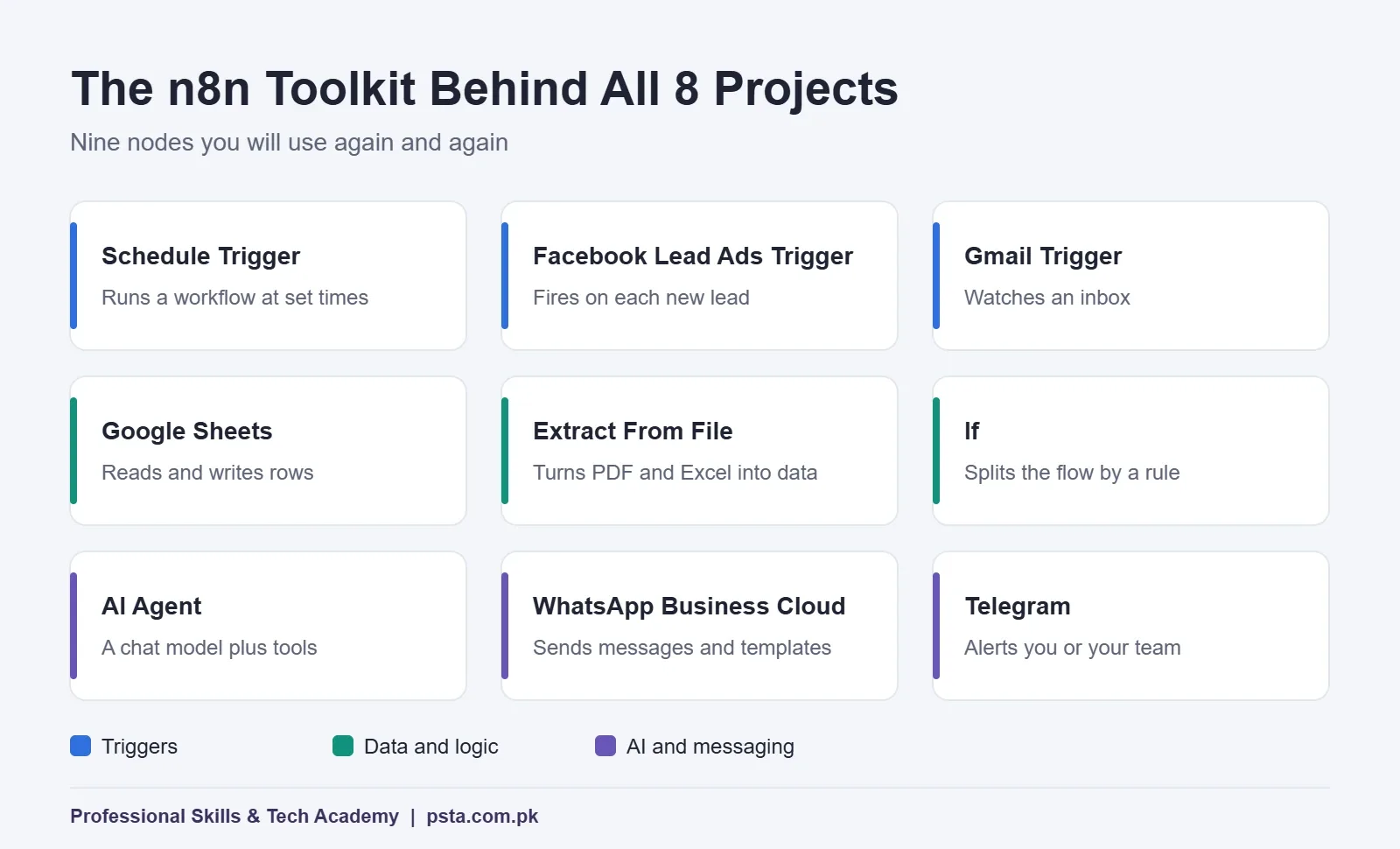
Whichever you choose, the n8n projects for beginners in this list lean on a short toolkit. You'll reuse the same small set of nodes in almost every project.
n8n Projects for Beginners at a Glance
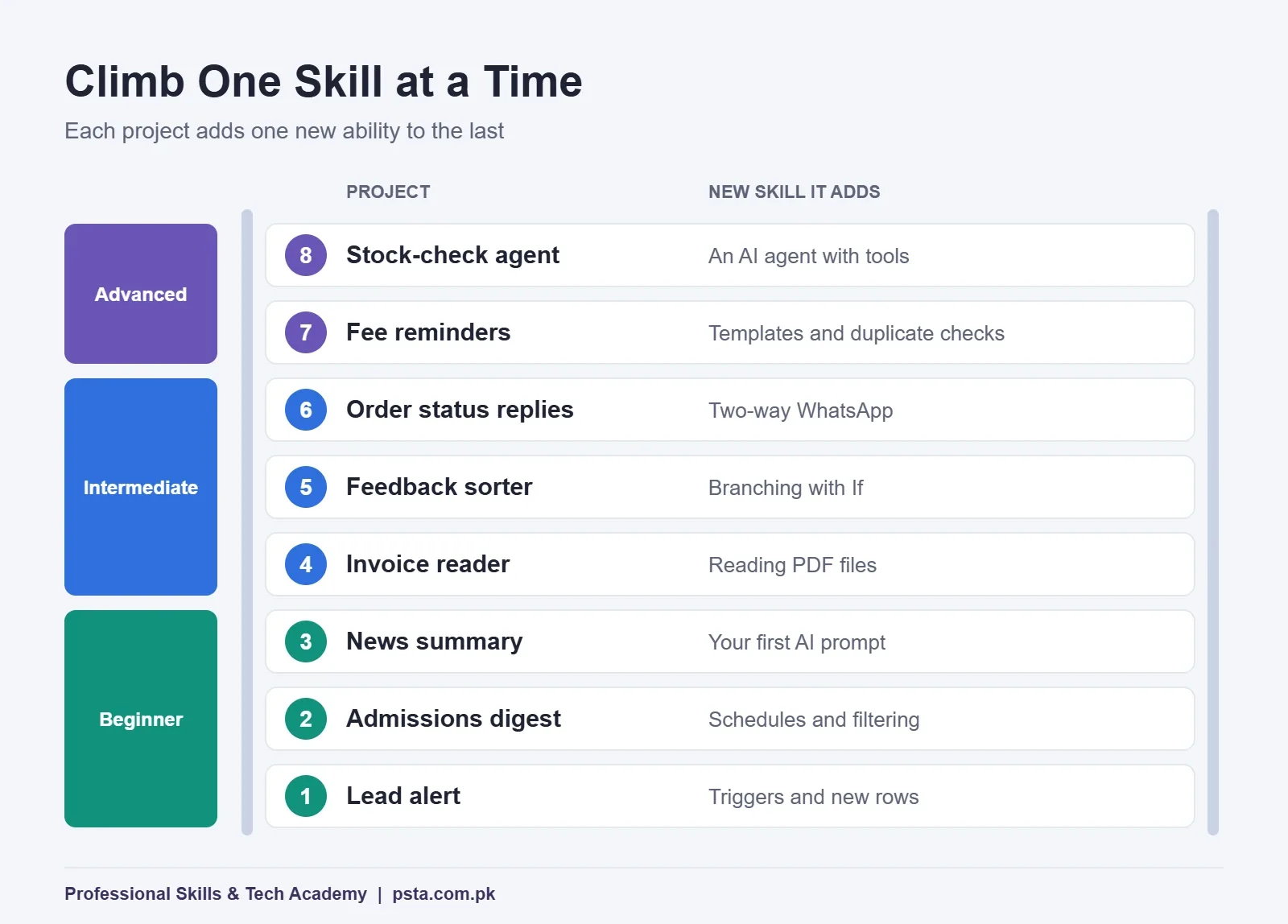
The table sorts the eight ideas by level. Build them roughly in order, because each one reuses something from the project before it.
| # | Project | Example business | Key nodes | Level |
|---|---|---|---|---|
| 1 | Lead alert | Real estate agency | Facebook Lead Ads Trigger, Google Sheets, Telegram | Beginner |
| 2 | Daily admissions digest | Tuition academy | Schedule Trigger, Google Sheets, Gmail | Beginner |
| 3 | News summary sheet | Marketing agency | RSS Read, AI model, Google Sheets | Beginner |
| 4 | Invoice reader | Wholesale distributor | Gmail Trigger, Extract From File, AI model, Google Sheets | Intermediate |
| 5 | Feedback sorter | Restaurant | Form trigger, AI model, If, Telegram | Intermediate |
| 6 | Order status replies | Online clothing store | WhatsApp trigger, Google Sheets, WhatsApp Business Cloud | Intermediate |
| 7 | Fee reminders | Private school | Schedule Trigger, Google Sheets, If, WhatsApp Business Cloud | Advanced |
| 8 | Stock-check agent | Hardware store | Chat trigger, AI Agent, Google Sheets tool | Advanced |
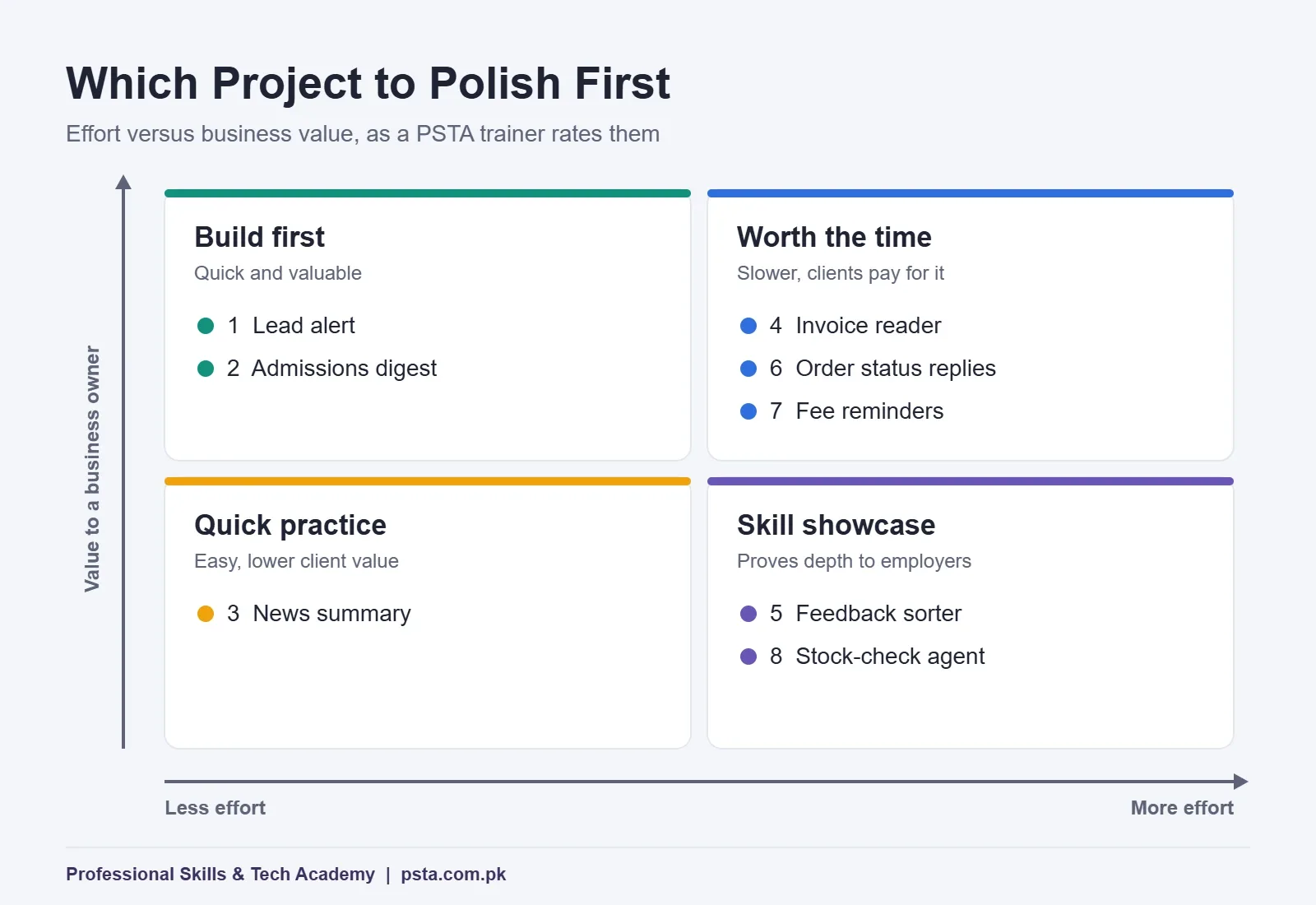
Not every project is worth the same to a client. Some are quick to build and save hours every week. Others take longer and matter mainly as proof of skill. The matrix below shows how I'd rate them. Projects 1 and 2 are quick builds with high value, so build them first. Projects 4, 6 and 7 take longer but solve problems owners will pay for. Project 3 is quick practice, while projects 5 and 8 mainly show off skill.
Beginner Projects: Your First Two Weeks
These three n8n projects for beginners teach triggers, spreadsheets and notifications. That trio covers a surprising share of the paid automation work small businesses ask for.
1. Instant Lead Alerts for a Real Estate Agency
Property agencies in Islamabad and Rawalpindi run Facebook lead forms constantly, and leads often sit in Ads Manager until someone remembers to download them. n8n has a Facebook Lead Ads Trigger that fires when a new lead arrives.
- Start the workflow with the Facebook Lead Ads Trigger.
- Add a Google Sheets node that appends the name, phone number, budget and area as a new row.
- Send a Telegram message to the sales group with the lead's details and a link to the sheet.
For your portfolio, use a test form and fake leads. Show the before and after: leads checked once a day versus an alert within seconds.
2. A Daily Admissions Digest for an Academy
A tuition academy collects enquiries through a Google Form. Instead of the owner opening the sheet every evening, a Schedule Trigger runs at 9 p.m., reads the day's new rows, counts them by course and emails a short summary through Gmail. The skill you're proving is filtering rows by date and formatting a clean, readable email.
3. A Morning News Summary for a Marketing Agency
Agencies that run social pages for clients need fresh topics daily. The RSS Read node pulls headlines from a few industry feeds, an AI model writes a two-line summary of each, and the results land in a Google Sheet for a human to approve. This is your first project with an AI step, and it teaches you to write a short, strict prompt and to keep a person in the loop before anything gets posted.
Intermediate Projects: Files, Branches and WhatsApp
The next three projects step past the beginner level and add file handling, conditions and two-way messaging. Expect each to take a few evenings rather than one.
4. An Invoice Reader for a Wholesale Distributor
Distributors receive supplier invoices as PDF attachments, and someone types the totals into a ledger. Use a Gmail Trigger to catch emails with attachments, then the Extract From File node, which converts PDF, CSV, XLS and XLSX files into data n8n can work with. An AI model then pulls out the supplier name, invoice number, date and total, and a Google Sheets node files them.
The honest part of this project is checking. Add a column that flags any invoice where the AI couldn't find a total, so a person reviews it. Clients trust automations that admit uncertainty.
5. A Customer Feedback Sorter for a Restaurant
Feedback in Pakistan often arrives in a mix of English, Urdu and Roman Urdu. Build a form for customers, then send each response to an AI model with one instruction: label it as praise, complaint or suggestion, and name the topic, such as food, service, delivery or price. An If node routes complaints straight to the manager on Telegram, while everything else goes to a weekly sheet.
Test it with at least 20 sample messages written the way real customers write, spelling mistakes included. Put the accuracy you measured in your project write-up.
6. WhatsApp Order Status Replies for an Online Store
Small clothing brands that sell through Instagram spend hours answering "where is my order?" on WhatsApp. When a customer sends their order number, the workflow looks it up in a Google Sheet and replies with the status and courier tracking number. n8n's WhatsApp Business Cloud node can send messages and templates, and upload or download media.
You'll need a Meta developer account and a test phone number to build this. That setup is part of the skill, so document the steps you took.
Advanced Projects: Scheduled Messaging and an AI Agent
7. Fee Reminders for a Private School
Schools chase late fees by phone. A Schedule Trigger runs each morning, reads the fee sheet, and an If node selects families whose due date is three days away. Each one gets a WhatsApp template message with the amount and due date. This project is advanced because business-initiated messages need approved templates, cost money per message, and must never go out twice. Keep a "reminder sent" column and check it before sending.
8. A Stock-Check Agent for a Hardware Store
Here, staff type a question such as "how many 1-inch PVC elbows do we have?" into a chat window. n8n's AI Agent node needs a chat model and at least one tool connected. Give it a Google Sheets tool pointed at the stock sheet, and it decides when to look things up before answering.
Make the agent read-only at first. An agent that can change stock numbers needs far more testing, and saying so in your write-up shows good judgment.
What Will WhatsApp Projects Cost to Run?
Projects 6 and 7 behave very differently on cost. Meta's WhatsApp Business Platform pricing has charged per message since July 1, 2025. Charges apply to delivered template messages, and the rate depends on the template category (marketing, utility or authentication) and the recipient's country code.
Replies inside an open customer service window are free, because non-template messages cost nothing. Utility templates sent inside that window are also free. So the order status bot in project 6, which only replies after a customer writes first, can run at no messaging cost. The fee reminders in project 7 start the conversation, so each delivered template is charged at Meta's rate for Pakistan. Check the current rate card before you quote a client, as Meta can update rates on the first day of each quarter.
How Should You Present These Projects in a Portfolio?
A screenshot of a canvas full of nodes impresses other automation people, not clients. The way you present n8n projects for beginners decides whether anyone reads past the first one. For each project, prepare four things:
- A one-line result: "Supplier invoices are logged in the sheet within two minutes of arriving."
- A short screen recording showing the trigger firing and the result appearing.
- A clean workflow screenshot with every node renamed to say what it does, such as "Find order in sheet" rather than "Google Sheets1."
- A limits paragraph: what the workflow doesn't handle yet, and how you'd improve it.
Use fake names and numbers throughout. Never show a real customer's phone number or a real API key, even blurred. If you're also building a freelancing profile, our Upwork guide for beginners in Pakistan covers how to turn projects like these into a profile that wins first jobs.
Five Habits That Make a Workflow Look Professional
Two people can build the same lead alert from this list of n8n projects for beginners. The one who gets hired usually follows these habits:
- Add an error workflow. n8n's error handling docs explain how a separate workflow starting with the Error Trigger node runs whenever another workflow fails. Point it at Telegram so you hear about failures before the client does.
- Store keys as credentials, never pasted into node fields or prompts.
- Test with ugly data: empty cells, extra spaces, numbers stored as text and phone numbers with and without +92.
- Prevent duplicates with a status column or a unique ID check, especially before sending messages.
- Write sticky notes on the canvas explaining each section, so the next person can maintain it.
Building These Projects in PSTA's AI Automation Course
Several of these n8n projects for beginners line up with the project list in our AI Automation Course: Beginner to Pro. During its 8 weeks you build a lead capture and follow-up workflow, an OCR invoice and document reader, a WhatsApp support bot, a content research assistant and a final multi-step AI agent. Alongside n8n, the course covers Make and Zapier, the OpenAI API, and error handling and data protection.
The course is set at beginner level, so you don't need to code first. The fee is currently Rs. 22,000 against a regular Rs. 28,000, payable in 2 installments, and batches start monthly. Classes are available on our Abbottabad campus, online, or as a hybrid of both.
If you'd like more scripting control later, the Advanced Python course pairs well with automation work, and our 8-week AI automation roadmap sets out the learning order in detail. Browse every program on the courses page, ask about timings by WhatsApp (+92 314 5424399), or reserve a seat through admission.
Pick the Business Nearest to You
Don't start with the project that sounds most impressive. Start with the one closest to a business you can actually talk to: a relative's shop, your old school, a friend's online store. Ask them which task they repeat every day, then build the version of project 1 or 2 that fits it.
A small workflow running for a real person, even for free, teaches more than five polished demos, and it gives you something better for your portfolio than a screenshot: a person who can say it works.
Frequently asked questions
Do I need to know coding to build n8n projects?
No. Every project in this list can be built with drag-and-drop nodes, and the course and most tutorials assume no coding background. Some basic comfort with spreadsheets and logic helps. Later, a little JavaScript or Python lets you handle unusual data, but you can build a full beginner portfolio before you reach that point.
Is n8n free to use for practice?
The self-hosted Community Edition is free software, and n8n describes it as including almost the complete feature set. You only pay for the server you run it on. n8n Cloud also offers a free trial with no credit card required, limited to 1,000 executions, which is enough for a week or two of practice.
How many n8n projects should a beginner portfolio have?
Three to four well-documented projects are more convincing than ten rough ones. A good mix is one lead or notification workflow, one file or data-processing workflow, one messaging workflow and, once you are ready, one AI agent. Each should show a clear result, a short recording and an honest note on its limits.
Can I use WhatsApp with n8n in Pakistan?
Yes, through the WhatsApp Business Cloud node, which needs a Meta developer setup and a business phone number. Replies within the 24-hour customer service window are free, but template messages that your business starts are charged per delivered message at Meta's rate for the recipient's country, so check the current rate card.
Which n8n project should I build first?
Start with a lead alert or a daily digest. Both use a trigger, Google Sheets and a notification, which are the building blocks of most paid automation work. They take an evening or two, they are easy to demonstrate, and a small business owner understands the value immediately.
What should I do when an n8n workflow fails?
Set an error workflow in the workflow settings. It starts with the Error Trigger node and receives details such as the error message and the last node that ran. Send that information to Telegram or email so you learn about failures quickly, then fix the cause and test again with the same data.
Sources & references
- n8n Plans and Pricing n8n.io
- n8n Community Edition features docs.n8n.io
- n8n Facebook Lead Ads Trigger node docs.n8n.io
- n8n Extract From File node docs.n8n.io
- n8n WhatsApp Business Cloud node docs.n8n.io
- n8n AI Agent node docs.n8n.io
- n8n error handling docs.n8n.io
- WhatsApp Business Platform pricing (Meta) developers.facebook.com
Last reviewed & updated on by Umar Qureshi. Written by the PSTA team in Abbottabad, Pakistan.

Umar Qureshi

AI Automation Course: Beginner to Pro (Dominate Workflows)
Turn this guide into a career: hands-on training with real projects, online across Pakistan or on-campus in Abbottabad · 8 Weeks.

Comments
No comments yet — ask a question or share your experience.