Quick answer
Most fresh graduate CVs fail because of fixable issues, not weak degrees. Keep yours to one single-column A4 page, replace the career objective with a two-line profile, list projects with results, drop CNIC and other extra personal details, tailor it to each ad, and send a correctly named PDF after a careful proofread.
Key takeaways
- • Recruiters in a 2018 Ladders study spent 7.4 seconds on a resume's first screen, so the top third of your CV matters most.
- • Jobscan detected applicant tracking systems at 97.4% of Fortune 500 companies, so a single-column layout is the safer choice.
- • Replace a generic career objective with a two-line profile naming your degree, two matching skills and the post.
- • List final-year projects and internships with the tool you used and one clear outcome.
- • Remove CNIC, religion and full address unless the ad asks, and send a PDF named Firstname-Lastname-CV.
Table of contents 22 sections
- What Do Employers Check First on a Fresh Graduate CV?
- Layout Mistakes That Hide Your Strengths
- Mistake 1: A Two- or Three-Page CV
- Mistake 2: Columns, Text Boxes and Skill Bars
- Mistake 3: Mixed Fonts, Dates and Spacing
- Contact and Personal Details Mistakes
- Mistake 4: An Email Address From Your School Days
- Mistake 5: Too Much Personal Information
- Content Mistakes in Education, Projects and Skills
- Mistake 6: A Generic Career Objective
- Mistake 7: Leaving Out Your Final-Year Project
- Mistake 8: Duties Instead of Results
- Mistake 9: A Skills List Full of Adjectives
- Why Does One CV for Every Job Fail?
- Mistake 10: Sending the Same File Everywhere
- Finishing Mistakes: File, Name and Proofreading
- Mistake 11: The Wrong File Type or a Messy File Name
- Mistake 12: Spelling and Grammar Errors
- Fresh Graduate CV Mistakes at a Glance
- Does a Government Job CV Need Anything Different?
- Building Your CV in Word With PSTA
- Fix the Top Third of Your CV Tonight
Here is an example of how a fresh graduate CV usually goes wrong. Hamza (a made-up student) finishes his BBA in Abbottabad, downloads a colorful two-column template, adds a career objective, his CNIC number and a skills list that says "hardworking, honest, MS Office," and sends the same file to 30 employers. Three weeks pass without a single call. Nothing in his CV is false. It just gives a busy recruiter no reason to stop reading.
Most of the problems in that CV take less than an hour to fix. This guide covers the 12 mistakes I correct most often when students bring their CVs to class. Each one comes with a fix you can make in Microsoft Word.
By the last section, you should be able to:
- Spot the layout choices that make software and recruiters skip your CV.
- Replace a vague objective with a short profile that matches the job.
- Turn a final-year project or internship into proof of skill.
- Decide which personal details to remove for privacy.
- Send a clean, correctly named PDF that opens properly on any phone.
What Do Employers Check First on a Fresh Graduate CV?
When an employer opens a fresh graduate CV, they look for one thing first: does this person fit the post? They decide fast. In a 2018 eye-tracking study by Ladders, recruiters spent an average of 7.4 seconds on the first screen of a resume, as HR Dive reported. The same Ladders report found that job titles got more attention than any other element.
The study also showed what slowed readers down: cluttered pages, little white space, multiple columns, long sentences and missing headings. Clear section headings, bold titles and bulleted achievements did well.
Before a person reads it, software may read it first. Jobscan's 2026 ATS usage report found a detectable applicant tracking system at 97.4% of Fortune 500 companies, according to Jobscan's analysis. If you apply through a company's online careers portal, assume software reads your CV before a person does. A small office in Abbottabad or Mansehra may simply print it. A plain, well-structured file works for both.
Competition is real too. The Pakistan Bureau of Statistics' Labour Force Survey 2024-25 put unemployment at 7.1%, with more than 8 million people jobless, ARY News reported. Every avoidable mistake gives someone else your interview slot.
Layout Mistakes That Hide Your Strengths
Mistake 1: A Two- or Three-Page CV
A fresh graduate CV rarely has enough relevant material for two pages. When the CV runs long, it's usually padded with school marks from Class 8, hobby lists and a full paragraph about each course. The recruiter has to dig for the good parts.
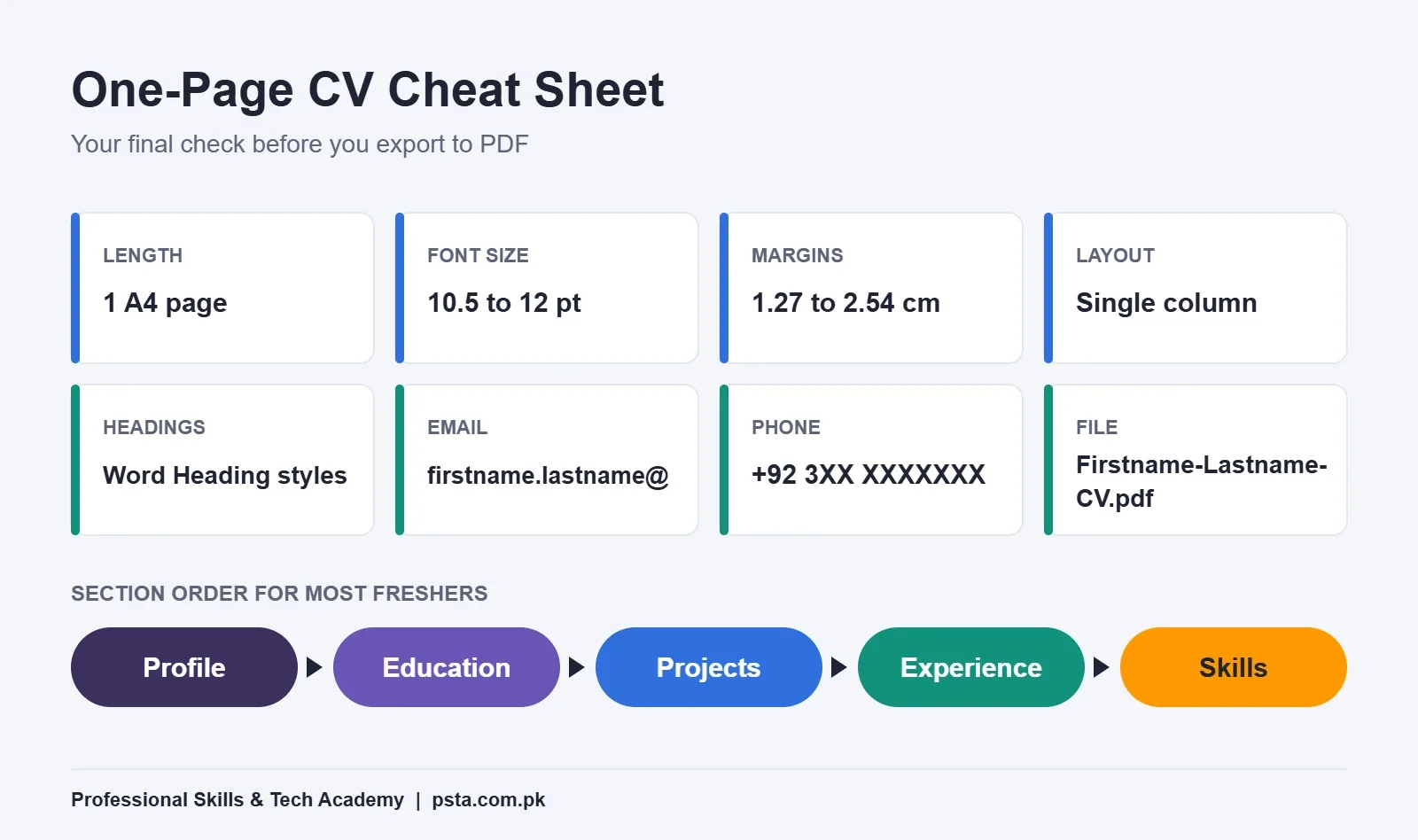
Fix: Keep it to one A4 page. Cut anything older than Matric unless the ad asks for it. Use a 10.5 to 12 pt font and margins between 1.27 cm and 2.54 cm. If it still spills over, shorten bullet points before you shrink the text. A simple CV format for freshers works in most cases: profile, education, projects, experience, skills.
Mistake 2: Columns, Text Boxes and Skill Bars
Fancy templates with sidebars, icons and five-star skill ratings look good in a preview. They cause two problems. Some applicant tracking systems read text boxes and columns in the wrong order, or skip them. And a "4 out of 5 stars in Excel" rating tells the employer nothing they can check.
Fix: Use a single column. In Word, go to File, then New, and search "Resume," as Microsoft's template guide explains. Pick the simplest one-column design and replace the sample text. Swap any star ratings for specific tasks you can do. Plain text in one column under standard headings is the heart of an ATS friendly CV.
Mistake 3: Mixed Fonts, Dates and Spacing
One heading in Calibri, another in Times New Roman, dates written as "2024-26" in one place and "Jan 2025 to present" in another. Small things, but they suggest you don't check your work. Office jobs are mostly about checking your work.
Fix: Use Word's built-in Heading 1 and Heading 2 styles for every section title. Pick one date format, such as "Jun 2025 to Aug 2025," and use it everywhere. Turn on the paragraph marks (Ctrl+Shift+8) to find stray spaces and empty lines.
Contact and Personal Details Mistakes
Mistake 4: An Email Address From Your School Days
An address like "cool.boy786" or "princess_aleena" gets read before your degree does. A missing city or a phone number written without a country code causes problems when the HR team or an overseas client tries to reach you.
Fix: Create a free address in the format firstname.lastname@ and use it only for jobs. Write your number as +92 3XX XXXXXXX, add your city, and include a LinkedIn link if your profile is complete.
Mistake 5: Too Much Personal Information
Many CV templates passed around in Pakistan still include CNIC number, father's name, religion, marital status, date of birth and full home address. A private employer rarely needs most of this to shortlist you. Your CV also gets forwarded, printed and left on desks, so every extra detail is a privacy risk.
Fix: Keep your name, phone, email, city and LinkedIn. Add anything else only when the job ad asks for it. Government applications usually collect CNIC and domicile on their own forms. Add a photo only when the ad requests one, and use a plain background.
Content Mistakes in Education, Projects and Skills
Mistake 6: A Generic Career Objective
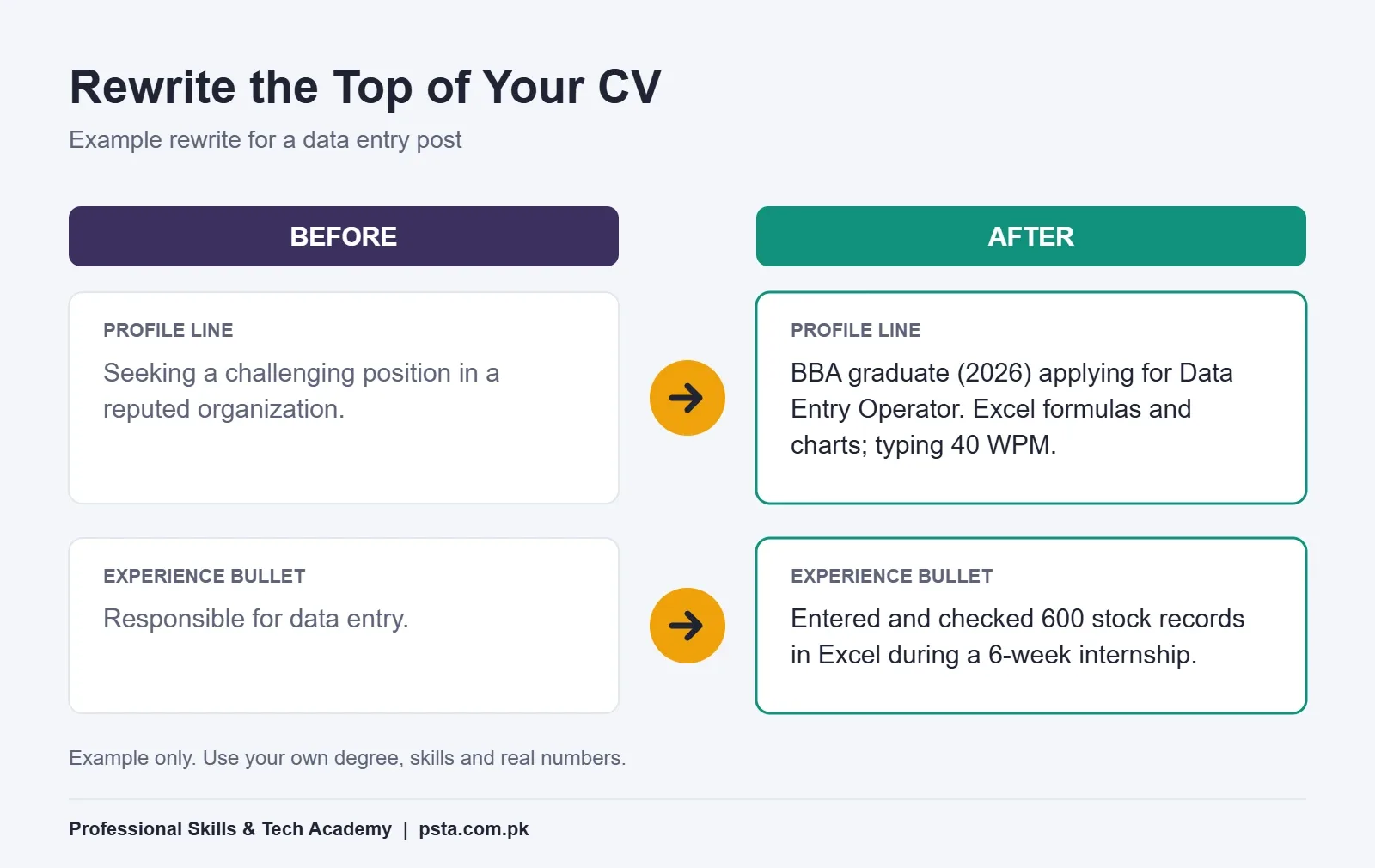
"Seeking a challenging position in a reputed organization where I can utilize my skills" appears on thousands of CVs. It talks about what you want, not what you offer, and it takes up the most-read spot on the page.
Fix: Replace it with a two-line profile: your degree and year, two skills that match the ad, and the post you're applying for. The infographic below shows a before-and-after example.
Mistake 7: Leaving Out Your Final-Year Project
Freshers often write "No experience" and stop there. Your final-year project, a semester assignment you're proud of, volunteer work or a short internship all count. They show what you can do when nobody is grading attendance.
Fix: Add a "Projects" section above "Experience" if your projects are stronger. For each one, write the tool you used, what you built and one outcome. For example: "Built an Excel sheet that tracks monthly stock for a family pharmacy, with formulas for reorder levels."
Mistake 8: Duties Instead of Results
"Responsible for data entry" says what the job was. It doesn't say how well you did it. Ladders found that bulleted accomplishments held attention, so give the reader something specific to notice.
Fix: Start each bullet with a verb, then add what you did and a number where you have one: how many records, how many customers, how many days saved. If you don't have a number, describe the result in plain words.
Mistake 9: A Skills List Full of Adjectives
"Hardworking, punctual, team player, MS Office" is the most common skills section I see. Anyone can write those words. An employer can't test them from the page.
Fix: List skills you could show in a practical test. "Excel: formulas, sorting, filters, charts" is better than "MS Office." Add your typing speed if you've measured it on a proper test, and mention Urdu typing if the post involves government or court documents. How employers measure WPM is covered in our typing speed for jobs article.
Why Does One CV for Every Job Fail?
Mistake 10: Sending the Same File Everywhere
A data entry post, a receptionist post and a sales trainee post look for different things. One general CV fits none of them well. Jobscan's guidance is to tailor each resume so it includes the skills and experience recruiters search for.
Real ads show how specific employers get. On Indeed Pakistan, a data entry clerk ad in Islamabad offered Rs. 65,000 to Rs. 70,000 a month and asked for 40+ WPM typing plus Excel and Word, while an Abbottabad computer operator ad asked for MS Office and good English communication, based on listings we checked this month. Listings change daily, so read the ad you're applying to.
Fix: Keep one master CV. For each application, copy it and change three parts: the profile line, the order of your skills, and which project you list first. Use the exact words from the ad where they truthfully describe you.
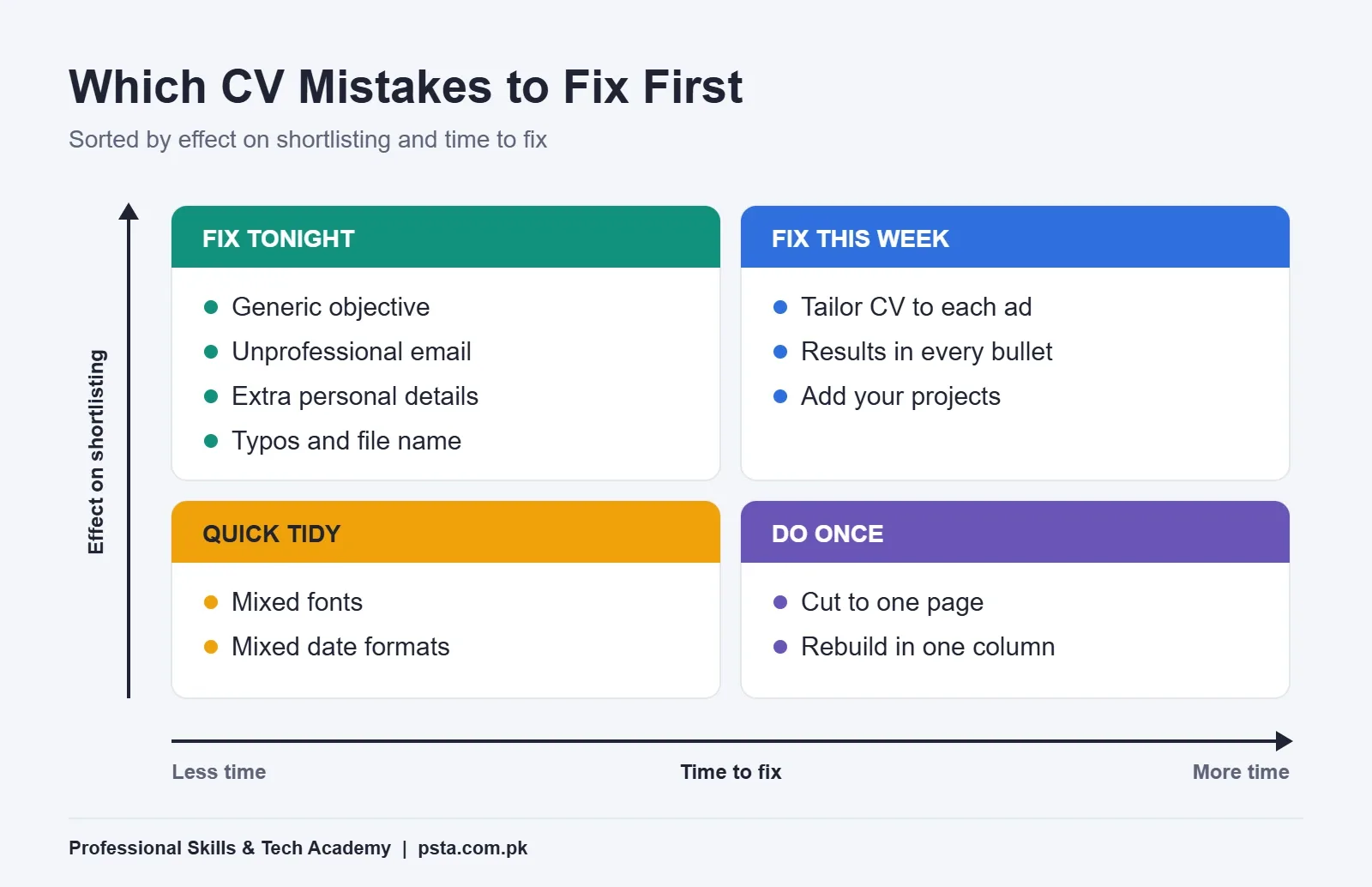
Not every mistake deserves the same attention. This matrix sorts them by how much they affect shortlisting and how long they take to fix.
Finishing Mistakes: File, Name and Proofreading
Mistake 11: The Wrong File Type or a Messy File Name
A Word file can open with shifted lines on a phone or an older version of Office. A file called "CV final new (2).docx" also looks careless when it lands in an HR inbox next to 200 others.
Fix: Unless the ad asks for Word, send a PDF. In Word for Windows, choose File, then Save a Copy, select PDF from the drop-down list and save, as Microsoft's PDF guide describes. Name it "Firstname-Lastname-CV.pdf."
Mistake 12: Spelling and Grammar Errors
"Bachlor," "recieve" and "I am having good communication skills" are the errors I mark most often. In an office role where you'll write letters and emails, a typo on the CV is read as a preview of your work.
Fix: Run Word's spelling and grammar check, then read the CV out loud slowly. Ask one person with strong English to read it too. If English writing is your weak area, our English Spoken and Grammar course covers the everyday grammar that shows up in CVs and interviews.
Once the content is right, use this one-page layout as your final check before you export.
Fresh Graduate CV Mistakes at a Glance
Use this table as a final pass on your fresh graduate CV before you hit send.
| # | Mistake | Quick Fix | Time Needed |
|---|---|---|---|
| 1 | Two or more pages | Cut to one A4 page | 30 minutes |
| 2 | Columns, text boxes, skill bars | Single-column Word template | 45 minutes |
| 3 | Mixed fonts and dates | Heading styles, one date format | 15 minutes |
| 4 | Old email, no country code | firstname.lastname@, +92 format | 10 minutes |
| 5 | CNIC, religion, full address | Name, phone, email, city only | 5 minutes |
| 6 | Generic objective | Two-line profile for the post | 15 minutes |
| 7 | No projects listed | Projects section with tool and outcome | 30 minutes |
| 8 | Duties, not results | Verb, task, number | 30 minutes |
| 9 | Adjectives as skills | Testable skills, measured WPM | 15 minutes |
| 10 | Same CV for every job | Edit profile, skills order, top project | 15 minutes per job |
| 11 | Word file, messy name | PDF named Firstname-Lastname-CV | 5 minutes |
| 12 | Typos and grammar | Spell check, read aloud, second reader | 20 minutes |
The times are rough estimates for someone comfortable in Word. If you're still learning the software, give yourself an evening.
Does a Government Job CV Need Anything Different?
Yes, a little. Many federal government posts are listed on the National Jobs Portal, which lets you filter by pay scale, job type, experience and age, apply online and track your application. It also has its own CV builder, so your profile there should match the CV you keep in Word.
Government ads are strict about eligibility. A Pakistan Railways computer operator post on the portal this summer listed PPS-4, a maximum age of 30 and at least two years of experience, with accepted degrees ranging from BA and B.Com to IT associate degrees. If you miss one condition, a perfect CV won't help.
So for government posts, put your exact degree title, year of passing and any required experience near the top. Write dates in full. Keep a scanned set of your documents ready, because the form will ask for them separately.
Building Your CV in Word With PSTA
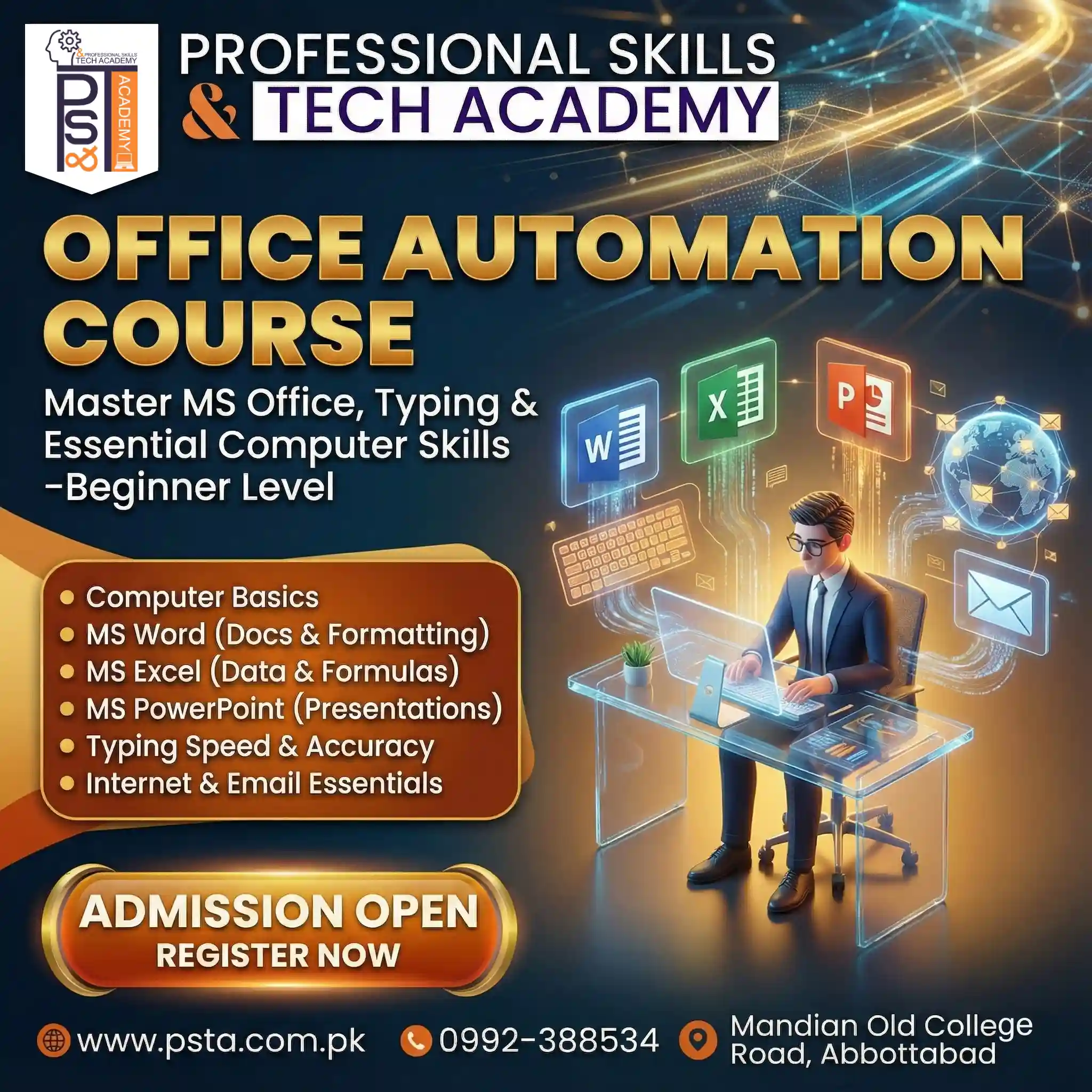
If Word itself is the obstacle, that's a skills gap you can close quickly. In our Certified Office Automation course, one of the projects is your own CV and job application letter in Word, formatted and ready to print or email. You also practice Excel formulas and charts, PowerPoint, data entry under a time limit, and English and Urdu typing.
The course runs for 12 weeks at beginner level. The current fee is Rs. 12,000 (regular Rs. 15,000), payable in two installments. You can join at our Mandian campus on Old College Road, opposite FIMS College, take the same classes live online from another city, or combine both modes. A new batch starts every month.
If typing is your weakest area, the English and Urdu typing course pairs well with it. Every program we teach is listed on the courses page, and when you decide, the admission form takes a few minutes. Questions about batch timings can go to us on WhatsApp at +92 314 5424399.
After your CV gets a call, the next hurdle is the interview. We've written model answers for the English interview questions Pakistani panels ask most.
Fix the Top Third of Your CV Tonight
You don't need to rebuild your fresh graduate CV all at once. Open it, cover the bottom two-thirds with a sheet of paper, and look only at what's left: your name, contact line, profile and first section. That's the part a recruiter sees in those first few seconds.
Replace the objective with a two-line profile, fix the email address, and remove your CNIC number. Then save it as a PDF with your name in the file name. Send that version with your next application and compare the response with your old one.
Frequently asked questions
Should a fresh graduate CV be one page or two?
One page is enough for almost every fresher. You rarely have two pages of relevant material, and recruiters skim the first screen quickly. Keep one A4 page with a 10.5 to 12 pt font. If it spills over, shorten bullet points and remove school-level details older than Matric before you reduce the font size.
Should I put a photo on my CV in Pakistan?
Add a photo only when the job ad asks for one. Many private employers don't need it to shortlist you, and it takes space from your skills and projects. If a photo is requested, use a recent, clear picture with a plain background and formal clothes. Never use a cropped group or social media photo.
Is it safe to write my CNIC number on my CV?
It's better to leave it off. Your CV gets forwarded, printed and stored by people you never meet, so an identity number on it is an unnecessary risk. Government applications collect CNIC on their own forms, and a private employer can ask for it after shortlisting. Keep name, phone, email, city and LinkedIn.
What should I write instead of a career objective?
Write a two-line profile. Include your degree and passing year, two skills that match the job ad, and the post you're applying for. For example, a BBA graduate applying for data entry could mention Excel formulas and measured typing speed. Change this line for every application so it matches the ad's wording.
Should I send my CV as a Word file or a PDF?
Send a PDF unless the ad specifically asks for a Word file. A PDF keeps your layout the same on phones and older computers. In Word for Windows, use File, Save a Copy, choose PDF from the file type list and save. Name it with your first and last name, such as Firstname-Lastname-CV.pdf.
What can I put on my CV if I have no work experience?
List your final-year project, strong semester assignments, internships, volunteer work and any freelance or family business tasks. For each item, write the tool you used, what you made and one result. A Projects section placed above Experience shows practical ability far better than a line that says no experience.
How do I make my CV ATS friendly?
Use a single column, standard section headings such as Education and Skills, and plain text instead of text boxes, icons or skill bars. Copy the exact keywords from the job ad where they truthfully describe you. Save it as a PDF unless the employer asks for Word, and avoid putting important details in headers or footers.
Do government jobs in Pakistan need a different CV?
The basics are the same, but eligibility matters more. Put your exact degree title, passing year and required experience near the top, and check age limits before you apply. Many federal posts appear on the National Jobs Portal, which has its own CV builder, so keep that profile consistent with your Word CV.
Sources & references
- Eye tracking study shows recruiters look at resumes for 7 seconds (HR Dive) hrdive.com
- Ladders Eye-Tracking Study 2018 csuglobal.edu
- 2026 Applicant Tracking System (ATS) Usage Report (Jobscan) jobscan.co
- Pakistan's unemployment rate jumps to 7.1% (ARY News) arynews.tv
- Use a template to create a resume (Microsoft Support) support.microsoft.com
- Save or convert to PDF (Microsoft Support) support.microsoft.com
- National Jobs Portal, Government of Pakistan njp.gov.pk
- Computer operator jobs in Pakistan (Indeed) pk.indeed.com
Last reviewed & updated on by Umar Qureshi. Written by the PSTA team in Abbottabad, Pakistan.

Umar Qureshi
Certified Office Automation Course: Master MS Office & Computer Basics
Turn this guide into a career: hands-on training with real projects, online across Pakistan or on-campus in Abbottabad · 12 Weeks.

Comments
No comments yet — ask a question or share your experience.