Quick answer
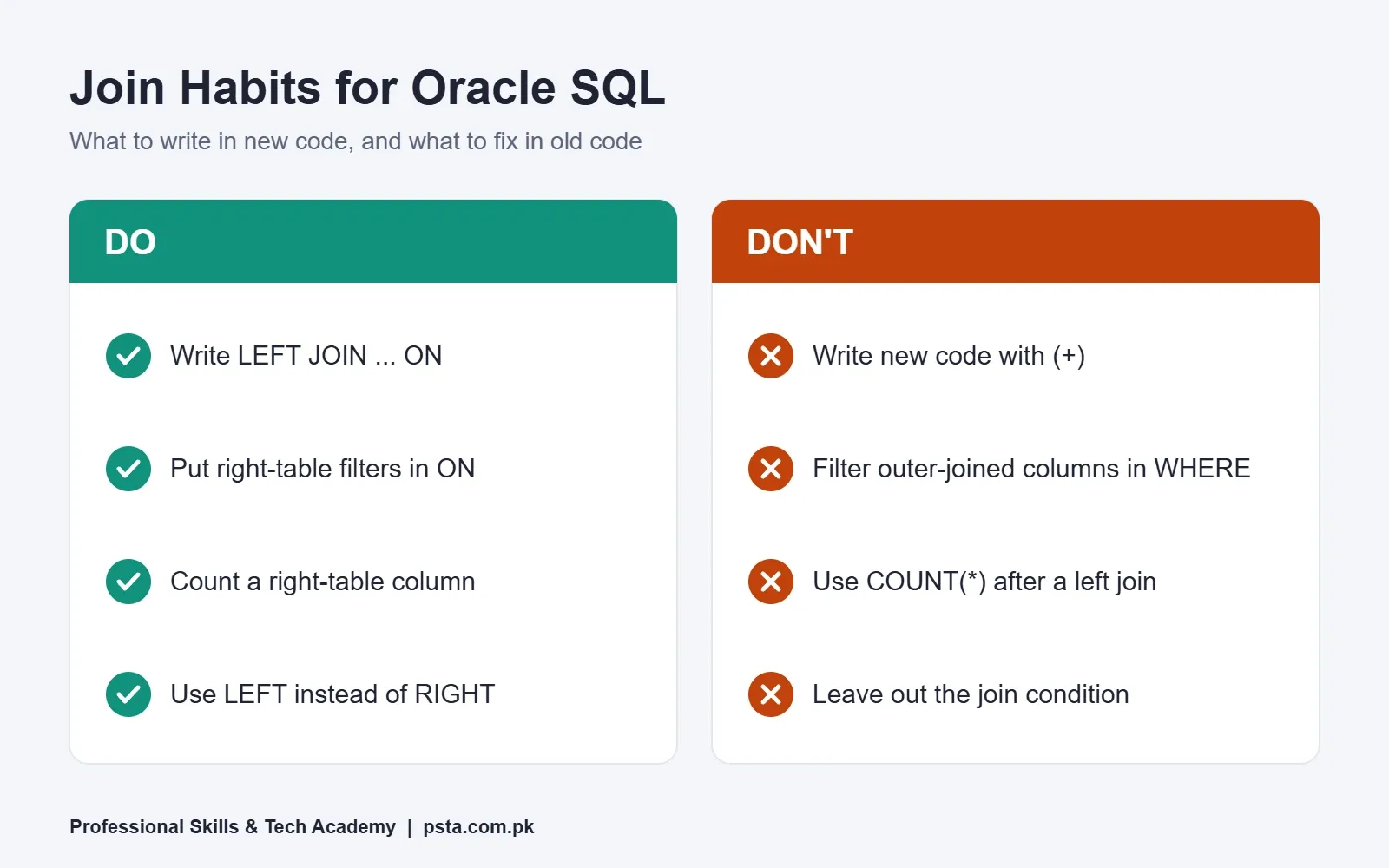
SQL joins combine rows from two tables on a shared column. An inner join keeps only matching rows, a left join keeps every row from the first table, and a full outer join keeps unmatched rows from both. In Oracle, write LEFT JOIN ... ON instead of the old (+) operator, and filter outer-joined columns in ON, not WHERE.
Key takeaways
- • The join type only decides one thing: what happens to a row that finds no match.
- • Use a left join with COUNT(right_table.column) to list every record, including those with zero matches.
- • A left join plus WHERE key IS NULL finds missing rows, such as customers who never ordered.
- • Oracle recommends ANSI OUTER JOIN syntax over the (+) operator, which fails silently in some cases.
- • A filter on the outer-joined table placed in WHERE quietly turns a left join into an inner join.
Table of contents 19 sections
- What Are SQL Joins?
- The Two Sample Tables Used in This Guide
- INNER JOIN: Only the Rows That Match
- LEFT JOIN: Keep Every Row From the First Table
- RIGHT JOIN and FULL OUTER JOIN
- Right Join
- Full Outer Join
- Which of the SQL Joins Should You Use?
- CROSS JOIN and Self Join: The Two Odd Ones
- Cross Join
- Self Join
- Finding Missing Rows With an Anti-Join
- Oracle's Old (+) Syntax: How to Read It
- Why Do My SQL Joins Return the Wrong Row Count?
- 1. A Filter in WHERE Turned Your Left Join Into an Inner Join
- 2. Two One-to-Many Joins Multiplied Your Rows
- 3. The Join Key Isn't Unique
- Practicing Joins in PSTA's Oracle Course
- A 20-Minute Joins Drill for Tonight
Here's an example you could meet in your first week at a data job. An online clothing shop in Peshawar asks for a list of every customer with their order count. You write a quick query, run it, and four customers come back as two. Nobody deleted anything. You used the wrong one of the SQL joins, and the customers who never ordered quietly dropped out of the result.
SQL joins combine rows from two or more tables using a column they share, such as a customer ID. The join you pick decides which rows survive when there is no match. In class, that one decision is behind a lot of the wrong reports students hand in.
In this guide you will see:
- What each join type keeps and drops, shown on the same two small tables
- When to use an inner join, a left join or a full outer join
- How to find "missing" rows, such as customers with no orders
- How to read Oracle's older (+) syntax when you meet it in legacy code
- The three traps that make a join return too many or too few rows
What Are SQL Joins?
A database rarely keeps everything in one table. Customer names live in one place, orders in another, payments in a third. This keeps data tidy, but most real questions need two tables at once. A join is how you bring them back together for one query.
Oracle's SQL Language Reference for Database 19c defines a join as a query that combines rows from two or more tables, views or materialized views. Every join has two parts:
- The tables you list in the FROM clause.
- The join condition that says how rows pair up, usually
ON a.id = b.id.
The join type sits between them and answers one question: what happens to a row that finds no partner? That's the whole idea behind SQL joins. Everything below is a variation of it.
The skill is worth the effort. In the 2025 Stack Overflow Developer Survey, 58.6% of all respondents said they had used SQL, and the figure was 61.3% among professional developers. SQL joins are a large part of that daily work.
The Two Sample Tables Used in This Guide
Every example of SQL joins below uses the same two tables from our made-up Peshawar shop. Keep them in view, because you will check each result against them.
| customers.customer_id | customers.name | customers.city |
|---|---|---|
| 1 | Ayesha | Peshawar |
| 2 | Bilal | Mardan |
| 3 | Sana | Nowshera |
| 4 | Kamran | Peshawar |
| orders.order_id | orders.customer_id | orders.amount (Rs.) |
|---|---|---|
| 101 | 1 | 2,500 |
| 102 | 1 | 1,200 |
| 103 | 2 | 4,000 |
| 104 | 9 | 3,100 |
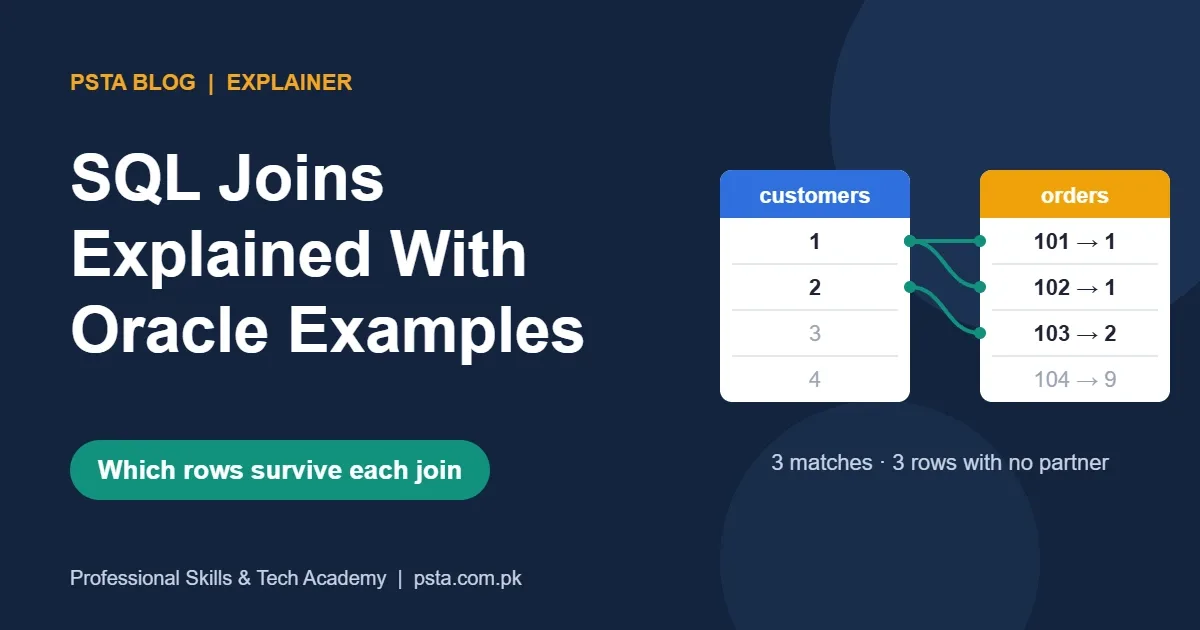
Notice three things. Ayesha has two orders. Sana and Kamran have none. Order 104 points to customer 9, who doesn't exist, perhaps because it was imported from an old spreadsheet. Real data is messy like this, and each join treats these rows differently.
INNER JOIN: Only the Rows That Match
An inner join returns only the pairs where the condition is true on both sides. Rows without a partner disappear from the result.
SELECT cu.name, od.order_id, od.amount
FROM   customers cu
JOIN   orders od ON od.customer_id = cu.customer_id;
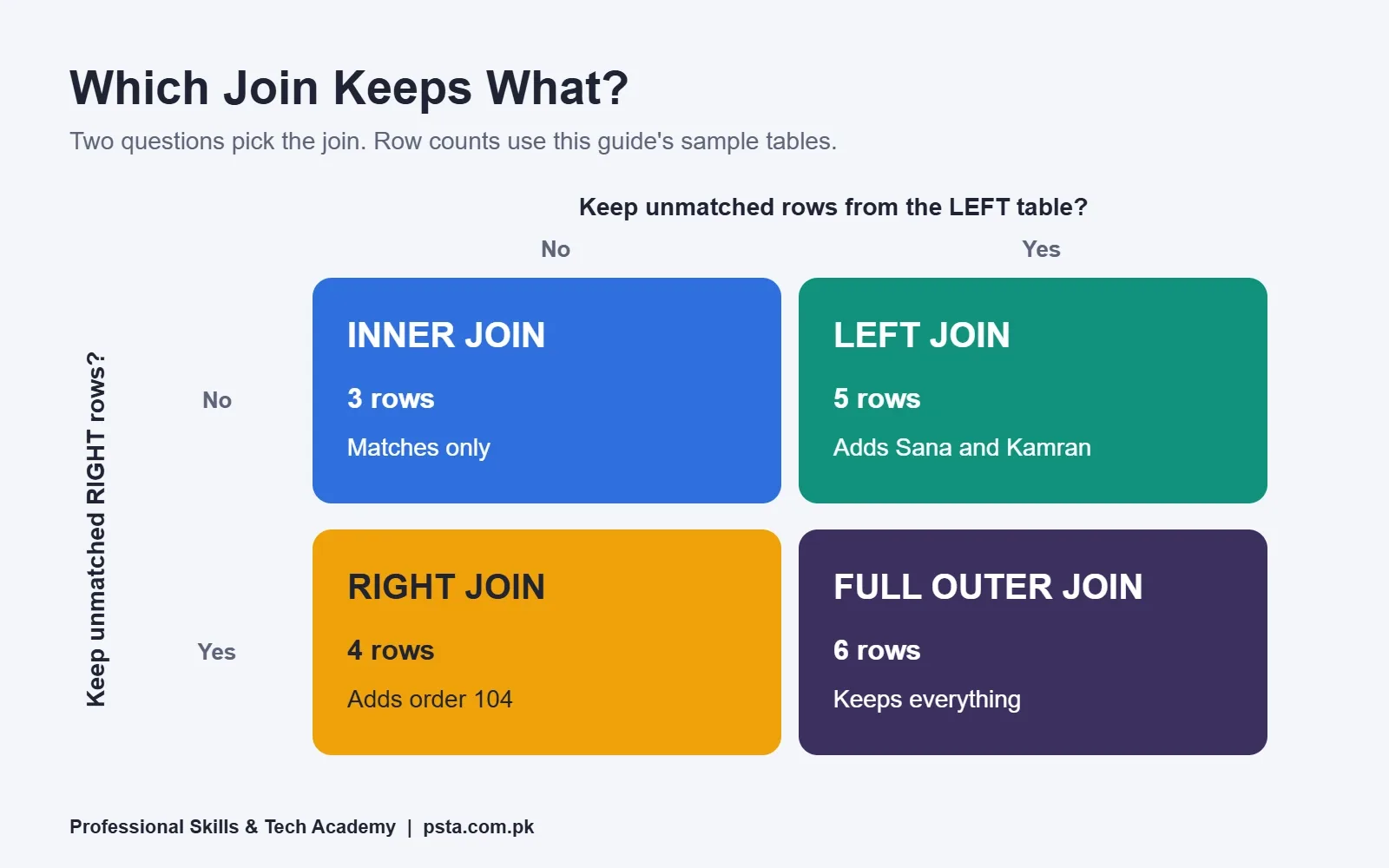
Result: three rows. Ayesha appears twice (orders 101 and 102), and Bilal once (103). Sana, Kamran and order 104 are gone.
Writing JOIN on its own means INNER JOIN. Use an inner join when you only care about matched data, such as "show me the orders with their customer names." It's the right default for reports where an unmatched row would be noise.
It's the wrong choice for the opening example. The shop asked for every customer, and an inner join can't return a customer with zero orders.
LEFT JOIN: Keep Every Row From the First Table
With a left join, every row of the table written before the JOIN keyword stays in the result. Where no match exists, the columns from the right table come back as NULL. The PostgreSQL documentation on table expressions puts it neatly: the joined table always has at least one row for each row of the left table.
SELECT cu.name, COUNT(od.order_id) AS order_count
FROM   customers cu
LEFT JOIN orders od ON od.customer_id = cu.customer_id
GROUP BY cu.name;
Result: Ayesha 2, Bilal 1, Sana 0, Kamran 0. That's the report the shop wanted.
Look closely at COUNT(od.order_id). If you write COUNT(*) instead, Sana and Kamran each show 1, because the row with NULLs still counts as a row. Counting a column from the right table skips those NULLs and gives the true zero.
LEFT JOIN and LEFT OUTER JOIN are the same thing. The word OUTER is optional in Oracle, MySQL and PostgreSQL.
RIGHT JOIN and FULL OUTER JOIN
Right Join
A right join is the mirror image of a left join. It keeps every row from the right-hand table. In our data, customers cu RIGHT JOIN orders od returns four rows: the three matches plus order 104 with a NULL name.
You will rarely need it. Any right join can be rewritten as a left join by swapping the table order. The MySQL 8.4 Reference Manual recommends using LEFT JOIN instead of RIGHT JOIN to keep code portable across databases. It's a good habit, because a chain of left joins reads in one direction.
Full Outer Join
A full outer join keeps everything from both sides. Oracle's 19c SELECT reference describes it as a two-sided outer join, where unmatched rows from both tables are preserved and extended with nulls.
SELECT cu.name, od.order_id
FROM   customers cu
FULL OUTER JOIN orders od ON od.customer_id = cu.customer_id;
Result: six rows. Three matches, Sana and Kamran with no order, and order 104 with no customer. This is the join for reconciliation work, such as comparing a bank statement with your sales ledger and spotting entries that exist on only one side.
One portability note. MySQL 8.4's JOIN grammar lists LEFT and RIGHT outer joins but has no FULL option. On MySQL, people usually combine a left join and a right join with UNION to get the same effect. Oracle and PostgreSQL support FULL OUTER JOIN directly.
Which of the SQL Joins Should You Use?
Picking between SQL joins comes down to two questions. Do you need rows from the first table that have no match? Do you need rows from the second table that have no match? The answers point to one join.
| Join type | Keeps unmatched rows from | Rows in our example | Typical use |
|---|---|---|---|
| INNER JOIN | Neither table | 3 | Orders with customer names |
| LEFT JOIN | Left table | 5 | All customers, with or without orders |
| RIGHT JOIN | Right table | 4 | Rarely used; swap tables and use LEFT |
| FULL OUTER JOIN | Both tables | 6 | Reconciling two lists |
| CROSS JOIN | No condition at all | 16 | Building every combination on purpose |
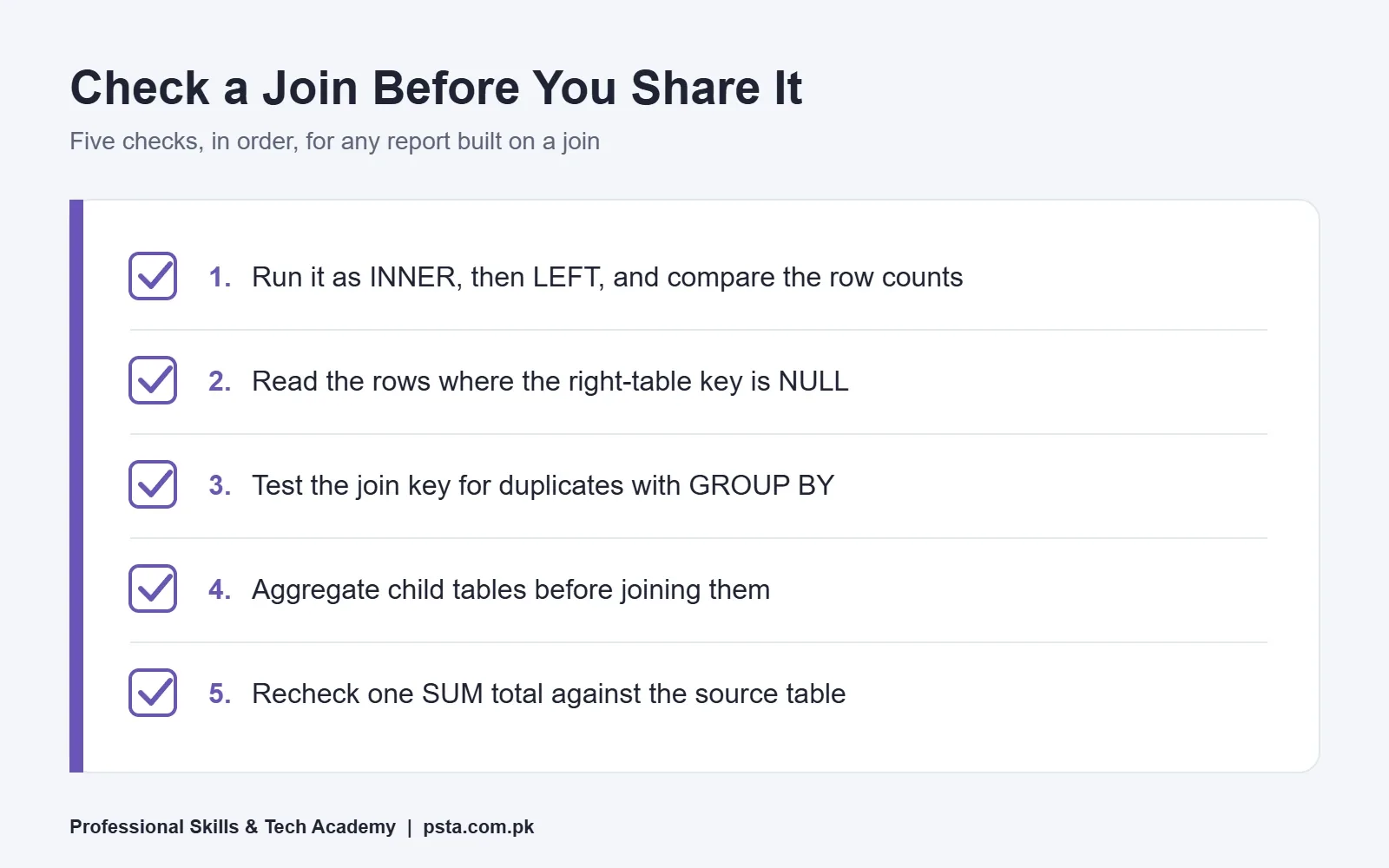
If you're unsure, write the query as an inner join first, note the row count, then switch to a left join. If the count rises, the extra rows are your unmatched records. Look at them before deciding which version the report needs.
CROSS JOIN and Self Join: The Two Odd Ones
Cross Join
A cross join has no join condition. It pairs every row of one table with every row of the other, so our four customers and four orders give 16 rows. Oracle calls this a Cartesian product and warns in its Joins reference that it "is rarely useful."
It does have honest uses. A school timetable might cross join a list of classes with the six weekdays to build an empty grid, which you then fill in. The danger is the accidental cross join. In the older comma style, forgetting the WHERE condition gives you one silently, and on two tables of 10,000 rows each, that's 100 million rows.
Self Join
In a self join, the same table appears twice in the FROM clause. You need it when one row points to another row in the same table. A common case is a staff table where each person has a supervisor_id that holds another staff member's ID.
SELECT s.name AS staff_member, m.name AS supervisor
FROM   staff s
LEFT JOIN staff m ON m.staff_id = s.supervisor_id;
The aliases s and m are what make this work. Without them, the database can't tell which copy of the table you mean. The left join keeps the person at the top, such as the owner, whose supervisor_id is NULL.
Finding Missing Rows With an Anti-Join
Some of the most useful questions are about what's missing. Which customers have never ordered? Which students enrolled but never paid? Which products have no stock entry? This pattern is called an anti-join.
The simplest version is a left join followed by a NULL check on the right table's key. The MySQL manual shows this exact technique for finding rows with no counterpart in another table.
SELECT cu.customer_id, cu.name
FROM   customers cu
LEFT JOIN orders od ON od.customer_id = cu.customer_id
WHERE  od.order_id IS NULL;
Result: Sana and Kamran. A sales team could call these two customers with a first-order discount.
You can write the same thing with NOT EXISTS:
SELECT cu.customer_id, cu.name
FROM   customers cu
WHERE  NOT EXISTS (SELECT 1 FROM orders od
                   WHERE od.customer_id = cu.customer_id);
Both give the same answer here. NOT EXISTS states the intent directly, which makes it easy to read later. Avoid NOT IN with a subquery that can return NULL, since a single NULL in the list makes it return no rows at all.
Oracle's Old (+) Syntax: How to Read It
If you join a bank, telecom or government project that runs on Oracle, you will probably open older Oracle SQL code that looks like this:
SELECT cu.name, od.order_id
FROM   customers cu, orders od
WHERE  od.customer_id(+) = cu.customer_id;
This is a left join written in Oracle's own operator. The rule for reading it: the (+) goes on the side that may be missing. Here it's on the orders column, so every customer is kept and orders fill in as NULL where none exist.
You should be able to read it, but don't write new code with it. Oracle's Joins reference says it recommends the FROM clause OUTER JOIN syntax rather than the (+) operator. The same page lists restrictions that catch people out:
- If two tables are joined on several conditions, the (+) must appear in all of them. Miss one and Oracle returns an inner join result with no warning or error.
- A condition that contains (+) can't be combined with another condition using OR.
- You can't mix (+) with ANSI JOIN syntax in the same query block.
When you edit an old query, converting it to LEFT JOIN ... ON often makes the logic easier for the next person to check.
Why Do My SQL Joins Return the Wrong Row Count?
When SQL joins give the wrong count, the cause is usually one of three traps. Check them in this order.
1. A Filter in WHERE Turned Your Left Join Into an Inner Join
Say you want all customers, plus only their orders above Rs. 2,000. Compare these two:
-- Keeps all four customers
LEFT JOIN orders od ON od.customer_id = cu.customer_id AND od.amount > 2000

-- Drops Sana and Kamran
LEFT JOIN orders od ON od.customer_id = cu.customer_id
WHERE od.amount > 2000
The PostgreSQL documentation explains why: a condition in ON is applied before the join, while a condition in WHERE is applied after it. For unmatched customers, od.amount is NULL, and NULL > 2000 is never true, so WHERE throws them out. With inner joins the two forms give the same result. With outer joins they don't.
2. Two One-to-Many Joins Multiplied Your Rows
Suppose you join customers to orders and also to payments. Ayesha has two orders. If she also has three payments, the join produces six rows for her, and every total you SUM over them is inflated. The fix is to aggregate each child table first, in a subquery, and then join the summaries. Before you share the report, check one SUM total against the source table.
3. The Join Key Isn't Unique
If a "customers" export lists the same customer ID twice, each order matches twice. Before joining, run a quick check: SELECT customer_id, COUNT(*) FROM customers GROUP BY customer_id HAVING COUNT(*) > 1; Any row it returns is a duplicate key.
Practicing Joins in PSTA's Oracle Course
SQL joins appear early in the Oracle Database 19c Masterclass at PSTA. Module 1 covers SQL fundamentals, including the SELECT statement, aggregation and grouping, and a lesson on specialized joins and set operators. After that, the course moves into PL/SQL, database architecture, security, RMAN backup and recovery, and performance tuning.
It's a 12-week program pitched at beginners. At the time of writing, the Oracle course is listed at Rs. 33,000 (its pre-discount price is Rs. 45,000). You can join on campus in Abbottabad, attend live online from anywhere in Pakistan, or mix the two.
If you're more interested in reporting than database administration, joins also matter in Power BI, where table relationships do similar work. Developers meet them through Python and Django in the Advanced Python course. You can compare options on the courses page.
For related reading, see our guides on Oracle vs MySQL, SQL vs PL/SQL and SQL interview questions for freshers. To enrol in an upcoming batch, fill in the form on the admission page. If you'd like to ask about class times first, message +92 314 5424399 on WhatsApp.
A 20-Minute Joins Drill for Tonight
You don't need to install anything to practice SQL joins. Oracle FreeSQL runs in your browser on a real Oracle Database and is free to use, with an optional free account for saving scripts.
- Create the customers and orders tables from this guide and insert the eight rows.
- Run the inner, left, right and full outer joins. Write down the row count for each before you press Run.
- Write the anti-join that finds Sana and Kamran.
- Move
od.amount > 2000from ON to WHERE and explain the change in one sentence.
If your predicted counts were 3, 5, 4 and 6, you have the core idea that SQL interviewers test.
Frequently asked questions
Is JOIN the same as INNER JOIN?
Yes. When you write JOIN without a type in front of it, Oracle, MySQL and PostgreSQL all treat it as an inner join. Writing INNER JOIN in full changes nothing in the result. Spelling it out can still help, because it makes the intent obvious to the next person who reads the query, especially in long statements that mix inner and outer joins.
Is LEFT JOIN the same as LEFT OUTER JOIN?
Yes. The word OUTER is optional, so LEFT JOIN and LEFT OUTER JOIN return identical results. The same is true for RIGHT JOIN and FULL JOIN. Pick one style and use it across a project so your code reads consistently.
Can I join more than two tables in one query?
Yes. You add one JOIN clause per extra table, each with its own ON condition. For example, customers can join orders, and orders can join order_items. Check the row count after each join you add. If the count jumps unexpectedly, a one-to-many relationship is multiplying rows and your totals may be inflated.
Does MySQL support FULL OUTER JOIN?
The MySQL 8.4 JOIN grammar lists LEFT and RIGHT outer joins but no FULL option. The usual workaround is to write a left join and a right join on the same tables and combine them with UNION. Oracle and PostgreSQL support FULL OUTER JOIN directly, so you can write it in one clause there.
What is the difference between a join and UNION?
A join places columns side by side, matching rows from different tables on a shared key. UNION stacks rows from two queries on top of each other, and both queries must return the same number of compatible columns. Use a join to add details from another table, and UNION to combine two similar lists into one.
Should beginners still learn Oracle's (+) join syntax?
Learn to read it, but write new code with ANSI joins. Code written for older Oracle versions often uses (+) joins, so you may meet them on the job. Oracle's own documentation recommends the FROM clause OUTER JOIN syntax instead, and the (+) operator has restrictions that can fail without any warning.
Which join is fastest?
No join type is always faster. Speed depends on the data size, indexes on the join columns and the plan the optimizer chooses. Pick the join that returns the correct rows first, then index the join keys and check the execution plan if the query is slow. A fast query with the wrong rows is still a wrong report.
Sources & references
- Oracle Database 19c SQL Language Reference: Joins docs.oracle.com
- Oracle Database 19c SQL Language Reference: SELECT docs.oracle.com
- MySQL 8.4 Reference Manual: JOIN Clause dev.mysql.com
- PostgreSQL Documentation: Table Expressions postgresql.org
- Stack Overflow Developer Survey 2025: Technology survey.stackoverflow.co
- Oracle FreeSQL oracle.com
Last reviewed & updated on by Umar Qureshi. Written by the PSTA team in Abbottabad, Pakistan.

Umar Qureshi

Oracle Database 19c Masterclass: SQL, PL/SQL & Administration
Turn this guide into a career: hands-on training with real projects, online across Pakistan or on-campus in Abbottabad · 12 Weeks.


Comments
No comments yet — ask a question or share your experience.