Quick answer
Use RGB for anything people will see on a screen, such as social posts, ads, product photos and websites. Use CMYK for files a press will print, such as visiting cards, flyers and brochures. Design in RGB, keep that master file, then convert one copy to CMYK near the end and print a test copy.
Key takeaways
- • RGB mixes light for screens; CMYK mixes ink for paper.
- • Export social posts, ads and web images in RGB, ideally sRGB.
- • Set up visiting cards, flyers and brochures in CMYK, and confirm specs with the printer first.
- • Keep a layered RGB master and convert a single copy to CMYK near the end.
- • Use 100% black for small text and save rich black for large dark areas.
- • CMYK PDF export in Canva is a paid-plan feature.
Table of contents 16 sections
- What Is the Difference Between RGB and CMYK?
- RGB vs CMYK at a Glance
- How RGB Color Mode Works on Screens
- How CMYK Color Mode Works on Paper
- Why Do Bright Colors Change When They Print?
- Which Mode Should You Use for Each Job?
- How to Convert RGB to CMYK Without Surprises
- In Photoshop
- In Illustrator
- In CorelDRAW
- In Canva
- Black in Print: Plain Black vs Rich Black
- Common Color Mode Mistakes Beginners Make
- Do You Need Pantone or Spot Colors?
- Color Work in PSTA's Graphic Design Course
- Print a Test Strip Before Your Next Order
Why does a logo that glows on your laptop come back from the print shop looking flat? Most of the time the answer is RGB vs CMYK. Screens build color from light, presses build it from ink, and some screen colors simply have no ink match.
The rule is short. Use RGB for anything people will see on a screen, and CMYK for anything a press will print. The hard part is knowing when to switch, how to switch, and what to check so the printed job still looks like your design.
Here is what this comparison covers:
- How the two color models work, in plain language
- A side-by-side table you can keep open while you work
- Which mode to pick for 10 common jobs Pakistani designers get
- A safe conversion routine for Photoshop, Illustrator, CorelDRAW and Canva
- The black ink settings and file mistakes that cause most reprints
What Is the Difference Between RGB and CMYK?
RGB stands for red, green and blue. It's an additive model: a screen mixes these three colors of light, and when all three run at full strength you see white. Adobe's guide to color models notes that each RGB channel runs from 0 to 255, so pure black is 0, 0, 0 and pure white is 255, 255, 255.
CMYK stands for cyan, magenta, yellow and key (black). It's a subtractive model. Ink sits on paper and absorbs part of the light that hits it. The more ink you add, the darker the result. Each ink is set as a percentage from 0% to 100%.
In theory, full cyan, magenta and yellow should make black. In practice they make a muddy brown, so printers add a separate black ink for clean shadows and sharp text. That's why four-color process printing has four plates, not three.
A quick way to remember it: RGB starts dark and adds light. CMYK starts with white paper and takes light away.
RGB vs CMYK at a Glance
Keep this RGB vs CMYK table handy when a client sends a job and you're not sure how to set up the file.
| Point | RGB | CMYK |
|---|---|---|
| Built from | Red, green and blue light | Cyan, magenta, yellow and black ink |
| Mixing type | Additive (more light = brighter) | Subtractive (more ink = darker) |
| Value format | 0 to 255 per channel, or a HEX code | 0% to 100% per ink |
| Where it ends up | Phones, monitors, TVs, websites, apps | Offset, digital and large-format printing |
| Color range | Wider, especially bright greens and blues | Narrower; neon tones look softer |
| Typical exports | PNG, JPG, WebP, MP4 | PDF for print, sometimes TIFF or EPS |
| Who asks for it | Social media managers, web developers | Print shops, packaging and flex printers |
How RGB Color Mode Works on Screens
Every pixel on your screen has three tiny lights. Change their strength and you get a new color. Adobe's Photoshop help explains that at 8 bits per channel, RGB can show up to 16.7 million colors per pixel. That huge range is why screen graphics can look so vivid.
On the web, the usual flavor of RGB is sRGB. MDN's glossary describes sRGB as the most widely used color space and the one browsers assume when an image carries no color profile. Newer phones and monitors can show wider spaces such as Display P3, but sRGB is still the safe default for anything you upload.
So for a Facebook ad, a Daraz product image, a YouTube thumbnail or a website banner, design and export in RGB, ideally sRGB. Converting these to CMYK gains you nothing, and keeping uploads in sRGB means viewers see the colors you actually picked.
How CMYK Color Mode Works on Paper
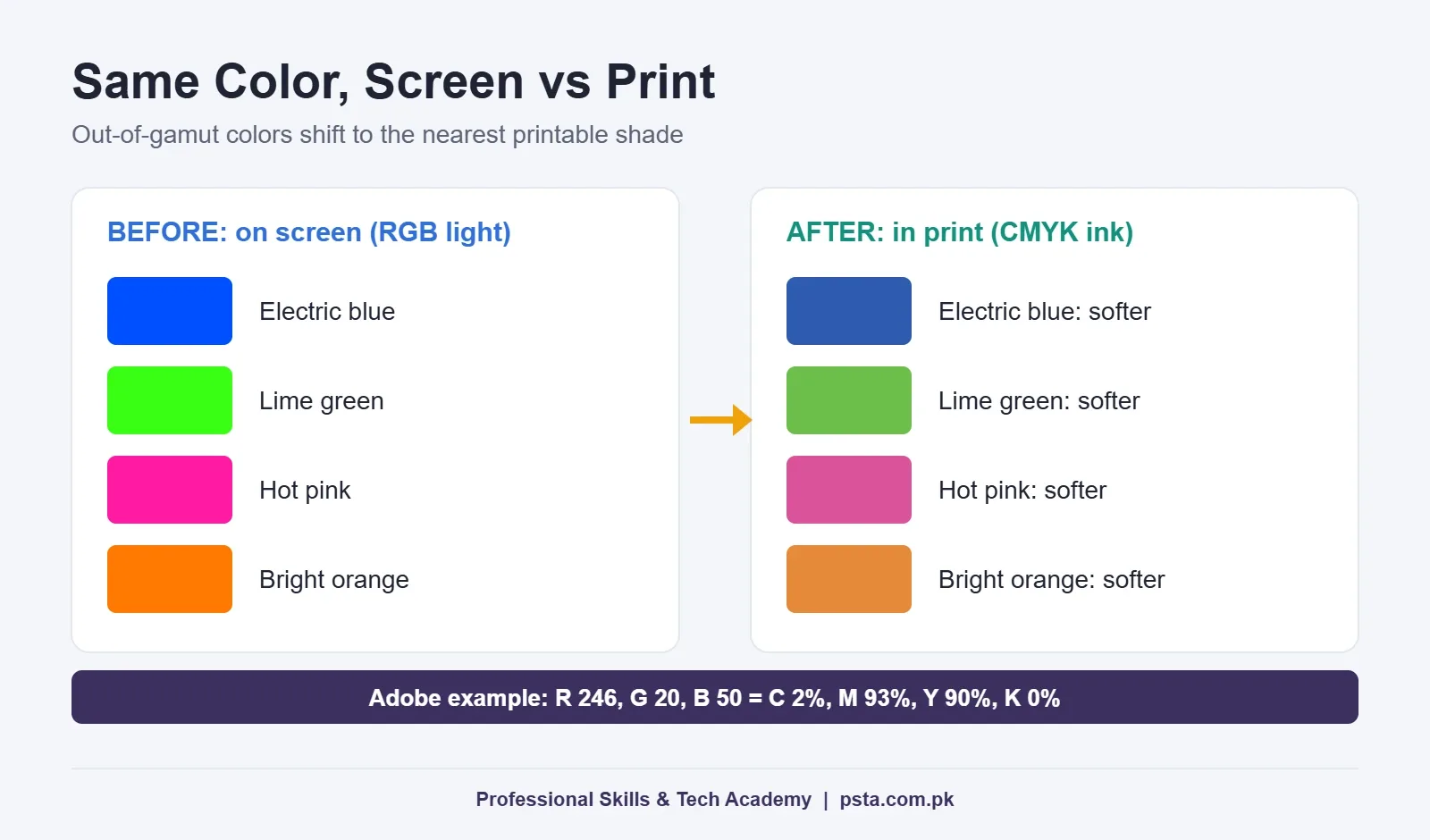
A printing press can't make light. It lays down dots of four inks in tiny patterns, and your eye blends them into a color. Adobe's example shows how different the numbers look: a bright red that is R 246, G 20, B 50 on screen becomes roughly 2% cyan, 93% magenta, 90% yellow and 0% black in print.
Paper matters too. Canva's print color guide says gloss and matte stock print fairly close to expectations, while uncoated or specialty paper can look a little warmer. Mugs, shirts and other non-paper items can differ even more, which is why it suggests ordering a single test piece first.
If you design wedding cards, school prospectuses, letterheads, flyers or packaging for local clients, CMYK is the language your printer speaks. Getting the file right saves both of you a second print run.
Why Do Bright Colors Change When They Print?
Every device has a gamut, which is the full range of colors it can produce. A monitor's gamut and a press's gamut overlap, but they aren't the same shape. Adobe calls a color that a device can't reproduce "out of gamut."
Electric blue, lime green, hot pink and bright orange are the usual casualties. On screen they sit outside what four inks can mix, so the conversion pulls them to the nearest printable shade. The result looks duller, and clients often blame the printer.
This is the part of RGB vs CMYK that surprises clients most. You can't stop it, but you can see it coming. Preview the print version early, adjust the colors yourself, and show the client the softer version before the job goes to press.
Which Mode Should You Use for Each Job?
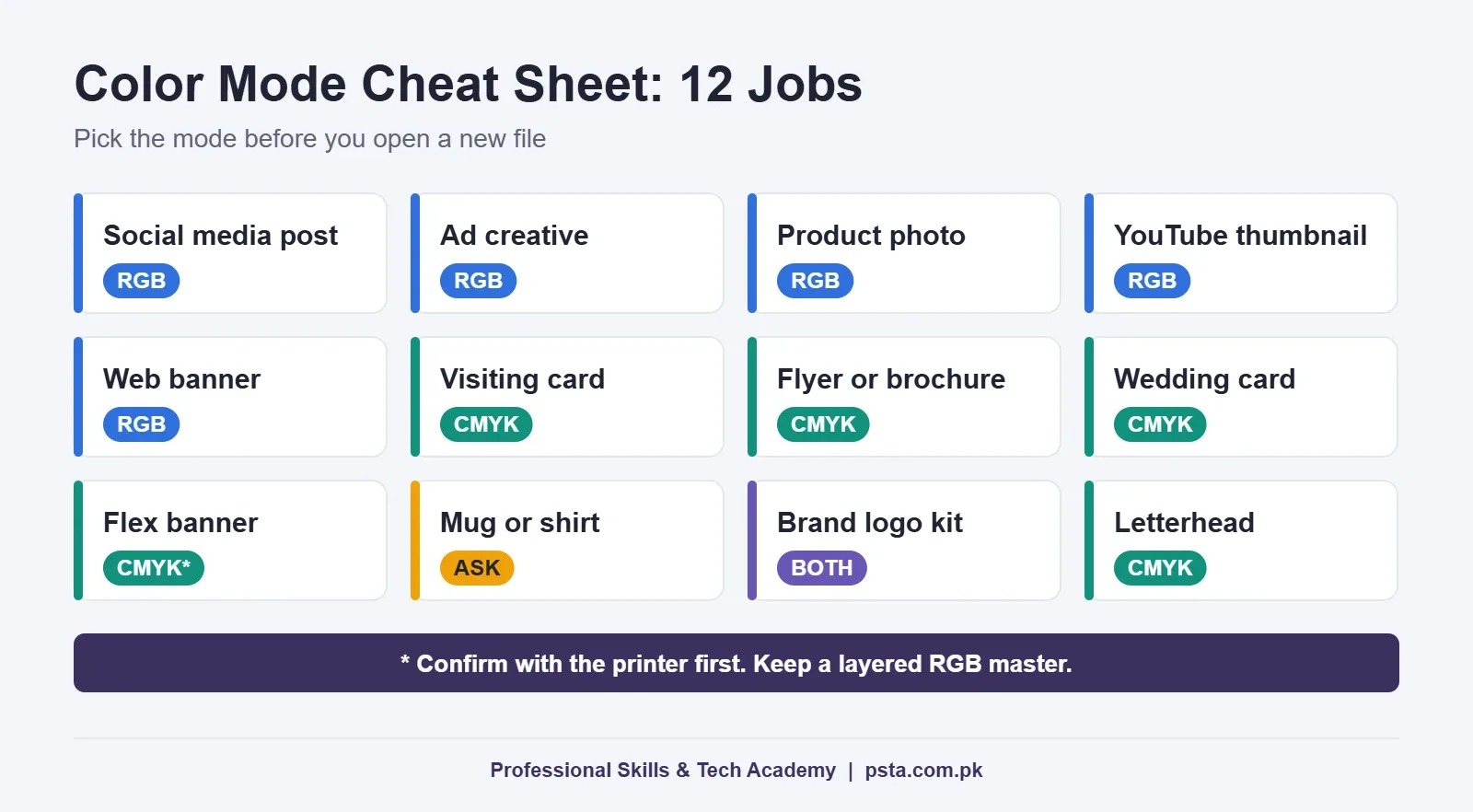
Here's how the RGB vs CMYK choice plays out for jobs that come up every week in a Pakistani design studio or freelance queue.
| Job | Mode | File to deliver |
|---|---|---|
| Facebook or Instagram post | RGB (sRGB) | PNG or JPG |
| Meta or TikTok ad creative | RGB (sRGB) | PNG, JPG or MP4 |
| Daraz or Shopify product photo | RGB (sRGB) | JPG or WebP |
| YouTube thumbnail | RGB (sRGB) | JPG or PNG |
| Website banner or logo for web | RGB (sRGB) | SVG, PNG or WebP |
| Visiting card or letterhead | CMYK | Print PDF with bleed |
| Flyer, brochure or wedding card | CMYK | Print PDF with bleed |
| Flex or panaflex banner | CMYK (confirm with printer) | PDF or the format the printer names |
| Mug or shirt print | Ask the printer first | Often a high-resolution PNG |
| Logo for a full brand kit | Both | Separate RGB and CMYK versions |
If a job isn't listed, ask one question: will people see it on a screen or hold it on paper? That answer picks the color mode for printing or posting. Two rows need a note. Large-format and sublimation printers in Pakistan vary a lot, and some ask for RGB files because their software converts color itself. One WhatsApp message to the printer before you start avoids a wasted evening. And for a logo, hand over both versions in clearly named folders, so the client never sends the web file to a press.
How to Convert RGB to CMYK Without Surprises
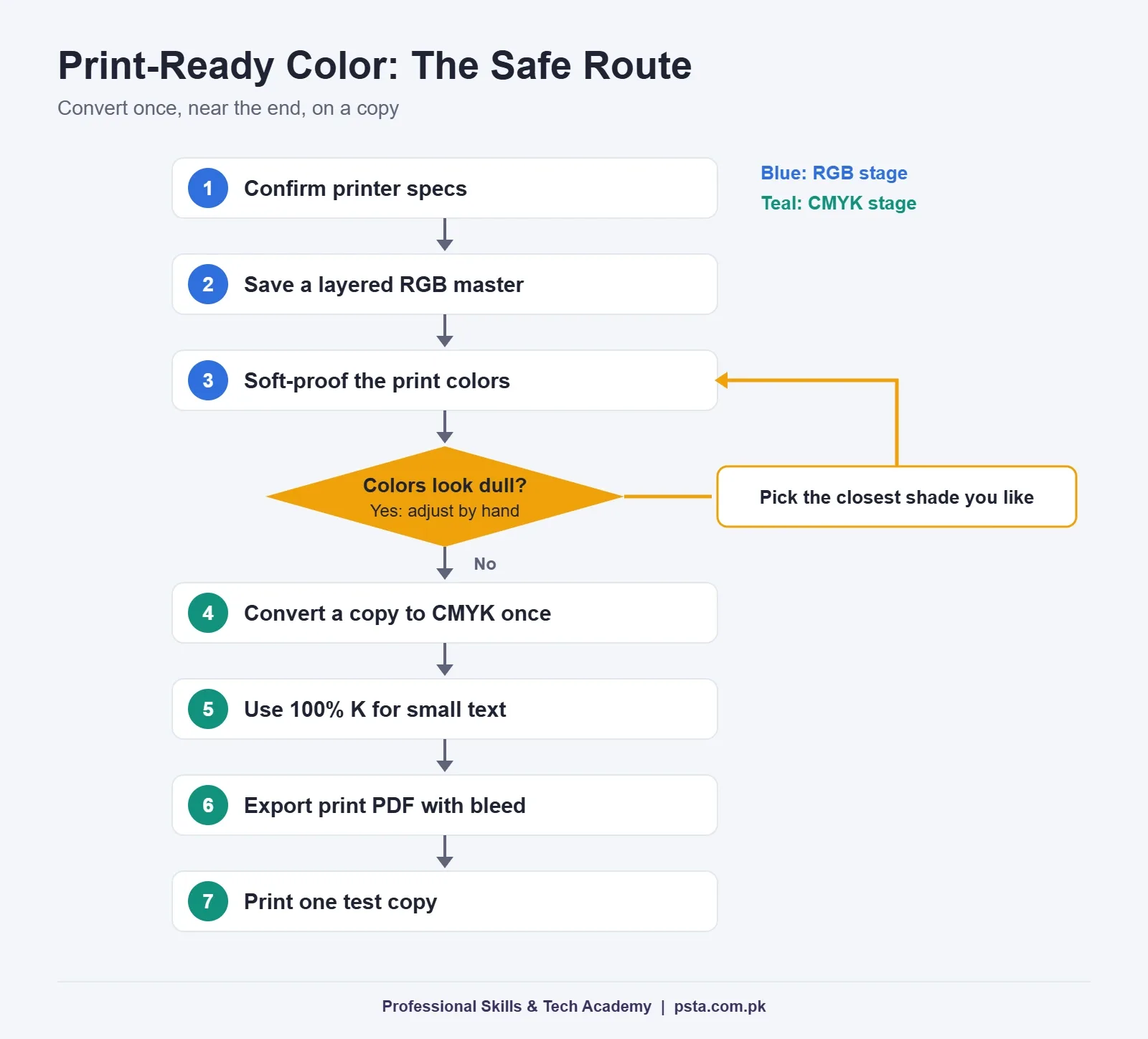
Most designers work in RGB first, because filters, effects and screen previews behave better there. The key is to convert once, near the end, and to keep an untouched RGB master. Follow this routine for any print job:
- Confirm the printer's specs. Ask for size, bleed, file type and whether they want CMYK or RGB. Some shops also name a color profile.
- Save an RGB master. Keep the layered file. You'll need it for the web version and for later edits.
- Preview the print colors. Turn on a soft proof and look for colors that dull down.
- Fix colors by hand. Pick the closest printable shade you like instead of letting the software choose.
- Convert a copy to CMYK. Do it once. Each conversion can change values, so avoid switching back and forth.
- Check your blacks and text. Small text should use 100% black only (more on this below).
- Export a print PDF. Include bleed and crop marks if the printer asked for them.
- Print one test copy. A single proof costs far less than reprinting 1,000 flyers.
In Photoshop
Check the current mode under Image > Mode, where the active one is ticked. ExpertPhotography's walkthrough shows that Ctrl+Y on Windows (Command+Y on a Mac) turns on a proof preview without changing the file. When you're ready, choose Image > Mode > CMYK Color on a saved copy. Photoshop's help notes that the CMYK result depends on the working space set in Color Settings, so match it to your printer's profile when they give you one.
In Illustrator
Pick CMYK when you create a print document. If a file was started in RGB, you can switch it under File > Document Color Mode. After switching, recheck your brand swatches, since their values may have changed.
In CorelDRAW
CorelDRAW is still the daily tool in many Pakistani print shops. Its color management help explains that the primary color mode, set on the Document tab, decides which palette the document opens with. It also notes that this setting doesn't lock the file to one mode, so check imported photos and pasted objects individually before you export.
In Canva
Canva designs in RGB on screen. Its download help lists CMYK PDF export among the extra download options on paid plans such as Pro and Teams. To get CMYK in Canva, choose PDF Print as the file type, then select CMYK under the color profile option. On a free plan, ask your printer whether they'll handle the conversion, and request a proof.
Black in Print: Plain Black vs Rich Black
Black causes more print complaints than any other color. In an RGB file, black is always 0, 0, 0. In CMYK there are two common choices.
Plain black is 100% K with no other ink. Use it for body text, phone numbers, small print and thin lines. One plate means no risk of colored edges if the plates shift slightly.
Rich black mixes black with some cyan, magenta and yellow for a deeper tone on large dark areas. Wikipedia's entry on rich black gives a common mix of 50% cyan, 50% magenta, 50% yellow and 100% black. It also suggests keeping total ink coverage at or below 240% on normal paper, and lower on thin stock like newsprint. Notice that the common mix adds up to 250%, so it already goes over that limit.
So ask your printer for their preferred rich black and ink limit, then use it only for big backgrounds and bold headings. Never set small text in rich black.
Common Color Mode Mistakes Beginners Make
These RGB vs CMYK mistakes come up again and again when students bring their first client jobs to class:
- Sending a JPG screenshot to the press. It's RGB, it's low resolution, and it has no bleed.
- Converting social posts to CMYK. Facebook and Instagram show screen colors, so the post just looks duller for no reason.
- Converting the only copy. Once the master is CMYK, you lose the brighter RGB version for the web.
- Trusting a phone preview. Phone screens are bright and saturated, so they flatter the design.
- Using brand HEX codes for print. HEX is an RGB format. Record a proper CMYK value for each brand color too.
- Rich black body text. Small type in four inks can print blurry or with color fringes.
- Skipping the proof. Paper type alone can shift how warm a color looks.
If you set up print files often, our guide to visiting card size and print setup covers bleed, safe zones and crop marks in detail. For screen work, the social media post sizes cheat sheet lists the dimensions to use alongside RGB.
Do You Need Pantone or Spot Colors?
Usually not as a beginner. Spot colors sit outside the RGB vs CMYK question. They are premixed inks that a printer uses as an extra plate, often for exact brand colors on packaging or stationery. They cost more and only make sense for large or brand-critical runs.
For most local jobs, four-color CMYK is fine. If a corporate client hands you a brand guide with a spot color, follow it and tell the printer at the start. Don't swap it for a CMYK guess without asking the client.
Color Work in PSTA's Graphic Design Course
Color theory and print setup are part of the Graphic Designing course at PSTA. According to the course page, it's a 12-week, beginner-level program covering Photoshop, Illustrator, CorelDRAW, Canva and InPage, with AI design tools in week 8. The fee listed is Rs. 18,000 (regular Rs. 20,000), payable in 2 installments.
Several projects put this topic straight to work. You design a tri-fold brochure in CorelDRAW set up for printing, a brand identity kit with a color palette and business card, and a social media pack for screens. That mix is exactly where RGB vs CMYK decisions happen. You can join in person in Abbottabad, attend live from any city through the online portal, or split your weeks between the two.
If your work leans toward video, the video editing course pairs well, and the digital marketing course helps if you design ads. Still choosing your tools? Compare the options in our beginner software roundup for designers, or browse all PSTA courses. When you're ready, the admission form takes a few minutes.
Print a Test Strip Before Your Next Order
Here's one task for this week. Take your five most-used brand or client colors and place them as squares on an A4 page. Label each square with its HEX and CMYK values. Ask your local printer to run that single page on the paper you usually order.
Keep the printed sheet next to your monitor. Next time a client picks a color, you'll know how it really prints before anyone pays for a full run. That one page teaches more about RGB vs CMYK than any chart.
Frequently asked questions
Is RGB or CMYK better for printing?
CMYK is the right choice for most printing because presses mix cyan, magenta, yellow and black ink. If you send an RGB file, the printer's software converts it anyway, and you lose control over how bright colors shift. Some large-format and sublimation printers prefer RGB, so confirm with the shop before you set up the file.
Should I use RGB or CMYK for Instagram and Facebook posts?
Use RGB, ideally sRGB, for every social media post, ad and story. Phones and monitors display light, not ink, so a CMYK file gains nothing on screen. Converting a post to CMYK usually makes it look duller. Export the final graphic as PNG or JPG in RGB and keep the layered file for edits.
Can I download CMYK files from Canva for free?
Canva's help centre lists CMYK PDF export among the extra download options on paid plans such as Pro and Teams. On a free plan you can still export a PDF for print, but without the CMYK color profile. Ask your printer whether they will convert the file, and request a printed proof before the full run.
Does converting RGB to CMYK reduce image quality?
Converting does not lower resolution, but it can change colors. Bright greens, blues, pinks and oranges outside the CMYK gamut are pulled to the nearest printable shade, so they look softer. Convert once, on a copy, near the end of the job. Repeated conversions between modes can shift colors further, so keep an untouched RGB master.
Can I use HEX color codes for print jobs?
HEX codes describe RGB colors for screens, so they are not reliable for print on their own. For each brand color, record a separate CMYK value that you have checked on a printed proof. Keep both values in the brand guide, so the web team uses HEX and the print shop uses CMYK.
What CMYK values should I use for black text?
Use 100% K with no cyan, magenta or yellow for body text, small print and thin lines. This prints from one plate, so letters stay sharp even if plates shift slightly. Save rich black, a mix such as 50% cyan, 50% magenta, 50% yellow and 100% black, for large dark backgrounds.
Why does my print shop ask for RGB files for mugs or banners?
Some sublimation and large-format printers use software that converts color itself and works best from RGB input. Their machines and inks also differ from offset presses. That is why there is no single rule for these jobs. Send one message asking which mode, file type and resolution they want before you start designing.
Sources & references
- Color models and color spaces: RGB, CMYK, HSB, Lab (Adobe) helpx.adobe.com
- Understanding Photoshop color modes (Adobe) helpx.adobe.com
- Color space glossary (MDN Web Docs) developer.mozilla.org
- Design with print colours (Canva Help Centre) canva.com
- Download or purchase designs (Canva Help Centre) canva.com
- Get started with color management (CorelDRAW 2026 Help) help.coreldraw.com
- How to convert RGB to CMYK in Photoshop (ExpertPhotography) expertphotography.com
- Rich black (Wikipedia) en.wikipedia.org
Last reviewed & updated on by Umar Qureshi. Written by the PSTA team in Abbottabad, Pakistan.

Umar Qureshi

Ultimate Graphic Designing Course in Pakistan: Master Photoshop, Illustrator, CorelDRAW & AI Tools (Practical & Beginner Friendly)
Turn this guide into a career: hands-on training with real projects, online across Pakistan or on-campus in Abbottabad · 12 Weeks.


Comments
No comments yet — ask a question or share your experience.