Quick answer
To set up Urdu typing on computer, add Urdu under Settings > Time & language > Language & region, then switch keyboards with Windows key + Spacebar. Install a phonetic layout such as CRULP v1.2 if you want keys placed by sound. In Word, add Urdu as an editing language and use the Right-to-left button.
Key takeaways
- • Windows already includes an Urdu keyboard (layout ID 00000420), so no purchase is needed to start.
- • A phonetic layout such as CRULP Urdu Phonetic v1.2 places letters by sound, which suits people who already type English.
- • Windows key + Spacebar switches between English and Urdu keyboards.
- • Word shows the Right-to-left button in Home > Paragraph only after Urdu is added as an editing language.
- • Unicode Urdu stays searchable and copyable; InPage remains useful for newspaper and print composing.
Table of contents 20 sections
- Why Unicode Urdu Matters More Than It Used To
- What Do You Need Before You Start?
- Urdu Typing on Computer: The Six-Step Setup
- Step 1: Add Urdu in Windows Settings
- Step 2: Decide Which Layout You'll Learn
- Step 3: Install a Phonetic Layout (Optional)
- Step 4: Switch Between English and Urdu
- Step 5: Set Up Microsoft Word for Right-to-Left Text
- Step 6: Choose a Readable Urdu Font
- Which Keyboard Layout Should You Learn?
- Should You Still Learn InPage?
- Common Setup Problems and Quick Fixes
- The Letters Appear but Don't Join
- The Paragraph Is Stuck on the Left
- Windows Key + Spacebar Does Nothing
- The Phonetic Layout Is Missing After Install
- Numbers Come Out in Urdu Digits
- How Long Does It Take to Type Urdu Comfortably?
- Practicing Urdu Typing at PSTA
- Type One Notice in Urdu Today
Urdu typing on computer is the skill many office workers in Pakistan put off until the morning they suddenly need it. Here's an example of how that morning usually goes. A school office in Abbottabad has to send parents a fee notice in Urdu before noon. The clerk opens Word, can't find an Urdu keyboard, pastes a few words from a website, and the letters come out disconnected and running the wrong way. The notice ends up handwritten and photocopied.
None of that is necessary. Windows already ships with an Urdu keyboard, Microsoft Word already handles right-to-left text, and good Unicode Urdu fonts cost nothing to use. You only need to switch the right settings on once and then practice a layout until your fingers know it.
In this guide, you'll learn:
- How to add Urdu to Windows 11 and switch languages with one shortcut
- The difference between the standard Urdu layout and a phonetic one, and which suits you
- How to set up Word so Urdu paragraphs line up from the right
- Where InPage still fits, and why Unicode text is the safer default
- The setup problems people hit most often, with a fix for each
Why Unicode Urdu Matters More Than It Used To
For years, a lot of Urdu on Pakistani screens wasn't really text. Newspapers and offices composed pages in desktop publishing software, then shared them as images or locked files. A March 2026 ProPakistani article on InPage and Urdu technology points out the cost of that habit: Urdu turned into pictures is harder to search, index, copy and reuse, and it does poorly on Google.
Unicode solves this. When you type Urdu with a Unicode keyboard, every letter is stored as a standard character that any modern app understands. You can paste the same sentence into Word, Gmail, a WhatsApp Web chat, a government web form or a Facebook post, and it stays readable and searchable. That's why this guide treats Unicode as the default for Urdu typing on computer and InPage as a specialist tool.
What Do You Need Before You Start?
Urdu typing on computer needs very little, and most of it is already on your laptop:
- Windows 10 or Windows 11. The menu names below follow Windows 11.
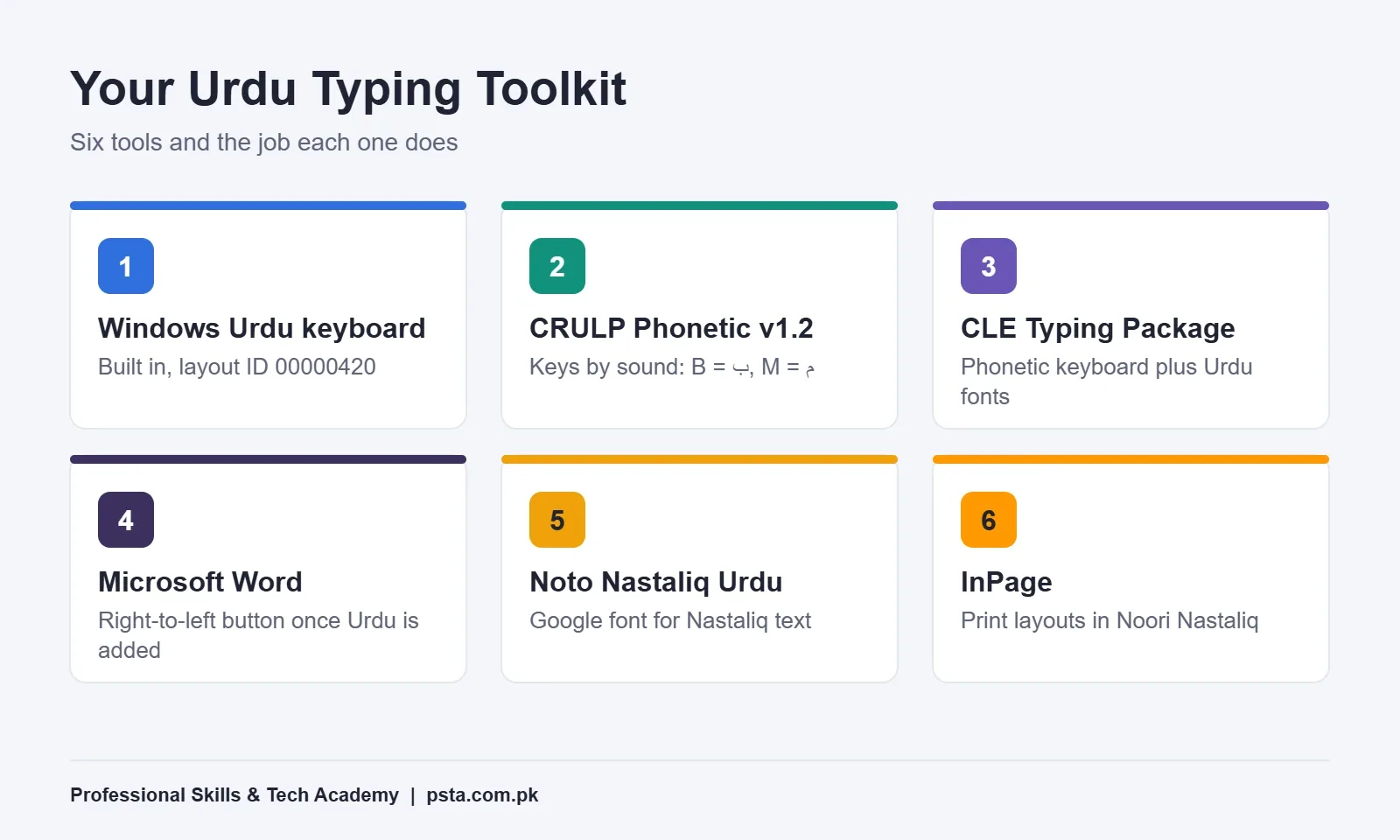
- A keyboard layout. Windows includes one called simply "Urdu." Microsoft's list of Windows keyboard layouts shows it with the identifier 00000420 and notes it has been available since before Windows XP.
- An optional phonetic layout, if you'd rather press B for ب than memorize new key positions.
- Microsoft Word or another editor that supports right-to-left paragraphs.
- An Urdu font that looks right on screen and in print.
You don't need to buy a special keyboard. Urdu stickers for the keys can help in the first week, but they're optional.
Urdu Typing on Computer: The Six-Step Setup
Follow these steps in order. Each one takes a minute or two, and you only do them once per computer.
Step 1: Add Urdu in Windows Settings
- Click Start, then open Settings.
- Go to Time & language, then Language & region.
- Next to Preferred languages, choose Add a language.
- Type "Urdu" in the search box, pick Urdu, and click Next, then Install.
- Leave the option to change your Windows display language unticked, unless you want menus in Urdu too.
Windows downloads a small language package and adds the Urdu keyboard automatically. Microsoft's support page on managing input and display languages in Windows explains the same menus, including how to add an extra keyboard under Language options > Add a keyboard. These steps are the same whether you type Urdu on a laptop or a desktop.
Step 2: Decide Which Layout You'll Learn
This is the choice that matters most, because you'll build muscle memory on whichever layout you pick. Switching later means unlearning.
The built-in Urdu layout places letters by its own logic, not by English sounds. A phonetic layout places them by sound, so ب sits on B and م sits on M, as the CLE Urdu Usage Guide describes. Most people who already type English find phonetic easier to start with. If your office already uses the standard layout on shared computers, learn that one instead so you aren't fighting the setup every day.
Step 3: Install a Phonetic Layout (Optional)
Skip this step if you chose the built-in layout. If you want an Urdu phonetic keyboard, this is where you add it.
The Center for Language Engineering (CLE) at UET Lahore publishes more than one Urdu keyboard for Windows. Its CRULP Urdu Phonetic v1.2 page says the layout was adapted from the InPage phonetic layout and is Unicode 5.1 compatible. It also added the dot and @ symbol on the Shift layer so you can type Urdu email addresses.
- Download the package from the CLE page and unzip it.
- Run setup.exe and finish the installer.
- Go back to Language & region, open the Urdu Language options, and check that the phonetic keyboard appears under Installed keyboards. Add it there if it doesn't.
One honest caution: the CLE page names Windows 10 as the supported system. It may install on Windows 11 as well, but test it on your own machine before you rely on it for an urgent document. If you'd like fonts and a keyboard in one installer, CLE's Urdu Typing Package page bundles a phonetic layout with Urdu fonts.
Step 4: Switch Between English and Urdu
Once two layouts are installed, you need a fast way to flip between them. Microsoft documents three:
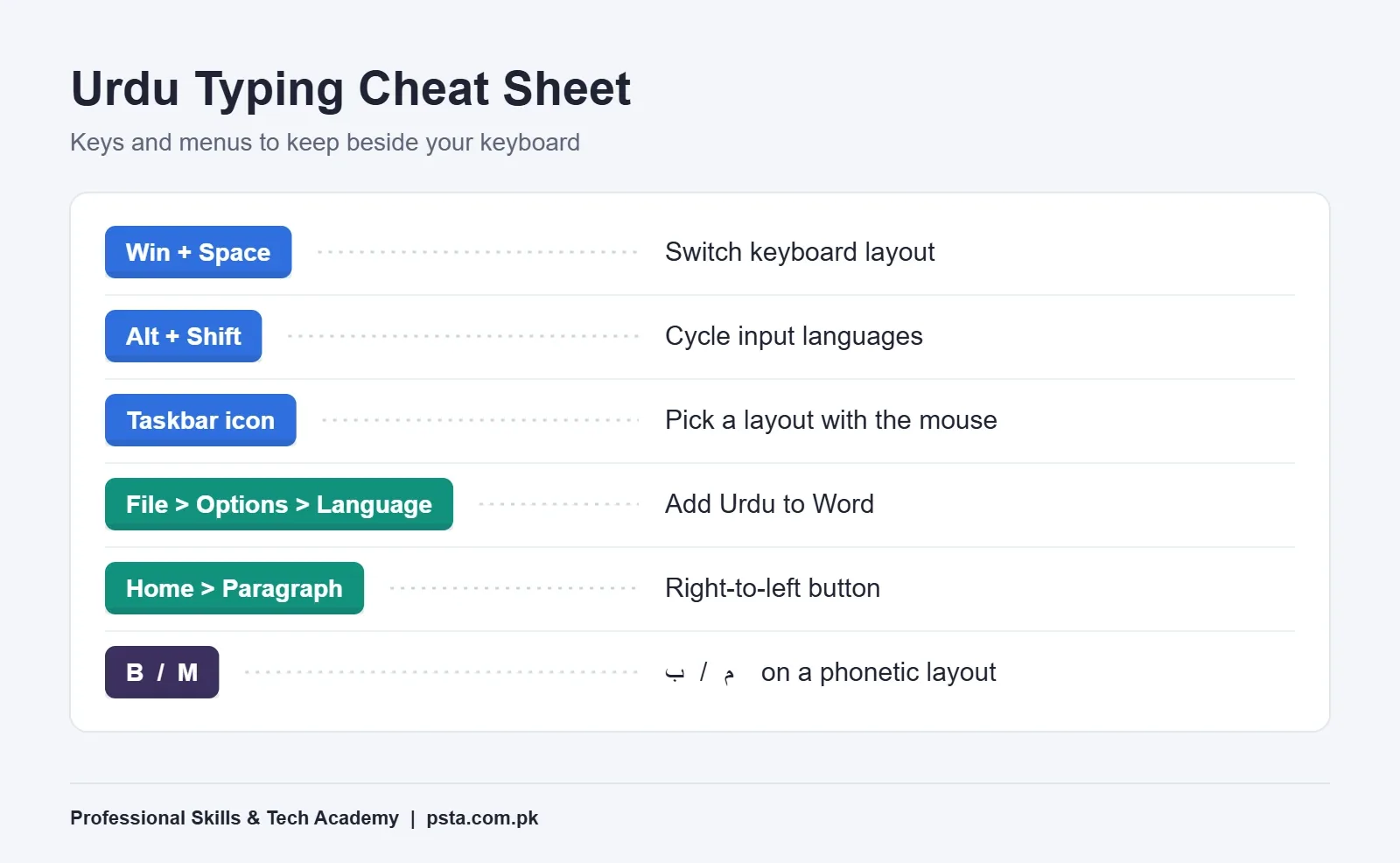
- Windows key + Spacebar cycles through your installed keyboards. If nothing happens, only one layout is installed.
- Alt + Shift also cycles input languages, according to Microsoft's Office guide to right-to-left languages.
- The language icon near the clock on the taskbar lets you pick a layout with the mouse.
Pick one shortcut and use only that for a week. Mixing them is how people end up typing Urdu into their password box.
Step 5: Set Up Microsoft Word for Right-to-Left Text
Word can type Urdu with no changes, but paragraphs will still align to the left until you tell Word about right-to-left languages. Microsoft's article on using right-to-left languages in Office covers this.
- In Word, open File > Options > Language.
- Under the Office authoring and proofing languages, add Urdu.
- Restart Word if it asks you to.
- On the Home tab, look in the Paragraph group. A Right-to-left text direction button now appears there.
- Click inside your Urdu paragraph and press that button. The text lines up from the right and punctuation lands in the right place.
Mixed documents, such as an Urdu notice with an English heading, work fine. Set the direction paragraph by paragraph.
Step 6: Choose a Readable Urdu Font
Urdu readers in Pakistan are used to Nastaliq, the flowing script of newspapers and books. Naskh-style fonts are simpler and easier to read at small sizes on screen. When you pick an Urdu font for MS Word, choose based on where the document is going.
Google released Noto Nastaliq Urdu in November 2014. The Google Developers announcement says the team spent more than a year on the technical and design problems Nastaliq creates for computers. Today the font is listed on Google Fonts, so you can download it and install it like any other font. For official letters, set the size a little larger than you would for English, around 14 to 16 points, because Nastaliq letters stack and get crowded at small sizes.
Which Keyboard Layout Should You Learn?
Here is a side-by-side view of the three layouts you'll come across in Pakistani offices and training centers.
| Layout | Where It Comes From | How Keys Are Placed | Best For |
|---|---|---|---|
| Urdu (standard) | Built into Windows (00000420) | Fixed positions, not linked to English sounds | Shared office PCs where nothing extra can be installed |
| CRULP Urdu Phonetic v1.2 | Download page at CLE, UET Lahore | By sound, adapted from the InPage layout | English typists learning Urdu for the first time |
| InPage phonetic | Inside the InPage software | By sound | Composing pages for print inside InPage |
Because the CRULP layout was adapted from InPage's, moving between the two feels familiar. That makes it a sensible choice if you might work in a press or publishing office later.
Should You Still Learn InPage?
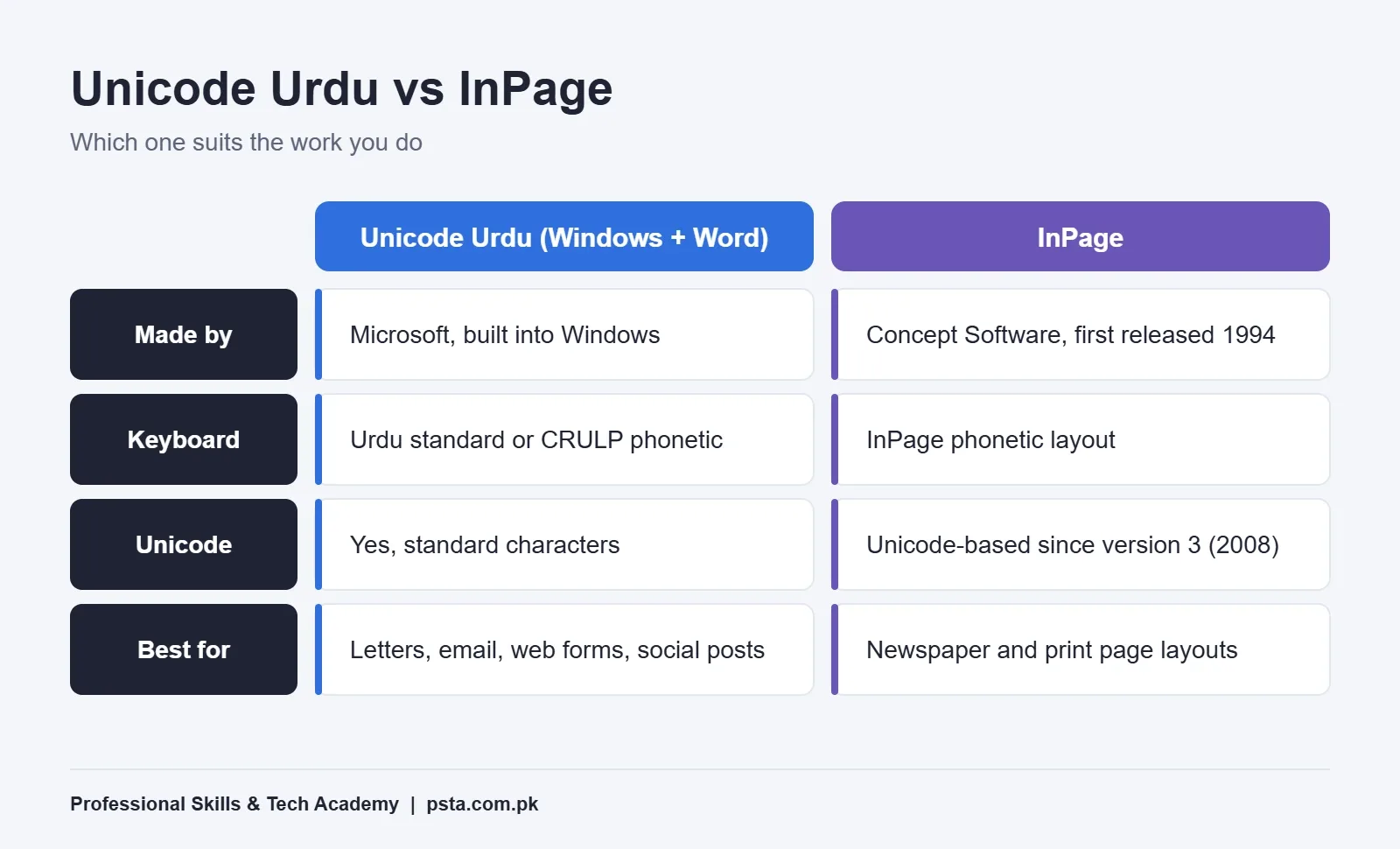
InPage has a long history here. According to Wikipedia's InPage entry, it was first released in 1994 for Pakistan's newspaper industry, which until then relied on calligraphers to correct text by hand. It licensed the Noori Nastaliq typeface, created in 1981 by calligrapher Mirza Ahmad Jamil with Monotype. Version 3, released in August 2008, moved InPage to Unicode, and the entry lists version 4.1 as the latest release, from January 2026.
The InPage vs Unicode question really comes down to the work you do. InPage is still worth learning if you want composing work at a newspaper, a printing press, a madrassa publication or a court typing office.
For everything else, such as letters, school notices, social posts, emails and web content, typing Unicode Urdu directly in Word or the browser is quicker and travels better. Older InPage files can also be awkward to share outside InPage, which is why converter tools exist. If you only have time for one skill, learn Unicode typing first and add InPage when a job asks for it.
Common Setup Problems and Quick Fixes
These are the issues students bring to class most often after trying Urdu typing on computer at home.
The Letters Appear but Don't Join
The text was probably pasted from an old non-Unicode source or an image-to-text tool. Retype it with your Urdu keyboard, or run old InPage text through a proper converter before editing.
The Paragraph Is Stuck on the Left
Urdu isn't added as an Office editing language yet, so the Right-to-left button isn't showing. Repeat Step 5 to turn on right-to-left text in Word, then apply the button to that paragraph.
Windows Key + Spacebar Does Nothing
Only one keyboard is installed. Open the Urdu Language options and confirm a keyboard is listed under it.
The Phonetic Layout Is Missing After Install
Restart the computer, then add the layout manually under Add a keyboard. If it still won't appear on Windows 11, fall back to the built-in Urdu layout while you look into it.
Numbers Come Out in Urdu Digits
Some layouts and fonts show Eastern Arabic numerals. That's fine for many notices, but if a form needs 0 to 9, switch to the English keyboard just for the numbers.
How Long Does It Take to Type Urdu Comfortably?
That depends on whether you already touch-type English. If you do, a phonetic layout can start to feel usable after a couple of weeks of daily practice, because your fingers already know where B, M and S are. If you still look at the keys for English, fix that first. Speed in Urdu builds on the same finger discipline. Our earlier guide on typing speed for jobs in Pakistan explains how employers test English typing, and the same practice habits carry over.
A simple two-week routine works well:
- Days 1 to 3: Type the Urdu alphabet in order, five times a session, without looking at a chart.
- Days 4 to 7: Type short everyday words: your name, your city, the days of the week.
- Days 8 to 11: Copy one short newspaper paragraph a day, timing yourself.
- Days 12 to 14: Write a real document you need, such as an application or a notice, from scratch.
Fifteen focused minutes a day beats a two-hour session once a week.
Practicing Urdu Typing at PSTA
If you'd prefer guided practice with Urdu typing on computer, PSTA's Professional English & Urdu Typing Course runs for four weeks and is built for complete beginners. Module 8 introduces Urdu typing on the phonetic and InPage layouts, and Module 9 moves you to full paragraphs in both English and Urdu. Module 10 closes with professional typing test simulations and a final assessment, which helps if you're preparing for a clerk or data entry test.
The fee shown on the course page today is Rs. 3,000, reduced from Rs. 4,500. A new batch starts each month, with classes Monday to Saturday between 9:00 AM and 9:30 PM. You can attend at our Abbottabad campus, join live from anywhere in Pakistan, or combine the two.
If Urdu typing is part of a wider office skill set you're building, the Office Automation course covers MS Office and computer basics, and our one-year DIT program goes further. The full list of programs sits on our courses page, and the admission page explains how enrollment works. Questions about batch timings are easiest to settle on WhatsApp at +92 314 5424399.
Type One Notice in Urdu Today
Don't wait for the urgent morning. Add Urdu to Windows now, pick your layout, and type a three-line notice, perhaps a holiday announcement for your office or a message to your family. Then paste it into WhatsApp Web and an email. If it reads correctly in both places, your Urdu typing on computer setup is done and the only thing left is practice.
Frequently asked questions
Can I type Urdu on a laptop without installing any software?
Yes. Windows 10 and Windows 11 include a built-in Urdu keyboard. Add Urdu under Settings, Time & language, Language & region, and the keyboard is installed with it. You can then type Urdu in Word, a browser or WhatsApp Web. Extra software is only needed if you want a phonetic layout or additional Urdu fonts.
What is the difference between the Urdu standard and phonetic keyboards?
The standard Urdu layout in Windows places letters in fixed positions that are not linked to English sounds. A phonetic layout places them by sound, so ب is on B and م is on M. Phonetic layouts are usually easier for people who already type English, while the standard layout works on any Windows PC without installing anything.
How do I switch between English and Urdu while typing?
Press the Windows key and Spacebar together to cycle through your installed keyboards. Alt + Shift also switches input languages on many setups. You can click the language icon near the clock on the taskbar as well. Stick to one method so you always know which language is active before you type.
Why does my Urdu text align to the left in Microsoft Word?
Word needs Urdu added as an editing language before it shows the Right-to-left button. Open File, Options, Language, add Urdu, restart Word if asked, then click inside the Urdu paragraph and press Right-to-left in the Paragraph group on the Home tab. The text will then line up from the right margin.
Which font is best for Urdu documents?
Choose Nastaliq for documents that should look like Urdu books and newspapers, and a Naskh-style font for small text on screen. Noto Nastaliq Urdu is a Google font you can download and install for free use in Word. Set Nastaliq a little larger than English text, around 14 to 16 points, so letters do not crowd together.
Is InPage still used in Pakistan?
Yes. InPage was built for Pakistani newspapers and is still common in composing work at presses and publishers. It became Unicode-based with version 3 in 2008. For everyday letters, emails and web content, typing Unicode Urdu directly in Word or a browser is simpler, so learn that first and add InPage when a job asks for it.
How can I make old Urdu text editable if it came from InPage?
Older InPage files and text copied from them can show broken or unjoined letters elsewhere. Use an InPage-to-Unicode converter, such as the one the Center for Language Engineering lists on its website, then paste the converted text into Word. Always proofread the result, because spacing and some characters may need manual fixes.
Sources & references
- Manage the input and display language settings in Windows support.microsoft.com
- Windows keyboard layouts (Microsoft Learn) learn.microsoft.com
- Using right-to-left languages in Office support.microsoft.com
- CRULP Urdu Phonetic Keyboard v1.2 (Center for Language Engineering) cle.org.pk
- CLE Urdu Typing Package cle.org.pk
- How InPage Shaped Urdu on the Internet (ProPakistani) propakistani.pk
- Announcing Noto Nastaliq Urdu (Google Developers Blog) developers.googleblog.com
- InPage (Wikipedia) en.wikipedia.org
Last reviewed & updated on by Umar Qureshi. Written by the PSTA team in Abbottabad, Pakistan.

Umar Qureshi

Professional English & Urdu Typing Course in Abbottabad
Turn this guide into a career: hands-on training with real projects, online across Pakistan or on-campus in Abbottabad · 4 Weeks.


Comments
No comments yet — ask a question or share your experience.