
Quick answer
Default to const for any name that never gets a new value, and use let for counters, totals and flags that change. Skip var in new work: it ignores block braces, allows silent redeclaration and lands on the global object in plain scripts. ESLint's no-var and prefer-const rules can enforce this habit for your whole team.
Key takeaways
- • let and const are block scoped, while var is scoped to the whole function or the global script.
- • Reading a let or const before its declaration throws a ReferenceError because of the temporal dead zone, while var quietly gives undefined.
- • const locks the binding, not the value, so you can still push to a const array or change a const object's properties.
- • Using let in a for loop header gives each pass its own binding, which fixes the classic setTimeout closure bug.
- • ESLint's no-var and prefer-const rules both support automatic fixes, but you should review every change before committing.
Table of contents 17 sections
- What Each Keyword Actually Does
- How Is Block Scope Different From Function Scope?
- JavaScript Hoisting and the Temporal Dead Zone
- What Happens With var
- What Happens With let and const
- Redeclaration and Reassignment Rules
- Redeclaring a Name
- Reassigning a Value
- Does const Make Objects and Arrays Read-Only?
- Loops, Closures, and the Classic setTimeout Bug
- var vs let vs const and the Global Object
- Which One Should You Use by Default?
- Weighing the Trade-Offs
- Letting ESLint Enforce the Rules
- What Do Interviewers Ask About var, let, and const?
- Where to Practice This With Guidance
- A Small Refactor to Try Next
Var vs let vs const comes down to one simple habit: reach for const first, switch to let when a value has to change, and leave var for old code you are maintaining. Both newer keywords arrived with ECMAScript 2015, the 6th edition of the language standard, which the Ecma General Assembly adopted in June 2015. Most modern tutorials and codebases now expect you to know the difference.
Here is what this comparison covers:
- How block scope and function scope change where a variable can be seen
- Why hoisting and the temporal dead zone cause very different errors
- What const really locks, and what it leaves open, with objects and arrays
- The loop and closure bug that still shows up in interviews
- Two ESLint rules that keep your team on the right keyword automatically
What Each Keyword Actually Does
All three keywords create a named slot that holds a value. The differences are about where that slot is visible, when you can use it, and whether you can point it at something new later.
Think of var as the original, loose version from early JavaScript. The let keyword is a stricter, block-aware replacement for values that change. The const keyword is the same as let, except the name can never be reassigned after you create it.
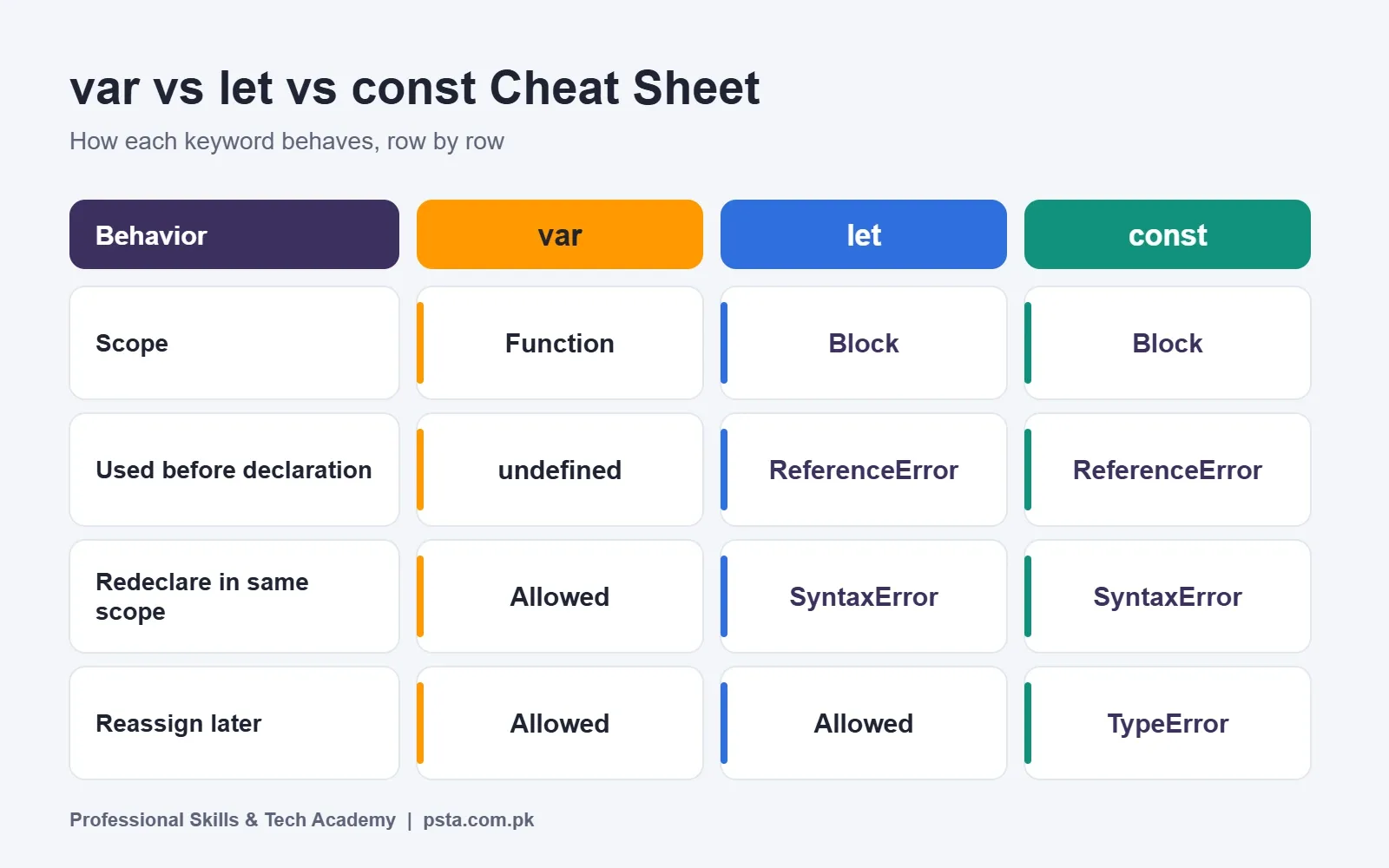
| Feature | var | let | const |
|---|---|---|---|
| Scope | Function (or global) | Block | Block |
| Use before the declaration line | Gives undefined | Throws ReferenceError | Throws ReferenceError |
| Redeclare in same scope | Allowed | SyntaxError | SyntaxError |
| Reassign later | Allowed | Allowed | TypeError |
| Must have a starting value | No | No | Yes |
| Top-level property on globalThis (classic script) | Yes | No | No |
Keep this var vs let vs const table nearby while you read the rest. Each row gets its own short section with code you can paste into your browser console.
How Is Block Scope Different From Function Scope?
A block is any code between curly braces. That includes an if statement, a for loop, or a bare pair of braces. According to the MDN reference for var, a var belongs to the closest function body. Blocks inside that function do not fence it in.
function showDiscount(isMember) {
  if (isMember) {
    var rate = 0.1;
    let label = "Member price";
  }
  console.log(rate);  // 0.1 (var leaks out of the if block)
  console.log(label); // ReferenceError: label is not defined
}
The let and const keywords follow block scope. A variable made inside the if block lives and dies inside that block. Code outside cannot touch it.
Why does this matter in real projects? Leaky variables cause quiet bugs. You might reuse the name i or total in two places and accidentally overwrite one with the other. Block scope keeps each name local to the small piece of code that needs it, so your functions are easier to reason about. This is the first big point in any var vs let vs const discussion.
JavaScript Hoisting and the Temporal Dead Zone
Before your code runs, the JavaScript engine scans each scope for declarations. People call the result hoisting. The MDN glossary entry on hoisting points out that the word is not formally defined in the spec, and it describes a few different behaviors that share the name.
What Happens With var
With var, the name is registered early, but the value is not. Until the assignment line runs, the variable simply holds undefined.
console.log(city); // undefined
var city = "Abbottabad";
console.log(city); // "Abbottabad"
No error appears, which sounds friendly. In practice it hides mistakes, because your code keeps running with a missing value.
What Happens With let and const
The let and const names are also known to the engine from the start of their block. However, you cannot read or write them until the declaration line has executed. That gap is called the temporal dead zone, often shortened to TDZ.
{
  console.log(score); // ReferenceError
  let score = 50;
}
The MDN page for let adds two details worth knowing. First, the dead zone depends on the order things run, not on which line comes first in the file. A function written above the declaration works fine if you call it after the declaration runs. Second, even typeof throws inside the dead zone, which surprises many learners.
For var vs let vs const, the takeaway is simple. A loud ReferenceError is better than a silent undefined, because it shows you the bug right away.
Redeclaration and Reassignment Rules
These two words sound alike but mean different things. Redeclaring means writing the keyword again with the same name. Reassigning means giving an existing name a new value with the equals sign.
Redeclaring a Name
MDN notes that a repeated var declaration does not throw, even in strict mode. That makes it easy to overwrite a variable from another part of a long file without noticing.
var total = 100;
var total = 0;      // no error, the old value is gone

let count = 1;
let count = 2;      // SyntaxError: Identifier 'count' has already been declared
With let or const, any second declaration of the same name in the same scope is a SyntaxError. The browser refuses to run the script at all, so the clash never reaches your users.
Reassigning a Value
A var or let variable can take a new value as often as you like. A const cannot. According to the MDN page for const, an attempt to reassign throws a TypeError. A const also needs its value on the same line where you declare it. Writing const taxRate; with nothing after it is a SyntaxError.
const taxRate = 0.17;
taxRate = 0.18; // TypeError: Assignment to constant variable.
A naming habit helps here. Many teams write fixed settings in uppercase, such as MAX_USERS, and ordinary const values in camelCase. The engine only enforces the keyword. The casing is a convention for human readers.
Does const Make Objects and Arrays Read-Only?
No, and this is the most common misunderstanding about const. MDN explains that const fixes the binding, meaning the link between the name and a value. If that value is an object or an array, its contents can still change.
const student = { name: "Ayesha", marks: 72 };
student.marks = 80;          // allowed, the object changed
student = { name: "Bilal" }; // TypeError, the binding is locked

const cart = [];
cart.push("Mouse");          // allowed
cart = ["Keyboard"];         // TypeError
Getting const with objects right saves you a lot of confused debugging. A const object can gain, lose or update properties. What you cannot do is make the name point to a brand-new object. This is why const works well with arrays you build up using push, map or filter. If you want practice with those, our walkthrough of JavaScript array methods pairs nicely with this topic.
If you truly need an object that cannot change, MDN suggests Object.freeze(). Use it for settings or lookup tables that should stay fixed for the life of the program.
Loops, Closures, and the Classic setTimeout Bug
If you remember only one var vs let vs const example, make it this one. It appears in many JavaScript interviews. Read it slowly and predict the output before you run it.
for (var i = 1; i <= 3; i++) {
  setTimeout(function () {
    console.log(i);
  }, 100);
}
// prints 4, 4, 4
There is only one i here, because var ignores the loop block. By the time the timers fire, the loop has finished and i equals 4. Every callback reads that same shared variable.
Now swap var for let:
for (let i = 1; i <= 3; i++) {
  setTimeout(function () {
    console.log(i);
  }, 100);
}
// prints 1, 2, 3
MDN explains that let in a for loop header creates a fresh binding for each pass through the loop. Each callback closes over its own copy, so you get the values you expected. Before 2015, developers had to wrap the body in an extra function to get this result. Today one keyword does it.
You might wonder why the loop counter uses let and not const. The counter changes on every pass with i++, so const would throw. In a for...of loop, though, each item gets a new binding, so const works there.
const fruits = ["apple", "mango"];
for (const fruit of fruits) {
  console.log(fruit); // apple, then mango
}
var vs let vs const and the Global Object
In a classic browser script, a top-level var becomes a property of the global object. MDN describes that property as non-configurable, which means you cannot delete it later. Top-level let and const do not create properties on globalThis at all.
var siteName = "PSTA";
let theme = "dark";
console.log(window.siteName); // "PSTA"
console.log(window.theme);    // undefined
Why care? Browsers already put many names on window, and third-party scripts add more. A global var can collide with one of them. Keeping your names off the global object reduces that risk.
One nuance: MDN notes that in ES modules and Node.js CommonJS modules, a top-level var stays scoped to the module. So this global difference mainly shows up in plain script tags, which is exactly what many beginner projects use.
Which One Should You Use by Default?
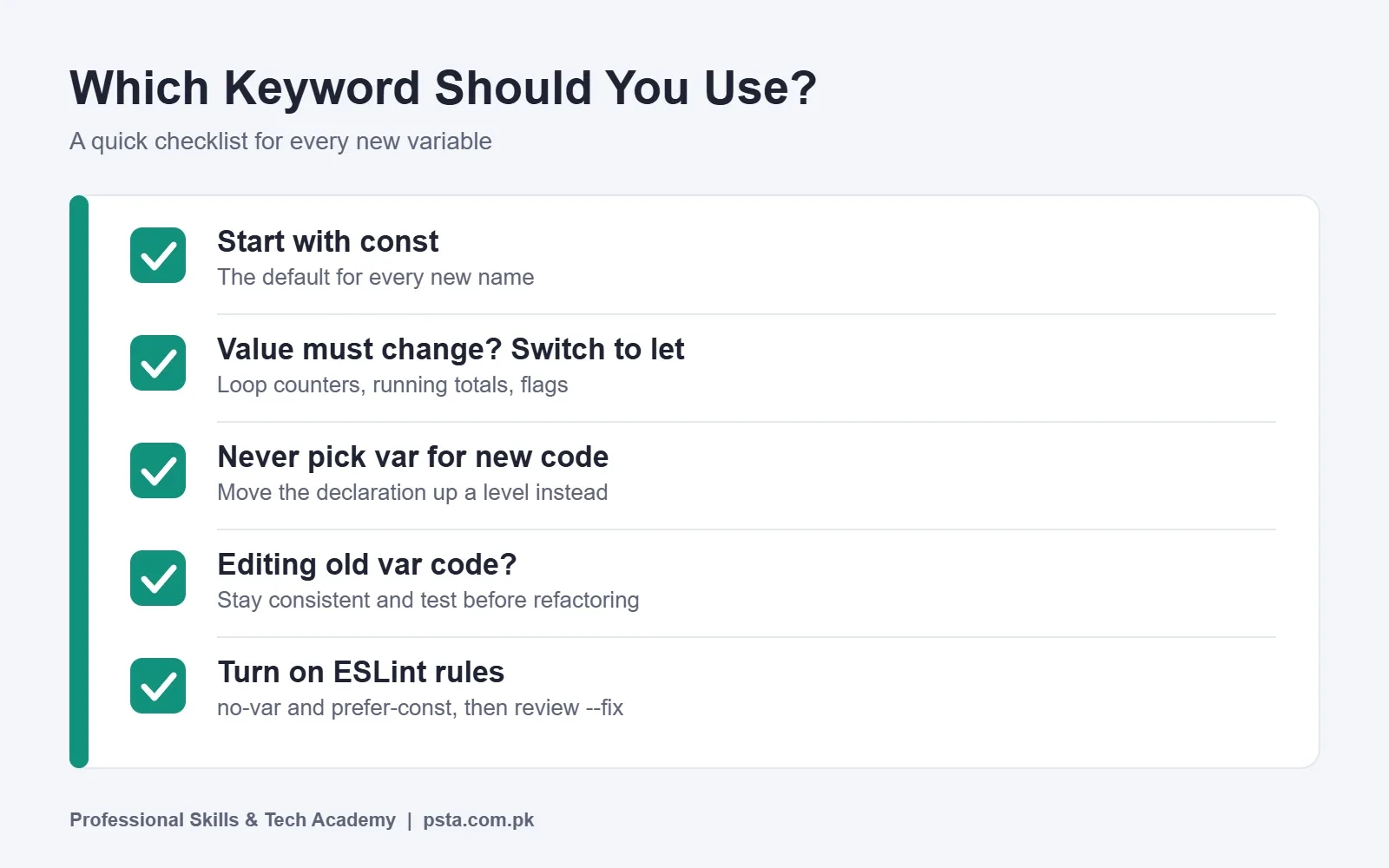
Most style guides and teams settle on the same var vs let vs const order. Use this short process each time you create a variable:
- Start by writing const.
- Ask yourself whether this name will ever need a new value later in the same scope.
- If yes, change it to let. Loop counters, running totals and flags are typical cases.
- If you are editing older code that already uses var, keep it consistent unless you have time to test a careful refactor.
- Never choose var for new code just to make something reachable outside a block. Move the declaration up a level instead.
This habit has a hidden benefit. When a reader sees const, they know the name stays put. When they see let, they know to watch for changes. Your keyword choice becomes a small note to the next developer.
Weighing the Trade-Offs
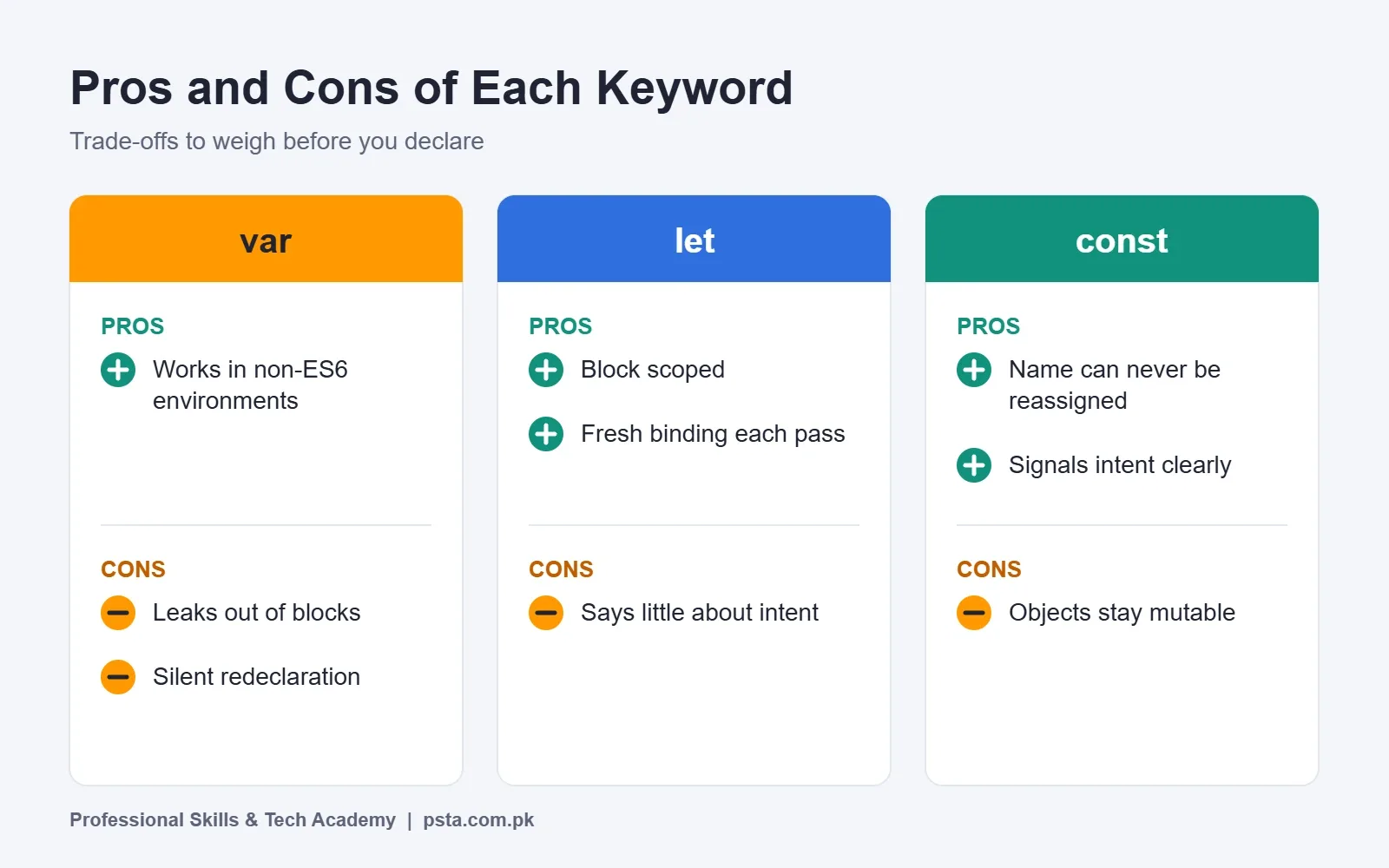
Each keyword in the var vs let vs const trio has strengths and weaknesses.
The var keyword works in older, non-ES6 environments and fills a lot of legacy code, but its loose scope and silent redeclaration cause bugs. The let keyword gives you block scope with the freedom to change values, though it says little about intent. The const keyword signals clearly that a name is fixed, yet any object it holds stays mutable, and beginners sometimes miss that.
On browser support for these ES6 variables, MDN lists const as working across browsers since July 2015 and let since September 2016. Both carry MDN's Baseline label of widely available, so support is no longer a reason to avoid them.
Letting ESLint Enforce the Rules
ESLint is a popular tool that reads your code and flags problems before you run it. Two of its built-in rules settle the var vs let vs const question for you.
The ESLint no-var rule reports every var declaration and asks for let or const instead. Its docs explain the goal as preventing accidental overwrites through block scoping. The rule was added in ESLint v0.12.0 and can fix some cases automatically.
The ESLint prefer-const rule looks for let variables that never get a new value and suggests const. It arrived in ESLint v0.23.0 and also supports automatic fixes. It has a destructuring option that controls how it treats several names unpacked at once.
To try both rules in a project, follow these steps:
- Open your project folder in a terminal and set up ESLint using the official getting-started command for your version.
- Open the ESLint config file it creates.
- Add no-var and prefer-const to the rules section, set to "error".
- Run ESLint on your source folder and read each warning.
- Run it again with the --fix flag, then review every change in Git before you commit.
Always read the diff after an automatic fix. Swapping var for let can change behavior when code depended on the old leaky scope.
What Do Interviewers Ask About var, let, and const?
Junior JavaScript interviews tend to test var vs let vs const with the same handful of ideas. Here are typical questions, with the short point you should get across in each answer.
- "What is the difference between var, let and const?" Cover scope, the dead zone, redeclaration and reassignment. Keep it to a minute.
- "Is let hoisted?" Explain that the name is known from the start of the block, but the temporal dead zone blocks access until the declaration runs.
- "Can you push to a const array?" Yes. The binding is fixed, the contents are not.
- "What does this setTimeout loop print?" Walk through the shared var versus the fresh let binding per pass.
- "Which one do you use by default and why?" Say const first, let when needed, and mention that tools like prefer-const back that up.
Interviewers care less about memorized wording and more about whether you can predict output. Practice by writing small snippets, guessing the result, and checking in the console. For a wider list of topics, see our guide to JavaScript interview questions.
Where to Practice This With Guidance
Reading about scope helps, but it really sticks when someone reviews your code and points out the var vs let vs const slip you missed. At Professional Skills & Tech Academy (PSTA), the JavaScript Programming Course is a 12-week program pitched at beginners. It covers variables, data types, loops, functions and closures, then moves on to ES6+ features such as arrow functions, destructuring and modules.
Later weeks bring in DOM work, async code with APIs, an introduction to React, plus Git, GitHub and debugging. You finish with portfolio projects deployed on GitHub. The current fee is Rs. 24,000, down from the regular Rs. 28,000. Umar Qureshi leads the training.
Ready for a wider program after the basics? Consider the Full-Stack Web Development course with AI tools or the React.js course. The full course list shows how these programs fit together.
Students sit in our classroom in Mandian (Old College Road, facing FIMS College), log in to the same live sessions from home, or split their weeks between both. A new group begins monthly, and timings run Monday to Saturday from 9:00 AM until 9:30 PM, including weekend and evening slots.
For the exact timing that suits you, send a quick message on WhatsApp at +92 314 5424399, or fill in the form on the admission page whenever you are ready.
A Small Refactor to Try Next
Open one old practice file of yours that still uses var. Change every declaration to const, then run the code. Wherever you get a TypeError, change that one to let. When you finish, you will have applied the whole var vs let vs const rule set by hand, and you will understand exactly why each choice was made.
Frequently asked questions
Is it wrong to use var in 2026?
It is not wrong, and your code will still run. Most teams simply avoid it in new files because block scoping catches more mistakes. When you work on an older project that uses var throughout, staying consistent is often wiser than mixing styles. Plan a tested refactor instead of swapping keywords at random in a file you do not fully understand yet.
What is the difference between redeclaring and reassigning a variable?
Redeclaring means writing var, let or const again in front of a name that already exists in that scope. Reassigning means giving an existing name a new value with a single equals sign. Only var lets you redeclare without complaint. Both var and let let you reassign, while const blocks reassignment and throws a TypeError at runtime.
Should I use uppercase names for every const?
No. Uppercase names such as API_URL are usually kept for fixed settings that act like configuration. Regular values that happen to use const, like a fetched user object or a DOM element, normally use camelCase. The keyword is what JavaScript enforces, while the casing is only a hint to other people reading your code.
Can I declare a const without giving it a value?
No. A const must receive its value in the same statement that creates it. Writing the keyword and a name with nothing after the equals sign stops the script with a SyntaxError. If you need to set a value later, for example after an if check, declare it with let and assign it once you know the result.
Does React code use let or const more?
In typical React components you tend to see const much more often. Components, hook results, handlers and props are usually created once per render and never reassigned. You will still meet let inside loops or when building up a value step by step. Learning the default rule early makes React tutorials and job codebases much easier to read.
How do I explain the temporal dead zone in one line during an interview?
You can say that a let or const name exists from the start of its block, but touching it before its declaration line runs throws a ReferenceError. Then show a two-line snippet to prove it. Interviewers usually value a short, correct explanation backed by a tiny example more than a long, memorized definition.
Will ESLint break my code if I run the automatic fix?
Usually the fix is safe, but not always. Code that relied on a leaky var, such as reading a variable after the block where it was declared, may behave differently once it becomes let. Commit your work first, run the fix, then read the diff line by line and test the page before you push.
Sources & references
- let - JavaScript
- const - JavaScript
- var - JavaScript
- Hoisting - MDN Glossary developer.mozilla.org
- ECMAScript 2015 Language Specification (ECMA-262, 6th Edition) 262.ecma-international.org
- no-var - ESLint Rules eslint.org
- prefer-const - ESLint Rules eslint.org
Last reviewed & updated on by Umar Qureshi. Written by the PSTA team in Abbottabad, Pakistan.

Umar Qureshi

JavaScript Programming Course in Abbottabad: Beginner to React
Turn this guide into a career: hands-on training with real projects, online across Pakistan or on-campus in Abbottabad · 12 Weeks.


Comments
No comments yet — ask a question or share your experience.