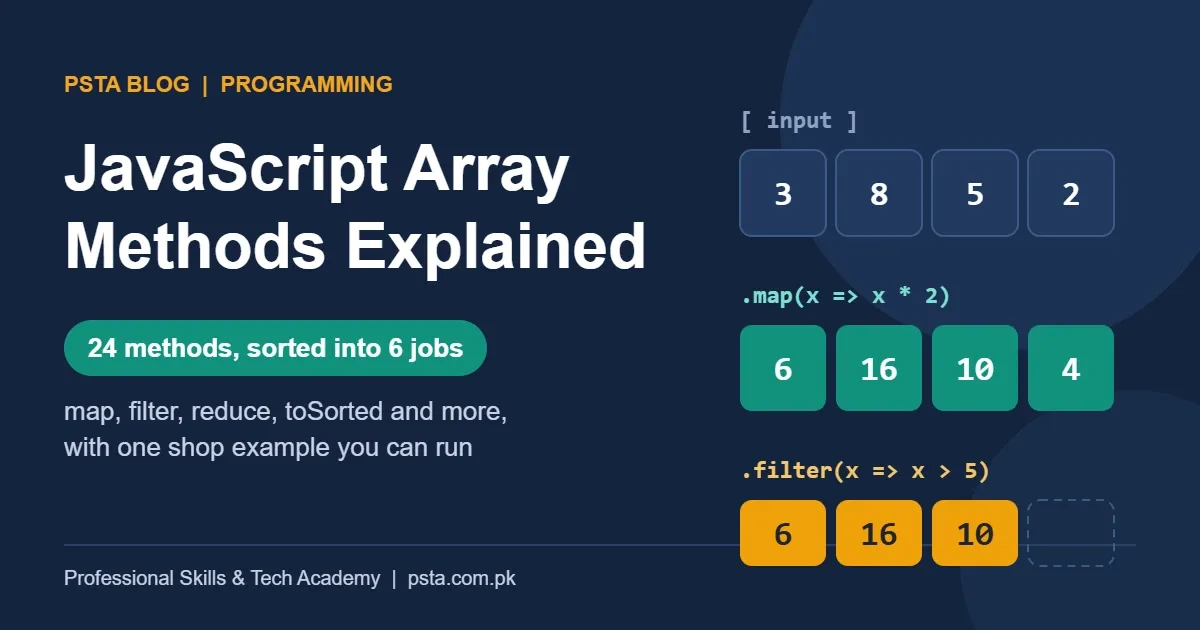
Quick answer
Learn JavaScript array methods by job, not as a list. Use map to transform, filter and find to pick, some and includes to check, reduce to total, and toSorted to order. Always ask whether a method changes the original array: sort, splice and push do, so use copying versions like toSorted in React.
Key takeaways
- • About 24 array methods cover six jobs: transform, pick, check, combine, order, and edit or read.
- • sort, reverse, splice, push, pop, shift and unshift change the original array; most other methods return a copy or a value.
- • Called with no compare function, sort() orders items as text, so pass (a, b) => a - b for numbers.
- • Always give reduce() a starting value; an empty array without one throws a TypeError.
- • In React state, prefer filter, map, toSorted, toReversed and with over push, splice and sort.
Table of contents 15 sections
- Which JavaScript Array Methods Do Beginners Actually Need?
- Two Questions That Explain Any Method
- Transform Each Item: map, flatMap and forEach
- Pick Items Out: filter, find, findLast and findIndex
- Get a Yes or No: some, every, includes and indexOf
- How Does reduce Work, and When Should You Skip It?
- Why Does sort() Put 100 Before 25?
- Adding, Removing and Reading Items
- push and pop vs Spread
- splice vs slice vs toSpliced
- with and at
- Chaining Methods: One Shop Report in Four Steps
- Which Methods Should You Avoid in React State?
- How PSTA's JavaScript Course Teaches Arrays
- Rewrite One Old Loop Using These Methods
"Which JavaScript array methods do I really have to learn, and which can wait?" Students ask me this in the second or third week of every batch, usually after opening a reference page and finding more than 30 of them. The honest answer is that about two dozen cover nearly everything you'll do in class projects, freelance work and junior job tasks.
The trick is to stop memorizing JavaScript array methods as one long list. Group them by the job they do, and learn which ones change your original array and which ones hand you a fresh copy. That second point causes more beginner bugs than any syntax error.
In this explainer, you'll learn:
- The six jobs that array methods do, with the right method for each
- The two questions that tell you how any method behaves
- Why
sort()puts 100 before 25, and the safe fix - How to chain
filter,mapandreduceinto one short report - Which methods to avoid when you move on to React
All examples use one small dataset: six orders from an example clothing shop in Abbottabad. You can paste every snippet into your browser's console (press F12, then open the Console tab) and run it.
const orders = [
  { id: 101, city: "Abbottabad", item: "Lawn suit", price: 3200, paid: true },
  { id: 102, city: "Mansehra", item: "Kurta", price: 1800, paid: false },
  { id: 103, city: "Abbottabad", item: "Shawl", price: 2500, paid: true },
  { id: 104, city: "Haripur", item: "Lawn suit", price: 3200, paid: true },
  { id: 105, city: "Mansehra", item: "Dupatta", price: 900, paid: false },
  { id: 106, city: "Abbottabad", item: "Kurta", price: 1800, paid: true }
];
Which JavaScript Array Methods Do Beginners Actually Need?
JavaScript remains one of the most widely used programming languages. In the Stack Overflow Developer Survey 2025, 66% of the 31,771 people who answered the language question said they had used it in the past year. Nearly every one of them works with arrays daily, because data from forms, APIs and databases usually arrives as a list.
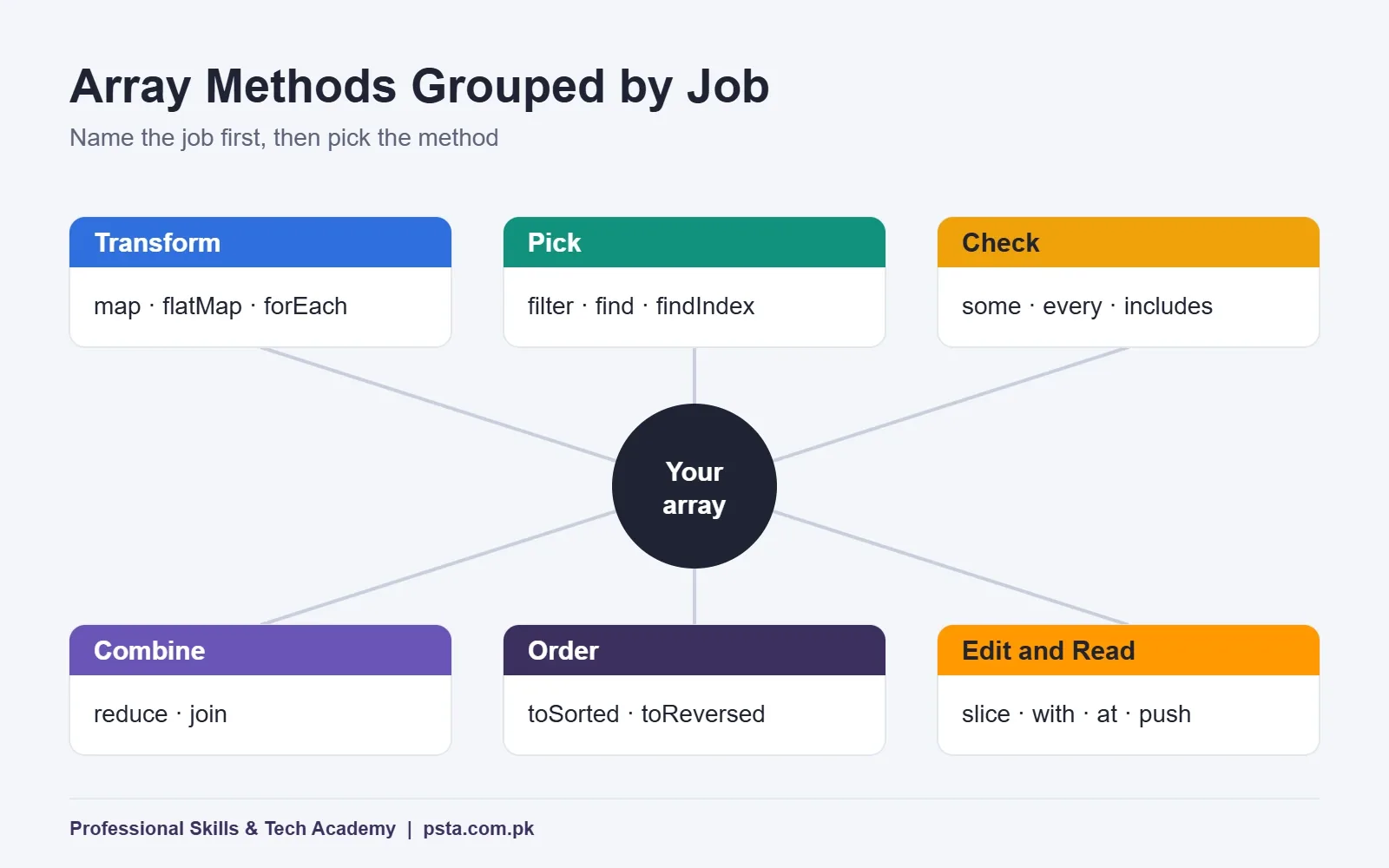
You don't need every method on day one. You need one or two for each of these six jobs:
- Transform: turn each item into something new (
map,flatMap,forEach). - Pick: keep some items or find one (
filter,find,findLast,findIndex). - Check: get a yes or no answer (
some,every,includes,indexOf). - Combine: squeeze the list into one value (
reduce,join). - Order: sort or flip the list (
sort,toSorted,reverse,toReversed). - Edit and read: add, remove, replace or grab items (
push,pop,splice,toSpliced,slice,with,at).
That's 24 methods. When a task comes up, ask which job it is first. The method usually follows.
Two Questions That Explain Any Method
Before you read about any of the JavaScript array methods one by one, keep two questions in mind. Together they predict most of a method's behavior.
Question 1: Does it change the original array? The MDN Array reference splits methods into copying methods, which return a new array, and mutating methods, which change the array you called them on. sort(), reverse(), splice(), push(), pop(), shift() and unshift() all mutate.
Question 2: What does it return? Some methods give back a new array. Others return a single value, such as a number, an item, true or false. A few surprise people: push() returns the new length, not the array, and forEach() always returns undefined.
One more detail from MDN: the copies are shallow. A copy is a new list, but the order objects inside it are the same objects. Change copy[0].price and the original order changes too.
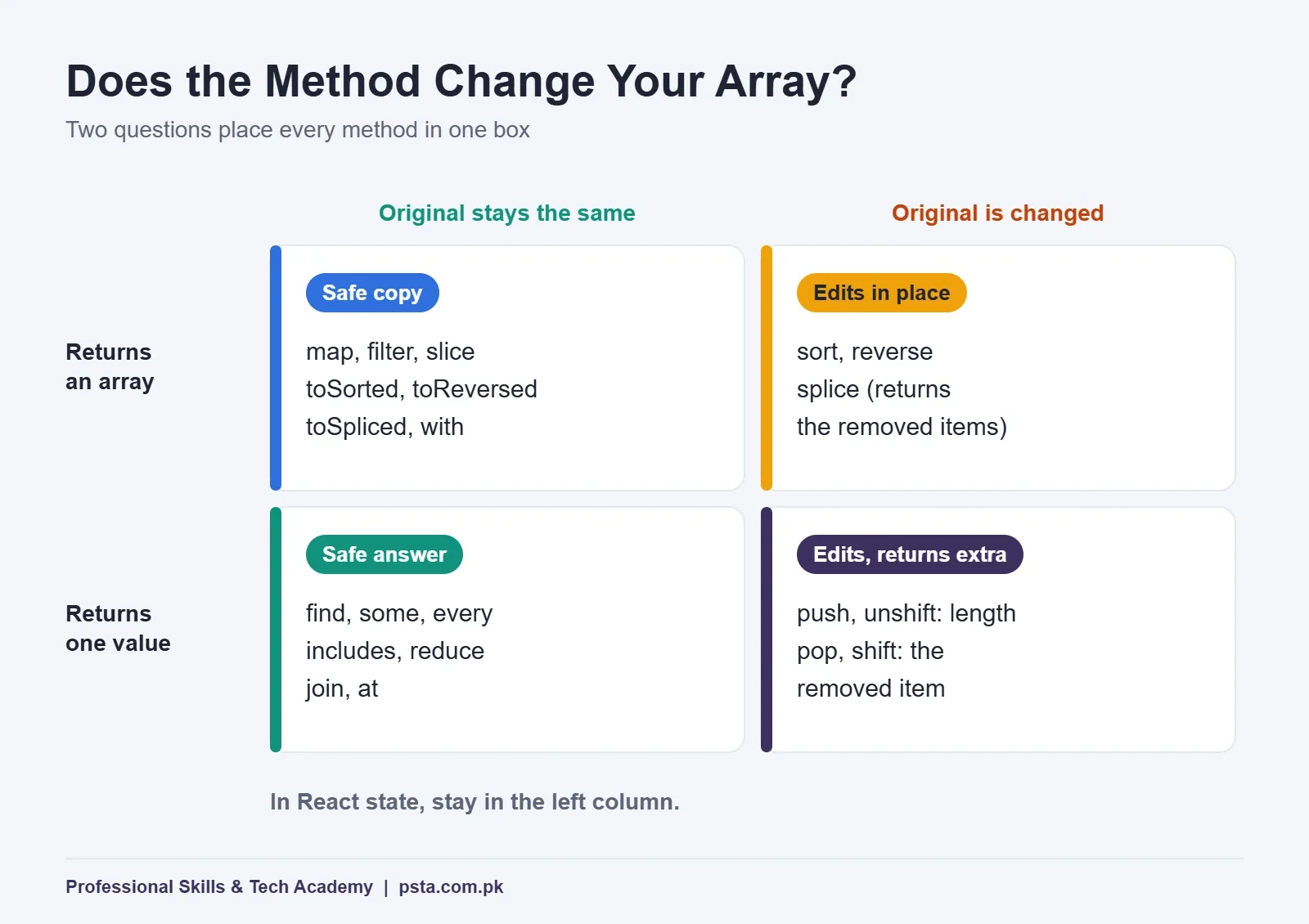
Here are all 24 JavaScript array methods from this guide in one table. Keep it open while you practice.
| Job | Method | What It Returns | Changes Original? |
|---|---|---|---|
| Transform | map |
New array, same length | No |
| Transform | flatMap |
New array, flattened one level | No |
| Transform | forEach |
undefined |
No |
| Pick | filter |
New array of matches | No |
| Pick | find / findLast |
First / last matching item, or undefined |
No |
| Pick | findIndex |
Position of first match, or -1 | No |
| Check | some / every |
true or false |
No |
| Check | includes |
true or false |
No |
| Check | indexOf |
Position, or -1 | No |
| Combine | reduce |
One value you build | No |
| Combine | join |
One string | No |
| Order | sort / reverse |
The same array, reordered | Yes |
| Order | toSorted / toReversed |
New reordered array | No |
| Edit | push / pop |
New length / removed item | Yes |
| Edit | splice |
Array of removed items | Yes |
| Edit | toSpliced / with |
New edited array | No |
| Read | slice |
New array, part of the original | No |
| Read | at |
One item (negative index counts from the end) | No |
Transform Each Item: map, flatMap and forEach
map() runs your function on every item and collects the results in a new array of the same length. Use it whenever the question starts with "for each order, give me...".
const labels = orders.map(o => `#${o.id} ${o.item} - Rs. ${o.price}`);
// ["#101 Lawn suit - Rs. 3200", "#102 Kurta - Rs. 1800", ...]
The most common map mistake is a missing return. If you write curly braces after the arrow, you must return a value yourself, or every item becomes undefined.
flatMap() maps and then flattens one level. It's handy when each item produces several values, such as splitting each order's item name into words for a search box.
forEach() is for side effects only: logging, updating the page, sending something. It returns undefined, so you can't chain after it. MDN's forEach page adds two warnings. You can't stop it with break, and it doesn't wait for async callbacks. If you need either, use a plain for...of loop.
Pick Items Out: filter, find, findLast and findIndex
These four look alike, but they answer different questions.
filter()answers "which orders match?" and always returns an array, even an empty one.find()answers "which is the first match?" and returns one item orundefined.findLast()searches from the end, which suits "latest entry" questions.findIndex()gives the position instead of the item, or -1 when nothing matches.
const unpaid = orders.filter(o => !o.paid);         // 2 orders: 102 and 105
const firstHaripur = orders.find(o => o.city === "Haripur");   // order 104
const lastKurta = orders.findLast(o => o.item === "Kurta");    // order 106
A rule I give students: if you only want one item, don't write filter(...)[0]. Use find(). It reads better, and it stops as soon as it finds a match instead of checking the whole list.
Get a Yes or No: some, every, includes and indexOf
When the answer is true or false, reach for this group.
orders.some(o => !o.paid);          // true: at least one order is unpaid
orders.every(o => o.price > 500);   // true: every order costs more than Rs. 500

const cities = orders.map(o => o.city);
cities.includes("Haripur");         // true
cities.indexOf("Peshawar");         // -1
some() and every() take a test function, so they work on objects. includes() and indexOf() compare plain values, so they suit lists of strings or numbers. Prefer includes() when you only need yes or no. According to MDN's includes page, it treats NaN as equal to itself, which indexOf() doesn't.
How Does reduce Work, and When Should You Skip It?
reduce() walks through the list carrying a running value, called the accumulator. Each step takes the accumulator and the current item and returns the next accumulator. After the last item, you get the final value.
const total = orders.reduce((sum, o) => sum + o.price, 0);
// 13400
Always pass the starting value (the 0 above). The MDN reduce page explains why: without it, the first item becomes the starting value, and an empty array throws a TypeError. On a live site, the empty case happens the first time a new customer's cart is empty.
MDN also says plainly that reduce isn't always the clearest choice. For grouping, it suggests Object.groupBy(). It's a static method on Object, not on arrays, and it has worked across major browsers since March 2024, according to its MDN page.
const byCity = Object.groupBy(orders, o => o.city);
// { Abbottabad: [3 orders], Mansehra: [2 orders], Haripur: [1 order] }
Use join() when the single value you want is text, such as cities.join(", ") for a delivery summary line.
Why Does sort() Put 100 Before 25?
Called with no arguments, sort() converts items to strings and compares them character by character. The MDN sort page shows [1, 30, 4, 21, 100000] coming out as [1, 100000, 21, 30, 4]. As text, "100000" starts with "1", so it lands near the front.
The fix is a compare function. (a, b) => a - b sorts numbers from low to high, and (a, b) => b - a sorts from high to low.
const cheapestFirst = orders.toSorted((a, b) => a.price - b.price);
const byName = orders.toSorted((a, b) => a.item.localeCompare(b.item));
There's a second trap. sort() reorders the array in place and returns that same array, so your original order is gone. If the original order matters, for example orders listed by time, use toSorted(). It returns a sorted copy, and MDN lists it as available across browsers since July 2023. toReversed() is the copying version of reverse().
Good news for ties: since ECMAScript 2019, sort() is stable. Two orders with the same price keep their original order relative to each other.
Adding, Removing and Reading Items
This group has the most look-alike names, so learn them in pairs.
push and pop vs Spread
push() adds to the end and pop() removes the last item. Both change the original. unshift() and shift() do the same at the start of the list: unshift() returns the new length, and shift() returns the item it removed. For a new array with an extra order, write [...orders, newOrder] instead.
splice vs slice vs toSpliced
splice(start, count) cuts items out of the original and returns what it removed. slice(start, end) copies part of the list and leaves the original alone. One letter apart, opposite behavior. toSpliced() gives you splice's flexibility on a copy.
const firstThree = orders.slice(0, 3);       // orders 101, 102, 103; original untouched
const withoutSecond = orders.toSpliced(1, 1); // copy without order 102
with and at
with(index, value) returns a copy with one item replaced. at() reads one item and accepts negative numbers, so orders.at(-1) is the last order. That's shorter than orders[orders.length - 1], and MDN notes it has worked across browsers since March 2022.
Chaining Methods: One Shop Report in Four Steps
Real tasks rarely use one method. Most useful code chains two or three JavaScript array methods together. The shop owner in our example wants one number: how much money has actually arrived. Here's how you build it, one link at a time.
- Start with all six orders.
- Keep only paid orders with
filter. Four remain: 101, 103, 104 and 106. - Turn each order into its price with
map: 3,200, 2,500, 3,200 and 1,800. - Add the prices with
reduce, starting from 0.
const received = orders
  .filter(o => o.paid)
  .map(o => o.price)
  .reduce((sum, price) => sum + price, 0);
// 10700
The answer is Rs. 10,700 received out of Rs. 13,400 booked. Put each method on its own line, as above. When a result looks wrong, comment out the last line and log what the chain produces so far. You'll spot the broken step in seconds.
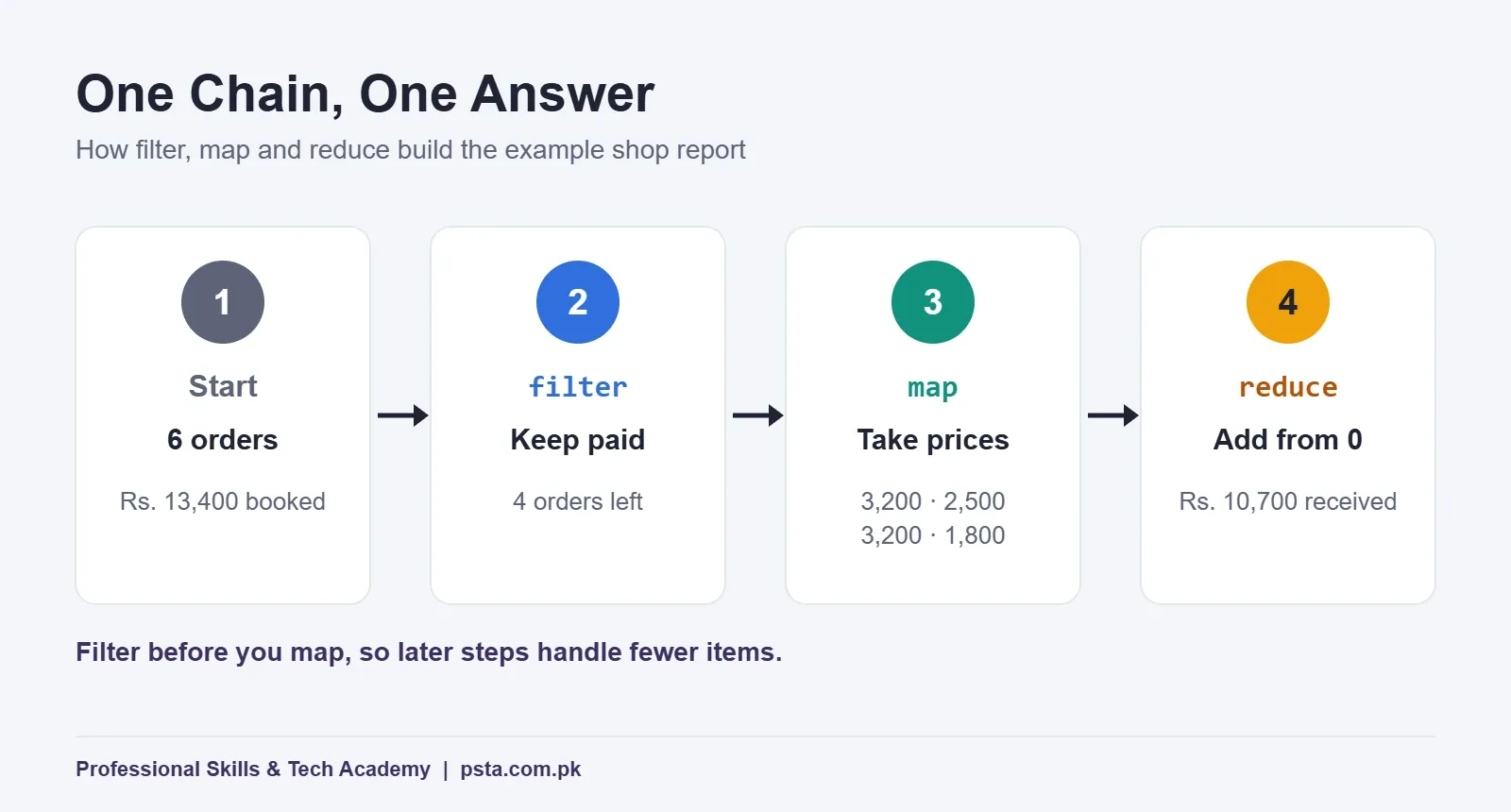
Order matters for speed, too. Filter first, then map, so the later steps handle fewer items. On six orders you won't notice. On a 50,000-row export from a courier portal, you will.
Which Methods Should You Avoid in React State?
If you plan to learn React next, the mutate-or-copy question about JavaScript array methods stops being a detail. The official guide Updating Arrays in State tells you to treat arrays in state as read-only. React notices a change when it gets a new array, so editing the old one in place can leave your screen out of date.
| Task | Avoid (Mutates) | Prefer (New Array) |
|---|---|---|
| Add an item | push, unshift |
[...arr, item], concat |
| Remove an item | pop, shift, splice |
filter, slice |
| Replace an item | arr[i] = value, splice |
map, with |
| Sort or reverse | sort, reverse |
toSorted, toReversed, or copy first |
The React guide's examples rely on spread, filter and map. toSorted, toReversed and with give the same result with less code. Remember the shallow-copy rule here as well: if you change one order inside the list, copy that object too, like { ...order, paid: true }.
Our React projects for beginners guide puts these patterns to work in an expense tracker and a cart, and our JavaScript interview questions post covers how employers test them.
How PSTA's JavaScript Course Teaches Arrays
Arrays and objects get a full module in PSTA's JavaScript Programming Course: Beginner to React, alongside destructuring and data handling. They come right before DOM work, events and the Fetch API, so you use JavaScript array methods on real API data soon after learning them. The course closes with React basics and portfolio projects deployed on GitHub.
According to the course page, the program runs 12 weeks at beginner level, and the current listed fee is Rs. 24,000 (down from Rs. 28,000). You can join on our Abbottabad campus, in live online classes from anywhere in Pakistan, or mix both. A new batch starts every month, with class times between 9:00 AM and 9:30 PM, Monday to Saturday.
Already comfortable with JavaScript? Advanced React.js Mastery picks up where arrays and state meet, and the Full-Stack Web Development with AI course adds the backend. You can compare options on the all courses page or start on the admission page. Questions about timings? Our admissions desk replies on WhatsApp (+92 314 5424399), and you are welcome to drop by the Mandian campus on Old College Road, facing FIMS College.
Rewrite One Old Loop Using These Methods
Open the last JavaScript assignment or project you wrote and find one for loop that builds a new list or a total. Rewrite it with filter, map or reduce, then check both versions give the same result in the console. Do one loop a day for a week. By the end, you'll pick the right method by job without looking at a list, and that habit shows quickly in a technical interview.
Frequently asked questions
What are the most used JavaScript array methods?
For everyday work, map, filter, find, some, includes, reduce and toSorted cover most tasks. map changes each item, filter keeps matches, find returns one match, some and includes give yes or no answers, reduce builds a total and toSorted orders a copy. Learn those seven first, then add splice, slice, at and the rest as projects need them.
What is the difference between map and forEach?
map returns a new array built from your callback's return values, so you can store it or chain another method after it. forEach always returns undefined and exists for side effects such as logging or updating the page. If you want a new list, use map. If you just want to do something with each item, forEach or a for...of loop is fine.
Which JavaScript array methods change the original array?
The mutating ones are sort, reverse, splice, push, pop, shift, unshift, fill and copyWithin. They edit the array in place. Methods such as map, filter, slice, concat, toSorted, toReversed, toSpliced and with leave the original alone and return a new array. When you are unsure, log the original after the call and check whether it changed.
Why does sort() give the wrong order for numbers?
Without a compare function, sort() converts every item to a string and compares the text character by character. That puts 100 before 25 because "1" comes before "2". Pass a compare function such as (a, b) => a - b for ascending order or (a, b) => b - a for descending order, and numbers sort by value.
What is the difference between slice and splice?
slice(start, end) copies part of an array into a new array and leaves the original unchanged. splice(start, count) removes items from the original array, can insert new ones, and returns the removed items. The names differ by one letter, so many beginners mix them up. If you need splice behavior without touching the original, use toSpliced.
Is it safe to use toSorted and Object.groupBy in projects?
For modern browsers, yes. MDN lists toSorted as available across browsers since July 2023 and Object.groupBy since March 2024. If your users run very old browsers or an old Node.js version, check your target environment first, or copy the array with the spread syntax and call sort on the copy instead.
How long does it take to learn JavaScript array methods?
Plan on two to three weeks of daily practice with small datasets to get comfortable with the core methods. The quickest route is rewriting your own loops with filter, map and reduce and checking the results in the browser console. Solving real tasks, such as totals, searches and sorted views from one dataset, teaches more than reading lists.
Sources & references
- Stack Overflow Developer Survey 2025: Technology survey.stackoverflow.co
- MDN: Array reference developer.mozilla.org
- MDN: Array.prototype.sort() developer.mozilla.org
- MDN: Array.prototype.toSorted() developer.mozilla.org
- MDN: Array.prototype.reduce() developer.mozilla.org
- MDN: Object.groupBy() developer.mozilla.org
- MDN: Array.prototype.forEach() developer.mozilla.org
- React: Updating Arrays in State react.dev
Last reviewed & updated on by Umar Qureshi. Written by the PSTA team in Abbottabad, Pakistan.

Umar Qureshi

JavaScript Programming Course in Abbottabad: Beginner to React
Turn this guide into a career: hands-on training with real projects, online across Pakistan or on-campus in Abbottabad · 12 Weeks.



Comments
No comments yet — ask a question or share your experience.