
Quick answer
Yes. Autodesk offers AutoCAD free for students enrolled at an accredited school, college or university, one year at a time and renewable while you stay eligible. You apply online and verify with a document showing your name, institution and a current-term date. It is for learning only, and short-course training centers don't qualify.
Key takeaways
- • Autodesk's education plan gives eligible students free AutoCAD access for one year, renewable while they stay enrolled.
- • You must be enrolled at an accredited school, college or university; training center courses on their own don't qualify.
- • Your proof must show your full name, your institution's full name and a date within the current term.
- • Choosing the wrong segment (Secondary or Postsecondary) is the most common reason a school doesn't appear in the list.
- • Education licenses are for learning only, so paid Fiverr, Upwork or client drafting work needs a paid license.
Table of contents 12 sections
- Who Qualifies for AutoCAD Free for Students?
- Does a Short Course or Training Center Count?
- Education Plan, Trial or Paid License: Which Route Fits You?
- Document Checklist Before You Apply
- How to Get AutoCAD Free for Students in 9 Steps
- How Long Does Autodesk Verification Take?
- Laptop Check Before You Install
- License Rules: What You Can and Can't Do
- How Do You Renew Your Education Access?
- Problems Students Hit and How to Fix Them
- Where PSTA's AutoCAD Course Fits In
- Gather Your Three Details Tonight
$2,095 a year is what Autodesk lists as the suggested price of a full AutoCAD subscription, yet AutoCAD free for students is a real, legal option if you are enrolled at a recognized school, college or university. The Autodesk education plan gives you one year of access, renewable each year while you stay eligible. Most failed applications come down to small details: the wrong school category, a name that doesn't match your records, or a document with an old date.
This checklist walks you through the whole process from a Pakistani student's point of view. Work through it in order and you will know:
- Whether you qualify, and why a short course on its own does not count
- Which document to upload and the three details it must show
- The exact steps from choosing AutoCAD to downloading it
- What your laptop needs before you install
- What you may and may not do with an education license, and how to renew it
Who Qualifies for AutoCAD Free for Students?
Autodesk's eligibility rules are short. You must be enrolled at, or employed by, a "qualified educational institution." Autodesk defines that as an institution accredited by an authorized government agency whose main purpose is teaching enrolled students.
In practice, the rule covers three groups:
- School and college students: accredited middle schools and high schools are listed, so a matric or intermediate student at a recognized school or college can apply.
- University students: BS, BArch, BE, MS and PhD students at recognized universities. Thesis and master's work is allowed, even when the project comes from an industry partner, as long as it is part of your degree.
- Teachers and staff: educators employed by a qualified institution, plus lab and IT administrators who manage computer labs.
There is also a minimum age requirement on the account eligibility page, so younger school students may need a parent or teacher to help. The eligibility pages don't list any country restrictions, so students in Pakistan follow the same steps as everyone else.
Does a Short Course or Training Center Count?
No, and this catches many people out. Autodesk's eligibility page lists "course participants at training centers and retraining programs" as not eligible. It adds that free trials are not meant for training either.
That rule applies to private academies, PSTA included. Joining a 45-day AutoCAD course does not, on its own, make you an Autodesk education user. What matters is your enrollment somewhere else:
- A civil engineering student at a university who also takes an evening AutoCAD class still qualifies through the university.
- A DAE student at a polytechnic institute can apply through that institute, provided it appears in Autodesk's school list or passes the "can't find your school" check.
- A graduate who has finished studying and only attends a training course does not qualify. The honest routes for that person are the 15-day AutoCAD free trial for a first look or a paid license for real work.
If you aren't sure where you stand, check one thing: does an accredited school, college or university have you on its current register? If yes, carry on with this checklist. If no, skip to the comparison table below.
Education Plan, Trial or Paid License: Which Route Fits You?
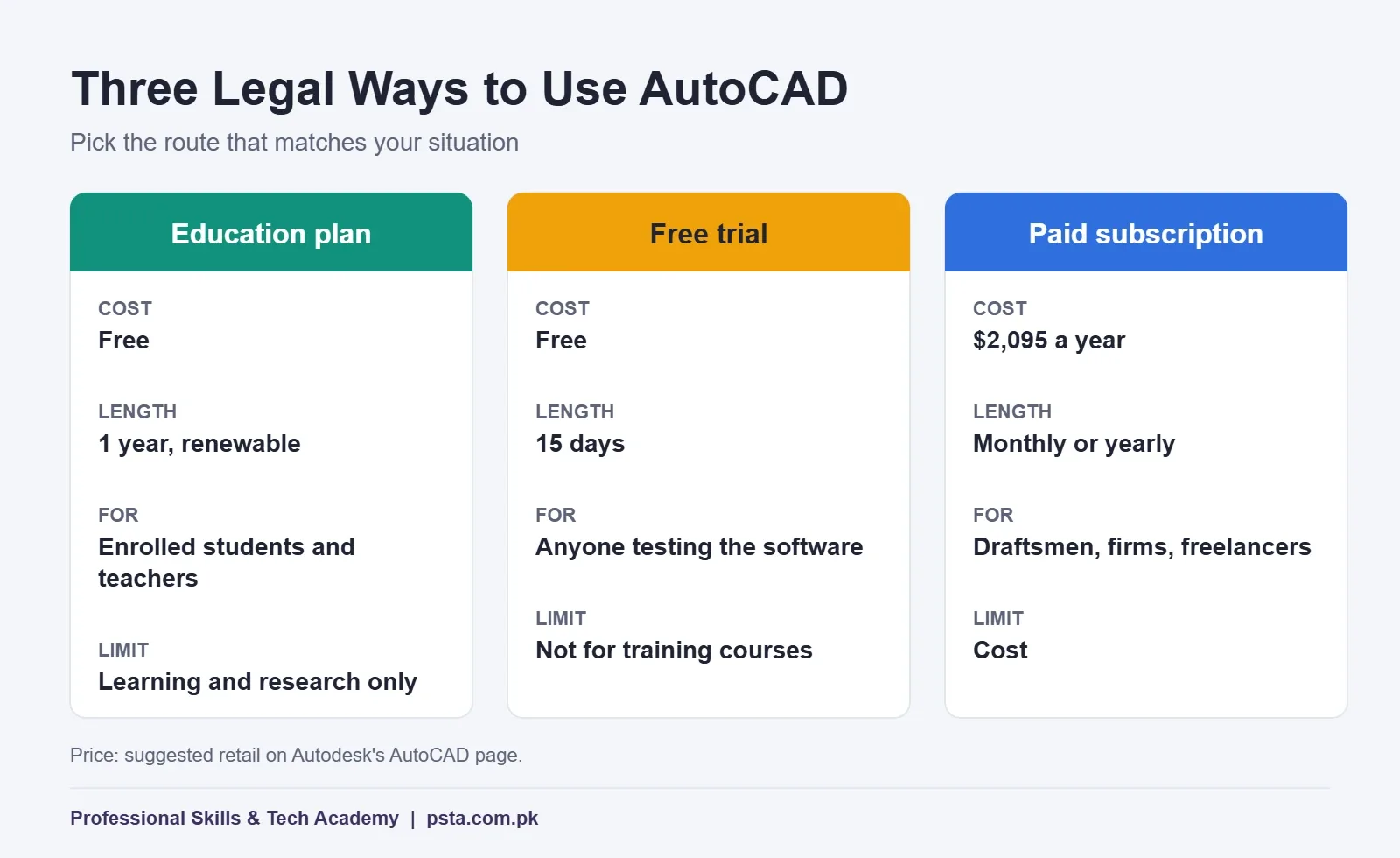
Students often treat these options as interchangeable. They aren't. Each one has a different purpose, length and set of rules. The figures below come from Autodesk's AutoCAD product page and its education pages.
| Route | Cost | Length | Who It Suits | Main Limit |
|---|---|---|---|---|
| Education plan | Free | 1 year, renewable | Enrolled students and teachers | Learning, teaching and research only |
| Free trial | Free | 15 days | Anyone testing the software | Short, and not meant for training courses |
| Paid subscription | $2,095 a year (suggested retail) | Monthly or yearly | Draftsmen, firms and freelancers | Cost |
The AutoCAD student version is not a cut-down edition. Autodesk says it has the same features as a paid subscription, and you can install the current release plus up to three earlier versions where available. That helps if your department still uses an older release in its labs.
Document Checklist Before You Apply
Autodesk uses SheerID, a verification service, to confirm that you are a student. You may be asked to upload proof. Your document must show all three of these details:
- Your full name, spelled exactly as it appears in your school or university registration.
- The full name of your institution, not just an abbreviation.
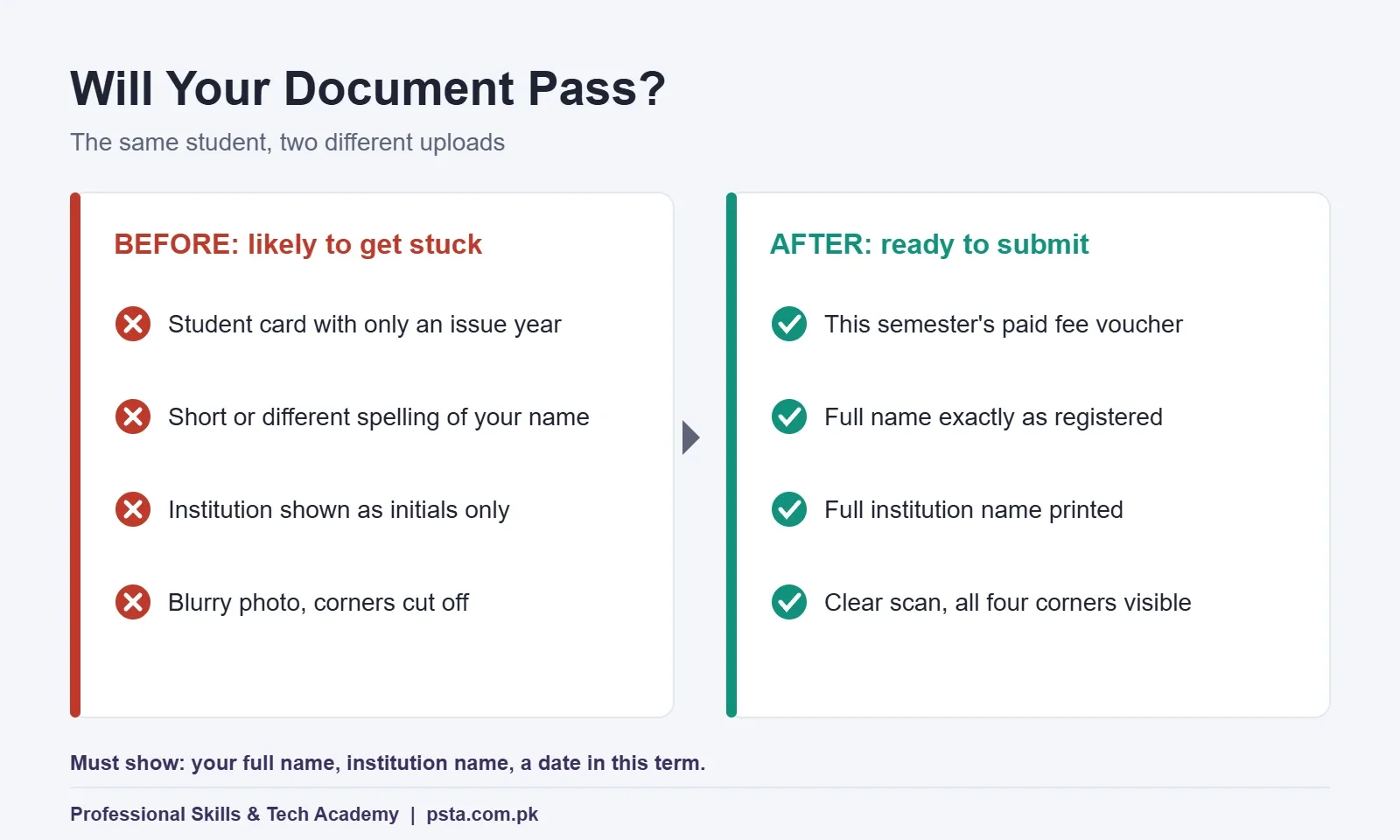
- A date within the current term, so Autodesk can see you are enrolled now.
Autodesk accepts several kinds of documents if they carry those details: an official letter from your institution, a registration receipt, a tuition receipt, a student ID card or a transcript. A photo on the ID is not required.
For most students in Pakistan, the easiest choice is a paid fee voucher or challan for the current semester. It usually prints your name, your university's full name and a recent date on one page. A student card can fail the third test, because some cards show only an issue year or an expiry date years away. If you use your card, check that it shows a date inside the current term.
Two practical tips before you scan anything:
- Use a clear scan or photo with all four corners visible and no glare across the text.
- If your CNIC spelling differs from your university records (for example "Muhammad" versus "M."), enter the name as your institution has it, because that is what the reviewer compares.
How to Get AutoCAD Free for Students in 9 Steps
Set aside about 20 minutes and have your document ready on your phone or laptop. Autodesk's getting started guide sets out the order below.
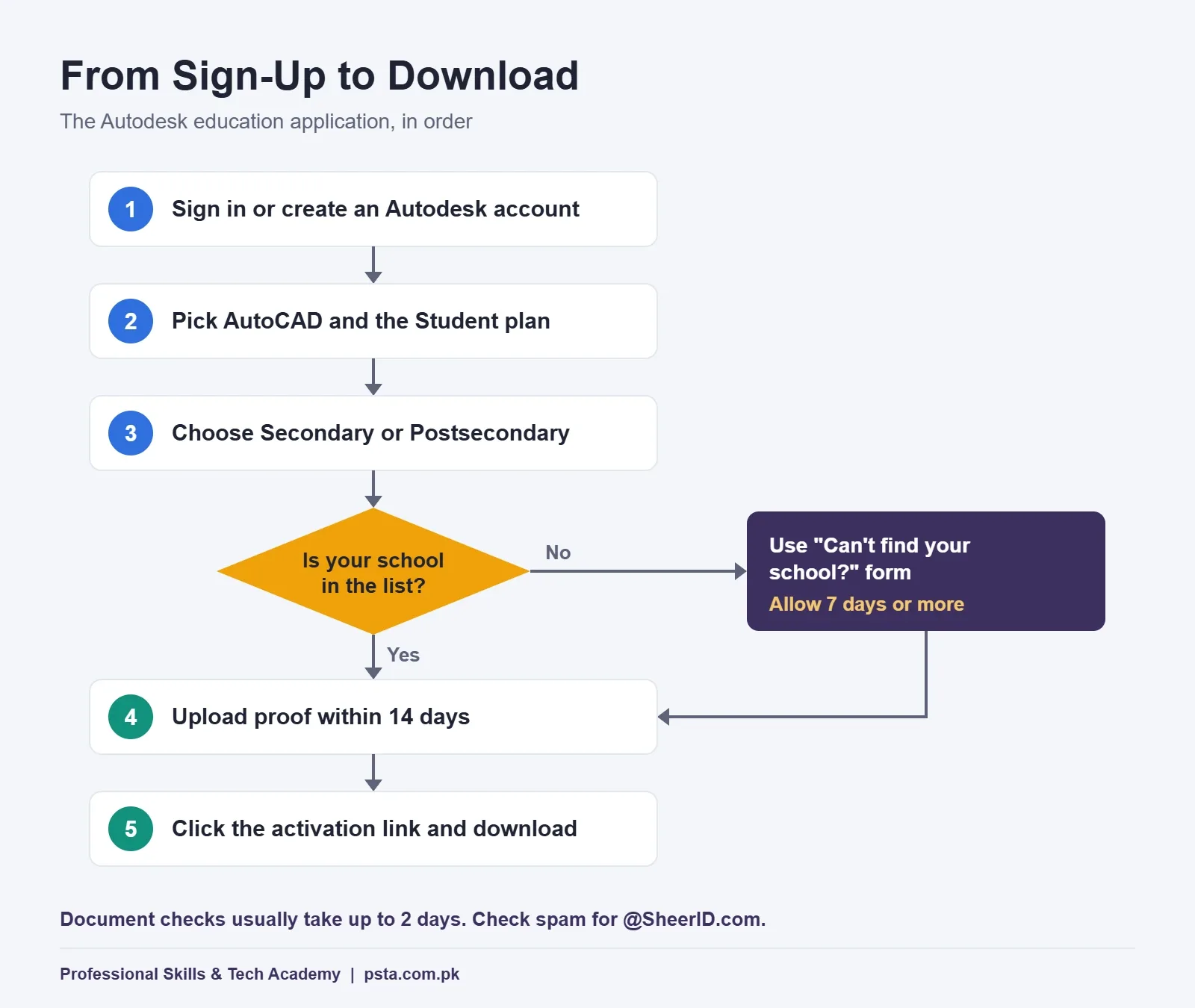
- Sign in or create an Autodesk account. If your institution gives you an official email address, use it. It ties your account to your school from the start.
- Open the education products page and pick AutoCAD. You can add other products later.
- Choose the Student plan. Teachers choose the educator option instead.
- Select the right segment. "Secondary" covers schools up to grade 12. "Postsecondary" covers universities, colleges, and trade and vocational schools. Pick the wrong one and your institution won't appear in the list.
- Find your institution in the drop-down. Try its full name and its common short name. If it truly isn't there, use "Can't find your school?" and fill in the form.
- Check every field twice. Autodesk warns that you can't change these details later, and they must match your institution's records.
- Upload your document if asked. You have up to 14 days to do this.
- Submit and watch your inbox. Status emails arrive from an address ending in @SheerID.com, so check your spam folder too.
- Click the activation link, then download. Once you are confirmed, AutoCAD appears in your account and you can install it.
How Long Does Autodesk Verification Take?
How long Autodesk student verification takes depends on whether your institution is already in its system. According to the eligibility page, a document check typically takes up to two days. If you had to add your school through the "Can't find your school?" form, validation usually takes up to seven days, and the getting started guide warns it may take longer.
You can't use the education software while you wait, so plan around deadlines. If your semester project is due on Friday, apply the week before, not the night before. Meanwhile, you can practice commands in an online tutorial or revise your notes. Our AutoCAD shortcut keys list is a good way to spend that waiting time.
Laptop Check Before You Install
An approved license is no help if AutoCAD won't run well on your machine. Below are the published AutoCAD system requirements for the 2026 release, as summarized by Autodesk partner Graitec. Check Autodesk's own page for the release you download, since newer versions can raise the bar.
| Component | Basic | Recommended |
|---|---|---|
| Operating system | 64-bit Windows 10 or 11 | 64-bit Windows 10 or 11 |
| Processor | 2.5 to 2.9 GHz, 8 logical cores | 3 GHz or faster base speed |
| Memory (RAM) | 8 GB | 32 GB |
| Graphics card | 2 GB, DirectX 11 | 8 GB, DirectX 12 |
| Screen | 1920 x 1080 | Up to 3840 x 2160 |
| Disk space | 10 GB (SSD suggested) | Not listed |
Two points matter most for used laptops sold in Pakistani markets. First, ARM processors are not supported, so some thin Windows laptops are ruled out. Second, 8 GB of RAM is the floor, not a comfortable target. For 2D floor plans it is workable. For 3D models and rendering, 16 GB makes daily work much smoother. An SSD also makes a bigger difference to opening large drawings than most students expect.
License Rules: What You Can and Can't Do
An AutoCAD student license comes with clear limits. Autodesk's student page states that education software is for learning, training and research only. It may not be used for commercial, professional or any other for-profit work.
Here is how that plays out in real situations students face:
- Allowed: class assignments, semester projects, your final year project, thesis drawings, competition entries and practice drawings for your portfolio.
- Not allowed: drawing a paid house map for a relative's client, taking a Fiverr or Upwork drafting order, or doing paid work for a construction firm during an internship on your own license.
The freelancing point deserves a plain answer because students ask it often. If someone pays you for the drawing, it is commercial work, even if the amount is small. When you are ready to earn from drafting, the 15-day trial will not cover you either. Budget for a paid license, or work on a computer your employer has licensed.
The same logic applies to portfolio pieces. Keep student work as student work, and if a client later wants to buy a design, redraw it on a licensed copy.
How Do You Renew Your Education Access?
Getting AutoCAD free for students is not a one-time step, because access lasts one year. Autodesk's eligibility page describes two cases:
- Before it expires: click Renew in the notice inside your account and confirm your eligibility again. Your access, and the products you already had, extend for another year.
- After it expires: you start verification again by selecting a product. You get only that product at first, and you have to add the others one by one.
Put a reminder in your phone for two weeks before the expiry date. Renewing early is far less work, and it saves you from a gap in the middle of a semester. Keep a scan of each new fee voucher in a folder too, since you may need fresh proof each year.
Problems Students Hit and How to Fix Them
Most stuck applications trace back to one of the rules above. These are the ones to check first:
| Problem | Likely Cause | What to Do |
|---|---|---|
| Your institution isn't in the list | Wrong segment selected | Switch between Secondary and Postsecondary, then search again |
| Still not listed | School not yet in Autodesk's system | Use "Can't find your school?" and allow seven days or more |
| Document not accepted | No date in the current term | Upload this semester's fee voucher or an enrollment letter |
| Name mismatch | Account name differs from records | Match the spelling your institution uses |
| No emails arriving | Messages filtered | Search spam for SheerID and add it to contacts |
If none of these fixes it, Autodesk's eligibility page points you to its support assistant. Explain your case briefly and attach the same document you uploaded.
One warning: avoid "free AutoCAD" downloads from file-sharing sites and cracked installers. They break the license terms and can carry malware. The legal route above costs you nothing if you qualify.
Where PSTA's AutoCAD Course Fits In
A free license gives you the software. It doesn't teach you how to set up layers, dimension a plan properly or plot a drawing to scale. That is where structured practice helps.
The AutoCAD Mastery course at PSTA runs for 45 to 90 days at beginner level. You can join on campus in Abbottabad, attend live online from anywhere in Pakistan, or mix the two. Its 10 modules move from the interface and 2D drafting through layers, blocks and X-Refs, isometric and orthographic views, 3D solids, a BIM introduction and rendering. The last two modules cover a complete design project, either architectural or mechanical, followed by putting your portfolio together. At the time of writing, PSTA charges Rs. 28,000 for it (previously Rs. 30,000).
The course is built for engineering, architecture and DAE students, and those who are enrolled at a college or university can practice at home on their own education license. If you are not enrolled anywhere, talk to us before you buy anything, and we'll explain your options honestly. Electrical students who work on control panel drawings may also find our industrial automation course a useful next step. If you're still choosing software, read AutoCAD vs Revit or our beginner guide to learning AutoCAD.
When you're ready, the admission page lists the next batch, or you can browse all PSTA courses first. Questions about eligibility or batch timings? Send them to PSTA on WhatsApp (+92 314 5424399).
Gather Your Three Details Tonight
Before you open the Autodesk site, find one document that shows your full name, your institution's full name and a date from this term. Your latest fee voucher is usually the quickest win. With that in hand, the application itself takes minutes, and you could have AutoCAD installed before your next lab class.
Frequently asked questions
Can PSTA students get the AutoCAD education license?
Not through PSTA alone. Autodesk's rules exclude course participants at training centers. If you are also enrolled at an accredited school, college, university or polytechnic, you can apply through that institution and use the license for practice at home. If you aren't enrolled anywhere, the 15-day trial or a paid subscription are the legal options.
Can I use my student AutoCAD license for Fiverr or freelance work?
No. Autodesk states that education software may only be used for learning, training and research, not for commercial, professional or for-profit work. Any drawing someone pays you for counts as commercial, even a small job. When you start earning from drafting, budget for a paid license or work on an employer's licensed computer.
Which document works best for Autodesk student verification in Pakistan?
A paid fee voucher or challan for the current semester is usually the easiest choice, because it often shows your full name, your institution's full name and a recent date together. An enrollment letter from your institution also works. Check that your student card shows a current-term date before you rely on it.
What if my college or university isn't in Autodesk's list?
First switch the segment: Secondary covers schools up to grade 12, while Postsecondary covers universities, colleges and trade or vocational schools. If your institution still doesn't appear, use the "Can't find your school?" form. Autodesk says validating a new institution takes up to seven days and may take longer.
How long does Autodesk education verification take?
When your institution is already listed and you upload a document, Autodesk says confirmation typically takes up to two days. You have up to 14 days to upload proof after applying. Adding a new school takes longer, so apply at least a week before a project deadline rather than the night before.
Can I install an older version of AutoCAD with the education plan?
Yes. Autodesk says education access includes the current version plus up to three prior versions where available. This helps if your university lab or teacher works in an older release and you want files to open the same way at home. The features match those in a paid subscription.
What happens when my one-year AutoCAD access ends?
Renew before the expiry date by clicking Renew in your account and confirming eligibility; your access and existing products extend for another year. If the date passes, you must verify again from scratch, and you start with only the product you select. Set a phone reminder two weeks before expiry.
Can matric or intermediate students get AutoCAD for free?
Yes, if their school or college is accredited. Autodesk lists accredited middle schools and high schools as qualified institutions, and they apply under the Secondary segment. There is a minimum age requirement, so younger students may need a parent or teacher to help with the account and documents.
Sources & references
- Autodesk Education: Free Software for Students autodesk.com
- Autodesk Education Support: Eligibility autodesk.com
- Autodesk Account: Education Eligibility for Students autodesk.com
- Autodesk Account: Getting Started With Education Access autodesk.com
- Autodesk: AutoCAD Overview and Pricing autodesk.com
- Graitec: System Requirements for AutoCAD 2026 graitec.com
Last reviewed & updated on by Umar Qureshi. Written by the PSTA team in Abbottabad, Pakistan.

Umar Qureshi

AutoCAD Mastery: 2D, 3D Design & BIM (Complete Professional Course)
Turn this guide into a career: hands-on training with real projects, online across Pakistan or on-campus in Abbottabad · 45 - 90 Days.
Comments
No comments yet — ask a question or share your experience.