Quick answer
Expect DIT viva questions about the task in front of you: Windows setup, Excel formulas, cables and ping, Python loops, MySQL keys, HTML and design basics. KPBTE practicals carry 25 marks per course and 100 for the Project, and you need 50% in each. Practice every task, then explain it aloud in three sentences.
Key takeaways
- • Viva questions follow the board outline, so practice the listed lab tasks first.
- • Nine first-year courses carry 25 practical marks each; the Project carries 100.
- • KPBTE requires 50% in each practical, with no grace marks in practicals.
- • The outline teaches Python, MySQL 8.0, Packet Tracer, Office 2016 and Premiere Pro.
- • Explain every task in three plain sentences: what you did, how and why.
Table of contents 37 sections
- What Happens in a DIT Practical Exam?
- DIT Viva Questions at a Glance: The 10 Subjects
- ICT and Operating System Questions
- 1. What is the difference between hardware and software?
- 2. What is an operating system, and name two examples.
- 3. How do you make a bootable USB for Windows?
- 4. Why do we partition a hard disk?
- 5. What is the difference between a standard user and an administrator?
- MS Office Viva Questions: Word, Excel, PowerPoint and Access
- 6. What is the difference between a relative and an absolute cell reference?
- 7. When would you use SUMIF instead of SUM?
- 8. What is a macro?
- 9. What is mail merge used for?
- 10. What is a primary key in MS Access?
- Computer Networks: Cables, IP Addresses and Commands
- 11. When do you use a straight-through cable and when a crossover cable?
- 12. What does the ping command do?
- 13. What is the difference between a hub, a switch and a router?
- 14. What does ipconfig show you?
- 15. Why do students use Cisco Packet Tracer?
- Python Programming Questions
- 16. What is the difference between a compiler and an interpreter?
- 17. What is the difference between a for loop and a while loop?
- 18. What is a function, and why do we use one?
- Database Systems: MySQL Keys, Joins and Views
- 19. What is a foreign key?
- 20. What is the difference between DDL and DML?
- 21. What does an inner join return?
- Web, Graphics and Video Editing Questions
- 22. What is the difference between HTML, CSS and JavaScript?
- 23. Why do we use RGB for screens and CMYK for print in Photoshop?
- 24. How do you remove a green screen in Premiere Pro?
- How Should You Defend Your DIT Project?
- Practical Tasks to Rehearse Before Exam Week
- Is a Board DIT Viva Harder Than an Institute Test?
- Preparing for Practicals With PSTA's DIT Course
- Record Yourself Answering Five Questions
"What will the examiner ask me in the lab?" is the question DIT students raise most often in the last month before practicals. The DIT viva questions you should expect come straight from the board's course outline: hardware and Windows, MS Office, networking, Python, MySQL, web pages, design and video. If you can explain what you did on screen in two or three plain sentences, you are ready.
This guide gives you 24 short model answers, grouped by subject, plus the practical tasks worth rehearsing. Here is what you will find below:
- How the KPBTE practical marks and pass rules work, taken from the board's own documents
- A subject-by-subject table of what the 1st-year outline expects you to do in the lab
- 24 viva questions with answers you can say out loud in under a minute
- How to explain your 100-mark DIT project without freezing
- A short rehearsal routine you can repeat on any lab PC
What Happens in a DIT Practical Exam?
The first year of the Khyber Pakhtunkhwa board's DIT has 10 IT courses split across Part-I and Part-II. According to the KPBTE DIT scheme of studies, nine of them carry 75 theory marks and 25 practical marks. The tenth, the Project, is worth 100 practical marks with no theory paper. That makes 1,000 marks for the first year.
The board's assessment and promotion rules say you pass a subject's theory with 40% and its practical with 50%. Theory and practical are passed separately, and no grace marks are given in practicals. You also need 75% attendance overall and 75% of practical classes to sit the exam.
Those rules do not publish a fixed viva format. In practice, many examiners give you a task, watch you do it, and then ask why you did each step. Ask your institute how the 25 marks are split between the task, your lab file and the oral questions. The split can differ from one exam center to another.
DIT Viva Questions at a Glance: The 10 Subjects
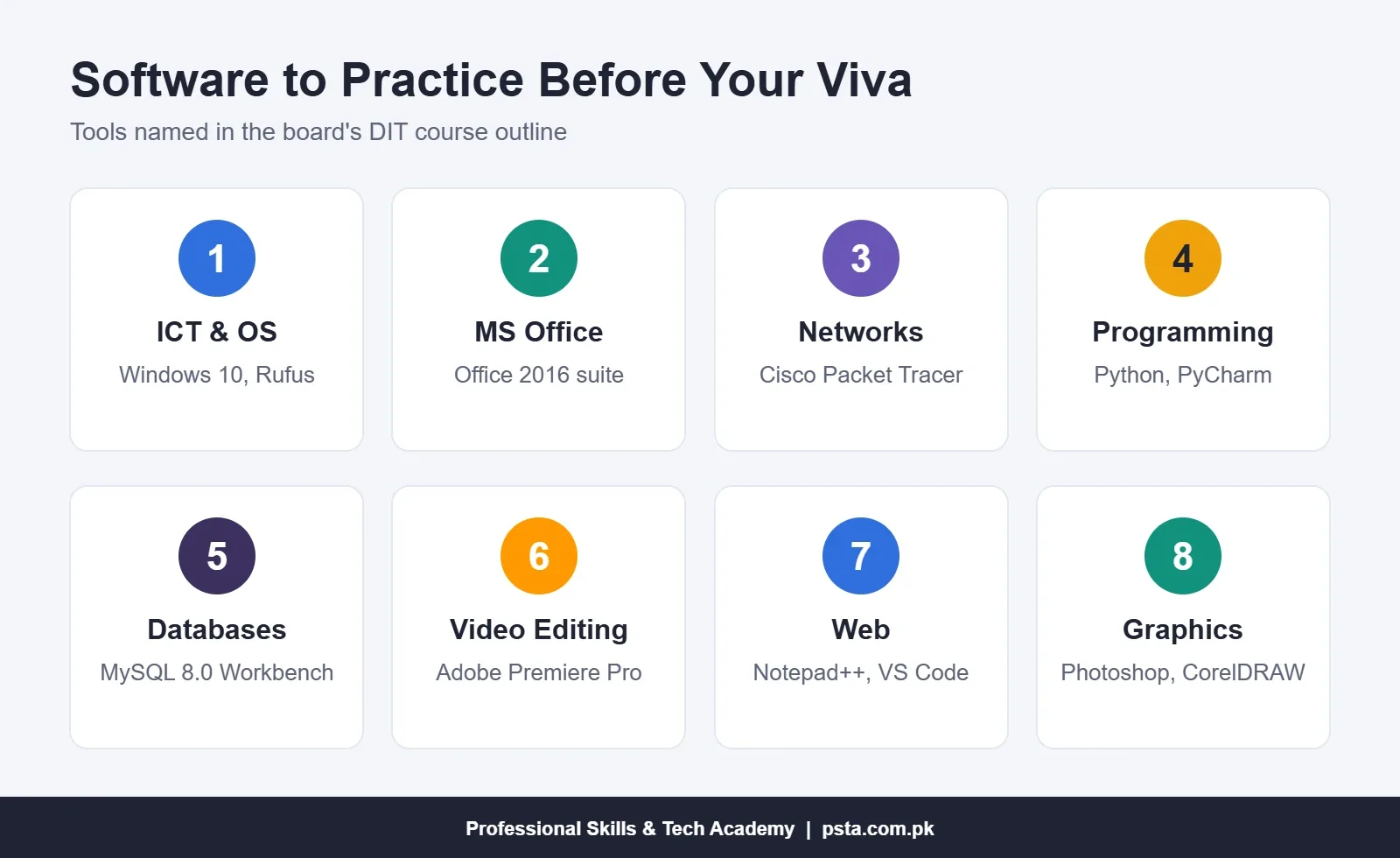
Before you memorize answers, look at what each course actually asks you to do in the lab. The table below summarizes the practical lists and software named in the board outline.
| Course | Typical lab task | Software named in the outline |
|---|---|---|
| Introduction to ICT | Install Windows, run DOS commands, zip files, scan for viruses | Windows 10, Command Prompt, Task Manager |
| Introduction to MS Office | Format a letter, build a marks sheet with IF and SUMIF, record a macro | Office 2016: Word, Excel, PowerPoint, Access |
| Computer Networks | Crimp straight and crossover cables, build a LAN, run ping and ipconfig | Cisco Packet Tracer |
| Operating System | Make a bootable USB, partition a disk, create user accounts | Windows 10, Rufus, Windows Server 2016/2019 |
| Introduction to Programming | Grade calculator, tables with loops, Turtle shapes | Python, PyCharm Community |
| Database Systems | Create tables with keys, write joins and views | MySQL 8.0, Workbench, MS Access |
| Video Editing | Logo intro, green screen, lower thirds | Adobe Premiere Pro |
| Web Development Essentials | HTML form, CSS navigation bar, JavaScript validation | Notepad++, Visual Studio Code |
| Graphics Design | Visiting card, letterhead, social media post | Photoshop 2016, CorelDRAW 2016, InPage |
| Project | Build, test and document one solution | Your choice of the above |
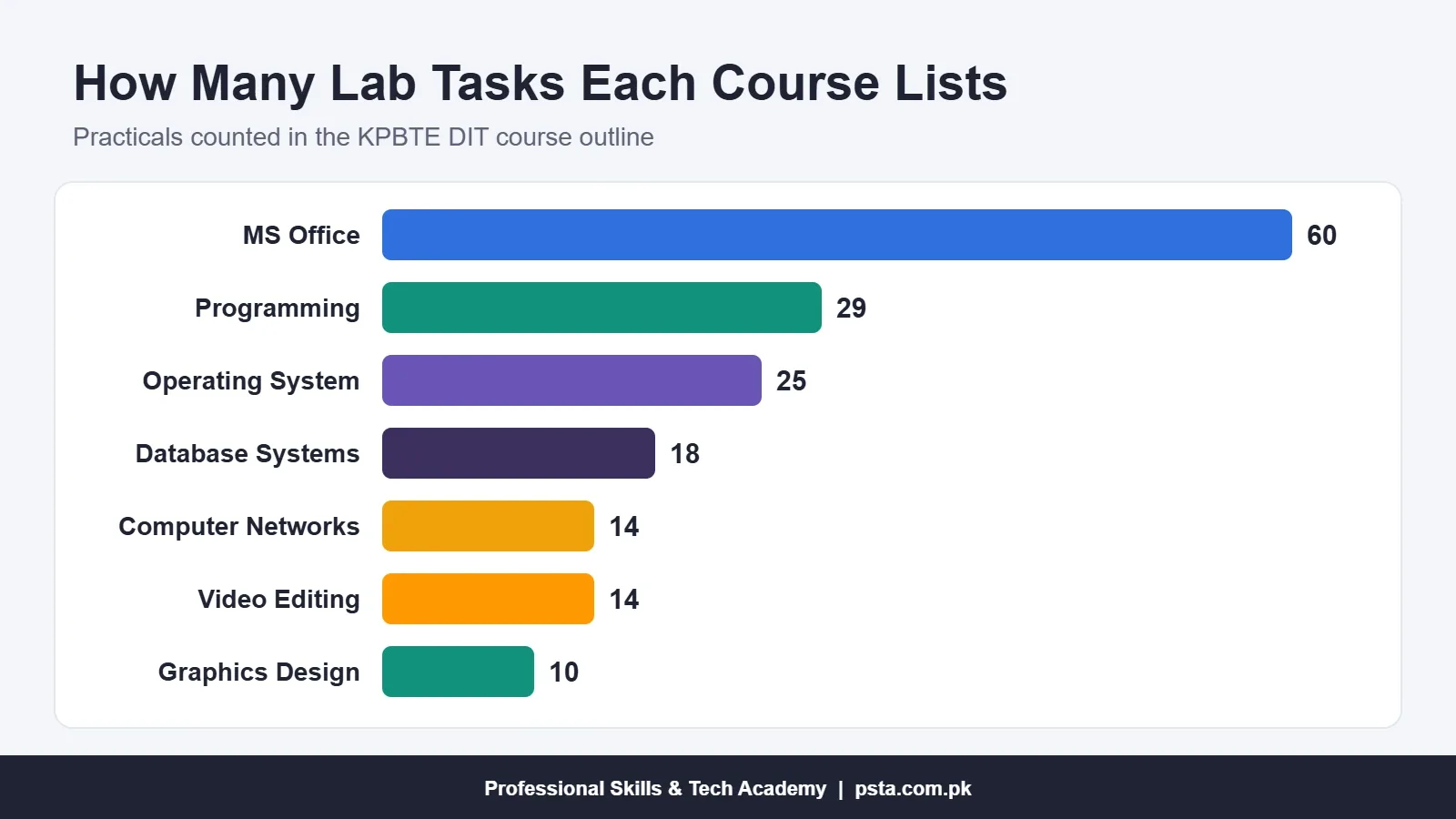
The practical lists differ a lot in length. The outline counts 60 tasks for MS Office, 29 for programming, 25 for the operating system course, 18 for databases, 14 each for networks and video editing, and 10 for graphics design. Spend your rehearsal time in roughly that proportion.
Notice that the outline uses Python in the programming course, not C++. If an old guide or a senior gives you C++ questions, check which scheme your batch follows.
ICT and Operating System Questions
These DIT viva questions test whether you understand the PC you are sitting at. Expect them while you install Windows or manage files.
1. What is the difference between hardware and software?
Hardware is the physical part of a computer you can touch, such as the keyboard, RAM and hard disk. Software is the set of programs that tells the hardware what to do. Windows is system software, while MS Word is application software.
2. What is an operating system, and name two examples.
An operating system manages the hardware, memory, files and running programs, and gives you a way to use them. Windows 10 is a desktop example. Android and iOS are mobile examples, and both appear in the board's OS outline.
3. How do you make a bootable USB for Windows?
Download the Windows installation file and plug in a large enough USB drive. Open a tool such as Rufus, select the drive and the file, and click Start. Then change the boot order in the BIOS or the boot menu so the PC starts from the USB.
4. Why do we partition a hard disk?
Partitioning divides one physical disk into separate drives, such as C: for Windows and D: for data. If you reinstall Windows, files on the other partition usually stay safe. It also keeps backups and projects easier to organize.
5. What is the difference between a standard user and an administrator?
An administrator can install software, change settings and manage other accounts. A standard user can run programs and save files but needs an admin password for system changes. In a lab, students get standard accounts so one mistake cannot break the whole PC.
MS Office Viva Questions: Word, Excel, PowerPoint and Access
The outline lists 60 Office lab tasks across Word, Excel, PowerPoint and Access, so these DIT viva questions come up often.
6. What is the difference between a relative and an absolute cell reference?
A relative reference like A1 changes when you copy the formula to another cell. An absolute reference like $A$1 stays fixed. Microsoft's Excel help page explains that pressing F4 while editing a reference switches between the types, including mixed ones like $A1.
7. When would you use SUMIF instead of SUM?
SUM adds every number in a range. SUMIF adds only the cells that meet a condition, for example the fee collected from one class out of a whole school list. COUNTIF works the same way but counts matching cells instead of adding them.
8. What is a macro?
A macro is a recorded set of steps that Excel can repeat with one click or shortcut. The board outline includes a practical where you record a macro for a marks certificate and assign it to a button. Save such files as .xlsm, or the macro is lost.
9. What is mail merge used for?
Mail merge joins one letter template in Word with a list of names and details, usually from Excel. It produces a separate letter, label or certificate for every row. Offices use it for admission letters, salary slips and invitation cards.
10. What is a primary key in MS Access?
A primary key is a field that uniquely identifies each record, such as a roll number. Two records can never share it, and it cannot be left empty. Access uses it to link tables, for example a Students table to a Fees table.
Computer Networks: Cables, IP Addresses and Commands
Networking DIT viva questions usually follow a hands-on task, such as crimping a cable or connecting two PCs in Packet Tracer.
11. When do you use a straight-through cable and when a crossover cable?
A straight-through cable connects different devices, such as a PC to a switch. A crossover cable connects similar devices directly, such as PC to PC. Many modern network cards detect the cable type automatically, but examiners still expect you to know the rule.
12. What does the ping command do?
Ping checks whether another device can be reached on the network. Microsoft's command reference says it sends ICMP Echo Request messages and, by default, sends four of them. Adding -t keeps it running until you press Ctrl+C.
13. What is the difference between a hub, a switch and a router?
A hub sends incoming data to every port. A switch learns which device sits on which port and sends data only there, so it wastes less bandwidth. A router connects different networks, such as your office LAN and the internet.
14. What does ipconfig show you?
Ipconfig shows your computer's IP address, subnet mask and default gateway. Use ipconfig /all to see the MAC address and DNS servers too. It is the first command to run when a PC says "No internet access."
15. Why do students use Cisco Packet Tracer?
Packet Tracer lets you build and test networks with virtual routers, switches and PCs, without buying equipment. A NetPilot guide notes that it is free, but the download needs a free Cisco Networking Academy account.
Python Programming Questions
Examiners often ask you to change one line of your program and explain the result. Keep your answers tied to code you wrote.
16. What is the difference between a compiler and an interpreter?
A compiler translates the whole program into machine code before it runs. An interpreter reads and runs the program line by line. Python is usually run by an interpreter, which is why an error appears at the exact line where the problem sits.
17. What is the difference between a for loop and a while loop?
A for loop runs a fixed number of times or once for every item in a list. A while loop keeps running as long as a condition stays true. Use for to print a multiplication table, and while to keep asking for a password until it is correct.
18. What is a function, and why do we use one?
A function is a named block of code that does one job and can be called many times. You define it with def, give it parameters, and return a result. Functions keep a program shorter and make bugs easier to find.
Database Systems: MySQL Keys, Joins and Views
Database DIT viva questions focus on keys and queries, because those are where most lab mistakes happen.
19. What is a foreign key?
A foreign key is a column in one table that points to the primary key of another table. The MySQL 8.0 reference manual explains that every foreign key value must match an existing value in the parent table. In MySQL, the InnoDB engine supports this rule.
20. What is the difference between DDL and DML?
DDL, or Data Definition Language, builds and changes structure with commands such as CREATE, ALTER and DROP. DML, or Data Manipulation Language, works with the rows inside, using INSERT, UPDATE, DELETE and SELECT. TRUNCATE empties a table but keeps its structure.
21. What does an inner join return?
An inner join returns only the rows that have matching values in both tables. If you join Medicines and Suppliers on supplier_id, any medicine without a supplier is left out. A left join would keep it and show empty supplier columns.
Web, Graphics and Video Editing Questions
Part-II creative subjects mix tool skills with design reasons. Have one finished file open to point at while you answer.
22. What is the difference between HTML, CSS and JavaScript?
HTML gives a page its structure: headings, paragraphs, images, links and forms. CSS controls the look, such as colors, spacing and layout. JavaScript adds behavior, for example checking that a form's phone field is not empty before it is sent.
23. Why do we use RGB for screens and CMYK for print in Photoshop?
Screens mix red, green and blue light, so RGB suits social media posts and web banners. Printers mix cyan, magenta, yellow and black ink, so CMYK suits visiting cards and letterheads. Designing a print job in RGB can make colors look dull on paper.
24. How do you remove a green screen in Premiere Pro?
Place the green screen clip above the background clip on the timeline. Apply the Ultra Key effect, pick the green with the eyedropper, then adjust the matte settings until the edges look clean. Light the green screen evenly when recording, or no setting will fully fix it.
How Should You Defend Your DIT Project?
The Project is the single biggest practical, at 100 marks. The board outline lets you choose a problem in Python application development, database development, web development or graphic design. The outline splits its 20 weeks into six phases. Field exploration and problem analysis take 2 weeks each, development takes 10, and testing, changes and the report take 2 weeks each.
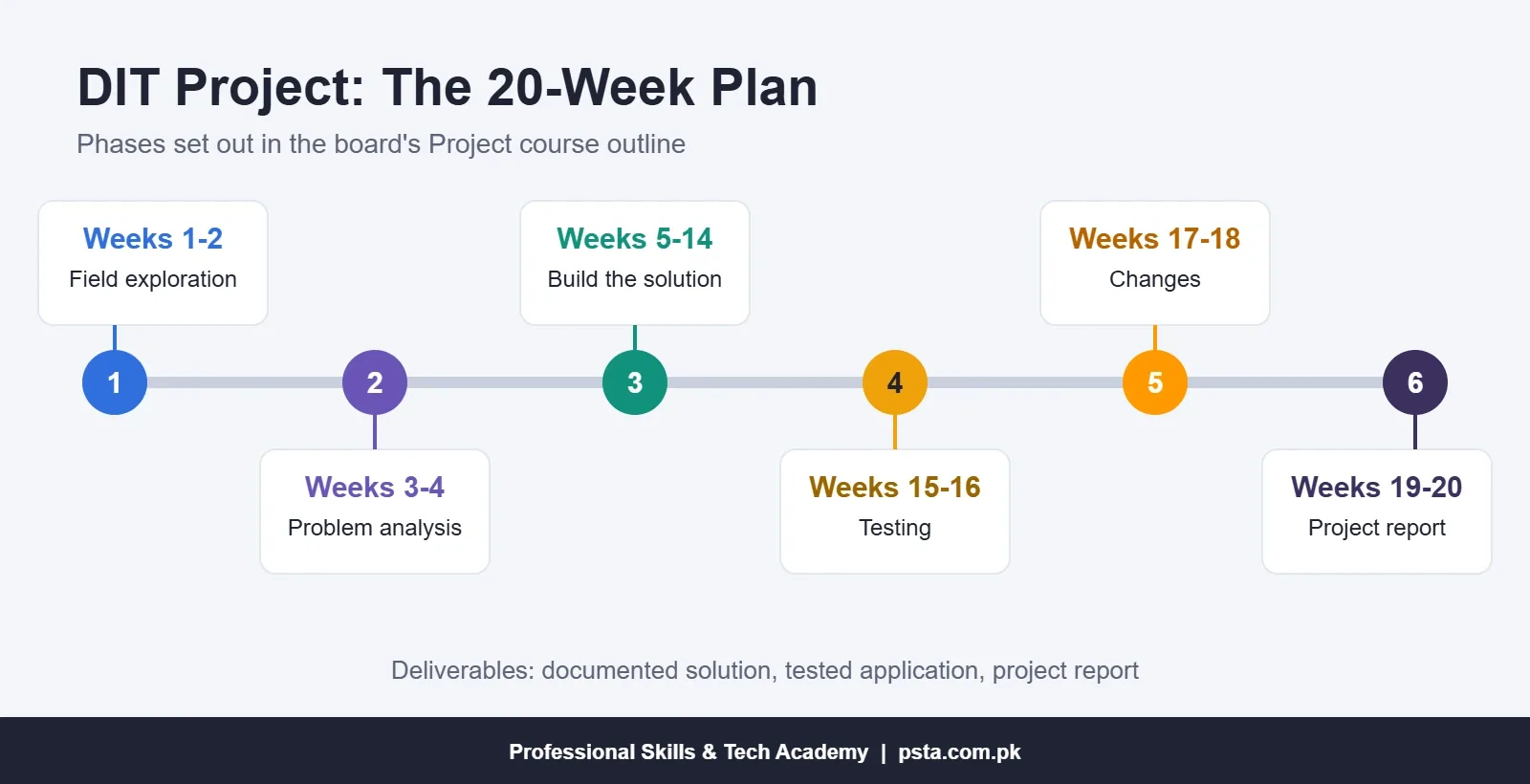
The outline asks for a documented problem and solution, a tested application and a project report. It does not mention a presentation, so treat any oral questions as a check that you built the work yourself. Be ready for these:
- What problem does your project solve, and for whom?
- Why did you choose this software or language?
- Show one feature and explain the code or steps behind it.
- How did you test it, and which bug did you fix?
- What would you add with two more weeks?
A simple, finished project you can explain beats an ambitious one copied from YouTube. A fee record system for a local academy, with an Access form on top of MySQL tables, is a sensible size for this level.
Practical Tasks to Rehearse Before Exam Week
Oral answers make sense only when your hands know the task. Rehearse these steps on a lab PC, timing yourself each time:
- Format a one-page application in Word with a table, header and page numbers, then export it as PDF.
- Build a 10-student marks sheet in Excel with SUM, AVERAGE, IF for pass or fail, and a chart.
- Create two linked tables in MySQL Workbench, insert five rows each, and run one join.
- Build a three-PC network in Packet Tracer and ping between the machines.
- Write a Python program that prints a grade from marks entered by the user.
- Code a contact form in HTML with CSS styling and one JavaScript check.
After each task, say aloud what you did in three sentences. This habit turns a silent viva into a confident one. It also shows you which steps you still do from memory and which you guess.
Is a Board DIT Viva Harder Than an Institute Test?
Not usually in content, because both test the same subjects. The difference is the stakes. If you score under 50% in a board practical, you clear it in a later exam. The KPBTE rules let ex-candidates reappear in the subjects they failed. An institute test lets you retry sooner. For background on board and private diplomas, read our guide to 1-year vs 2-year DIT, and see jobs after DIT for what the diploma leads to.
Preparing for Practicals With PSTA's DIT Course
At PSTA, the Diploma in Information Technology is a beginner-level, one-year program taught in two semesters. Its outline lines up closely with the board subjects above, from Windows setup and cabling to Python, MS Office, MySQL, web pages, Photoshop and Premiere Pro. You build projects such as a Windows installation from your own bootable USB and a small office network with shared folders.
Monthly fee: Rs. 2,000, down from the usual Rs. 2,500, and batches open every month. Classes run in person at our Abbottabad campus in Mandian (Old College Road, facing FIMS College), live online for students in other cities, or as a mix of the two. Note that this is PSTA's own diploma, verifiable on our certificate page, so ask us about board registration separately if you need it.
If one subject is your weak spot, the Office Automation course or the Python course goes deeper. Browse every option on the courses page, or message +92 314 5424399 on WhatsApp to ask about batch timings. When you are ready, the admission form takes a few minutes.
Record Yourself Answering Five Questions
Pick five DIT viva questions from this list, one from each of five subjects. Answer each into your phone's voice recorder without reading, then play it back. Any answer that runs past a minute or wanders needs another try. Repeat with a new five each day, and the full set of 24 will feel familiar before your exam date.
Frequently asked questions
Is there a viva in the DIT practical exam?
The KPBTE assessment rules set pass marks for practicals but do not publish a fixed viva format. In many exam centers, the examiner gives you a task and asks short oral questions while you work. Ask your institute how the practical marks are divided between the task, your lab file and the questions.
How many practical marks does the first year of DIT carry?
According to the KPBTE scheme of studies, nine first-year courses carry 25 practical marks each, and the Project carries 100 practical marks. That adds up to 325 practical marks out of the 1,000 total for the first year, so practical skill has a real effect on your result.
What is the passing mark for a DIT practical?
The board's assessment rules require 50% in each practical and 40% in each theory paper. Theory and practical are passed separately, so a strong theory score cannot cover a weak practical. The rules also state that no grace marks are given in practicals.
Can I use C++ instead of Python in the DIT programming practical?
The current KPBTE outline teaches Introduction to Programming in Python, using PyCharm Community, with practicals on strings, loops, lists, functions and Turtle graphics. If your institute teaches a different language, confirm with them which scheme your batch is registered under before you prepare.
Which DIT project is best for a beginner?
Pick a small problem you can finish, test and explain, such as a fee record system, a marks calculator in Python, or a simple business website. The outline allows Python, database, web or graphic design projects. A completed project with a clear report scores better than an unfinished ambitious one.
What happens if I fail a DIT practical?
Under the KPBTE rules, a student who fails first-year subjects can reappear in those subjects as an ex-candidate in later exams. Because theory and practical are passed separately, you repeat only the part you failed. Check the next exam schedule and fee with your institute.
How should I prepare for DIT viva questions in one week?
Spend the first days rehearsing the lab tasks from the outline, starting with MS Office and its 60 listed practicals. Then read the model answers and say each one aloud without notes. On the last two days, ask a friend to quiz you while you perform a task.
Sources & references
- KPBTE Scheme of Studies and Course Outline: DIT (2-Year) kpbte.edu.pk
- KPBTE Assessment and Promotion Rules (DIT 2-Year) kpbte.edu.pk
- Microsoft Support: Switch between relative, absolute and mixed references support.microsoft.com
- Microsoft Learn: ping command reference learn.microsoft.com
- MySQL 8.0 Reference Manual: FOREIGN KEY Constraints dev.mysql.com
- NetPilot: Is Cisco Packet Tracer free? netpilot.io
Last reviewed & updated on by Umar Qureshi. Written by the PSTA team in Abbottabad, Pakistan.

Umar Qureshi

Diploma in Information Technology (DIT) – 1 Year Certified Program
Turn this guide into a career: hands-on training with real projects, online across Pakistan or on-campus in Abbottabad · 1 Year.
Comments
No comments yet — ask a question or share your experience.