Quick answer
Install Wireshark 4.6.9 from wireshark.org with Npcap, pick the active Wi-Fi or Ethernet interface, reproduce the problem for about two minutes and save the file. Then use display filters such as dns.time > 0.5 and tcp.analysis.flags to find slow lookups, retransmissions or resets. Capture only devices you own or have written permission to test.
Key takeaways
- • Download Wireshark only from wireshark.org; 4.6.9 is the current stable release, with Windows x64 and Arm64 installers.
- • Keep the Install Npcap box ticked, because live capture on Windows needs it.
- • Leave the capture filter empty on short tests and do your investigating with display filters.
- • Start with dns.time > 0.5 and tcp.analysis.flags to spot slow lookups and problem packets quickly.
- • Under PECA 2016, unauthorized access and interception are offenses, so capture only with clear permission.
Table of contents 17 sections
- What Does Wireshark Actually Show You?
- Is It Legal to Use Wireshark in Pakistan?
- Meet the Example Office and the Problem
- Install Wireshark 4.6.9 and Npcap on Windows
- Your First Capture, Start to Finish
- Capture Filters or Display Filters: Which Should You Use?
- Wireshark for Beginners: 10 Display Filters That Answer Real Questions
- Combining Filters
- The Exclusion Mistake
- Reading the Evidence: What Each Symptom Usually Means
- Slow or Failed DNS
- Retransmissions and Duplicate ACKs
- Resets and Zero Windows
- What Can't Wireshark See?
- How Do You Turn a Capture Into a Report the Owner Understands?
- Where Packet Analysis Fits in PSTA's Cyber Security Course
- Before You Close This Tab: Record Five Minutes of Your Own Browsing
Example scenario: a small travel agency in Abbottabad calls you on a Monday morning. Booking websites load slowly on every computer, the internet provider says the line is fine, and the owner wants to know who is right. This guide uses that made-up office to teach Wireshark for beginners: you will capture traffic on one PC, filter it down to a few dozen packets, and come back with evidence instead of guesses.
Wireshark is a free, open-source packet analyzer that network and security teams widely use to see what really travels across a cable or Wi-Fi link. It looks scary on first launch because it shows everything at once. Once you learn where to click and which filters to type, it becomes one of the most useful programs on your laptop. Getting you to that point is the whole aim of this Wireshark for beginners walkthrough.
Here is what this Wireshark tutorial covers:
- How to install the current Wireshark release on Windows with Npcap
- When to use a capture filter and when a display filter is the better choice
- Ten display filters that answer real troubleshooting questions
- How to read slow DNS, retransmissions and connection resets
- The legal line you must not cross in Pakistan, and how to stay on the right side of it
What Does Wireshark Actually Show You?
Every time your computer loads a page, it sends and receives small chunks of data called packets. Wireshark records those packets and decodes them, so you can see which device talked to which server, on which port, using which protocol and how long each reply took.
The main window has three panes. The top pane lists packets, one per row, with a number, time, source, destination, protocol and a short summary. The middle pane shows the selected packet broken into layers, from Ethernet up to DNS or TLS. The bottom pane shows the raw bytes. In Wireshark for beginners lessons, you will spend most of your time in the top two panes.
Wireshark doesn't fix anything by itself. It is a measuring tool, like a multimeter for an electrician. Its value comes from the questions you ask it, and learning how to use Wireshark is mostly learning to ask good questions with filters.
Is It Legal to Use Wireshark in Pakistan?
Installing and running Wireshark is legal. What matters is whose traffic you capture. Pakistan's Prevention of Electronic Crimes Act (PECA) 2016 covers both sides of this. The Council of Europe's cybercrime profile of Pakistan summarizes the two sections that matter here. Under Section 3, getting into someone's system or data with dishonest intent and without authorization can bring three months' imprisonment, a Rs. 50,000 fine, or both. Section 19 deals with intercepting private transmissions by technical means without authorization, and the penalty rises to two years' imprisonment, a Rs. 500,000 fine, or both.
In practice, follow three rules every time:
- Capture only on your own devices, your own home network, or a network where the owner has given you permission in writing.
- Tell the people whose computers you are testing what you are doing and why.
- Delete capture files once the job is done, because they can contain names, addresses and website visits.
Public Wi-Fi at a café or hostel is not your network. Practice at home or in a lab like the one in our ethical hacking lab setup guide.
Meet the Example Office and the Problem
Our pretend agency has eight Windows PCs, one fiber router from the internet provider and a basic unmanaged switch. Staff say Google opens fine, but airline and visa portals sometimes hang for several seconds before anything appears. Speed tests look normal.
The owner has signed a short note allowing you to test the reception PC. That PC is where you will run Wireshark. You are not going to capture anyone else's computer; you will reproduce the problem on this one machine and study its traffic.
Write the complaint down before you start. Good Wireshark for beginners practice always begins with a question, not a capture. A clear question, such as "Why does the visa portal pause before loading?", keeps you from scrolling through thousands of packets with no plan.
Install Wireshark 4.6.9 and Npcap on Windows
At the time of writing, the official Wireshark download page lists 4.6.9 as the current stable release and 4.4.19 as the old stable branch, with Windows installers for both x64 and Arm64 PCs. Both versions were released on 23 September 2026 and, as the release announcement notes, they fix a long list of security vulnerabilities. Download only from wireshark.org, never from a random software site. A common Wireshark for beginners problem is an outdated or repackaged installer, so check the version number on the file.
- Download the Windows x64 installer (or Arm64 if your laptop uses an Arm chip) and run it.
- Keep the default components, then leave the Install Npcap box ticked when the installer asks.
- Finish the Npcap setup with its default options, and restart if Windows asks you to.
- Open Wireshark. You should see a list of network interfaces with small moving lines next to the active ones.
Npcap is the driver that lets Windows hand packets to Wireshark. The Wireshark User's Guide explains that it is required for live capture; without it, you can open saved capture files but you can't record new traffic. The silent installer also skips Npcap, so use the normal interactive installer on your first try.
Your First Capture, Start to Finish
On the welcome screen, each interface has a small activity line. Pick the one that is moving: usually Wi-Fi on a laptop or Ethernet on a desktop. If you see several adapters with names like vEthernet or VirtualBox, ignore them for now.
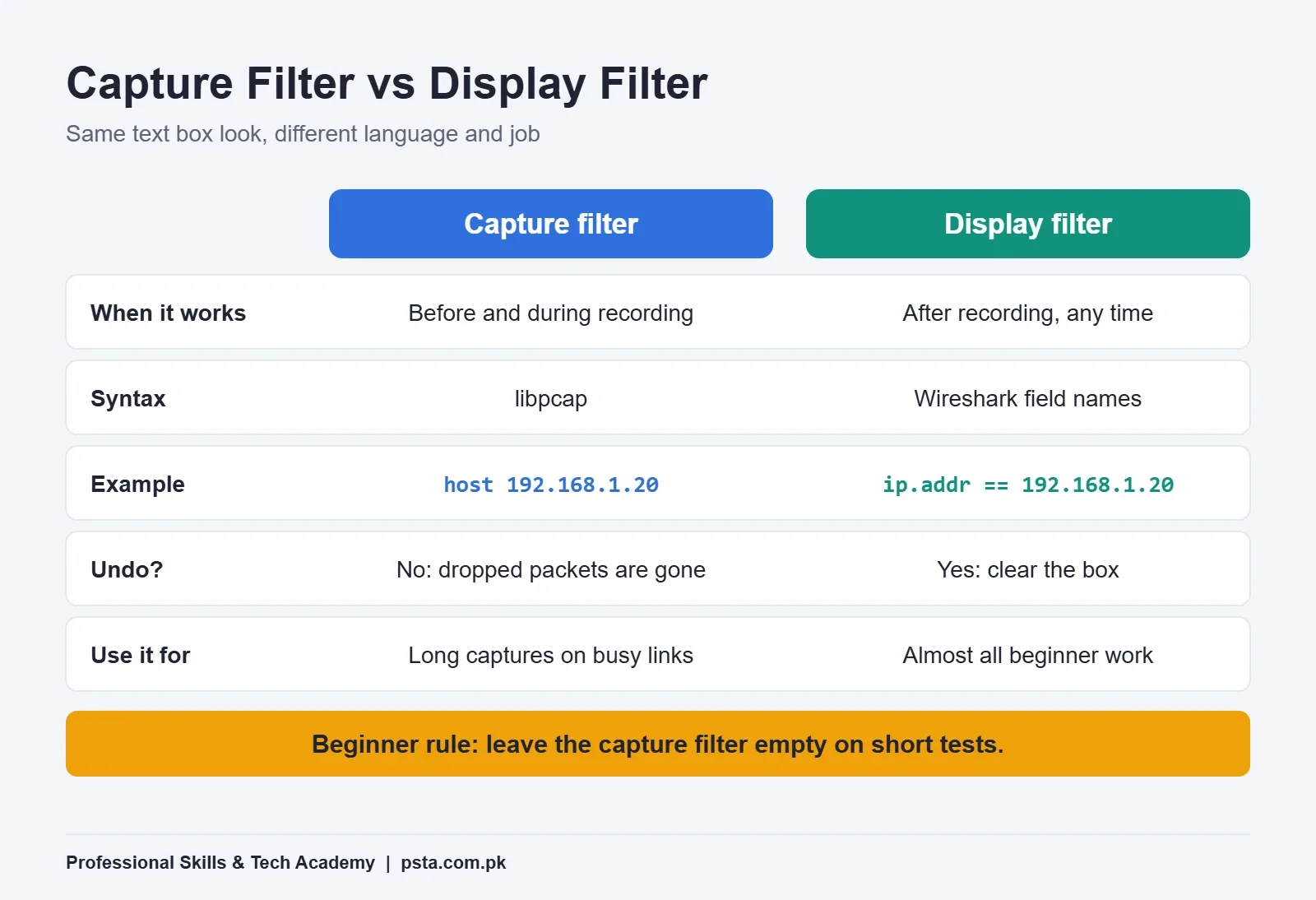
Before you press the blue fin button, close apps you don't need, such as cloud sync and streaming tabs. Fewer background conversations mean a cleaner capture. Then follow this order:
- Start the capture.
- Open the slow visa portal and wait until it fully loads. Repeat twice.
- Stop the capture after about two minutes.
- Save it with File > Save As using a clear name, such as reception-pc-visa-portal.pcapng.
Even two minutes on a quiet PC can produce thousands of packets. That's normal. The next step is to cut them down.
Capture Filters or Display Filters: Which Should You Use?
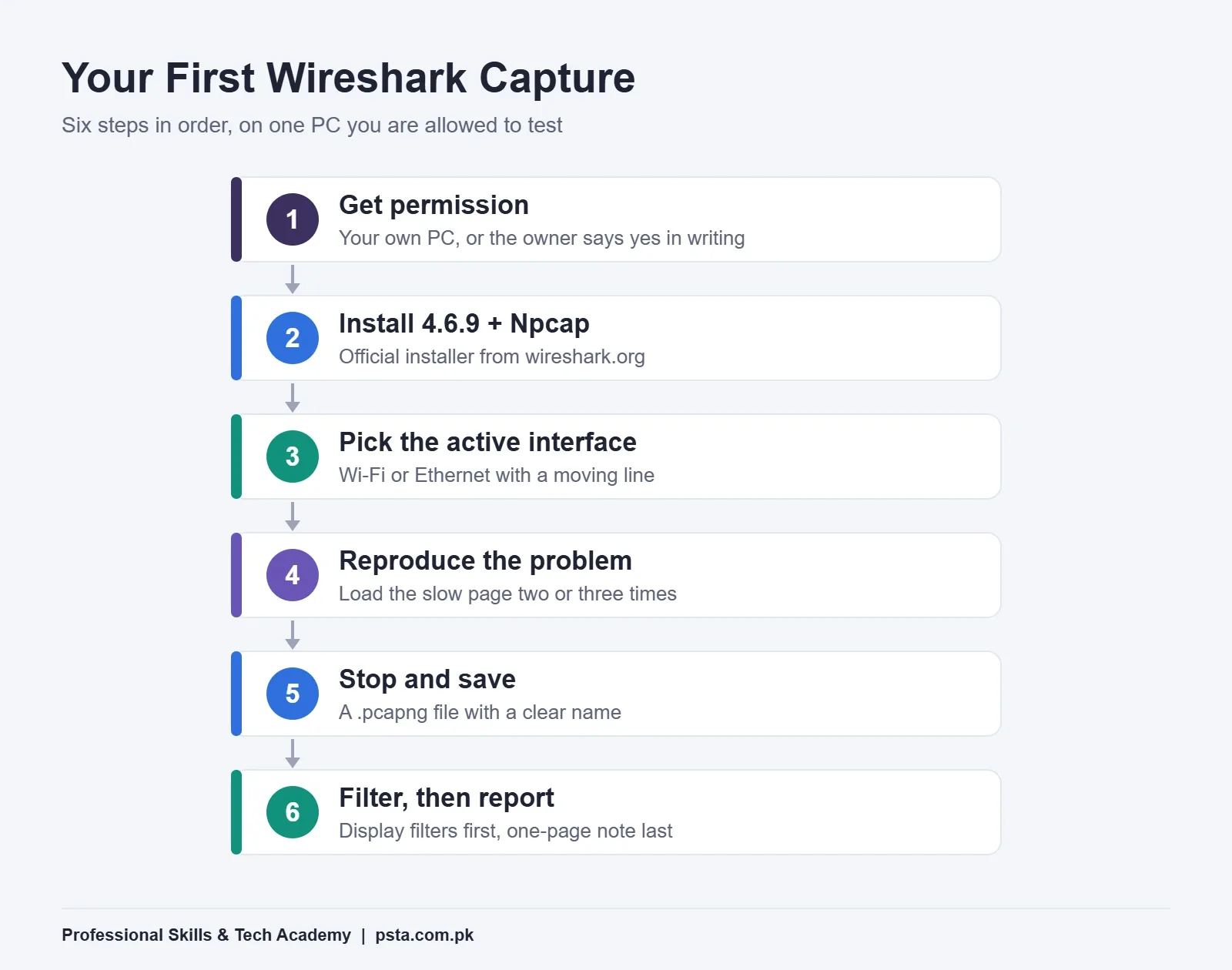
Wireshark has two kinds of filters, and beginners often mix them up because both go into a text box. They use different languages and do different jobs, and this is the single most important idea in Wireshark for beginners.
A Wireshark capture filter decides what gets recorded at all. It uses the libpcap syntax, and the official capture filter section gives examples such as tcp port 23 and host 10.0.0.5. Anything the filter excludes is gone for good, so a wrong guess means capturing again.
A display filter hides packets from view but keeps them in the file. It uses Wireshark's own field names, such as ip.addr==192.168.0.1 or tcp.port in {80, 443, 8080}, as shown in the guide to building display filter expressions. You can change it as often as you like.
| Question | Capture filter | Display filter |
|---|---|---|
| When does it apply? | Before and during recording | After recording, any time |
| Syntax style | libpcap, e.g. host 192.168.1.20 |
Field names, e.g. ip.addr == 192.168.1.20 |
| Can you undo it? | No, excluded packets are never saved | Yes, clear the box to see everything |
| Best for | Long captures on a busy link | Investigating a saved file |
| Beginner advice | Leave empty on short tests | Use it for almost all your work |
For the travel agency, leave the capture filter empty. A two-minute capture is small, and you don't yet know what the cause is.
Wireshark for Beginners: 10 Display Filters That Answer Real Questions
Type one of these Wireshark display filters into the filter bar above the packet list and press Enter. The bar turns green when the syntax is valid and red when it isn't. Every field below is listed in Wireshark's official display filter reference for version 4.6.9, including the TCP field reference.
| # | Filter | The question it answers |
|---|---|---|
| 1 | dns |
Which names is this PC looking up? |
| 2 | dns.time > 0.5 |
Which lookups took longer than half a second? |
| 3 | dns.flags.rcode != 0 |
Which lookups came back with an error? |
| 4 | tls.handshake.extensions_server_name contains "visa" |
When did the browser start a secure connection to the portal? |
| 5 | tcp.analysis.flags |
Which packets did Wireshark mark as possible problems? |
| 6 | tcp.analysis.retransmission |
Which data had to be sent again? |
| 7 | tcp.analysis.duplicate_ack |
Where is the receiver repeating "I'm still waiting"? |
| 8 | tcp.flags.reset == 1 |
Which connections were cut off abruptly? |
| 9 | tcp.analysis.zero_window |
Is a device too busy to accept more data? |
| 10 | tcp.stream eq 7 |
Show one single conversation from start to end. |
Combining Filters
Join conditions with and, or and not. For example, dns and ip.addr == 192.168.1.1 shows only lookups sent to or from the router. Right-clicking any field in the middle pane and choosing Apply as Filter writes the filter for you, which is the fastest way to learn field names.
The Exclusion Mistake
To hide one address, write !(ip.addr == 10.43.54.65). The Wireshark wiki on display filters explains that ip.addr matches either the source or destination, and that before version 3.6, ip.addr != 10.43.54.65 let almost everything through. Newer versions changed this behavior, but the bracketed form is clear in any version and easier for a colleague to read.
Reading the Evidence: What Each Symptom Usually Means
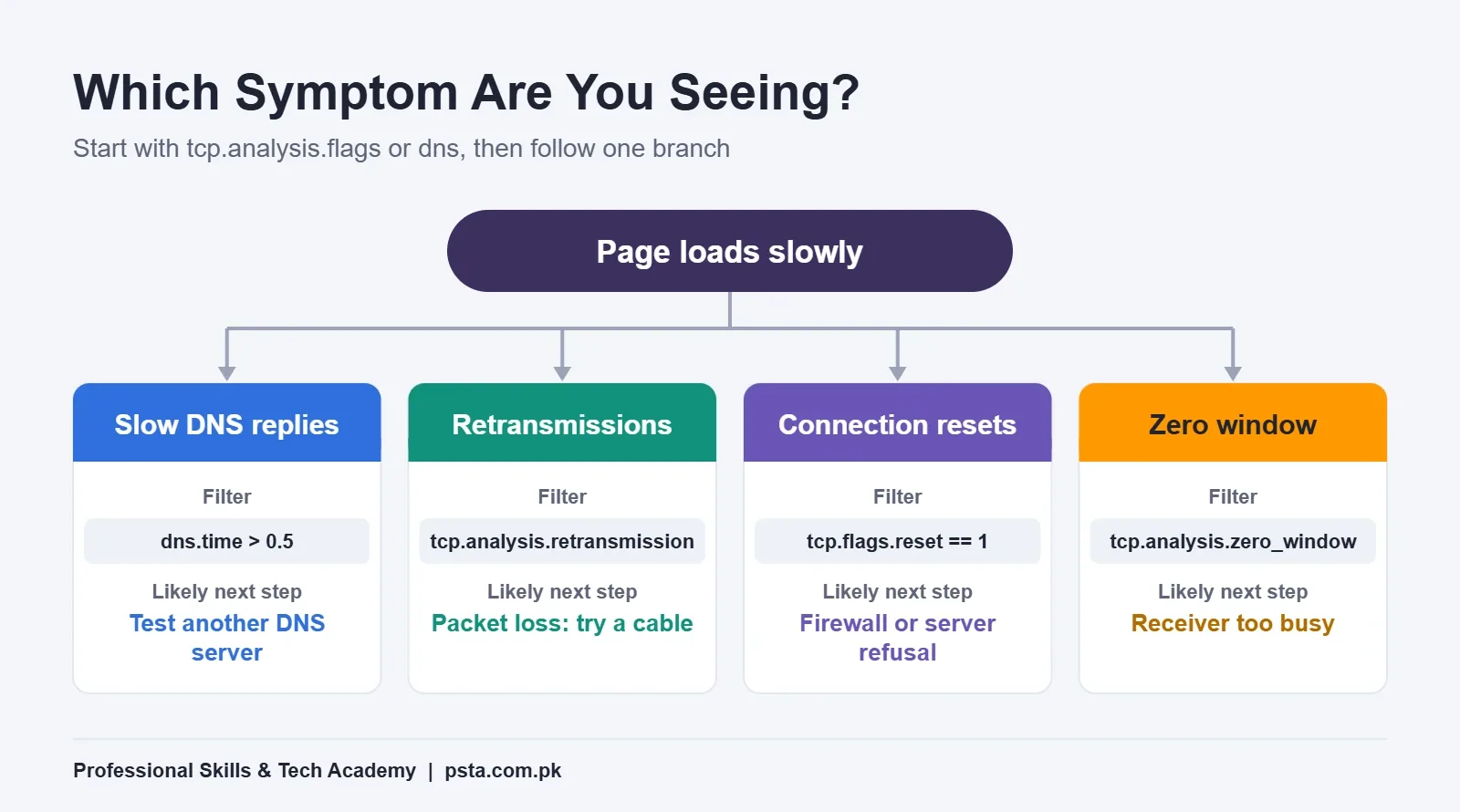
Filters give you packets; you still need to interpret them. This is the step most Wireshark for beginners tutorials skip. Wireshark helps here: its TCP analysis runs by default, and the TCP Analysis chapter of the User's Guide describes how it flags retransmissions, duplicate ACKs and zero windows.
Slow or Failed DNS
Apply dns.time > 0.5. If many replies from the router take a second or more, the page is waiting before it even contacts the website. In our example, suppose most slow replies come from the router's built-in DNS relay. A reasonable next test is to set a different DNS server on the reception PC and capture again to compare.
Retransmissions and Duplicate ACKs
A few retransmissions in two minutes are normal. Long runs of them, especially paired with duplicate ACKs, point to packet loss somewhere on the path: weak Wi-Fi, a damaged cable, a crowded link or a problem at the provider. Test the same page on a cable connection to narrow it down.
Resets and Zero Windows
Resets right after a connection opens often mean a firewall, antivirus or the server itself refused it. A zero window means the receiving side asked the sender to pause. The guide notes that this can be normal for some devices, such as a printer working through a job, but often points to a busy or underpowered receiver.
What Can't Wireshark See?
Knowing the limits saves you from wrong conclusions, which is a part of Wireshark for beginners that many people learn the hard way.
- Encrypted content. Most websites use HTTPS, so you will see the server name and timing, but not the page content, passwords or form data. That is by design.
- Other people's traffic on a switch. A normal switch sends each PC only its own traffic. Capturing on the reception PC tells you about the reception PC, not the whole office.
- The cause outside your network. If delays begin after packets leave the router, Wireshark shows the symptom, and the provider still has to find the fault.
- Your intent. The tool can't tell testing from snooping. The permission note is your protection.
When you need to know which devices and open ports exist on a network you are allowed to test, a scanner is the better tool. Our Nmap commands guide covers that side.
How Do You Turn a Capture Into a Report the Owner Understands?
The owner doesn't want packet numbers. They want a cause, a fix and proof. Keep the report to one page:
- Complaint: one sentence in the owner's words.
- What you tested: which PC, what time, how long, with written permission.
- What you found: one or two facts, each with the filter you used and a screenshot.
- Likely cause: in plain words, with honest uncertainty.
- Next step: the change you recommend and how you will check it worked.
In our example, the finding might read: "DNS replies from the router took over one second for most portal lookups during the test. After setting a different DNS server, the same portal loaded without the pause." Then delete the capture file, or hand it over and let the owner decide.
This kind of short, evidence-based write-up is what entry-level IT support and SOC roles expect. If you are planning that path, our cyber security certifications guide explains which exams build on these skills.
Where Packet Analysis Fits in PSTA's Cyber Security Course
Wireshark for beginners makes most sense once you understand what normal traffic looks like, and that is where structured practice helps. PSTA's Cyber Security & Ethical Hacking Course is a 12-week, beginner-level program. According to the course page, the labs include setting up an isolated practice lab, mapping a test network, configuring firewalls, VPNs and intrusion detection, and investigating an incident with a documented timeline. A cyber law module covers the rules you must follow at work.
Classes run on campus at Mandian, Old College Road, opposite FIMS College, Abbottabad, and live online for students elsewhere in Pakistan; a hybrid mix is also possible. New batches start every month. Students who want to move into offensive testing afterwards can move on to PSTA's advanced penetration testing course.
To ask about the next batch timings, send a message on WhatsApp at +92 314 5424399, fill in the admission form, or browse all PSTA courses first.
Before You Close This Tab: Record Five Minutes of Your Own Browsing
Open Wireshark on your own laptop, start a capture on Wi-Fi, and visit three websites you use daily. Stop after five minutes. Then try filters 1, 2 and 5 from the table above. Note the slowest DNS lookup and any packet Wireshark flags in black. That small Wireshark for beginners exercise teaches more than an hour of reading, and it uses nobody's traffic but yours.
Frequently asked questions
Is Wireshark free to use?
Yes. Wireshark is free and open source, and you should download it only from wireshark.org. At the time of writing, the current stable release is 4.6.9, with installers for Windows on x64 and Arm64 PCs as well as macOS. Avoid third-party download sites, because repackaged installers can be outdated or bundle unwanted software.
Can Wireshark see passwords on HTTPS websites?
No, not in normal use. HTTPS encrypts the page content, so Wireshark shows the server name, IP addresses, ports and timing, but not the passwords, messages or form data inside. That is why it works well for performance troubleshooting while still respecting the privacy that encryption is designed to give users.
Is it legal to capture office or public Wi-Fi traffic in Pakistan?
Only with permission. PECA 2016 makes dishonest unauthorized access to an information system and unauthorized interception of non-public transmissions offenses, with prison terms and fines. Capture on your own devices and home network, or get written permission from the network owner before testing anything else. Never capture on cafe or hostel Wi-Fi.
Why does Wireshark show no interfaces on Windows?
Usually Npcap is missing or failed to install. Run the Wireshark installer again, keep the Install Npcap box ticked and restart Windows if asked. The silent installer skips Npcap, so use the normal installer. Without Npcap, Wireshark can still open saved capture files, but it cannot record live traffic.
What is the difference between a capture filter and a display filter?
A capture filter, written in libpcap syntax such as host 192.168.1.20, decides what is recorded, and anything it excludes is lost. A display filter, such as ip.addr == 192.168.1.20, only hides packets from view, so you can change or clear it at any time. Beginners should mostly use display filters.
Do I need Kali Linux to learn Wireshark?
No. Wireshark runs on Windows, macOS and Linux, so you can learn it on the laptop you already use. A Linux virtual machine becomes useful later, when you build a practice lab for security testing, but your first captures and filters work exactly the same on an ordinary Windows PC.
How long does it take to learn Wireshark basics?
The basics, such as choosing an interface, saving a capture and using ten common display filters, can be practiced in a few short sessions. Reading problems confidently takes longer, because you need to know what normal traffic looks like. Short, regular captures of your own browsing build that sense faster than long reading sessions.
Sources & references
- Download Wireshark wireshark.org
- Wireshark 4.6.9 and 4.4.19 Released wireshark.org
- Installing Wireshark under Windows (User's Guide) wireshark.org
- Filtering While Capturing (User's Guide) wireshark.org
- Building Display Filter Expressions (User's Guide) wireshark.org
- Display Filter Reference: TCP wireshark.org
- TCP Analysis (User's Guide) wireshark.org
- Council of Europe: Pakistan Cybercrime Legal Profile (PECA 2016) rm.coe.int
Last reviewed & updated on by Umar Qureshi. Written by the PSTA team in Abbottabad, Pakistan.

Umar Qureshi

Cyber Security & Ethical Hacking Course in Abbottabad - PSTA
Turn this guide into a career: hands-on training with real projects, online across Pakistan or on-campus in Abbottabad · 12 Weeks.
Comments
No comments yet — ask a question or share your experience.