Quick answer
To make a Facebook ads payment from Pakistan, use a Visa or Mastercard with international online payments switched on, choose PKR or USD when you create the ad account, and keep a cushion for deductions. Banks collect 236Y advance tax (0.5% for ATL filers, 1% otherwise) and may withhold provincial sales tax.
Key takeaways
- • Ask your bank to enable international online payments before you add the card to Ads Manager.
- • Pick PKR or USD when you create the ad account; changing currency later needs a new account.
- • Expect 236Y advance tax on each charge: 0.5% on the ATL and 1% off it for tax year 2027.
- • The State Bank caps card payments abroad at $30,000 a year per person, across all your cards.
- • When a payment fails, find the cause with your bank first, then pay the balance once.
Table of contents 16 sections
- How Does Facebook Ads Payment Work in Pakistan?
- Which Cards Work for Meta Ads From Pakistan?
- Debit Card, Credit Card or Virtual Card?
- PKR or USD: Which Ad Account Currency Should You Pick?
- How to Add a Payment Method in Ads Manager: 7 Steps
- What Will Your Bank Statement Show?
- Advance Income Tax Under Section 236Y
- Provincial Sales Tax on Advertising
- Bank Charges on Foreign-Currency Payments
- The $30,000 Card Limit and the Personal-Use Rule
- Why Did My Facebook Ads Payment Fail?
- How to Fix a Failed Payment Without Making It Worse
- Setting Up Billing for a Client's Ad Account
- A Worked Example: The First Month for a Small Shop
- Where PSTA's Meta Ads Course Covers This
- Run a Two-Day Test Before Your Real Campaign
Most Facebook ads payment problems in Pakistan trace back to three settings you can check in five minutes. So before you add a card, take this quick self-test. Score one point for every question you can answer with a firm yes.
- Has your bank switched on international e-commerce payments for the card you plan to use?
- Do you know whether your name is on FBR's Active Taxpayers List (ATL)?
- Have you decided whether your ad account will bill in Pakistani rupees or US dollars?
Three points means you're ready. One or two means at least one charge will probably surprise you or fail. This guide walks through each setting, the deductions that appear on your statement, and what to do when Meta can't charge you.
What this guide covers:
- How Meta bills an ad account and when your card is actually charged
- Which cards tend to work, and why the ad account currency matters
- The taxes and limits that apply to card payments made abroad from Pakistan
- A fault-finding path for declined or failed payments
- How agencies and freelancers should set up billing for clients
How Does Facebook Ads Payment Work in Pakistan?
Meta doesn't sell ads like a shop sells a product. You set a budget, your ads run, and Meta charges your saved payment method for the spend it has already delivered. That's why a card can look fine on the day you add it and still fail two weeks later, when the first real charge goes through.
Every Facebook ads payment happens in one of two ways. Either your spend reaches a billing threshold and Meta bills you straight away, or your monthly billing date arrives and Meta charges whatever has built up. New accounts often get small thresholds, so the first few charges come close together. Your exact threshold and billing dates appear under Billing in Ads Manager.
For a Pakistani advertiser, each of those charges is a cross-border card payment. Your bank treats it the same way it treats a payment to any foreign website. That one fact explains most of what follows: the bank's permission settings, the yearly limit, and the taxes on your statement.
Which Cards Work for Meta Ads From Pakistan?
In practice, a Visa or Mastercard debit or credit card issued by a Pakistani bank is the most common choice. What matters is not the brand of the card but whether it's allowed to make online payments to foreign merchants. Many banks ship cards with that switch turned off, and you have to turn it on in the mobile app or by calling the helpline.
Debit Card, Credit Card or Virtual Card?
Each option has a trade-off. A debit card spends your own balance, so a charge fails if the account runs low on the billing date. A credit card gives you room before you pay, but not every student or small shop qualifies for one. Virtual cards from digital banks and wallets are quick to issue, yet NayaPay's help center notes that the State Bank's yearly limit on card spending abroad covers all your cards, virtual cards included.
| Card type | Good for | Watch out for |
|---|---|---|
| Bank debit card | Small shops and first campaigns | Low balance on billing day; online payments abroad may be off by default |
| Bank credit card | Steady monthly spend | Approval needs income proof; interest if you miss the due date |
| Virtual card (digital bank or wallet) | Fast setup, separate card for ads | Counts toward the same yearly card limit; personal-use rules still apply |
A simple habit helps here. Keep one card only for ads, fund it each week, and you'll always know what Meta has charged.
PKR or USD: Which Ad Account Currency Should You Pick?
Meta's own Marketing API currency list includes the Pakistani rupee (PKR), and the page says it supports every currency ad accounts support. You choose the currency when you create the ad account, and it's worth getting right the first time. As TechJuice explained when rupee billing first arrived, a currency change later needs a fresh ad account, while your old campaign history stays behind in the original.
| Question | PKR ad account | USD ad account |
|---|---|---|
| Budgets shown in | Rupees | Dollars |
| Easy to match with your bank statement | Yes, figures are in the same currency | Harder, the rupee amount depends on the bank's rate |
| Typical user | Local shops, clinics, schools, Daraz and Shopify sellers | Agencies running ads for foreign clients |
| Changing it later | Needs a new ad account | Needs a new ad account |
Either way, your bank still sees a payment to a foreign company. Choosing PKR keeps your budgeting simple. It doesn't make the charge a domestic payment, so the taxes and limits below still apply.
How to Add a Payment Method in Ads Manager: 7 Steps
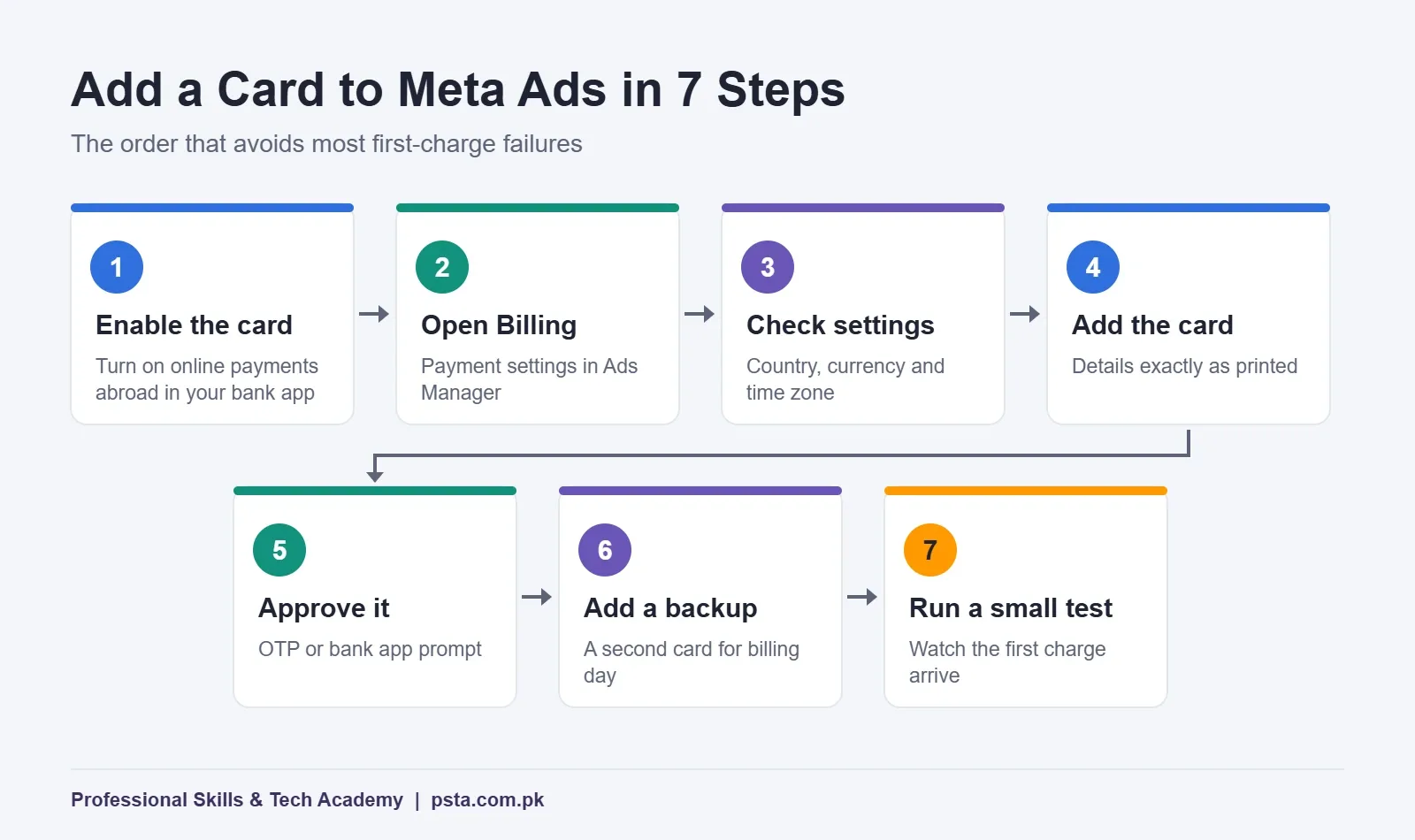
The menu names shift slightly between the desktop and the app, but the order stays the same. Do this on a laptop if you can, because the billing screens are easier to read there.
- Enable the card first. Open your bank's app and turn on international online or e-commerce payments for the card. Check the per-transaction and daily limits while you're there.
- Open Billing. In Ads Manager or Meta Business Suite, go to Billing and payments, then Payment settings, for the ad account you'll use.
- Confirm country, currency and time zone. These are set when the account is created, so check them before adding money or cards.
- Add the card. Enter the card number, expiry and security code exactly as printed. Use the billing address your bank has on file.
- Approve the check. Meta may place a small temporary authorization. Approve any OTP or app prompt from your bank within the time allowed.
- Add a backup method. A second card saves the campaign if the first one is declined on billing day.
- Run a small test. Launch a low-budget ad for a day or two and watch the first charge arrive on your statement before you scale up.
What Will Your Bank Statement Show?
This is where many first-time advertisers get confused. The amount on your bank statement is often higher than the spend shown in Ads Manager. The difference usually comes from three kinds of deductions, and none of them is Meta overcharging you.
Advance Income Tax Under Section 236Y
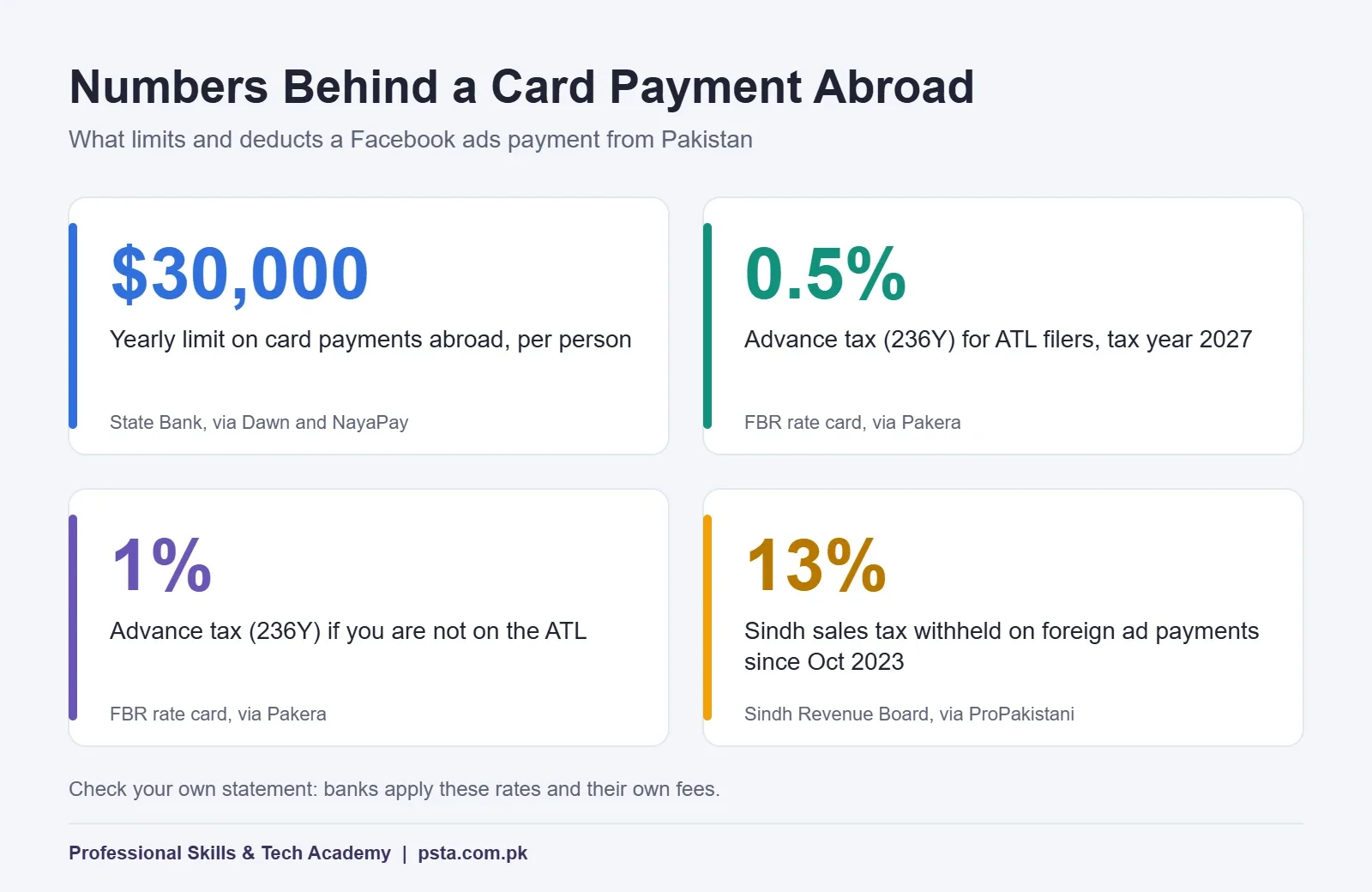
Pakistani banks collect advance income tax on card payments made to foreign merchants. According to a summary of FBR's withholding tax rate card for tax year 2027 published by Pakera, the rate under Section 236Y is now 0.5% for people on the Active Taxpayers List and 1% for those who aren't. Tax Buddy Umair's explainer links the drop from the earlier 5% and 10% rates to the Finance Act 2026. Both write-ups advise checking your own statement, because some banks were slow to update their pages.
Provincial Sales Tax on Advertising
Provinces can also require banks to withhold sales tax on payments for advertising services bought from platforms based outside Pakistan. ProPakistani reported that the Sindh Revenue Board set a 13% rate for this from October 1, 2023, with banks acting as the collecting agents. Rules and rates differ by province, so look for a separate sales tax line on your statement and ask your bank which authority it's paying.
Bank Charges on Foreign-Currency Payments
Your bank may add a fee for processing a payment abroad, plus federal or provincial tax on that fee. These charges vary by bank and card type. Ask for your bank's schedule of charges before you set a monthly budget.
| Line on your statement | What it is | Can you reduce it? |
|---|---|---|
| Advance tax (236Y) | Income tax collected on the foreign card payment | Yes, being on the ATL keeps you on the lower rate; filers can adjust it against their yearly tax |
| Sales tax on advertising | Provincial tax withheld by the bank | Registered businesses may be able to claim it; check with a tax adviser |
| Bank fee and tax on the fee | The bank's own charge for the cross-border payment | Compare banks; some charge less for online foreign payments |
The $30,000 Card Limit and the Personal-Use Rule
Dawn reported in November 2022 that the State Bank capped card-based international transactions at $30,000 a year per person, starting January 1, 2023. NayaPay's help center describes the same $30,000 limit today. It says the limit is counted across every card you hold in the banking system, and that card payments abroad pause until the limit resets on November 1 if you go over.
The same Dawn report adds an important detail. The State Bank expects cards to be used for personal needs, and business payments abroad fall under a separate framework in the Foreign Exchange Manual. For a home baker spending a few thousand rupees a month, this rarely matters. For an agency paying for many clients on one personal card, it can. Ask your bank about a business card or the right channel before your ad spend grows.
Why Did My Facebook Ads Payment Fail?
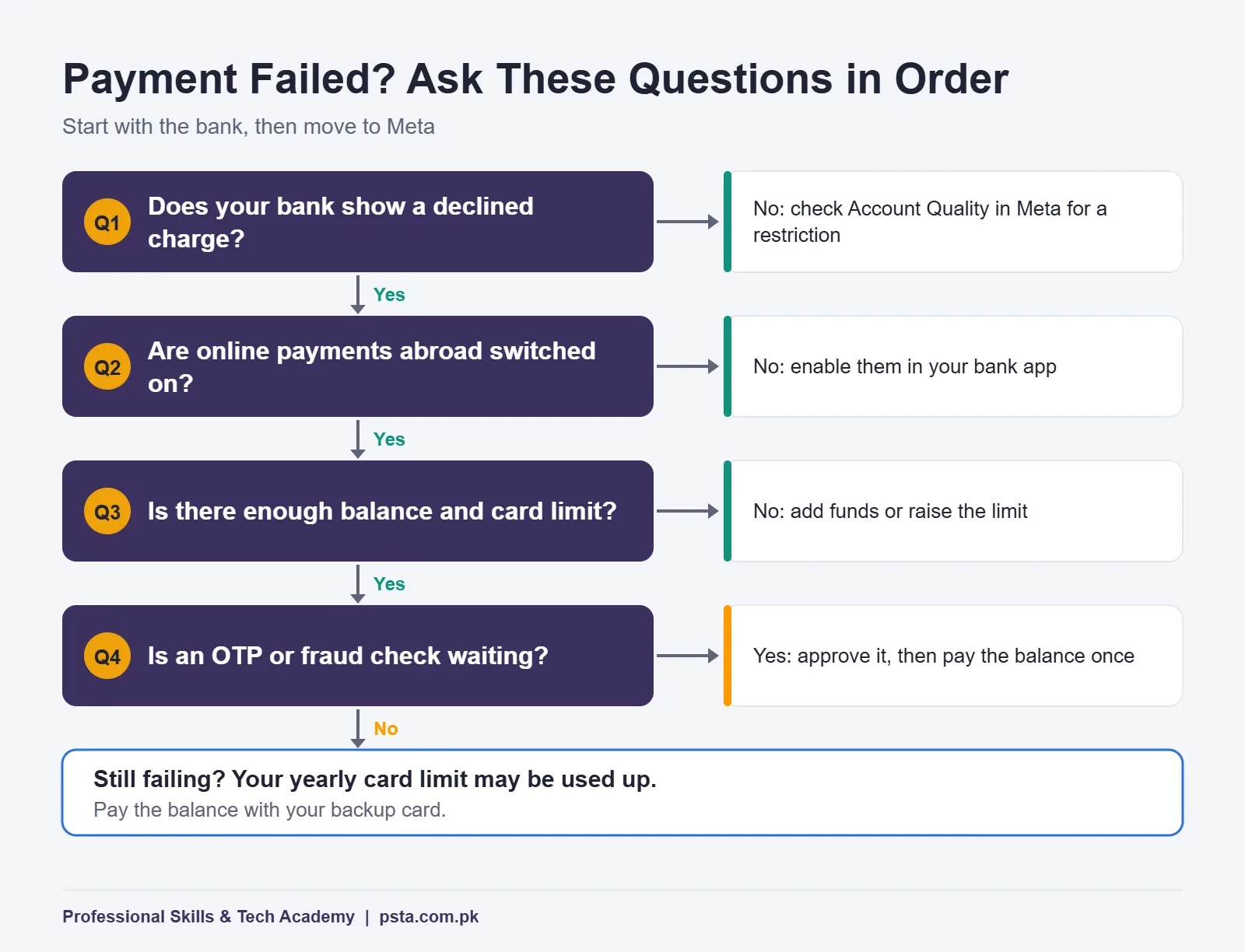
When a charge fails, Ads Manager shows a payment issue and your ads stop delivering until the balance is settled. Work through the causes in this order, because the first ones are the most common for Pakistani cards.
- Online payments abroad are switched off. The bank declines the charge before it even reaches your balance.
- Not enough balance or credit. A threshold charge landed on a day the account was low.
- A bank limit was hit. The per-transaction, daily or monthly limit on the card is lower than the charge.
- OTP or fraud check. The bank flagged the payment and is waiting for you to confirm it.
- Wrong card details. An expired card or a mistyped expiry date or security code.
- The yearly card limit is used up. Your card spending abroad has reached the State Bank cap.
- An account-level problem. If the bank sees no charge attempt at all, check Account Quality in Meta for a restriction.
How to Fix a Failed Payment Without Making It Worse
When a Facebook ads payment fails, students sometimes panic and keep clicking "Pay now" over and over. Repeated declines can make Meta treat the payment method as risky, so slow down and fix the cause first.
- Call your bank or open its app and ask why the charge was declined. Bank staff can see the reason code even when Meta can't.
- Fix the cause: enable online payments abroad, raise the limit, add balance, or approve the pending check.
- Go to Billing in Ads Manager and pay the outstanding balance once.
- If the card still fails, pay with your backup card and remove the failing one later.
- Wait for your ads to resume delivery before you change budgets or creatives.
If the payment works but your ads still don't run, the problem is probably not billing. Check ad review and account status before you blame the card.
Setting Up Billing for a Client's Ad Account
If you freelance or run a small agency in Abbottabad, Peshawar or Islamabad, try not to put client spending on your own card. Each Facebook ads payment should come from the business that owns the ads. That way the receipts, taxes and limits stay with the business that benefits from the ads.
- Ask the client to create the ad account in their own Business portfolio and add their own card.
- Request partner access to that ad account, so you can build campaigns without touching billing.
- Agree the monthly spend cap in writing and set it as an account spending limit.
- Send a short billing report each month that matches Meta's receipts with the client's bank statement.
This setup also protects you. If a client stops paying, their ad account pauses, not yours.
A Worked Example: The First Month for a Small Shop
Here's a realistic example, not a real client. A clothing shop in Abbottabad opens a PKR ad account and plans Rs. 15,000 of spend in its first month, using a debit card kept only for ads. The owner is on the Active Taxpayers List.
| Item | How to estimate it | Example amount |
|---|---|---|
| Ad spend shown in Ads Manager | Your planned budget | Rs. 15,000 |
| Advance tax at 0.5% (ATL) | Spend × 0.005 | Rs. 75 |
| Advance tax at 1% (non-ATL) | Spend × 0.01 | Rs. 150 |
| Provincial sales tax and bank fees | Check your bank's schedule | Varies |
The lesson isn't the exact figure. A Facebook ads payment almost always costs a little more than the spend in Ads Manager, so keep a small cushion on the card above your ad budget. That way, taxes and fees never cause a decline on billing day.
Where PSTA's Meta Ads Course Covers This
A campaign that can't be paid for can't run, so ad account setup comes early in the course. PSTA's Social Media Marketing & Meta Ads course is a beginner-level program spread over 12 weeks, and you don't need earlier ad experience to join. It covers Business Manager and ad account setup, the Meta auction, Pixel and Conversions API tracking, custom and lookalike audiences, short-form video for Reels and TikTok, and packaging your skills for freelance clients. The course page currently lists the fee at Rs. 24,000, down from Rs. 30,000.
Classes run in person at the Abbottabad campus and live online for students in other cities, and you can combine the two. If you'd also like SEO, Google Ads and email marketing, compare it with the Advanced Digital Marketing course. Sellers who plan to run ads for their own store may prefer the E-Commerce course. You'll find every program on the courses page.
Already running ads? These guides go deeper: choosing between Boost Post and Ads Manager, a walkthrough of Click to WhatsApp ads for Pakistani shops, and the Meta ads mistakes beginners make most often.
Run a Two-Day Test Before Your Real Campaign
Pick the card you'll use, turn on online payments abroad, and launch one small ad for two days. When the first charge appears, compare it line by line with your Ads Manager receipt. Once your first Facebook ads payment matches and you understand every deduction, scale the budget with confidence. If you'd like help setting this up in class, you can apply for admission or ask your questions on WhatsApp (+92 314 5424399) before you decide. Our campus is on Old College Road, Mandian, opposite FIMS College.
Frequently asked questions
Can I pay for Facebook ads with a Pakistani debit card?
Yes, in most cases. A Visa or Mastercard debit card from a Pakistani bank works once the bank has enabled international online or e-commerce payments on it. Many cards ship with that setting off, so turn it on in your banking app or through the helpline first. Keep enough balance for your billing threshold, plus a little extra for tax and bank charges.
Why does my bank statement show more than Ads Manager?
Ads Manager shows only your ad spend. Your bank adds deductions on top, such as advance income tax under Section 236Y, possible provincial sales tax on advertising, and its own fee for a payment abroad. Each appears as a separate line, so compare the statement with Meta's receipt to see exactly what was added and why.
What is the 236Y tax rate on Meta ads payments?
According to a summary of FBR's rate card for tax year 2027, the advance tax on card payments abroad under Section 236Y is 0.5% if you are on the Active Taxpayers List and 1% if you are not. Earlier rates were 5% and 10%. Check your own bank statement, since banks apply the deduction.
Should my ad account be in PKR or USD?
For a business selling in Pakistan, PKR usually makes budgeting easier because Ads Manager and your bank statement use the same currency. USD can suit agencies working for foreign clients. Decide carefully when you create the account, because changing the currency later means opening a new ad account.
What happens to my ads if a payment fails?
Your ads stop delivering until the outstanding balance is paid. Find the reason with your bank first, fix it, and then pay the balance once from Billing in Ads Manager. Avoid retrying the same failing card many times, because repeated declines can lead Meta to treat the payment method as risky.
Is there a limit on how much I can spend on Meta ads with a card?
Your bank sets daily and per-transaction limits on each card. On top of that, the State Bank caps card-based payments abroad at $30,000 a year per person, counted across all your cards. Most small shops never reach it, but agencies paying for many clients on one card can.
Can I run ads for clients using my own card?
You can, but it is better for each client to add their own card to an ad account in their own Business portfolio and give you partner access. That keeps receipts, taxes and the yearly card limit with the business that owns the ads, and your account isn't affected if a client stops paying.
Sources & references
- Meta Marketing API: Currency Codes developers.facebook.com
- Dawn: SBP Cuts Limits on Travelling Cash dawn.com
- NayaPay Help: Annual Card-Based International Transactions Limit help.nayapay.com
- Pakera: Tax on Card Payments Abroad Is Now 0.5% pakera.pk
- Tax Buddy Umair: Section 236Y Advance Tax on International Card Payments taxbuddyumair.com
- ProPakistani: Sindh Revenue Board Orders Banks to Charge 13% Tax on Ad Payments propakistani.pk
- TechJuice: Pay in Pakistani Rupees for Facebook Ad Campaigns techjuice.pk
Last reviewed & updated on by Umar Qureshi. Written by the PSTA team in Abbottabad, Pakistan.

Umar Qureshi

Social Media Marketing (SMM) & Meta Ads Course
Turn this guide into a career: hands-on training with real projects, online across Pakistan or on-campus in Abbottabad · 12 Weeks.
Comments
No comments yet — ask a question or share your experience.