Quick answer
Most Meta ads mistakes come from setup. Use Ads Manager instead of Boost for sales, match the objective to your goal, test the Pixel and Conversions API first, avoid big edits during the learning phase, consolidate small budgets, prepare your landing page or WhatsApp replies, and judge ads by cost per result.
Key takeaways
- • Use Boost for visibility and Ads Manager for sales, leads or measured WhatsApp chats.
- • A Traffic objective finds clickers, not buyers, so match the objective to the result you want.
- • Test the Meta Pixel and Conversions API with a small order before any Sales campaign.
- • Significant edits, including budget jumps of roughly 20% or more, restart the learning phase.
- • Compare click-through rate with conversion rate to decide which mistake to fix first.
Table of contents 14 sections
- Why Do Meta Ads Mistakes Cost Pakistani Businesses So Much?
- Mistake 1: Pressing Boost When You Need Ads Manager
- Mistake 2: Choosing an Objective That Doesn't Match Your Goal
- Mistake 3: Running Ads Before Tracking Works
- A Quick Tracking Test
- Mistake 4: Editing Every Morning and Restarting the Learning Phase
- Which Edits Reset Learning?
- Mistake 5: Splitting a Small Budget Into Too Many Ad Sets
- Mistake 6: Sending Clicks Somewhere That Can't Convert
- Mistake 7: Using One Square Image for Every Placement
- Mistake 8: Judging Ads by Likes and Cheap Clicks
- Which Meta Ads Mistakes Should You Fix First?
- Learn Meta Ads With PSTA
- Your Next Step: Audit One Live Campaign
Most Meta ads mistakes come from setup, not from a small budget. Facebook had 52.9 million users in Pakistan in late 2025, according to DataReportal's Digital 2026: Pakistan report, so the audience is rarely the problem. The money usually leaks through a wrong objective, missing tracking or too many edits in the first week.
This guide covers eight Meta ads mistakes that most often waste a beginner's budget, with a fix for each. In the next 15 minutes, you will learn:
- Why the Boost button and Ads Manager suit different goals
- How to match a campaign objective to the result you actually want
- What the learning phase is and which edits restart it
- How to read a weak campaign and decide which fix comes first
- A four-question audit you can run on any live campaign today
Why Do Meta Ads Mistakes Cost Pakistani Businesses So Much?
Meta's ad system learns from the signals you give it. If you tell it to find clicks, it finds people who click. If you tell it nothing about sales, it can't find buyers. A small setup error doesn't just waste one day of budget. It trains the system in the wrong direction for every day after.
The audience keeps growing, too. DataReportal reports that Facebook's potential ad reach in Pakistan rose by 7.10 million, or 15.5%, between October 2024 and October 2025. Instagram had 22.4 million users in the country in late 2025. More users means more competition from other advertisers, and a careless campaign loses those auctions quickly.
Take a typical example. A clothing seller in Peshawar spends Rs. 5,000 on a boosted post, gets hundreds of likes and two WhatsApp messages, then decides "Facebook ads don't work." The platform worked fine. It delivered exactly what the setup asked for.
Mistake 1: Pressing Boost When You Need Ads Manager
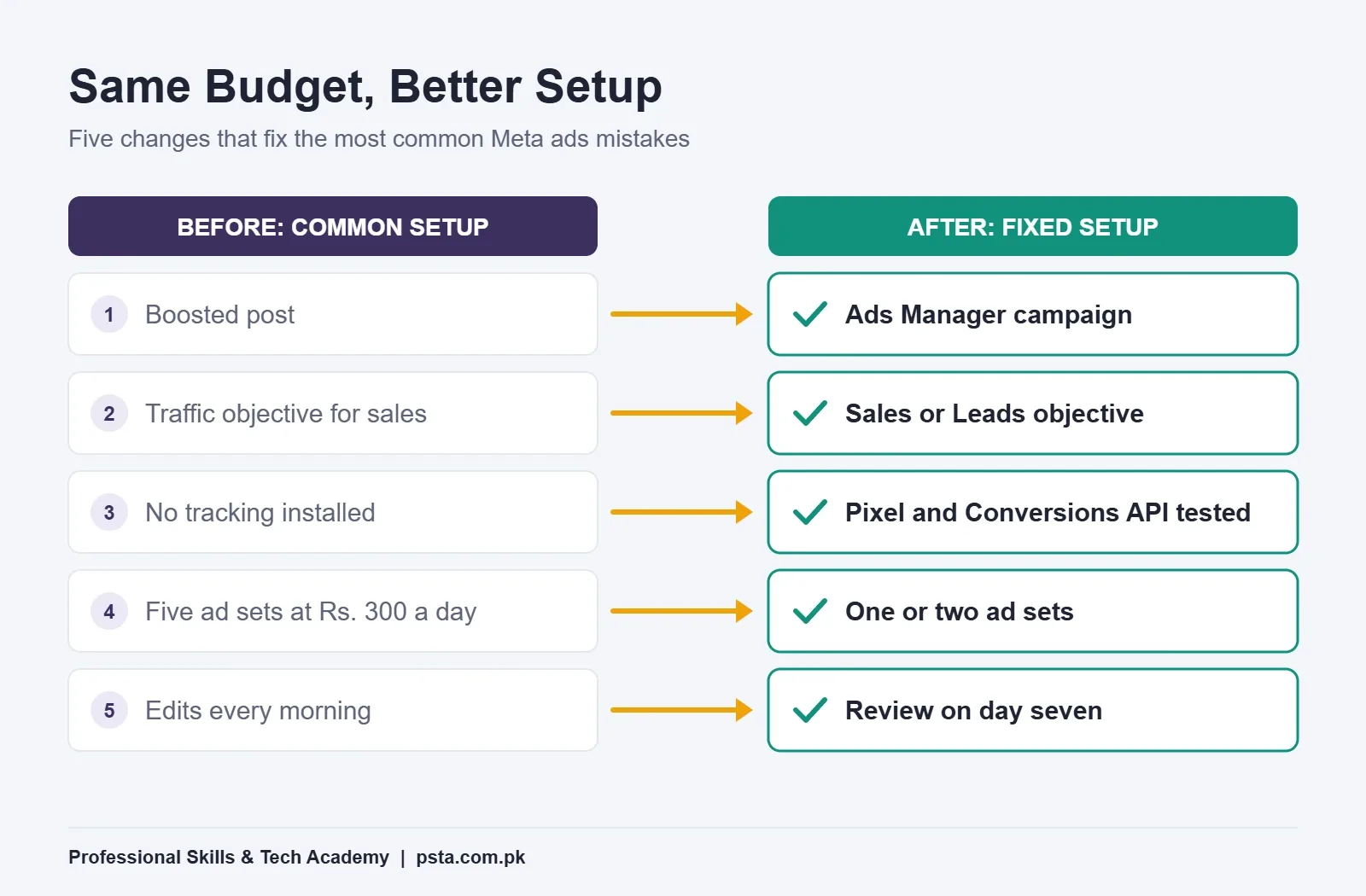
The blue Boost button on a Page post is quick. You pick an audience, a budget and a duration, and the post starts running. For a simple goal such as more people seeing an event announcement, that's often enough.
The trouble starts when you want sales or qualified leads. Ads Manager gives you the full set of campaign objectives, separate ad sets for testing, detailed placement control and conversion reporting. A boosted post gives you a shortened version of those choices.
Use this simple rule:
- Boost when the goal is visibility for a post that already performs well organically.
- Ads Manager when the goal is a purchase, a lead form, a booked call or a WhatsApp conversation you plan to measure.
If you've only ever boosted posts, open Ads Manager once just to look around before you spend anything. Seeing the three levels (campaign, ad set and ad) makes the rest of this guide much easier to follow.
Mistake 2: Choosing an Objective That Doesn't Match Your Goal
Meta Ads Manager now groups its objectives into six options. Each one tells the delivery system which kind of person to look for. Pick the wrong one and your cheap results won't turn into customers.
| Objective | What Meta looks for | Good fit for |
|---|---|---|
| Awareness | People likely to see and remember the ad | A new brand or shop opening |
| Traffic | People likely to click a link or load a page | Blog posts, building a retargeting pool |
| Engagement | Likes, comments, video views, messages | Social proof, WhatsApp or Messenger chats |
| Leads | People likely to fill a form or call | Admissions, property, clinics, services |
| App promotion | Installs and in-app actions | Businesses with their own app |
| Sales | Purchases and other tracked conversions | Online stores with working tracking |
A 2026 guide from Influee on Meta campaign objectives describes the classic trap well. A Traffic campaign can show a strong click-through rate and a low cost per click while purchases stay close to zero. The system found clickers because that's what it was asked to find.
For a shop that sells through chat, which is common in Pakistan, look at the message-based options inside Engagement or Sales. For a store with a checkout, use Sales, but only after Mistake 3 is fixed.
Mistake 3: Running Ads Before Tracking Works
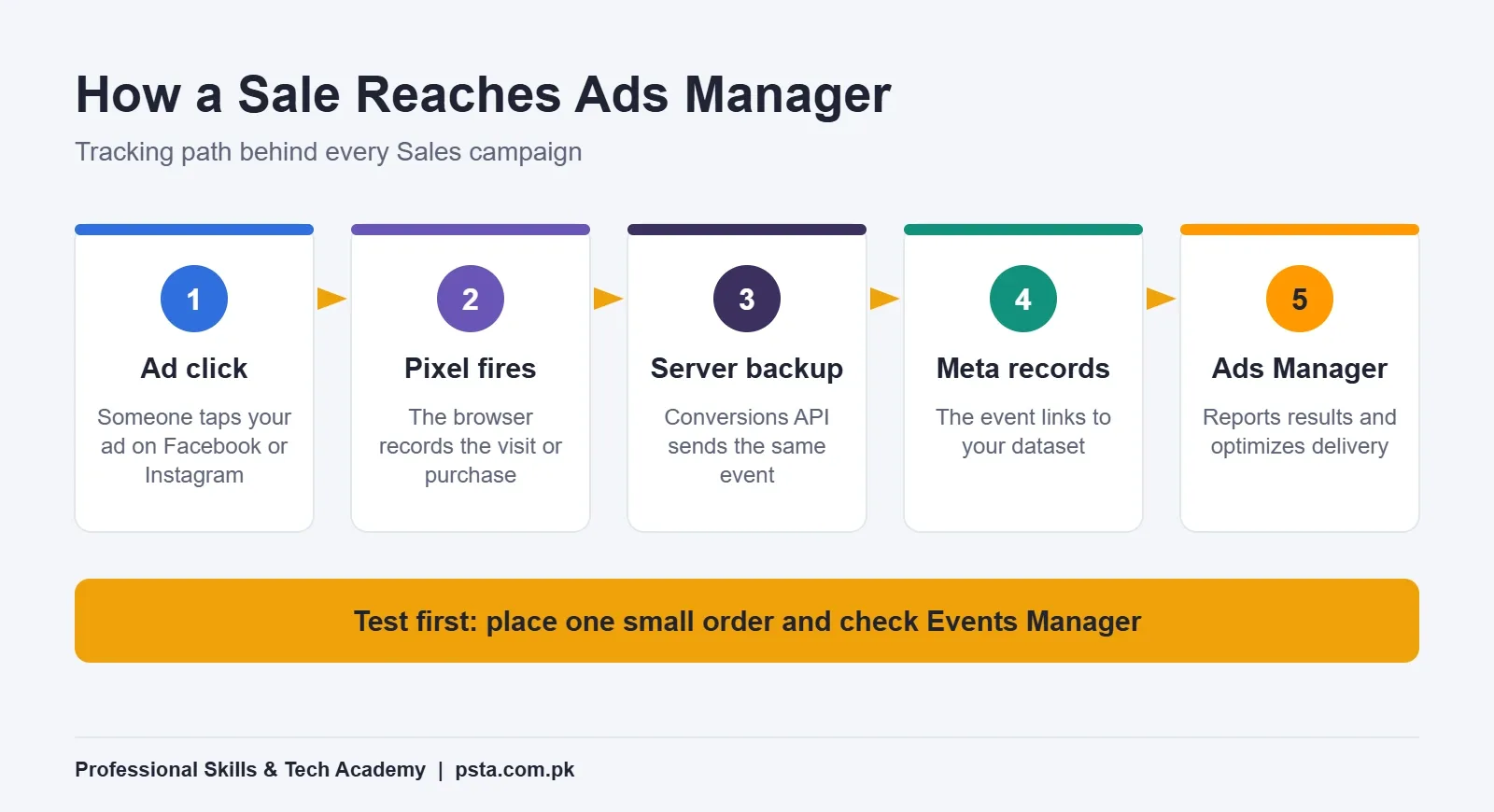
A Sales campaign without tracking is like asking a delivery rider to find a house with no address. Meta's own Meta Pixel documentation describes the pixel as a JavaScript snippet that records visitor activity on your website. Those recorded conversions then appear in Ads Manager and can be used to build custom audiences.
A browser-only setup can miss some events, for example when a visitor's browser blocks scripts. That's why Meta also offers the Conversions API, which sends events from your server, website platform or CRM. Meta says server events are processed like pixel events, so they also count toward measurement and optimization.
A Quick Tracking Test
- Install the pixel on every page, or connect it through your Shopify or WordPress plugin.
- Choose the standard events you need, such as ViewContent, AddToCart and Purchase.
- Place a small test order yourself and open Events Manager.
- Check that the Purchase event arrived with the correct value and currency.
- If your platform supports it, switch on the Conversions API connection and test again.
Only start a Sales campaign once the test purchase shows up correctly. Fixing tracking after a week of spend means that week's data was mostly wasted, which makes this one of the costliest Meta ads mistakes.
Mistake 4: Editing Every Morning and Restarting the Learning Phase
New ad sets go through a learning phase while delivery settles. A 2026 explainer from Jetfuel on the Meta ads learning phase puts the exit point at about 50 optimization events within a rolling seven-day window. Meta ads specialist Jon Loomer reported briefly seeing a lower threshold in his own account, then seeing it return to 50 events in seven days.
Many beginners open Ads Manager each morning, see yesterday's numbers and change something. Each significant edit sends the ad set back to the start of learning.
Which Edits Reset Learning?
- Changing the audience or targeting
- Swapping or adding creative
- Changing the optimization event or bid strategy
- Raising or cutting the budget by roughly 20% or more at once
- Pausing for a long time and then turning the ad set back on
Renaming an ad set doesn't reset anything. If you must scale, Jetfuel's advice is to make small, gradual budget changes rather than big jumps. Set a calendar reminder to review on day seven, not day two.
Mistake 5: Splitting a Small Budget Into Too Many Ad Sets
Here's a common beginner setup: Rs. 1,500 a day spread across five ad sets, each with a different interest. Every ad set gets Rs. 300. None of them collects enough conversions to leave learning, and Ads Manager labels them "Learning limited."
Jetfuel lists the usual causes of that status as a low budget, a narrow audience, too many ad sets sharing the same conversions and a rare optimization event. It also notes the label is not a penalty. It simply means the ad set can't reach about 50 events in seven days.
This is one of the easier Meta ads mistakes to fix, and the fix is usually consolidation:
- Combine similar ad sets into one or two.
- Widen the audience, or let Meta's broader targeting do more of the work.
- If purchases are rare, optimize for an earlier step such as AddToCart until volume builds.
Mistake 6: Sending Clicks Somewhere That Can't Convert
An ad can only be as good as the place it sends people. Three weak destinations show up again and again:
- A Facebook Page with no prices, sizes or delivery details
- A website product page that takes too long to load on mobile data
- A WhatsApp number nobody answers for six hours
Chat-based selling is popular here for good reason. WhatsApp Business describes ads that click to WhatsApp as Facebook and Instagram ads that open a chat with your business, and they can run in Feed, Stories and Marketplace. That works only if someone is ready to reply.
Before you spend, prepare a WhatsApp Business greeting, quick replies for price and delivery questions, and a catalog. Decide who answers messages during ad hours. A fast, clear reply often matters more than a clever ad, and slow replies are among the most expensive Meta ads mistakes for chat-based sellers.
Mistake 7: Using One Square Image for Every Placement
Many first campaigns run one square product photo with a long paragraph of text. On a phone, that image looks small in Reels and Stories, and the text gets cut off after the first line or two.
Give Meta a few options instead:
- A vertical 9:16 version for Reels and Stories
- A square version for Feed
- At least two or three different hooks, such as a price-led ad, a problem-led ad and a short demo video
Put the key message in the first line of text and the first three seconds of video. Our graphic designing course covers layout for these sizes if design is your weak spot.
Mistake 8: Judging Ads by Likes and Cheap Clicks
Many Meta ads mistakes begin with the wrong scorecard. Likes feel good. Low cost per click looks good in a screenshot. Neither one pays your supplier.
Pick one number that matches your goal and judge the campaign by it. For an online store, that's cost per purchase and return on ad spend. For a service business, it's cost per qualified lead, which means a lead that actually picks up the phone. For a chat-based seller, track cost per conversation and how many of those chats became orders.
Keep a simple sheet with spend, results, cost per result and sales closed each week. After a month, you'll know which ads earn money and which only earn attention.
Which Meta Ads Mistakes Should You Fix First?
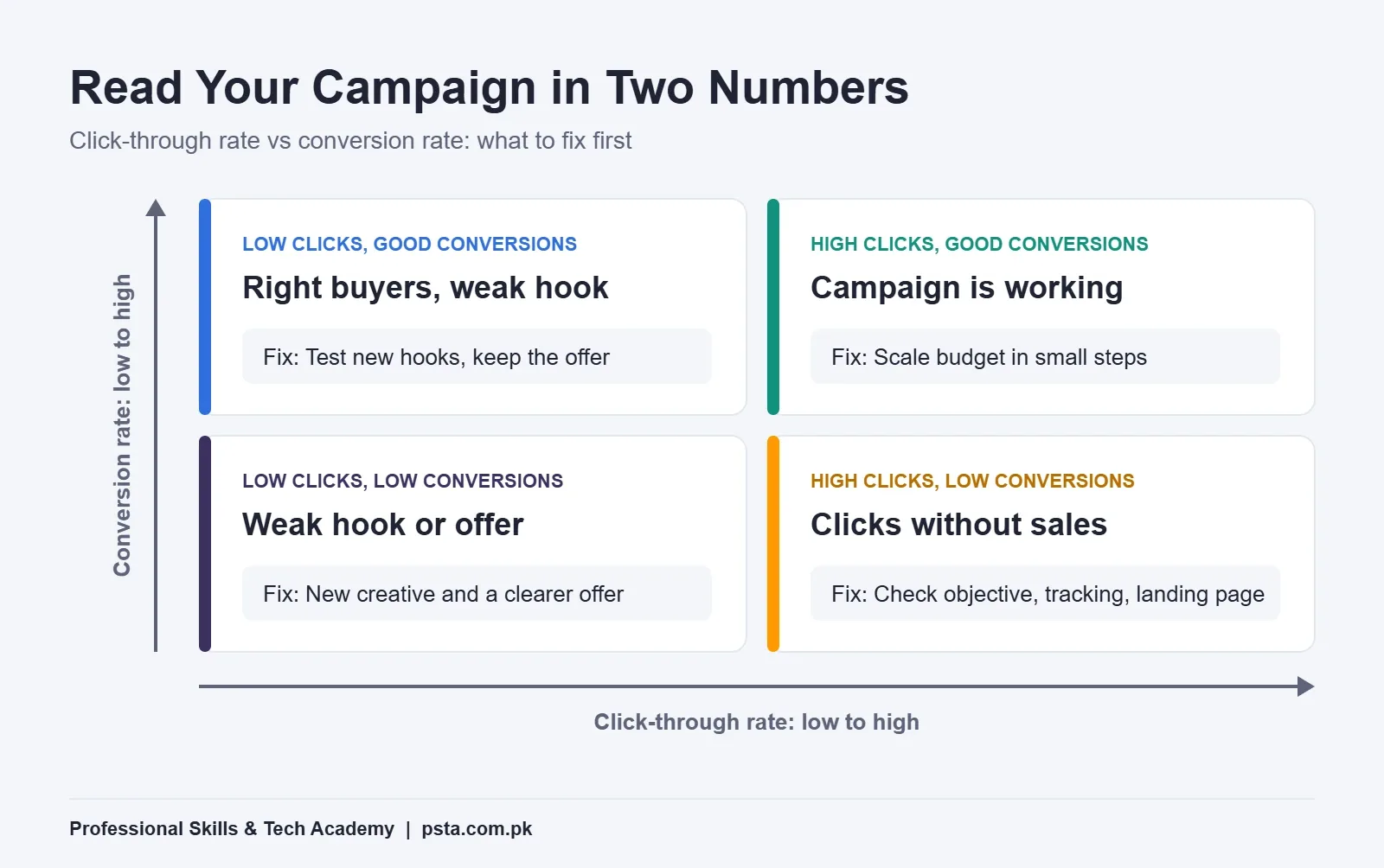
When a campaign is weak, you need to know which Meta ads mistakes sit behind it. Compare two numbers: click-through rate (how many people click) and conversion rate (how many of those clickers buy or enquire). Together they point you to the right fix.
| What you see | Likely cause | Fix first |
|---|---|---|
| Low clicks, low conversions | Weak hook or offer | New creative and a clearer offer |
| High clicks, low conversions | Wrong objective, weak landing spot or broken tracking | Mistakes 2, 3 and 6 |
| Low clicks, good conversions | Right buyers, but the ad stops too few people | Test new hooks, keep the offer |
| High clicks, good conversions | Campaign is working | Scale budget in small steps |
Run this check before you touch anything else. It stops you from redesigning ads when the real problem is a slow page, and from rebuilding the page when the real problem is a dull ad.
Learn Meta Ads With PSTA
If you'd like to practice all of this with an instructor who can spot Meta ads mistakes in your setup, the PSTA Social Media Marketing and Meta Ads course runs for 12 weeks and starts at beginner level. Classes run online for students across Pakistan, and in person at the Abbottabad campus. The current fee listed on the course page is Rs. 24,000.
The modules that match this guide include:
- Meta Ads Manager objectives, ad sets, bid strategies and audience overlap
- Meta Pixel and Conversions API setup and troubleshooting, with standard and custom events
- Custom audiences, lookalikes and retargeting
- WhatsApp Business catalogs and automated replies
- GA4 tracking with UTM parameters and performance reporting
The course ends with a capstone in which you launch and manage a real campaign. If you want a wider foundation that also covers SEO and Google Ads, look at the Advanced Digital Marketing course. Store owners can pair either one with our e-commerce course. You'll find every option on the courses page.
Planning to work for clients later? Our guide on building a digital marketing portfolio with no clients shows how to turn practice campaigns into proof of skill, and Upwork for beginners in Pakistan covers the next step.
Your Next Step: Audit One Live Campaign
Open Ads Manager today and pick one campaign, yours or a practice one. Write down its objective, check that the right event fires in Events Manager, count its ad sets and note the last date you edited it. Those four answers will show you which of these eight Meta ads mistakes to fix first.
When you're ready to learn it properly, you can apply for admission online or message us on WhatsApp at +92 314 5424399 with any questions. Our campus is in Mandian, Old College Road, opposite FIMS College, Abbottabad.
Frequently asked questions
What is the most common Meta ads mistake for beginners?
Choosing the wrong campaign objective is the most common. Many beginners run a Traffic or Engagement campaign when they really want sales or leads. Meta then finds people who click or like, not people who buy. Start by writing down the one result you want, then pick the objective built for that result.
Is boosting a Facebook post a waste of money?
Not always. Boosting is fine when you only want more people to see a post that already does well, such as an event or offer announcement. For purchases, leads or tracked WhatsApp chats, Ads Manager gives you more objectives, testing options and reporting, so your budget is easier to judge and improve.
How long should I wait before changing a Meta ad?
Give a new ad set about a week unless something is clearly broken. Guides on the learning phase put the exit point at around 50 optimization events in a rolling seven-day window, and significant edits restart that count. Review results on day seven, then make one change at a time.
Do I need a website to run Meta ads in Pakistan?
No. Many Pakistani sellers run ads that open a chat on WhatsApp or Messenger, or use Meta lead forms. A website helps when you want to track purchases with the Meta Pixel and Conversions API. Without one, measure cost per conversation and how many chats turn into paid orders.
Why are my Meta ads getting clicks but no sales?
Clicks without sales usually point to a mismatch after the click. Check three things: the objective (Traffic finds clickers), tracking (is the Purchase event firing?) and the landing spot (prices visible, page loads fast, someone replies quickly). Fix those before you spend time redesigning the ad itself.
What does Learning Limited mean in Ads Manager?
It means the ad set is unlikely to reach about 50 optimization events within seven days. It isn't a penalty. Common causes are a small budget, a narrow audience, too many ad sets sharing conversions or a rare optimization event. Combining ad sets or optimizing for an earlier step usually helps.
Can I learn Meta ads without a big budget?
Yes. You can learn Ads Manager structure, tracking setup, audiences and reporting with small test budgets or practice accounts. What matters more than spend is a clear goal, working tracking and patience during the learning phase. A guided course also lets you practice on a real campaign with feedback.
Sources & references
- Digital 2026: Pakistan (DataReportal) datareportal.com
- Meta Pixel documentation (Meta for Developers) developers.facebook.com
- Conversions API documentation (Meta for Developers) developers.facebook.com
- What Is the Meta Ads Learning Phase? (Jetfuel, 2026) jetfuel.agency
- Is the Learning Phase 10 or 50 Events? (Jon Loomer) jonloomer.com
- Meta Campaign Objectives: All 6 Goals (Influee, 2026) influee.co
- Ads That Click to WhatsApp (WhatsApp Business) whatsappbusiness.com
Last reviewed & updated on by Umar Qureshi. Written by the PSTA team in Abbottabad, Pakistan.

Umar Qureshi

Advanced Social Media Marketing (SMM) & Meta Ads Mastery – 2025 Professional Certification
Turn this guide into a career: hands-on training with real projects, online across Pakistan or on-campus in Abbottabad · 12 Weeks.
Comments
No comments yet — ask a question or share your experience.