Quick answer
Click to WhatsApp ads are Facebook or Instagram ads whose button opens a chat with your business. You can run them from the free WhatsApp Business app or Ads Manager. Finish your profile first, run the ad for at least seven days, reply fast, label every chat and judge results by cost per confirmed order.
Key takeaways
- • The free WhatsApp Business app can run click to WhatsApp ads, so you don't need the API to start.
- • Complete your profile, catalog, greeting and labels before you spend anything on ads.
- • WhatsApp advises running the ad for at least seven days, with audiences of 2 to 10 million performing best.
- • Meta reports lead-optimized WhatsApp ads cut cost per lead by 24% on average in its own 2024 test.
- • Measure cost per confirmed order from your labels, not just cost per conversation in Ads Manager.
Table of contents 18 sections
- Click to WhatsApp Ads: What They Are and Where They Appear
- When Is WhatsApp a Better Destination Than a Website?
- The Example Business Used in This Walkthrough
- Day 0: Get the WhatsApp Business Profile Ready
- How to Set Up Click to WhatsApp Ads in Ads Manager
- How Big Should the Audience Be?
- Conversations or Leads: Which Performance Goal Should You Pick?
- Writing the Ad and the First Reply
- The Seven-Day Plan, Day by Day
- How Do You Know if the Campaign Worked?
- What Does WhatsApp Messaging Cost Behind the Ads?
- Common Problems and Quick Fixes
- The Ad Was Rejected
- Lots of Chats, Few Orders
- Messages Arrive at Midnight
- Buyers Ask the Same Thing Ten Times a Day
- Learning Meta and WhatsApp Ads at PSTA
- Before You Press Publish
A lot of shop owners in Pakistan believe click to WhatsApp ads are only for big brands that pay for the WhatsApp Business API and a chatbot company. That isn't true. The free WhatsApp Business app on your phone can run these ads, and Meta's own small business guide walks you through creating one from the app's Tools menu.
The harder part isn't the setup. It's what happens after someone taps the button and lands in your chat. This walkthrough follows one example shop through a seven-day test so you can see every decision in order.
In this walkthrough, you'll learn:
- What click to WhatsApp ads are and when they beat sending people to a website
- The profile checklist to finish before you spend a single rupee
- How to set up the campaign in Ads Manager, step by step
- A day-by-day plan for the first week, including what to change and what to leave alone
- How to judge results by orders, not by message counts
Click to WhatsApp Ads: What They Are and Where They Appear
A click to WhatsApp ad is a normal Facebook or Instagram ad with one difference. Its button opens a WhatsApp chat with your business instead of a website or a lead form. WhatsApp's product page describes it in exactly those terms, and the same page links to a newer option for ads inside WhatsApp Status.
The customer doesn't fill in anything. They tap "Send WhatsApp message", a chat opens with a pre-filled line such as "Is this still available?", and they send it. You now have a real person, with a real phone number, asking a real question.
That's why this format suits businesses where buyers want to ask first: clothing sizes, furniture delivery, tuition fees, home services, or cake orders. It suits a business far less if the product is cheap, needs no explanation and sells best through a fast checkout page.
The reach is large enough for most local sellers. DataReportal's Digital 2026 Pakistan report puts Facebook's ad reach in Pakistan at 52.9 million users and Instagram's at 22.4 million in late 2025, based on Meta's own advertising tools.
When Is WhatsApp a Better Destination Than a Website?
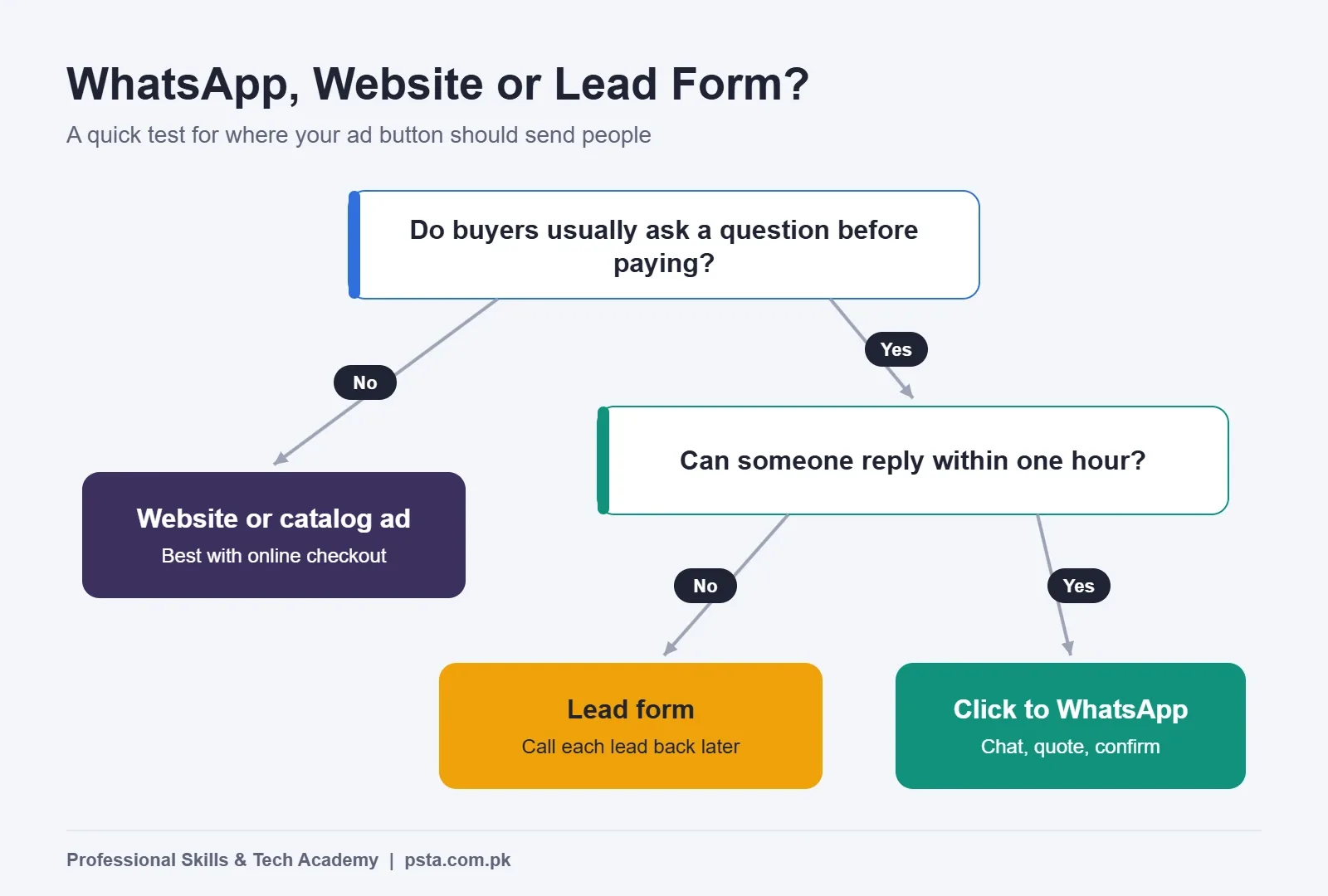
Before you build anything, decide where the click should go. Ads Manager will let you send people to a website, a lead form, Messenger or WhatsApp. Pick the wrong one and even a good ad looks like a failure.
Use these questions as a quick filter:
- Does the buyer usually ask something before paying? Size, color, delivery charges, or "Can you send more pictures?" all point to WhatsApp.
- Can someone reply within an hour during the ad's hours? If nobody can, a lead form that you call back later is safer.
- Do you already have a store with online payment and smooth checkout? Then a website or catalog ad may convert with less effort on your side.
The Example Business Used in This Walkthrough
To keep this practical, the rest of the guide follows an example business. It's a made-up composite, not a real client, so treat every number tied to it as illustrative.
Example: a small shop in Abbottabad sells handwoven shawls and winter jackets. It delivers by courier to Islamabad, Rawalpindi and Peshawar with cash on delivery. The owner already posts on Instagram, gets a few messages a week, and wants to test paid ads before the cold season peaks. Two family members can share the replies from 10 AM to 10 PM.
The goal for week one is modest. The shop wants to learn its cost per real order from WhatsApp, not to make a fortune in seven days.
Day 0: Get the WhatsApp Business Profile Ready
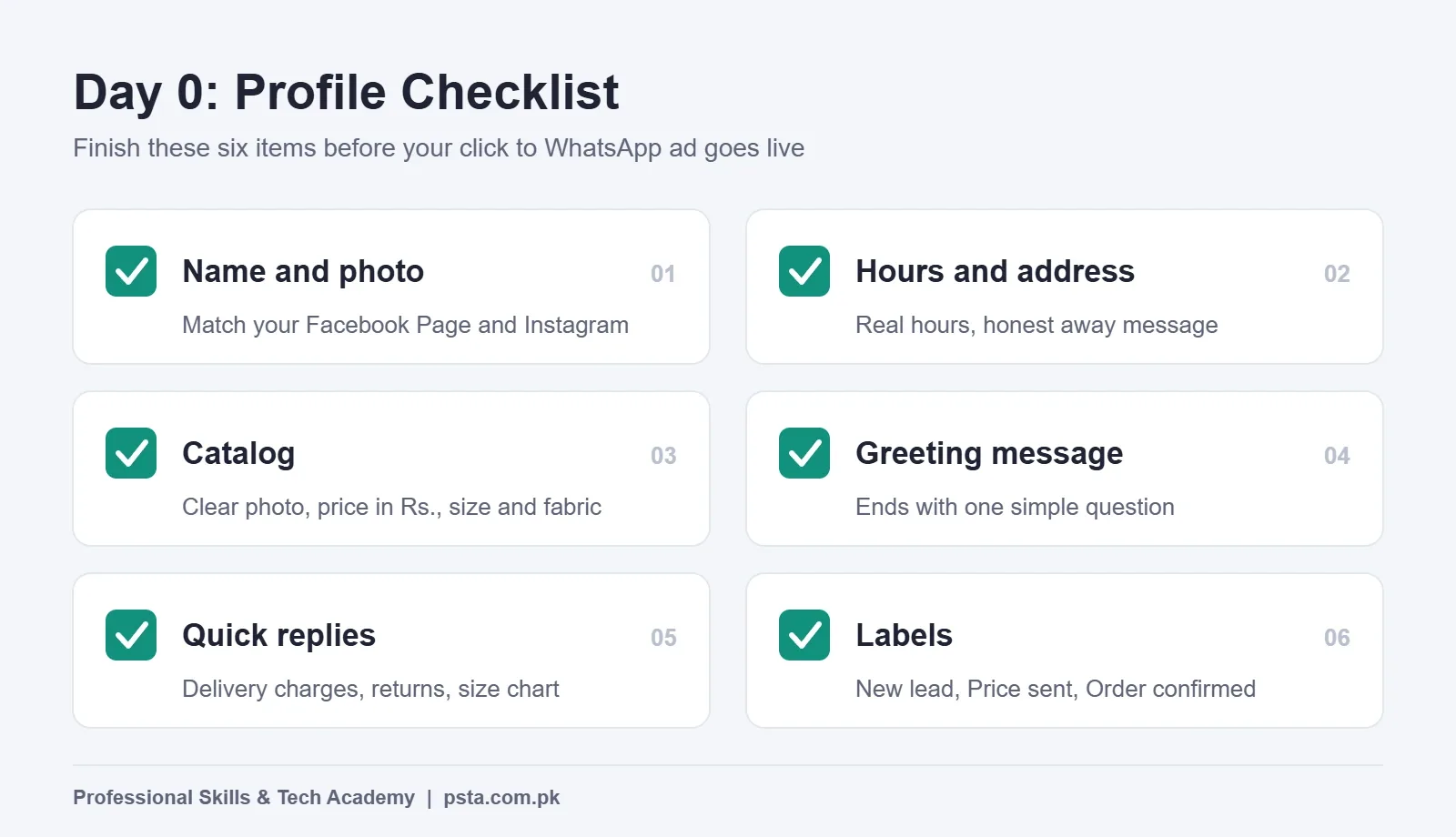
Your ad is only half the sale. The chat it opens is the other half. WhatsApp's small business guide asks advertisers to complete the business profile, including name, hours, location and catalog, and to switch on greeting and away messages first. Here is the checklist our example shop follows:
- Business name and photo: The same name as the Facebook Page and Instagram account, so buyers trust that they reached the right shop.
- Hours and address: Real hours, so an 11 PM message gets an honest away message instead of silence.
- Catalog: Each shawl and jacket with a clear photo, price in Rs. and one line on fabric and size.
- Greeting message: A short welcome that asks one question, such as which city the buyer is in.
- Quick replies: Saved answers for delivery charges, return rules and the size chart.
- Labels: "New lead", "Price sent", "Order confirmed" and "Delivered", so you can count results later.
If you sell through a courier, settle your order confirmation process now. Our earlier guide on reducing COD returns in Pakistan covers confirmation calls and address checks that fit neatly into a WhatsApp flow.
How to Set Up Click to WhatsApp Ads in Ads Manager
You can create a simple version from the WhatsApp Business app. Ads Manager on a laptop gives you more control over audience, placements and testing, so our example shop uses it. The steps below are based on WhatsApp's own setup instructions:
- Link your WhatsApp Business number to your Facebook Page so Ads Manager can find it.
- Open Ads Manager, click Create and choose a campaign objective. Engagement is the usual choice for chat-based selling.
- Name the campaign clearly, for example "Shawls | WhatsApp | Oct test".
- At the ad set level, set the conversion location to Messaging apps, then select WhatsApp.
- Set a start and end date. WhatsApp's page advises running the ad for at least seven days.
- Set the budget and audience, then build the ad: format, images or video, primary text and the pre-filled message.
- Review everything and publish.
Two budget details trip up beginners. First, Meta's budget documentation says spend can run up to 25% above your daily budget on days with better opportunities, so plan your cash with that margin. Second, if you want to pay in rupees rather than dollars, set the ad account currency to PKR when you create the account. TechJuice reported back in 2016 that switching currency later creates a new ad account.
New to Ads Manager in general? Read Boost Post vs Ads Manager first, because the boost button hides most of the settings this walkthrough relies on.
How Big Should the Audience Be?
WhatsApp's setup page says audiences of 2 to 10 million perform best. That's a useful target, but a shop that only delivers to a few cities shouldn't chase a big number by adding places it can't serve. Our example shop targets Abbottabad plus the three cities it ships to, adults 22 to 55, and leaves detailed interests broad. Meta's system then finds buyers inside that area.
Conversations or Leads: Which Performance Goal Should You Pick?
Inside an Engagement campaign with WhatsApp as the destination, you'll see a choice of performance goal. Maximizing conversations gets you the most chats for your budget. Optimizing for leads asks Meta to find people more likely to become customers, based on signals you share about who replied, qualified or bought.
WhatsApp's lead generation article reports that ads optimized for leads drove a 24% lower cost per lead on average, in a November 2024 experiment across 116,000 campaigns and 43,000 businesses. That's Meta's own test, so treat it as a reason to try the option, not a promise.
| Performance goal | What Meta optimizes for | Best for | Watch out for |
|---|---|---|---|
| Maximize conversations | The most chats started | A first test with a small budget | Many "price?" chats that never buy |
| Leads | Chats likely to become customers | Shops that label and track buyers | Needs consistent lead signals to learn |
| Website purchases (other objective) | Checkout on your site | Stores with online payment | Not a WhatsApp campaign at all |
For week one, our example shop picks conversations because it has no history yet. It plans to try leads in week three once its labels show which chats turned into orders.
Writing the Ad and the First Reply
The ad has one job: give a clear reason to message. WhatsApp's guidance is to use real product photos rather than a logo, and to be specific about what the buyer gets. Here's how the example shop fills each part:
| Ad element | Example shop's version | Why it works |
|---|---|---|
| Image or video | A 10-second clip of a shawl being unfolded in daylight | Shows texture and real color |
| Primary text | Handwoven wool shawls from Rs. 3,500. COD to Islamabad, Rawalpindi and Peshawar. Message us for colors. | Price, delivery and a reason to chat |
| Pre-filled message | "Assalam o Alaikum, please share the shawl colors" | Tells you what the buyer saw |
| First reply | Greeting, two catalog links, then "Which city should we deliver to?" | Moves straight to the order |
The price in that example is illustrative. Put your own real price in the ad, because hiding it fills your chat with people who leave as soon as they hear it.
Good creative matters as much as settings. If your product photos look dull, the Graphic Designing course covers layouts and photo editing that suit ad placements.
The Seven-Day Plan, Day by Day
The biggest beginner mistake is editing the campaign every few hours. Each major edit can send the ad back into learning. The example shop follows a simple schedule instead:
- Day 1: Publish in the morning. Check that the ad is approved and send yourself a test message from another phone.
- Day 2: Reply to every chat, label it, and note the questions people ask most.
- Day 3: Turn those common questions into quick replies. Leave the ad settings alone.
- Day 4: Follow up once with anyone who received a price but went quiet. Keep it polite and stop if they don't respond.
- Day 5: Check results. If one ad clearly lags, pause it and keep the stronger one.
- Day 6: Confirm orders by voice call or voice note before booking couriers.
- Day 7: Count labels, add up orders and decide the next test. Change only one thing next week.
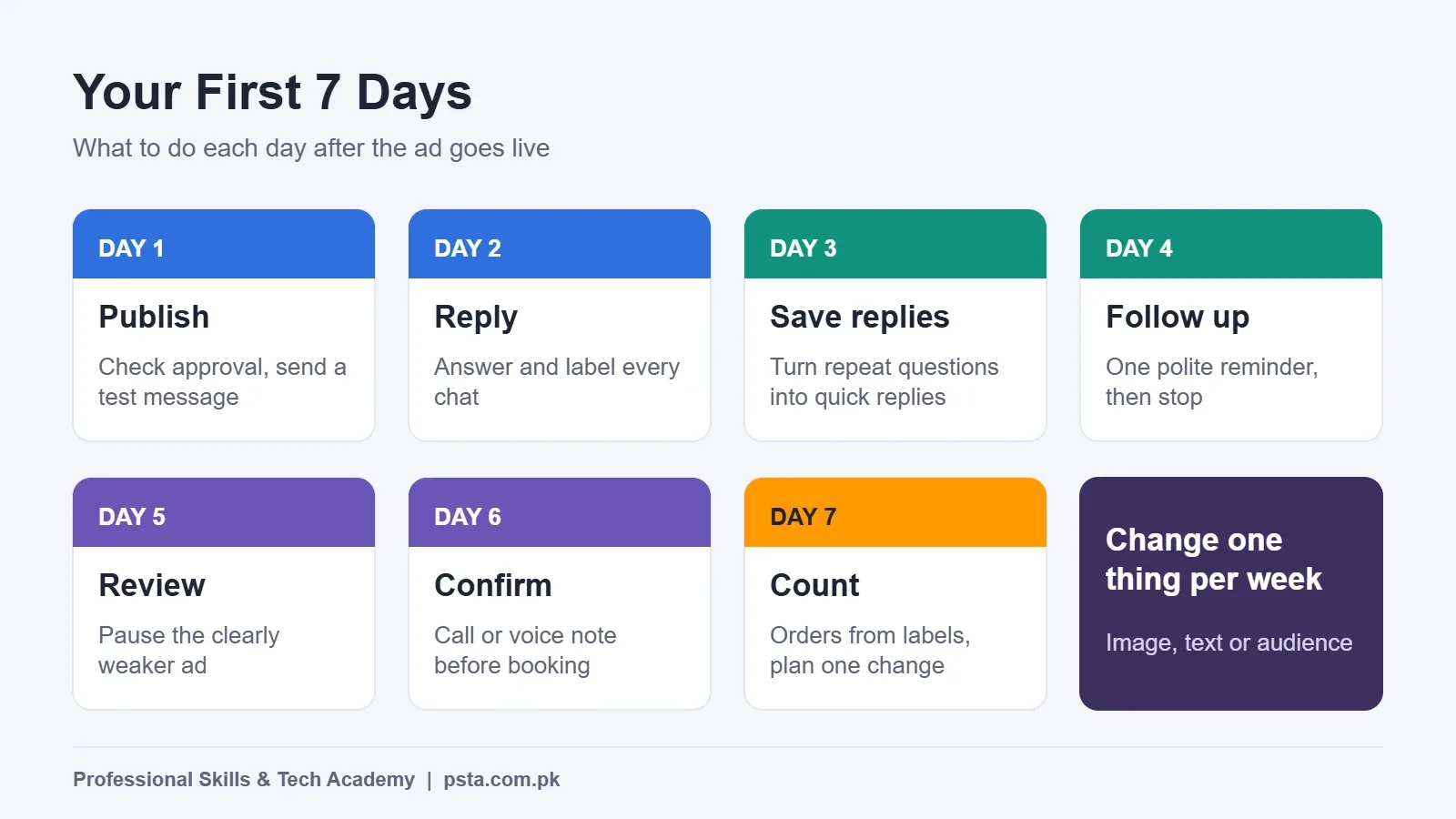
Changing one thing at a time is also WhatsApp's own advice. If you swap the image, the text and the audience together, you won't know which change helped. For more errors that waste ad money, see our list of Meta ads mistakes beginners make.
How Do You Know if the Campaign Worked?
Ads Manager reports messaging conversations started and the cost per conversation. Those are useful, but a chat isn't a sale. The real number lives in your WhatsApp labels, so you need to join the two yourself.
Here's the simple math, using made-up numbers for the example shop. Say it spent Rs. 7,000 in the week, Ads Manager showed 70 conversations started, and the labels show 9 confirmed orders. Cost per conversation is Rs. 100. Cost per order is Rs. 7,000 divided by 9, roughly Rs. 778.
| Metric | Where to find it | What it tells you |
|---|---|---|
| Messaging conversations started | Ads Manager | Whether the ad gets people to tap |
| Cost per conversation | Ads Manager | How expensive attention is |
| Chats that received a price | "Price sent" label | Whether replies move buyers forward |
| Confirmed orders | "Order confirmed" label | The result that pays the bills |
| Cost per order | Total spend divided by orders | Whether the campaign is profitable |
Compare cost per order with your profit per item after courier charges and returns. If the profit on a shawl is higher than the cost per order, the test is promising. If it isn't, look at the replies before blaming the ad. Slow answers and missing prices lose more sales than weak targeting does.
What Does WhatsApp Messaging Cost Behind the Ads?
With the free WhatsApp Business app, you pay only for the ads. Chats inside the app don't carry a per-message fee.
Larger businesses that use the WhatsApp Business Platform, usually through a provider, pay per message. Meta's pricing page says this model took effect on July 1, 2025. When a customer messages from a click to WhatsApp ad on Android or iOS and the business replies within the 24-hour customer service window, a free entry point window opens that can stay open for up to seven days. Inside it, Meta doesn't charge for marketing, utility, authentication or service messages.
The same page notes that from October 1, 2026, service messages are charged after each business number uses its 1,000 free service messages for the month. For a small shop on the app, none of this applies. It matters once you move to an API provider with automated replies.
Common Problems and Quick Fixes
The Ad Was Rejected
Read the reason first. If you believe the rejection is wrong, WhatsApp's guidance is to edit and resubmit, or go to Account Quality, select the ad and request another review if that button is available.
Lots of Chats, Few Orders
Check your first reply and your speed. Ask one or two qualifying questions, such as city and budget, and send the catalog early. WhatsApp's lead article also suggests greeting new contacts by name.
Messages Arrive at Midnight
Use ad scheduling if your campaign setup allows it, or keep a clear away message that tells buyers exactly when you'll reply.
Buyers Ask the Same Thing Ten Times a Day
That question belongs in the ad text or the greeting. Move it there and your chat load drops.
Learning Meta and WhatsApp Ads at PSTA
If you'd rather practice this with a trainer checking your settings, PSTA's Social Media Marketing (SMM) & Meta Ads course takes 12 weeks, and you can start it with no ad experience. Module 4 covers Business Manager, ad account setup and the Ads Manager structure. Module 9 is about WhatsApp marketing, including catalogs, automated responses and connecting chats to a CRM. The final capstone asks you to launch and manage a real campaign.
You can join on our Mandian campus in Abbottabad, join live classes online from another city, or combine the two. If you also sell online, the E-Commerce course pairs well with it, and the Advanced Digital Marketing course covers the wider marketing skill set beyond social ads. The full list of programs sits on the courses page. For batch timings, a short WhatsApp to +92 314 5424399 reaches our admissions team.
Before You Press Publish
Pick up a second phone today and message your own WhatsApp Business number. Look at what a stranger would see: the greeting, the catalog, the hours and how long the first answer takes. Fix whatever feels slow or unclear. When that chat feels like talking to a helpful shopkeeper, your first click to WhatsApp ads test is ready to run. When you want structured practice, the admission page has the next steps.
Frequently asked questions
Do I need the WhatsApp Business API to run click to WhatsApp ads?
No. The free WhatsApp Business app can create these ads from its Tools menu, and you can also build them in Ads Manager with your app number linked to your Facebook Page. The API only becomes useful when you have high chat volume and want automated replies or several agents answering from one number.
How much should I spend on my first click to WhatsApp ad?
Pick a daily amount you could lose for a full week without stress, because WhatsApp advises running the ad for at least seven days. Remember that Meta may spend up to 25% above your daily budget on some days. Treat week one as a test that tells you your cost per order.
Which campaign objective should I choose for WhatsApp ads?
Most chat-based sellers choose Engagement, set the conversion location to Messaging apps and select WhatsApp. Start with maximizing conversations if you have no history. Once you label which chats became buyers, test the Leads performance goal, which Meta says lowered cost per lead in its own 2024 experiment.
Why am I getting messages but no orders?
Usually the chat, not the ad, is the problem. Check how fast you reply, whether you share the price early and whether you ask a simple next question such as the delivery city. Also make sure the ad text shows price and delivery areas, so curious people who cannot buy do not fill your inbox.
Are messages from click to WhatsApp ads free?
On the free WhatsApp Business app, chats carry no per-message fee, so you pay only for the ads. On the WhatsApp Business Platform, Meta opens a free entry point window of up to seven days when you reply in time to a chat started from one of these ads.
Can I pay for Meta ads in Pakistani rupees?
Yes. You can set the ad account currency to PKR when you create the account. Choose carefully at setup, because changing the currency later means creating a new ad account, as TechJuice reported when rupee billing arrived. Check your card or payment method supports online international payments before launching.
How do I measure if my WhatsApp ads are profitable?
Divide your total ad spend by the number of confirmed orders from your WhatsApp labels. That gives cost per order. Compare it with your profit per item after courier charges and returns. If profit is higher than cost per order, the campaign is worth continuing and improving one change at a time.
Sources & references
- Digital 2026: Pakistan (DataReportal) datareportal.com
- Ads That Click to WhatsApp (WhatsApp Business) whatsappbusiness.com
- Ads That Click to WhatsApp: Small Business Guide whatsappbusiness.com
- Lead Generation Strategies for Small Businesses on WhatsApp whatsappbusiness.com
- How to Create Successful Ads That Click to WhatsApp whatsappbusiness.com
- WhatsApp Business Platform Pricing (Meta for Developers) developers.facebook.com
- Budgets (Meta Marketing API) developers.facebook.com
- You Can Now Pay in Pakistani Rupees for Facebook Ads (TechJuice) techjuice.pk
Last reviewed & updated on by Umar Qureshi. Written by the PSTA team in Abbottabad, Pakistan.

Umar Qureshi

Social Media Marketing (SMM) & Meta Ads Course
Turn this guide into a career: hands-on training with real projects, online across Pakistan or on-campus in Abbottabad · 12 Weeks.
Comments
No comments yet — ask a question or share your experience.