Quick answer
Boost a post when a strong post just needs more reach or messages. Use Meta Ads Manager when you need leads, tracked sales, custom audiences or side-by-side tests. You can also turn an existing post into an Ads Manager ad, keeping its likes and comments while choosing any of Meta's six objectives.
Key takeaways
- • Boosted posts are ads too: they enter the same auction and appear on your bill.
- • Ads Manager offers six objectives, including Leads and Sales, which a boost can't fully match.
- • You can run an existing post as an ad inside Ads Manager and keep its social proof.
- • Facebook's ad audience in Pakistan was 52.9 million at the end of 2025, Instagram's 22.4 million.
- • Boosting in the Facebook iOS app may add a 30% Apple fee, so use a computer browser instead.
Table of contents 16 sections
- What Is the Difference Between Boosting and Ads Manager?
- Boost Post vs Ads Manager at a Glance
- What Boosting Does Well
- Where Ads Manager Pulls Ahead
- Objectives Tied to Business Results
- Audiences You Build Yourself
- Placements and Formats
- Budgets and Testing
- Which Goals Fit Each Tool?
- Where Your Customers Are: Ad Reach in Pakistan
- Should a Small Shop in Pakistan Ever Press Boost?
- The Middle Path: Use an Existing Post Inside Ads Manager
- A Two-Week Test Plan for Your First Budget
- Fees and Settings to Check Before You Pay
- Practising Both Tools in PSTA's Meta Ads Course
- Pick One Post and Run the Comparison
Boost post vs Ads Manager: which one should you use for your business? It's one of the first questions shop owners and new marketing students in Pakistan ask. The short answer: boost when a good post simply needs more eyes, and open Ads Manager when you need leads, sales or a fair test between ads.
Both tools spend your money in the same ad auction. What changes is how much say you get over the goal, the audience, the placements and the reporting.
In this comparison, you'll see:
- What each tool can and can't do, based on Meta's own help pages
- Which business goals belong with which tool
- The middle option most beginners never notice
- A two-week plan to test both on a small budget
- The fees and settings to check before you pay
What Is the Difference Between Boosting and Ads Manager?
A boosted post is an ad made from something you've already published. Meta's page on the difference between boosted posts and Meta ads calls it the simplest way to show a post, Story or Reel to more people on Facebook, Messenger or Instagram. You choose a goal, a budget, a schedule and placements, and the post goes out as an ad.
Meta Ads Manager is the full campaign builder. You start with an objective, set up ad sets with their own budgets and audiences, and then create one or more ads inside each set. Meta also states that campaign creation, budget settings and performance metrics are only available in Ads Manager.
Think of it like printing flyers. Boosting is handing your best flyer to a delivery boy and asking him to cover the area. Ads Manager is choosing the streets, the hours and three flyer designs, then counting which one brought people into the shop.
One thing stays the same either way. A boosted post is still an ad, so it appears as an ad on your bill and competes for the same space as every other advertiser.
Boost Post vs Ads Manager at a Glance
This table sums up the practical differences. The details come from Meta's help pages, plus a comparison guide from Amplify for the testing row.
| Feature | Boost Post | Ads Manager |
|---|---|---|
| Starting point | A post, Story or Reel you already published | An existing post or brand-new creative |
| Goals | Simple results such as messages, engagement, website visits or calls | Six objectives: Awareness, Traffic, Engagement, Leads, App promotion and Sales |
| Audience | Age, gender, interests and location, or an Advantage+ suggested audience | Everything in a boost, plus Custom Audiences, Lookalike Audiences and more detailed targeting |
| Placements | Facebook and Instagram, chosen with a few checkboxes | Adds options such as Messenger, Instagram Stories, WhatsApp Status and Audience Network |
| Formats | The post as it was published | Carousels, custom descriptions and several ads per ad set |
| Testing and reports | Basic results in your Page's Ads Centre | Full campaign metrics and side-by-side tests of ads and audiences |
| Best for | Giving a strong post more reach, fast | Measurable leads, orders and long-running campaigns |
What Boosting Does Well
Boosting earns its place when speed matters more than precision. You can go from a published post to a live ad in a few minutes, straight from your Page.
Meta's About boosted posts page makes a sensible point: if a post already drew plenty of comments, likes and shares, it probably connected with people. Boosting that post lets you show it to people who haven't found your Page yet. If it keeps performing, you can boost it again.
The boost form has also grown over the years. According to Meta's guide to boosting a post from your Facebook Page, you can now set:
- A goal, or let Facebook pick one from your settings
- An Advantage+ recommended audience or your own audience by traits
- Advantage+ creative, which tries different versions of your ad
- An extra contact method for people who open the ad
- A duration, a daily budget and placements
For a bakery announcing a new item or a tutor sharing a free class video, that's often enough.
Where Ads Manager Pulls Ahead
Ads Manager is slower to learn, and that's the trade-off for control. Four areas make the biggest difference for a business that wants results it can measure.
Objectives Tied to Business Results
Meta says a boosted post may at first optimize for Page likes, comments and shares or for general awareness. Ads Manager can optimize for website conversions, app installs, video views and shop orders. If you sell online, that difference decides who sees your ad. Picking the wrong objective is a common and costly slip, which we covered in Meta ads mistakes beginners make.
Audiences You Build Yourself
With Ads Manager you can create Custom Audiences, such as people who watched your videos, and Lookalike Audiences based on your existing customers. Meta notes that some detailed targeting features exist only in Ads Manager.
Placements and Formats
A boost lets you tick Facebook and Instagram. Ads Manager adds placements such as Messenger, Instagram Stories and WhatsApp Status, and formats such as carousels with a separate card for each product.
Budgets and Testing
You can raise spending on the days you expect demand, such as before Eid or on payday weekends. You can also run several ads in one ad set and see which one brings cheaper results, instead of guessing.
Which Goals Fit Each Tool?
Ads Manager uses six simplified objectives, listed on Meta's page about choosing an ad objective. The table below matches each one to a typical Pakistani business and shows whether a boost can do something similar.
| Ads Manager Objective | Typical Use | Can a Boost Do It? |
|---|---|---|
| Awareness | A new restaurant wants nearby people to remember its name | Partly, through reach |
| Traffic | A clothing brand sends people to its sale page | Yes, with a website visits goal |
| Engagement | A mobile shop wants questions on Messenger or WhatsApp | Yes, with a messages goal |
| Leads | A training institute collects sign-ups for a new batch | Partly, with simpler options |
| App promotion | A delivery app wants installs | No |
| Sales | An online store wants tracked purchases | No |
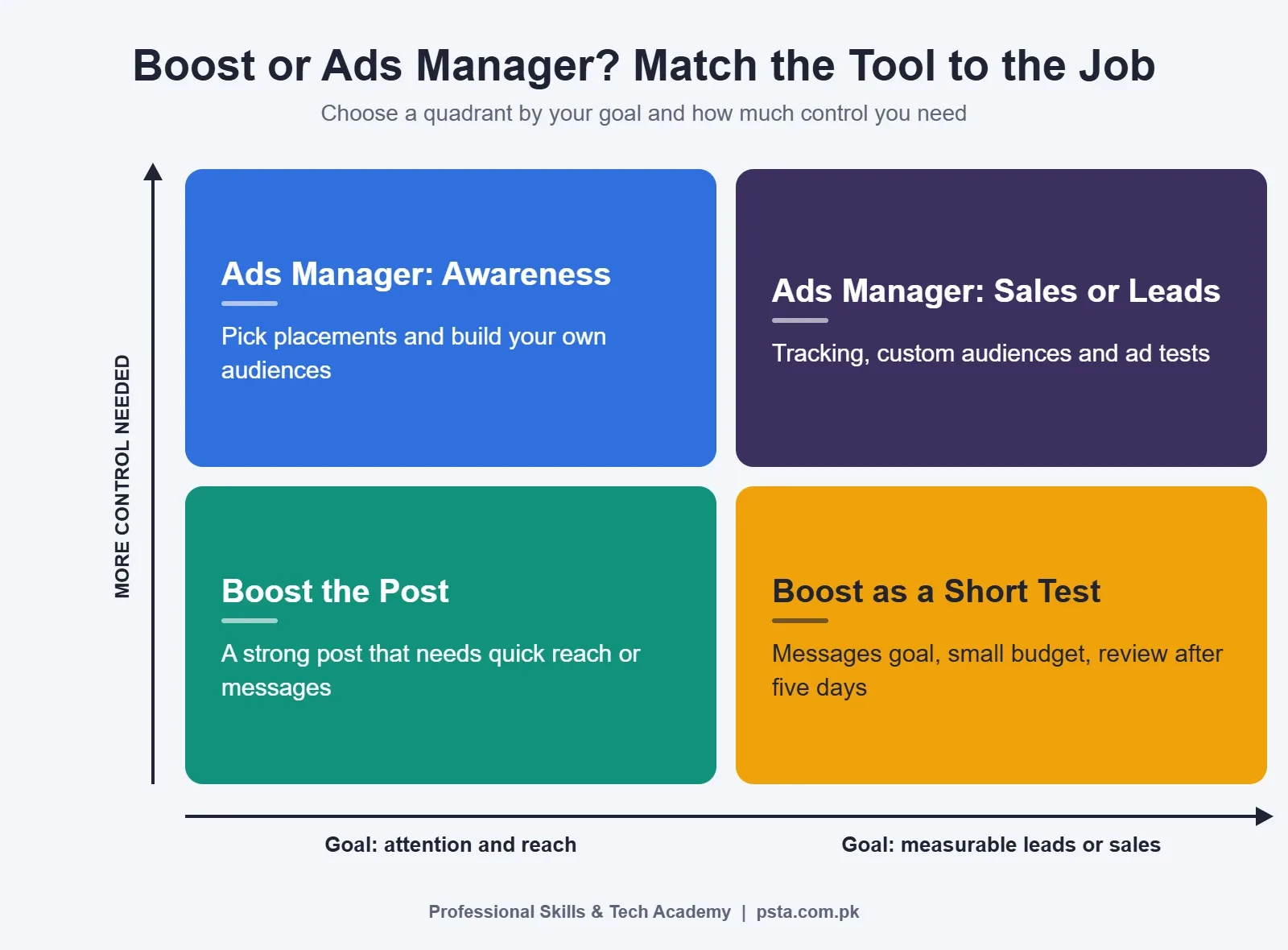
The chart below turns that into a quick decision. Ask two things: do you want attention or a measurable result, and how much control do you need?
Where Your Customers Are: Ad Reach in Pakistan
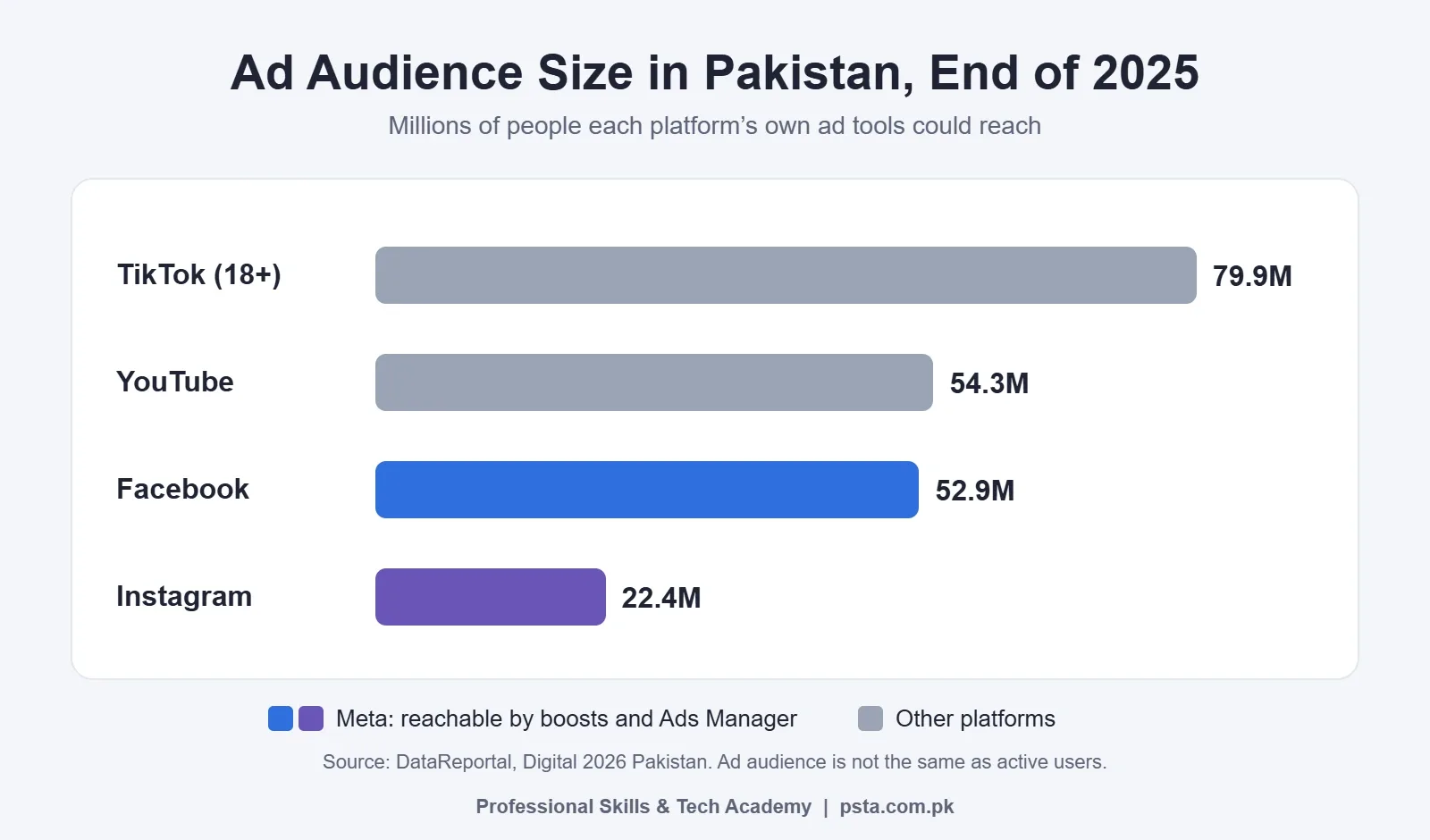
Before you split budget between placements, look at how many people each platform can reach. DataReportal's Digital 2026 Pakistan report used the platforms' own ad tools at the end of 2025:
- Facebook's ad audience was 52.9 million, about 20.6% of the population
- Instagram's was 22.4 million, about 8.7% of the population
- YouTube's was 54.3 million
- TikTok's was 79.9 million adults aged 18 and above
The report repeats Meta's warning that estimated audience size isn't the same as monthly active users. Still, the gap matters. A boost limited to Instagram works with less than half the pool that Facebook offers in Pakistan, so leave both placements on unless your customers clearly live on one app.
Should a Small Shop in Pakistan Ever Press Boost?
Yes, at the right moment. The button isn't the problem. Using it for a job it wasn't built for is.
Example scenario: a shoe shop in Abbottabad posts a short Reel of new winter stock. By the evening it has more comments and shares than its usual posts, and several people ask the price. Boosting that Reel for a few days, to people within driving distance, with a messages goal, is a reasonable and cheap move.
Now change the facts. The same shop launches an online sale with cash on delivery across Pakistan. It needs to know the cost of each confirmed order, not each like. That's an Ads Manager job, with the Sales objective and proper tracking. Our walkthrough on reducing COD returns shows why the order figure matters more than the click figure.
Use these signals to decide:
- Boost when the post is already doing well, the goal is visibility or messages, and you need it live today.
- Use Ads Manager when you're selling online, collecting leads, retargeting past visitors, or comparing two or more ads.
- Do neither yet if your Page is empty or your Google listing is missing. A free Google Business Profile often brings local calls before you spend anything.
The Middle Path: Use an Existing Post Inside Ads Manager
Many people treat boost post vs Ads Manager as an either-or choice. It isn't. Meta lets you create ads from existing posts in Ads Manager, so the likes and comments travel with the ad while you keep full control of the objective.
- Open Ads Manager and click + Create.
- Choose your objective and click Continue.
- Set up the campaign, then click Next.
- In the ad set, choose a conversion location such as Website, Messaging apps or Calls (this section is skipped for Awareness).
- Fill in the budget, schedule, audience and placements.
- Under Identity, select your Page and Instagram account.
- Under Ad setup, choose Use existing post, then click Select post.
- Pick a call to action, preview each placement and click Publish.
Two cautions from Meta's guide. A post that already has a different call to action may not fit your objective; a post with a Shop now button can't become a call ad. And changing details on the ad, such as a phone number, also changes the original post. For Instagram Stories, only active Stories can be picked, not archived ones or Highlights.
A Two-Week Test Plan for Your First Budget
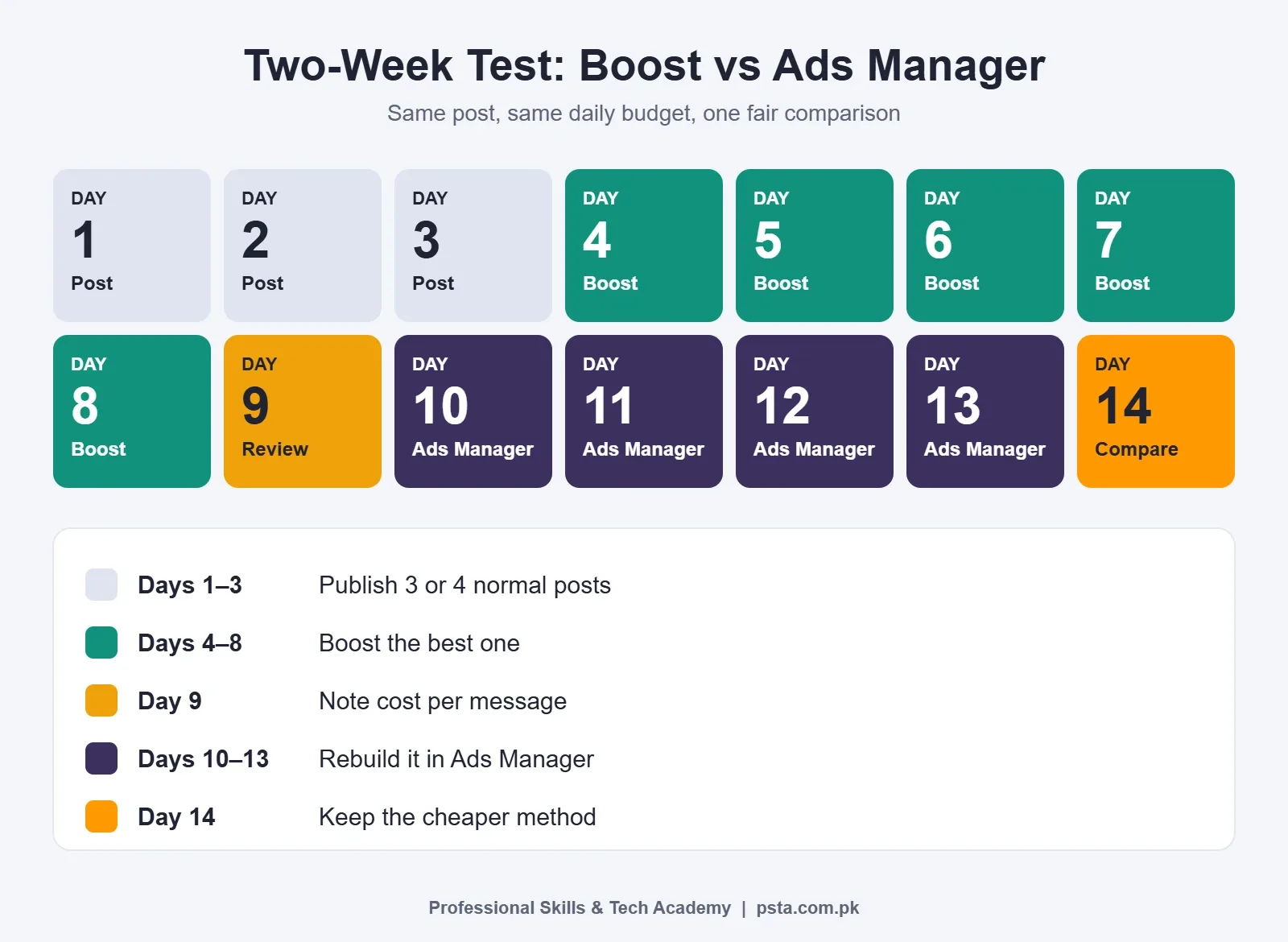
The fairest way to settle boost post vs Ads Manager for your own business is to test both with the same post and the same daily budget. Choose a budget you can afford to spend while learning, and don't change it halfway.
- Days 1 to 3: publish three or four normal posts and watch which one gets the most comments, shares and messages.
- Days 4 to 8: boost the winner with a messages goal, your city or a set radius, and a fixed daily budget.
- Day 9: note the cost per message in Ads Centre, plus how many chats turned into real enquiries.
- Days 10 to 13: rebuild the same post in Ads Manager with the Engagement objective and Messaging apps as the conversion location, at the same budget.
- Day 14: compare cost per message and the quality of the chats, then keep the method that wins.
Resist editing the ad every morning. Frequent changes make it harder to tell whether the tool or your tinkering caused the result.
Fees and Settings to Check Before You Pay
A few details catch beginners off guard, whichever side of the boost post vs Ads Manager choice they pick.
- The Apple service fee. Meta says that since February 2024 a 30% Apple fee, on top of your ad payment and before taxes, may apply when you boost in the Facebook iOS app on an iPhone or iPad. The same fee may apply when you add funds in the Instagram iOS app. Boosting from a computer browser or Ads Manager avoids it.
- Special Ad Category. Turn this on for ads about jobs, financial services, housing, social issues or politics. If you post job ads for a recruitment agency or promote loans or insurance, switch it on before you publish.
- Page access. You need Facebook access to the Page or task access to ads before you can boost. Sort this out early if a freelancer or agency runs your ads.
- Your payment card. Ask your bank whether international online payments are enabled on your debit or credit card and what charges apply. If a payment fails, delivery can pause until you fix it, so check this before a sale starts.
Practising Both Tools in PSTA's Meta Ads Course
Reading about Ads Manager helps, but the settings make sense only after you've built a few campaigns yourself. PSTA's Social Media Marketing and Meta Ads course is a 12-week, beginner-level program. Classes run at the Abbottabad campus, as live online sessions for students in other cities, or as a mix of both, and a fresh batch opens each month. Its listed fee is Rs. 24,000, reduced from Rs. 30,000.
The modules most relevant to this topic are:
- Module 4: Business Manager and ad account setup, objectives, ad sets and the Meta auction
- Module 5: Meta Pixel and Conversions API setup, with standard and custom events
- Module 6: Custom Audiences, Lookalike Audiences and retargeting
- Module 12: a capstone in which you run a real campaign from start to finish
If you'd like a program that goes beyond social media, the Advanced Digital Marketing course covers more ground. Store owners may prefer the E-Commerce course. You can compare all programs on the courses page, see the steps on the admission page. Questions about the next batch? WhatsApp PSTA on +92 314 5424399 and mention whether you prefer campus or online classes. The campus is on Mandian, Old College Road, opposite FIMS College.
Pick One Post and Run the Comparison
Open your Page today and find the post from the last month with the most comments. That's your test candidate. Boost it for five days, then rebuild it in Ads Manager from the existing post with the same budget. Write down the cost per message for each. After two weeks you'll have your own answer to boost post vs Ads Manager, based on your customers rather than someone else's opinion.
Frequently asked questions
When should I boost the same post again?
Meta suggests boosting again when a post keeps performing well after its first boost. Check its results in the Ads Centre tab on your Page before you decide. If the cost per message or per click is still acceptable and people are still commenting, run it again. If results are slipping, publish a fresh post instead of paying for a tired one.
Do boosted posts cost more than Ads Manager ads?
Neither tool has its own price list. Both are ads, both show up on your bill, and both compete in Meta's auction, so the cost depends on your audience, your competitors, your creative and your goal. A boost can feel expensive when its goal doesn't match what you want, because you end up paying for results you don't need.
Can I get WhatsApp messages from a boosted post?
A boost can use a messages goal, and the boost form lets you add an extra contact method. For more control, Ads Manager lets you choose messaging apps as the conversion location under objectives such as Engagement, Leads and Sales, and Meta lists WhatsApp among the options. Run both and compare how many chats turn into real enquiries.
Why does boosting from an iPhone cost more?
Meta says that since February 2024, a 30% Apple service fee may apply when you boost in the Facebook iOS app on an iPhone or iPad, and a similar fee may apply when you add funds in the Instagram iOS app. Apple keeps that fee, not Meta. Boost from a computer browser or use Ads Manager to avoid it.
Can I use an Instagram Reel or Story in Ads Manager?
Yes. In the Ad setup step, choose Use existing post and select the content you want. Reels and posts work this way, but for Stories you can only pick ones that are still active. Archived Stories and Stories saved to Highlights won't appear in the list, so promote a Story while it is live.
Do I need a Facebook Page to run Meta ads?
For boosting, yes. Meta requires a Facebook Page and either Facebook access to that Page or task access to ads. In Ads Manager, the Identity step asks you to choose the Page, plus an Instagram account if you have one, that the ad runs under. Set up and verify your Page before you plan any budget.
Should beginners learn boosting or Ads Manager first?
Start with one small boost on a post that's already doing well. It teaches you budgets, audiences and reading results with very little setup. Then move to Ads Manager within a few weeks, because client and agency work usually needs objectives, audiences and tests that only Ads Manager offers. Don't stop at the Boost button.
Sources & references
- The difference between boosted posts and Meta ads facebook.com
- About boosted posts facebook.com
- Boost a post from your Facebook Page facebook.com
- How to choose the right ad objective in Meta Ads Manager facebook.com
- Create ads from existing posts in Meta Ads Manager facebook.com
- Digital 2026: Pakistan (DataReportal) datareportal.com
- Boosted Posts vs. Facebook Ads (Amplify) amplify.dk
Last reviewed & updated on by Umar Qureshi. Written by the PSTA team in Abbottabad, Pakistan.

Umar Qureshi

Social Media Marketing (SMM) & Meta Ads Course
Turn this guide into a career: hands-on training with real projects, online across Pakistan or on-campus in Abbottabad · 12 Weeks.
Comments
No comments yet — ask a question or share your experience.