Quick answer
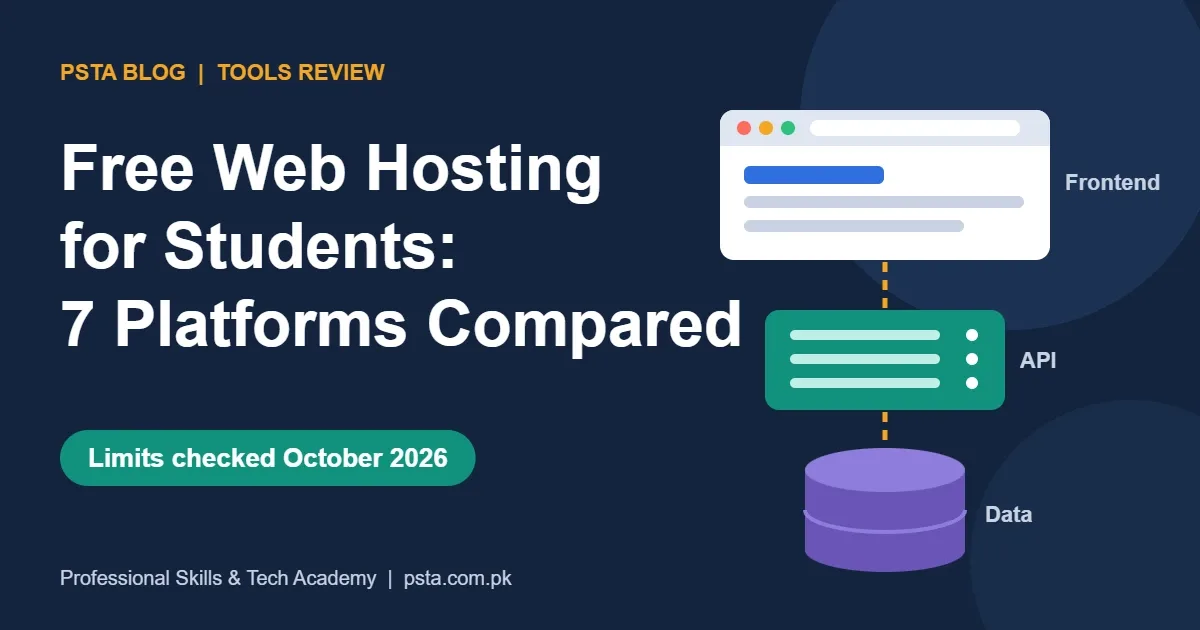
For free web hosting for students, put static sites on GitHub Pages, Cloudflare Pages, Netlify or Vercel, run a Node.js API on Render, and store data in MongoDB Atlas M0 or Supabase. Plan around the catches: Render sleeps after 15 idle minutes, Supabase pauses after a week, and Vercel Hobby bans commercial use.
Key takeaways
- • Split a web app into three layers: frontend, backend and database, then pick a free host for each.
- • GitHub Pages, Cloudflare Pages, Netlify and Vercel handle static frontends well at no cost.
- • Render gives 750 free instance hours a month, but free web services sleep after 15 minutes without traffic.
- • MongoDB Atlas M0 offers 512 MB free; Supabase Free offers 500 MB and pauses after one week of inactivity.
- • Vercel Hobby is for personal, non-commercial use only, so move paid client work to a paid plan.
Table of contents 18 sections
- What Does "Free Hosting" Cover for a Developer?
- How I Judged Each Platform
- The Seven Free Platforms Worth Testing in 2026
- 1. GitHub Pages: Best for Plain HTML and Portfolio Sites
- 2. Cloudflare Pages: Best for Static Sites That Deploy Often
- 3. Vercel Hobby: Best for Next.js and React Frontends
- 4. Netlify Free: Best for Forms and Simple JAMstack Sites
- 5. Render Free: Best Free Home for a Node.js API
- 6. MongoDB Atlas M0: Best Free Database for MERN Projects
- 7. Supabase Free: Best for PostgreSQL With Built-In Login
- Free Web Hosting for Students at a Glance
- Which Free Host Should You Pick for Your Project?
- How Do You Host a MERN Stack App for Free?
- The Free-Tier Limits That Catch Beginners Off Guard
- Can You Use Free Hosting for Client Work?
- What Does the First Paid Step Cost?
- Deploying Real Projects in PSTA's Full-Stack Course
- Put One Project Online Before Friday
Here's a typical example of why free web hosting for students matters. A BSCS student in Abbottabad finishes a MERN to-do app, records a screen video and sends it with a job application. The software house replies with one line: "Can you share a live link?" She has the code on GitHub but no URL anyone can open.
That gap is easy to close in 2026, and it shouldn't cost you a rupee. Several platforms give you a public link, HTTPS and automatic deploys from GitHub at no charge. Each one has a catch, though, and the catches decide which host fits which project.
In this review you'll learn:
- Which seven free platforms are worth testing, and what each one is good at
- The exact free limits as of October 2026, taken from each company's own pages
- How to split a MERN or React project across a frontend host, a backend host and a database
- Which free plans you can't use for paid client work
- What the first paid step costs once a project outgrows free
What Does "Free Hosting" Cover for a Developer?
When people search for free hosting, they usually picture one box that holds everything. A modern web app is really three separate pieces, and most free plans only cover one or two of them well.
- The frontend: HTML, CSS, JavaScript and the built files from React or Vite. This is static content, and it's the easiest part to host for free.
- The backend: your Node.js and Express API, or any code that runs on a server. This needs a machine that stays available, which is where free plans get stingy.
- The database: MongoDB, PostgreSQL or MySQL. Free database tiers exist, but they come with storage caps and inactivity rules.
Once you see the project in three layers, the choice gets simpler. You aren't looking for one perfect free host. You're picking the best free option for each layer and wiring them together.
Shared PHP hosting with cPanel, the kind many local businesses in Pakistan buy for WordPress, is a different product. It's cheap rather than free, and our WordPress website cost breakdown covers that route. This review is about developer platforms that deploy straight from your code.
How I Judged Each Platform
I teach deployment in the final module of our full-stack course, so I judge free web hosting for students by what breaks during a live demo, not by marketing pages. Every platform below was checked against five questions:
- Which layer does it handle: frontend, backend or database?
- What are the published free limits on storage, bandwidth and hours?
- Does the app sleep, pause or expire when nobody uses it?
- Can you use the free plan for paid client work?
- Can you deploy by pushing to GitHub, without a long manual setup?
All numbers come from the providers' own pricing and documentation pages, checked in October 2026. Free plans change often, so open the linked page again before you build anything important on them.
The Seven Free Platforms Worth Testing in 2026
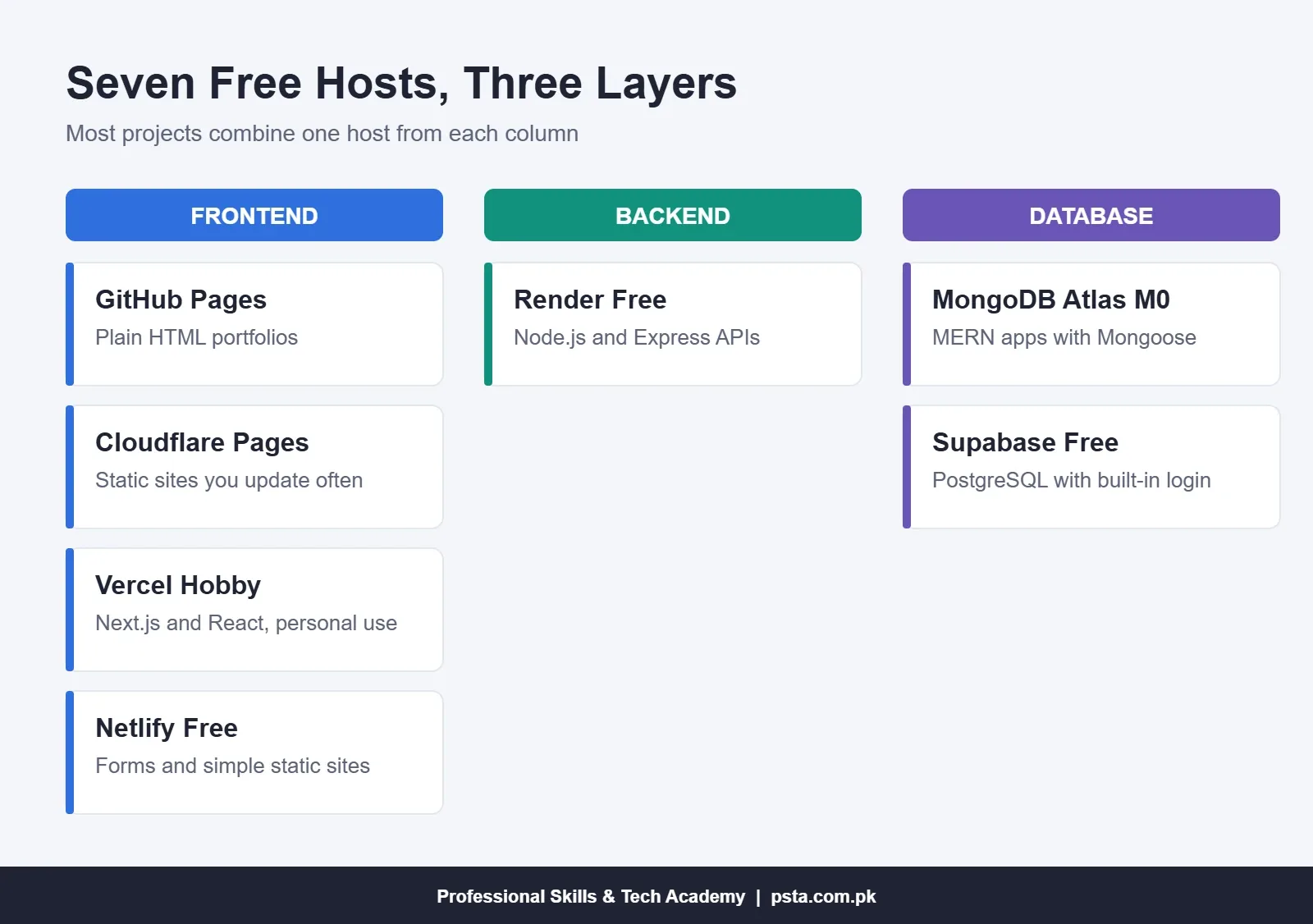
The list below moves from the simplest static hosts to the backend and database services. You won't need all seven. Most student projects use two or three together.
1. GitHub Pages: Best for Plain HTML and Portfolio Sites
If your project is HTML, CSS and JavaScript with no server code, GitHub Pages is the shortest path to a live link. You push to a repository, switch Pages on, and the site appears at a github.io address.
According to GitHub's Pages limits page, a published site can be up to 1 GB, with a soft bandwidth limit of 100 GB per month and a soft limit of 10 builds per hour. GitHub also says Pages isn't meant to run an online business or e-commerce site. Keep it for your portfolio, course assignments and documentation.
2. Cloudflare Pages: Best for Static Sites That Deploy Often
Cloudflare Pages suits React, Vue or Astro builds that you update several times a week. Its limits page lists 500 builds a month on the free plan, up to 20,000 files per site, a 25 MiB cap on any single file and 100 custom domains per project.
You can also add small server functions. Cloudflare bills Pages Functions as Workers, and the Workers pricing page allows 100,000 requests per day with 10 milliseconds of CPU time per request on the free plan. That's enough for a contact form or a small API, not a heavy Express server.
3. Vercel Hobby: Best for Next.js and React Frontends
Vercel builds React and Next.js projects with almost no configuration, and every pull request gets its own preview link. That preview feature alone is useful when a teammate or teacher wants to check your work before it goes live.
Vercel's Hobby plan page lists 100 GB of fast data transfer, 1,000,000 function invocations, 4 hours of active CPU and up to 200 projects each month. Functions can run for up to 300 seconds. There's one rule you must remember: Hobby is limited to non-commercial, personal use. A client's shop or a paid freelance site doesn't qualify.
4. Netlify Free: Best for Forms and Simple JAMstack Sites
Netlify now runs on credits. Its pricing page gives the Free plan 300 credits a month, with hard limits that can't create a bill. When you run out, the site pauses until the next cycle.
Netlify's credit documentation prices each production deploy at 15 credits, bandwidth at 20 credits per GB and 10,000 web requests at 2 credits. Form submissions cost nothing. In plain terms, 300 credits would cover 20 production deploys if you spent them on nothing else. Push small fixes to a branch preview first, because preview deploys don't use credits.
5. Render Free: Best Free Home for a Node.js API
If you want to deploy a Node.js app free of charge, Render is the simplest place to start. You connect a GitHub repository, set a start command such as node server.js, add your environment variables and it runs.
The Render free tier documentation explains the trade-off. A free web service spins down after 15 minutes without traffic, and the next visitor waits about a minute while it wakes. Each workspace gets 750 free instance hours per calendar month. A 31-day month has 744 hours, so one always-on service fits, but two will run out.
Render also offers a free PostgreSQL database with 1 GB of storage. It expires 30 days after you create it, with a 14-day grace period before deletion. Treat it as a practice database, never as the only copy of your data.
6. MongoDB Atlas M0: Best Free Database for MERN Projects
For anything built with Mongoose, the MongoDB Atlas free tier is the natural pick. MongoDB's pricing page lists the free M0 cluster with 512 MB of storage and up to 100 operations per second. For a portfolio app with a few hundred users or products, that is plenty of room.
The Atlas free-tier documentation adds three limits worth knowing: one free cluster per project, a maximum of 500 connections, and 10 GB in plus 10 GB out of data transfer per rolling seven days. Atlas pauses a free cluster after 30 days with zero connections. You can resume it, but a recruiter clicking your link during that pause will see errors.
7. Supabase Free: Best for PostgreSQL With Built-In Login
Supabase gives you a PostgreSQL database plus user sign-up, file storage and an auto-generated API. Supabase's pricing page lists 500 MB of database space per project, 50,000 monthly active users, 1 GB of file storage, 5 GB of egress and two active projects.
The limit that surprises students: free projects pause after one week of inactivity. If your portfolio link sits untouched while you job hunt, open the dashboard or call the API at least once a week.
Free Web Hosting for Students at a Glance
Here are the same seven platforms side by side. Each row shows the main free allowance and the catch you should plan around.
| Platform | Layer | Key Free Allowance | Main Catch |
|---|---|---|---|
| GitHub Pages | Frontend | 1 GB site, 100 GB/month soft bandwidth | No e-commerce or business use |
| Cloudflare Pages | Frontend + light functions | 500 builds/month, 20,000 files | 10 ms CPU per function call |
| Vercel Hobby | Frontend + functions | 100 GB transfer, 1M invocations | Non-commercial use only |
| Netlify Free | Frontend + functions | 300 credits/month | Site pauses when credits run out |
| Render Free | Backend | 750 instance hours/month | Sleeps after 15 minutes idle |
| MongoDB Atlas M0 | Database | 512 MB storage | Pauses after 30 days with no connections |
| Supabase Free | Database + auth | 500 MB database, 2 projects | Pauses after 1 week inactive |
Which Free Host Should You Pick for Your Project?
Start with the question that matters most: does your project need code running on a server? Your answer splits the options in half.
- Static portfolio or landing page: GitHub Pages. Nothing else is simpler.
- React or Vite app that calls a public API: Vercel, Netlify or Cloudflare Pages. Pick the one whose dashboard you find clearest.
- Next.js app with a few API routes: Vercel Hobby, as long as it's a personal project.
- Full MERN app: frontend on Vercel or Netlify, Express API on Render, data on MongoDB Atlas.
- App that needs user login and you'd rather not write auth: frontend on any static host, with Supabase handling the database and accounts.
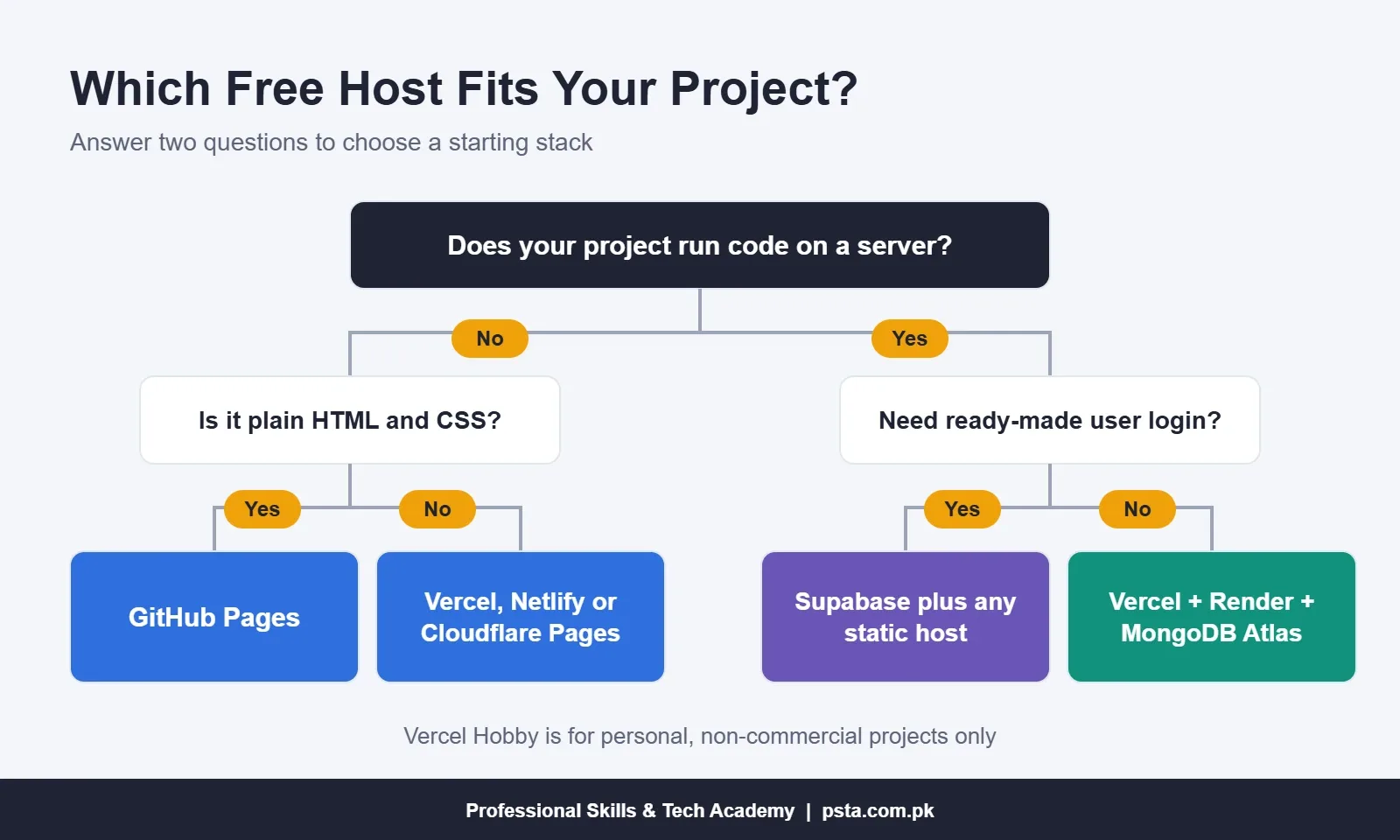
Notice that no single platform appears in every branch. That's normal. Splitting the layers also teaches you how real deployments work, which is a good thing to explain in an interview.
How Do You Host a MERN Stack App for Free?
This is the setup I'd use for a capstone or portfolio project. It keeps the API and database separate, which is how most production apps are arranged anyway.
- Prepare the repository. Keep the React frontend and the Express backend in separate folders or separate repositories. Move every secret, such as your database password, into a
.envfile and add it to.gitignore. - Create the database. Make a free M0 cluster on MongoDB Atlas, add a database user and allow network access. Copy the connection string.
- Deploy the API on Render. Create a free web service from the backend repository. Set the build command (
npm install), the start command and an environment variable holding the Atlas connection string. - Test the API URL. Open the Render URL with a simple route, such as
/api/health, and confirm it returns data. Expect the first request after a quiet period to take about a minute. - Point the frontend at the API. In React, read the API address from an environment variable instead of hard-coding
localhost:5000. Students often skip this step, and the live site then calls their own laptop. - Deploy the frontend. Import the frontend repository into Vercel or Netlify, add the same environment variable and deploy.
- Fix CORS. Allow your frontend's live domain in the Express CORS settings, push the change and let Render redeploy.
- Write a short README. Add the live link, a screenshot and one line warning that the API may take a minute to wake. That note stops a reviewer from assuming the app is broken.
If any of these steps feel unfamiliar, our frontend developer roadmap shows where deployment fits in the wider learning order.
The Free-Tier Limits That Catch Beginners Off Guard
Most "my site is broken" problems on free plans trace back to one of four rules. None of them is hidden. They're just easy to skip when you're excited to see your app live.
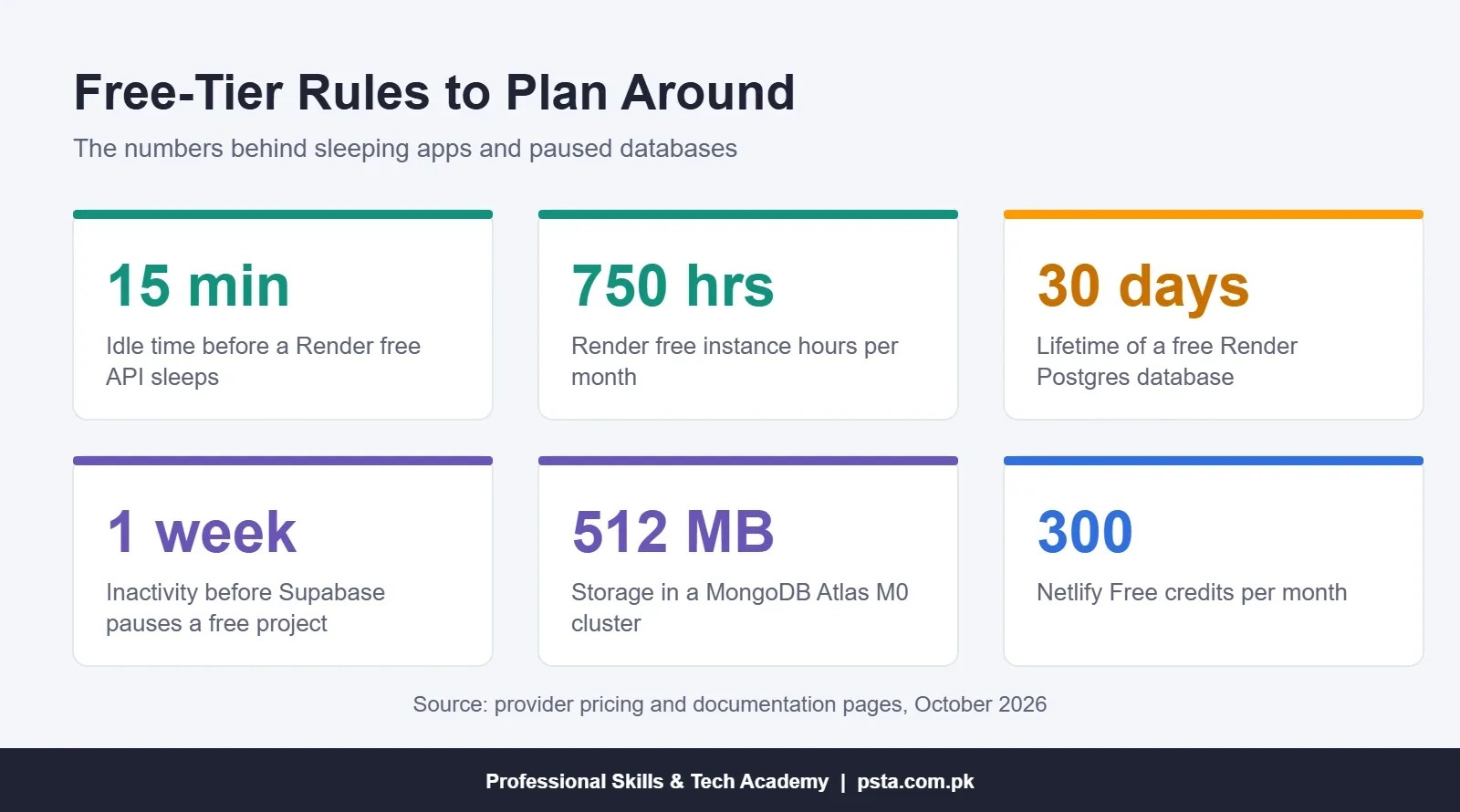
- Sleeping backends. The 15-minute spin-down on Render means the first visitor waits. Warn people, or open the link yourself a minute before a demo.
- Expiring databases. Render's free PostgreSQL expires after 30 days. Export your data or switch to Atlas or Supabase for anything you want to keep.
- Inactivity pauses. Supabase pauses after a week and Atlas after 30 days without connections. A portfolio project you haven't touched since last semester may be asleep.
- Usage caps that pause the whole site. Netlify pauses at its credit limit, and Vercel's Hobby page says you may have to wait 30 days after exceeding a limit before using that feature again.
Can You Use Free Hosting for Client Work?
This question matters to anyone planning to freelance from Pakistan. The short answer is: check the terms platform by platform, because the rules differ.
Vercel's Hobby plan is explicitly non-commercial and personal. GitHub Pages isn't allowed for running an online business or e-commerce site. Render, Netlify, Atlas and Supabase have free plans without that same wording on the pages I checked, but their sleep, pause and credit limits make them a poor fit for a paying client anyway.
A client who pays you to build a site expects it to load quickly at 2 AM and still be online next month. Use free plans to build and demo. When the client approves, move the project to a paid plan or to hosting the client owns, and include that cost in your quote. If you're preparing for your first freelance projects, our guide to Upwork for beginners in Pakistan covers quoting and delivery.
What Does the First Paid Step Cost?
You don't need to pay while learning. Still, it helps to know the next step so you can price client work honestly. These figures are in US dollars and come from the providers' pages:
- MongoDB Atlas Flex: starts at $0.011 per hour, about $8 a month if it runs all month, and is capped at $30 a month.
- Vercel Pro: developer seats cost $20 per user per month, according to the Hobby plan page.
Before you subscribe to anything, confirm that your bank card is enabled for international online payments. Ask your bank to turn it on before you need it, and keep only a small balance on any card you use online.
Deploying Real Projects in PSTA's Full-Stack Course
Free web hosting for students solves the "where" question. The harder part is building something worth hosting, and putting it online is part of our course, not an extra. Across six months, our full-stack program takes beginners with zero coding background from HTML to a deployed app. You learn HTML, CSS, modern JavaScript, React with Hooks and Redux Toolkit, Node.js with Express, MongoDB with Mongoose and MySQL.
Module 9 is a capstone where you build and deploy a complete MERN application, such as an online store or booking system, as a live portfolio piece. Fees for this program: Rs. 45,000 instead of the usual Rs. 60,000, paid in two parts. Classes run at our Mandian campus in Abbottabad (Old College Road, facing FIMS College) and live online for learners in other cities.
If you'd prefer to start with one part of the stack, look at the JavaScript course or the React.js course. Every PSTA program is listed on one page, and enrollment steps sit on the admission page. Questions about timings? WhatsApp us on +92 314 5424399.
Students in the course also use AI assistants while building. Our review of free AI coding tools for students explains how to use them without skipping the learning.
Put One Project Online Before Friday
Pick the smallest finished project in your GitHub account, even a calculator or a landing page. Deploy it on GitHub Pages or Netlify today and paste the live link at the top of its README.
Once that works, try the three-layer MERN setup on a bigger project. A working link on your CV says more than a screen recording. With free web hosting for students this generous, it only costs you an afternoon.
Frequently asked questions
Is there any truly free web hosting for students in 2026?
Yes. GitHub Pages, Cloudflare Pages, Netlify Free and Vercel Hobby host static sites at no cost, Render Free runs small Node.js APIs, and MongoDB Atlas M0 and Supabase Free provide databases. Each has limits, such as sleeping servers or inactivity pauses, so read the provider page before you rely on it for a demo or interview.
Can I host a MERN stack app for free?
You can. A common free setup puts the React frontend on Vercel or Netlify, the Express API on Render Free and the data on a MongoDB Atlas M0 cluster. Store the database connection string and API address in environment variables, allow your live frontend domain in CORS, and warn visitors that the first API request may take about a minute.
Why does my Render app take so long to load the first time?
Render Free web services spin down after 15 minutes without inbound traffic. The next request wakes the service, which takes about a minute according to Render. This is normal on the free plan. Open the link yourself shortly before a demo, or mention the delay in your README so reviewers don't assume the app is broken.
Can I use Vercel Hobby for a client website?
No. Vercel's documentation says the Hobby plan is restricted to non-commercial, personal use. For a client project, build and test on Hobby if you like, then move the site to a paid Pro plan or to hosting the client owns. Include that monthly cost in your quote so the client isn't surprised later.
Do I need a credit card to use these free plans?
Sign-up rules vary by provider and change over time, so check each sign-up page before you start. A card matters most when you upgrade or go past free limits; Render, for example, suspends free services instead of billing you if no payment method is added. Before paying for any plan, ask your bank to enable international online payments.
How much data can I store on MongoDB Atlas for free?
The free M0 cluster includes 512 MB of storage and up to 100 operations per second. You get one free cluster per project, a 500-connection limit and 10 GB of data in and out per rolling seven days. Atlas pauses a free cluster after 30 days with no connections, but you can resume it.
Is GitHub Pages enough for a student portfolio?
For most portfolios, yes. GitHub Pages serves HTML, CSS and JavaScript from a repository, allows sites up to 1 GB and has a soft bandwidth limit of 100 GB per month. It doesn't run server code, and GitHub says it shouldn't be used for an online business or e-commerce site.
Sources & references
- GitHub Pages limits docs.github.com
- Cloudflare Pages limits developers.cloudflare.com
- Cloudflare Workers pricing developers.cloudflare.com
- Vercel Hobby plan vercel.com
- Netlify pricing netlify.com
- Render: Deploy for Free render.com
- MongoDB Atlas pricing mongodb.com
- Supabase pricing supabase.com
Last reviewed & updated on by Umar Qureshi. Written by the PSTA team in Abbottabad, Pakistan.

Umar Qureshi

Full-Stack Web Development Course with AI Tools
Turn this guide into a career: hands-on training with real projects, online across Pakistan or on-campus in Abbottabad · 6 Months.



Comments
No comments yet — ask a question or share your experience.