Quick answer
To draw a house plan in AutoCAD, set Architectural units, create layers, draw the plot at true size, offset 9-inch outer walls and 4.5-inch partitions by typed distances, cut openings, add annotative dimensions, then plot from a layout viewport at 1/4" = 1'-0" with plot scale 1:1, never Fit to Paper.
Key takeaways
- • A 5 marla plot is 1,125 sq ft at 225 sq ft per marla, but the older 272.25 sq ft marla still applies in many areas, so measure first.
- • Set Architectural units before drawing: one drawing unit equals one inch.
- • Use 9-inch outer walls and 4.5-inch partitions placed with typed offsets, not the mouse.
- • Keep walls, doors, windows, dimensions and text on separate layers with their own lineweights.
- • Plot from a layout at 1:1 with a 1/4" = 1'-0" viewport; Fit to Paper breaks the scale.
Table of contents 19 sections
- The Example Job: A Single-Storey 5 Marla Home
- How Big Is a 5 Marla Plot, Really?
- How to Draw a House Plan in AutoCAD: Six Stages
- Setting Up Units, Layers and a Template
- Units First
- A Lean Layer Set
- Save It as a Template
- Drawing the Plot Boundary and the 9-Inch Outer Walls
- Placing the Internal Walls Room by Room
- Two Ways to Draw Partitions
- Cutting Doors and Windows Into the Walls
- Dimensions, Room Labels and Hatch a Builder Can Follow
- Dimension Strings
- Room Labels
- Hatch and Furniture
- How Do You Print a House Plan to Scale in AutoCAD?
- Which Mistakes Spoil a First House Plan?
- Drafting Your First Full Plan in PSTA's AutoCAD Course
- A Weekend Exercise: Measure, Draw, Print
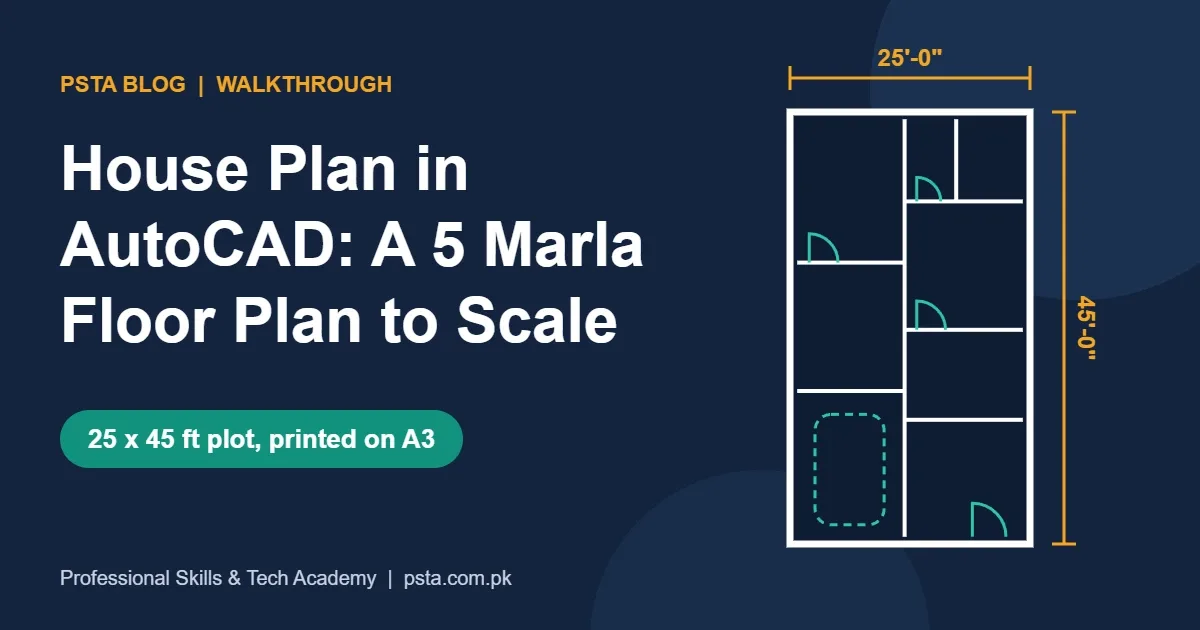
To draw a house plan in AutoCAD, you set architectural units, draw the plot at full size, offset the walls, cut the openings, then add dimensions and print a layout to scale. A 5 marla plot works out to 1,125 sq ft on Zameen's plot size conversion chart. That's why a 25 by 45 ft rectangle makes a practical first drawing.
This walkthrough builds one practice house plan in AutoCAD, from the client's wish list to a PDF a builder could read. The family and their brief are invented for the exercise. The plot sizes, wall thicknesses and room ranges come from published Pakistani sources, and the commands come from Autodesk's own help pages.
Work through it and you'll come away with:
- Why "5 marla" can mean two different plot sizes, and how to confirm yours
- A small layer set that keeps walls, doors, text and dimensions apart
- A clean method for 9-inch outer walls and 4.5-inch partitions
- Dimension strings a mistri can build from without phoning you
- How to print on A3 at 1/4" = 1'-0" without the plan losing its scale
The Example Job: A Single-Storey 5 Marla Home
Treat this as a sample brief. A family in Abbottabad owns a 25 x 45 ft plot. They want a car porch, a drawing room for guests, a lounge, a kitchen, two bedrooms and two attached baths, all on the ground floor. A first floor may come later, so they want neat drawings that someone else can extend.
That program is realistic for the plot size. Zameen's comparison of five common 5 marla floor plans includes a single-storey design of about 1,100 sq ft with two bedrooms and two baths. The same article lists typical sizes, such as bedrooms from roughly 11 x 12 to 14 x 15 ft and garages around 11 x 15 ft. Our example room sizes stay inside those ranges. A clear brief like this is half the work of any house plan in AutoCAD, because every wall you draw answers one line of it.
One limit before you start: this is a drafting exercise. A plan you submit for approval must follow your development authority's setback and covered-area rules. It usually needs an architect or engineer to sign it as well.
How Big Is a 5 Marla Plot, Really?
Students often draw the wrong rectangle on day one because "marla" isn't one fixed number across Pakistan. Zameen's chart works on 225 sq ft per marla, which gives 1,125 sq ft for 5 marla. Wikipedia's entry on the marla notes that in most of Pakistan the older British unit of 30.25 square yards still applies. That's 272.25 sq ft per marla, or 1,361.25 sq ft for five.
| Basis | Sq ft per marla | 5 marla area | Example plot shape |
|---|---|---|---|
| Zameen conversion chart | 225 | 1,125 sq ft | 25 x 45 ft |
| Older British marla | 272.25 | 1,361.25 sq ft | Varies by scheme |
| Zameen floor-plan article | Not stated | 1,250 sq ft | 25 x 50 ft (their average) |
The practical rule is simple. Never draw from the marla count alone. Take the width and depth from the allotment letter, the society map or your own tape measurements, and type those numbers in. The house plan in AutoCAD that follows uses 25 x 45 ft.
How to Draw a House Plan in AutoCAD: Six Stages
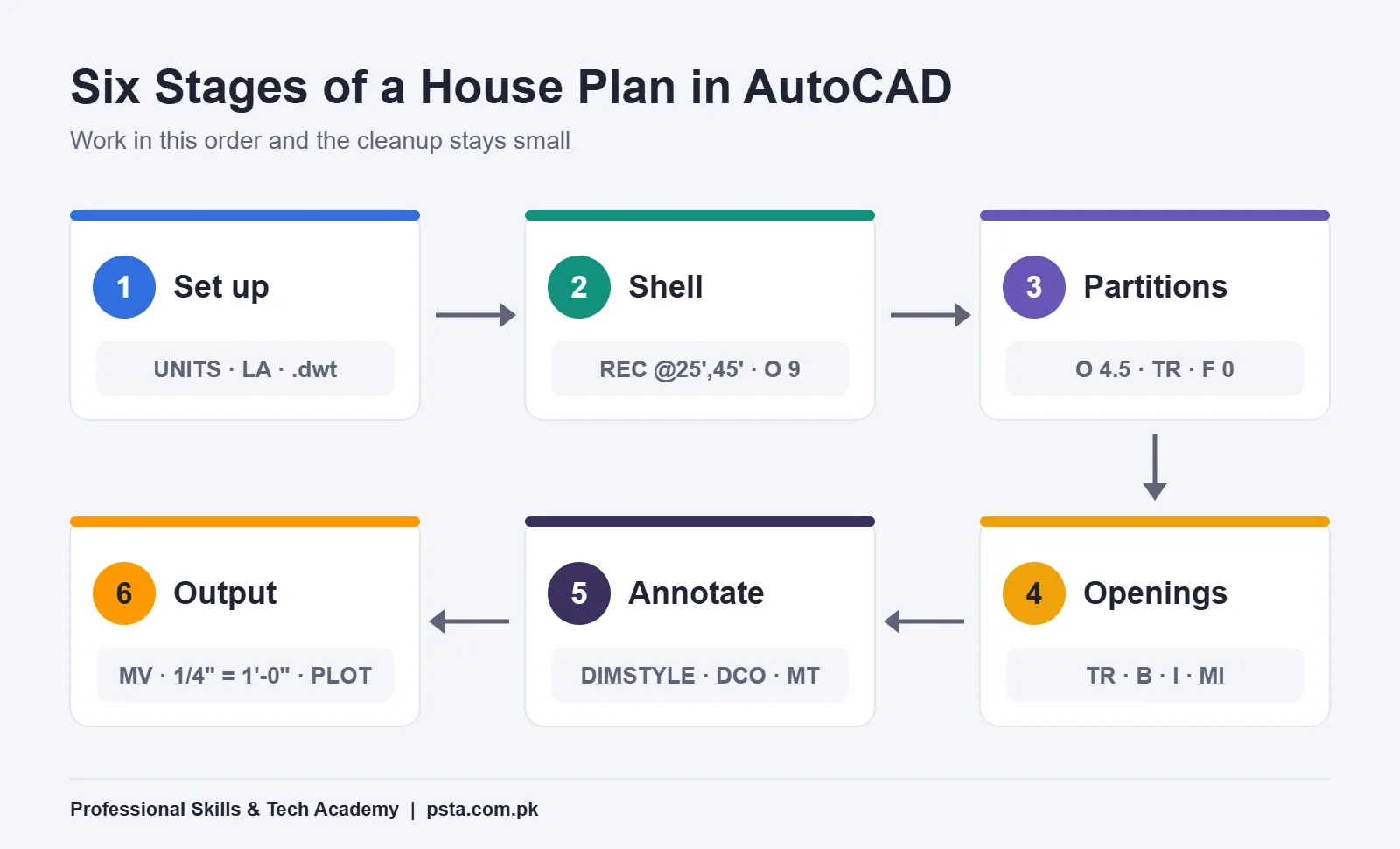
Most residential plans follow the same order from start to finish. Whether it's a 5 marla house plan or a 1 kanal bungalow, the stages don't change. Get the order right and most of the cleanup problems disappear.
- Set up: architectural units, layers and a template.
- Shell: the plot rectangle and the 9-inch outer walls.
- Partitions: internal walls placed by typed distances, then trimmed.
- Openings: door and window gaps, then reusable blocks.
- Annotation: dimension strings, room labels and hatch.
- Output: a layout viewport at 1/4" = 1'-0" and a PDF plot.
On a first attempt, give yourself a few evenings rather than one long sitting. Speed comes from repetition, and the AutoCAD shortcut keys guide lists the aliases that cut that time down.
Setting Up Units, Layers and a Template
Units First
Units decide how every number in a house plan in AutoCAD behaves, so set them before anything else. Type UNITS and set Length Type to Architectural. According to Autodesk's Drawing Units dialog help, this format shows feet and inches and treats one drawing unit as one inch. So 25 ft equals 300 units, and you can type either 25' or 300. Set precision to 1/2" and the insertion scale to inches, so blocks you bring in later arrive at the right size.
A Lean Layer Set
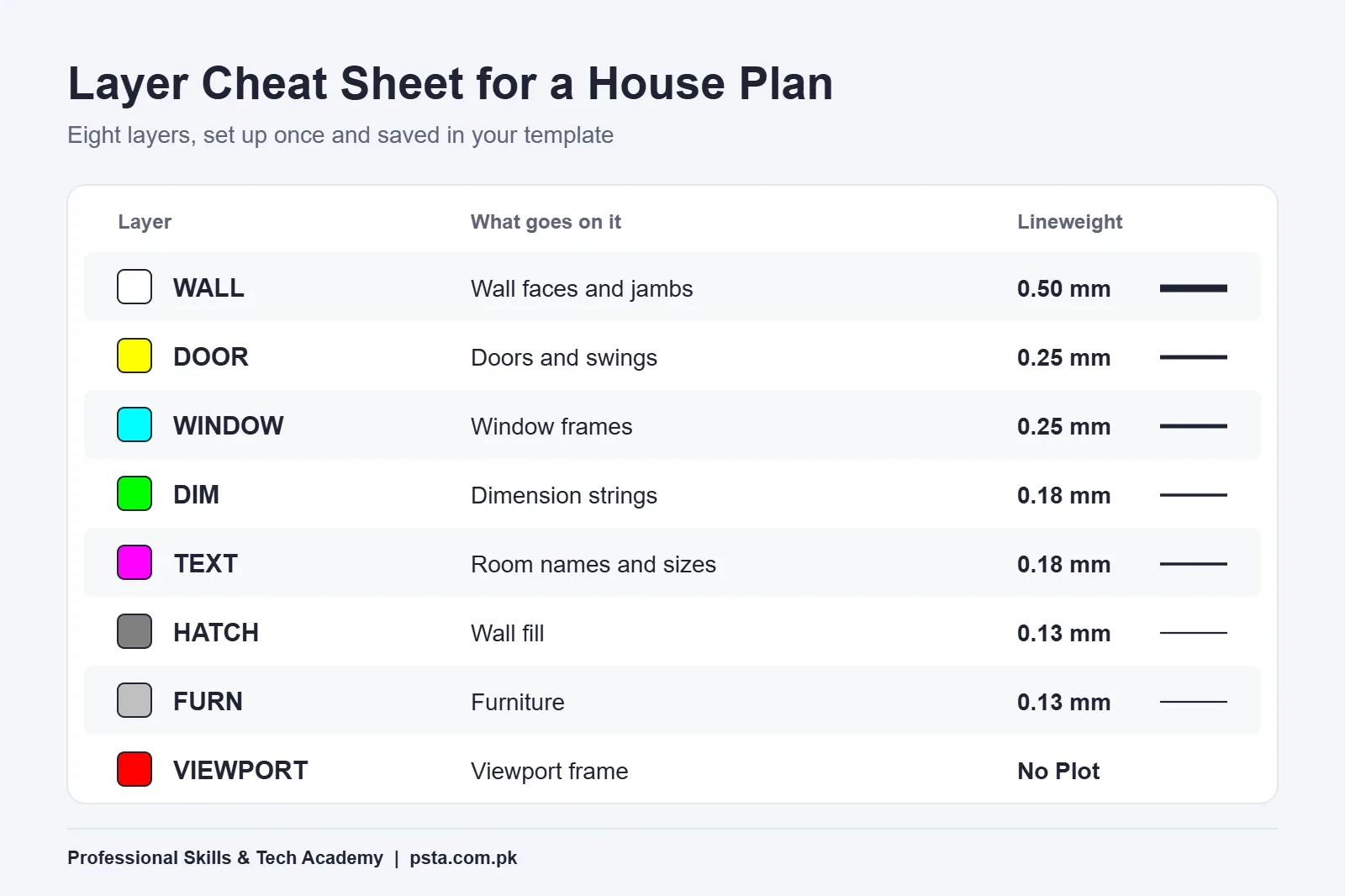
Open the Layer Properties Manager with LA and create eight layers before you draw a single line. AutoCAD layers do two jobs here. They let you hide clutter while you draw, and they decide how each line prints, so walls come out bold and furniture faint.
| Layer | What goes on it | Color | Lineweight |
|---|---|---|---|
| WALL | Wall faces and jambs | 7 (white) | 0.50 mm |
| DOOR | Door leaves and swings | 2 (yellow) | 0.25 mm |
| WINDOW | Window frames and glass lines | 4 (cyan) | 0.25 mm |
| DIM | All dimension strings | 3 (green) | 0.18 mm |
| TEXT | Room names and sizes | 6 (magenta) | 0.18 mm |
| HATCH | Wall and floor hatch | 8 (grey) | 0.13 mm |
| FURN | Beds, sofas, kitchen counters | 9 (light grey) | 0.13 mm |
| VIEWPORT | Layout viewport frames (set to No Plot) | 1 (red) | Default |
Save It as a Template
Once units and layers are ready, use Save As and pick the AutoCAD Drawing Template (.dwt) type. Name it something like House-Plan-Feet.dwt. Every future house plan in AutoCAD then starts with the same setup, and your drawings look consistent when a client compares two jobs.
Drawing the Plot Boundary and the 9-Inch Outer Walls
Why 9 inches? A World Housing Encyclopedia report on brick homes in Peshawar and nearby areas describes 9-inch solid burnt-brick walls, with 4.5-inch brick walls also in use. Those two numbers are the ones you'll type most often in northern Pakistan. Your structural engineer has the final say on a real building, though.
- Make WALL the current layer and press F8 to turn Ortho on.
- Type REC, click or type 0,0 for the first corner, then type @25',45' for the opposite corner. In this example, the outer face of the wall sits on the plot line.
- Type O for OFFSET, enter 9, pick the rectangle and click inside it. You now have the inner face of the outer wall.
- Type X to explode the inner rectangle into four separate lines. Partitions are offset from single edges, not from the whole rectangle.
Check the inside size with DI (DIST). The clear width should read 23'6" and the clear depth 43'6". If it doesn't, fix it now. An error in the shell spreads to every room.
Placing the Internal Walls Room by Room
This is the stage where an AutoCAD floor plan either stays clean or turns messy. Think of the house as two strips running from the road to the back wall. The left strip is 11'0" clear, the right strip 12'1.5" clear, with a 4.5-inch wall between them. Add those up and you get the 23'6" clear width, so nothing is left over.
| Room (front to back) | Strip | Clear size | Approx. area |
|---|---|---|---|
| Car porch | Left | 11'0" x 15'0" | 165 sq ft |
| Lounge | Left | 11'0" x 13'0" | 143 sq ft |
| Bedroom 1 | Left | 11'0" x 14'9" | 162 sq ft |
| Drawing room | Right | 12'1.5" x 12'0" | 146 sq ft |
| Kitchen | Right | 12'1.5" x 9'0" | 109 sq ft |
| Bedroom 2 | Right | 12'1.5" x 13'0" | 158 sq ft |
| Bath 1 (opens to Bedroom 1) | Right | 5'0" x 8'4.5" | 42 sq ft |
| Bath 2 (opens to Bedroom 2) | Right | 6'9" x 8'4.5" | 56 sq ft |
Each strip adds up to the 43'6" clear depth once you count the 4.5-inch walls between rooms. Bath 1 sits in the right strip but shares a wall with Bedroom 1, so its door opens into that bedroom.
Two Ways to Draw Partitions
The offset method. Offset the inner left wall line by 11', then offset that new line by 4.5. You have both faces of the long partition. Repeat across the depth for each room wall. Then use TR (TRIM) to cut every crossing, and F (FILLET) with radius 0 to close corners that fall short.
The multiline method. Type ML, set Scale to 4.5 and Justification to Zero, then draw along wall centerlines. Autodesk's page on multilines explains that justification decides which side of the cursor the lines fall on, and scale sets the overall width. Multilines are quick, but junctions need extra editing. Offsets are the safer choice for a first plan because every line stays easy to trim.
Cutting Doors and Windows Into the Walls
In this example, room doors are 3'0" wide, bath doors 2'6" and the main entrance 3'6". Windows are 4'0" in bedrooms and 3'0" in baths. Those are the sample's choices, so adjust them to your client's brief.
- Offset a wall end or corner line to mark where the opening starts, then offset again by the opening width.
- Trim the wall faces between those two marker lines.
- Draw short jamb lines across the wall thickness to close each side of the gap.
- On the DOOR layer, draw a 3'0" door leaf and a quarter arc for the swing. Turn it into a block with B and name it DOOR-36.
- Insert the block in each opening with I. Use rotation and MI (MIRROR) for left-hand and right-hand doors.
- For windows, draw three parallel lines inside the wall thickness on the WINDOW layer and save them as a block too.
Swing doors so they open against a wall, not into a bed or a kitchen counter. A badly swung bath door is the first thing a client notices on a printed plan.
Dimensions, Room Labels and Hatch a Builder Can Follow
Dimension Strings
Good AutoCAD dimensions give the builder three levels of detail. Open D (DIMSTYLE), set primary units to Architectural, and tick Annotative so the dimensions size themselves to the viewport scale later. Then place three strings on each side of the house:
- Outer string: one overall dimension, such as 25'0" or 45'0".
- Middle string: room-by-room sizes, chained with DCO (DIMCONTINUE).
- Inner string: opening positions and widths.
Always snap dimensions to wall corners, never to hatch lines. Otherwise the numbers look right but measure the wrong thing.
Room Labels
Use MT (MTEXT) on the TEXT layer. Write the room name on one line and the clear size underneath, for example BEDROOM 1 and then 11'0" x 14'9". On site, builders often read these labels before the dimension strings, so keep them accurate.
Hatch and Furniture
Hatch the wall thickness on the HATCH layer with a solid fill or ANSI31 so walls stand out from rooms. Add beds, sofas and kitchen counters on FURN. Thin, grey furniture against thick, dark walls is what makes a plan readable at a glance.
How Do You Print a House Plan to Scale in AutoCAD?
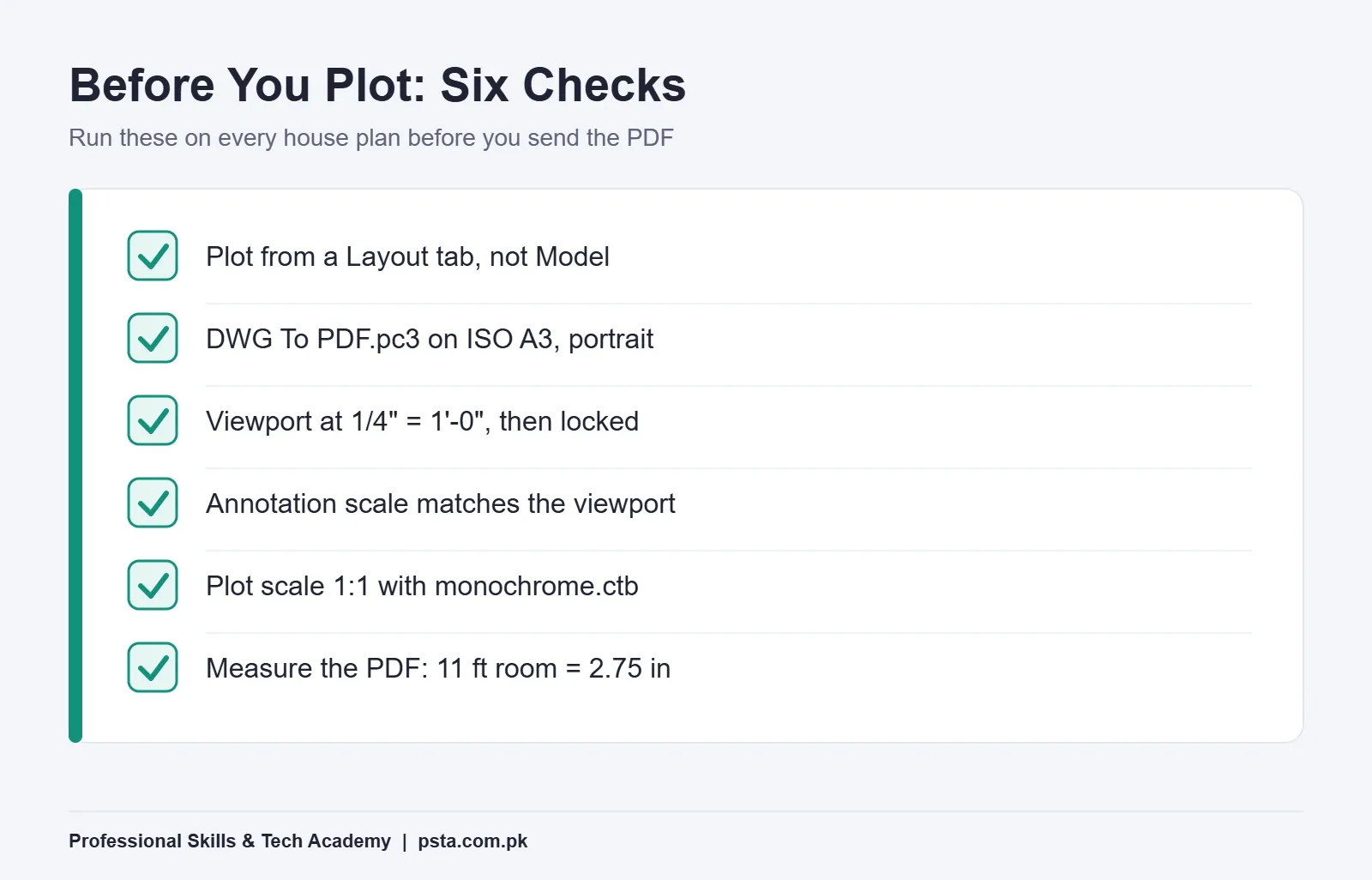
Printing from the Model tab with "Fit to paper" is the most common beginner shortcut, and it destroys the scale. Autodesk's Plot dialog help confirms that Fit to Paper is the default on the Model tab, while 1:1 is the default for layouts. To plot to scale in AutoCAD, you therefore work from a layout.
- Click a Layout tab and open the Page Setup Manager. Choose DWG To PDF.pc3, paper ISO A3 (297 x 420 mm), portrait.
- Insert your title block, then draw a viewport with MV on the VIEWPORT layer.
- Double-click inside the viewport and set its scale to 1/4" = 1'-0". At that scale, the 45 ft depth becomes 11.25 inches on paper, which fits inside the 16.5-inch tall sheet with room for the title block.
- Check that the annotation scale matches. Autodesk's notes on annotation scales and viewports warn that zooming with the mouse wheel changes the viewport scale but leaves the annotation scale unchanged.
- Lock the viewport so a stray scroll can't change it.
- Open PLOT, set Plot Area to Layout and scale to 1:1, choose monochrome.ctb as the plot style, and click Preview.
When the PDF opens, measure one room with a scale ruler. If an 11-foot room reads 2.75 inches, your plan is truly to scale.
Which Mistakes Spoil a First House Plan?
- Drawing in decimal units and later guessing whether 300 means inches or millimeters.
- Everything on layer 0, which makes lineweights and color changes impossible to control.
- Walls as single lines. A single line has no thickness, so room sizes on the plan become fiction.
- Eyeballed partitions drawn with the mouse instead of typed offsets.
- Room sizes that don't add up to the clear width, leaving a mystery 7-inch gap somewhere.
- Plotting with Fit to Paper, so no one can scale anything off the print.
Run a quick sum before you print any house plan in AutoCAD: room widths plus wall thicknesses should equal the plot width exactly. If they don't, the drawing isn't finished.
Drafting Your First Full Plan in PSTA's AutoCAD Course
A tidy house plan in AutoCAD is a solid first portfolio piece. It suits applications for civil draftsman jobs and small construction firms, and freelance clients often want hand sketches redrawn this way. If interviews are your next step, the AutoCAD interview questions for draftsman jobs post shows what employers ask. If you're weighing a move into BIM later, read AutoCAD vs Revit before you decide.
In PSTA's AutoCAD Mastery: 2D, 3D Design and BIM course, this kind of plan sits at the center of the 2D work. The course page lists modules on layers, dimensions and text annotation, then blocks, attributes and X-Refs, and a final architectural or mechanical project. It also covers plotting and publishing drawings to scale as PDFs. The course is beginner level, runs 45 to 90 days and lists its fee as Rs. 28,000 at the time of writing, reduced from Rs. 30,000.
You can study at the Mandian campus on Old College Road in Abbottabad, join live online from anywhere in Pakistan, or mix both. A new batch starts every month, with class slots from Monday to Saturday. Electricians who mainly draw panel layouts may find the Industrial Automation course a better fit. You can compare every program on the courses page. Questions about timings are easiest to settle on WhatsApp at +92 314 5424399, or you can apply directly through the admission form.
Don't have the software yet? The AutoCAD free for students checklist covers who qualifies for Autodesk's education access.
A Weekend Exercise: Measure, Draw, Print
Pick one room in your own home. Measure its length, its width, the door width and the window positions with a tape. Draw it with the method above: units, WALL layer, 9-inch outer faces, an opening and one dimension string. Then plot it on A4 or A3 at 1/4" = 1'-0" and check one wall with a scale ruler. If the printed number matches your tape, you're ready to draw a full house plan in AutoCAD for the 5 marla plot.
Frequently asked questions
Can I draw a house plan in AutoCAD LT?
Yes. Everything in this walkthrough is 2D drafting: units, layers, offsets, blocks, dimensions, layouts and plotting. AutoCAD LT is built for exactly that kind of work. The Drawing Units and Plot dialog pages linked in this guide come from Autodesk's AutoCAD LT 2027 help, so the settings described match what you will see on screen.
Should I draw a house plan in feet and inches or in millimeters?
Use the unit your client and builder use. Plot sizes in Pakistan are usually quoted in feet and marla, so Architectural units with feet and inches are the easier choice for most house plans. If an engineering firm sends you metric drawings, switch to Decimal units in millimeters and keep every drawing in that project consistent.
What scale should I use to print a 5 marla plan on A3?
For a 25 x 45 ft plot, 1/4" = 1'-0" works well on A3 portrait. The 45 ft depth becomes 11.25 inches on paper, leaving space for a title block on the 16.5-inch tall sheet. Set that scale on the layout viewport, then plot at 1:1 from the layout rather than using Fit to Paper.
Is every 5 marla plot 25 x 45 ft?
No. At 225 sq ft per marla, 5 marla is 1,125 sq ft, which suits 25 x 45 ft. Where the older 272.25 sq ft marla applies, the same 5 marla is 1,361.25 sq ft. Some schemes also use 25 x 50 ft. Always take the real width and depth from the allotment papers or a tape measurement.
How thick should walls be on a house plan drawing?
A World Housing Encyclopedia report on brick homes around Peshawar describes 9-inch solid brick walls, with 4.5-inch brick walls also used. That is why this guide draws outer walls at 9 inches and partitions at 4.5 inches. On a real building, the structural engineer decides the final thickness, especially for a home that will get more storeys later.
Can I submit this plan for building approval?
Not as it stands. This walkthrough is a drafting exercise. An approval drawing must follow your development authority's setbacks, covered-area limits and other bylaws, and it usually needs a registered architect or engineer to sign it. Use this method to build the drafting skill, then follow your local authority's checklist for submission drawings.
How many weeks before I can draw a full house plan on my own?
It depends on how often you practice. PSTA's AutoCAD Mastery course runs 45 to 90 days and covers layers, dimensions, blocks and plotting to scale before the final project. A single room is a sensible first target. A full, well-dimensioned house plan comes after you have repeated the same workflow on several different layouts.
Sources & references
- Plot Size Conversions in Pakistan (Zameen) zameen.com
- Marla (unit) (Wikipedia) en.wikipedia.org
- Best Floor Plans for a 5 Marla House (Zameen) zameen.com
- Unreinforced Brick Masonry Residential Building, Report 112 (World Housing Encyclopedia) world-housing.net
- Drawing Units Dialog Box, AutoCAD LT 2027 Help (Autodesk) help.autodesk.com
- About Multilines (Autodesk Help) help.autodesk.com
- Plot Dialog Box, AutoCAD LT 2027 Help (Autodesk) help.autodesk.com
- About Annotation Scales and Viewports (Autodesk Help) help.autodesk.com
Last reviewed & updated on by Umar Qureshi. Written by the PSTA team in Abbottabad, Pakistan.

Umar Qureshi

AutoCAD Mastery: 2D, 3D Design & BIM (Complete Professional Course)
Turn this guide into a career: hands-on training with real projects, online across Pakistan or on-campus in Abbottabad · 45 - 90 Days.



Comments
No comments yet — ask a question or share your experience.