Quick answer
To increase typing speed, fix accuracy before you chase speed. Keep your wrists straight, stay on the home row, stop looking at the keys and drill your weakest letters for 20 to 30 minutes a day. In a study of 168,000 typists, the fastest group also made the fewest errors.
Key takeaways
- • Faster typists in the CHI 2018 study also made fewer errors, so build accuracy before speed.
- • The average participant typed 51.56 WPM and left about 1.17% of characters wrong.
- • Most fast typists overlapped keypresses (rollover) on 40% to 70% of their keys.
- • A typing course added only about 5 WPM on average; consistent finger use matters more than finger count.
- • Short daily practice of 20 to 30 minutes works better than one long weekly session.
Table of contents 22 sections
- How to Increase Typing Speed: What Actually Moves the Number
- Where Are You Starting From?
- Accuracy Habits That Put a Ceiling on Your Speed
- 1. Racing Past Mistakes and Fixing Them With Long Backspace Runs
- 2. Glancing Down at the Keyboard
- 3. Practicing Only the Words You Already Know
- Hand Technique Habits Most Beginners Don't Notice
- 4. Letting Your Hands Drift Off the Home Row
- 5. Pressing One Key, Waiting, Then Pressing the Next
- 6. Hitting Keys Too Hard
- 7. Using Whatever Finger Is Closest
- Practice Habits That Waste Your Time
- 8. Taking Test After Test Instead of Drilling
- 9. Practicing for Two Hours Once a Week
- 10. Ignoring Your Chair, Desk and Wrists
- Do You Really Need All Ten Fingers?
- Which Kind of Typist Are You Right Now?
- A Weekly Routine That Replaces Bad Habits
- How to Judge Progress Honestly
- What About Urdu Typing and Office Tests?
- Correcting These Habits in PSTA's Typing Classes
- Tonight's Task: Pick One Habit, Not Ten
A question typing students ask me almost every month goes like this: why does my speed climb for two weeks and then refuse to move, no matter how many tests I take? If you want to increase typing speed past that wall, more tests won't do it. You have to find the habits that hold your fingers back and replace them one at a time.
This guide lists the 10 habits I see most often in beginners and office staff in Abbottabad, explains why each one costs you words per minute, and gives you a fix you can practice today. The advice leans on a large published study of real typists, not on guesswork.
Here is what you will take away from it:
- Why accuracy, not raw effort, decides how fast you can get
- The 10 habits that keep learners stuck on the same score for weeks
- What research on 168,000 typists says about fingers, courses and rollover
- A weekly practice routine with free tools and clear targets
- How to check your progress without fooling yourself
How to Increase Typing Speed: What Actually Moves the Number
In 2018, researchers from Aalto University and the University of Cambridge analyzed 136 million keystrokes from about 168,000 volunteers who took an online typing test. According to the published CHI 2018 paper, the average participant typed 51.56 words per minute and left about 1.17% of characters wrong.
Two findings matter most for anyone trying to get faster. First, the faster typists in the study also made fewer errors. Speed and accuracy were not a trade-off at the top; they came together. Second, fast typists used a lot of rollover, which means pressing the next key before the previous one is fully released. The paper reports that most fast typists did this on 40% to 70% of their keypresses.
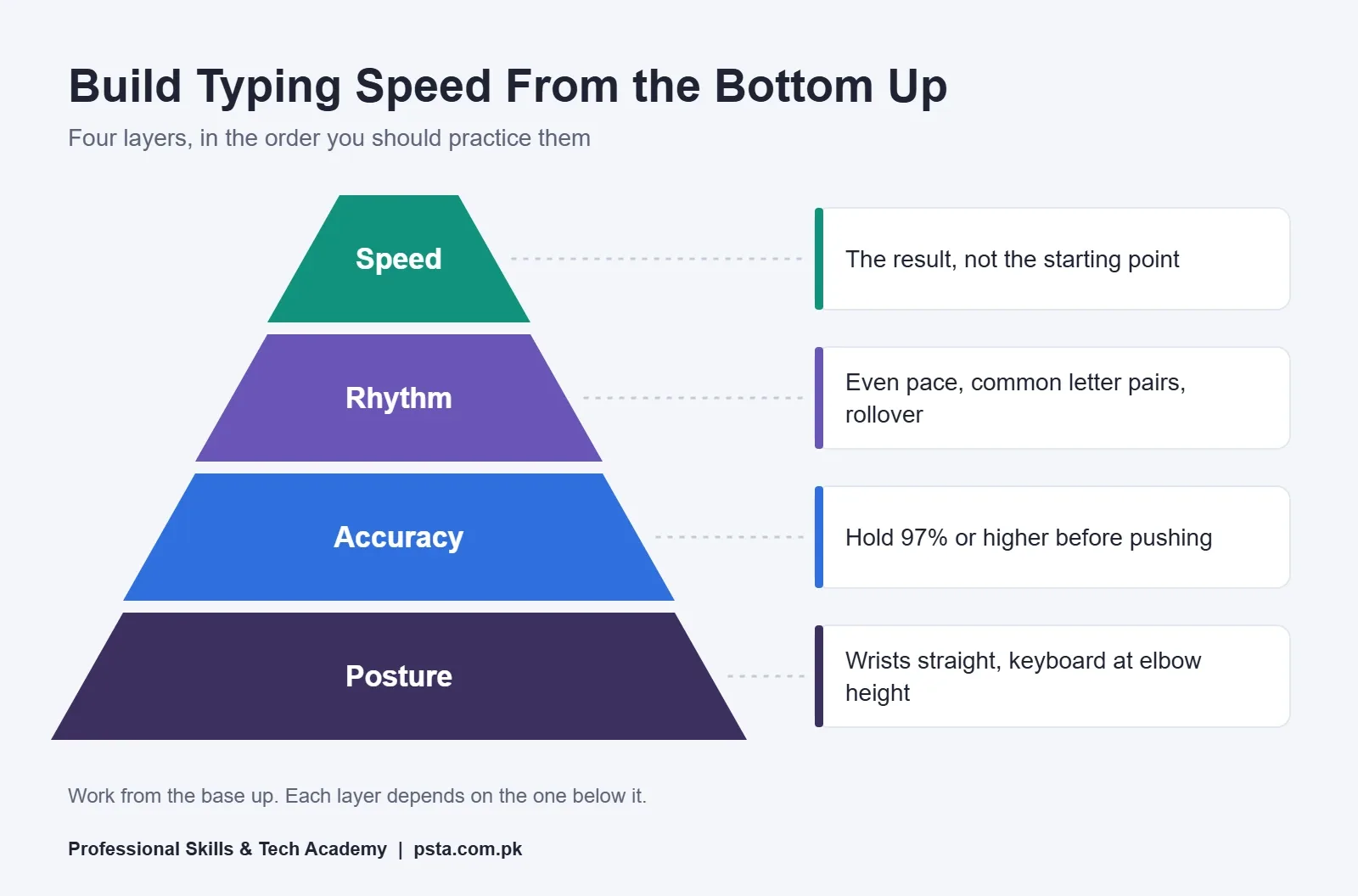
So the order of work is clear. Get your posture right, then accuracy, then rhythm. Speed is what shows up when the three layers below it are solid. Most of the habits below break one of those layers.
Where Are You Starting From?
Before you try to increase typing speed, take a baseline so you can measure real progress later. Typing tests count a "word" as five characters, including spaces and punctuation, as the standard WPM definition explains. A long word like "examination" therefore counts as more than two words.
- Take a one-minute typing speed test three times, using ordinary sentences rather than random letters.
- Write down the WPM and the accuracy figure for each one.
- Use the middle result as your baseline, not the best one.
- Note which letters you missed. Those keys will become your drill list.
If you are preparing for a government or office test, read our breakdown of the WPM that Pakistani job ads require to see your target. This article focuses on how to get there.
Accuracy Habits That Put a Ceiling on Your Speed
Typing accuracy is the first place to look when you try to increase typing speed. These three habits create most of the errors I see in new learners.
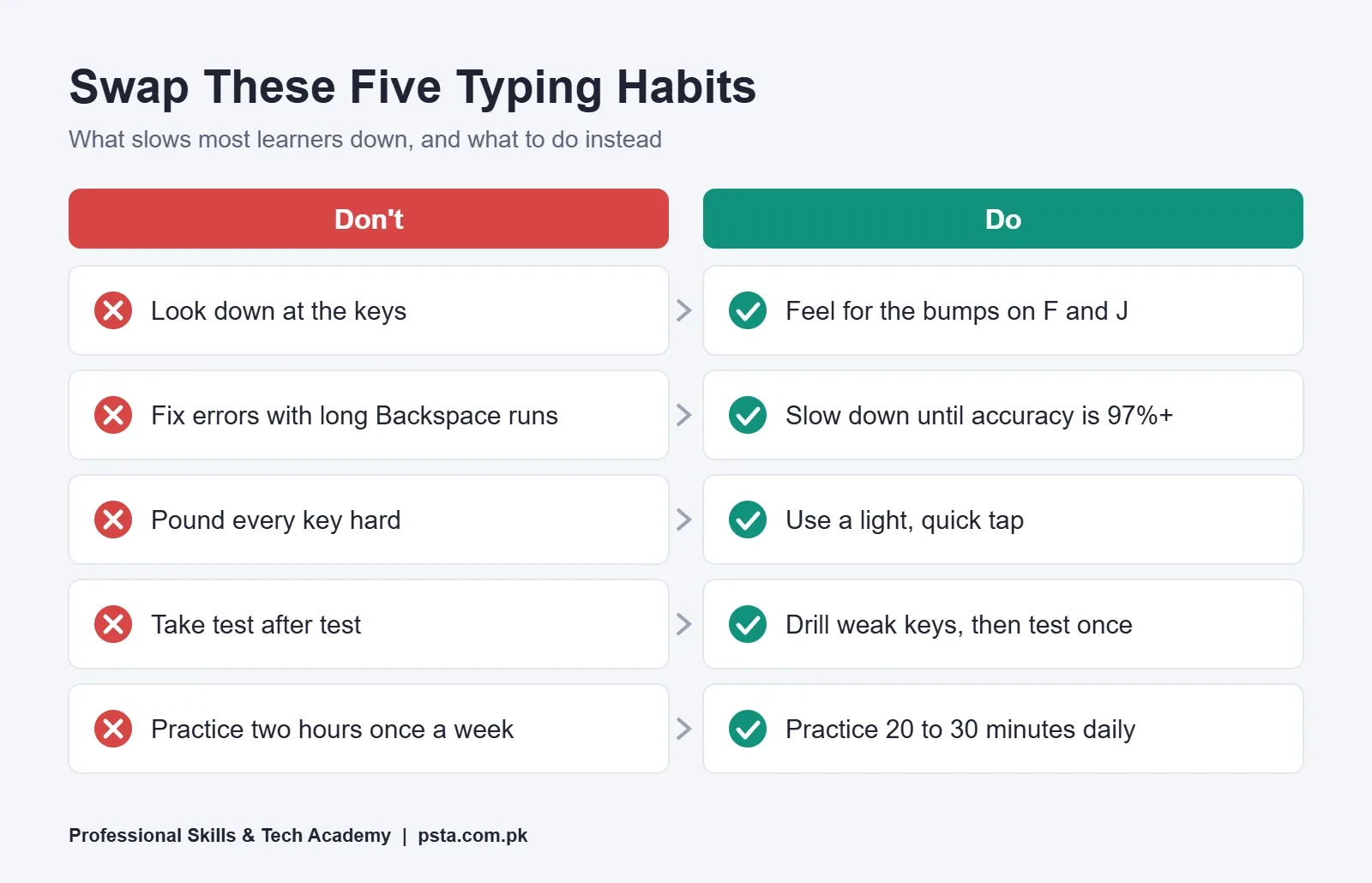
1. Racing Past Mistakes and Fixing Them With Long Backspace Runs
Every wrong letter costs you three keystrokes: the mistake, the Backspace and the correct key. When you type fast enough to make an error every few words, those extra keystrokes eat the time you thought you saved. One of the study's authors, Anna Feit, advised typists to slow down to avoid errors, because fixing them is so expensive (I Programmer's report covers this).
Fix: Drop your speed until your accuracy sits at 97% or higher. Hold it there for a week before you push again.
2. Glancing Down at the Keyboard
Each glance breaks your reading flow, and your eyes need time to find their place on the screen again. A quick look feels harmless, yet a two-finger typist does it many times in a single line. According to the WPM article on Wikipedia, hunt-and-peck typists sustain around 37 WPM from memory and 27 WPM when copying text.
Fix: Feel for the small bumps on the F and J keys. Put a light cloth over your hands for 10 minutes a day if you can't stop looking.
3. Practicing Only the Words You Already Know
Common words like "the" and "and" feel fast because your fingers memorized them long ago. If every drill uses easy words, your weak keys never get the repetition they need. In my classes, learners usually stumble on Q, Z, X and the punctuation keys, because school exercises rarely use them.
Fix: Spend part of each session on text that includes numbers, commas, brackets and less common letters.
Hand Technique Habits Most Beginners Don't Notice
Once your errors drop, technique decides how far you can increase typing speed. Watch your hands for a few minutes and check for these four habits.
4. Letting Your Hands Drift Off the Home Row
Your fingers should return to the home row keys (A, S, D, F and J, K, L, ;) after every reach. When the hands drift, every next key becomes a small search. That search shows up as hesitation in your results, even when you don't make a mistake.
Fix: After each sentence, check that your index fingers rest on F and J before you start the next one.
5. Pressing One Key, Waiting, Then Pressing the Next
Slow typists often finish one keypress completely before starting the next. Fast typists overlap them. You don't need to force this. It develops when common letter pairs, such as "th", "er" and "in", become automatic.
Fix: Drill short, frequent letter pairs and three-letter chunks until they feel like one movement, not two.
6. Hitting Keys Too Hard
Pounding the keys tires your fingers and slows the return to home row. A light, quick tap is all a key needs.
Fix: Type one paragraph as quietly as you can. Notice how little force you actually need.
7. Using Whatever Finger Is Closest
Self-taught typists often use the same two or three fingers for keys on both sides of the keyboard. That habit makes some reaches awkward and blocks the overlap that fast typing depends on. The study found that letter pairs typed by different hands or fingers predict speed better than repeated letters do.
Fix: Learn the standard finger zones for each column, then practice words that alternate hands, such as "form", "half" and "visit".
Practice Habits That Waste Your Time
Hours at the keyboard alone won't increase typing speed. How you spend those minutes matters more than how many you log.
8. Taking Test After Test Instead of Drilling
A typing test measures your speed. It doesn't build it. Taking 20 tests in a row mostly repeats the habits you already have, including the bad ones.
Fix: Split each session into drills first and one test at the end. Adaptive tools such as keybr start with a small set of frequent letters, add new ones once you reach your target speed, and build lessons around your weakest keys.
9. Practicing for Two Hours Once a Week
Muscle memory grows through short, regular repetition. One long weekend session leaves you tired and sloppy by the second hour, and you lose most of the gains by the next weekend.
Fix: Practice 20 to 30 minutes a day, five or six days a week. Stop while your accuracy is still high.
10. Ignoring Your Chair, Desk and Wrists
Many students practice on a laptop placed on a bed or a high dining table. That position bends the wrists and tires the shoulders within minutes. The OSHA computer workstation guide recommends keeping the keyboard at about elbow height, wrists straight and in line with the forearms, and forearms roughly parallel to the floor.
Fix: Raise your chair or lower the keyboard until your wrists stay straight. OSHA also warns that wrist rests with hard edges can press on the wrists, so don't lean on the desk edge while you type.
Do You Really Need All Ten Fingers?
Not strictly. In the CHI 2018 paper, participants reported using about seven fingers on average, and the number of fingers was only moderately linked to speed (a correlation of 0.38). Some quick typists in the data used fewer than ten.
Formal training showed a similar pattern. Around 72% of participants said they had taken a typing course, and they were on average about 5 WPM faster than those who hadn't. The authors called this a small effect and noted that untrained typists can match trained ones.
What does that mean for you? Ten-finger touch typing is still the most reliable method to teach, because it gives every key an owner. But the real goal is consistency: the same finger for the same key, every time, without looking. If you already type with eight fingers at 45 WPM and high accuracy, don't tear everything down. You can still increase typing speed by fixing the keys that cause errors.
Which Kind of Typist Are You Right Now?
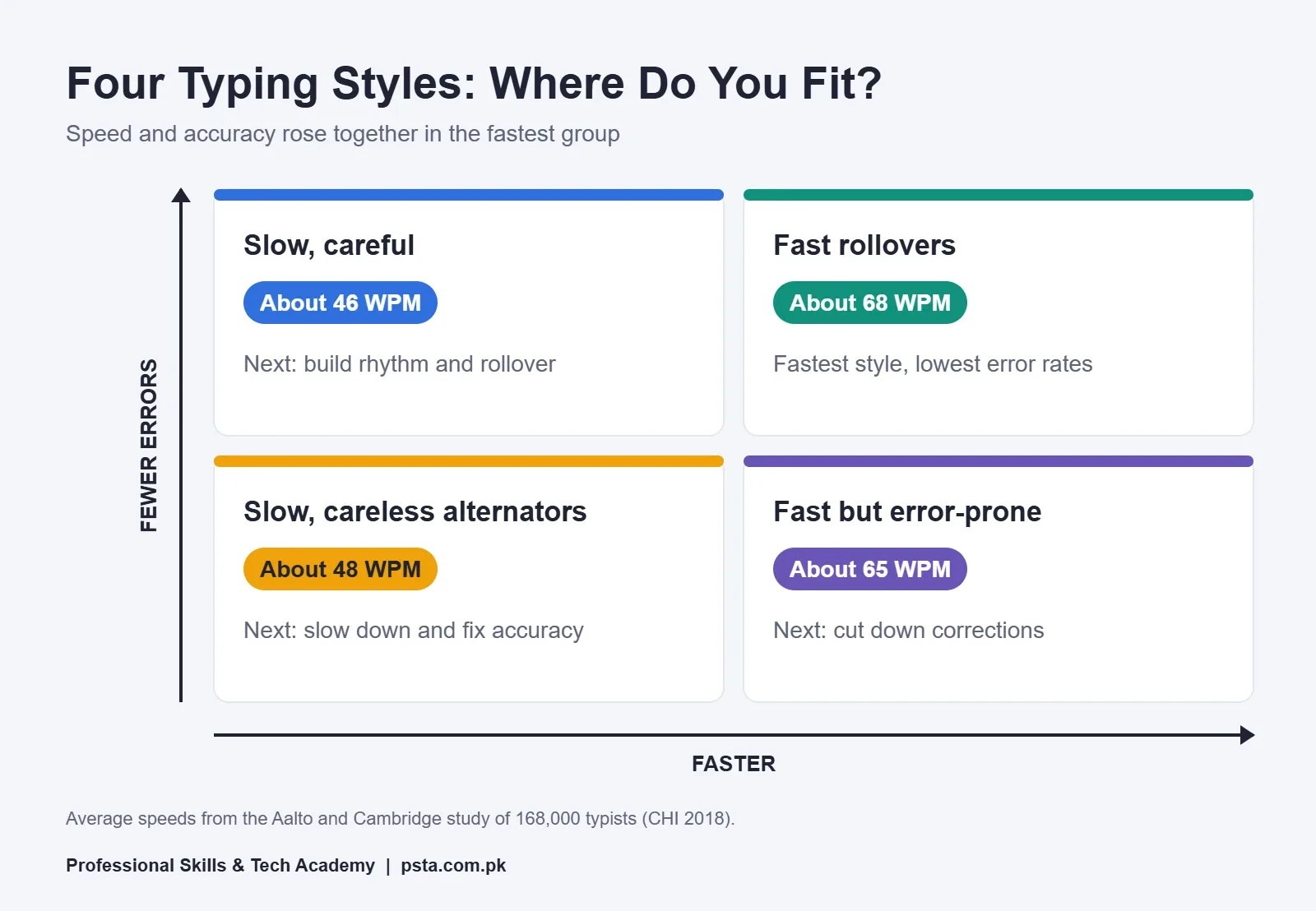
The researchers grouped participants into eight typing styles. I Programmer's summary lists the approximate average speed of each group. Four of them make a useful map for learners:
| Typing Style | Approx. Average Speed | What It Tells You |
|---|---|---|
| Slow, careful typists | About 46 WPM | Accurate base. Work on rhythm and rollover next. |
| Slow, careless hand alternators | About 48 WPM | Errors are the main brake. Slow down and fix accuracy first. |
| Fast but error-prone | About 65 WPM | Speed is there. Error correction is wasting much of it. |
| Fast rollovers | About 68 WPM | The fastest group, with the lowest error rates. |
The largest group in the study was the slow, careful one. The second largest was the fast rollover group. That second fact should encourage you: the fastest style was also one of the most common.
A Weekly Routine That Replaces Bad Habits
This typing practice routine is built to increase typing speed steadily, and it fits into 25 minutes a day. Change the drill content every week based on the keys you missed most.
| Session Part | Minutes | What to Do | What to Record |
|---|---|---|---|
| Warm-up | 3 | Home row and hand-alternating words at a slow, even pace | Nothing |
| Weak-key drill | 10 | Adaptive lessons or a custom list built from your missed letters | The three keys with most errors |
| Real text | 8 | Copy a paragraph from a newspaper, email or textbook, including numbers and punctuation | Accuracy only |
| One test | 2 | A single one-minute test with eyes on the screen | WPM and accuracy |
| Cool-down | 2 | Stretch your fingers and wrists, look away from the screen | Nothing |
For the test part, a site such as Monkeytype lets you change the test length and word set to suit your goals. Keep the settings the same every day, or your weekly comparison won't mean much.
How to Judge Progress Honestly
- Compare weekly averages, not single best scores.
- Count a week as a win only if accuracy stayed at 97% or above.
- Expect flat weeks. A plateau usually means one habit needs attention, not that you have reached your limit.
What About Urdu Typing and Office Tests?
Many offices in Pakistan work with both English and Urdu documents. The habits above apply to both, but Urdu adds a new layout to learn. Set up your keyboard first with our Urdu typing on computer guide, then apply the same routine at a slower starting pace.
For office roles, speed is one skill among several. Our checklist of basic computer skills for office jobs covers what else employers expect, and the Office Automation course adds Word, Excel and general computer skills on top of typing.
Correcting These Habits in PSTA's Typing Classes
Self-practice works, but most people can't see their own bad habits. A drifting hand or a wrong finger is obvious to someone standing behind you and almost invisible to you. That's where a class helps.
The Professional English and Urdu Typing course at PSTA runs for four weeks at beginner level. According to the course page, it covers ergonomics, each keyboard row in turn, numbers and special characters, speed-building and accuracy drills, Urdu typing with Phonetic and InPage layouts, and timed test simulations. The listed fee is Rs. 3,000, shown against a regular price of Rs. 4,500.
You can join on campus in Abbottabad (Mandian, Old College Road, opposite FIMS College), live online from anywhere in Pakistan, or in a mix of both. New batches start every month. If you want a broader IT foundation, the one-year DIT program is another route, and you can compare every option on the courses page.
To reserve a seat in the next batch, fill in the form on our admission page. You can also send a message to +92 314 5424399 on WhatsApp with your current WPM, and we'll tell you which batch suits you.
Tonight's Task: Pick One Habit, Not Ten
Read the list again and choose the single habit that sounds most like you. Work only on that one for the next seven days, using the 25-minute routine. Take your baseline test tonight, and repeat the same test next week. One fixed habit and an honest number will teach you more about how to increase typing speed than a month of random tests.
Frequently asked questions
How long does it take to increase typing speed by 10 WPM?
There is no fixed timeline, because it depends on your starting speed, your accuracy and how often you practice. Learners who drill for 20 to 30 minutes a day and keep accuracy at 97% or higher usually see steady gains within a few weeks. Learners who only take tests tend to stay flat for much longer.
What is a good typing speed for a beginner?
In the CHI 2018 study of about 168,000 volunteers, the average speed was 51.56 WPM. Wikipedia lists professional typists at roughly 43 to 80 WPM. If you are below 30 WPM, focus on accuracy and the home row first. Above 40 WPM with high accuracy, you are already in a useful range for most office work.
Does rollover typing cause more mistakes?
Not when it develops naturally. In the CHI 2018 study, the fast rollover group was the fastest of the eight typing styles and also had the lowest error rates. Rollover becomes a problem only when you force it before your fingers know the keys. Build it through short letter-pair drills, not by rushing.
I type fast with two fingers. Should I switch to touch typing?
If you are accurate and reach your target speed without looking down, you don't have to start over. The study found that finger count was only moderately linked to speed. If you look at the keys often or make many errors, learning proper finger zones is worth the short-term drop in speed.
Why is my typing slower when I copy from paper?
Copying adds reading to the task, and your eyes move between the page and the screen. Wikipedia notes that hunt-and-peck typists average about 37 WPM from memory but only about 27 WPM when copying. Place the paper at eye level beside the screen and practice copying real text, not only memorized sentences.
Are typing games useful for building speed?
Games can keep practice fun, but they rarely target your weakest keys. Adaptive drills such as keybr build lessons around the letters you miss and add new letters only when you reach your target speed. Use games as a reward at the end of a session, not as your main practice.
Should I practice on a laptop or a desktop keyboard?
Practice on the type of keyboard you will use at work or in your test, if you can. Key spacing and travel differ, so speed doesn't always transfer fully. Whichever you use, set it at about elbow height with straight wrists, as OSHA recommends, instead of typing on a bed or a high table.
Sources & references
- Observations on Typing from 136 Million Keystrokes (Aalto University) userinterfaces.aalto.fi
- Dhakal et al., Observations on Typing from 136 Million Keystrokes, CHI 2018 (PDF) pokristensson.com
- What Makes a Fast Typist (I Programmer) i-programmer.info
- Words per minute (Wikipedia) en.wikipedia.org
- Computer Workstations eTool: Keyboards (OSHA) osha.gov
- keybr.com source and feature list (GitHub) github.com
Last reviewed & updated on by Umar Qureshi. Written by the PSTA team in Abbottabad, Pakistan.

Umar Qureshi

Professional English & Urdu Typing Course in Abbottabad
Turn this guide into a career: hands-on training with real projects, online across Pakistan or on-campus in Abbottabad · 4 Weeks.


Comments
No comments yet — ask a question or share your experience.