
Quick answer
Expect three rounds: basic functions such as COUNTA and text formulas, formula questions on absolute references, IF, SUMIFS and lookups, then data cleaning with Remove Duplicates, tables, PivotTables and charts. Learn XLOOKUP and INDEX with MATCH, because XLOOKUP isn't available in Excel 2016 or 2019.
Key takeaways
- • Most office Excel interviews move from basic functions to formulas to data cleaning and reporting.
- • Press F4 to lock a reference such as $H$1 before copying a formula down a column.
- • SUMIFS puts the sum range first, while SUMIF puts it third, so check the order.
- • Use XLOOKUP on Excel 2021, 2024 or Microsoft 365, and INDEX with MATCH on older versions.
- • Remove Duplicates deletes data permanently, so copy the sheet before cleaning.
- • A PivotTable needs one header row and no blank rows or columns inside the data.
Table of contents 26 sections
- What Do Excel Interviews in Pakistan Actually Test?
- Round 1: Basic Excel Interview Questions
- 1. What Is the Difference Between a Workbook and a Worksheet?
- 2. What Is the Difference Between COUNT, COUNTA and COUNTBLANK?
- 3. How Would You Join a First Name and a Last Name?
- 4. How Do You Pull Part of a Text, Such as a CNIC Number?
- 5. How Do You Sort a List by More Than One Column?
- Round 2: Formula Questions to Answer Without Notes
- 6. What Is the Difference Between Relative and Absolute References?
- 7. Write an IF Formula for a Simple Office Rule
- 8. What Is the Difference Between SUMIF and SUMIFS?
- 9. How Does VLOOKUP Work, and What Are Its Limits?
- 10. Why Would You Use XLOOKUP Instead?
- 11. What Does #N/A Mean, and How Do You Deal With It?
- Round 3: Data Cleaning and Reporting Questions
- 12. How Do You Remove Duplicate Entries Safely?
- 13. Why Would You Convert a Range Into a Table?
- 14. How Do You Build a PivotTable?
- 15. When Would You Use Conditional Formatting?
- 16. Which Chart Would You Use for Monthly Sales?
- How Does a Practical Excel Test Usually Run?
- Excel Interview Questions at a Glance
- Answers That Cost Candidates the Job
- A Seven-Day Plan if Your Interview Is Next Week
- Where PSTA Fits Into Your Preparation
- Rebuild One Sheet From Memory Tonight
Most Excel interview questions for office jobs fall into three groups: everyday functions, lookup and summary formulas, and keeping data clean enough to report on. Microsoft's own skills outline for its MO-200 Excel exam gives formulas and functions 20 to 25 percent of the weight, and charts get the same share. Interviewers in Pakistan rarely use that exact exam, but they test the same ground.
I sit on the other side of these tests often, helping students rehearse for computer operator, office assistant and accounts posts. Here's what you'll get from this page:
- 16 questions grouped into the three rounds most panels follow
- Short model answers you can say out loud, with the formula written out
- A simple rule for choosing between VLOOKUP, XLOOKUP and INDEX with MATCH
- The answers that quietly lose candidates the job
- A seven-day plan to get ready if your interview is next week
What Do Excel Interviews in Pakistan Actually Test?
Look at a real government advert and you'll see the pattern. A July 2026 listing for a Computer Operator at Pakistan Railways Headquarters asked for MS Office (Word, Excel, PowerPoint and Outlook), InPage Urdu, database maintenance and digital filing. Private firms write shorter adverts, yet the test that follows usually looks similar.
In practice, the panel wants to know three things. Can you enter and tidy data without breaking it? Can you write the formulas the office already uses? Can you turn a long list into a summary your manager understands? The level rises with the post. A data entry operator is mostly judged on speed and accuracy, while an accounts assistant will almost always face a lookup formula.
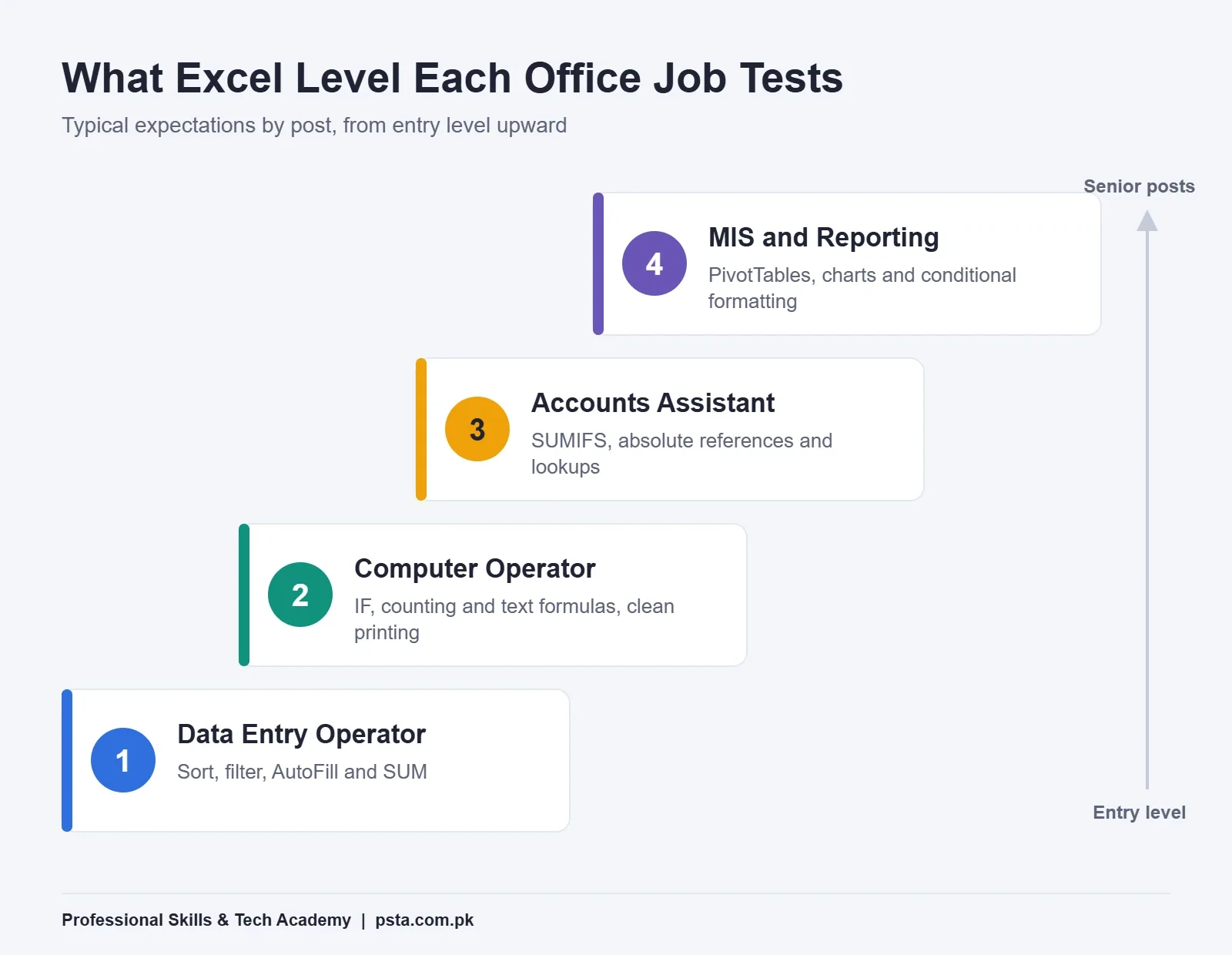
Roughly, the ladder looks like this. Data entry tests focus on sorting, filtering, AutoFill and SUM. Computer operator tests add IF, counting and text formulas, plus printing a clean page. Accounts posts expect SUMIFS, absolute references and lookups. MIS and reporting roles go further, into PivotTables, charts and conditional formatting.
Keep that ladder in mind as you read. You don't need every rung for every job, but you should be solid on the rung the advert describes and comfortable with the one above it.
Round 1: Basic Excel Interview Questions
These open most interviews. They sound easy, which is exactly why a vague answer stands out.
1. What Is the Difference Between a Workbook and a Worksheet?
Model answer: "A workbook is the whole Excel file. A worksheet is one tab inside it. I usually keep raw data on one sheet and the summary on another, so nobody types over the source records."
The second sentence matters. It shows you think about how an office actually uses files.
2. What Is the Difference Between COUNT, COUNTA and COUNTBLANK?
Model answer: "COUNT counts cells holding numbers. COUNTA counts every cell that isn't empty, including text. COUNTBLANK counts the empty ones. On an attendance sheet, COUNTBLANK quickly shows how many days nobody marked."
3. How Would You Join a First Name and a Last Name?
Write =A2&" "&B2 or =CONCAT(A2," ",B2). If the panel asks about joining a whole row of values with commas, mention TEXTJOIN, which takes a separator and can skip blanks. All three text tools appear in Microsoft's MO-200 list, so they are fair game.
4. How Do You Pull Part of a Text, Such as a CNIC Number?
A CNIC is written as 12345-1234567-1. To get the first five digits, use =LEFT(A2,5). For the seven digits in the middle, use =MID(A2,7,7). You can add that LEN returns the length, which helps you spot numbers typed without dashes.
5. How Do You Sort a List by More Than One Column?
Model answer: "I select the data, open Data > Sort, sort by the first column, then click Add Level for the second. For a student list I'd sort by class first and then by name."
Round 2: Formula Questions to Answer Without Notes
This round decides most interviews, and it holds the Excel interview questions candidates fear most. Practice writing each formula on paper, because some panels ask you to say it before you type it.
6. What Is the Difference Between Relative and Absolute References?
A relative reference such as A1 shifts when you copy the formula. An absolute reference such as $A$1 stays fixed. Microsoft's guide to switching reference types explains that pressing F4 cycles through $A$1, A$1, $A1 and A1.
Give a real case. "If a tax rate sits in cell H1 and I copy a formula down 200 rows, I write $H$1 so every row uses the same rate." That one sentence proves you've done it, not just read about it.
7. Write an IF Formula for a Simple Office Rule
Suppose staff with 24 or more working days get a Rs. 2,000 attendance allowance. The formula is =IF(C2>=24,2000,0). Panels like this question because it mirrors payroll work. If you've built a salary sheet before, mention it; our salary sheet walkthrough uses the same logic for deductions.
8. What Is the Difference Between SUMIF and SUMIFS?
SUMIF adds values that meet one condition. SUMIFS handles several, for example total sales for the Abbottabad branch in March. The trap is argument order. Microsoft's SUMIFS page notes that SUMIFS puts the sum range first, while SUMIF puts it third. Mention that difference and your answer will stand out.
Example: =SUMIFS(D:D,B:B,"Abbottabad",C:C,"March").
9. How Does VLOOKUP Work, and What Are Its Limits?
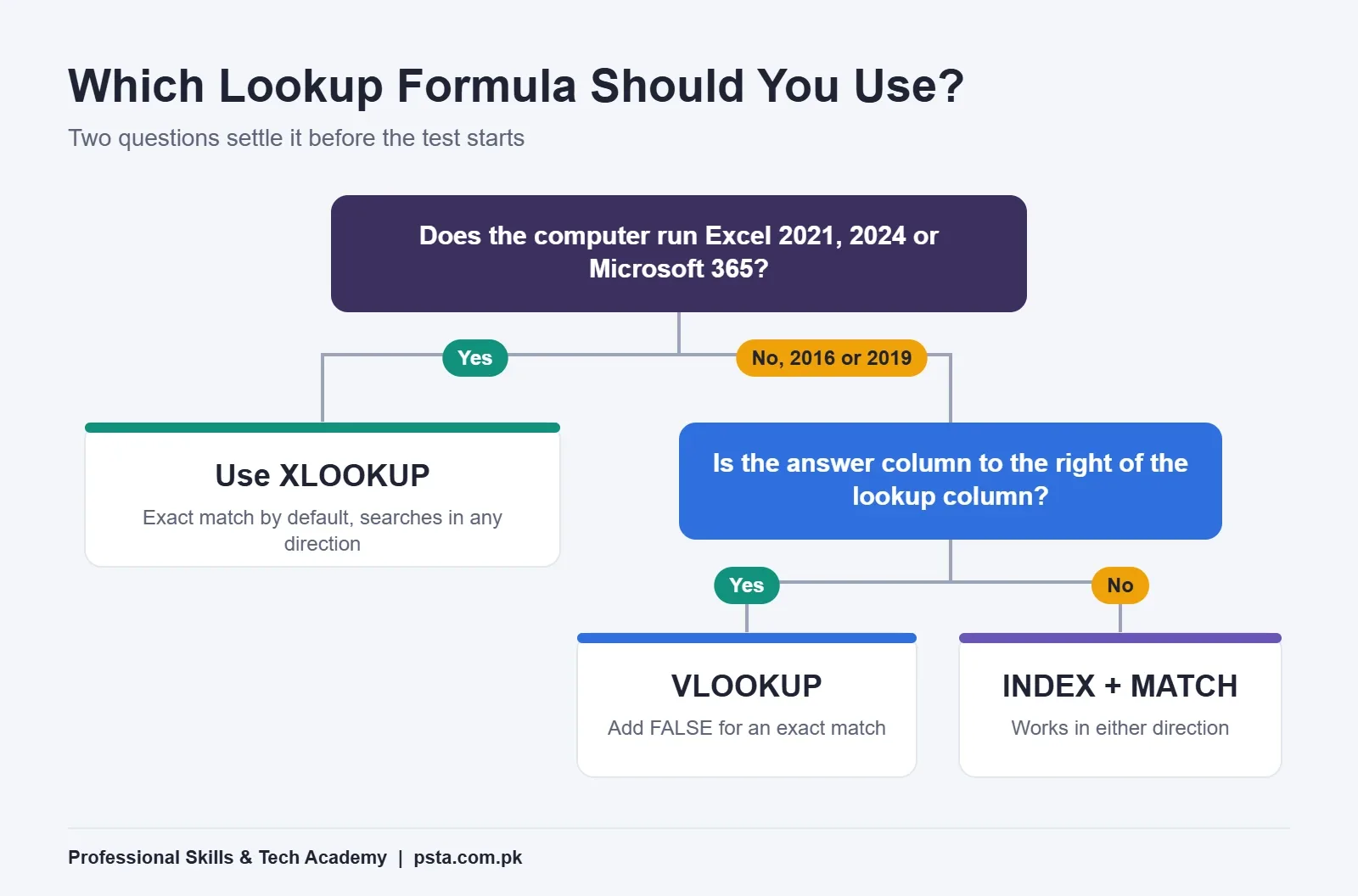
VLOOKUP searches the first column of a range and returns a value from a column to its right. Put FALSE as the last argument to get an exact match. Microsoft's VLOOKUP article spells out the main weakness: it only looks from left to right, so the lookup column must sit to the left of the answer column.
Example: =VLOOKUP(A2,Fees!A:D,4,FALSE) returns the fee status for a roll number.
10. Why Would You Use XLOOKUP Instead?
XLOOKUP searches in any direction, gives an exact match by default and lets you set your own message when nothing is found. According to Microsoft's XLOOKUP reference, it works in Excel 2021, Excel 2024 and Microsoft 365, but not in Excel 2016 or 2019.
Example: =XLOOKUP(A2,Fees!A:A,Fees!D:D,"Not found").
That version detail is worth saying aloud. You often won't know which version the test computer runs, so a good answer is: "I'd use XLOOKUP where it's available and INDEX with MATCH on older versions."
11. What Does #N/A Mean, and How Do You Deal With It?
#N/A means the lookup value wasn't found. Before hiding it, check why. Extra spaces, a number stored as text or a typing mistake are the usual causes. Once the data is clean, use XLOOKUP's fourth argument to show a clear message such as "Not found" instead of an error.
Round 3: Data Cleaning and Reporting Questions
For assistant and MIS posts, the panel often hands you a messy file. These questions check whether you can tidy it safely and then summarize it.
12. How Do You Remove Duplicate Entries Safely?
Select the data and choose Data > Remove Duplicates, then tick the columns to compare. Microsoft's guide on removing duplicates warns the deletion is permanent and suggests copying the original data first. Say you'd do exactly that. Interviewers notice candidates who protect the source file.
13. Why Would You Convert a Range Into a Table?
A table adds filter buttons, banded rows and an optional total row. Your formulas can use readable column headings in place of A1-style addresses. Best of all, a PivotTable built on a table picks up new rows when you refresh it.
14. How Do You Build a PivotTable?
Click inside the data, choose Insert > PivotTable, pick a new sheet and drag fields into Rows and Values. Microsoft's PivotTable guide lists the data rules: one header row, no blank rows or columns inside the data, and a consistent type in each column.
A good spoken answer: "From a list of 3,000 fee receipts, I'd put Class in Rows and Amount in Values to get the total collected per class in under a minute."
15. When Would You Use Conditional Formatting?
Use it to make a problem visible. For instance, color unpaid fees red, highlight stock below a reorder level or flag duplicate CNIC numbers. Keep it to one or two rules per sheet. A rainbow of colors hides the very thing you wanted to show.
16. Which Chart Would You Use for Monthly Sales?
A line chart suits a trend over months. Use a clustered column chart to compare branches, and keep pie charts for a few parts of one whole. Give the chart a clear title and label the axes. Microsoft's exam outline even includes adding alternative text to charts, a small detail that shows care.
How Does a Practical Excel Test Usually Run?
Here's a typical example of the format, not a copy of any one employer's test. You get a laptop, a file with about 200 rows of sales or fee records and 20 to 30 minutes. The tasks often look like this:
- Fix the formatting: dates in one style, amounts with thousand separators and a frozen header row.
- Remove duplicate rows after copying the original sheet.
- Add a column that uses IF to mark each record, such as "Paid" or "Due".
- Bring a value across from a second sheet with a lookup formula.
- Build a PivotTable or a SUMIFS summary by branch or month.
- Insert one chart and save the file with a sensible name.
Work in that order. Cleaning first stops your lookups and totals from failing later. If you get stuck on one step, leave a note in the cell and move on. A finished file with one gap beats a perfect half.
Excel Interview Questions at a Glance
Use this table for last-minute revision. Cover the right-hand column and try to answer from memory.
| Question | What the Panel Is Checking | Key Formula or Feature |
|---|---|---|
| COUNT vs COUNTA | You know numbers from text | COUNT, COUNTA, COUNTBLANK |
| Join or split names and CNICs | Text handling | CONCAT, TEXTJOIN, LEFT, MID, LEN |
| Relative vs absolute | You can copy formulas safely | $A$1 and the F4 key |
| Allowance or pass mark rule | Basic logic | IF |
| Totals with conditions | Report building | SUMIFS (sum range first) |
| Find a value in another sheet | Linking data | VLOOKUP, XLOOKUP, INDEX with MATCH |
| Clean a messy list | Care with source data | Remove Duplicates, tables |
| Summarize thousands of rows | Reporting speed | PivotTable |
| Show a trend | Presenting results | Line or column chart |
Answers That Cost Candidates the Job
In mock interviews, the same few habits trip people up again and again. None of them is about talent.
- Typing totals by hand. If a number can be calculated, use a formula. A typed total breaks the moment data changes.
- Saying "I know advanced Excel" without an example. Name one sheet you built and the formulas in it.
- Forgetting FALSE in VLOOKUP. Without it, VLOOKUP looks for an approximate match and can return the wrong person's record.
- Merging cells inside data. Merged cells break sorting, filtering and PivotTables. Use them only in titles.
- Deleting rows from the only copy. Always duplicate the sheet before cleaning.
- Guessing in silence. If you don't know a function, explain how you'd find it. Calm problem solving counts.
A Seven-Day Plan if Your Interview Is Next Week
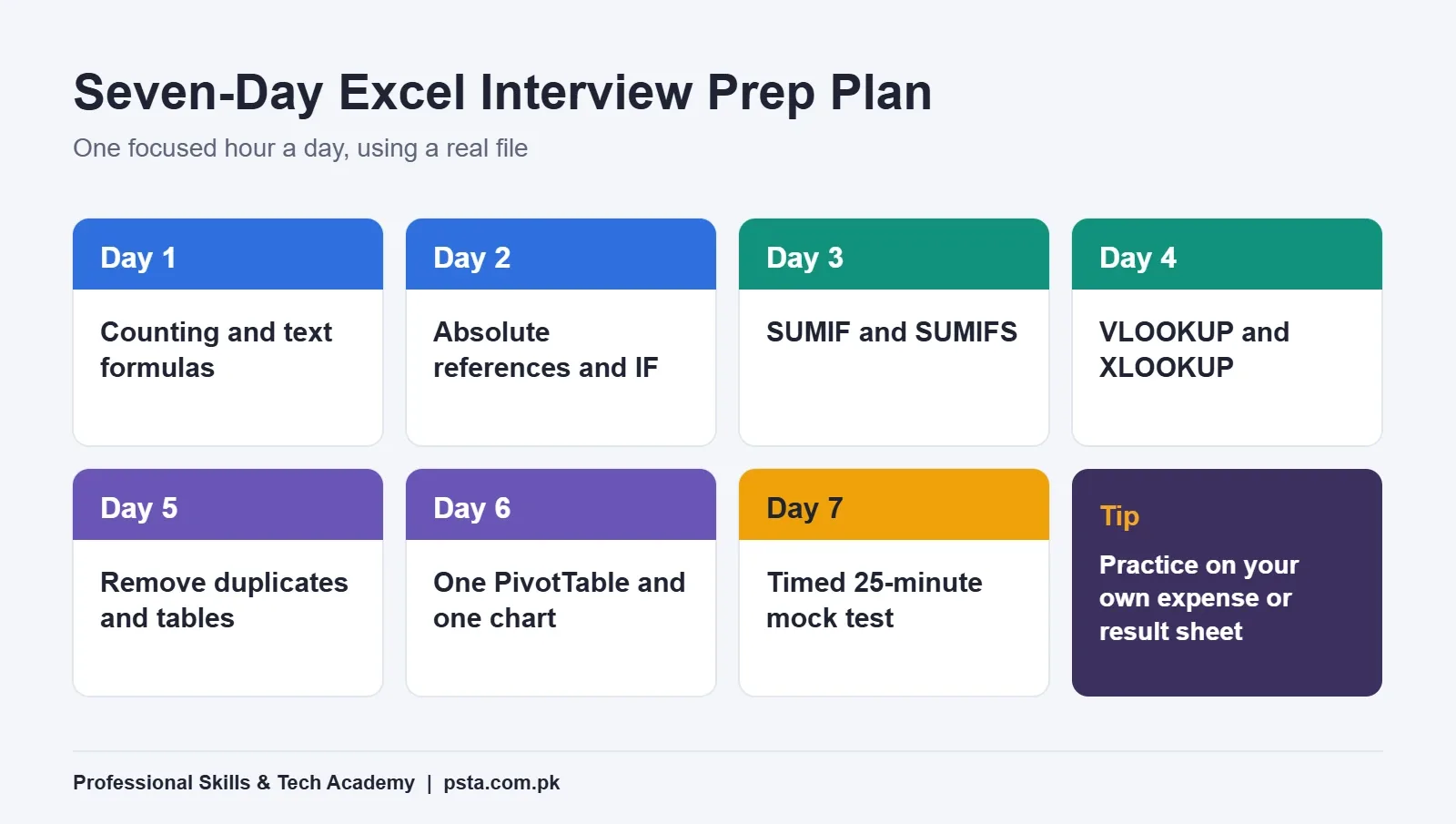
One focused hour a day is enough to sharpen your answers to these Excel interview questions. Use a real file each day, such as your household expenses or a class result sheet, so practice feels like work.
- Day 1: counting and text formulas (Questions 2 to 4).
- Day 2: absolute references and IF.
- Day 3: SUMIF and SUMIFS on a branch or class list.
- Day 4: VLOOKUP and XLOOKUP between two sheets.
- Day 5: removing duplicates and converting ranges into tables.
- Day 6: one PivotTable and one chart from the same data.
- Day 7: a timed 25-minute mock test.
On the last day, time yourself. Give yourself 25 minutes to run the six-step practical test above on a fresh file. If you finish early, add a chart and check every formula once more.
Typing is often tested in the same sitting, so check what WPM adverts expect in our post on typing speed for jobs in Pakistan. For the spoken part of the interview, our list of English interview questions and answers covers the "tell me about yourself" round.
Where PSTA Fits Into Your Preparation
If you'd like guided practice, the Certified Office Automation Course at PSTA runs for 12 weeks at beginner level. The Excel module covers tables, formulas, formatting and charts, and the course ends with a final practical exam. One of the projects is a timed data entry and cleaning task, which is close to what office tests ask for.
At the time of writing, the course costs Rs. 12,000 against a regular price of Rs. 15,000, split into two installments. Classes run at the Mandian campus in Abbottabad and live online, and you can mix the two if your week changes. If typing is your weak point, the English and Urdu typing course pairs well with it. For a broader one-year qualification, look at the DIT diploma.
When you're ready, the admission page explains how to enroll, or browse all courses first. Questions about batch timings can go to WhatsApp at +92 314 5424399.
Rebuild One Sheet From Memory Tonight
Open a blank workbook and recreate a small fee or sales list of 20 rows. Then add one IF column, one SUMIFS total and one lookup from a second sheet, without looking anything up. Wherever you hesitate, that's the gap to close before the real Excel interview questions start.
Frequently asked questions
Is the Excel test in a job interview practical or verbal?
Usually both. Many panels start with a few spoken questions, such as the difference between COUNT and COUNTA or what an absolute reference is, then hand you a laptop and a short file. The practical part often asks you to clean data, add an IF column, use a lookup and build a quick summary within a fixed time.
Which Excel version should I practice on before an interview?
Practice on whatever you have, but learn both lookup styles. Microsoft states that XLOOKUP works in Excel 2021, Excel 2024 and Microsoft 365, but not in Excel 2016 or 2019. If the test computer runs an older version, you will need VLOOKUP with FALSE or INDEX with MATCH instead.
Is VLOOKUP still asked in Excel interviews?
Yes, very often. It is the lookup most office staff already use, so interviewers expect you to explain it and its main limit: it only returns values from columns to the right of the lookup column. Mentioning XLOOKUP as the newer option, and when it is available, makes your answer stronger.
How long does it take to prepare for an Excel interview?
If you already use Excel for basic tables, one focused hour a day for a week is usually enough to sharpen formulas like IF, SUMIFS and lookups. Complete beginners need longer, because they first have to get comfortable with entering data, formatting and simple formulas before interview questions make sense.
Do I need a Microsoft Office Specialist certificate to get an office job?
Most Pakistani office adverts ask for MS Office skills rather than a specific certificate, and the test at interview is what decides. A certificate can support your CV, but showing you can build a clean sheet with correct formulas in front of the panel matters more for computer operator and assistant posts.
What Excel formulas should a computer operator know?
At minimum, know SUM, AVERAGE, COUNT, COUNTA, IF and basic text formulas such as LEFT, MID and CONCAT. Add sorting, filtering, AutoFill and clean page setup for printing. If the advert mentions records or reports, also practice SUMIFS, a lookup formula and a simple PivotTable.
Can I practice Excel interview questions on a mobile phone?
You can review formulas on a phone, and Microsoft lists Excel for Android and iPhone among the versions that support XLOOKUP. Still, interview tests are taken on a computer with a keyboard and mouse, so do your timed practice on a laptop or desktop whenever you can.
Sources & references
- Microsoft Excel (MO-200) Skills Measured query.prod.cms.rt.microsoft.com
- XLOOKUP function - Microsoft Support support.microsoft.com
- VLOOKUP function - Microsoft Support support.microsoft.com
- Switch between relative, absolute and mixed references - Microsoft Support support.microsoft.com
- SUMIFS function - Microsoft Support support.microsoft.com
- Filter for or remove duplicate values - Microsoft Support support.microsoft.com
- Create a PivotTable to analyze worksheet data - Microsoft Support support.microsoft.com
- Computer Operator, Pakistan Railways - National Job Portal njp.gov.pk
Last reviewed & updated on by Umar Qureshi. Written by the PSTA team in Abbottabad, Pakistan.

Umar Qureshi

Certified Office Automation Course: Master MS Office & Computer Basics
Turn this guide into a career: hands-on training with real projects, online across Pakistan or on-campus in Abbottabad · 12 Weeks.

Comments
No comments yet — ask a question or share your experience.