Quick answer
CCTV camera specifications describe resolution, lens coverage, night range, power draw and weather protection. Read them together: choose the lens by the DORI identify distance you need, insist on true WDR for bright doorways, total the PoE watts against your switch budget, and look for IP66 for driving rain and IK10 where people can reach.
Key takeaways
- • A lens change can double useful distance: on one Hikvision 4 MP bullet, identify range grows from 6 m (2.8 mm) to 12 m (6 mm).
- • DORI distances, based on IEC EN 62676-4, tell you more about face detail than the megapixel figure.
- • "Up to 30 m IR" assumes ideal conditions; walls and low ceilings reduce it.
- • True 120 dB WDR handles bright doorways far better than digital WDR.
- • Add up camera watts and compare them with the PoE switch's total budget, not its port count.
- • IP67 does not automatically include IP66; look for both on outdoor cameras.
Table of contents 24 sections
- What Do CCTV Camera Specifications Actually Tell You?
- Sensor, Resolution and Frame Rate
- Resolution and Megapixels
- Sensor Size
- Frame Rate at Full Resolution
- Lens and Field of View
- What Is DORI Distance, and How Should You Use It?
- Night Vision: Lux, IR Range and Smart Hybrid Light
- Minimum Illumination (Lux)
- IR and White Light Range
- Is 120 dB WDR Worth Paying For?
- Compression and Bitrate: H.264, H.265 and H.265+
- Power: 12 V DC, PoE Class and Watts
- Analog and 12 V DC Cameras
- IP Cameras and PoE
- IP67 and IK10: Weather and Impact Ratings
- IP Rating (IEC 60529)
- IK Rating (IEC 62262)
- Temperature and Corrosion
- CCTV Camera Specifications at a Glance
- Smart Events and ONVIF
- Analog HD Output Modes
- Where Datasheet Reading Fits in the CPCST Course
- Print One Datasheet and Mark It Up
CCTV camera specifications are the numbers on a datasheet that tell you what a camera can see, how far, in what light, and what it needs from the cable and recorder. They matter because a lens change alone can move the result a lot: on one current Hikvision 4 MP bullet, the 6 mm lens identifies a person at 12 m while the 2.8 mm version manages 6 m, according to the DS-2CD2043G2-LI datasheet. Same camera body, same sensor, twice the useful distance.
Most buyers in Pakistan still compare cameras on two words, "megapixel" and "night vision." Shopkeepers quote those two lines, and the rest of the sheet goes unread. This guide walks you through the rest.
In this explainer, you'll learn:
- What each line on a CCTV camera datasheet means, in plain words
- How lens size changes field of view and DORI distance
- How to read lux, IR range and WDR figures without being misled
- What H.265, PoE Class 3 and IP67 mean for your installation
- A one-page glossary table you can keep beside your toolbox
What Do CCTV Camera Specifications Actually Tell You?
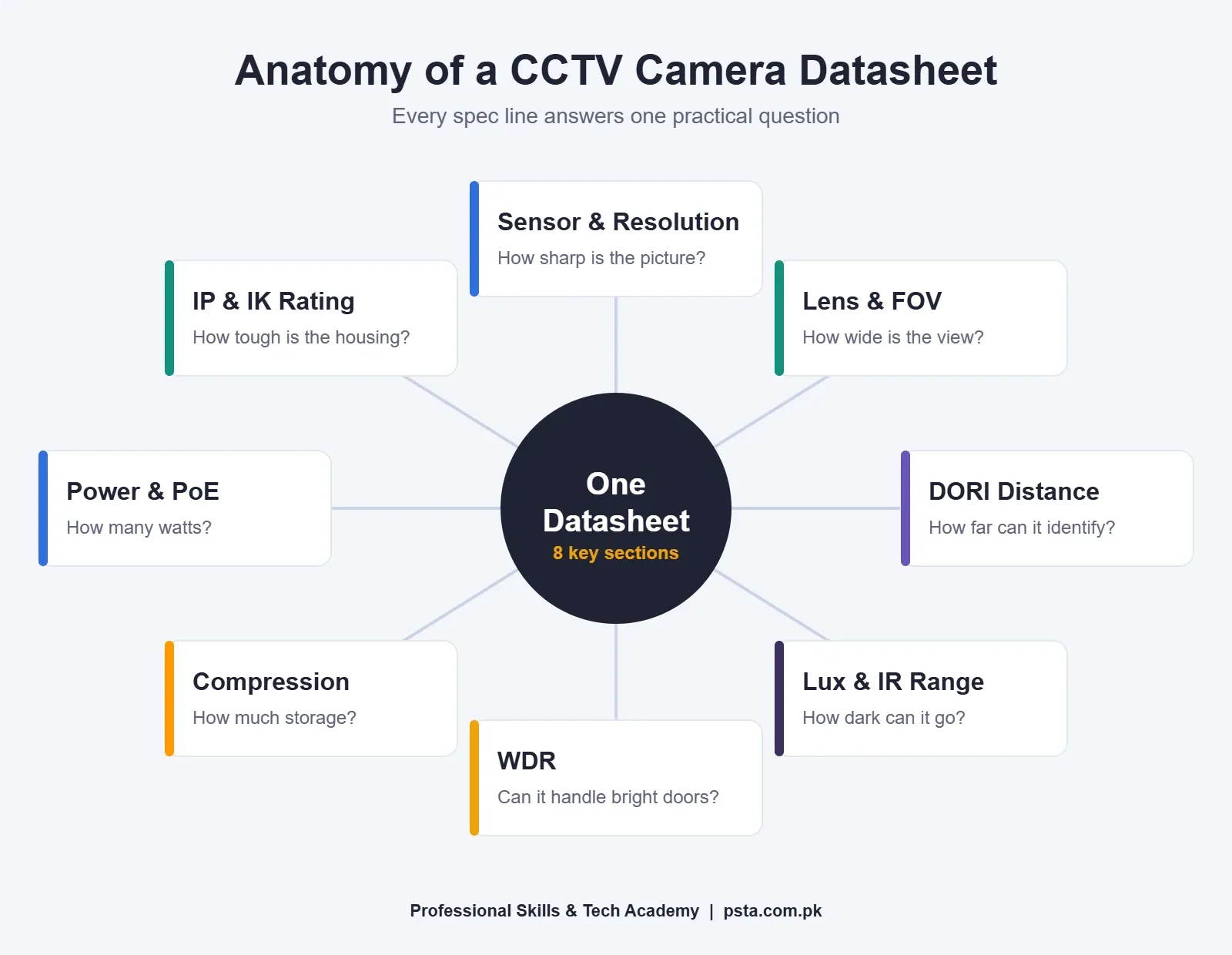
CCTV camera specifications answer four practical questions. What will the picture look like? How much of the scene will it cover? Will it survive the place you mount it? What does it need from your network, power supply and recorder? Every line of CCTV camera specifications belongs to one of those groups.
To keep this guide concrete, we'll use three real datasheets throughout. Two are IP cameras and one is an analog HD camera, which covers most of what PSTA students see in shops and on job sites:
- Hikvision DS-2CD2043G2-LI: a 4 MP AcuSense bullet with smart hybrid light (datasheet dated January 2026)
- Hikvision DS-2CD1043G2-I: a 4 MP value-series IP bullet with IR
- Hikvision DS-2CE16D0T-EXIPF: a 2 MP Turbo HD analog mini bullet
We use one brand only because its sheets are public and consistently laid out. Dahua, Uniview and other makers print the same fields with slightly different names, so the skills transfer directly.
Sensor, Resolution and Frame Rate
The first block of CCTV camera specifications on any sheet describes the image sensor. On the DS-2CD1043G2-I datasheet, it reads "1/3" Progressive Scan CMOS" with a maximum resolution of 2560 × 1440.
Resolution and Megapixels
Multiply the two numbers and you get the pixel count. 2560 × 1440 is about 3.7 million pixels, which the industry rounds up and sells as "4 MP." A 1920 × 1080 camera is about 2.1 million pixels, sold as "2 MP" or "1080p." The rounding is normal, but it's worth knowing when two cameras both claim 4 MP and list different resolutions.
Sensor Size
The fraction, such as 1/3" or 1/2.7", describes the sensor's size. Bigger sensors usually gather more light per pixel, which helps at night. Treat it as a tie-breaker between two similar cameras, not the main deciding spec.
Frame Rate at Full Resolution
Here's a line people skip. The same Hikvision sheet lists 20 fps at 2560 × 1440 but 25 fps at 1920 × 1080 on 50 Hz power. In other words, you get the full 4 MP picture or the smoother frame rate, not both. For a shop counter, 20 fps is usually plenty. For a gate where cars pass quickly, you might choose 1080p at 25 fps instead.
Lens and Field of View
The lens line tells you the focal length in millimeters. A short focal length gives a wide view. A longer focal length gives a narrower view but more detail far away. Datasheets print the field of view (FOV) in degrees next to each lens option.
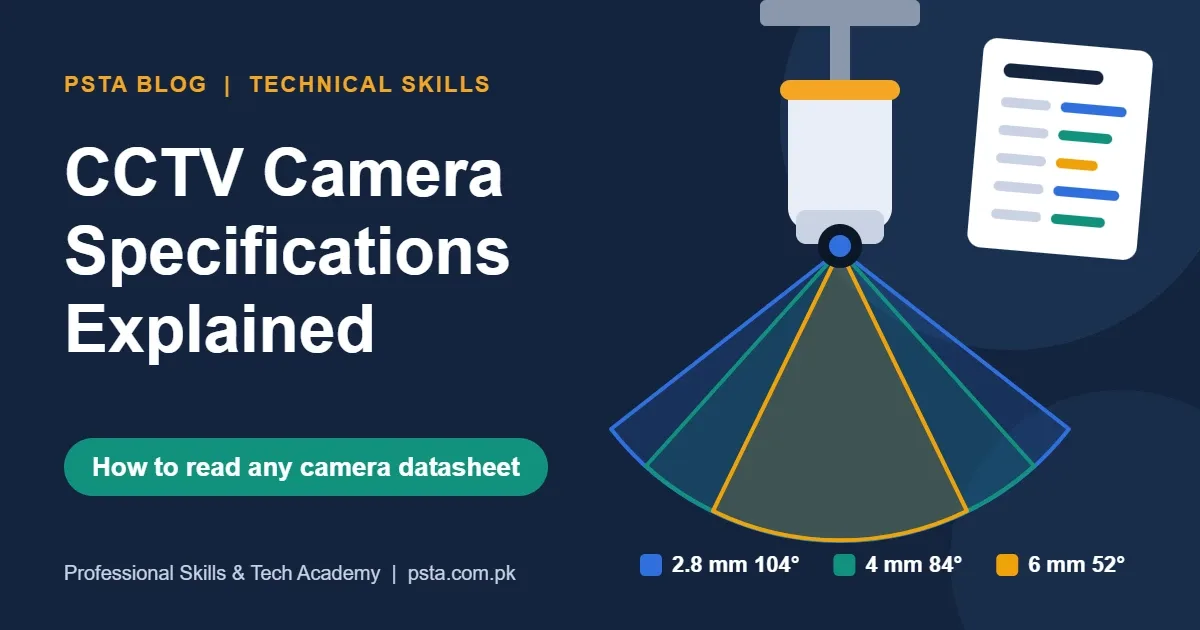
The DS-2CD2043G2-LI comes with three fixed lens choices. The 2.8 mm version covers 104° horizontally, the 4 mm covers 84°, and the 6 mm covers 52°. The analog DS-2CE16D0T-EXIPF shows the same pattern at a smaller scale: 96.5° with a 2.8 mm lens and 76.9° with a 3.6 mm lens, as listed on its Turbo HD datasheet.
A simple way to choose:
- Stand where the camera will go and decide what must be covered: a whole room, a doorway or a gate.
- If you need the whole room from a corner, start with 2.8 mm.
- If you need faces at a doorway 8 to 10 m away, move to 4 mm or 6 mm.
- Check the DORI distance (next section) for the lens you picked before ordering.
A varifocal lens (for example "2.8–12 mm") lets you adjust the view after mounting. It costs more but saves a second trip when the client changes their mind about the angle.
What Is DORI Distance, and How Should You Use It?
DORI stands for Detect, Observe, Recognize and Identify. Each level needs a minimum number of pixels across one meter of the scene. According to TP-Link's DORI explainer, the IEC EN 62676-4:2015 standard sets these at 25, 62, 125 and 250 pixels per meter.
- Detect (25 px/m): you can tell a person is there.
- Observe (62 px/m): you can see what they're doing and what they're wearing.
- Recognize (125 px/m): someone who knows the person could say who it is.
- Identify (250 px/m): the image is clear enough to identify a stranger.
Good CCTV camera specifications print DORI distances for each lens. On the DS-2CD2043G2-LI, the identify distance is 6 m with the 2.8 mm lens, 7 m with the 4 mm and 12 m with the 6 mm. Detection stretches from 63 m to 128 m across the same three lenses.
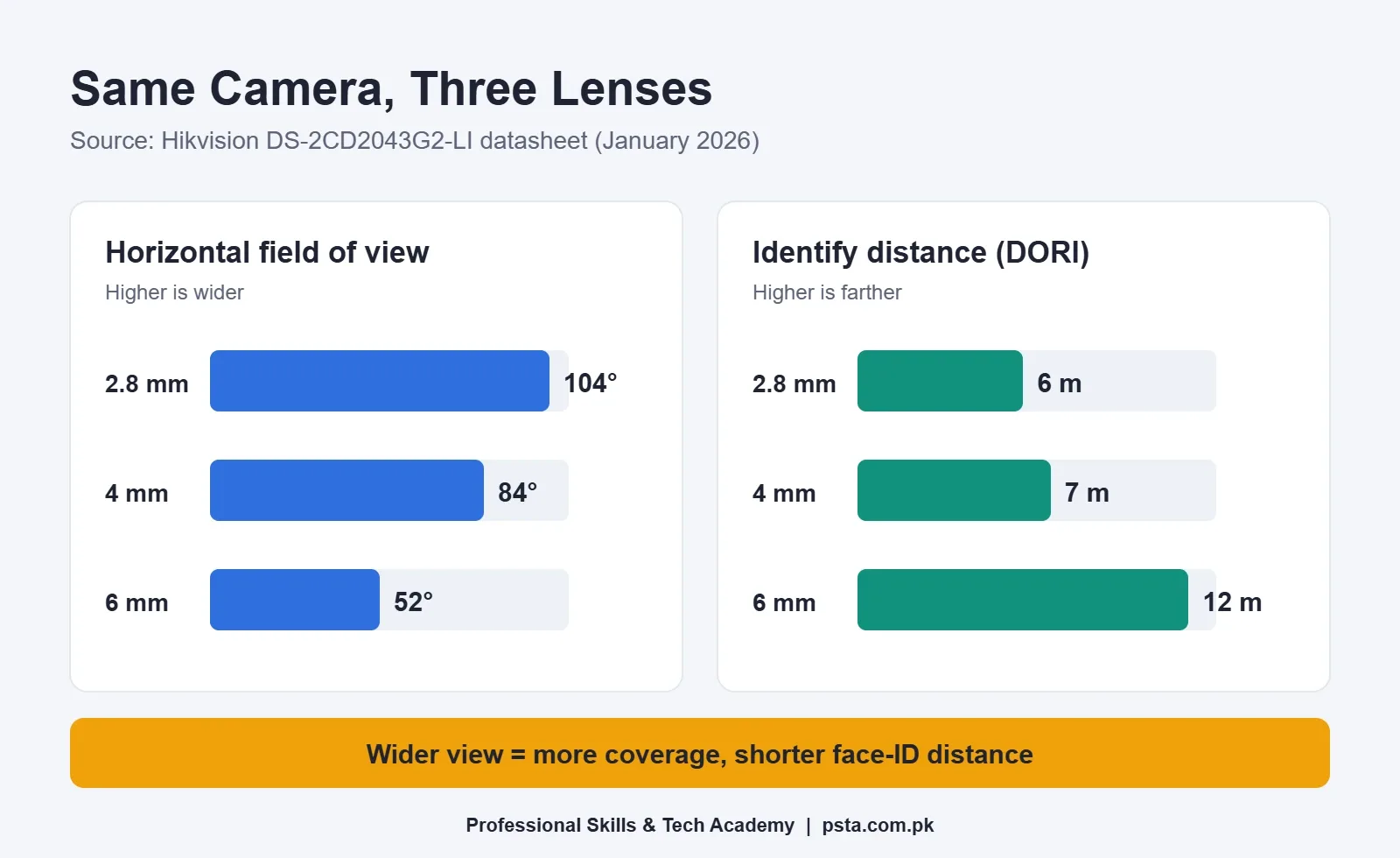
The lesson for you: if a client asks for "clear faces at the main gate," measure the distance from the camera to the gate first. If it's 10 m, the 2.8 mm version of this camera will not give you an identify-level image there, no matter how sharp the demo looked in the shop. Our earlier post on CCTV installation mistakes covers what happens on site when this check is skipped.
One caution: DORI figures are calculated from pixel density in ideal conditions. Low light, rain, glare and heavy compression all reduce the real result, so leave a margin.
Night Vision: Lux, IR Range and Smart Hybrid Light
Night performance shows up in two lines of the CCTV camera specifications: minimum illumination and the illuminator range.
Minimum Illumination (Lux)
Lux measures how much light falls on the scene. A lower number means the camera can still produce a color image in darker conditions. The DS-2CD2043G2-LI lists 0.005 lux at F1.6 for color. The analog DS-2CE16D0T-EXIPF lists 0.02 lux at F1.2.
Two details matter. First, always check the aperture (the "F" number) and whether "AGC ON" is written beside it. AGC boosts the signal, which also adds grain. Second, "0 Lux with IR" simply means the camera sees in total darkness using its own infrared light, in black and white.
IR and White Light Range
The IR range tells you how far the camera's built-in light reaches. The value bullet lists "up to 30 m," the analog mini bullet lists "up to 20 m," and the smart hybrid light model lists up to 40 m using either 850 nm IR or white light. The word "up to" matters. That distance assumes nothing reflects the light back, so a camera mounted under a low roof slab or close to a wall will perform worse.
Smart hybrid light models switch between IR (black and white) and white light (color) when they detect a person or vehicle. That's useful for shops that want color footage of a night visitor, but the white light is visible, which some homeowners don't want.
Is 120 dB WDR Worth Paying For?
WDR means wide dynamic range: the camera's ability to show detail in bright and dark parts of the same frame. Think of a shop entrance on a sunny afternoon. Without good WDR, the doorway turns white and the customer's face turns into a dark shape.
CCTV camera specifications use two kinds of wording for it. "120 dB true WDR," as printed on both Hikvision 4 MP IP sheets, means the sensor captures more than one exposure and blends them. "Digital WDR" or "DWDR," as on the 2 MP analog camera, means the camera brightens shadows in software. Digital WDR helps a little. True WDR helps a lot.
So yes, for any camera facing a glass door, a gate opening onto a bright road or a window, true WDR is worth the extra cost. For an indoor corridor with even lighting, digital WDR is usually enough.
Compression and Bitrate: H.264, H.265 and H.265+
Compression decides how much storage and bandwidth your footage uses. When the HEVC standard (H.265) was agreed in January 2013, the ITU announced it would need only half the bit rate of its predecessor, H.264/AVC, for similar quality.
On a datasheet, look for three things:
- Supported codecs: the DS-2CD1043G2-I lists H.265+, H.265, H.264+ and H.264 on the main stream.
- Bitrate range: the same camera lists 32 Kbps to 8 Mbps. The figure you actually set inside that range decides your storage use.
- Sub-stream support: a second, lighter stream used for mobile viewing and grid view, so remote access doesn't eat your internet bandwidth.
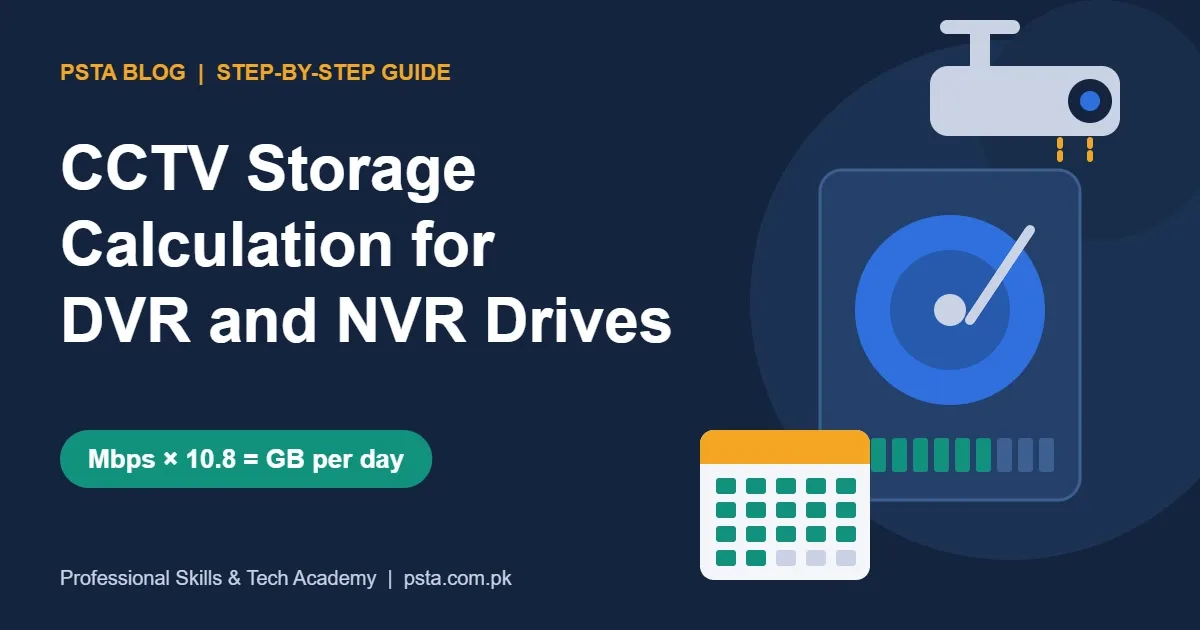
"H.265+" and "H.264+" are maker-specific add-ons that lower the bitrate further for scenes with little movement. Your recorder must support the same codec, so check the NVR datasheet too. When you're ready to turn bitrate into hard drive size, follow our CCTV storage calculation guide.
Power: 12 V DC, PoE Class and Watts
The power line tells you how to feed the camera and how much load it adds to your power supply or switch.
Analog and 12 V DC Cameras
The DS-2CE16D0T-EXIPF runs on 12 VDC ± 25% and draws a maximum of 3.3 W. Add up the maximum watts of every camera, then choose a power supply with spare capacity. If you plan a UPS for load-shedding hours, this total also tells you how long the backup will last.
IP Cameras and PoE
PoE (Power over Ethernet) sends power and data through one network cable. The DS-2CD2043G2-LI lists "IEEE 802.3af, Class 3, max. 7.5 W." The standard 802.3af port supplies about 15 W at the switch and up to 12.95 W at the device, as IONOS explains in its 802.3af guide, so one camera fits easily on one port.
The catch is the switch's total PoE budget. Eight of these cameras at their 7.5 W maximum add up to 60 W. A cheap eight-port switch with a smaller total budget may power six cameras and leave two rebooting at night when the IR or white light turns on. Always compare the total camera watts with the switch's PoE budget, not just its port count.
If you're still deciding between coax and network cabling for a site, our IP camera vs analog camera comparison breaks down both.
IP67 and IK10: Weather and Impact Ratings
Outdoor cameras in Pakistan face dust storms, monsoon rain and summer heat. Two ratings describe how well the housing copes.
IP Rating (IEC 60529)
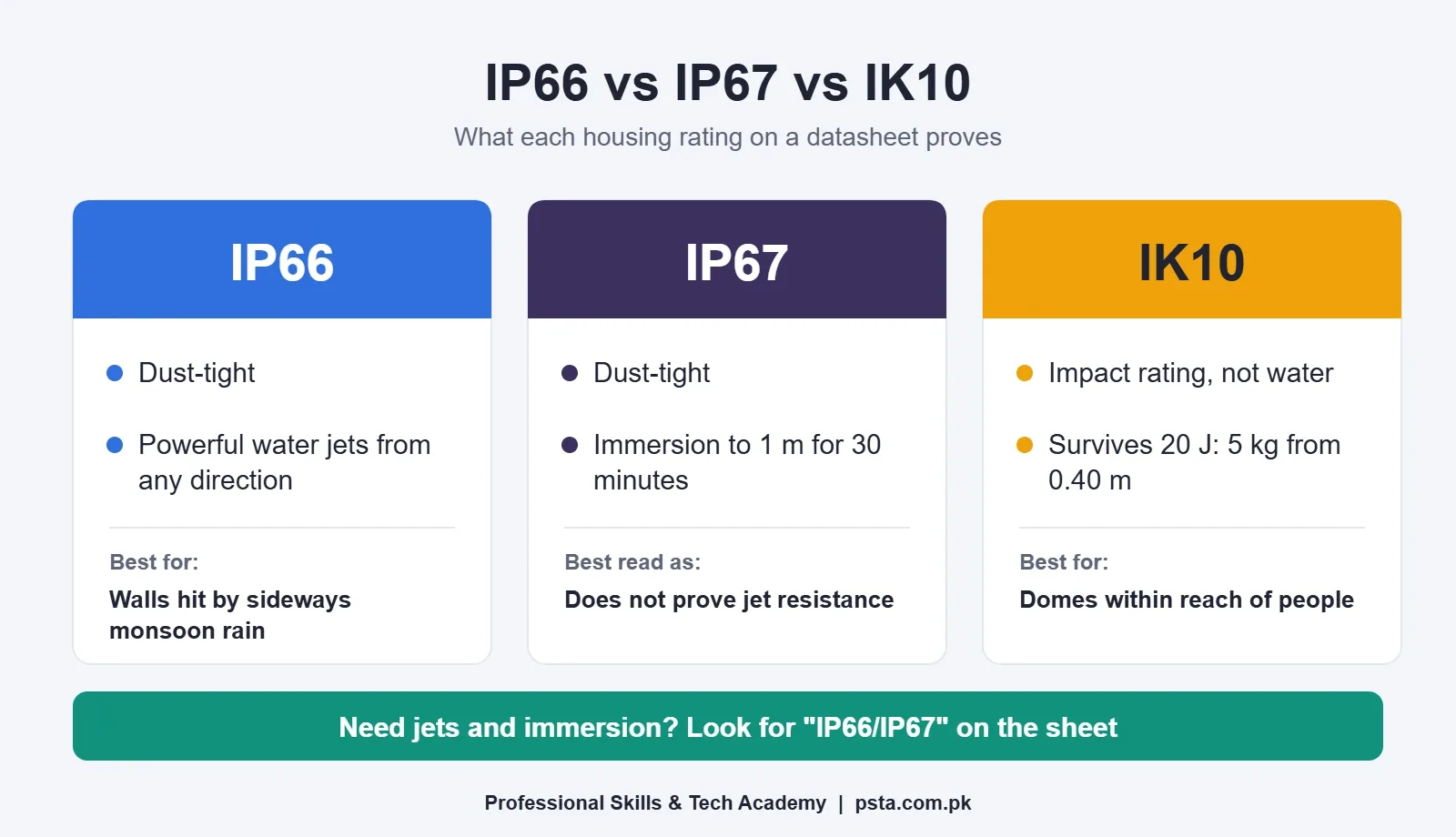
The IP code has two digits. The first is for solids and the second is for water. Per the IP code reference, a first digit of 6 means dust-tight. A second digit of 6 means the housing resists powerful water jets from any direction. A second digit of 7 means it survives immersion up to 1 m for 30 minutes.
Here's the surprise for most students: IP67 is not automatically better than IP66. The standard treats jets and immersion as different tests, and passing immersion doesn't prove the housing resists jets. A product that passes both is labeled with both, such as IP66/IP67. For a wall-mounted camera hit by sideways rain, the jet test is arguably the more relevant one.
IK Rating (IEC 62262)
The IK code measures resistance to impact. According to the EN 62262 summary, IK08 withstands 5 joules and IK10 withstands 20 joules, which equals a 5 kg mass dropped from 0.40 m. IK10 dome cameras suit places within reach of people, such as school corridors, parking areas and ATM lobbies.
Temperature and Corrosion
Check the operating temperature too. The DS-2CD1043G2-I lists -30 °C to 60 °C, a wide range that suits most outdoor sites in Pakistan. Both 4 MP IP sheets also state "This model has NO SPECIFIC PROTECTION" against corrosion. For coastal sites in Karachi or Gwadar, look for a model that lists a corrosion rating instead.
CCTV Camera Specifications at a Glance
Keep this table of CCTV camera specifications on your phone when you visit a supplier. Each row gives the spec, a sample value from the datasheets above and the question it answers.
| Spec on the Sheet | Sample Value | What It Tells You |
|---|---|---|
| Image sensor | 1/3" Progressive Scan CMOS | Sensor size; bigger usually helps in low light |
| Max resolution | 2560 × 1440 | Real pixel count (about 3.7 MP, sold as 4 MP) |
| Frame rate | 20 fps at 2560 × 1440 | Smoothness at full resolution |
| Lens / FOV | 2.8 mm, 104° horizontal | How wide the view is |
| DORI | Identify 12 m (6 mm lens) | Distance for usable detail |
| Min illumination | 0.005 lux @ F1.6, AGC ON | Color performance in low light |
| IR / light range | Up to 40 m | Night coverage in ideal conditions |
| WDR | 120 dB true WDR | Handling of bright doors and windows |
| Compression | H.265+ / H.265 / H.264 | Storage and bandwidth use |
| Power | 802.3af Class 3, max. 7.5 W | PoE budget and power supply sizing |
| Protection | IP67 | Dust and water resistance |
| Interoperability | ONVIF Profile S, T, G | Works with other brands' recorders |
Smart Events and ONVIF
Two lines don't fit neatly into the table but deserve a look. The smart events line tells you which alarms the camera can raise on its own. The DS-2CD2043G2-LI lists line crossing, intrusion and face detection, with alarms filtered by human and vehicle targets. That filtering cuts false alerts from cats, swaying trees and car headlights.
The ONVIF line shows which open profiles the camera supports. The DS-2CD1043G2-I lists Profile S, Profile T and, on the -F model only, Profile G. If you're mixing brands, for example a Dahua NVR with Hikvision cameras, ONVIF support is what lets them talk. Even then, expect some smart features to work fully only within one brand.
Analog HD Output Modes
On analog HD cameras, look for the output line. The DS-2CE16D0T-EXIPF lists "Switchable TVI/AHD/CVI/CVBS," which means it can match the format of most DVRs in the market. That's handy when you're replacing one dead camera on an older system.
Where Datasheet Reading Fits in the CPCST Course
Reading CCTV camera specifications is the first habit we build in PSTA's CPCST program for CCTV and AI security technicians, since lens choice, storage and power planning all start from the sheet. It's a 12-week program pitched at beginners. Its listed fee right now is Rs. 22,000, down from a regular Rs. 25,000.
The modules begin with optics and electrical safety, then cover coax, twisted pair and fiber, DVR and NVR configuration, TCP/IP and subnetting, PoE switches and VLANs, remote viewing through P2P apps, and AI alarms like line crossing and intrusion. Toward the end, you practice site surveys, draw layouts using basic AutoCAD and price jobs through written quotations.
Classes run at our Abbottabad campus near FIMS College on Old College Road, Mandian, and also live online for students elsewhere in Pakistan, with a hybrid option in between. A new batch opens each month. Students who expect to produce detailed floor plans often add the AutoCAD course, while the Cyber Security course suits anyone who'll be locking down networked cameras in offices.
You can see the full list of PSTA courses or fill in the online admission form. Batch timings are easiest to confirm over WhatsApp: +92 314 5424399.
Print One Datasheet and Mark It Up
Pick a camera you've seen installed on a neighbor's shop, in your street or at your own house. Download its CCTV camera specifications sheet from the maker's website and print it. With a pen, mark the resolution, lens, DORI identify distance, IR range, WDR type, power draw and IP rating. Then walk to the camera and pace out the distance to the spot it's meant to cover.
That one exercise will teach you more than a dozen product videos. You'll also start to notice which installs were planned from the sheet and which were planned from the price tag.
Frequently asked questions
What are the most important CCTV camera specifications to check?
Start with resolution, lens size with its field of view, and the DORI identify distance, because together they decide whether faces will be usable. Then check the IR range, WDR type, compression support, power draw and IP rating. Those eight lines cover nearly every buying and installation decision for a home, shop or office camera.
Is a 4 MP camera always better than a 2 MP camera?
Not always. A 4 MP camera with a wide 2.8 mm lens can still give a weak face image at 10 m, while a 2 MP camera with a narrower lens placed closer may do better at that spot. Pixel density on the target matters more than the headline megapixel figure, so compare DORI distances for the actual lens.
Which lens size should I choose for a home CCTV camera?
For covering a whole room or a small courtyard from a corner, 2.8 mm is the usual choice. For a gate or doorway several meters away where you need faces, a 4 mm or 6 mm lens works better. Measure the distance first and match it to the DORI identify figure printed on the datasheet.
What does IR range up to 30 m mean on a CCTV camera?
It means the built-in infrared light can illuminate a scene up to roughly 30 meters in ideal conditions, giving a black-and-white picture in total darkness. Real results are shorter when nearby walls, roof slabs or rain reflect the light back into the lens, so treat the figure as a ceiling, not a promise.
Is IP67 better than IP66 for outdoor cameras?
Not necessarily. IP66 is tested against powerful water jets, while IP67 is tested for immersion up to 1 m for 30 minutes. Passing one test does not prove the other. For wall-mounted cameras facing driving rain, IP66 is arguably the more relevant test, and products that pass both are labeled IP66/IP67.
How many PoE cameras can one switch power?
Divide the switch's total PoE budget by each camera's maximum power from its datasheet. For example, eight cameras rated at 7.5 W maximum need 60 W in total. If the budget is lower, some cameras may reboot at night when infrared or white light switches on and power draw rises.
Do I need H.265 support on both the camera and the recorder?
Yes. The camera and the DVR or NVR must both support the same codec, otherwise the recorder may not display or store the stream properly. H.265 needs roughly half the bit rate of H.264 for similar quality, which saves hard drive space, so check both datasheets before buying.
Sources & references
- Hikvision DS-2CD2043G2-LI Datasheet (2026) assets.hikvision.com
- Hikvision DS-2CD1043G2-I(UF) Datasheet assets.hikvision.com
- Hikvision DS-2CE16D0T-EXIPF Turbo HD Datasheet assets.hikvision.com
- TP-Link: What is DORI? tp-link.com
- ITU: New video codec to ease pressure on global networks itu.int
- IONOS: IEEE 802.3af explained ionos.com
- IP code (IEC 60529) en.wikipedia.org
- EN 62262 (IK code) en.wikipedia.org
Last reviewed & updated on by Umar Qureshi. Written by the PSTA team in Abbottabad, Pakistan.

Umar Qureshi

Certified Professional CCTV Surveillance & AI Security Technician (CPCST)
Turn this guide into a career: hands-on training with real projects, online across Pakistan or on-campus in Abbottabad · 12 Weeks.
Comments
No comments yet — ask a question or share your experience.