Quick answer
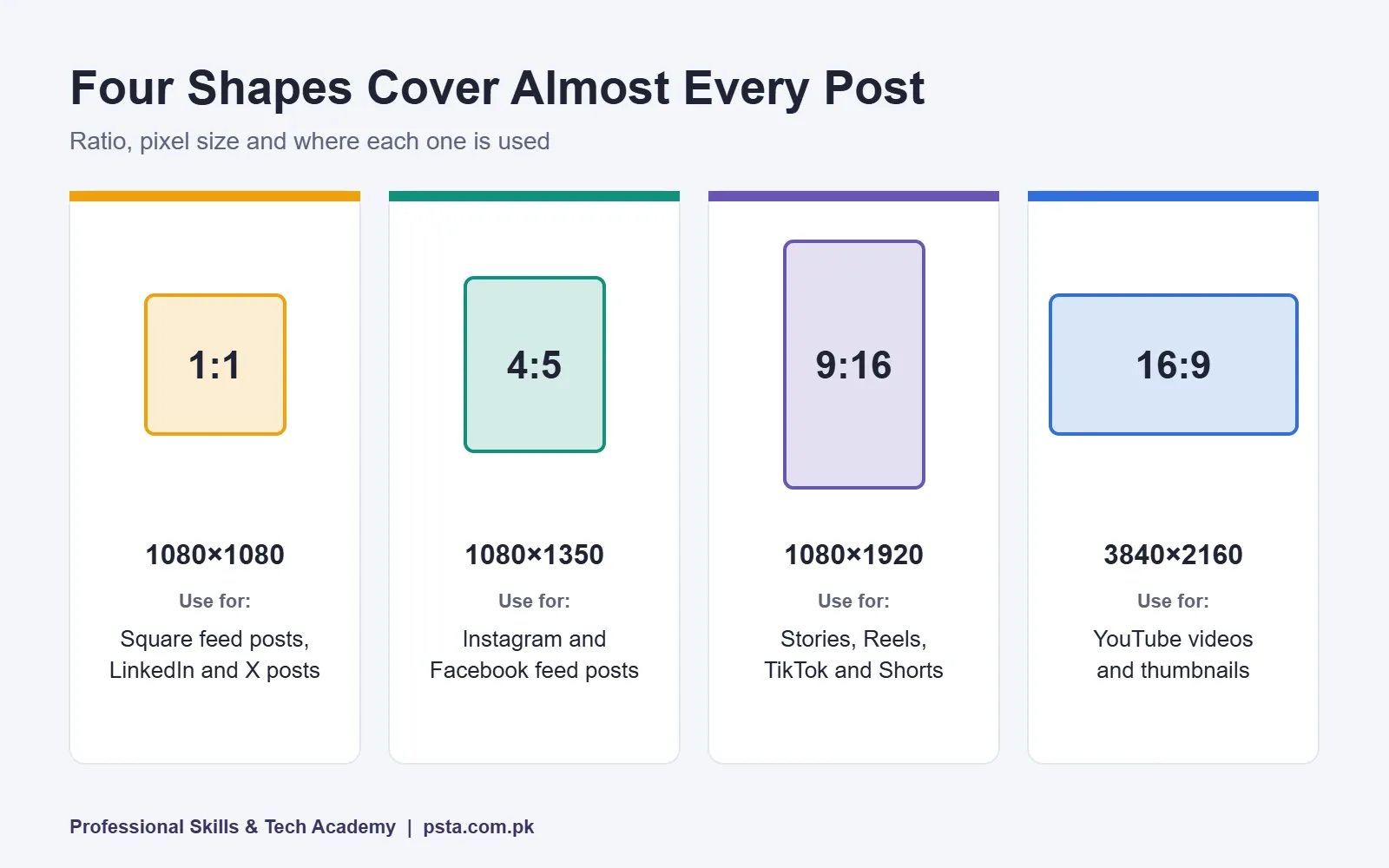
Most social media post sizes fit four shapes. Use 1080×1350 (4:5) or 1080×1080 (1:1) for Instagram and Facebook feeds, 1080×1920 (9:16) for Stories, Reels, TikTok and Shorts, and 16:9 for YouTube, where thumbnails are now recommended at 3840×2160. Keep Story text out of the top and bottom 14%.
Key takeaways
- • Design Instagram and Facebook feed posts at 1080×1350 (4:5) or 1080×1080 (1:1).
- • Stories, Reels, TikTok and Shorts all use 1080×1920 in a 9:16 ratio.
- • YouTube now recommends 3840×2160 thumbnails, with a minimum width of 640 pixels.
- • Instagram's profile grid crops posts to 3:4, so keep headlines away from the edges.
- • Keep Story text out of the top and bottom 14% of the frame.
- • Export text-heavy graphics as PNG in sRGB and check file size limits.
Table of contents 17 sections
- Which Platforms Matter Most for Pakistani Clients?
- Aspect Ratios in Plain English
- Social Media Post Sizes at a Glance (2026 Table)
- Instagram Post Size: Feed, Grid, Stories and Reels
- The Taller Profile Grid
- Stories, Reels and Carousels
- Facebook Cover Photo Size and Feed Posts
- YouTube Thumbnail Size, Banners and Shorts
- LinkedIn Banner Size, X, TikTok and Pinterest
- X
- TikTok and Pinterest
- What Is a Story Safe Zone, and Why Does It Hide Your Text?
- Export Settings That Keep Posts Sharp
- How Do You Set Up These Sizes in Canva and Photoshop?
- Practising Real Client Packs in PSTA's Graphic Design Classes
- Build a Five-Size Template Set Today
Here's an example of how wrong social media post sizes can spoil a simple job. A bakery in Abbottabad asks a new designer for an Eid offer graphic. The designer makes one square file, sends it over, and the owner posts it everywhere. On Instagram Stories, the price sits under the profile bar. On the Facebook cover, the logo is chopped in half. On YouTube, the thumbnail looks blurry next to everyone else's.
None of that is a talent problem. It's a sizing problem, and it's easy to fix once you know the numbers. In 2026, the sizes you need come down to four shapes: square 1:1, portrait 4:5, vertical 9:16 and wide 16:9. Design at the right pixel size for each, keep text inside the safe area, and export correctly.
In this cheat sheet you'll find:
- The exact canvas size for every common post, cover and profile image on Instagram, Facebook, YouTube, LinkedIn, X, TikTok and Pinterest
- What changed recently, including Instagram's taller profile grid and YouTube's new 4K thumbnail advice
- How safe zones work, so captions and buttons never cover your text
- Export settings that keep graphics sharp after upload
- A quick setup method for Canva and Photoshop templates
Which Platforms Matter Most for Pakistani Clients?
Before you memorize social media post sizes, it helps to know where your client's customers actually scroll. The DataReportal Digital 2026 Pakistan report counted 79.9 million social media user identities in October 2025, or 31.2% of the population.
The same report lists each platform's advertising reach in late 2025. TikTok reported 79.9 million adult users, YouTube 54.3 million, Facebook 52.9 million, Snapchat 41.1 million, Instagram 22.4 million and X 2.88 million. LinkedIn reported 18.0 million members, but that counts registrations, so DataReportal warns it isn't directly comparable.
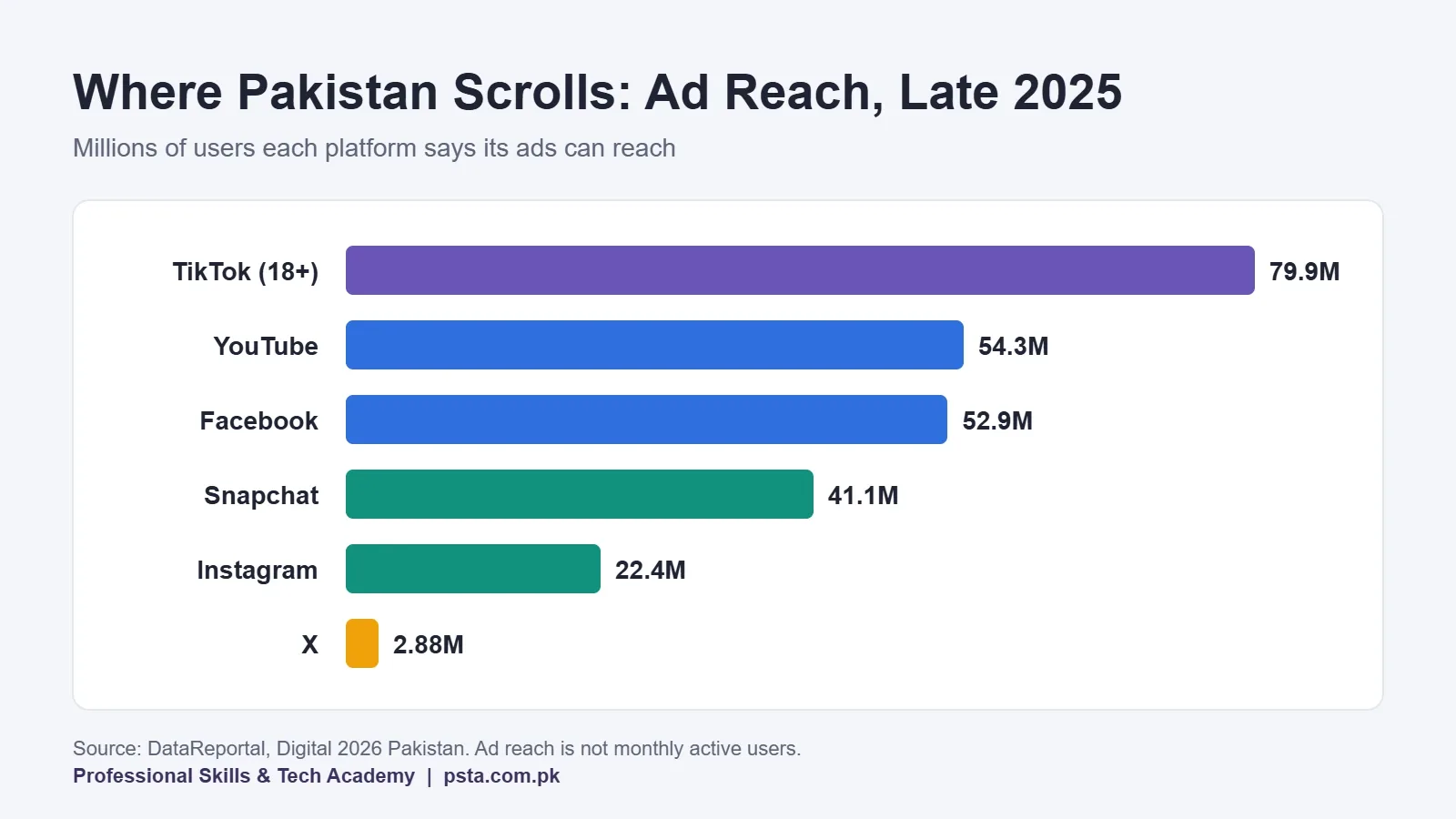
What does that mean for your design work? Vertical 9:16 video and graphics reach the most people, because TikTok, Reels, Stories and Shorts all use that shape. Facebook and YouTube still need wide and square files. A local shop rarely needs X or Pinterest assets, while a software house or recruiter will care far more about LinkedIn.
Aspect Ratios in Plain English
An aspect ratio is simply width compared with height. A 1:1 image is as wide as it is tall. A 4:5 image is a little taller than it is wide. Pixel size is the actual number of dots, such as 1080×1350.
Two files can share a ratio and still differ in quality. A 540×675 file and a 1080×1350 file are both 4:5, but the smaller one will look soft on a modern phone. So think in two steps: pick the ratio for the placement, then pick a pixel size that's large enough.
Getting social media post sizes wrong usually means the platform crops your design or adds padding around it. YouTube's help page on video resolution and aspect ratios says the standard ratio on a computer is 16:9, and it may add padding around vertical 9:16 videos. It also advises you not to add black bars yourself.
Social Media Post Sizes at a Glance (2026 Table)
This table pulls the most-used placements into one place. Figures come from the official YouTube and X help pages, plus Sprout Social's image size guide, last updated on October 15, 2026. Bookmark it and check these social media post sizes again every few months, because platforms adjust them quietly.
| Platform | Placement | Size (pixels) | Ratio |
|---|---|---|---|
| Square feed post | 1080×1080 | 1:1 | |
| Portrait feed post | 1080×1350 | 4:5 | |
| Story or Reel | 1080×1920 | 9:16 | |
| Reel cover on profile grid | 1080×1440 | 3:4 | |
| Profile photo | 320×320 | 1:1 | |
| Feed post | 1080×1080 or 1440×1800 | 1:1 or 4:5 | |
| Page cover | 851×315 | About 2.7:1 | |
| Story | 1080×1920 | 9:16 | |
| YouTube | Video thumbnail | 3840×2160 (min. width 640) | 16:9 |
| YouTube | Shorts thumbnail | 2160×3840 | 9:16 |
| YouTube | Channel banner | 2560×1440 (min. 2048×1152) | 16:9 |
| Personal banner | 1584×396 | 4:1 | |
| Company page cover | 1512×256 | About 5.9:1 | |
| Post image | 1080×1080 or 1200×627 | 1:1 or 1.91:1 | |
| X | Header | 1500×500 | 3:1 |
| X | Profile photo | 400×400 | 1:1 |
| TikTok | Photo mode post | 1080×1920 | 9:16 |
| Standard pin | 1000×1500 | 2:3 |
Instagram Post Size: Feed, Grid, Stories and Reels
For feed posts, design at 1080 pixels wide. Instagram's help page on photo resolution says it uploads images at the best quality possible, up to 1080 pixels. Anything larger gets scaled down, so a 3000-pixel canvas only adds file size.
The portrait 1080×1350 size usually works better than a square for promotional posts. It takes up more of the screen as people scroll, which gives your headline and product photo more room.
The Taller Profile Grid
In January 2025, Instagram replaced the square thumbnails on profiles with taller rectangles. Inquirer Technology reported that Instagram head Adam Mosseri explained the change by pointing out that most uploads are vertical. According to Kapwing's guide to the new layout, the grid now crops every post to 3:4, while the full image still shows when someone taps it.
In practice, keep the important parts of a 4:5 post away from the very top and bottom edges. Otherwise your headline may be trimmed on the grid. A 1:1 square will show with thin slices cut from its left and right sides.
Stories, Reels and Carousels
Stories and Reels both use 1080×1920. A carousel can mix square and portrait slides at 1080 pixels wide, and Sprout Social notes that you can now add up to 20 items. Use the same ratio for every slide, though, or the swipe will feel jumpy.
Facebook Cover Photo Size and Feed Posts
Facebook still matters a lot for Pakistani small businesses, from clothing stores to coaching centers. The page cover is 851×315 pixels. That shape is wide and short, so it suits a simple brand line and one strong image, not a full price list.
The profile photo is shown as a circle, so place a logo in the middle of a 320×320 square with some padding around it. Corners will be hidden.
For feed posts, 1080×1080 or 1440×1800 both work well. If you also plan to boost the post, the portrait size is a safe default. Our guide on Boost Post vs Ads Manager explains when to run a proper campaign instead.
YouTube Thumbnail Size, Banners and Shorts
This is where many older cheat sheets are now out of date. YouTube's help page on adding custom thumbnails now recommends 3840×2160 pixels with a minimum width of 640 pixels. The ratio stays 16:9, and accepted formats are JPG and PNG.
File size limits depend on where you upload. The limit is 2 MB from mobile and 50 MB from a desktop. You also need a verified account before you can upload a custom thumbnail at all.
Shorts thumbnails use 2160×3840 pixels in a 9:16 ratio. YouTube says these can only be added in YouTube Studio on a computer. If you're building a channel for a client, read our YouTube monetization checklist too, since thumbnails are only one part of the setup.
For channel art, Sprout Social lists 2560×1440 pixels, with a minimum of 2048×1152. Only a center strip of about 1235×388 pixels shows on every device. Put the channel name and any text inside that strip and treat the rest as background.
LinkedIn Banner Size, X, TikTok and Pinterest
A personal LinkedIn banner is 1584×396 pixels, and a company page cover is 1512×256. Both are very thin, so use them for a single line of text at most. Post images can be 1080×1080 or 1200×627, and link previews use 1200×627.
X
The X header is 1500×500 and the profile photo is 400×400. For ads, the X creative specifications page lists supported sizes including 1080×1080, 1920×1080, 1440×1800 and 1080×1920. Images must be PNG or JPEG and no larger than 5 MB.
TikTok and Pinterest
TikTok photo posts and videos are vertical, so design at 1080×1920. The profile photo is small, at 200×200 pixels, so a simple mark reads better than a detailed logo. On Pinterest, a standard pin is 1000×1500, a 2:3 ratio.
What Is a Story Safe Zone, and Why Does It Hide Your Text?
A safe zone is the area of a vertical design where text won't be covered by the app's own interface. On Stories, the top holds the profile name and progress bar. The bottom holds the reply box or the link sticker area. On Reels, the right side also carries the like, comment and share buttons.
Sprout Social advises keeping text out of the top and bottom 14% of a 1080×1920 Story. On that canvas, 14% is about 270 pixels at each end. So your headline, price and phone number should sit inside the middle band, roughly between 270 and 1650 pixels from the top.
A simple habit helps here. Add guides in your design file at those two lines and leave them on as you design. On Reels, also leave extra space on the right edge for the button column.
Export Settings That Keep Posts Sharp
A file built at the right social media post sizes can still look poor if the export is wrong. These rules come from what I see students get wrong most often in class.
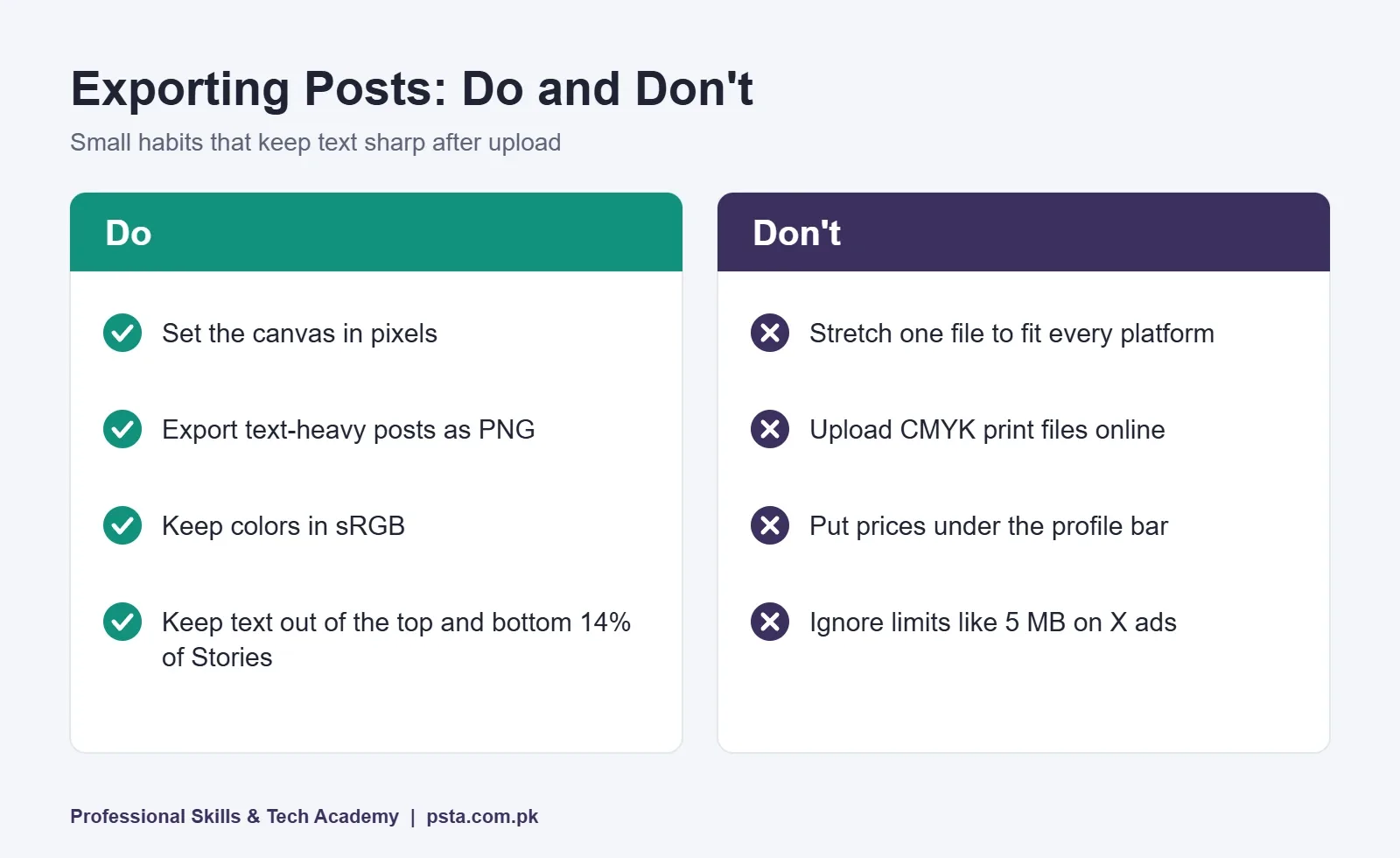
- Work in pixels, not inches. Screens don't use print resolution. Set width and height in pixels and ignore DPI for social posts.
- Use PNG for text-heavy graphics. Offer posts, menus and infographics keep cleaner edges as PNG. Photos can go out as high-quality JPG.
- Stay in the sRGB color profile. Phones display sRGB. A CMYK file made for printing will look dull or shift color online.
- Respect the file size limits. Check the platform's cap before you export. X image ads stop at 5 MB, and YouTube thumbnails from mobile stop at 2 MB.
- Check on a real phone. Send the file to yourself on WhatsApp or upload it as a draft, then look at it on an ordinary mid-range Android phone, not only on your laptop screen.
If you also design for print, our visiting card size guide covers the opposite set of rules: millimeters, bleed and CMYK.
How Do You Set Up These Sizes in Canva and Photoshop?
You don't need to type social media post sizes from memory every time. Build a small template set once and reuse it for every client.
- Create one file per shape. In Canva, choose a custom size and enter the pixel values. In Photoshop, open a new document and set the units to pixels.
- Name each file clearly. For example: "IG-portrait-1080x1350" or "YT-thumb-3840x2160". You'll find them faster later.
- Add guides for safe areas. Mark the 14% bands on vertical files and the center strip on the YouTube banner.
- Place your brand elements. Add the logo, brand colors and font styles, so each new post starts on-brand.
- Design the master version first. Start with the portrait 4:5 post, since it's the most common. Then adapt it to 9:16 and 16:9 by moving elements, not just stretching.
Not sure which design tool to start with? Our comparison of graphic design software for beginners covers Canva, Photoshop and free alternatives.
Practising Real Client Packs in PSTA's Graphic Design Classes
Knowing social media post sizes is the easy part. Clients pay for designs that look good at every size, and that takes practice with real briefs. In PSTA's graphic designing course, Week 5 is spent on Canva and social media graphics. One of the course projects is a social media pack of matching Facebook and Instagram posts, cover images and a promotional banner.
It's a 12-week, beginner-level program that also teaches Photoshop, Illustrator, CorelDRAW, InPage and AI design tools. Fees are Rs. 18,000 against a regular Rs. 20,000, and you can split that into two installments. Batches open monthly. Classes happen at the Mandian campus in Abbottabad, live over the internet wherever you are in Pakistan, or as a hybrid of both.
If you want to plan and run campaigns as well as design them, the social media marketing and Meta Ads course is a natural next step. Video-heavy clients may also need the video editing course. You can browse all programs on the courses page, or ask about timings on WhatsApp at +92 314 5424399.
Build a Five-Size Template Set Today
Open your design tool and create five blank files: 1080×1350, 1080×1920, 1080×1080, 3840×2160 and 851×315. Add safe-area guides and your logo to each one. That single hour will save you from most resizing mistakes on your next client job. When you're ready for guided practice, you can apply through the admission page.
Frequently asked questions
What is the best Instagram post size in 2026?
For most feed posts, use 1080×1350 pixels in a 4:5 portrait ratio. It fills more of the screen than a square. Instagram stores photos at up to 1080 pixels, so a larger canvas only adds file size. Since early 2025 the profile grid crops posts to 3:4, so keep headlines away from the very top and bottom edges.
What size should a YouTube thumbnail be?
YouTube's help page now recommends 3840×2160 pixels in a 16:9 ratio, with a minimum width of 640 pixels. Save it as JPG or PNG. The file limit is 2 MB when uploading from mobile and 50 MB from a desktop. Your channel must be verified before you can upload a custom thumbnail.
What size is a Facebook page cover photo?
Design the cover at 851×315 pixels. The shape is wide and short, so keep it simple: one image, a brand line and perhaps an offer. Preview it on both a phone and a computer after uploading, because the visible area can differ between devices, and move any text that gets cut.
What size should an Instagram Story or Reel be?
Both use 1080×1920 pixels in a 9:16 vertical ratio. Keep text out of the top and bottom 14% of the frame, which is about 270 pixels at each end, so the profile bar and reply area don't cover it. On Reels, also leave space on the right for the like and share buttons.
Can I use one design size for every platform?
You can reuse the same design idea, but not the same file. A square post gets cropped in Stories, and a vertical design gets padded on YouTube. Make a master 4:5 version first, then rebuild it at 9:16 and 16:9 by moving elements around rather than stretching the whole image.
Is PNG or JPG better for social media graphics?
Use PNG for graphics with text, logos or flat colors, such as offer posts and infographics, because edges stay cleaner. Use high-quality JPG for photos to keep file sizes down. Always check the platform's limit before exporting. For example, X image ads must be 5 MB or smaller.
What size is a LinkedIn banner?
A personal LinkedIn banner is 1584×396 pixels, and a company page cover is 1512×256 pixels. Both are very thin, so a single line of text and a simple background work best. For posts inside the feed, use 1080×1080 for a square image or 1200×627 for a wide one.
Do social media images need 300 DPI?
No. DPI only matters for printing. Phones and screens care about pixel dimensions, so a 1080×1350 post looks the same at 72 or 300 DPI. Set your canvas in pixels, work in the sRGB color profile, and save DPI settings for print jobs like visiting cards and flyers.
Sources & references
- DataReportal: Digital 2026 Pakistan datareportal.com
- YouTube Help: Add custom thumbnails support.google.com
- YouTube Help: Video resolution and aspect ratios support.google.com
- Instagram Help: Image resolution of photos you share help.instagram.com
- X Help Center: Creative ad specifications help.x.com
- Sprout Social: Social media image sizes guide sproutsocial.com
- Kapwing: Instagram's new grid layout size and dimensions kapwing.com
- Inquirer Technology: Instagram grid swaps squares for rectangles technology.inquirer.net
Last reviewed & updated on by Umar Qureshi. Written by the PSTA team in Abbottabad, Pakistan.

Umar Qureshi

Ultimate Graphic Designing Course in Pakistan: Master Photoshop, Illustrator, CorelDRAW & AI Tools (Practical & Beginner Friendly)
Turn this guide into a career: hands-on training with real projects, online across Pakistan or on-campus in Abbottabad · 12 Weeks.

Comments
No comments yet — ask a question or share your experience.