Quick answer
To learn AI automation, start with one no-code tool such as n8n or Make, then add data skills, AI prompts, document OCR, chatbots and simple agents. Spend 8 to 10 hours a week building real workflows for eight weeks, and keep a human check on anything risky. Free plans are enough to start.
Key takeaways
- • AI automation joins your apps into workflows and adds an AI step that can read, write or sort information.
- • Every workflow has four parts: a trigger, an AI step, an action and a human check.
- • Make n8n your main tool and learn Make or Zapier as a second. All three have a free way to practice.
- • Follow an eight-week plan where every week ends with something you build, not something you watched.
- • Give the AI facts from a sheet or document instead of letting it answer from memory.
- • You can earn through freelancing, local business clients or automating work inside a job, but no course can promise an income.
Table of contents 22 sections
- What Is AI Automation?
- Why Learn AI Automation in Pakistan in 2026?
- What Can You Automate? Real Examples From Pakistani Businesses
- Which AI Automation Tools Should Beginners Learn First?
- The 8-Week Roadmap to Learn AI Automation
- Week 1: Learn How AI Models and Automations Work
- Week 2: Build Your First No-Code Workflows
- Week 3: Understand Data, APIs and Webhooks
- Week 4: Add AI to Your Workflows
- Week 5: Automate Documents With OCR
- Week 6: Build a Chatbot That Answers From Real Data
- Week 7: Try AI Agents, Carefully
- Week 8: Package, Price and Pitch Your Work
- Your First Workflow: Answer Admission Questions on WhatsApp
- How to Earn With AI Automation in Pakistan
- Freelancing for International Clients
- Serving Local Businesses
- Automating Work Inside a Job
- Common Mistakes Beginners Make
- How Long Does It Take to Learn AI Automation?
- Learn AI Automation With PSTA
- Final Thoughts: Automate One Boring Task This Week
AI automation means getting software to handle the repetitive parts of a job. An AI model takes care of the parts that need a little judgment, like reading a message or sorting a request. This guide shows you how to learn AI automation in eight weeks, starting from zero, with free tools and real examples from businesses in Pakistan.
Picture a clinic in Abbottabad. Every evening, the receptionist scrolls through WhatsApp, copies patient names into a register and types the same reply about timings again and again. Or think of a clothing store in Lahore that calls every customer to confirm a cash-on-delivery order. None of this work needs a person. It needs a workflow.
That is what AI automation builds. A message arrives, an AI model reads it, a tool saves the details to a sheet and a reply goes out in seconds. A person only steps in when something unusual comes up.
Businesses now pay well for people who can set this up properly. You don't need a computer science degree to start. You need a laptop, a stable internet connection and a few focused hours each week.
By the end of this guide, you will know:
- What AI automation is, in plain words
- Which tools to learn first and what they cost
- A week-by-week plan to go from beginner to your first paid project
- How to build your first real workflow: answering admission questions on WhatsApp
- How people in Pakistan earn from this skill, and the mistakes to avoid
What Is AI Automation?
AI automation is the use of software workflows, combined with AI models, to finish tasks with little or no manual work. A normal automation follows fixed rules. For example: when someone fills in a form, add a row to a sheet. AI automation adds a step that can read, write or decide.
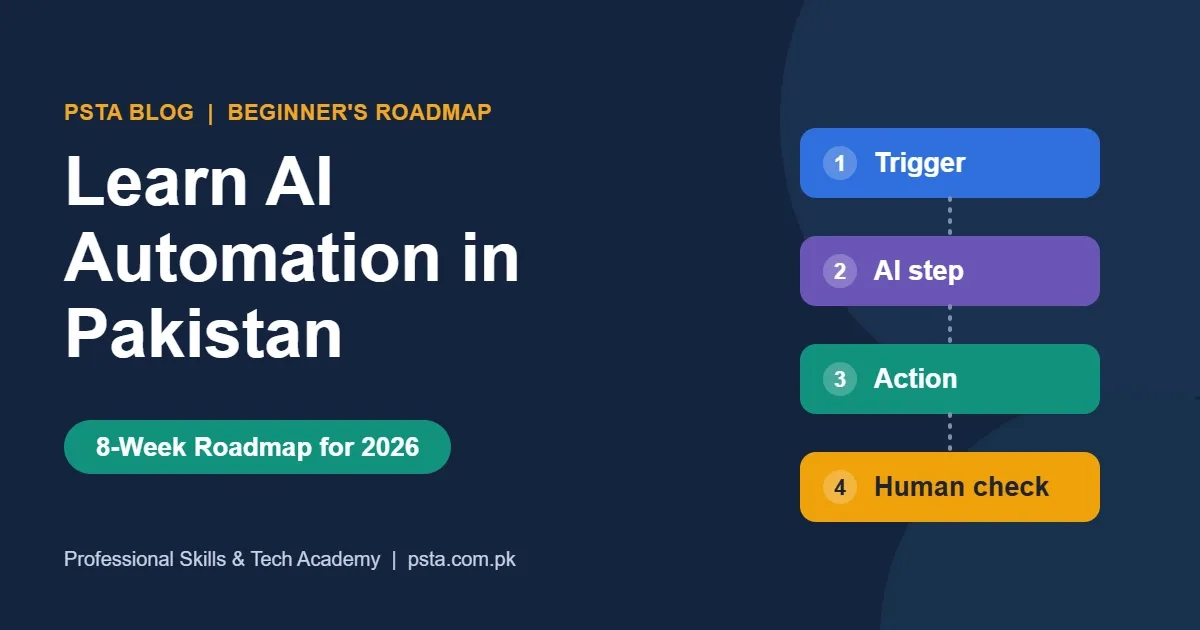
Every workflow, simple or complex, is built from the same four parts:
- Trigger: the event that starts it, such as a new WhatsApp message, an email or a form entry.
- AI step: a model such as ChatGPT, Claude or Gemini reads the input, pulls out details or writes a draft.
- Action: the tools do the work, like saving to Google Sheets, sending a reply or creating an invoice.
- Human check: a person approves anything risky before it goes out.
Here is the difference in one example. A rule-based automation can forward every email that contains the word "invoice." An AI automation can read a message written in Roman Urdu, understand that the customer wants to change a delivery address and update the order.
When people talk about AI agents, they usually mean a workflow where the AI chooses its next step instead of following a fixed path. Agents are powerful, but they are harder to test and control. Learn fixed workflows first, then add agents.
Why Learn AI Automation in Pakistan in 2026?
The demand shows up clearly in recent data:
- Upwork's In-Demand Skills 2026 report, based on 2025 job data, found that demand for AI integration work grew 178% in a year. AI chatbot development grew 71%.
- McKinsey's State of AI in 2026 survey found that 40% of large organizations now scale AI agents, up from 27% a year earlier.
- The World Economic Forum's Future of Jobs Report 2025 ranks AI and big data as the fastest-growing skill to 2030.
- Pakistan's IT exports reached a record $4.6 billion in FY2025-26, about 20% more than the year before, according to State Bank data reported by ProPakistani.
- Pakistan's National AI Policy 2025 sets a goal to train one million people in AI-related skills, as Arab News reported.
There is a simpler reason too. Most small businesses in Pakistan run on WhatsApp, Google Sheets and phone calls. Their staff repeat the same tasks every day, and very few local freelancers can fix that properly. That gap is your opportunity.
Living in Pakistan helps. Your rates stay competitive for international clients. You also understand local businesses in a way foreign agencies don't: cash on delivery, JazzCash and Easypaisa payments, and customers who write in a mix of English and Urdu.
What Can You Automate? Real Examples From Pakistani Businesses
Look for work that is repetitive, follows clear rules and happens mostly in text. Those three signs point to a task worth automating.
| Business | Repetitive task | What the workflow does |
|---|---|---|
| Academy or school | Answering admission questions on WhatsApp | Replies with fees and timings, saves the lead and alerts the admissions team |
| Clinic | Booking and reminding patients | Takes the booking, adds it to a calendar and sends a reminder the day before |
| Online store | Confirming cash-on-delivery orders | Messages the buyer, records the reply and flags orders that are not confirmed |
| Real estate office | Sorting property inquiries | Tags each inquiry by budget and area, then sends matching listings |
| Accounts office | Typing invoice details | Reads PDF invoices with OCR and fills a spreadsheet for review |
| Freelancer or agency | Weekly client reports | Pulls numbers from ads and analytics, writes a summary and emails it |
Notice what is missing from this list: decisions about money, legal advice and anything that would embarrass the business if it went wrong. Those stay with a person, at least until a workflow has a long record of working well.
Which AI Automation Tools Should Beginners Learn First?
You will see dozens of tools online. Ignore most of them for now. Three platforms cover almost every beginner and client project: n8n, Make and Zapier. Each one is a no-code automation platform that connects apps with visual building blocks, so you can build real workflows with little or no code.
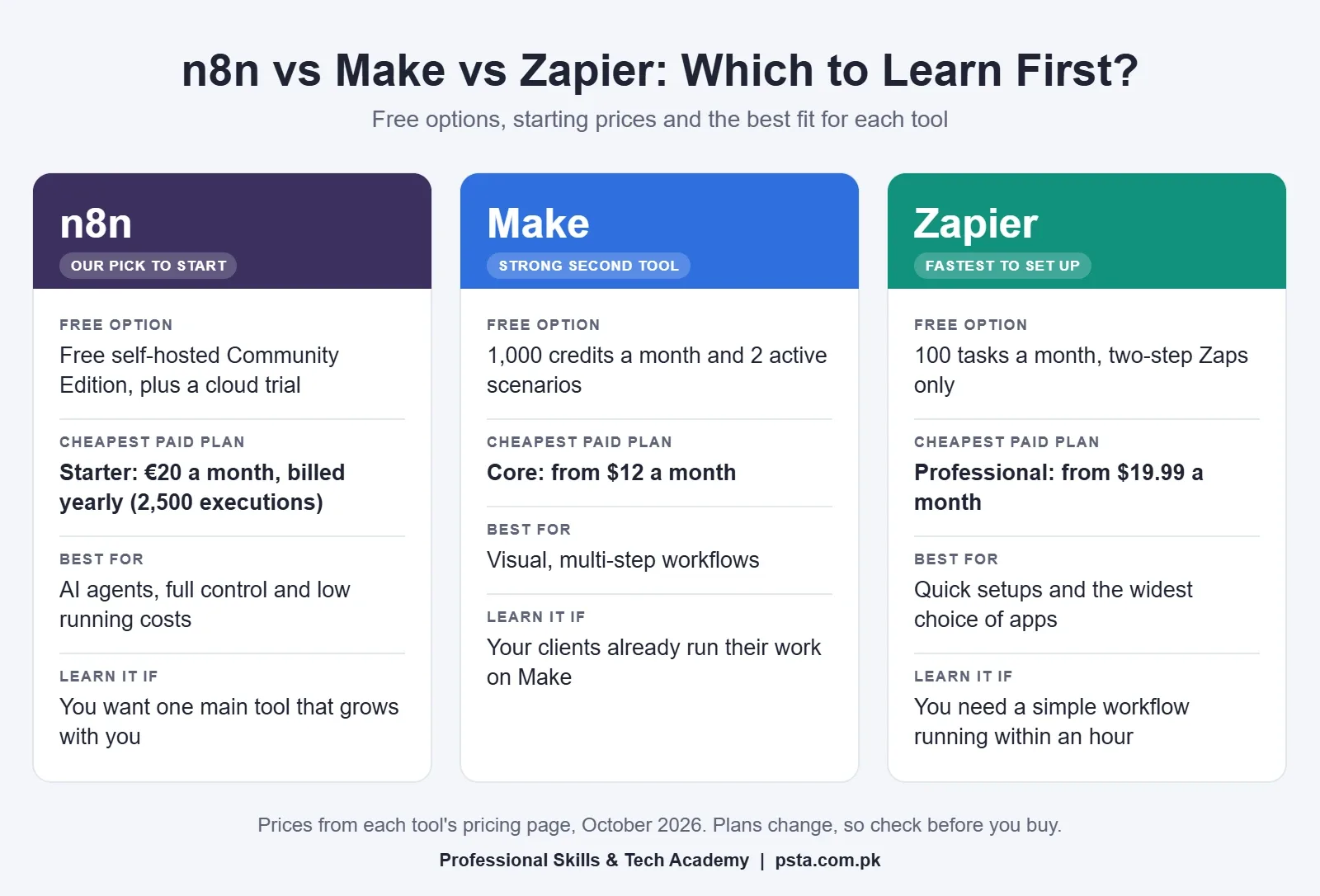
| Tool | Free option | Cheapest paid plan | Best for |
|---|---|---|---|
| n8n | Free self-hosted Community Edition, plus a cloud trial | Starter: €20 a month, billed yearly, with 2,500 executions | Full control, AI agents and low running costs |
| Make | 1,000 credits a month and 2 active scenarios | Core: from $12 a month | Visual, multi-step workflows |
| Zapier | 100 tasks a month with two-step Zaps | Professional: from $19.99 a month | Quick setups and the widest choice of apps |
Prices are from each tool's pricing page in October 2026.
Our advice for most students: make n8n your main tool and get comfortable with Make or Zapier as a second. n8n handles AI steps well, can run on your own server and is a name many clients search for. Make and Zapier are still worth knowing, because plenty of businesses already use them and need someone to fix or extend what they have.
You also need a few supporting skills:
- Google Sheets: most small business data lives here, so it becomes your first database.
- APIs and webhooks: the way apps send data to each other. The basics are enough at first.
- Prompt writing: clear instructions, examples and limits that make AI output reliable.
- JSON: the simple text format that workflows use to pass data between steps.
- A little code: optional at the start, but useful later for cleaning data. Our JavaScript course or Python course covers it.
The 8-Week Roadmap to Learn AI Automation
This plan assumes 8 to 10 focused hours a week. Each week ends with something you build, not something you watched. Save every build. By week eight, they become your portfolio.
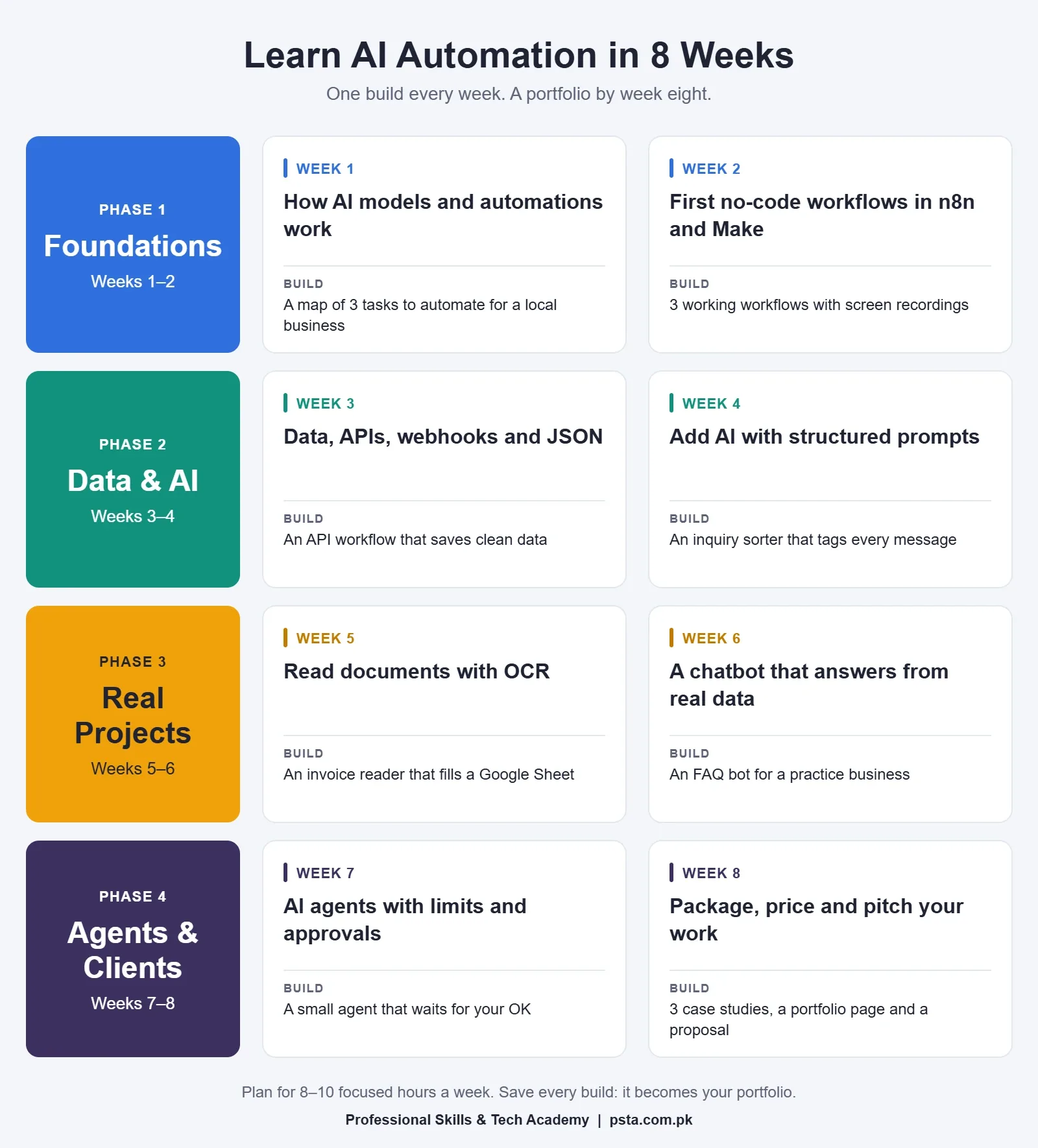
Week 1: Learn How AI Models and Automations Work
Learn what a large language model can and can't do. Try ChatGPT, Claude or Gemini on real business text: a customer complaint, an invoice, a long email. Notice where the answers are excellent and where the model makes things up.
Then draw three workflows on paper using the four parts: trigger, AI step, action and human check.
Build: a one-page map of three tasks you would automate for a local business.
Week 2: Build Your First No-Code Workflows
Create free accounts on n8n and Make. Build simple workflows with no AI at all, such as a Google Form entry that lands in a sheet and sends an email. Learn triggers, filters and schedules.
Keep it boring on purpose. The goal is to understand how data moves from one app to the next.
Build: three working workflows, each with a short screen recording.
Week 3: Understand Data, APIs and Webhooks
Most beginners get stuck here, so take your time. Learn what an API request is, how webhooks work and how to read JSON. Use the HTTP Request node in n8n to pull data from a free public API.
Then practice cleaning messy data. Real business sheets have phone numbers with and without +92, names in mixed case and dates in three formats.
Build: a workflow that collects data from an API and saves it clean.
Week 4: Add AI to Your Workflows
Connect an AI model through its API. Write prompts that return structured output, such as JSON with name, course and city, so the next step can use it.
Add clear rules for what the AI must never do, like quoting a fee that is not in your data.
Build: a workflow that reads an inquiry and sorts it into the right category.
Week 5: Automate Documents With OCR
Teach a workflow to read PDFs, scanned forms and photos of invoices. Pull out the key fields, check them against simple rules and send anything doubtful to a person.
Document work is one of the most common paid requests, because it saves offices hours of typing every week.
Build: an invoice reader that fills a Google Sheet.
Week 6: Build a Chatbot That Answers From Real Data
Build a chatbot for a website or WhatsApp that answers only from a business's own information: fees, timings and policies. Learn how to stop it from guessing and how to hand the chat to a person.
Test it with real questions in English, Urdu and Roman Urdu. Your users will write all three.
Build: an FAQ chatbot for a practice business.
Week 7: Try AI Agents, Carefully
Now give the AI more freedom. Build a simple agent that can choose between tools, such as checking a calendar, looking up a sheet and drafting a reply.
Add limits, logs and an approval step. Learn where agents fail, because clients will ask you about it.
Build: a small agent that waits for a person's approval before it acts.
Week 8: Package, Price and Pitch Your Work
Pick your three best builds and turn each into a short case study: the problem, the workflow, the time it saves and what you would improve. Record a two-minute video of each one running.
Our guide on building a portfolio with no clients shows a case study format that works for automation projects too.
Build: a portfolio page and your first proposal to a real business.
Your First Workflow: Answer Admission Questions on WhatsApp
Here is a project you can build in your first month. It solves a real problem for academies, schools and coaching centers across Pakistan, and every step uses something from the roadmap.
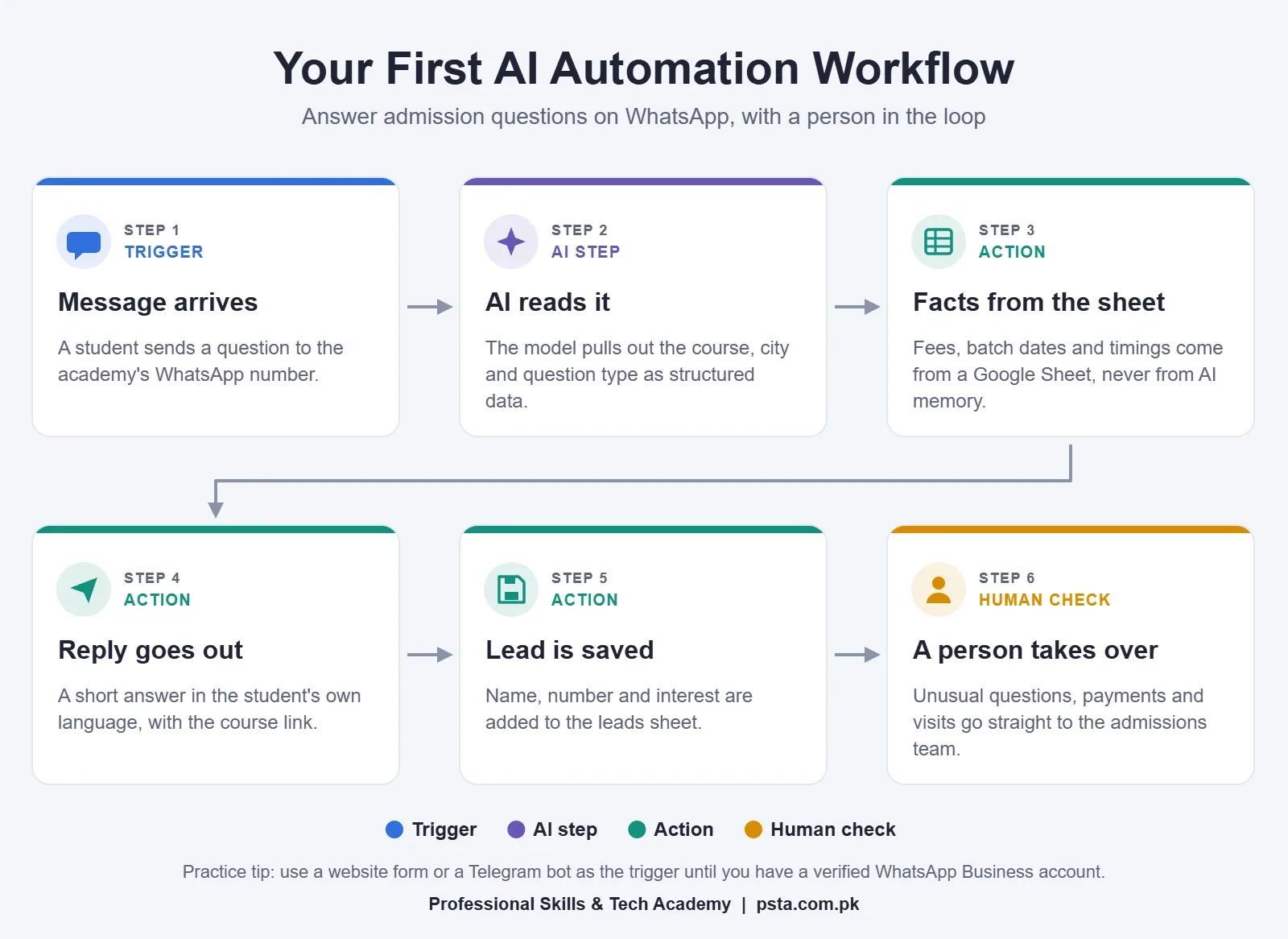
- Trigger: a new message arrives on the academy's WhatsApp Business number.
- AI step: the model reads the message and returns the course name, the student's city and the type of question, such as fee, timing or admission.
- Lookup: the workflow finds the answer in a Google Sheet that holds current fees, batch dates and timings. The AI never invents a fee.
- Reply: a short answer goes back in the language the student used, with a link to the course page.
- Save: the student's name, number and interest are added to a leads sheet.
- Human check: if the question is unusual, or the student wants to pay or visit, the admissions team gets an alert and takes over.
Two details make this workflow trustworthy. First, the facts come from a sheet the academy controls, not from the AI's memory. Second, a person sees every lead and every unusual question. That is the standard clients expect.
A practical tip: connecting the official WhatsApp Business Platform needs a verified business account. While you learn, build the same workflow with a website chat form or a Telegram bot. Switch the trigger to WhatsApp when you have a real client.
How to Earn With AI Automation in Pakistan
There are three common paths, and many people combine them.
Freelancing for International Clients
Search Upwork and Fiverr for projects that mention n8n automation, Make, Zapier or AI chatbots. Start with small, clear jobs like fixing a broken workflow or connecting two apps. These build reviews faster than big projects.
Include a screen recording of a working build in every proposal. It does more than any claim you can write.
Serving Local Businesses
Clinics, academies, property offices, shops and travel agents in your own city need this help, and they trust someone they can meet. Offer one small workflow at a fixed price, then a monthly fee to monitor and improve it.
Automating Work Inside a Job
Companies in Islamabad, Lahore, Karachi and abroad want operations, marketing and support staff who can automate their own work. Automation skills make a digital marketer, accountant or HR officer far more useful to an employer.
Be careful with anyone who promises a fixed income from this skill. Earnings depend on your portfolio, your communication and how reliably your workflows run. No course can promise a job or a monthly figure, and that includes ours.
Common Mistakes Beginners Make
- Watching tutorials without building. Rebuild every tutorial with your own data, then change something.
- Starting with AI agents. Fixed workflows come first. Agents are harder to test and control.
- Letting the AI answer from memory. Give it facts from a sheet or document, and tell it to say it doesn't know otherwise.
- Skipping error alerts. Real workflows break. Add an alert so you know the moment one fails.
- Ignoring privacy. Phone numbers and CNIC details need care. Store only what you need and limit who can see it.
- Hiding running costs. AI usage and tool plans cost money every month. Put them in your proposal.
How Long Does It Take to Learn AI Automation?
Most beginners can build useful workflows within four to six weeks of steady practice, and client-ready projects within two to three months. The roadmap above takes eight weeks at 8 to 10 hours a week.
If you already know spreadsheets or basic coding, you will move faster. Going deeper into custom code, agents and large systems takes months of real project work.
Learn AI Automation With PSTA
If you would rather learn in a class with an instructor, PSTA runs an AI automation course in Pakistan that follows the same path as this roadmap.
- Duration: 8 weeks
- Mode: on campus in Abbottabad, or online from anywhere in Pakistan
- Fee: Rs. 22,000 (regular fee Rs. 28,000)
- Level: beginner, and suitable for non-programmers
- Topics: AI and machine learning basics, low-code and no-code platforms, data gathering and scraping, OCR document automation, LLM chatbots, AI API integration, agentic AI and ethical deployment
Every module is hands-on, and you finish with projects you can show to clients. Campus classes are at Mandian, Old College Road, opposite FIMS College, Abbottabad. To ask about the next batch, message us on WhatsApp at +92 314 5424399 or apply through online admission.
Want to go further later? Our Full-Stack Web Development course is a natural next step if you enjoy code. Marketers can pair automation with the Advanced Digital Marketing Course, since most marketing teams want their reports and lead follow-ups automated. You can also browse all PSTA courses.
Final Thoughts: Automate One Boring Task This Week
You won't learn AI automation by reading about it. Pick one boring task, even one of your own, and automate it this week. Then do another.
In two months, you will have a set of working builds, a clear story about what each one saves and the confidence to pitch a real client. Start with the free tools, keep a person in the loop and write down everything you build.
Frequently asked questions
What is AI automation in simple words?
AI automation means building workflows where software does repetitive tasks on its own, and an AI model handles the steps that need some judgment, such as reading a message, sorting a request or drafting a reply. A typical workflow has a trigger, an AI step, an action and a human check for anything risky.
Can I learn AI automation without coding?
Yes. Tools like n8n, Make and Zapier let you build workflows with visual blocks, so you can start without writing code. You still need a basic understanding of data, APIs and JSON. Learning a little JavaScript or Python later helps you clean data and handle cases the visual blocks can't.
Which tool should I learn first: n8n, Make or Zapier?
For most beginners in Pakistan, n8n is the best first tool. It handles AI steps well, has a free self-hosted edition and is a tool many clients ask for by name. Learn Make or Zapier as a second tool, because many businesses already use them. All three offer a free way to practice.
How long does it take to learn AI automation?
With 8 to 10 focused hours a week, most beginners can build useful workflows in four to six weeks and client-ready projects in two to three months. The eight-week roadmap in this guide gives you one practical build each week. People who already know spreadsheets or basic coding usually move faster.
Is AI automation a good skill for freelancing in Pakistan?
It is one of the stronger options right now. Upwork reported that demand for AI integration work grew 178% in 2025, and local businesses also need help automating WhatsApp, sheets and reports. Your results depend on your portfolio, communication and reliability, and no one can promise a fixed income.
How much does it cost to start learning AI automation?
You can start for free. n8n has a free self-hosted edition and a cloud trial, Make has a free plan with 1,000 credits a month, and Zapier's free plan includes 100 tasks a month. Connecting an AI model's API costs a little, so set a small monthly spending limit while you practice.
Can I automate WhatsApp messages for a business in Pakistan?
Yes, through Meta's WhatsApp Business Platform, which tools like n8n and Make can connect to. It needs a verified business account and must follow WhatsApp's messaging rules. While you learn, practice the same workflow with a website form or a Telegram bot, then switch to WhatsApp for a real client.
Does PSTA offer an AI automation course?
Yes. PSTA's AI Automation Course runs for 8 weeks, on campus in Abbottabad or online across Pakistan. It covers no-code platforms, data scraping, OCR, LLM chatbots, AI API integration and agentic AI, with hands-on projects throughout. The fee is Rs. 22,000. Message +92 314 5424399 on WhatsApp to ask about the next batch.
Sources & references
- Upwork's In-Demand Skills 2026 upwork.com
- McKinsey, The state of AI in 2026 mckinsey.com
- World Economic Forum, Future of Jobs Report 2025: Skills outlook weforum.org
- ProPakistani, Pakistan's IT exports reach all-time high of $4.6 billion propakistani.pk
- Arab News, Pakistan unveils national AI policy arabnews.com
- n8n pricing n8n.io
- Make pricing make.com
- Zapier pricing zapier.com
Last reviewed & updated on by Umar Qureshi. Written by the PSTA team in Abbottabad, Pakistan.

Umar Qureshi

AI Automation Course: Beginner to Pro (Dominate Workflows)
Turn this guide into a career: hands-on training with real projects, online across Pakistan or on-campus in Abbottabad · 8 Weeks.


Comments
No comments yet — ask a question or share your experience.