Quick answer
Most Power BI interview questions for freshers cover five areas: basics, Power Query, star schema modeling, DAX such as CALCULATE and SUMX, and storage modes or row-level security. Prepare a one-sentence definition plus one example for each, and practice explaining your own dashboard as question, data, model and decision.
Key takeaways
- • Expect basics, Power Query, data modeling, DAX, storage modes and RLS questions.
- • Know the difference between a measure and a calculated column cold.
- • Explain Import, DirectQuery and Dual using Microsoft's own trade-offs.
- • Describe your project as question, data, model and decision.
- • Pair every definition with one real example from your own file.
Table of contents 31 sections
- How Power BI Interviews for Freshers Usually Work
- Basic Power BI Interview Questions for Freshers
- 1. What is Power BI?
- 2. What are the main building blocks of Power BI?
- 3. What is the difference between a report and a dashboard?
- 4. What is Power Query used for?
- 5. What does DAX stand for?
- Data Modeling Questions Interviewers Love
- 6. What is a star schema, and why does Power BI prefer it?
- 7. What is the difference between a fact table and a dimension table?
- 8. What is a surrogate key?
- 9. What is a role-playing dimension?
- 10. What is cardinality in relationships?
- DAX Interview Questions With Model Answers
- 11. What is the difference between a measure and a calculated column?
- 12. What is the difference between explicit and implicit measures?
- 13. What does CALCULATE do?
- 14. SUM or SUMX: When Do You Use Each?
- 15. What is filter context versus row context?
- Power BI Interview Questions on Storage Mode and Performance
- 16. Import vs DirectQuery: What Is the Difference?
- 17. What is Dual storage mode?
- 18. How would you make a slow report faster?
- Power BI Interview Questions on Security and Sharing
- 19. What is row-level security (RLS)?
- 20. Does RLS apply to everyone who opens the report?
- How Should You Talk About Your Own Dashboard?
- Which Power BI Interview Questions Trip Up Freshers Most?
- A One-Week Plan Before Your Interview
- Preparing for Data Roles With PSTA
- Answer Three Questions Out Loud Today
Try this quick self-test before your next data analyst interview. Can you explain, in one breath each, the difference between a measure and a calculated column, between Import and DirectQuery, and between a fact table and a dimension table? If any of those made you pause, this list of Power BI interview questions is for you.
The questions below are the ones fresh graduates in Pakistan are most likely to face for junior analyst, MIS and reporting roles. Each comes with a short model answer you can adapt, based on Microsoft's own documentation. You'll find:
- 20 questions grouped by level, from basics to data modeling and security
- Short answers written the way you'd actually say them in an interview
- A DAX cheat sheet of functions interviewers love to ask about
- How to talk about your own dashboard project with confidence
- A plan to prepare in the week before the interview
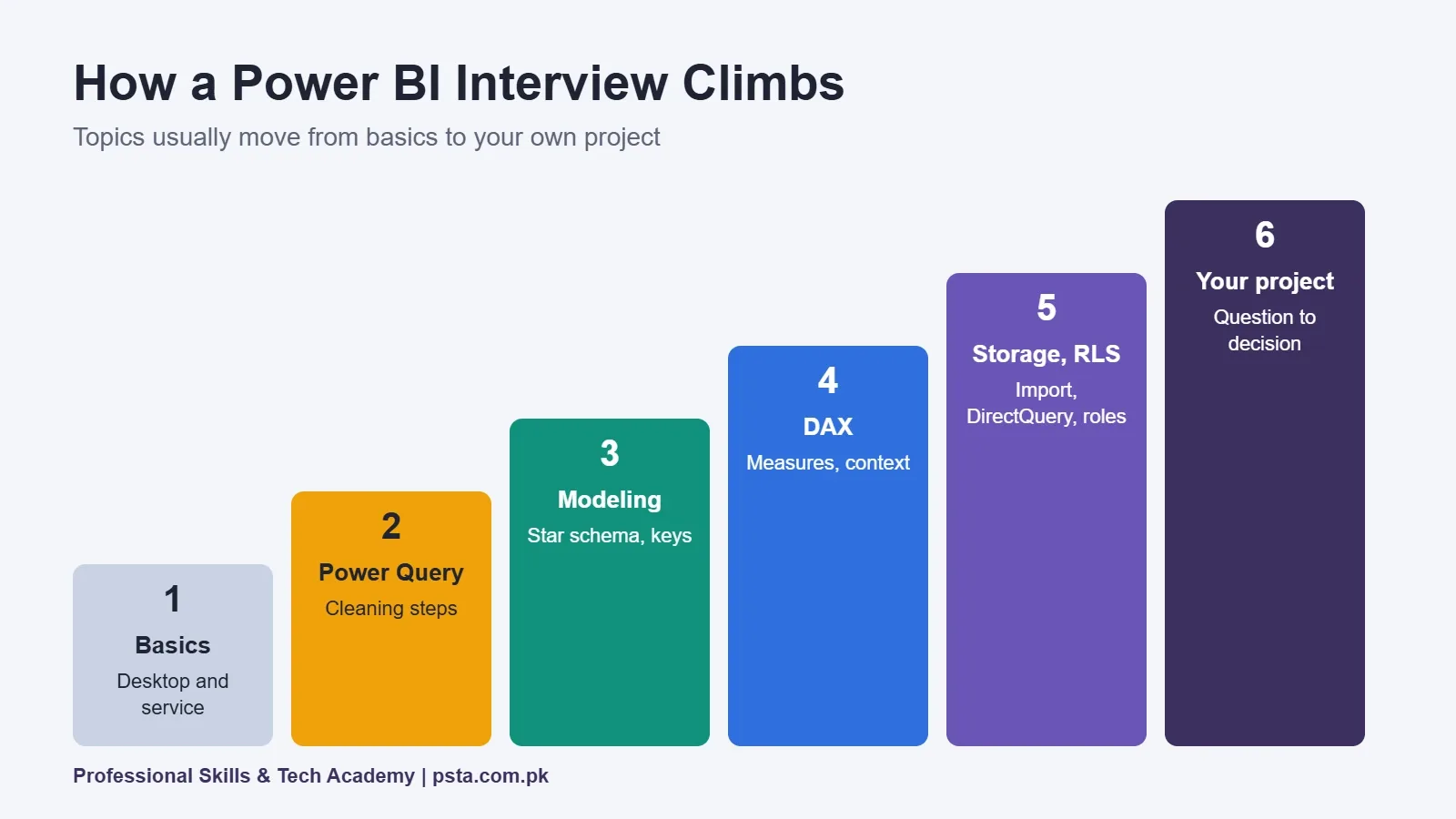
How Power BI Interviews for Freshers Usually Work
Most junior interviews mix three parts: concept questions, a few DAX questions, and a discussion of a dashboard you built. Some companies also give a short take-home task, such as cleaning a sales file and building a one-page report.
Interviewers rarely expect a fresher to know every feature. They want to hear clear thinking: why you modeled data a certain way, how you checked your numbers and what a manager should do with your chart. Answer in plain words first, then add the technical term.
Basic Power BI Interview Questions for Freshers
1. What is Power BI?
Power BI is Microsoft's business intelligence tool for connecting to data, cleaning it, modeling it and building interactive reports and dashboards. You build reports in Power BI Desktop and share them through the Power BI service in the browser.
2. What are the main building blocks of Power BI?
Power Query for getting and transforming data, the data model with relationships and DAX for calculations, report visuals for presenting results, and the Power BI service for publishing, sharing and refreshing.
3. What is the difference between a report and a dashboard?
A report can have many pages of interactive visuals built on one semantic model. A dashboard is a single canvas in the Power BI service where you pin tiles from one or more reports for a quick overview.
4. What is Power Query used for?
Power Query cleans and shapes data before it reaches the model: removing blank rows, splitting columns, changing data types, merging tables and unpivoting. Every step is recorded, so the same cleaning runs again on each refresh.
5. What does DAX stand for?
Data Analysis Expressions. It is the formula language for measures, calculated columns and calculated tables in Power BI.
Data Modeling Questions Interviewers Love
6. What is a star schema, and why does Power BI prefer it?
A star schema has one central fact table connected to several dimension tables. Microsoft's star schema guidance explains that dimension tables handle filtering and grouping while fact tables handle summarizing, which helps both performance and usability.
7. What is the difference between a fact table and a dimension table?
Fact tables store events or observations, such as sales lines, and usually grow large over time. Dimension tables describe business entities, such as products, customers or dates, and have a unique key used for filtering. In a one-to-many relationship, the dimension is on the "one" side.
8. What is a surrogate key?
A unique identifier you add to a table when the source data doesn't have one. Microsoft's guidance suggests adding an index column in Power Query when a dimension lacks a unique column for its relationship.
9. What is a role-playing dimension?
One dimension that filters facts in different ways, such as a date table used for order date and ship date. Only one relationship between two tables can be active, so Microsoft recommends creating a separate date table for each role instead of relying on inactive relationships.
10. What is cardinality in relationships?
It describes how rows match between tables: one-to-many, one-to-one or many-to-many. One-to-many from a dimension to a fact table is the standard pattern in a clean model.
DAX Interview Questions With Model Answers
11. What is the difference between a measure and a calculated column?
A measure is calculated when a visual asks for it, in the current filter context, and isn't stored. The star schema guidance describes explicit measures as calculated at query time and never stored. A calculated column is computed row by row and kept in the table, so it uses memory. Use measures for totals and ratios, columns for values you need to slice by.
12. What is the difference between explicit and implicit measures?
Implicit measures appear when you drag a numeric column into a visual and Power BI sums it automatically. Explicit measures are ones you write in DAX. Microsoft shows explicit measures with a calculator icon and implicit ones with a sigma icon. Explicit measures give you control, for example averaging unit price instead of summing it.
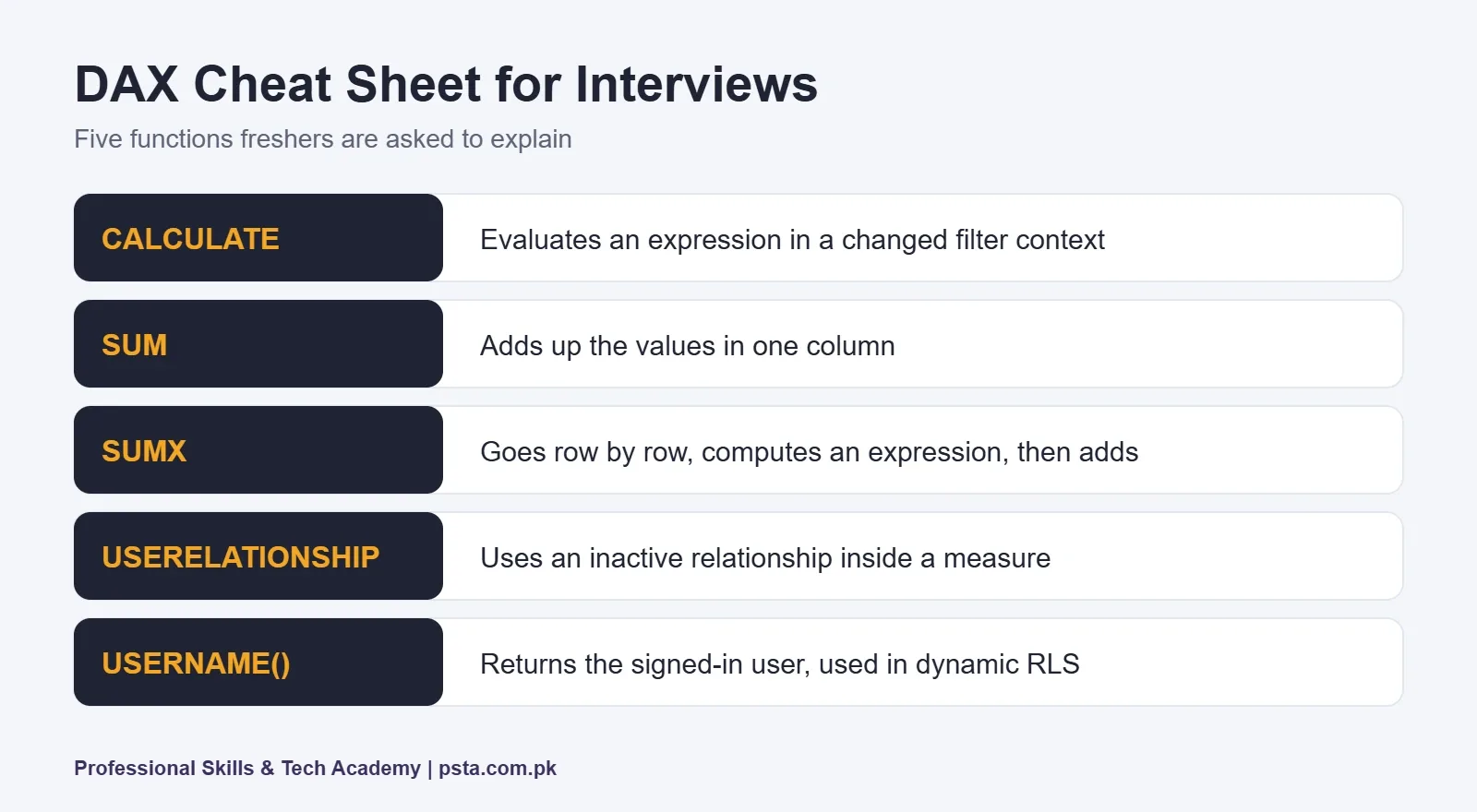
13. What does CALCULATE do?
CALCULATE evaluates an expression in a modified filter context. For example, total sales for only the Karachi region, or for last year. It is the function interviewers ask about most because most advanced DAX builds on it.
14. SUM or SUMX: When Do You Use Each?
Use SUM when the number already sits in one column. Use SUMX when you must first compute something per row, such as quantity times price; it iterates the table, evaluates that expression on every row and totals what it gets.
15. What is filter context versus row context?
Filter context is the set of filters applied by slicers, visuals and CALCULATE. Row context exists when a formula works on one row at a time, as in a calculated column or an iterator like SUMX. Being able to explain this simply impresses most interviewers.
Power BI Interview Questions on Storage Mode and Performance
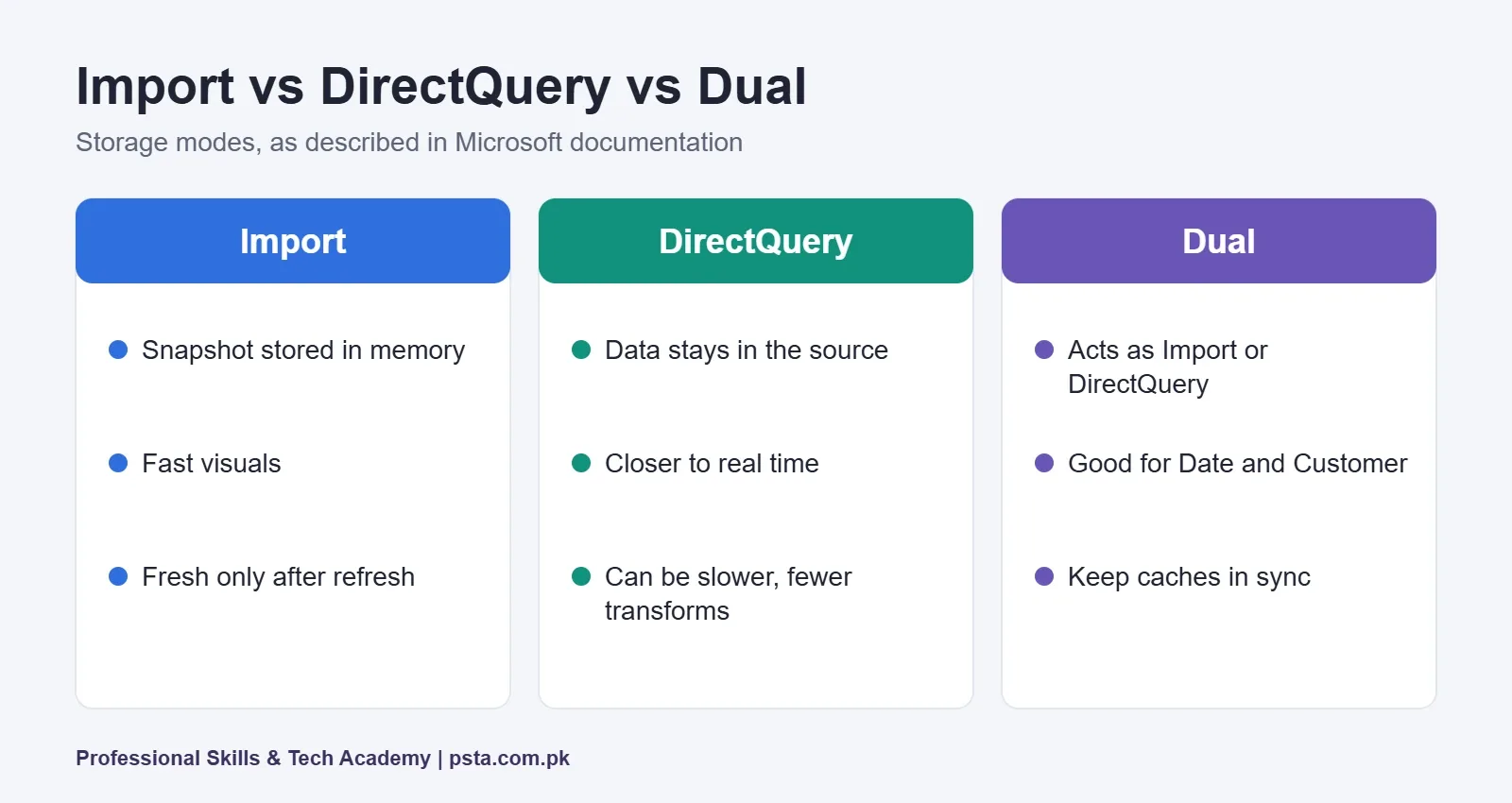
16. Import vs DirectQuery: What Is the Difference?
Import mode stores a snapshot of the data in memory, so visuals load fast, but data is only as fresh as the last refresh. DirectQuery leaves data in the source and sends queries each time a visual loads, which keeps results closer to real time but can be slower and supports fewer transformations. That summary follows Microsoft's storage mode documentation.
17. What is Dual storage mode?
A Dual table can act as Import or DirectQuery depending on the query. Microsoft suggests it for dimension tables like Date or Customer, so slicers load quickly while large fact tables stay in DirectQuery.
18. How would you make a slow report faster?
Start with the model: move toward a star schema, remove columns you don't use, and prefer measures over calculated columns. Then reduce the number of visuals on one page and check which visual is slowest with Performance Analyzer in Power BI Desktop.
Power BI Interview Questions on Security and Sharing
19. What is row-level security (RLS)?
RLS filters rows so each viewer sees only the data they're allowed to see. According to Microsoft's RLS guidance, each role holds a DAX filter expression, roles are additive, and RLS cannot hide whole tables, columns or measures. Static RLS uses a fixed filter such as Region equals West. Dynamic RLS uses a function like USERNAME() to filter by the signed-in user.
20. Does RLS apply to everyone who opens the report?
Not always. Microsoft notes that enforcement depends on the user's permissions on the semantic model, and recommends giving consumers only Read permission so the rules apply. Mentioning this detail shows you understand real deployments, not just the Desktop feature.
How Should You Talk About Your Own Dashboard?
Expect at least one question like "Walk me through a project." Use a simple four-part answer: the business question, the data and cleaning steps, the model and key measures, and the decision a manager could make from it.
| Part | What to say | Example line |
|---|---|---|
| Question | The problem the dashboard answers | "Which product lines lose money after returns?" |
| Data | Sources and the main cleaning steps | "Two Excel exports, merged and unpivoted in Power Query" |
| Model | Fact and dimension tables, key measures | "A sales fact table with product and date dimensions, plus a return-rate measure" |
| Decision | What a manager can act on | "Pause ads for the two lines with the highest return rate" |
If you don't have a project yet, our list of Power BI projects for beginners gives you ideas you can finish in a weekend. For the DAX side, the DAX for beginners guide covers the functions above in more depth.
Which Power BI Interview Questions Trip Up Freshers Most?
In practice, the questions that cause freshers the most hesitation tend to be measure versus calculated column, filter context, and Import versus DirectQuery. The fix is the same for all three: prepare a one-sentence definition, then one real example from your own file.
Other common slip-ups:
- Memorizing definitions without a use case. Always add "for example" and a business situation.
- Saying "I used the sum" when asked about DAX. Name the function and why you chose it.
- Ignoring data checks. Explain how you confirmed your totals match the source, such as comparing with an Excel pivot table.
- Overselling. If you haven't used a feature like RLS in a real project, say you've practiced it in a sample file. Honesty lands better than bluffing.
Many junior roles in Pakistan also test Excel and SQL in the same interview. Review our SQL interview questions for freshers alongside this list.
A One-Week Plan Before Your Interview
- Days 1 and 2: Rebuild one dashboard from scratch, including Power Query steps.
- Day 3: Write five measures, including one with CALCULATE and one with SUMX.
- Day 4: Redraw your model as a star schema on paper and fix anything that doesn't fit.
- Day 5: Add a simple RLS role and test it with "View as" in Desktop.
- Day 6: Answer all 20 Power BI interview questions above out loud, timing each answer to under a minute.
- Day 7: Practice your project walkthrough with a friend and ask what was unclear.
Preparing for Data Roles With PSTA
Each topic in these Power BI interview questions maps to a module in PSTA's Power BI Course: Data Analytics & Dashboards. The course page lists an 8-week, beginner-level program that teaches cleaning in Power Query, building relationships in the model, writing DAX measures, designing visuals, and publishing with security roles in the Power BI service. It is project-based, and the listed fee is Rs. 32,000, with on-campus classes in Abbottabad, live online classes across Pakistan or a hybrid option.
If your SQL is weak, the Oracle Database 19c course builds the query skills that many analyst interviews also test. You can see all programs on the courses page.
Answer Three Questions Out Loud Today
Pick questions 11, 13 and 16. Record yourself answering each in under a minute, then listen back. If any answer wanders, rewrite it as one definition plus one example and try again tomorrow. When you want structured practice with feedback from a trainer, you can apply for the next Power BI batch or ask the PSTA team on WhatsApp (+92 314 5424399) about upcoming class times.
Frequently asked questions
How many Power BI questions are asked in a fresher interview?
It varies by company, but a junior interview usually includes a handful of concept questions, two or three DAX questions and a discussion of one project. Some employers add a short practical task instead of many questions. Preparing the 20 questions in this guide covers the topics most interviews touch.
Do I need a Microsoft certification to get a Power BI job?
No certification is required for most junior roles, but it can help your CV stand out. Employers care more about whether you can clean data, build a sensible model and explain your dashboard. A small portfolio of two or three projects often carries more weight in an interview than a certificate alone.
Should I learn SQL before Power BI?
You can start Power BI without SQL, because Power Query handles a lot of cleaning visually. However, many analyst interviews in Pakistan test SQL basics too, such as joins and grouping. Learning both together, or SQL soon after, makes you a stronger candidate for data analyst and MIS roles.
What is the hardest Power BI interview topic for freshers?
Filter context and the CALCULATE function confuse most beginners, followed by the difference between measures and calculated columns. Practice by writing small measures in a sample file and explaining aloud what each slicer changes. Once you can describe the filter context in plain words, most DAX questions become easier.
Can I prepare for a Power BI interview in one week?
You can sharpen your answers in a week if you already know the basics. Spend the time rebuilding one dashboard, writing a few DAX measures, redrawing your model as a star schema and practicing answers aloud. If you are starting from zero, plan for several weeks of structured practice first.
What should a Power BI portfolio project include?
Choose a clear business question, use real or realistic data, show your Power Query cleaning steps, build a star schema model with a few explicit measures, and end with one or two insights a manager could act on. A short written summary of your choices helps interviewers follow your thinking.
Sources & references
- Microsoft Learn: Understand star schema and the importance for Power BI learn.microsoft.com
- Microsoft Learn: Table storage mode in Power BI learn.microsoft.com
- Microsoft Learn: Row-level security (RLS) guidance in Power BI Desktop learn.microsoft.com
- Microsoft Learn: Guidance for Power BI learn.microsoft.com
Last reviewed & updated on by Umar Qureshi. Written by the PSTA team in Abbottabad, Pakistan.

Umar Qureshi
Power BI Course: Data Analytics & Dashboards
Turn this guide into a career: hands-on training with real projects, online across Pakistan or on-campus in Abbottabad · 8 Weeks.

Comments
No comments yet — ask a question or share your experience.