Quick answer
Build Power BI projects in order of skill. Start with Microsoft's Financial Sample, then use free PBS and SBP EasyData files for inflation and interest-rate dashboards. Add practice sheets for fee collection, COD returns and HR attendance, then combine sources and add row-level security. Finish three projects properly before starting a fourth.
Key takeaways
- • Power BI Desktop is free but needs Windows 10 or later and at least a 1440×900 screen.
- • SBP EasyData and PBS price reviews give you real Pakistani data for your first dashboards.
- • Label self-made business data clearly as practice data on every report.
- • Each of the eight projects proves one new skill, from basic measures to row-level security.
- • Publish to web makes data public, so use it only for public or practice datasets.
Table of contents 20 sections
- What Makes a Power BI Project Worth Putting in a Portfolio?
- Before You Start: Laptop, Software and Free Data
- The 8 Projects at a Glance
- Projects 1 to 3: Learn the Basics on Clean Public Data
- 1. Sales and Profit Report From the Financial Sample
- 2. Pakistan Inflation Tracker From PBS Data
- 3. Interest Rate Dashboard From SBP EasyData
- Projects 4 to 6: Messy Data From Pakistani Workplaces
- 4. Academy Fee Collection Dashboard
- 5. Online Store COD Returns Report
- 6. HR Attendance and Leave Dashboard
- Projects 7 and 8: Combine Sources and Control Access
- 7. Freelancer Income in Dollars and Rupees
- 8. Multi-Branch Report With Row-Level Security
- Which Project Should You Build First?
- Power BI Projects for Beginners: What Each Portfolio Page Needs
- Should You Use Publish to Web for Your Portfolio?
- What Do Employers in Pakistan Look For in a Junior Analyst?
- Building These Projects in PSTA's Power BI Course
- Start Tonight: Load the Sample and Ask One Question
The strongest Power BI projects for beginners answer a real business question with data you understand, and Pakistani public data makes that easy. The State Bank of Pakistan's EasyData portal says it lets you download and plot 23,314 economic time series, which is more than enough raw material for your first three dashboards.
So the problem isn't finding data. It's picking projects that show an employer, step by step, that you can clean, model, measure and explain. That's what this guide is built around.
Here's what you'll get from it:
- Eight project ideas, ordered from your first afternoon in Power BI to a report with access control.
- A free or self-made data source for each one, with Pakistani context.
- The specific skill each project proves, so your portfolio doesn't repeat itself.
- A simple way to choose your first project based on the job you want.
- What to put on each portfolio page, and when not to use Publish to web.
What Makes a Power BI Project Worth Putting in a Portfolio?
A hiring manager looking at your work has one silent question: can this person take messy data from our office and give me a report I trust? Pretty charts alone don't answer that. A good beginner project shows the whole chain, from raw file to a decision someone could make.
In my classes, I ask students to test every project idea against four checks before they start:
- One clear question. "Which courier returns the most cash-on-delivery orders?" is a project. "Sales analysis" is a topic.
- Some cleaning work. If the file loads perfectly, you haven't proved anything about Power Query yet.
- At least three measures. Written in DAX, named clearly, and shown in your write-up.
- A finding. End with two or three sentences a manager could act on.
The eight ideas below each pass those checks. They also build on each other, so project six assumes you've done the work in projects one and two.
Before You Start: Laptop, Software and Free Data
You won't pay anything for Power BI Desktop itself. According to Microsoft's install page, it needs Windows 10 or later, at least 2 GB of available RAM with 4 GB or more recommended, and a 64-bit processor. The Microsoft Store version updates itself and doesn't need admin rights, which helps if you're on a shared or office computer.
One requirement catches a lot of students off guard. Microsoft lists a minimum screen resolution of 1440×900 or 1600×900 and says lower resolutions such as 1280×800 aren't supported. It also asks you to keep Windows display scaling at 100%, because higher scaling can hide dialog boxes. If your laptop screen is small, plug in an external monitor before you decide Power BI is "broken".
For data, you have three free routes:
- Microsoft's own sample. The Financial Sample workbook holds sales and profit data by market segment and country, and you can also load it from inside Desktop with "Use sample data".
- Pakistani public data. SBP EasyData covers the external, monetary, financial and real sectors. The Pakistan Bureau of Statistics publishes its monthly price index reviews as PDF files.
- Data you create. For business scenarios like fee collection or courier returns, you'll build a sample sheet in Excel and label it clearly as practice data.
The 8 Projects at a Glance
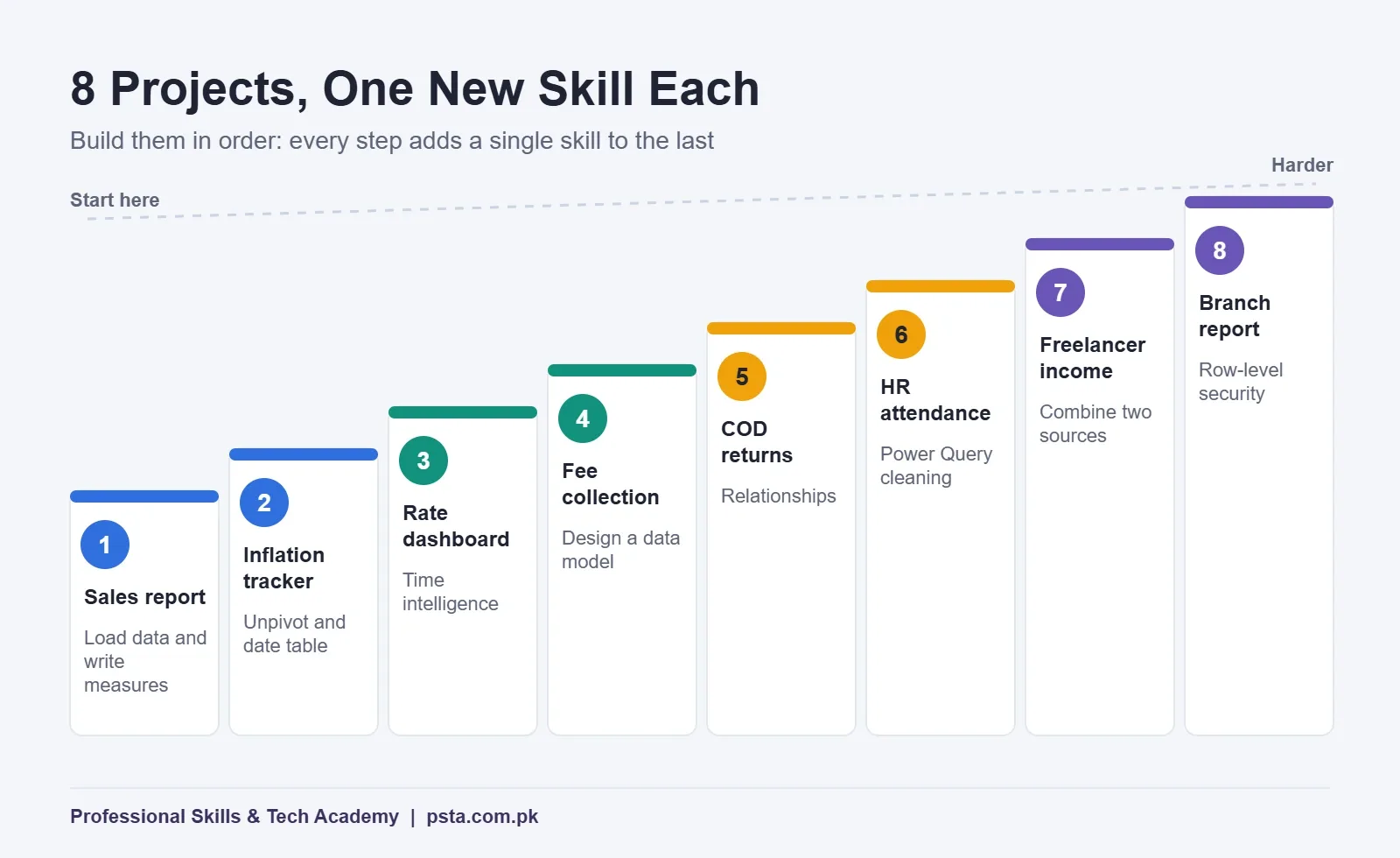
Use this table as your build order for these Power BI projects for beginners. The time column is my estimate for a beginner practicing a couple of hours a day, not a rule.
| # | Project | Data source | Main skill it proves | Rough time |
|---|---|---|---|---|
| 1 | Sales and profit report | Microsoft Financial Sample | Loading, cards, basic measures | 1 weekend |
| 2 | Pakistan inflation tracker | PBS reviews and Open Data Pakistan | Unpivoting, date table | 3 to 4 days |
| 3 | Interest rate dashboard | SBP EasyData | Time intelligence in DAX | 3 to 4 days |
| 4 | Academy fee collection | Your own sample sheet | Designing a data model | 1 week |
| 5 | Online store COD returns | Your own sample sheet | Relationships, conditional formatting | 1 week |
| 6 | HR attendance and leave | A deliberately messy export | Power Query cleaning | 1 week |
| 7 | Freelancer income in $ and Rs. | Your log plus an SBP rate series | Combining two sources | 4 to 5 days |
| 8 | Multi-branch report with security | Your own sample sheet | Row-level security roles | 1 week |
Each step on this ladder adds one new skill on top of the last, so you're never learning five things at once.
Projects 1 to 3: Learn the Basics on Clean Public Data
1. Sales and Profit Report From the Financial Sample
Start here even if it feels too easy. Load the Financials table, then build one page with three cards (total sales, total profit, profit margin), a bar chart by segment, a bar chart by country and a year slicer.
The question to answer: which segment has the best margin, rather than simply the most sales? Those are often different, and spotting that difference is exactly what analysts get paid for. Write your margin as a DAX measure, not a calculated column, and explain why in one line.
2. Pakistan Inflation Tracker From PBS Data
PBS releases its Monthly Review on Price Indices as PDFs. Open Data Pakistan hosts a monthly CPI compilation by Gallup Pakistan as a zipped Excel file under a Creative Commons Attribution license. That's a good teaching combination, because the spreadsheet saves you typing and the PDFs let you check or extend it.
The dataset page doesn't say which months the file covers, so open it first and note the last month included. Then add newer months by hand from the latest PBS review. In Power Query, unpivot the month columns into rows, set proper data types and add a separate date table. Your report should show the year-on-year trend and the latest reading in a card, with the source credited on the page.
3. Interest Rate Dashboard From SBP EasyData
EasyData's recent releases include KIBOR and repo market rates. Download one rate series, load it, and build a line chart with a month-over-month change measure and a "same month last year" comparison.
This is where DAX time intelligence starts to make sense. If functions like CALCULATE and DATEADD still feel abstract, work through our DAX for beginners guide alongside this project. A banking or finance recruiter will understand this dashboard in seconds, which is why it's worth the effort.
Projects 4 to 6: Messy Data From Pakistani Workplaces
Public data is tidy compared with what you'll see at work. These three projects use sample sheets you build yourself, shaped like the files offices in Pakistan actually pass around. Put a line such as "Practice data created for this portfolio" on the report so nobody mistakes it for a real company's figures.
4. Academy Fee Collection Dashboard
Create two tables in Excel: a student list (ID, name, course, batch month, city) and a payments list (student ID, amount due, amount paid, payment date). Around 300 students is enough. Then connect them in the model view with a one-to-many relationship.
Build measures for collected fees, outstanding fees and collection percentage, and show them by course and by month. The finding might be that one batch always pays late, which is a scheduling question rather than a finance one. If you've made fee sheets with pivot tables before, this is the natural next step up.
5. Online Store COD Returns Report
Many Pakistani online sellers live and die by cash-on-delivery return rates. Your sample sheet needs order ID, order date, city, courier, payment type, order value and final status (delivered or returned). Add a small city table with the province, so you practice using a dimension table.
The key measure is return rate by courier and by city. Use conditional formatting so the worst combinations stand out in a matrix. For realistic column ideas and the reasons returns happen, read our walkthrough on reducing COD returns in Pakistan.
6. HR Attendance and Leave Dashboard
Make this file ugly on purpose. Mix date formats, store check-in times as text, leave some names with extra spaces and give one department two spellings. That's what a real biometric or register export often looks like.
Fix every problem in Power Query, not in Excel, and keep the applied steps tidy and renamed. Your write-up should list each cleaning step in plain words. Our Power Query for beginners guide covers the transformations you'll lean on most here.
Projects 7 and 8: Combine Sources and Control Access
7. Freelancer Income in Dollars and Rupees
If you freelance, or plan to, this project is personal and practical. Keep a log of payments in US dollars with date, platform and client. Then look in EasyData's external sector indicators for a PKR per US dollar rate series and load it as a second table.
Relate both tables to one date table, then write a measure that converts each payment to Rs. at that month's rate. You'll learn why a shared date table matters, and you'll see how much exchange-rate movement changes your rupee income from month to month.
8. Multi-Branch Report With Row-Level Security
Imagine a training company with branches in Abbottabad, Mansehra and Haripur. Build one sales or admissions report, then create a role for each branch so its manager only sees their own rows. Test each role with "View as" in Desktop.
This project shows you understand that data access is part of reporting, not an afterthought. Note one limit for later: Microsoft's documentation says Publish to web doesn't work for reports that rely on row-level security, so share this one through screenshots and a recorded walk-through.
Which Project Should You Build First?
Everyone should start with project one. After that, let the job you want decide the order. A student aiming for a bank or a finance department gets more from projects three and seven. Someone applying to e-commerce or retail roles should jump to project five next. Office, admin and HR applicants will get more value from four and six.
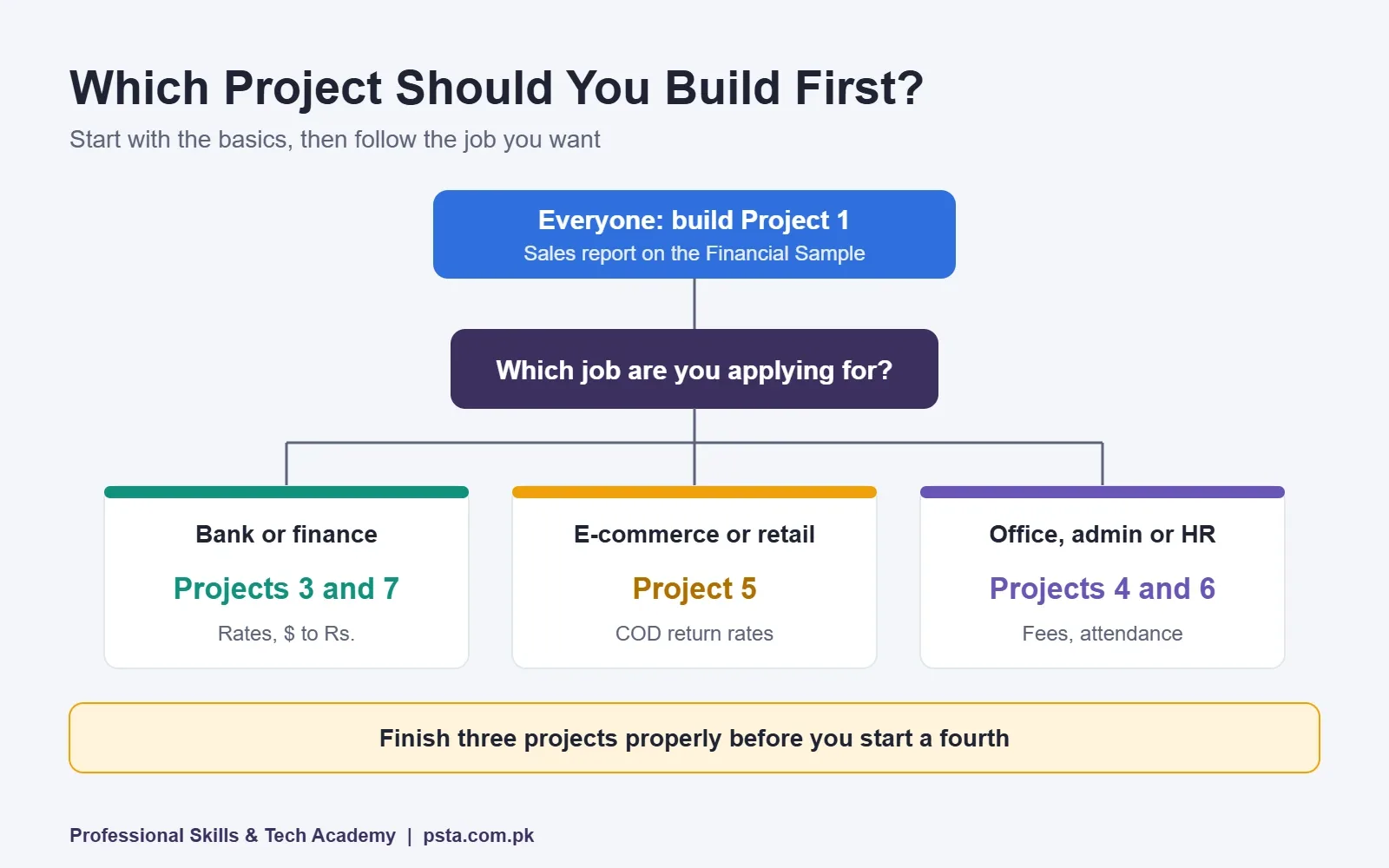
Whichever route you take, try to finish three projects properly before starting a fourth. In a Power BI portfolio, three complete, well-explained reports beat eight half-built ones every time a recruiter clicks through.
Power BI Projects for Beginners: What Each Portfolio Page Needs
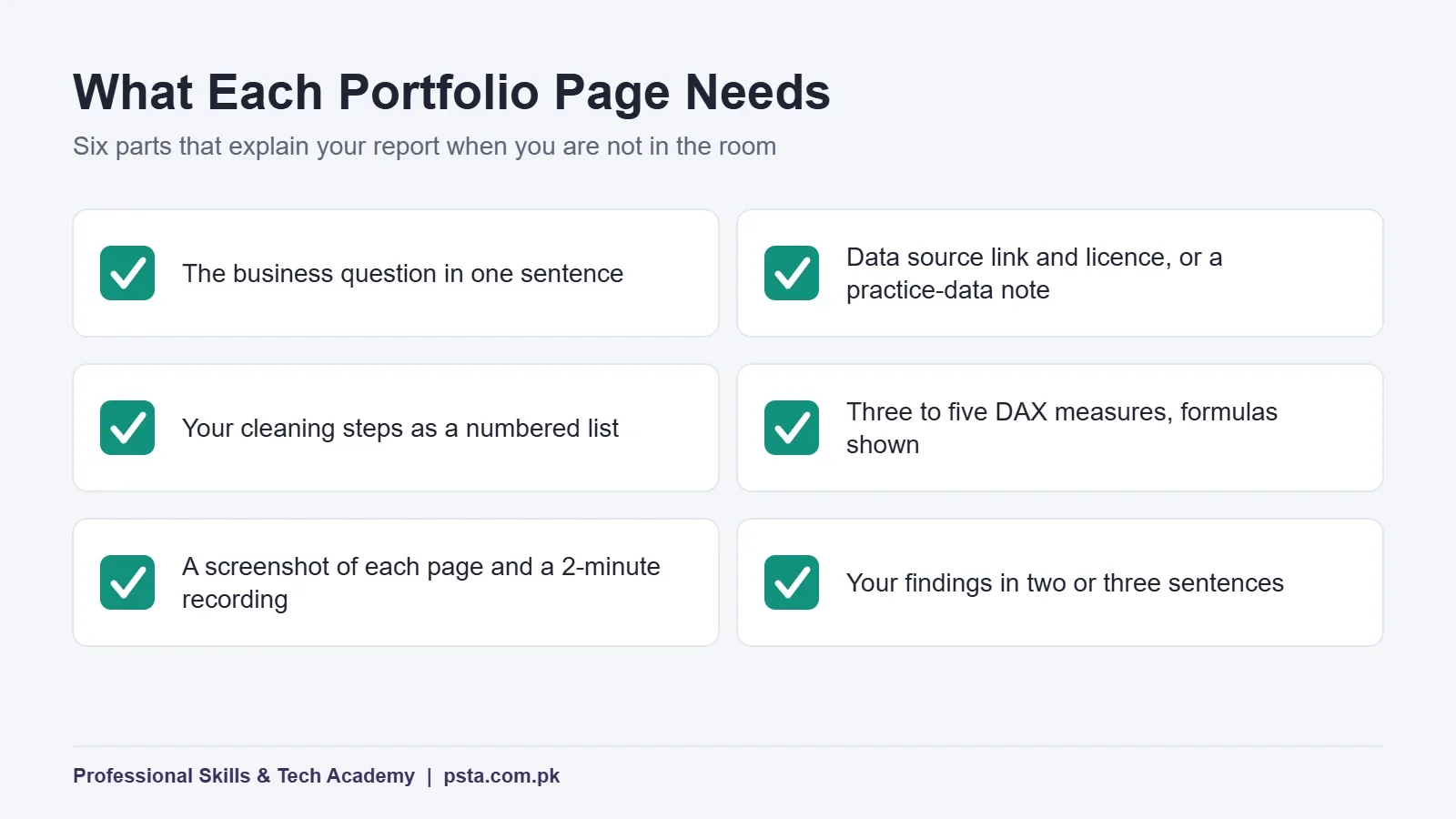
A finished report is only half the work. The page you present it on does the explaining when you aren't in the room. For each project, write a short page on GitHub, LinkedIn or your own site with these parts:
- The business question, in one sentence.
- The data source with a link and its license, or a note that it's practice data.
- Your cleaning steps as a short numbered list.
- Three to five DAX measures, with the formula shown.
- A screenshot of each report page, plus a two-minute screen recording.
- Your findings in two or three sentences.
If you share the PBIX file, check first that it holds nothing private. Anyone who opens it can see the full data model, not just the visuals.
Should You Use Publish to Web for Your Portfolio?
Publish to web turns a report into a public link you can embed on a blog or site. It's tempting, but read Microsoft's guidance first. Anyone on the internet can view a published report without signing in, and the underlying data in the model can be reached even if your visuals don't show it.
There are practical limits too. You need a Power BI license, publishing from a shared workspace requires Pro or Premium Per User, and an administrator has to switch on the Publish to web tenant setting. So use it only for reports built entirely on public or practice data, such as projects one to three. For everything else, screenshots and a recording do the job safely.
What Do Employers in Pakistan Look For in a Junior Analyst?
Salary data for this role in Pakistan is thin, so treat any single figure with care. Payscale's page for data analysts with Microsoft Power BI skills shows an average base salary of Rs. 516,000 a year, but it's based on only 31 salary profiles. Use it as a rough reference, not a promise.
From what I see in student interviews, the skills that come up together are Excel, Power BI and SQL. That's why the portfolio above leans on modeling and cleaning rather than visuals alone. If you can also write a basic join, you'll answer a whole category of interview questions; our guide to SQL joins with Oracle examples is a good place to start. When you feel ready to prove your skills formally, see the PL-300 certification guide for Pakistan.
Building These Projects in PSTA's Power BI Course
If you'd rather build this portfolio with a trainer checking your models, the Power BI Course: Data Analytics & Dashboards at PSTA is an 8-week, beginner-level program. The course page lists the current fee as Rs. 32,000, reduced from Rs. 35,000.
Its modules run from connecting to SQL, Excel, web and cloud data, through Power Query cleaning, model relationships and DAX, to custom visuals, publishing in the Power BI Service, security roles and business case projects. That covers every skill on the ladder above. Classes run in person at the Mandian campus in Abbottabad, opposite FIMS College, and live online classes let a learner in Quetta or Multan join too. A hybrid mix of both is also offered. A new batch opens every month.
If your SQL needs work first, the Oracle Database 19c course pairs well with Power BI. Fees for every program sit side by side on the courses page, and when you've decided, the admission form takes a few minutes. Questions about batch timings can go to our WhatsApp line at +92 314 5424399.
Start Tonight: Load the Sample and Ask One Question
Open Power BI Desktop, choose "Use sample data", load the Financials table and build a single card showing profit margin by segment. Write down which segment wins and one reason you think it does. That's your first project started, and it took less than an hour.
Frequently asked questions
Can I build Power BI projects on a Mac?
Not directly. Microsoft lists only Windows requirements for Power BI Desktop: Windows 10 or later, or Windows Server 2016 or later. Mac users usually run Windows in a virtual machine, borrow a Windows laptop for practice, or use a computer lab. Make sure whatever you use meets the minimum 1440×900 screen resolution, or some dialog boxes may not fit.
How many projects should a beginner Power BI portfolio have?
Three finished projects are enough to start applying. Pick ones that show different skills, such as a clean sales report, a Power Query cleaning project and a project with a proper data model or time intelligence. Each should have a clear question, visible DAX measures and a short write-up of what you found.
Is it acceptable to use made-up data in a portfolio project?
Yes, as long as you say so. Many business scenarios, such as fee collection or courier returns, have no public dataset, so building your own sample sheet is normal. Add a visible note like "practice data created for this portfolio" on the report and in your write-up, and never present invented numbers as a real company's results.
Do I need a paid license to make these projects?
No. Microsoft offers Power BI Desktop at no cost, and every project in this guide can be built and saved on your own computer. A license only matters when you want to share reports online through the Power BI service. Publishing from a shared workspace requires Pro or Premium Per User, according to Microsoft's documentation.
Where can I find free Pakistani data for Power BI practice?
Start with the State Bank of Pakistan's EasyData portal, which covers external, monetary, financial and real sector series such as KIBOR. The Pakistan Bureau of Statistics publishes monthly price index reviews, and Open Data Pakistan hosts a compiled CPI workbook under a Creative Commons Attribution license. Always credit the source on your report page.
Should I upload my PBIX file to GitHub?
You can, if the file contains only public or practice data. Anyone who opens a PBIX file can see the full data model, including tables your visuals don't show. Add a README with your business question, cleaning steps, measures and screenshots, so a recruiter can understand the project without installing Power BI.
How long will it take to finish all eight projects?
At a couple of hours a day, most beginners can finish all eight in roughly two to three months. The first three move fastest because the data is clean. Projects with messy data, combined sources or security roles take longer. Going slowly and finishing each one properly matters more than speed.
Sources & references
- Get Power BI Desktop (Microsoft Learn) learn.microsoft.com
- Publish to web from Power BI (Microsoft Learn) learn.microsoft.com
- Download the Financial Sample workbook (Microsoft Learn) learn.microsoft.com
- SBP EasyData portal easydata.sbp.org.pk
- Consumer Price Index dataset (Open Data Pakistan) opendata.com.pk
- Price statistics, CPI (Pakistan Bureau of Statistics) pbs.gov.pk
- Data Analyst with Microsoft Power BI skills salary in Pakistan (Payscale) payscale.com
Last reviewed & updated on by Umar Qureshi. Written by the PSTA team in Abbottabad, Pakistan.

Umar Qureshi

Power BI Course: Data Analytics & Dashboards
Turn this guide into a career: hands-on training with real projects, online across Pakistan or on-campus in Abbottabad · 8 Weeks.

Comments
No comments yet — ask a question or share your experience.