Quick answer
To add subtitles to a video, use CapCut for burned-in Reel captions, Premiere Pro Speech to Text for English client work and YouTube Studio for free closed captions. For Urdu speech, draft an SRT with Subtitle Edit and Whisper, correct it by hand, save it as UTF-8 and upload or import it.
Key takeaways
- • YouTube's automatic captions cover English, Hindi and Punjabi, but Urdu isn't on the list.
- • Premiere Pro Speech to Text is included in the subscription and transcribes 18 languages, not including Urdu.
- • Subtitle Edit is free and uses Whisper, which supports Urdu, Pashto and Punjabi.
- • In a 2024 benchmark, Whisper's error rate on read Urdu speech fell from 96.57% (tiny) to 24.44% (large).
- • Save every SRT as UTF-8, and keep lines to 42 characters and two lines on screen.
Table of contents 12 sections
- Burned-In or Separate File: Which Kind of Subtitles Do You Need?
- Add Subtitles to a Video: The Four Tools at a Glance
- CapCut Auto Captions: Quickest for Reels and Shorts
- Premiere Pro Speech to Text: Best for Client Work in English
- YouTube Studio: Free Captions Without Re-Exporting
- Subtitle Edit With Whisper: The Free Route for Urdu
- How Accurate Is Machine Transcription for Urdu Speech?
- Working With SRT Files Without Breaking Them
- Subtitle Style Rules Professional Editors Follow
- Which Subtitle Tool Should You Pick?
- Captioning Inside PSTA's Video Editing Course
- Caption One 60-Second Clip This Week
Many Pakistani creators assume they never need to add subtitles to a video by hand, because YouTube will caption it after upload. That works for English, Hindi and Punjabi, but Urdu isn't on YouTube's automatic captions list, so an Urdu vlog gets no captions at all. The right tool depends on the language spoken and on where the video will end up.
This review compares the four tools I'd actually hand to a beginner editor in Pakistan. In it, you'll find:
- Which tool fits Reels, client work, YouTube uploads and Urdu talks
- Where each one is free and where it stops being useful
- What independent research says about machine accuracy for Urdu speech
- How an SRT file is built, so you can fix one in Notepad
- The line length and reading speed rules professional subtitlers follow
Burned-In or Separate File: Which Kind of Subtitles Do You Need?
Before you open any software, decide what the viewer will receive. There are two kinds of subtitles, and they behave very differently.
Burned-in (open) captions are drawn onto the picture during export. Everyone sees them, nobody can switch them off, and they look the same on every phone. This is what you want for Reels, TikTok, Facebook ads and WhatsApp Status clips, because a viewer scrolling with the sound off still gets the message.
Closed captions live in a separate file, usually SRT, that the player loads on top of the video. The viewer can turn them on or off, YouTube can offer several languages for one upload, and you can correct a typo without exporting the video again.
A practical rule: short social clips get burned-in captions, long YouTube videos and course lessons get a closed caption file. Some editors do both, burning in a styled English version and uploading an Urdu SRT as a second track.
Add Subtitles to a Video: The Four Tools at a Glance
Each of these tools can add subtitles to a video, but they solve different problems. The table sums up what each one does well, based on each vendor's own help pages.
| Tool | Cost | Automatic Urdu transcription? | Best output | Best for |
|---|---|---|---|---|
| CapCut (desktop and mobile) | Basic auto captions free; Pro adds styles | Not confirmed in CapCut's help pages; check the language menu | Burned-in styled captions, SRT import | Reels, Shorts, TikTok |
| Premiere Pro Speech to Text | Included in a Premiere subscription | No (18 transcription languages, Hindi but not Urdu) | Caption track, SRT, burned-in | English client projects |
| YouTube Studio | Free | No | Closed captions on YouTube only | Long-form YouTube uploads |
| Subtitle Edit with Whisper | Free, open source | Yes, Urdu is a Whisper language | SRT and many other formats | Urdu, Pashto and Punjabi speech |
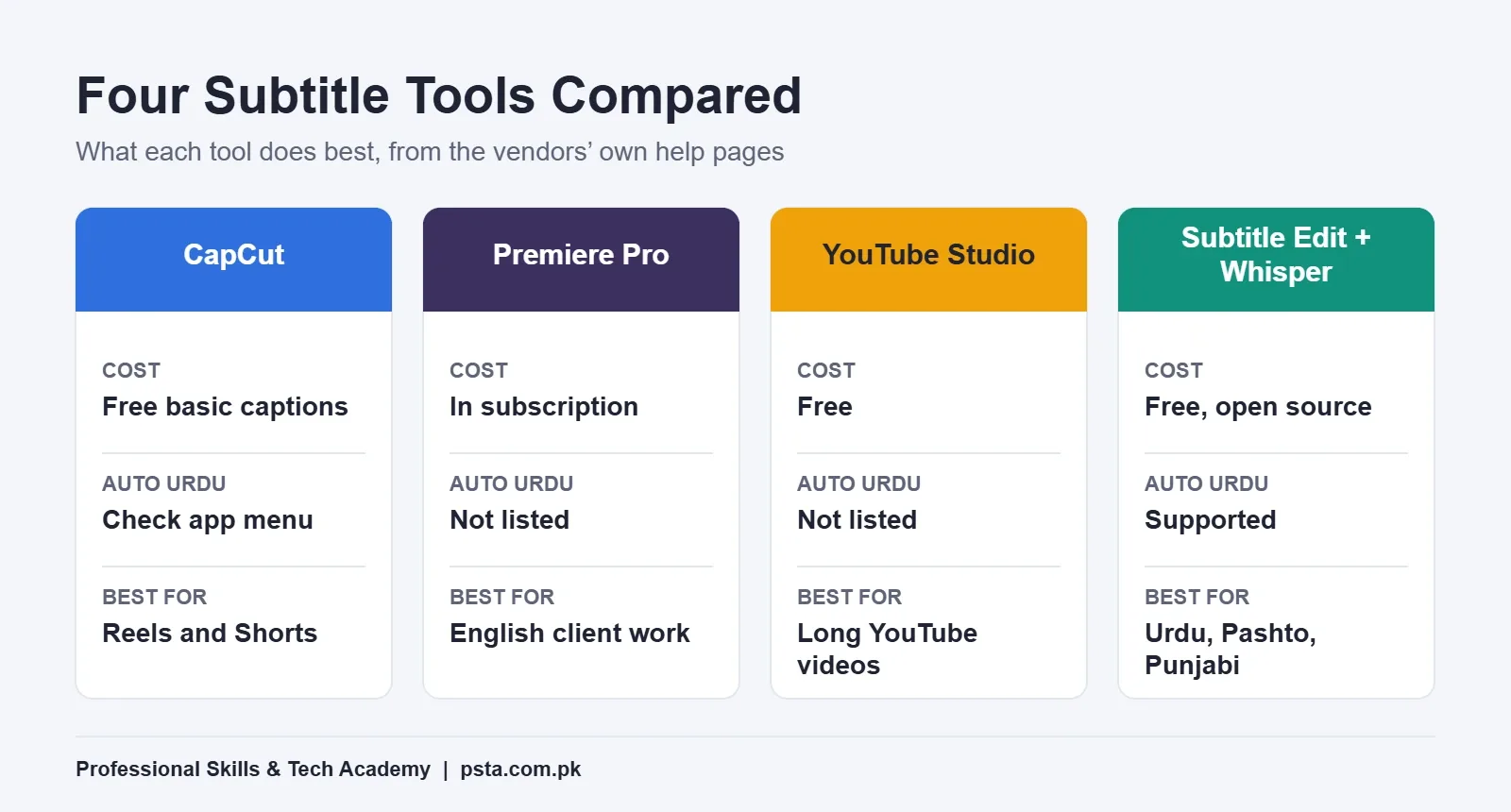
Notice that no single tool wins every row. In practice, many editors use two: one to transcribe and one to style or publish.
CapCut Auto Captions: Quickest for Reels and Shorts
CapCut is the tool most students already have on their phone, and for short vertical video it's hard to beat. On the desktop app, CapCut's help center describes the path as Captions, then Auto Captions, then choosing the audio source and language and clicking Generate. On mobile it's the Captions button in the bottom menu.
The strength is styling. You get word-by-word highlight effects, outlines and backgrounds that look right on a 9:16 screen, and you can apply one style to every caption at once.
There are limits you should know before taking client work:
- CapCut's help page says some features, such as batch SRT export and speaker detection, depend on platform, region and app version.
- The mobile app can't import a subtitle file. You import on desktop or web, then open the project on your phone through cloud sync.
- Imported files must be SRT (or timecoded TXT on desktop) saved as UTF-8, which matters a lot for Urdu script.
My advice: use CapCut when the client wants a punchy 30-second clip with bold captions, and always read every line before export. Auto captions often misspell brand names, Roman Urdu words and the names of places like Mansehra or Havelian.
Premiere Pro Speech to Text: Best for Client Work in English
If a client sends a 20-minute English interview, Premiere Pro is the comfortable choice. According to Adobe's Speech to Text page, the feature is included in a Premiere subscription and transcribes 18 languages. You open the Text panel, choose Transcribe Sequence, then click Create Captions and adjust style and timing in the Captions tab.
Adobe also lists caption translation into 27 languages. That's useful when a Pakistani business wants an English video subtitled for Arabic-speaking clients in the Gulf.
The weak point for local work is language. Adobe's list includes Hindi but not Urdu, Pashto or Punjabi. So for an Urdu talk show, a common approach is to transcribe elsewhere, then import the SRT into Premiere for styling and final export.
Premiere's other advantage is the edit itself. Captions sit on their own track, so when you trim a scene the captions move with the cut. On long projects, that saves a lot of time compared with fixing timing by hand.
YouTube Studio: Free Captions Without Re-Exporting
For a long-form YouTube channel, you often don't need to touch the video file at all. YouTube's help page on adding subtitles gives three routes inside Studio, all starting from Subtitles, then Add Language:
- Upload file: choose "With timing" for an SRT you already made, or "Without timing" for plain text.
- Auto-sync: paste or upload a transcript and YouTube matches it to the speech. The transcript must be in a language its speech recognition supports.
- Type manually: play the video and type each line yourself.
For English channels, the automatic captions are a fair first draft. YouTube itself tells creators to review them, since accents, dialects and background noise cause mistakes, and they may not be ready right after upload.
For Urdu channels, Studio is still useful, but as a publishing tool rather than a transcriber. Make the Urdu SRT elsewhere and upload it with timing. YouTube's supported formats page says basic SRT files must be plain UTF-8 and that styling markup inside them isn't recognized.
Subtitle Edit With Whisper: The Free Route for Urdu
Subtitle Edit is a free, open-source subtitle editor. Its GitHub releases page lists builds for Windows, macOS and Linux, with version 5.4.0 released in November 2026. Its real value for Pakistani editors is the built-in speech recognition based on OpenAI's Whisper.
Whisper's official repository includes Urdu, Pashto and Punjabi in its language list and is released under the MIT license. The Subtitle Edit documentation explains the workflow:
- Open your video file in Subtitle Edit.
- Go to Video, then Speech to text (Whisper).
- Pick an engine. Whisper.cpp runs on an ordinary CPU; the CUDA versions need an NVIDIA graphics card.
- Pick a model. The first run downloads the engine and model automatically.
- Set the audio language to Urdu and click Transcribe.
Two cautions. Models ending in ".en" are English-only, so don't choose one for Urdu audio. And model size matters a lot, which brings us to accuracy.
How Accurate Is Machine Transcription for Urdu Speech?
Accuracy is usually measured as word error rate (WER): the share of words the machine gets wrong, so lower is better. A 2024 study, "WER We Stand: Benchmarking Urdu ASR Models", tested Whisper models on Urdu speech without any extra training.
On the CSaLT read-speech set, the smallest model had a WER of 96.57%, while base scored 57.77%, small 41.10%, medium 33.39% and large 24.44%. The paper also found that fine-tuning lowered the error rate for every model size.
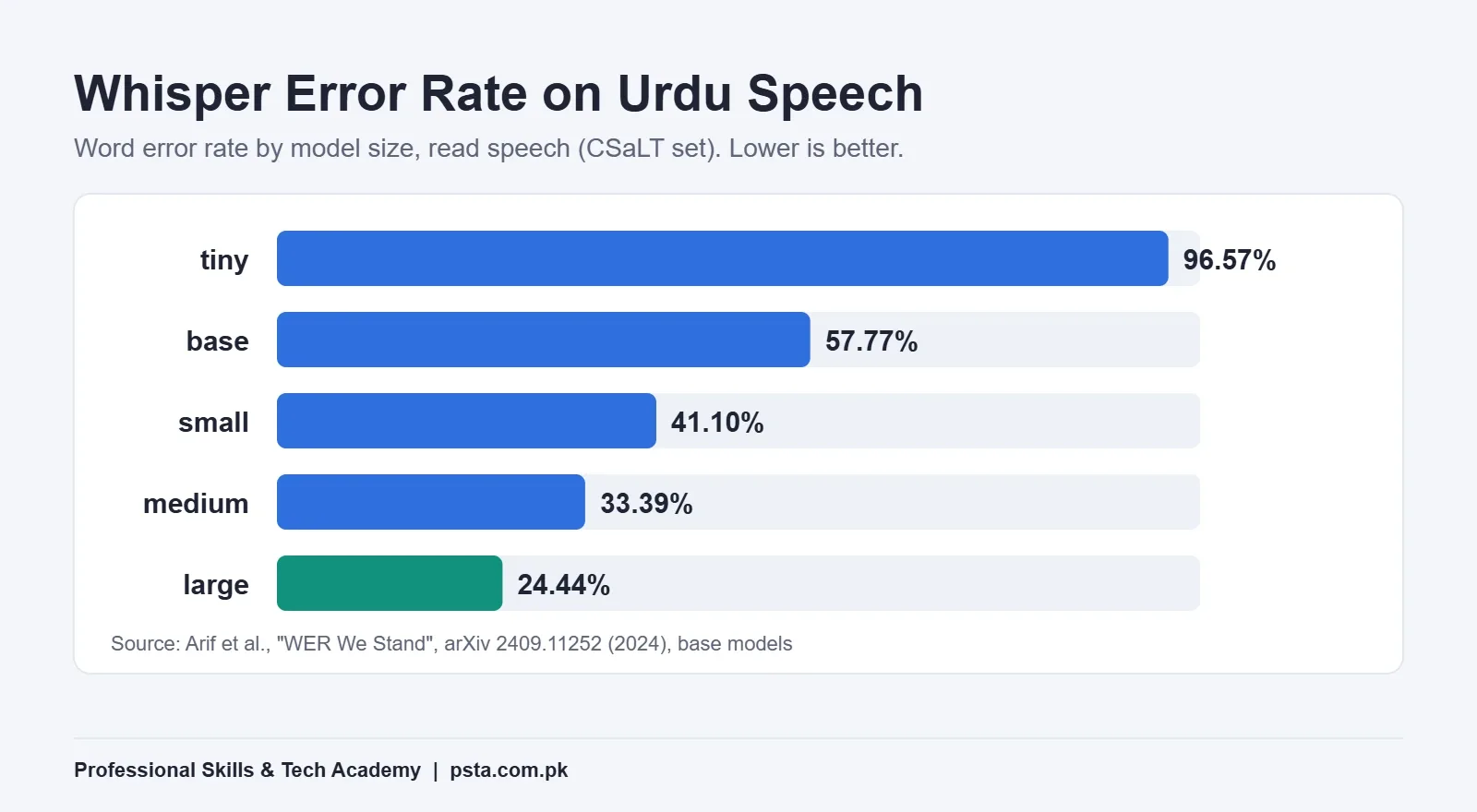
What does that mean at your desk? Even the best result in that table still gets roughly one word in four wrong on read Urdu speech. Treat machine output as a rough draft, not a finished file. Budget time to correct spellings, add punctuation and split long lines.
Hardware is the other trade-off. Whisper's repository lists the large model at about 10 GB of video memory, compared with about 2 GB for small. On a typical student laptop without a strong graphics card, the large model will run slowly on CPU, so start with a short test clip.
Working With SRT Files Without Breaking Them
SRT is the format every tool here can read, so it's worth understanding. An SRT file is plain text. Each subtitle has four parts: a number, a time range, one or two lines of text and a blank line.
1
00:00:01,200 --> 00:00:03,900
Welcome to today's lesson.

2
00:00:04,100 --> 00:00:07,000
We'll start with the timeline.
Note the comma before the milliseconds and the arrow between the start and end times. A missing blank line or a dot in place of that comma are common reasons an upload gets rejected.
For Urdu, encoding causes most problems. If you save the file in an old encoding, the letters turn into question marks or boxes. Both CapCut and YouTube ask for UTF-8, so in Windows Notepad choose "Save as" and check that UTF-8 is selected before you save.
Subtitle Style Rules Professional Editors Follow
Getting the words right is half the job. The other half is making them easy to read in the time they're on screen. Netflix publishes its English (USA) Timed Text Style Guide for vendors, and its numbers make a sensible default for any English work:
- A maximum of 42 characters per line
- No more than two lines on screen
- Reading speed up to 20 characters per second for adult content, and 17 for children's content
- Line breaks after punctuation and before conjunctions or prepositions
- When a subtitle needs two lines, a bottom-heavy shape is preferred
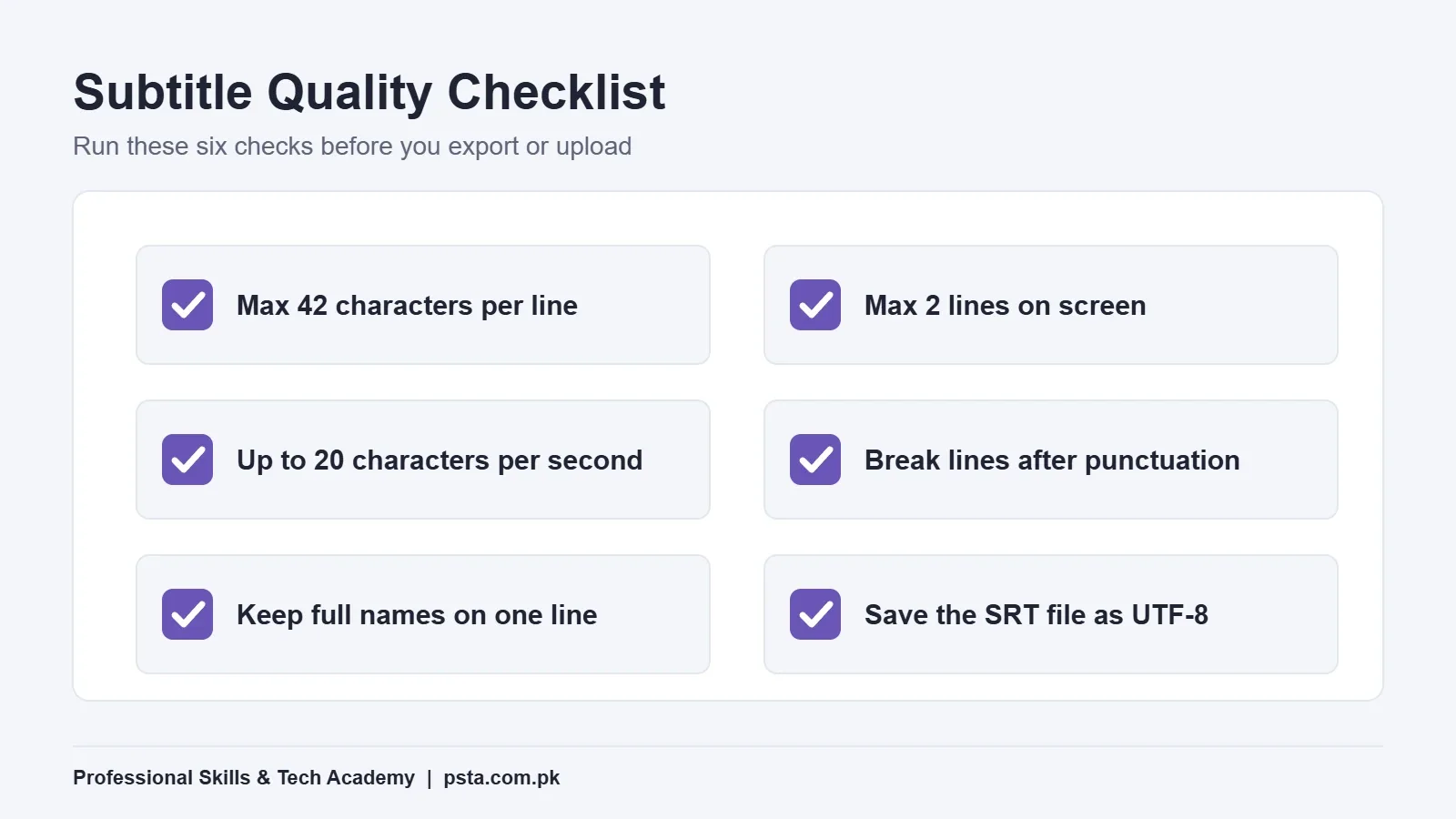
The guide also says to keep certain words together on one line, such as a first name and last name, or an article and its noun. Breaking "Umar" and "Qureshi" across two lines looks careless, even if the timing is perfect.
Social media captions bend these rules on purpose. Reels often show two to four words at a time in large type. That's fine for a 30-second clip, but for lessons, interviews and documentaries, the Netflix-style limits are kinder to viewers.
Which Subtitle Tool Should You Pick?
The easiest way to add subtitles to a video is to match the tool to the job rather than learning all four at once:
- English Reel or TikTok for a shop: CapCut auto captions, styled and burned in.
- English corporate or interview video: Premiere Pro Speech to Text, then export captions and video.
- English YouTube channel: let YouTube draft the captions, then correct them in Studio.
- Urdu, Pashto or Punjabi speech: Subtitle Edit with Whisper to draft the SRT, then edit it by hand and upload it to YouTube or import it into your editor.
If you freelance, the last route is a real skill to sell. Plenty of editors can drop auto captions on a Reel. Fewer can hand a client a clean, correctly timed Urdu SRT file.
Captioning Inside PSTA's Video Editing Course
The first project in PSTA's Mastering Video Editing & Visual Effects (VFX) course is a YouTube vlog edit: raw footage cut into a story, with music, an intro and captions. Across 12 weeks, the beginner-level program works mainly in Adobe Premiere Pro, with After Effects for titles and motion graphics.
Classes happen at our Mandian campus on Old College Road in Abbottabad, as live online sessions for students elsewhere in Pakistan, or as a mix of both. The course page currently lists the fee as Rs. 22,000 against a regular Rs. 25,000, split into 2 installments, and a fresh batch opens each month.
If you make content for your own business, pairing it with the Social Media Marketing and Meta Ads course or the Graphic Designing course helps you plan the post as well as edit it. You can compare all programs on the courses page, and the admission page lists the steps to enroll.
Captions also work best on clean sound. Our guide to removing background noise from video helps automatic transcription before you even start, and the YouTube export settings guide covers the final render.
Caption One 60-Second Clip This Week
Pick a one-minute clip of yourself speaking. Caption it once in the tool that matches its language, then open the SRT in Notepad and check every line against the 42-character and two-line limits. Doing it once by hand shows you how timing and line length really feel. If you'd like feedback on the result, send it to us on WhatsApp at +92 314 5424399 and ask about the next video editing batch.
Frequently asked questions
Can YouTube auto-generate Urdu subtitles?
Not at the moment. YouTube's help page lists the languages its automatic captions support, and Urdu isn't one of them, although Hindi and Punjabi are. Auto-sync also needs a supported language. For an Urdu video, create an SRT file in another tool, correct it, then upload it in YouTube Studio under Subtitles using the Upload file option with timing.
What is the difference between captions and subtitles?
In everyday use people mix the two words. Strictly, subtitles translate or transcribe dialogue for viewers who can hear, while captions also describe sounds such as music or a door closing for viewers who can't. Both can be burned into the picture or delivered as a separate file like SRT that viewers switch on or off.
Which free tool can add Urdu subtitles to a video?
Subtitle Edit is a free, open-source editor with a Speech to text option built on OpenAI's Whisper, and Whisper's language list includes Urdu. Choose a larger model if your computer can handle it, because research shows smaller models make far more mistakes on Urdu speech. Always proofread the result before you publish.
Why does my Urdu SRT file show boxes or question marks?
This almost always means the file was saved in the wrong text encoding. YouTube and CapCut both expect SRT files in UTF-8. Open the file in Notepad, choose Save as, select UTF-8 in the encoding menu and save again. If the original text was already damaged, export the subtitles again from your editing tool.
How long should each subtitle stay on screen?
Work from reading speed. Netflix's English style guide allows up to 20 characters per second for adult content and 17 for children's content. So a full 40-character line needs at least two seconds on screen for adults. If a line would flash past faster than that, shorten the wording or split it into two subtitles.
Can I add subtitles to a video on my phone?
Yes. CapCut's mobile app has Auto Captions under the Captions menu, and you can edit the text, timing and style by tapping each caption. The mobile app can't import an SRT file, though. To use a ready-made subtitle file, import it on CapCut desktop or web, then open the synced project on your phone.
Does Premiere Pro charge extra for Speech to Text?
Adobe says Speech to Text is included in a Premiere subscription, and individual subscribers have no fixed usage cap for their own projects, subject to fair use. It transcribes 18 languages, including English and Hindi, and can translate captions into 27 languages. Urdu isn't among the transcription languages, so Urdu projects usually start in another tool.
Sources & references
- Adobe: Speech to Text in Premiere adobe.com
- YouTube Help: Automatic captions support.google.com
- YouTube Help: Add subtitles and captions support.google.com
- YouTube Help: Supported subtitle and closed caption files support.google.com
- CapCut Help: How do I recognise subtitles? capcut.com
- Subtitle Edit docs: Speech to Text niksedk.github.io
- Netflix: English (USA) Timed Text Style Guide partnerhelp.netflixstudios.com
- Arif et al.: WER We Stand, Benchmarking Urdu ASR Models arxiv.org
Last reviewed & updated on by Umar Qureshi. Written by the PSTA team in Abbottabad, Pakistan.

Umar Qureshi

Mastering Video Editing & Visual Effects (VFX)
Turn this guide into a career: hands-on training with real projects, online across Pakistan or on-campus in Abbottabad · 12 Weeks.
Comments
No comments yet — ask a question or share your experience.