Quick answer
A workflow follows steps you design in advance, sometimes with one AI step inside. An AI agent gets a goal and tools, then chooses its own steps at run time. Agents cost more, run slower and are harder to debug, so build a workflow first and use an agent only when the path truly changes from case to case.
Key takeaways
- • Workflows follow predefined steps; agents let the model choose which tool to use next.
- • Adding one AI step to a workflow covers most classify, extract and draft tasks.
- • Agents make more model calls per run, so they cost more and respond slower.
- • Gartner expects more than 40% of agentic AI projects to be canceled before the end of 2027.
- • Use an agent only when input is messy and the path changes case by case.
- • Learn workflows first, then build one agent with two or three well-described tools.
Table of contents 15 sections
- AI Agents vs Automation: The Core Difference
- What Is an AI Agent, in Practical Terms?
- What Counts as Workflow Automation, Even With AI Inside?
- Side-by-Side: How the Two Approaches Compare
- Which Tasks Suit Each Approach?
- Three Pakistani Business Scenarios, Built Both Ways
- An Academy Sending Fee Reminders
- A Clothing Store Sorting Instagram and WhatsApp Enquiries
- A Property Dealer Qualifying Buyers
- What Does the Research Say About AI Agent Projects?
- Why Do Agents Cost More and Break Differently?
- The Five-Question Test Before You Build
- Which Should You Learn First as a Beginner?
- Studying Agents and Workflows at PSTA
- Map One Task on Paper Before You Open n8n
Many new freelancers believe every automation project now needs an AI agent. That belief costs clients money. In the AI agents vs automation choice, most small-business tasks in Pakistan run better as a fixed workflow, sometimes with one AI step inside it, and only a minority truly need an agent that decides its own next move.
The difference is simple once you see it. A workflow follows steps you wrote in advance. An agent gets a goal and some tools, then picks which tool to use and in what order. Both are useful. Picking the wrong one is what makes projects slow, costly or unreliable.
This guide walks you through:
- How an AI agent differs from a workflow that simply calls ChatGPT or another model
- A side-by-side comparison of cost, speed, reliability and debugging
- Which everyday business tasks suit each approach, with three worked examples
- What recent Gartner and McKinsey research says about agent projects
- A five-question test you can apply to any client request
AI Agents vs Automation: The Core Difference
The clearest definition comes from Anthropic's engineering guide, Building Effective Agents. It describes workflows as systems where language models and tools follow predefined code paths. Agents are systems where the model directs its own process and decides how to use tools to finish the job.
Put another way, the question is who owns the plan. In workflow automation, you own it. You draw the boxes: trigger, step one, step two, a condition, an output. In an agent, the model owns it. You give it a goal, instructions and a list of tools, and it works out the route at run time.
That single shift changes everything else: how much each run costs, how fast it finishes, how often it surprises you and how hard it is to fix when something breaks.
What Is an AI Agent, in Practical Terms?
Forget the science-fiction picture. In practice, an n8n AI agent is a single node with three kinds of parts attached to it. The n8n Tools Agent documentation lists them:
- A chat model (required). This is the brain, for example a model from OpenAI, Anthropic, Mistral or Groq.
- Tools (optional). These are actions the model may call, such as an HTTP request, a calculator, a Google Sheets lookup or another n8n workflow.
- Memory (optional). This keeps the thread of a conversation across several messages.
You also write a system message that tells the agent its role and limits. Then the loop starts. The model reads the request, decides whether it needs a tool, calls it, reads the result and decides again. n8n caps this loop with a Max Iterations setting, which defaults to 10, so a confused agent can't run forever.
That loop is the defining feature. If nothing in your build lets the model choose its next action, you have built a workflow with AI in it, not an agent.
What Counts as Workflow Automation, Even With AI Inside?
Plenty of "AI automation" is really a classic workflow with one smart step. n8n's Basic LLM Chain node is the usual building block. You send it a prompt, it returns an answer, and you can force that answer into a fixed structure with an output parser. There's no tool choice and no loop.
Here's a typical example. A Facebook lead form fills a row in Google Sheets. A workflow picks up the row, sends the message text to a model with the instruction "Classify as admission, fee query or complaint and return JSON." A Switch node then routes each category to the right WhatsApp template or staff member. The model only labels the message. Your workflow decides what happens next.
This pattern covers a large share of real client work: summarizing, classifying, extracting fields from invoices, drafting a reply for a human to approve. It is cheaper and easier to test than an agent, and it behaves the same way every time.
Side-by-Side: How the Two Approaches Compare
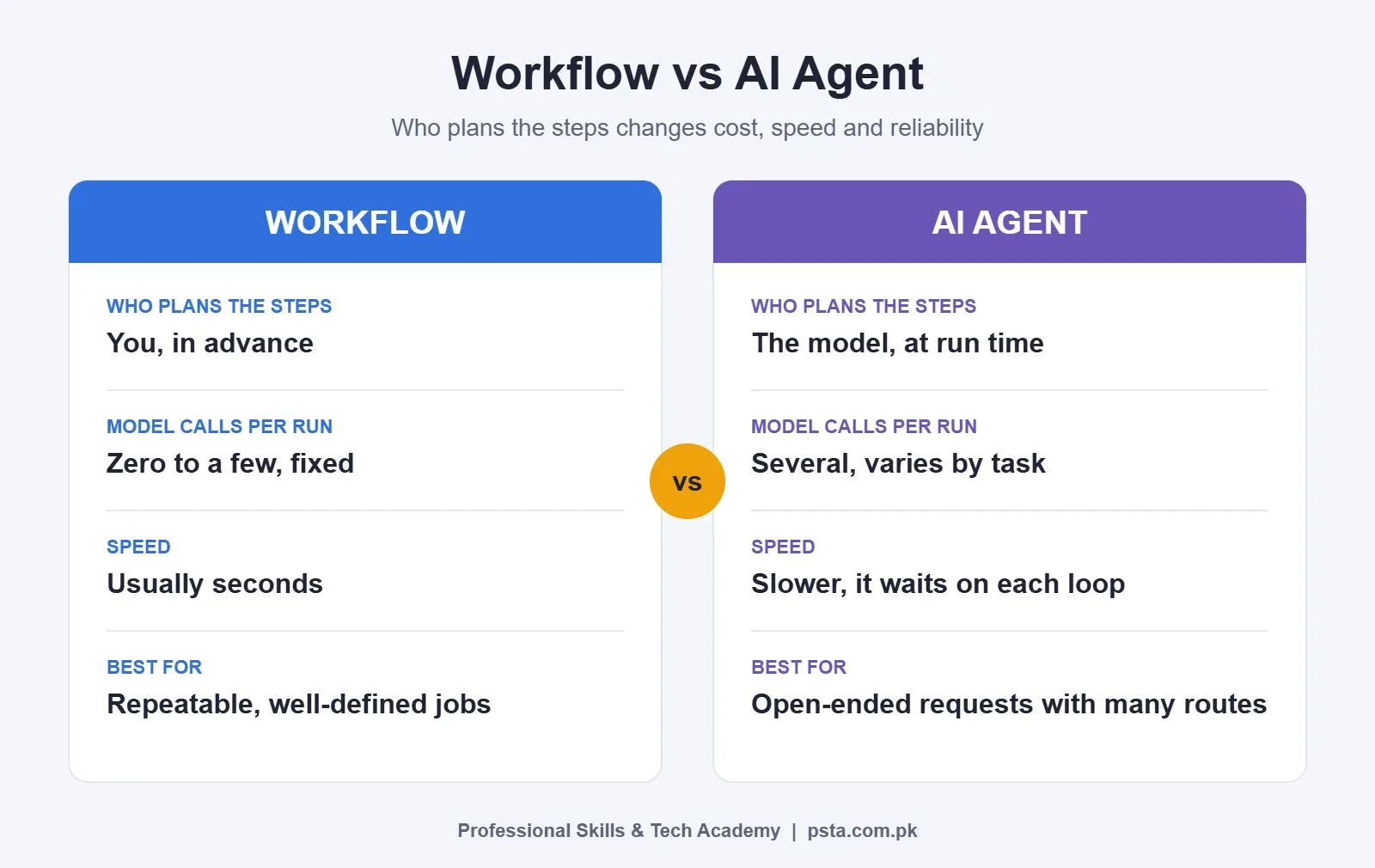
The table below sums up the AI agents vs automation trade-offs you'll weigh on most projects. The cost and speed rows follow Anthropic's point that agents trade extra latency and cost for flexibility.
| Factor | Workflow (with or without an AI step) | AI agent |
|---|---|---|
| Who decides the steps | You, in advance | The model, at run time |
| Predictability | Same input gives the same path | Path can change between runs |
| Model calls per run | Zero to a few, fixed | Several, varies with the task |
| Speed | Usually seconds | Slower, since each loop waits on the model |
| Debugging | Check the failed node | Read the agent's reasoning and tool calls |
| Best for | Repeatable, well-defined jobs | Open-ended requests with many possible routes |
| Typical n8n node | Basic LLM Chain, IF, Switch | AI Agent with tools and memory |
Which Tasks Suit Each Approach?
Two questions settle most AI agents vs automation decisions. First, how messy is the input? A form with fixed fields is tidy. A free-text WhatsApp voice note transcript is messy. Second, does the path change from case to case? Sending a fee reminder always follows one path. Answering "Is my order shipped, and can I swap the size?" might need an order lookup, a stock check and a policy check, in an order nobody can predict.
Put those two questions on a grid and you get four zones:
- Tidy input, fixed path: a plain workflow. No model needed. Example: send a reminder three days before each fee due date.
- Tidy input, branching path: rules with IF or Switch nodes. Still no model. Example: route admission forms by course and city.
- Messy input, fixed path: a workflow with one AI step. Example: pull the name, amount and date out of scanned invoices.
- Messy input, changing path: an agent, with clear limits. Example: a support assistant that can look up orders and stock before replying.
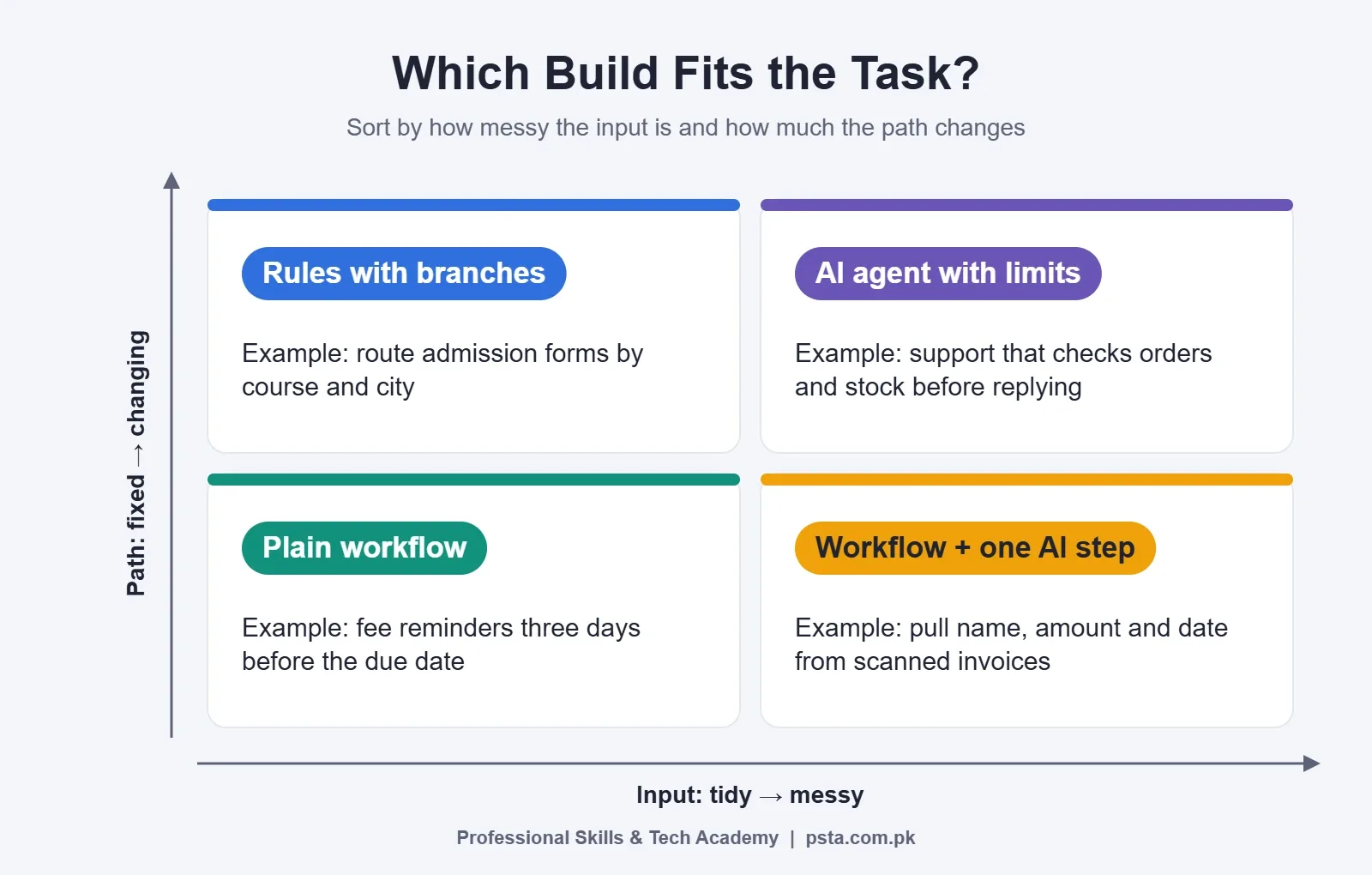
This grid also explains why a simple AI chatbot for business enquiries often works better as a workflow than as a full agent. When money, legal claims or personal data are involved, add a human approval step no matter which zone you're in. Refunds and fee waivers are good examples.
Three Pakistani Business Scenarios, Built Both Ways
The scenarios below are realistic examples written for teaching, not case studies of named businesses.
An Academy Sending Fee Reminders
A training institute in Mardan keeps student fees in Google Sheets. Every morning, a scheduled workflow reads rows where the due date is three days away and sends a WhatsApp template. An agent adds nothing here. The steps never change, and a model would only add cost and a small chance of a strange message. Verdict: plain workflow.
A Clothing Store Sorting Instagram and WhatsApp Enquiries
A Lahore lawn brand gets hundreds of messages after each new drop. Most ask about price, size or delivery time. A workflow sends each message to a model that labels it and drafts a short answer from a fixed price list. Staff approve drafts in one click. The model reads messy text, but the path stays fixed. Verdict: workflow with an AI step.
A Property Dealer Qualifying Buyers
An Islamabad real estate office receives questions like "Any 10 marla house in Bahria under budget X, near a school, ready to move?" Answering well means searching listings, checking a map service and maybe booking a viewing slot, in different orders for different buyers. Here an agent with three tools (listings search, distance check, calendar) earns its cost. Keep a cap on iterations and send any booking to a human for confirmation. Verdict: agent with guardrails.
What Does the Research Say About AI Agent Projects?
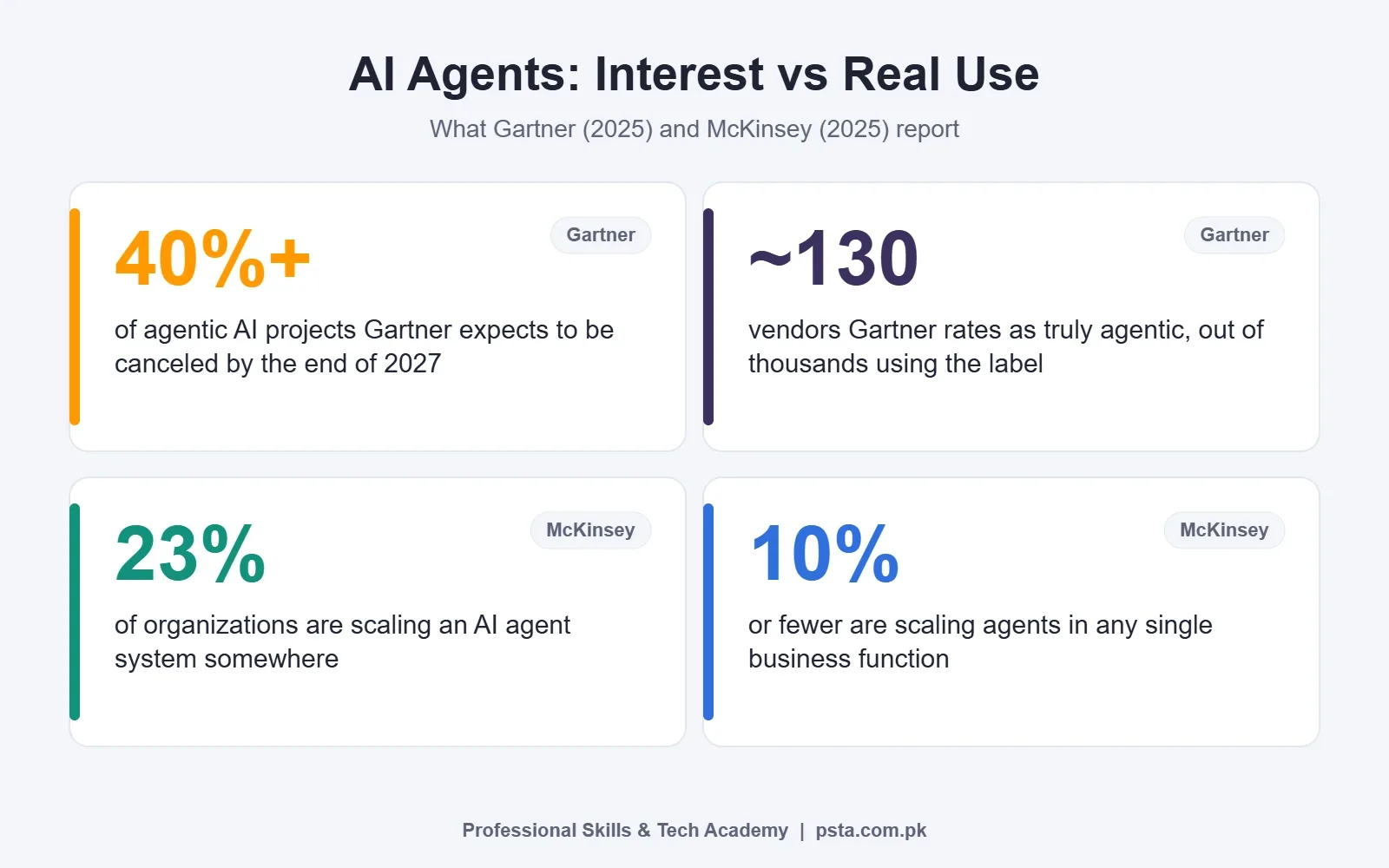
Research on AI agents vs automation projects shows interest is real, but so is the failure rate. In a June 2025 forecast, Gartner said it expects more than 40% of agentic AI projects to be canceled before the end of 2027. The reasons it gave were climbing costs, business value that's hard to prove and risk controls that fall short. Gartner also reckoned that just around 130 out of thousands of vendors marketing "agentic" products offer the real thing. It calls the rest agent washing.
McKinsey's State of AI 2025 survey of 1,993 participants found that 23% of organizations are scaling an agentic AI system somewhere, and another 39% are experimenting with agents. Yet no more than 10% report scaling agents in any single business function. IT service desks and research tasks were among the most common uses.
For a freelancer or small agency, the lesson is practical. Clients have heard the hype, and many will ask for "an AI agent." Your job is to deliver the result they need, and often that's a reliable workflow.
Why Do Agents Cost More and Break Differently?
Each time an agent decides, it calls the model again. A support query that needs three tool calls might mean four or five model calls, each with the full conversation attached. Workflows with one AI step make one call. Over thousands of runs a month, that gap shows up on the API bill.
Agents also fail in less obvious ways. A workflow usually fails loudly: a node turns red and you see the error. An agent can fail quietly. It might call the wrong tool, misread a tool's output, or give up after hitting the iteration limit with a vague answer. Anthropic's guide warns that errors can compound across steps and recommends testing in a sandbox with guardrails.
Practical guardrails that work well on client projects:
- Give each tool a clear name and a one-line description of when to use it.
- Keep the tool list short. Three or four well-described tools beat ten vague ones.
- Set a sensible iteration cap and handle the "limit reached" case with a polite fallback message.
- Turn on intermediate steps while testing so you can read every decision.
- Send anything that moves money or changes records to a human first.
The Five-Question Test Before You Build
This is the AI agents vs automation checklist I use with students. Run any client request through these questions, in order. Stop at the first clear answer.
- Can you write the steps on paper today? If yes, build a workflow.
- Is the only hard part reading or writing free text? Add one AI step to the workflow, such as classify, extract or draft.
- Does the right sequence of actions depend on what the customer says? If the branches are few, use a Switch node. If they're many and unpredictable, consider an agent.
- What happens if it gets one answer wrong? If the cost is high, keep a human in the loop whatever you build.
- Will the volume make extra model calls expensive? Estimate runs per month before you choose. A cheaper model in a workflow often beats a stronger model in an agent loop.
Many good builds mix both. A workflow handles intake, logging and notifications, and calls an agent only for the one step that needs judgment. n8n supports this directly, since an agent can call another workflow as a tool.
Which Should You Learn First as a Beginner?
When beginners ask me about AI agents vs automation, my answer is the same: learn workflows first. Agents sit on top of the same skills: triggers, API requests, data mapping, error handling and credentials. If you can't debug a broken Google Sheets node, you won't be able to debug an agent that calls it.
A sensible order looks like this:
- Build three or four plain workflows with forms, Sheets, email and WhatsApp.
- Add one AI step to each: classification, summary or field extraction with a structured output.
- Learn prompt basics so the model returns clean, consistent output. Our guide to prompt engineering mistakes covers the common ones.
- Build one agent with two or three tools and a clear system message.
- Add logging, a fallback message and a human approval step, then show it in your portfolio.
If you're still choosing a platform, compare them in n8n vs Zapier vs Make. Our list of n8n projects for beginners gives you practice builds, and when you're ready to run your own server, follow the self-host n8n guide.
Studying Agents and Workflows at PSTA
If the AI agents vs automation question is now clearer and you want guided practice, PSTA's AI Automation Course follows the order above. It runs for 8 weeks at beginner level, and you can attend at our Abbottabad campus, live online from anywhere in Pakistan, or in hybrid mode. At the time of writing the fee is Rs. 22,000, down from Rs. 28,000, with the option of paying in 2 installments.
If you're comparing options for an AI automation course in Pakistan, here is how ours is structured. After a plain-language module on AI and machine learning basics, the outline covers no-code platforms such as n8n, Make and Zapier, then moves through data scraping, OCR document automation, LLM chatbots for WhatsApp and websites, and AI API integrations. Agentic AI design comes near the end, followed by ethical deployment and error handling. The last project asks you to design a multi-step agent that solves something you actually deal with at work or in a family business.
If you'd like to script your own tools later, the Advanced Python course is the natural follow-on. Browse every program on the courses page, apply through admission, or ask about batch timings on WhatsApp at +92 314 5424399.
Map One Task on Paper Before You Open n8n
Pick one repetitive task from your job, your family business or a client. Write each step on a sheet of paper, one line per step. Circle any step where a person has to read free text or make a judgment call. If nothing is circled, build a workflow. If one step is circled, add a single AI step. If the order of steps keeps changing, that's your first real agent project.
Frequently asked questions
What is the difference between an AI agent and automation?
Automation, or a workflow, follows steps you design in advance, so the same input always takes the same path. An AI agent receives a goal and a set of tools, then decides which tool to call and in what order while it runs. The key question is who owns the plan: you, or the model.
Is ChatGPT an AI agent?
It depends on how it is set up. If your n8n or Make workflow sends text to ChatGPT or the OpenAI API and gets a reply, that is a workflow with one AI step. It becomes an agent only when the model can choose which tools to call and keeps looping until the task is finished. The model is the brain; the agent is the setup around it.
Do I need coding to build an AI agent?
Not for a first agent. Tools such as n8n let you connect a chat model, tools and memory visually, and you mainly write the system message and tool descriptions. Basic comfort with JSON, APIs and reading error messages helps a lot, and Python becomes useful once you build custom tools.
Are AI agents more expensive than workflows?
Usually, yes. An agent calls the model each time it decides on a step, so one request can trigger several model calls. A workflow with one AI step makes a single call. For high-volume tasks like order updates or reminders, that difference can add up to a noticeably larger monthly API bill.
Which is better for a WhatsApp customer support bot?
It depends on the questions. If most messages ask about prices, timings or fees, a workflow that classifies the message and replies from a fixed knowledge base works well and is easier to control. If customers need order lookups, stock checks and changes in varying order, an agent with a few tools and human handover is a better fit.
Should beginners learn n8n workflows or AI agents first?
Start with workflows. Agents depend on the same skills: triggers, credentials, API requests, data mapping and error handling. Build a few plain workflows, add an AI step to each, then create one agent with two or three tools. That order makes debugging far easier when something goes wrong.
Can a workflow and an agent work together?
Yes, and many good builds do this. A workflow handles intake, logging and notifications, then hands one judgment-heavy step to an agent. In n8n, an agent can also call another workflow as a tool, so you keep predictable parts predictable and use the agent only where flexibility pays off.
Sources & references
- Building Effective Agents (Anthropic) anthropic.com
- Tools AI Agent node documentation (n8n) docs.n8n.io
- Basic LLM Chain node documentation (n8n) docs.n8n.io
- Gartner: Over 40% of agentic AI projects could be canceled by end of 2027 (W.Media) w.media
- The State of AI in 2025: Agents, innovation and transformation (McKinsey) mckinsey.com
Last reviewed & updated on by Umar Qureshi. Written by the PSTA team in Abbottabad, Pakistan.

Umar Qureshi

AI Automation Course: Beginner to Pro (Dominate Workflows)
Turn this guide into a career: hands-on training with real projects, online across Pakistan or on-campus in Abbottabad · 8 Weeks.
Comments
No comments yet — ask a question or share your experience.