Quick answer
A Google Business Profile is free. Search Google Maps for your shop first, then claim the existing listing or add a new one at business.google.com/add. Use your real signboard name, a few specific categories and an exact map pin. Verification reviews take up to 5 business days. Ask every customer for reviews, never with incentives.
Key takeaways
- • Check Google Maps for an existing listing before you create one, so you never make a duplicate.
- • Use the exact name on your signboard; adding keywords, cities or phone numbers breaks Google's rules.
- • Google chooses your verification method, and verification reviews take up to 5 business days.
- • Ask every customer for a review through a link or QR code, and never offer discounts or gifts for one.
- • Ranking depends on relevance, distance and prominence, and Google says no one can pay for a better spot.
Table of contents 13 sections
- What Is a Google Business Profile, and Who Can Have One?
- Meet the Example Shop
- Step 1: Claim an Existing Listing or Add a New One?
- Filling In Name, Category and Address the Right Way
- How Does Verification Work for Shops in Pakistan?
- Photos, Services and Hours: Your First Week on Google Business Profile
- How Should a Shop Ask for Google Reviews?
- Replying to Reviews, Including the Angry Ones
- What Moves a Google Business Profile Up in Local Results?
- Reading the Performance Report After 30 Days
- Can You Manage Profiles for Other Businesses?
- Where PSTA's Digital Marketing Course Fits In
- A Ten-Minute Check for Tomorrow Morning
A Google Business Profile costs nothing to create, and most shops in Pakistan can set one up in a single afternoon. The slow part is verification: Google says its verification reviews take up to 5 business days, so start today and finish the rest of the profile while you wait. What decides whether customers actually find you afterwards is how accurate, complete and active the profile stays.
This post follows one made-up business from a blank screen to its first month of results. The steps are the same ones you would use for a pharmacy in Mansehra, a tuition center in Haripur or a bakery in Rawalpindi.
Here is what the walkthrough covers:
- How to tell whether your shop needs a new profile or has one waiting to be claimed
- Which name, category and address entries Google accepts, and which ones break Google's rules
- The verification methods Google may offer you, and how long each one takes
- A fair way to collect reviews that stays inside Google's policy
- Which numbers to read in the performance report once the profile goes live
What Is a Google Business Profile, and Who Can Have One?
A Google Business Profile is the box that appears on Google Search and Google Maps when someone looks up a business. It shows your name, location pin, hours, phone number, photos and reviews. Customers can call you, ask for directions or open your website straight from it.
Two kinds of businesses qualify. The first has a storefront that customers visit, such as a shop, clinic or academy. The second is a service-area business that travels to the customer, such as an AC technician or a home tutor. Google's guidelines for representing your business ask service-area businesses without a storefront to hide their address and set a service area instead.
Some setups are not eligible at all. Google rules out virtual offices, and it only accepts a co-working desk when it has clear signage, receives customers during business hours and is staffed by your own team. If your "office" is a mailing address you never sit in, a profile is the wrong tool.
The audience is large enough to matter. DataReportal's Digital 2026 report for Pakistan counts 117 million internet users at the end of 2025, about 45.6% of the population. Many of them search on their phones with phrases like "mobile repair near me".
Meet the Example Shop
To keep things concrete, picture a made-up business we'll call Bilal's Phone Clinic. It's a small mobile repair counter on a busy road in Abbottabad. Bilal fixes screens, batteries and charging ports. He opens six days a week, has a WhatsApp number his customers already use, and has no website.
Bilal's problem is common, and a Google Business Profile is the free fix. People walk past his shop every day, but when someone two streets away searches for screen repair, Google shows three other shops. He wants to appear in those results without paying for ads. Every step below is something he can do himself on a phone.
Step 1: Claim an Existing Listing or Add a New One?
Before creating anything, Bilal opens Google Maps and searches for his shop name and city. This matters because Google or a customer may already have created an unverified Google Maps listing for the shop. Making a second one creates a duplicate, which confuses customers and Google alike.
Google's help page on adding or claiming a profile describes both routes, and it confirms you can add or claim your business at no charge:
- If the shop already appears: open the listing, select "Claim this business", then "Manage now", and pick a verification option. In the Maps app, the claim option sits under the About tab.
- If nothing appears: go to business.google.com/add, select "Add your business to Google", enter the details on screen and choose a verification option.
- If someone else already manages it: a former partner or an old employee may control a verified profile. Google lets an authorized owner request ownership from the current manager instead of starting over.
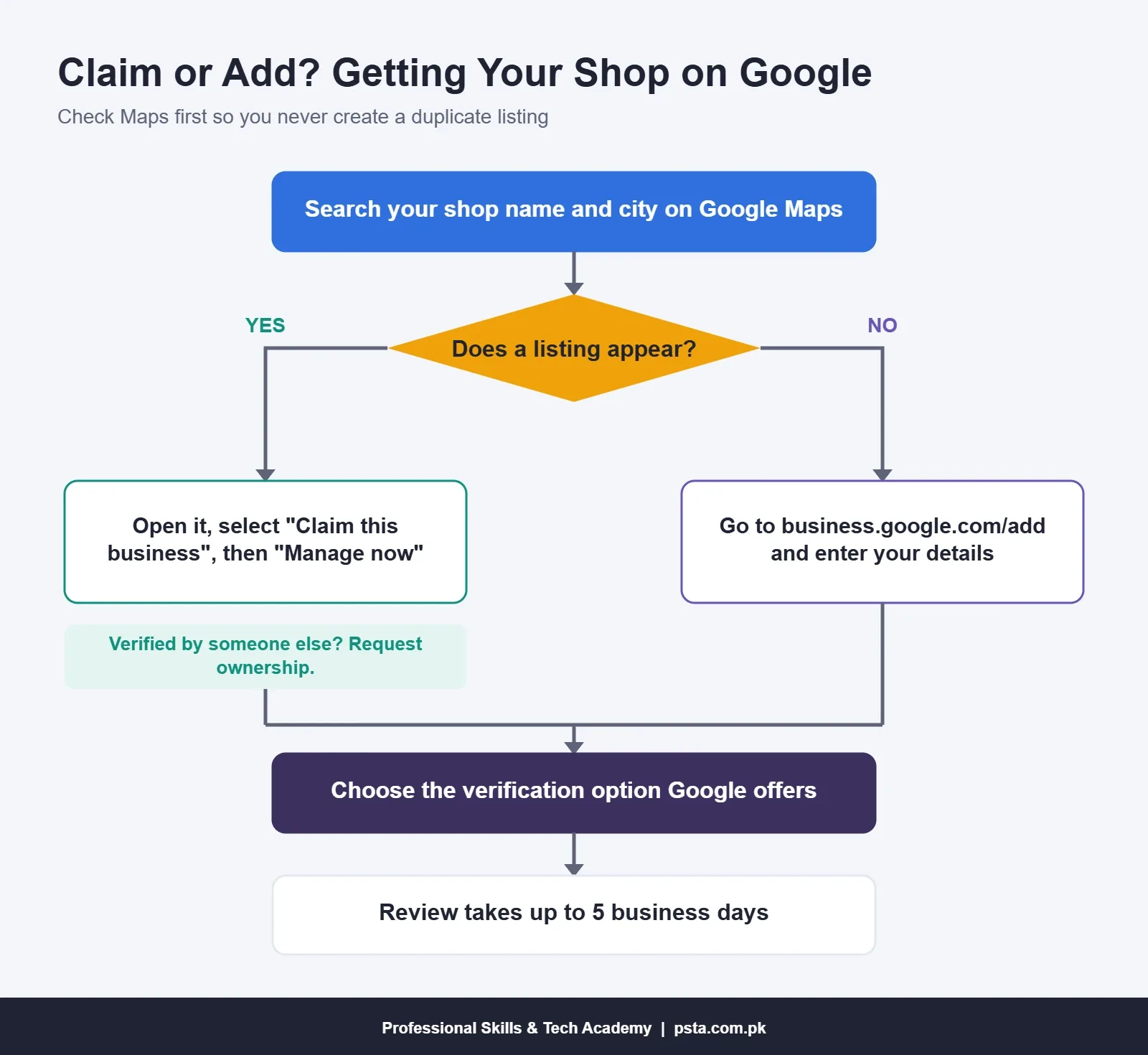
Manage your Google Business Profile from a Google account that belongs to the business, not a nephew's personal Gmail. A shop can lose access to its own profile when the person who created it moves on.
Filling In Name, Category and Address the Right Way
This is where most Google Business Profile setups in Pakistan go wrong. Owners often pack keywords into the name hoping to rank higher. Google's guidelines say the name should match your real-world name as it appears on your signboard, stationery and website. Adding taglines, phone numbers, services or locations to the name isn't permitted.
Bilal's sign says "Bilal's Phone Clinic", so that's the name. Not "Bilal's Phone Clinic Best Mobile Repair Abbottabad".
| Field | What Bilal enters | What breaks the rules |
|---|---|---|
| Business name | Bilal's Phone Clinic | Adding "best", "cheap", a city or a phone number |
| Category | Mobile phone repair shop | Picking five loosely related categories as keywords |
| Address | Street address with the pin placed on the actual shop | A P.O. box, a remote mailbox or keywords in address lines |
| Hours | Regular customer-facing hours, Monday to Saturday | Listing 24 hours to look available |
| Phone | The shop's own number, which Bilal answers | A premium-rate number or one he doesn't control |
| Website | Left empty until he has a real site | A link that redirects to another page or number |
On categories, Google advises using as few as possible to describe your core business. Pick the most specific one that fits, then add a second only if it describes real work you do every day.
Addresses deserve extra care here. Many Pakistani addresses rely on landmarks rather than house numbers, so drag the map pin until it sits exactly on your door. A pin on the wrong side of the road sends customers to a competitor.
How Does Verification Work for Shops in Pakistan?
Verification proves to Google that you're allowed to represent the business, and Google says a verified Google Business Profile is more likely to appear in results. For Business Profile verification, Google picks the available methods automatically, and you can't choose them yourself. According to Google's verification help page, the options depend on business type, public information, region and business hours, and some businesses need more than one.
The methods you may see:
- Phone or text: a code arrives on the business number. An automated answering system (IVR) won't receive it, so use a line a person picks up.
- Email: you follow the steps in an email sent to the address shown on screen.
- Video recording: Google recommends this option when your business is eligible, and links to a separate article with the recording rules.
- Live video call: a support representative guides you while you show your location, your business or equipment, and proof that you manage it. Calls only run during your location's business hours.
- Postcard: a 5-digit code goes to your address. Google says most codes arrive within 14 days and expire after 30 days, and mail isn't offered to every business.
Bilal is offered a video recording. Before pressing record, he reads Google's recording rules, then films the signboard, walks inside and shows his repair tools in one steady take. Plan your own clip the same way, since a rushed video is easy to get wrong. If Google rejects a video, a "Review issues" notice appears with the next steps.
Once submitted, verification reviews take up to 5 business days, and occasionally longer. Don't create a second profile while you wait.
Photos, Services and Hours: Your First Week on Google Business Profile
A verified but empty Google Business Profile does little. Google's own local ranking help page states that businesses with complete and accurate information are more likely to show up in local results.
In his first week, Bilal adds:
- Exterior photos in daylight, so a customer can recognize the shopfront from the road.
- Interior photos of the counter and work area, taken with the lights on.
- A services list with plain names customers actually use, such as "screen replacement" and "battery replacement".
- Special hours for Eid and other closures, so nobody arrives to a locked shutter.
- Attributes that apply, for example whether parking is nearby.
- A short business description in plain language, with no links and no claims he can't back up.
Keep the photos honest. A stock image of a glossy showroom makes customers distrust the place the moment they walk in.
How Should a Shop Ask for Google Reviews?
Reviews feed what Google calls prominence, so every shop wants more of them. The way you ask matters, because Google's Maps contribution policy removes reviews gathered the wrong way.
Under that policy, a business may not offer payment, discounts or free goods or services for a review. It may not ask staff to collect a set number of reviews, and it may not selectively ask only happy customers. Reviews written by employees or people with a business relationship count as conflicts of interest and are taken down.
What Bilal does instead is simple. Google's reviews help page suggests asking customers to visit a Google review link or scan a QR code. He prints the QR code on a small card at the counter and sends the link on WhatsApp with each repair receipt, to every customer, not just the cheerful ones.
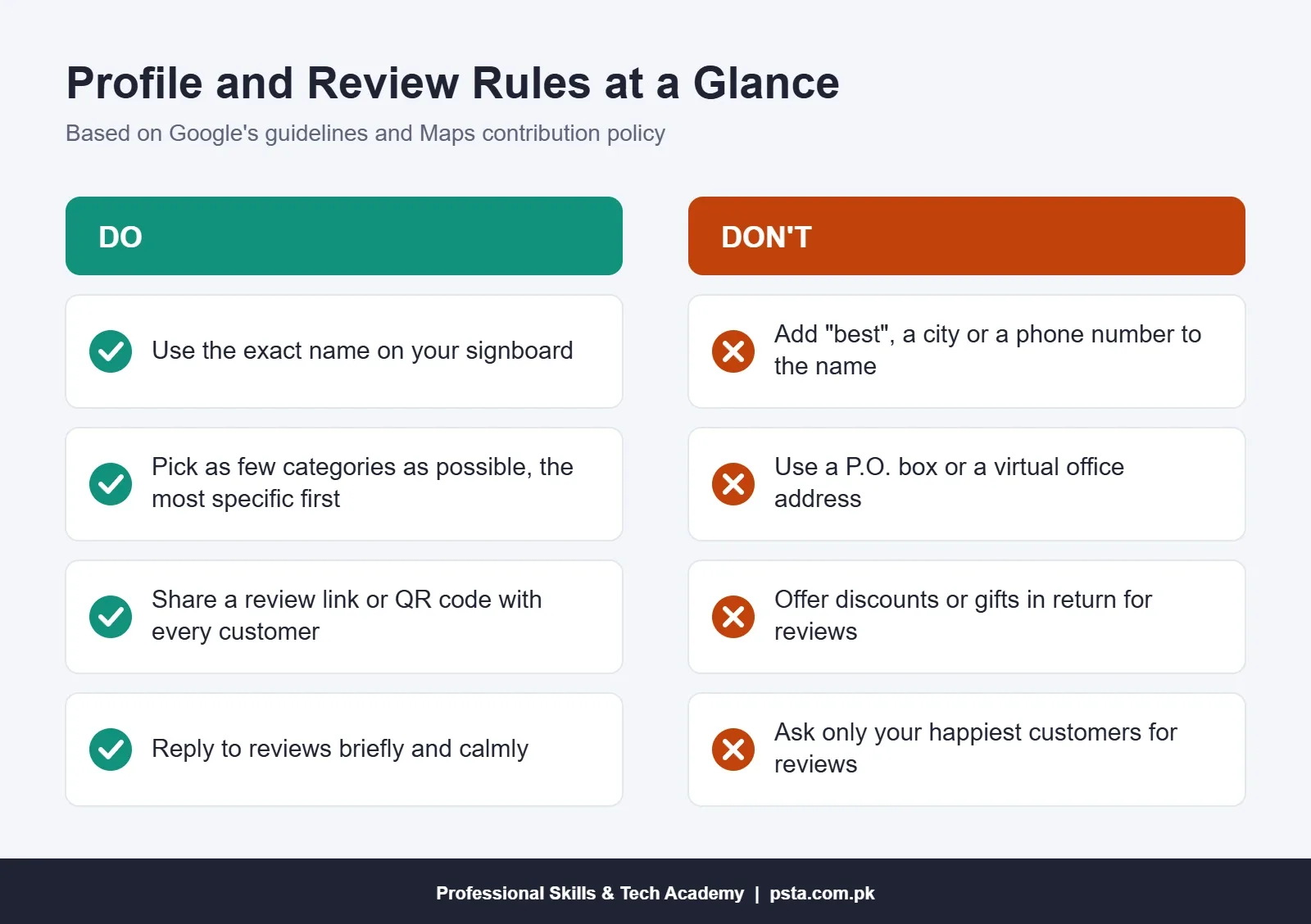
Expect slow, steady growth rather than a sudden jump. That's normal, and it keeps your profile on the right side of the policy, unlike a burst of five-star ratings from strangers.
Replying to Reviews, Including the Angry Ones
Every review on your Google Business Profile deserves a reply, and Google's help page explains why: replies show customers their feedback matters. It also gives practical advice that suits small shops well.
- Keep replies short and direct. Long replies lose readers before the main point.
- Skip the generic "Thanks for your review". Add something useful, such as a fix you made.
- Don't use replies to advertise discounts.
- With a negative review, stay calm, protect the reviewer's privacy and apologize where it's fair. If the issue is complicated, invite them to contact you directly.
Say a customer writes that his screen stopped responding two days after a repair. A good reply from Bilal might read: "Sorry about this, Ahmed. Screens we fit carry a warranty, so please bring the phone back and we'll check it today." That reply is short and specific, and it shows the next customer how the shop handles problems.
What Moves a Google Business Profile Up in Local Results?
Google names three main factors on its local ranking page. Relevance is how well your profile matches the search. Distance is how far you are from the person searching. Prominence is how well-known the business is, which includes reviews and how many websites link to it.
You control relevance through accurate details. You can't change distance, which is why a shop three kilometers away won't beat one next to the customer in near me searches. Prominence builds slowly through reviews, mentions on other websites and a good offline reputation.
Google is blunt on one point: there's no way to request or pay for a better local ranking. Anyone selling a guaranteed first spot on Maps is selling something Google itself says doesn't exist.
Reading the Performance Report After 30 Days
After a month, Bilal opens the Performance section of his Google Business Profile. Google's performance help page lists what it can show, and only the metrics that apply to your business appear:
- Calls: taps on the call button.
- Directions: how many people asked for directions to the shop.
- Website clicks: taps on the website link, if one is listed.
- Searches: the search terms people used to find the profile. This list updates at the start of each month.
- Views: how many people saw the profile on Search and Maps.
The searches list is the most useful part for a small shop. If people find Bilal through "laptop repair" and he doesn't do laptops, that's a signal to adjust his services list. If "battery replacement" shows up often, he can post photos of that work.
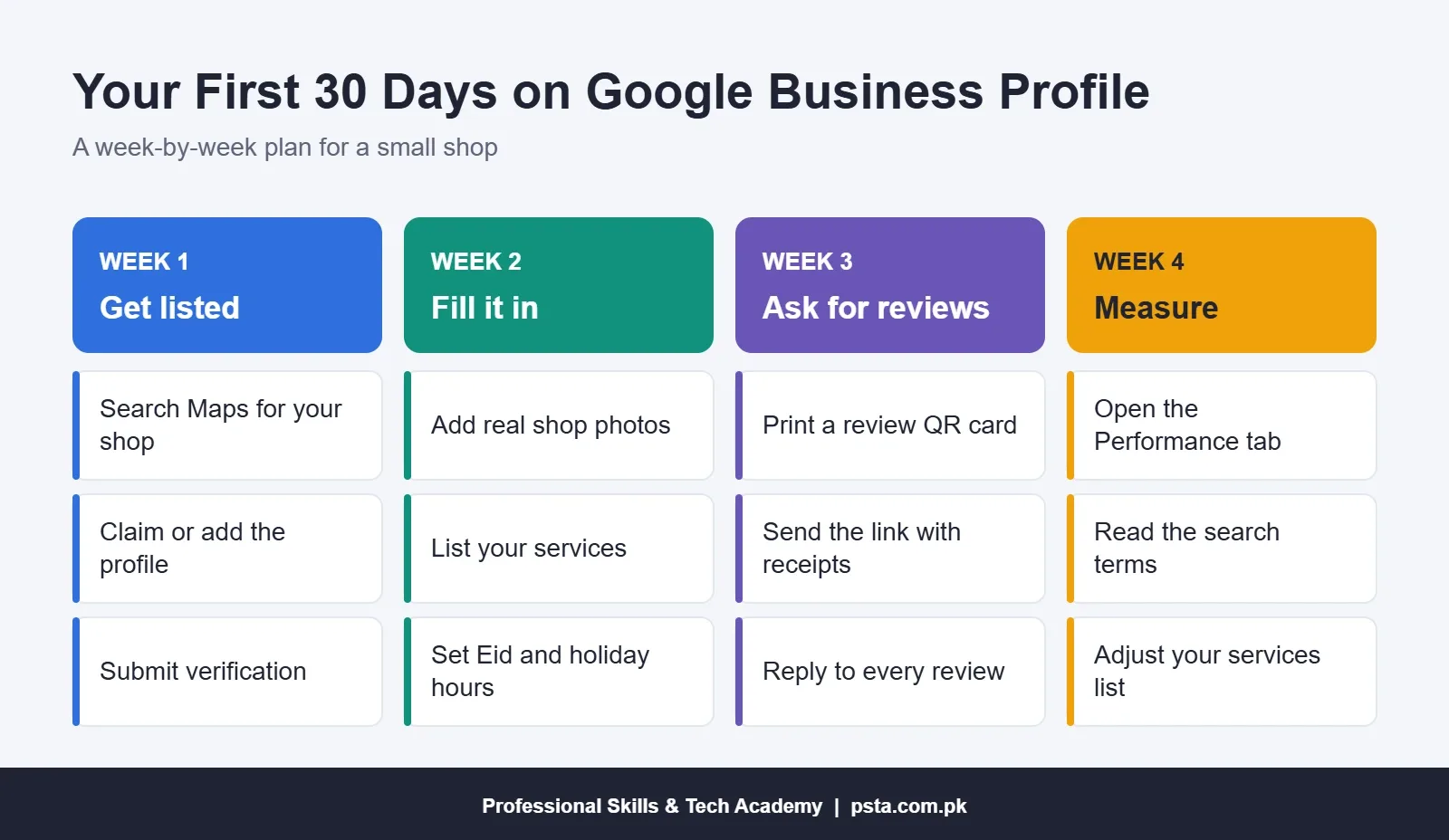
Write the numbers down each month in a notebook or spreadsheet. A trend over three months tells you far more than a single week.
Can You Manage Profiles for Other Businesses?
Yes, and it's a sensible first service for a digital marketing freelancer. Google's help page on owners and managers explains that an owner can invite a manager, who can edit business info, reply to reviews, publish posts, manage photos and download insights. Managers can't add or remove users or delete the profile, so the shop owner keeps control. Local shops rarely have time for this work, and the results are easy to show them in the performance report.
Be careful about what you promise when you manage a Google Business Profile for a client. Since Google says ranking can't be bought, sell the work you control: a complete profile, a review routine and a monthly report. Shop owners trust results they can see, so our 12-week portfolio plan for new marketers is a good place to collect your practice work before you pitch. A business that later wants a proper site can use our WordPress website cost breakdown to plan the budget.
Where PSTA's Digital Marketing Course Fits In
Local SEO and the Google Business Profile have their own module in PSTA's Advanced Digital Marketing course. One of the course projects is an optimized profile with categories, services, photos, posts and a plan for collecting reviews, so you finish with something you can show a shop owner.
The course lasts 12 weeks and the listed fee is Rs. 30,000 (regular Rs. 35,000), payable in 2 installments. You can study at the Mandian campus on Old College Road in Abbottabad, join live classes from elsewhere in Pakistan, or mix the two. It also covers SEO, Meta ads, Google Ads and analytics. If social media is your main interest, compare it with the Social Media Marketing and Meta Ads course, and read our note on common Meta ads mistakes before spending on ads.
You can browse all PSTA courses or check the steps on the admission page. Questions about batch timings can go to our team on WhatsApp at +92 314 5424399.
A Ten-Minute Check for Tomorrow Morning
Open Google Maps on your phone and search for your own business name and town. Note three things: whether a listing exists, who controls it, and whether the pin sits on your door. That one search tells you whether today's job is claiming, creating or fixing, and you can start verification before lunch.
Frequently asked questions
Is a Google Business Profile free in Pakistan?
Yes. Google's help page says you can add or claim your business at no charge, and that applies in Pakistan too. You only need a Google account and a real business that serves customers in person. Be wary of anyone who charges a fee just for creating the listing, though paying a marketer to manage and improve it over time is a normal service.
Can I create a profile if I work from home and have no shop?
Yes, if you serve customers at their location, such as a home tutor, electrician or AC technician. Google treats you as a service-area business, so you hide your home address and set the areas you cover instead. Google's guidelines say a service area generally shouldn't extend beyond about two hours of driving from your base.
Why didn't Google offer me postcard verification?
Google chooses the verification methods automatically based on your business type, public information, region and hours, and you can't change them. Mail isn't available for every business. Many shops are offered video recording, a live video call, phone, text or email instead. Some businesses need to complete more than one method.
Can I add my city or the word 'best' to my business name?
No. Google's guidelines say your profile name should match your real-world name on your signboard, website and stationery. Adding taglines, services, locations or phone numbers to the name isn't permitted. Put services in the services section and location details in the address and service area fields instead.
Can I get a fake or unfair negative review removed?
You can report a review that breaks Google's Maps content policy, for example one from a competitor or someone with a conflict of interest. Google decides whether to remove it. What you can't do is offer a customer a discount or gift to change or remove a negative review, because the policy prohibits that.
How long before my shop appears on Google Maps?
Verification reviews usually take up to 5 business days, and occasionally longer. Postcard codes can take up to 14 days to arrive. After verification, where you appear depends on relevance, distance and prominence, so a complete profile and steady reviews matter more than how quickly you finished the setup.
Can I manage a client's profile without their password?
Yes. The business owner can invite you as a manager on their profile. Managers can edit business details, reply to reviews, publish posts, manage photos and download performance insights. They can't add or remove other users or delete the profile, so the owner keeps final control of the listing.
Sources & references
- How to improve your local ranking on Google support.google.com
- Verify your business on Google support.google.com
- Guidelines for representing your business on Google support.google.com
- Maps user contributed content policy support.google.com
- Read and reply to reviews support.google.com
- Add or claim your Business Profile support.google.com
- Business Profile performance metrics support.google.com
- Digital 2026: Pakistan (DataReportal) datareportal.com
Last reviewed & updated on by Umar Qureshi. Written by the PSTA team in Abbottabad, Pakistan.

Umar Qureshi

Advanced Digital Marketing Course in Pakistan and Abbottabad
Turn this guide into a career: hands-on training with real projects, online across Pakistan or on-campus in Abbottabad · 12 Weeks.



Comments
No comments yet — ask a question or share your experience.