Quick answer
Most common Python errors come from about 12 messages. Read the traceback from the bottom: the last line gives the error type and clue, and the line above shows where. Typos cause NameError, mixing text and numbers causes TypeError, and installing libraries with py -m pip fixes most ModuleNotFoundError cases.
Key takeaways
- • Read every traceback from the last line upward: error type, line number, then the markers.
- • Syntax and indentation errors stop the file before any line runs, so check colons, brackets and four-space blocks first.
- • input() always returns text, so convert with int() or float() before doing math.
- • Install libraries with py -m pip on Windows so they go into the Python that runs your script.
- • Use try and except for outside problems like bad input or missing files, not to hide your own typos.
Table of contents 24 sections
- How Do You Read a Python Traceback?
- Common Python Errors at a Glance
- Errors Python Catches Before Your Code Runs
- 1. SyntaxError: expected ':'
- 2. IndentationError: expected an indented block
- Name and Type Mix-Ups
- 3. NameError: name 'totl' is not defined
- 4. TypeError: can only concatenate str (not "int") to str
- 5. TypeError: greet() missing 1 required positional argument
- Bad Values and Missing Items
- 6. ValueError: invalid literal for int() with base 10
- 7. IndexError: list index out of range
- 8. KeyError: 'phone'
- When an Object Doesn't Have That Method
- 9. AttributeError: 'list' object has no attribute 'push'
- Setup Errors: Missing Libraries and Files
- 10. ModuleNotFoundError: No module named 'pandas'
- 11. FileNotFoundError: No such file or directory
- Math That Can't Happen: Dividing by Zero
- 12. ZeroDivisionError: division by zero
- When Should You Use try and except?
- A Five-Minute Debugging Routine Before You Ask for Help
- Fixing Errors With an Instructor in PSTA's Python Course
- Keep an Error Diary for One Week
Quick self-test: can you fix these common Python errors without searching? Your script prints NameError: name 'totl' is not defined. Did you mean: 'total'? Then a second script prints ValueError: invalid literal for int() with base 10: '1,500'. If you already know that the first is a typo and the second is a comma inside a number, you are ahead of most first-month students.
If you weren't sure, that's normal. Nearly every message a beginner sees comes from a short list of about a dozen errors, and each one names the line and the type of mistake. Once you can read that list, debugging stops feeling like guesswork.
In this guide, you will learn:
- How to read a Python traceback from the bottom up in four steps
- What the 12 most common Python errors mean, with the exact message text
- A one-line fix for each, using small examples from Pakistani shops, fee slips and result sheets
- When
tryandexcepthelp, and when they only hide a bug - A five-minute routine to follow before you ask a teacher or post in a group
Every message below was checked by running the code in Python 3.14 and Python 3.15. Python 3.15 was first released on October 9, 2026, and the python.org downloads page lists 3.15.1 as the newest release. If your lab computer runs an older version, the wording may be shorter, but the error names are the same.
How Do You Read a Python Traceback?
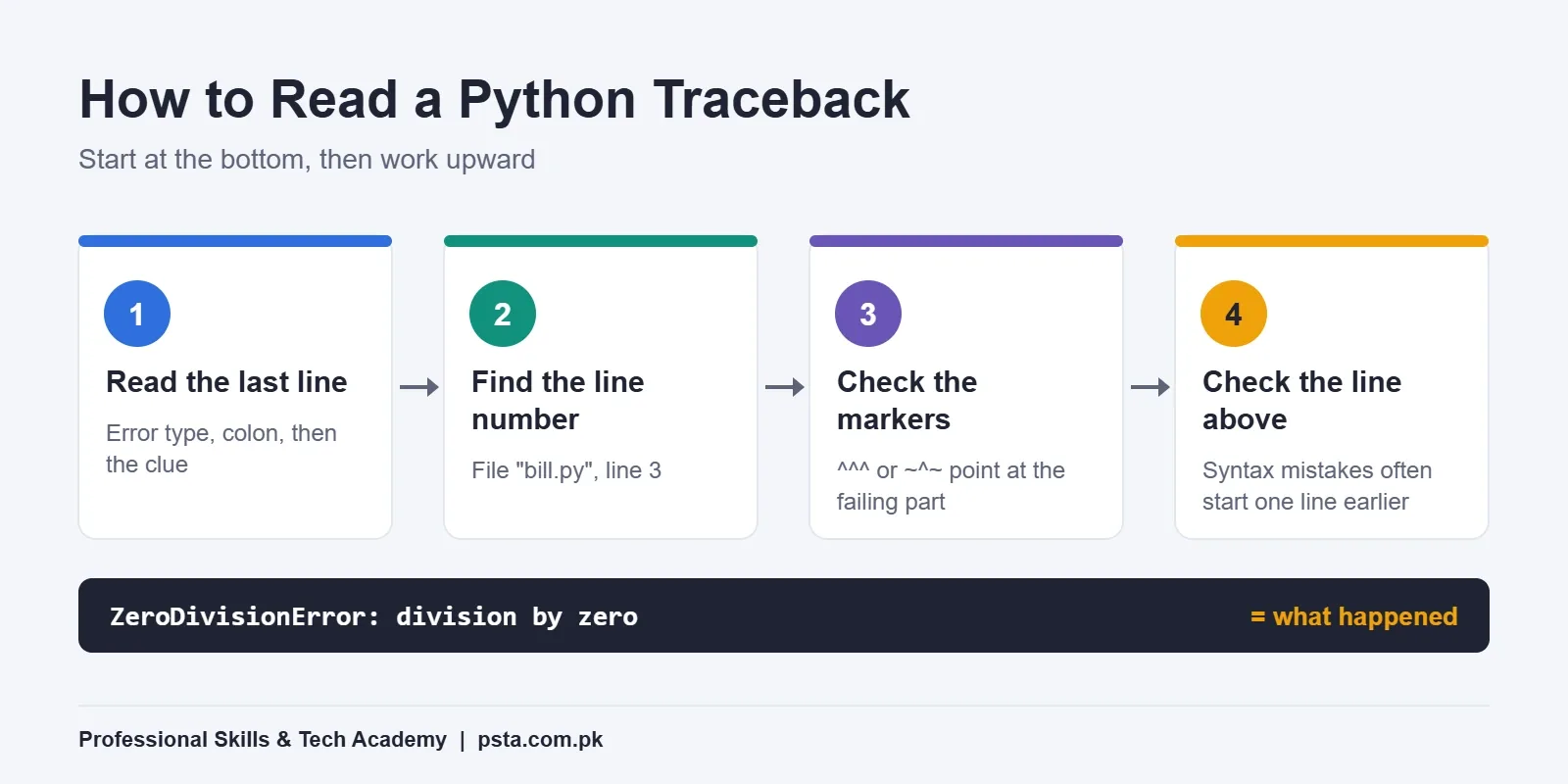
A traceback is the block of text Python prints when your program stops. Beginners often read it from the top, get lost in file paths, and give up. Read it from the bottom instead. This one habit makes every one of the common Python errors below easier to fix.
The official Python tutorial on errors and exceptions explains that the last line says what happened: the error type, a colon, then the details. The lines above it show where it happened, with the most recent call last.
- Read the last line. The word before the colon is the error type, such as
TypeError. The words after it are the clue. - Find the line number. Look for
File "fees.py", line 12just above. That is the line Python was running when it stopped. - Look at the markers. Newer versions print
^^^^or~^~under the exact part of the line that failed. - Check the line above, too. For syntax errors, the real mistake is often one line earlier, such as a missing bracket or colon.
Here is a short example. A shop script divides a bill by the number of items, and the item count is zero:
Traceback (most recent call last):
  File "bill.py", line 3, in <module>
    print(1500 / items)
          ~~~~~^~~~~~~
ZeroDivisionError: division by zero
Last line: dividing by zero. Line number: 3. Marker: the slash. You know what failed and where before you have read any other part of the output.
Common Python Errors at a Glance
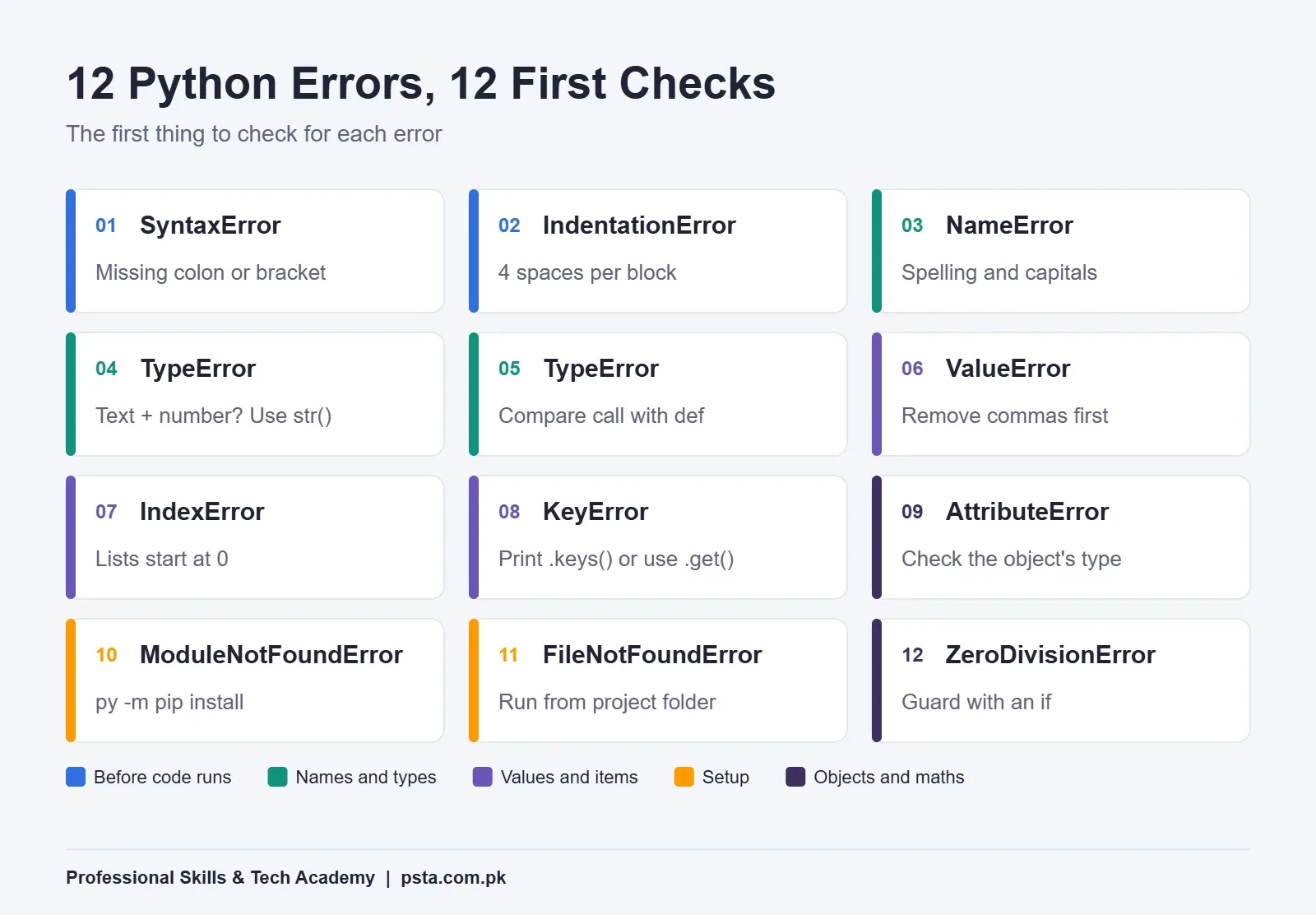
This table is the short version of the whole guide. Keep it open next to your editor for your first few weeks.
| # | Error | What It Usually Means | First Thing to Check |
|---|---|---|---|
| 1 | SyntaxError | Python can't parse the line | Missing colon, bracket or quote |
| 2 | IndentationError | Spaces at the start of a line are wrong | Four spaces inside every block |
| 3 | NameError | A name was never created | Spelling and capital letters |
| 4 | TypeError (concatenate) | Text and a number were joined | Wrap the number in str() |
| 5 | TypeError (missing argument) | A function got too few values | Compare the call with the def line |
| 6 | ValueError | Right type, unusable value | Commas, spaces or letters in the input |
| 7 | IndexError | A list position does not exist | Lists start at 0 |
| 8 | KeyError | A dictionary key does not exist | Exact key spelling, or use .get() |
| 9 | AttributeError | The object has no such method | The object's real type |
| 10 | ModuleNotFoundError | A library isn't installed for this Python | Install with py -m pip |
| 11 | FileNotFoundError | Python can't see the file | The folder you ran the script from |
| 12 | ZeroDivisionError | A number was divided by zero | Guard with an if check |
The sections below group these common Python errors by cause, because errors with the same cause share the same kind of fix.
Errors Python Catches Before Your Code Runs
Syntax errors are found while Python reads your file, before the first line runs. That is why a script with one can print nothing at all, not even the lines above the mistake.
1. SyntaxError: expected ':'
Every if, for, while, def and class line must end with a colon. Students coming from C++ often forget it.
price = 500
if price > 100
    print("Delivery is free")
# SyntaxError: expected ':'
Fix: add the colon at the end of the if line. Other syntax errors come from a bracket or quote that was opened and never closed. Count your brackets on the line Python points to and the line before it.
Python 3.14 made several of these messages friendlier. According to What's New in Python 3.14, a misspelled keyword such as whille now gets Did you mean 'while'?, and a string with stray quotes inside it gets Is this intended to be part of the string?
2. IndentationError: expected an indented block
Python uses the spaces at the start of a line to decide which lines belong inside an if, a loop or a function.
marks = 80
if marks > 33:
print("Pass")
# IndentationError: expected an indented block after 'if' statement on line 2
Fix: indent the print line by four spaces. The opposite mistake, a line indented when nothing above it opened a block, gives IndentationError: unexpected indent.
A close cousin is TabError: inconsistent use of tabs and spaces in indentation. It usually appears when you paste code from a PDF, WhatsApp or a website into your editor. In VS Code, open the Command Palette and run "Convert Indentation to Spaces", then save.
Name and Type Mix-Ups
These errors happen while the program is running. The line is written correctly, but Python can't do what it says with the names or values it has.
3. NameError: name 'totl' is not defined
Python has never seen this name. The cause is nearly always a typo, a different capital letter (Total and total are two different names), or using a variable before the line that creates it.
total = 1500
print(totl)
# NameError: name 'totl' is not defined. Did you mean: 'total'?
Fix: use the suggested name. If there is no suggestion, search your file for the name and check that it is created above the line that uses it.
4. TypeError: can only concatenate str (not "int") to str
You used + to join text and a number. Python refuses to guess whether you meant math or joining.
fee = 1500
print("Fee: Rs. " + fee)
# TypeError: can only concatenate str (not "int") to str
Fix: use an f-string, print(f"Fee: Rs. {fee}"), or convert with str(fee).
The same message often appears with input(). Whatever the user types comes back as text, even if they type 20. So age = input("Age: ") followed by age + 1 fails. Convert first: age = int(input("Age: ")).
5. TypeError: greet() missing 1 required positional argument
def greet(name):
    return "Assalam o Alaikum, " + name

greet()
# TypeError: greet() missing 1 required positional argument: 'name'
Fix: put the def line and the call side by side and count the values. Here the function expects one name and received none, so call greet("Sana"). Inside a class, also check that the method's first parameter is self.
Bad Values and Missing Items
This group shows up as soon as your programs start handling real data: typed input, lists of cities, or records from a spreadsheet.
6. ValueError: invalid literal for int() with base 10
The type is right, but the value can't be used. In Pakistan, the usual cause is a number typed the way we write it on paper, with a comma.
qty = int("1,500")
# ValueError: invalid literal for int() with base 10: '1,500'
Fix: clean the text before converting: int(text.replace(",", "").strip()). If the value can contain decimals, such as 1,250.50, use float() after removing the comma.
7. IndexError: list index out of range
cities = ["Abbottabad", "Mansehra", "Haripur"]
print(cities[3])
# IndexError: list index out of range
The list has three items, so the valid positions are 0, 1 and 2. Fix: use cities[-1] for the last item, or loop with for city in cities: so you never type a position by hand.
8. KeyError: 'phone'
student = {"name": "Ali", "marks": 81}
print(student["phone"])
# KeyError: 'phone'
The dictionary has no key called phone. This is very common when reading a CSV whose column is actually named "Phone" or "Phone No". Fix: print student.keys() to see the real names, or use student.get("phone", "not given") when a missing value is acceptable.
When an Object Doesn't Have That Method
9. AttributeError: 'list' object has no attribute 'push'
You called a method that this type of object does not have. Students who learned JavaScript first often write push instead of append.
orders = ["shirt", "shoes"]
orders.push("cap")
# AttributeError: 'list' object has no attribute 'push'. Did you mean '.append'?
That hint is new. What's New in Python 3.15 says the interpreter now checks a table of method names from JavaScript, Java, Ruby and C#, so 'hello'.toUpperCase() suggests .upper. On Python 3.14 the same line prints the message without the hint.
Watch for one special version: AttributeError: 'NoneType' object has no attribute 'upper'. It means the variable holds None, usually because a function you wrote has no return line. Fix: print the variable and its type() just before the failing line, then check where it got its value.
Setup Errors: Missing Libraries and Files
These two have nothing to do with your logic. They come from how Python is installed and where you run your script, which is why they confuse beginners the most.
10. ModuleNotFoundError: No module named 'pandas'
The built-in exceptions reference says this is raised when import cannot locate a module. Either the library is not installed, or it was installed for a different copy of Python than the one running your script.
Fix on Windows: install through the Python you actually use. The pip getting started guide uses py -m pip install on Windows and python -m pip install on Linux and macOS. Check which version you have with py --version and py -m pip --version.
py -m pip install pandasIn VS Code, also check the interpreter shown in the bottom-right corner. If it points to a different Python or a virtual environment, install the library there, or switch the interpreter.
11. FileNotFoundError: No such file or directory
open("marks.csv")
# FileNotFoundError: [Errno 2] No such file or directory: 'marks.csv'
Python looks for the file in the folder you ran the script from, which is not always the folder the script is saved in. Fix: open the whole project folder in VS Code and run from there, or build the path from the script's own location:
from pathlib import Path
data = Path(__file__).parent / "marks.csv"
Also check for hidden extensions. Windows may hide them, so a file you saved as marks.csv could really be marks.csv.txt.
Math That Can't Happen: Dividing by Zero
12. ZeroDivisionError: division by zero
You saw this one in the traceback example. It appears when a count, an average or a percentage divides by a value that turned out to be zero, such as a class with no students marked present yet.
present = 0
percent = 30 / present * 100
# ZeroDivisionError: division by zero
Fix: decide what the answer should be when the count is zero, and write it down in code: percent = 0 if present == 0 else 30 / present * 100. That decision is business logic, so don't leave it to chance.
When Should You Use try and except?
A try block lets your program handle an error instead of stopping. It is the right tool when the problem comes from outside your code: a user typing letters into a number field, a file that may not exist yet, or an internet connection that drops.
while True:
    try:
        qty = int(input("Quantity: "))
        break
    except ValueError:
        print("Please type digits only, without commas.")
It is the wrong tool for bugs in your own code. Wrapping a NameError in try only hides a typo you should fix. The Python tutorial advises catching errors as specifically as you can. A bare except: or a broad except Exception: that just prints "Error" throws away the message that would have told you what went wrong.
| Situation | Use try/except? | Better Approach |
|---|---|---|
| User types "abc" for a quantity | Yes | Catch ValueError and ask again |
| Optional settings file might be missing | Yes | Catch FileNotFoundError and use defaults |
| Misspelled variable name | No | Fix the spelling |
| Wrong list position in your own loop | No | Loop over items, not positions |
| Library not installed | No | Install it with pip |
A Five-Minute Debugging Routine Before You Ask for Help
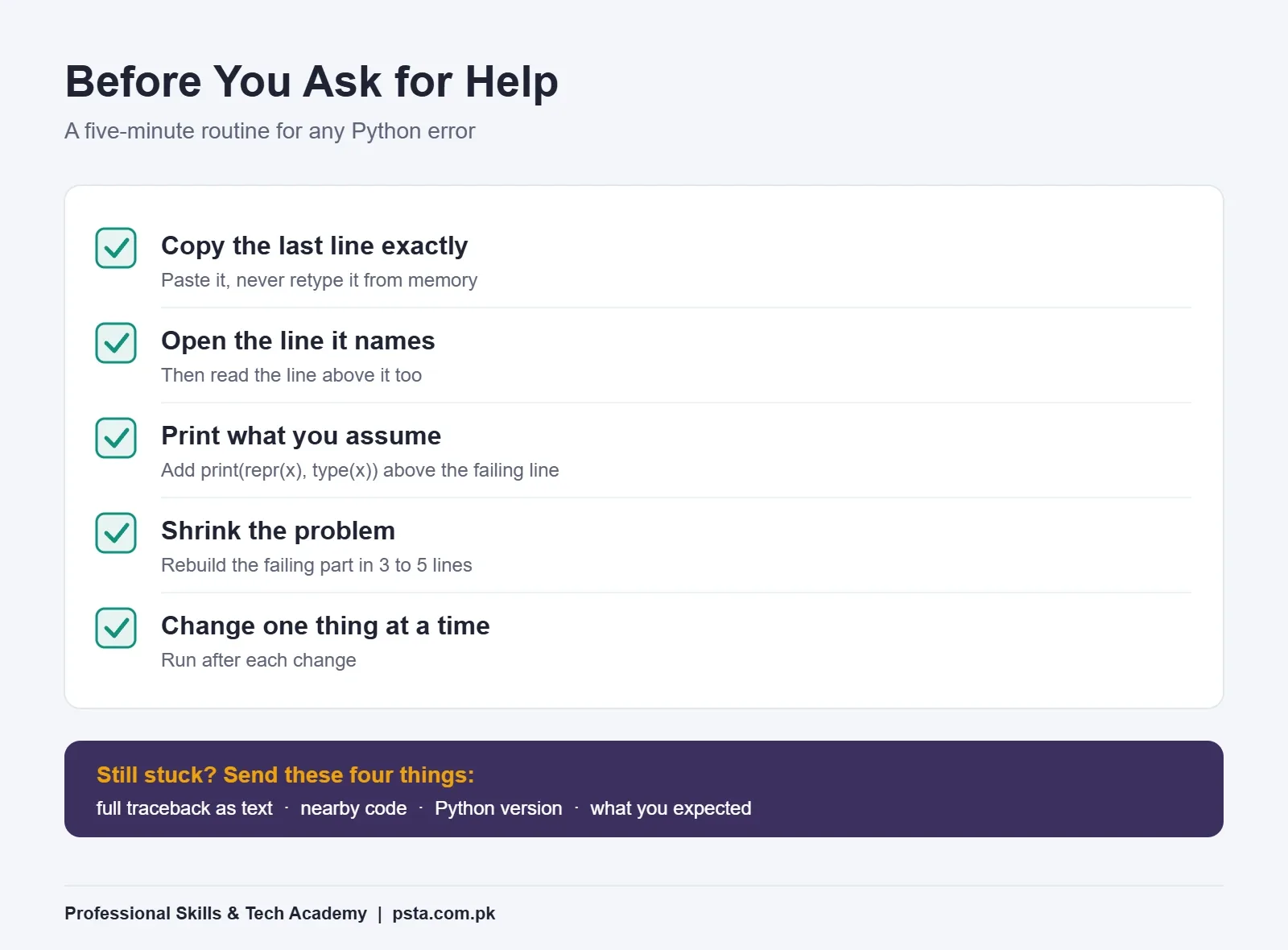
Python is popular, which means someone has almost certainly met your error before. The Stack Overflow 2025 Developer Survey found that 57.9% of respondents had used Python in the past year, from more than 49,000 responses. Searching works best when you bring a precise message, though, so try this routine first:
- Copy the last line exactly. Don't retype it from memory.
- Open the line number it names. Then read the line above it as well.
- Print what you assume. Add
print(repr(x), type(x))before the failing line. Most bugs are a value you thought was a number but is text, or a list you thought was full but is empty. - Shrink the problem. Copy the failing part into a new file with three to five lines. If the error disappears, the cause is in what you removed.
- Change one thing at a time. Run after each change, so you know which change fixed it.
If you still need help, send the full traceback as text, the few lines around it, your Python version, and what you expected to happen. A screenshot of half a screen makes it much harder for anyone to help you.
AI assistants can explain a traceback well, but paste the error and your code, and ask why it happened rather than asking for a fixed version. Our guide to AI coding tools for students covers how to use them without skipping the learning.
Fixing Errors With an Instructor in PSTA's Python Course
Reading errors is a skill you build by meeting them, not by memorizing a table. In PSTA's Advanced Python Programming course, error handling has its own module, "File Handling and Exception Management", and you hit every error in this guide while building the course projects: a quiz game, a contact book, a file-sorting script and a Flask or Django app.
- Duration: 12 weeks, starting from beginner level, with no prior coding needed
- Modes: on campus in Abbottabad, live online from anywhere in Pakistan, or a mix of both; online sessions are recorded
- Fee: Rs. 30,000 (regular Rs. 40,000), payable in 2 installments
- Batches: new batches open monthly, and you can pick a morning, afternoon, evening or weekend class
When a script breaks in class, you read the traceback with the instructor beside you, which is the fastest way to stop fearing red text. If you are still choosing a first language, our C++ vs Python comparison may help, and our list of Python projects for beginners shows what you would build. After Python, the AI Automation course builds on the same scripting skills.
You can see all programs on the courses page, read the steps on the admission page, or send your city and preferred class time on WhatsApp (+92 314 5424399). The campus is in Mandian, on Old College Road opposite FIMS College, Abbottabad.
Keep an Error Diary for One Week
Here is one practical habit. For the next seven days, every time Python stops your program, write three things in a notebook or a text file: the last line of the traceback, what caused it, and the fix. By the end of the week you'll see your own common Python errors: the same four or five, repeating. That list is your personal checklist, and it tells you exactly which topic to revise next.
Frequently asked questions
What is the most common Python error for beginners?
In the first weeks, IndentationError and NameError appear most often in class. Both come from small slips: a block not indented by four spaces, or a variable name spelled differently from where it was created. Newer Python versions suggest the right name with "Did you mean", so read the full last line of the traceback before changing anything.
What is the difference between a syntax error and an exception in Python?
A syntax error means Python could not read your code, so nothing runs at all. An exception happens while the program is running, on a line that is written correctly but cannot be completed, such as dividing by zero or opening a missing file. Exceptions can be handled with try and except; syntax errors must be fixed in the code.
Why do I still get ModuleNotFoundError after installing a library?
Usually the library went into a different copy of Python than the one running your script. This happens when a computer has two Python versions, or when VS Code uses a virtual environment. Install with py -m pip install name on Windows, then check that the interpreter shown in VS Code matches the Python you installed into.
How do I fix UnboundLocalError in Python?
Recent versions, including Python 3.14 and 3.15, show "cannot access local variable where it is not associated with a value". It appears when a function changes a variable from outside, for example count += 1, without receiving it first. The clean fix is to pass the value in as a parameter and return the new value, instead of relying on a global variable.
Should beginners wrap all their code in try and except?
No. Use try and except only around code that can fail for reasons outside your control, such as user input, files and network calls, and catch the specific error you expect. Wrapping everything hides real bugs, because a typo or wrong index no longer shows its message, and you lose the line number that would have shown you the problem.
Why does input() cause a TypeError when I add a number?
The input() function always returns text, even when the user types digits. Adding 1 to that text gives "can only concatenate str (not int) to str". Convert the value first with int(input("Age: ")) or float() for decimals, and handle ValueError in case the user types letters or a number with commas.
Do Python error messages change between versions?
The error names stay the same, but the wording keeps improving. Python 3.14 added keyword typo hints, such as suggesting while when you type whille, and Python 3.15 added hints like suggesting append when you call push on a list. Older lab computers may show shorter messages for the same mistake, so always note which version you are running.
Sources & references
- Errors and Exceptions, Python Tutorial docs.python.org
- Built-in Exceptions, Python Documentation docs.python.org
- What's New in Python 3.14 docs.python.org
- What's New in Python 3.15 docs.python.org
- Python Releases, python.org python.org
- Getting Started, pip Documentation pip.pypa.io
- Stack Overflow 2025 Developer Survey survey.stackoverflow.co
Last reviewed & updated on by Umar Qureshi. Written by the PSTA team in Abbottabad, Pakistan.

Umar Qureshi

Advanced Python Programming Course in Pakistan – Online Classes and On-Campus in Abbottabad
Turn this guide into a career: hands-on training with real projects, online across Pakistan or on-campus in Abbottabad · 12 weeks.
Comments
No comments yet — ask a question or share your experience.