Quick answer
Start with small, legal labs on devices you own: an Nmap scan of your home network, a Wireshark capture, a phishing header analysis, two Python tools, a Juice Shop report and a Wazuh SIEM lab. Finish with a small business audit. Write a one-page report for each, because the report is what employers read.
Key takeaways
- • Test only devices you own or apps built for practice; PECA 2016 Section 3 punishes unauthorized access.
- • Climb in order: observe a network, build small Python tools, then test a web app and watch logs.
- • The Pwned Passwords API needs no key and only ever sees five characters of a hash.
- • A Wazuh all-in-one lab needs 4 vCPUs, 8 GiB of RAM and 50 GB of storage, so plan your hardware.
- • Every project needs a one or two page write-up: goal, scope, method, findings, fix and next step.
Table of contents 19 sections
- How Should You Choose Cyber Security Projects for Beginners?
- Ground Rules Before You Scan Anything
- The 8 Projects at a Glance
- Level 1: See What Is on a Network
- Project 1: Map Your Home Network With Nmap
- Project 2: Read Real Traffic in Wireshark
- Project 3: Take Apart a Phishing Email
- Level 2: Write Small Security Tools in Python
- Project 4: Build a Breached-Password Checker
- Project 5: Write a File Integrity Monitor
- Level 3: Test a Web App and Watch the Logs
- Project 6: Write a Findings Report on OWASP Juice Shop
- Project 7: Run a Wazuh SIEM and Catch a Failed-Login Spike
- Capstone: Audit a Small Business (Example Scenario)
- What Should Each Project Write-Up Include?
- Which Projects Work for a BSCS or BSIT Final Year Project?
- How Do You Show These Projects to Employers?
- Doing These Labs With an Instructor at PSTA
- Scan One Device Tonight, Write It Up Tomorrow
The best cyber security projects for beginners are small labs you run on devices you own. Each one ends with a short report on what you found and how you'd fix it. That report is what employers look for. In ISC2's 2025 Cybersecurity Workforce Study of 16,029 professionals, 59% said their teams had critical or significant skills needs, up from 44% a year earlier.
Below are eight projects in the order I teach them, from a simple network scan to a full audit of a small shop. After reading, you will have:
- Eight legal projects, each with a clear deliverable you can put on GitHub
- The free tools every project needs, and the hardware limits to plan around
- The ground rules that keep your practice inside Pakistani law
- A write-up structure a hiring manager can scan in two minutes
- Ideas for turning these labs into a BSCS or BSIT final year project
How Should You Choose Cyber Security Projects for Beginners?
A good first project passes three tests. It runs on hardware you own or on an app built for practice. It finishes in a weekend or two, not a whole semester. And it leaves behind something a stranger can check, such as a report, a script or a dashboard screenshot.
Skip projects that only prove you followed a video. "Installed Kali Linux" is a setup step. "Found four open services on my home router, closed two and explained why" is a project, because it has a finding, a fix and a reason.
Also remember where most people start. The same ISC2 study found that 56% of respondents came into security through IT work, and only 10% through cybersecurity education. Projects that show you understand networks, logs and everyday systems count as much as hacking challenges. The list below mixes defensive labs with ethical hacking projects for that reason.
Ground Rules Before You Scan Anything
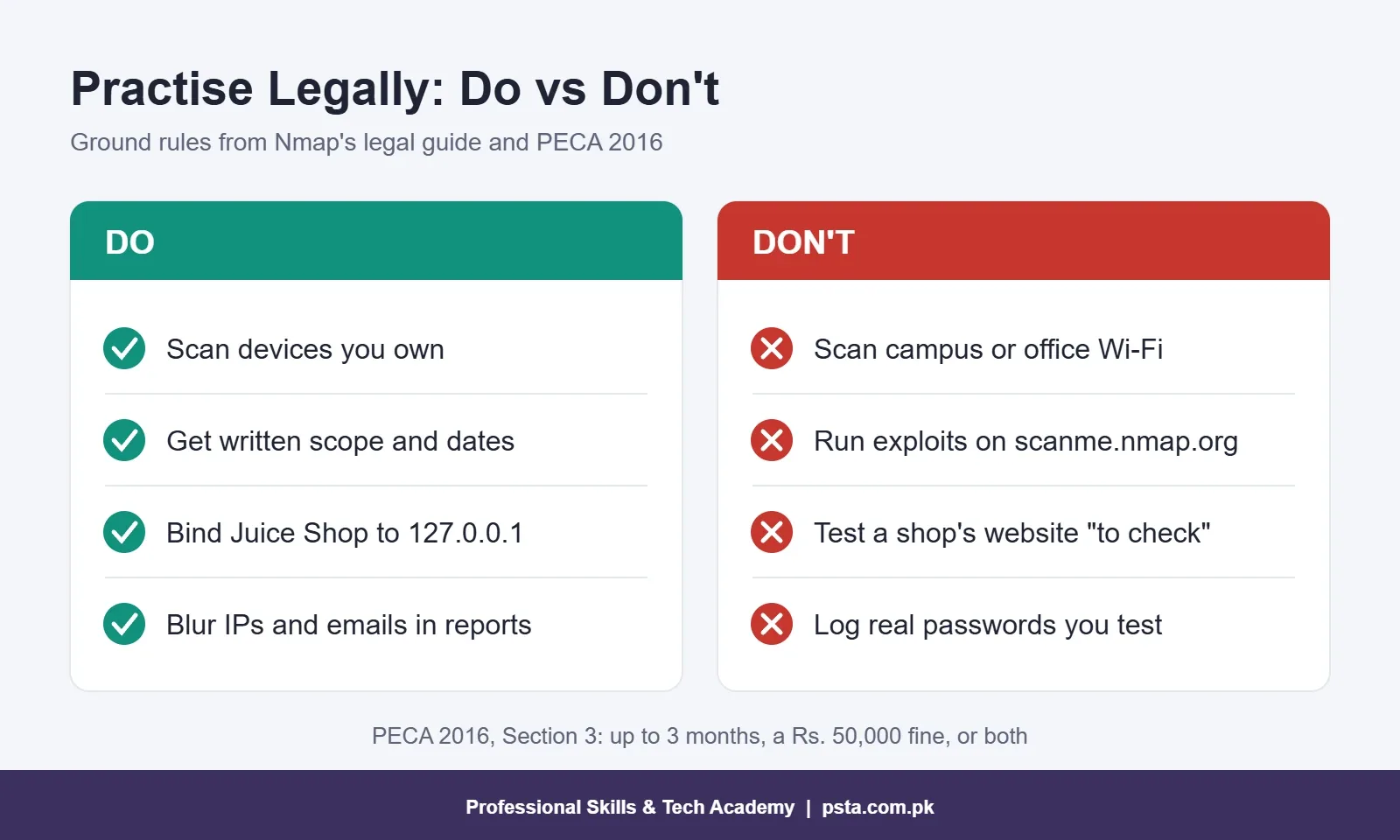
Permission comes first, every time. The Nmap project's own legal guide advises getting written authorization before you scan a network you don't own. It also warns that many internet providers ban unauthorized port scanning in their acceptable use policies, and that complaints can cost you your connection.
Pakistani law points the same way. Section 3 of the Prevention of Electronic Crimes Act 2016 covers gaining unauthorized access to an information system or data with dishonest intention. The Commonwealth's summary of the Act puts the maximum penalty at three months' imprisonment, a Rs. 50,000 fine, or both together. Attacks on critical systems carry heavier sentences.
In practice, that means you test your own laptop, phone and router, or a deliberately vulnerable app running on your own machine. Leave your university lab, your office Wi-Fi and any shop's website alone, even if you only want to "check". If a relative asks you to look at their business network, write down the scope and dates and get their signature before you start. If you haven't built an isolated practice setup yet, our ethical hacking lab setup checklist covers that first.
The 8 Projects at a Glance
Here are all eight cyber security projects for beginners in one table. The times are typical for a student working on evenings and weekends. Yours may be shorter or longer, and that's fine.
| # | Project | Main Tool | Skill It Proves | Rough Time | Level |
|---|---|---|---|---|---|
| 1 | Home network map | Nmap | Asset discovery, service checks | 1 weekend | Beginner |
| 2 | Traffic capture | Wireshark | Reading DNS and TLS | 1 weekend | Beginner |
| 3 | Phishing email teardown | Email headers | SPF, DKIM and DMARC checks | 2 evenings | Beginner |
| 4 | Breached-password checker | Python, Pwned Passwords API | Hashing, safe API use | 1 weekend | Beginner+ |
| 5 | File integrity monitor | Python hashlib | Change detection | 1 to 2 weekends | Beginner+ |
| 6 | Web app findings report | OWASP Juice Shop | Web flaws, report writing | 2 to 3 weekends | Intermediate |
| 7 | SIEM home lab | Wazuh 4.14 | Log monitoring, alert triage | 2 to 3 weekends | Intermediate |
| 8 | Small business audit | Checklist plus tools above | Risk assessment, plain reporting | 2 weeks | Capstone |
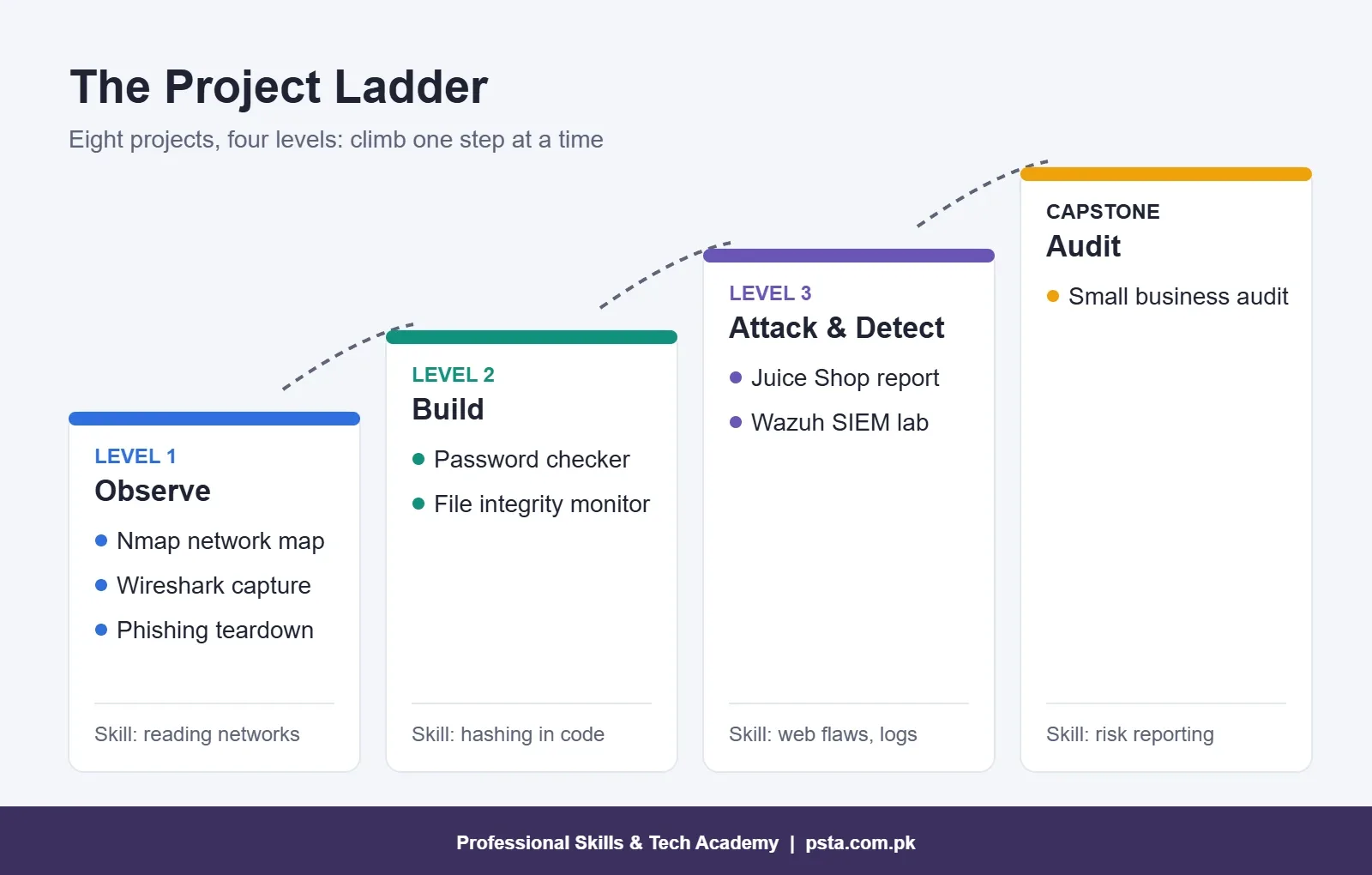
Work through them in order. Each level reuses something from the one before it, so by the capstone you are combining skills rather than learning everything at once.
Level 1: See What Is on a Network
These three projects teach you to observe before you touch anything. That habit is the base of every security role, from SOC analyst to penetration tester.
Project 1: Map Your Home Network With Nmap
- Open Command Prompt, run
ipconfig, and note your IPv4 address and subnet. Most home routers in Pakistan hand out addresses like 192.168.1.x or 192.168.0.x. - List live devices with a ping sweep:
nmap -sn 192.168.1.0/24. - Pick the devices you own, starting with the router, and check which services they run:
nmap -sV 192.168.1.1. - Make a table of each open port, the service behind it, and whether it should be open at all.
- Fix one issue, such as a default router password or remote admin left switched on, then scan again and record the difference.
Want a target outside your house? Nmap's maintainers allow scans of scanme.nmap.org, but only with Nmap itself, with no exploits or denial-of-service testing, and no more than about a dozen scans a day.
Deliverable: a device table, before-and-after scan output, and one paragraph of recommendations.
Project 2: Read Real Traffic in Wireshark
Capture five minutes of your own laptop's traffic while you open a few websites. Apply the filter dns to see every name your laptop looked up. Then try tls.handshake.type == 1 to see the Client Hello messages that start each HTTPS connection.
Now answer one question in writing: what could someone on the same Wi-Fi learn about you, even when every site uses HTTPS? In most setups they can see which domains you contacted, when, and roughly how much data moved. They can't read the pages themselves. Note in your report that encrypted DNS settings in modern browsers can hide some of those lookups.
Deliverable: three annotated screenshots and a half-page explanation of DNS, the TLS handshake and what HTTPS protects.
Project 3: Take Apart a Phishing Email
Pick a fake prize, courier or bank message from your own spam folder. In Gmail, open the three-dot menu on the message and choose "Show original" to see the full headers, including SPF, DKIM and DMARC results.
Those three checks are now standard. Google's email sender guidelines require everyone sending to Gmail accounts to set up SPF or DKIM. Senders of more than 5,000 messages a day must use SPF, DKIM and DMARC together. In your report, answer three questions. Does the visible From domain match the domain that passed SPF or DKIM? Which checks failed? Where do the links really point (hover, never click)?
Deliverable: a one-page analysis with every real address blurred. For the phone side of the same problem, see our guide to fraud calls in Pakistan.
Level 2: Write Small Security Tools in Python
You don't need to be a strong programmer for these. Each tool is under 60 lines, and both teach hashing, one of the ideas that shows up in almost every security interview.
Project 4: Build a Breached-Password Checker
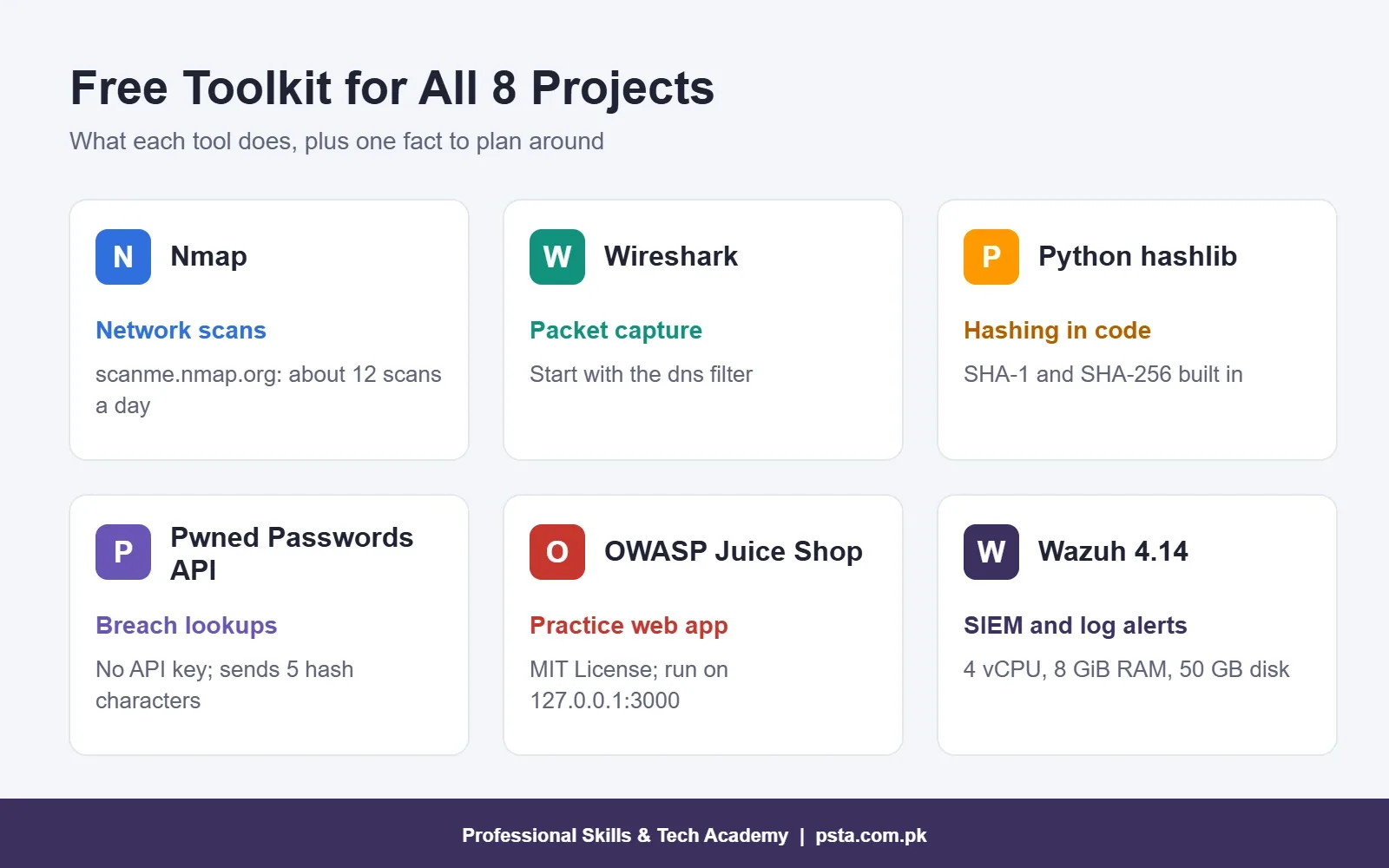
Have I Been Pwned runs a free Pwned Passwords API that needs no subscription or API key. The clever part is the privacy model. Your script hashes the password with SHA-1 on your own computer and sends only the first five characters of that hash. The service returns every hash suffix that starts with those characters, and your script looks for a match locally. The full password never leaves your machine.
import hashlib
import requests

def times_seen(password):
    digest = hashlib.sha1(password.encode("utf-8")).hexdigest().upper()
    prefix, rest = digest[:5], digest[5:]
    url = "https://api.pwnedpasswords.com/range/" + prefix
    reply = requests.get(url, headers={"Add-Padding": "true"}, timeout=10)
    for line in reply.text.splitlines():
        suffix, count = line.split(":")
        if suffix == rest:
            return int(count)
    return 0
The Add-Padding header pads each response to between 800 and 1,000 results, so someone watching the traffic can't guess your prefix from the response size. Padded rows have a count of 0, so the function above ignores them naturally. Extend it by reading candidate passwords from a file and printing a simple risk label. Never log the passwords you test.
Project 5: Write a File Integrity Monitor
This script answers a question every incident responder asks: "Which files changed, and when?" It walks through a folder, stores a SHA-256 hash of each file in a JSON baseline, and on the next run reports files that were added, changed or deleted.
- Use
os.walkto list files andhashlib.sha256to hash each one in chunks. - Save the results as a dictionary of path to hash in
baseline.json. - On the next run, compare the new hashes with the baseline and print three lists.
- Test it honestly: edit one file, delete another, add a third, then show the output.
Push it further by scheduling it with Windows Task Scheduler and writing results to a log file. That small step makes it feel like a real monitoring tool.
Level 3: Test a Web App and Watch the Logs
Now you combine attack and defense. Project 6 shows how web apps break, and Project 7 shows what those attacks look like from the other side.
Project 6: Write a Findings Report on OWASP Juice Shop
OWASP Juice Shop is a deliberately insecure online store built for security training and released under the MIT License. With Docker installed, run docker run --rm -p 127.0.0.1:3000:3000 bkimminich/juice-shop and open http://localhost:3000. The 127.0.0.1 part keeps the app reachable from your machine only, which matters for software designed to be broken.
Pick five challenges and map each one to a category from the OWASP Top 10 2025. Then write each finding the way a professional tester would: title, severity, steps to reproduce, impact and fix. Solutions are easy to find online, so the report is the part that shows your thinking.
Project 7: Run a Wazuh SIEM and Catch a Failed-Login Spike
Wazuh is a free, open source security monitoring platform, and version 4.14 is current. Its quickstart guide says an all-in-one install for 1 to 25 agents needs 4 vCPUs, 8 GiB of RAM and 50 GB of storage for 90 days of alerts. It runs on 64-bit Linux such as Ubuntu 24.04. An 8 GB student laptop can't spare that much for a virtual machine. Use a spare desktop with 16 GB or more, or share a lab PC with a classmate.
- Install Wazuh with the single script from the quickstart page.
- Add an agent on your own Windows laptop.
- Type a wrong password several times on a test account you created for this purpose.
- Find the alerts in the dashboard and note the time, host, rule and severity.
- Write a triage note: what happened, true or false positive, and what action you'd take.
A junior SOC analyst writes notes like this many times in a single shift. That makes this one of the strongest projects you can show for that role.
Capstone: Audit a Small Business (Example Scenario)
Here is an example of how the capstone can look. Imagine a pharmacy in Abbottabad with three PCs, one Wi-Fi router, a CCTV recorder and a WhatsApp Business number. With the owner's written permission, you check:
- Has the router's default admin password been changed, and is guest Wi-Fi separate from the billing PCs?
- Are Windows updates and Microsoft Defender switched on for every PC?
- Is sales data backed up somewhere other than the shop?
- Is the CCTV recorder reachable from the internet with a default password?
- Does the shared Gmail account use 2-Step Verification?
- Can staff spot a fake payment screenshot or a phishing link?
Patching deserves a line of its own. Pakistan's national CERT issued 53 security advisories in 2025, including critical flaws in Chrome, Firefox and Windows, ProPakistani reported. Small shops run the same software as big companies, and they rarely have anyone checking for updates.
Deliverable: a risk table (issue, likelihood, impact, fix, rough cost) and a one-page summary the owner can read in Urdu or English. If you can explain a risk to a pharmacist, you can explain it to a manager.
What Should Each Project Write-Up Include?
A finished lab without a write-up is invisible to employers. Keep each report to one or two pages and use the same six parts every time:
| Section | What to Write |
|---|---|
| Goal | One sentence on what you set out to test or build |
| Scope and permission | Which devices or apps, who allowed it, and the dates |
| Method | Tools, versions and the exact commands you ran |
| Findings | What you found, with redacted screenshots as evidence |
| Fix and retest | What you changed and proof that it worked |
| Next step | What you would test next with more time |
Before you publish anything, blur IP addresses, MAC addresses, email addresses and names. Put code and reports in a separate GitHub repository for each project, with a README that opens with the result, not the setup.
Which Projects Work for a BSCS or BSIT Final Year Project?
Single labs are usually too small for a cyber security final year project, but they combine well. A few directions that grow naturally from this list:
- Email header analyzer: extend Project 3 into a tool that reads raw headers and scores a message on SPF, DKIM, DMARC and link mismatches.
- Integrity agent with a dashboard: turn Project 5 into a small agent and server that tracks changes across several lab PCs.
- Detection rule pack: build on Project 7 by writing and testing custom Wazuh rules for a simulated college lab.
- Small business audit kit: package the capstone as a checklist app that produces the risk table and summary automatically.
Agree the scope with your supervisor early, and keep the same permission rules. A university project doesn't make an unauthorized scan legal.
How Do You Show These Projects to Employers?
Pin your three best repositories on GitHub and link them at the top of your CV. Write each CV line as an outcome, for example: "Set up a Wazuh SIEM lab with two agents and documented triage of a failed-login alert." That says more than "familiar with SIEM tools".
Practise a two-minute spoken walkthrough of each project. Interviewers often ask, "Tell me about something you built." Explain the problem, the method, one finding and what you'd improve. When you're ready for a credential to sit beside the portfolio, our comparison of cyber security certifications for beginners explains which exam to take first.
Doing These Labs With an Instructor at PSTA
Working alone is possible, but many students stall at the setup stage or aren't sure their report is good enough. Our beginner cyber security course runs for 12 weeks, and no security background is required. The fee currently listed is Rs. 45,000 (the regular price shown is Rs. 60,000). Check the course page for the latest figure before you apply.
The modules line up with the projects above. You cover security fundamentals and common attacks such as phishing and SQL injection. Then come information gathering, vulnerability scanning, firewalls, VPNs, intrusion detection, incident response, and digital forensics with PECA. The course ends with a final security project that you present, which fits straight into your portfolio.
Our campus sits on Old College Road in Mandian, Abbottabad, across from FIMS College, and the same classes run live online for students in other cities. Once the basics feel easy, PSTA's advanced course in ethical hacking and pen testing goes deeper into offensive work. You can compare other programs on the courses page, apply through online admission, or ask about the next batch on WhatsApp at +92 314 5424399.
Scan One Device Tonight, Write It Up Tomorrow
Don't wait until you have every one of these cyber security projects for beginners planned. Install Nmap tonight, scan your own router, and save the output. Tomorrow, spend 30 minutes turning it into a one-page report using the six-part structure above. That single page starts your cybersecurity portfolio, and the next seven get easier from there.
Frequently asked questions
Can I do these projects without a powerful laptop?
Yes, for most of them. The Nmap, Wireshark, phishing and Python projects run on any ordinary laptop, and Juice Shop only needs Docker. The Wazuh lab is the exception: its quickstart guide lists 4 vCPUs, 8 GiB of RAM and 50 GB of storage for an all-in-one install. Use a spare desktop or share a lab PC for that one.
Is it legal to practise hacking skills in Pakistan?
Practising on your own devices, or on apps built for training such as OWASP Juice Shop, is the safe route. Section 3 of PECA 2016 makes gaining unauthorized access to an information system or data with dishonest intention an offence. Never test a network, website or account without written permission from its owner. For legal questions, consult a lawyer.
Do I need programming skills for beginner cyber security projects?
Only two of the eight projects need code. The password checker and the file integrity monitor are short Python scripts, each under 60 lines, and both are good first programs. The other projects use ready-made tools such as Nmap, Wireshark and Wazuh, where the skill lies in reading results and writing clear reports.
Which project helps most for a SOC analyst job?
The Wazuh SIEM lab is the closest match, because writing triage notes on alerts is daily SOC work. Pair it with the phishing email teardown, since checking suspicious emails is another common analyst task. Together they show an interviewer that you can read logs, judge whether an alert is real, and explain your decision in writing.
How many projects should I finish before applying for jobs?
There is no fixed number, but three finished and well-documented projects usually make a stronger case than eight half-done ones. Pick one from each level, write a proper report for each, and pin them on GitHub. Quality of explanation matters more than count, because interviewers will ask you to walk through your work.
Should I upload my security projects to GitHub?
Yes. Give each project its own repository with a README that opens with the result, then the method. Before you push anything, remove real IP addresses, MAC addresses, email addresses, names and passwords from code, screenshots and logs. A clean, well-explained repository is easy for employers to check from your CV link.
Can these labs become a BSCS or BSIT final year project?
A single lab is usually too small, but several combine well. You could extend the phishing teardown into an email header analyzer, grow the integrity monitor into an agent with a dashboard, or write custom Wazuh detection rules. Agree the scope with your supervisor early, and keep the same permission rules throughout.
Sources & references
- 2025 ISC2 Cybersecurity Workforce Study isc2.org
- Nmap Network Scanning: Legal Issues nmap.org
- Prevention of Electronic Crimes Act (Commonwealth policy repository) tradecca.thecommonwealth.org
- Google Email Sender Guidelines support.google.com
- Have I Been Pwned API v3 Documentation haveibeenpwned.com
- OWASP Juice Shop Project owasp.org
- Wazuh Quickstart (4.14) documentation.wazuh.com
- ProPakistani: National CERT Advisories in 2025 propakistani.pk
Last reviewed & updated on by Umar Qureshi. Written by the PSTA team in Abbottabad, Pakistan.

Umar Qureshi
Cyber Security & Ethical Hacking Course in Abbottabad - PSTA
Turn this guide into a career: hands-on training with real projects, online across Pakistan or on-campus in Abbottabad · 12 Weeks.
Comments
No comments yet — ask a question or share your experience.