Quick answer
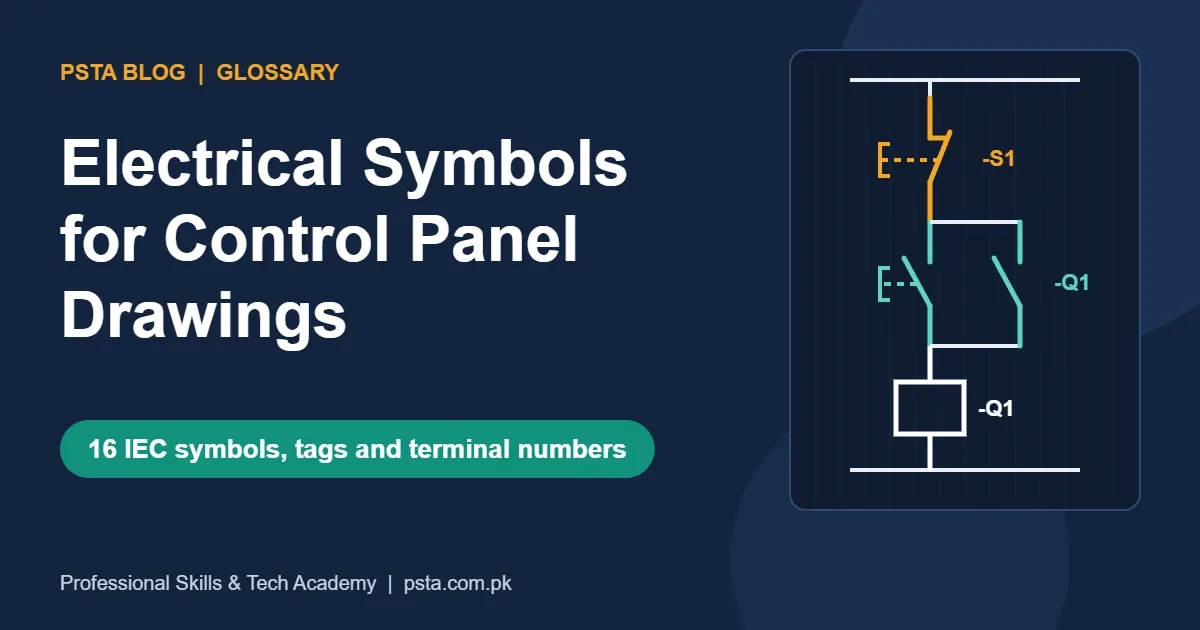
Control panel drawings in Pakistan mostly use IEC-style symbols. Contacts are drawn at rest, coils are rectangles, and a tag like -Q1 links a coil to its contacts. IEC 81346-2 tags contactors Q, protection F, buttons S and lamps P, while older drawings use K and H. A1-A2 feed the coil; 95-96 is the overload trip contact.
Key takeaways
- • Every contact on a schematic is drawn at rest, with coils off and no button pressed.
- • IEC coils are rectangles; the tag beside a coil, such as -Q1, matches all of its contacts.
- • IEC 81346-2 tags contactors Q, fuses F, buttons S, lamps P and terminals X; older IEC 750 drawings use K for contactors and H for lamps.
- • Auxiliary contacts ending in 1-2 are normally closed and 3-4 normally open; 95-96 is the overload trip contact.
- • QElectroTech 0.100 is a free, open-source editor with over 8,200 symbols for practising at home.
Table of contents 18 sections
- Which Electrical Symbols Standard Do Pakistani Panels Use?
- What Is Inside IEC 60617?
- The Two Building Blocks: Contacts and Coils
- Contacts Are Drawn at Rest
- IEC Coils Are Rectangles
- Power Circuit Symbols: From Supply to Motor
- Control Circuit Symbols: Buttons, Lamps and Timers
- Push Buttons and Selector Switches
- Lamps, Sensors and Timer Marks
- What Do Letter Codes Like K1, Q1 and F2 Mean?
- Why Your Drawing May Use Different Letters
- Terminal Numbers Printed on Contactors and Overloads
- Reading a DOL Starter Drawing Symbol by Symbol
- Symbol Myths That Lead to Wiring Faults
- Free Software for Drawing Electrical Symbols
- A One-Week Plan to Learn Panel Symbols
- Practicing Panel Drawings in PSTA's Industrial Automation Course
- Your First Exercise: Redraw One Panel Door
Here is a belief many trainees bring to their first panel class: electrical symbols are the same on every drawing in the world, so once you learn one chart you can read any machine. That isn't quite true. Most panels our trainees open in Pakistan follow the IEC style, older American machines often use ANSI-style symbols, and the letter codes beside each symbol changed when the IEC 81346-2 standard replaced the older system.
This guide works as a glossary. It explains the symbols you meet on a control panel drawing, the tags printed beside them and the numbers stamped on the parts themselves. It's written for DAE students, electricians moving into factory maintenance and anyone who has stared at a schematic and wondered where to start.
In this guide, you'll learn:
- why the same contactor can be drawn and tagged in two different ways
- how to read the 16 electrical symbols that appear on almost every motor control drawing
- what codes like -Q1, -K3 and -F2 mean, and how the old and new systems differ
- how terminal numbers such as A1, 13 and 95 tell you which wire goes where
- which free software lets you draw IEC-style diagrams at home
Which Electrical Symbols Standard Do Pakistani Panels Use?
Two families of electrical symbols dominate industrial drawings. The first is IEC 60617, the International Electrotechnical Commission's official symbol database. The second is the ANSI/IEEE style that grew up around North American industrial control documents.
A product guide from VIOX Electric links ANSI/IEEE-style symbols to North American drawings and legacy CAD libraries, and IEC-style symbols to international and export-oriented machinery. The same guide notes that IEEE now lists IEEE/ANSI 315-1975 as inactive-reserved, which is why many people call it a "style" rather than a current rule.
In the textile, food and cement plants our trainees work in, IEC-style sheets are what you'll usually find, since much of the imported machinery is documented that way. Older US-built equipment may still arrive with ANSI-style sheets. Whatever the origin, the legend on the drawing itself is the final word, so check it before you assume anything.
What Is Inside IEC 60617?
According to the IEC webstore listing, IEC 60617 is a database of more than 1,500 graphical symbols for diagrams, covering conductors, switchgear and protection, measuring instruments, energy conversion and more. The current edition, IEC 60617:2026 DB, was published on 4 March 2026. A single-user subscription is listed at CHF 710 for the first year, with renewal at CHF 280 a year.
You don't need to buy that subscription to start learning. Factories and panel builders use it to make drawings; as a trainee, you need to recognize the common symbols, and the 16 below cover most motor control work.
The Two Building Blocks: Contacts and Coils
Nearly all electrical symbols on a control drawing come down to two ideas. A coil is the part that receives power and creates a magnetic pull. A contact is a switch that opens or closes when that coil, a button or a sensor acts on it.
Contacts Are Drawn at Rest
Every contact on a schematic is shown in its rest condition, usually with the coil switched off and no button pressed. A normally open (NO) contact is drawn with a gap: a short line, then a slanted blade that doesn't reach the other end. A normally closed (NC) contact shows the blade touching a small horizontal stub, so current can flow while nothing is happening.
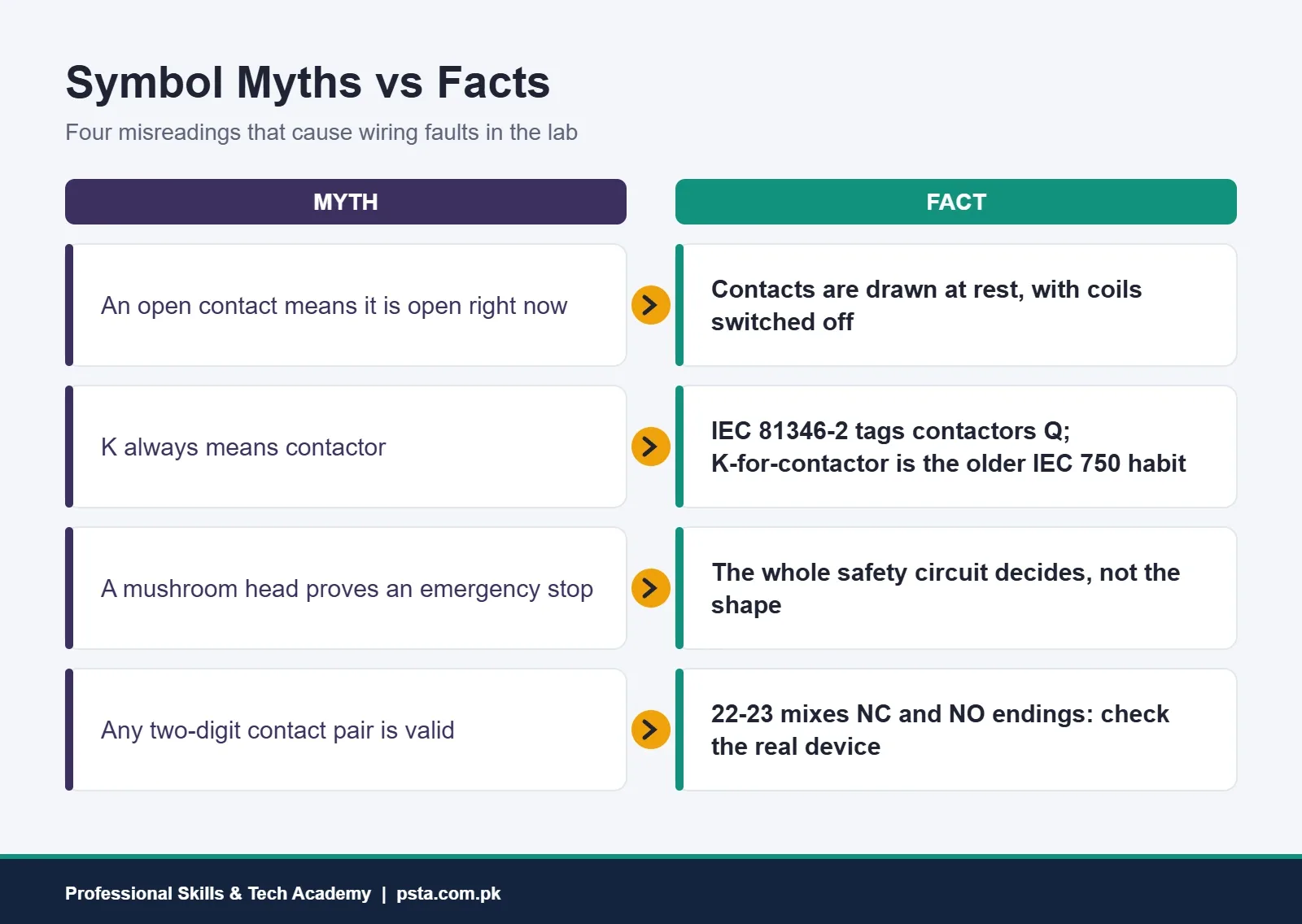
This catches beginners all the time. A running motor doesn't change the drawing. If the sheet shows a contact open, it means "open when the system is at rest," not "open right now."
IEC Coils Are Rectangles
In the IEC style, a relay or contactor coil is a plain rectangle with two leads. Extra marks inside or beside it show special behavior, such as a time delay. ANSI-style drawings usually show the coil as a circle with letters inside, for example "M" or "CR." Same device, different picture.
The key habit: a contact and its coil are often far apart on the sheet. The tag beside each one, such as -Q1, is what connects them. Find the coil tagged -Q1, and every contact tagged -Q1 belongs to it.
Power Circuit Symbols: From Supply to Motor
The first group of electrical symbols sits in the power circuit, which carries the heavy current from the supply to the load. On most drawings it sits on the left or top of the sheet and uses thicker lines.
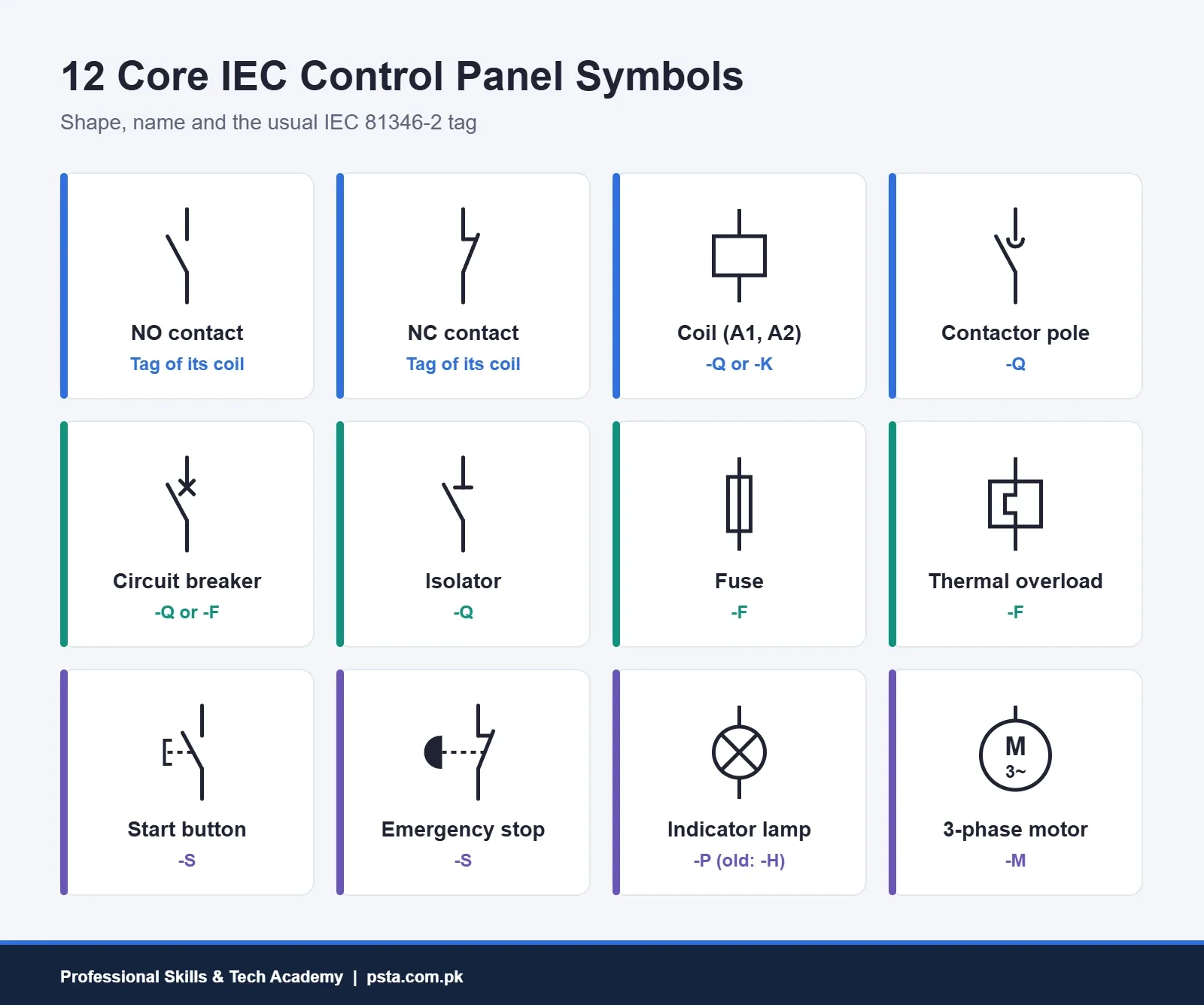
Read the power circuit from the incoming supply toward the motor, one device at a time:
- Supply lines. Three lines marked L1, L2 and L3, often with N for neutral and PE for protective earth.
- Isolator. A NO-style contact with a short bar across the fixed end. It disconnects the panel for safe work.
- Fuse. A small rectangle with the conductor line running through it lengthwise.
- Circuit breaker. A contact with a small cross on the fixed end. This is the symbol you'll see for an MCB or MCCB.
- Contactor main contacts. Three NO contacts with a small arc on the fixed end, linked by a dashed line to show they move together.
- Thermal overload element. A rectangle with a stepped line inside, representing the heat-sensing part of the overload relay.
- Motor. A circle with "M" inside. "3~" underneath means a three-phase AC motor.
If you need a refresher on what each protective device actually does, our MCB vs MCCB vs RCCB guide explains the hardware behind the circuit breaker symbol.
Control Circuit Symbols: Buttons, Lamps and Timers
The second group of electrical symbols lives in the control circuit. It runs at a lower current and decides when the power circuit switches. It's usually drawn between two horizontal or vertical supply rails, one rung at a time.
Push Buttons and Selector Switches
A push button is a contact with a dashed line leading to an actuator mark. A flat bracket shape means "operated by pushing." A start button is normally open; a stop button is normally closed. A mushroom-shaped head usually marks an emergency stop, but VIOX's guide warns that the mushroom shape alone doesn't prove the circuit meets emergency-stop requirements. The function comes from the whole safety circuit, not the picture.
Lamps, Sensors and Timer Marks
An indicator lamp is a circle with a cross inside. Sensors such as proximity switches and limit switches use a contact with an extra mark for how they're operated, and those marks vary between drawing libraries, so check the legend. Timer coils and timer contacts carry an additional sign for on-delay or off-delay. Don't guess these; the drawing legend or the relay's datasheet will tell you which one you have.
The table below collects the 16 electrical symbols you'll meet most on motor control sheets.
| Symbol | How It Looks (IEC Style) | What It Does | Common Tag |
|---|---|---|---|
| NO contact | Slanted blade with a gap | Closes when operated | Same tag as its coil |
| NC contact | Blade touching a short stub | Opens when operated | Same tag as its coil |
| Coil | Rectangle, leads A1 and A2 | Pulls in a contactor or relay | -Q (contactor), -K (relay) |
| Contactor main contact | NO contact with a small arc | Switches motor current | -Q |
| Circuit breaker | Contact with a cross on the fixed end | Trips on overcurrent | -Q or -F |
| Isolator | Contact with a bar on the fixed end | Safe disconnection | -Q |
| Fuse | Rectangle with a line through it | Melts on fault current | -F |
| Thermal overload element | Rectangle with a stepped line | Senses motor overheating | -F |
| Overload trip contact | NC contact, terminals 95-96 | Breaks the coil circuit on trip | -F |
| Start push button | NO contact with push actuator | Starts the motor | -S |
| Stop push button | NC contact with push actuator | Stops the motor | -S |
| Emergency stop | NC contact with mushroom head | Part of a safety stop circuit | -S |
| Indicator lamp | Circle with a cross | Shows run, trip or power status | -P (older drawings: -H) |
| Three-phase motor | Circle with M and 3~ | Converts power to motion | -M |
| Terminal | Small open circle | Wire connection point on a strip | -X |
| Protective earth | Stacked lines getting shorter | Earth connection for safety | PE |
What Do Letter Codes Like K1, Q1 and F2 Mean?
The letters printed beside electrical symbols are reference designations. They tell you what kind of device it is, and the number tells you which one. The rules come from the IEC 81346 series, which replaced the older IEC 61346. Part 2 groups devices by the job they do.
Under the IEC 81346-2 classes listed on Wikipedia, Q covers controlling objects such as switches, breakers and contactors; F covers protecting objects such as fuses; M covers driving objects such as motors; S covers human-interaction objects such as push buttons; P covers presenting objects such as indicators; X covers interfacing objects such as terminals; and B covers sensing objects.
Why Your Drawing May Use Different Letters
Plenty of drawings still carry the older IEC 750 lettering, which remains built into many CAD libraries. A reference guide from Industrial Monitor Direct explains that in IEC 750, K covered contactors and relays and H was used for signaling devices, while P meant a measuring instrument. That's why you'll find a contactor tagged -K1 on one machine and -Q1 on another.
| Device | IEC 81346-2 Letter | Older IEC 750 Letter |
|---|---|---|
| Contactor | Q | K |
| Control relay | K | K |
| Fuse or overload relay | F | F |
| Indicator lamp | P | H |
| Push button | S | S |
| Motor | M | M |
| Terminal strip | X | X |
| Transformer | T | T |
Neither system is wrong. What matters is that one drawing stays consistent, and that you read the legend before you start tracing wires.
Terminal Numbers Printed on Contactors and Overloads
Electrical symbols tell you what a device is. Contactor terminal numbers tell you exactly which screw a wire lands on, and they're printed on both the drawing and the device.
- A1 and A2 are the coil terminals. ABB's contactor instruction sheet shows the coil fed on A1 and A2.
- 1/L1, 3/L2, 5/L3 are the main poles on the supply side, and 2/T1, 4/T2, 6/T3 are the load side going to the motor. Odd numbers in, even numbers out.
- Two-digit auxiliary numbers follow a simple rule: the last digit gives the function. Endings 1-2 are normally closed and 3-4 are normally open, so 13-14 is a NO contact and 21-22 is a NC contact. Sprecher + Schuh's tech tip on CA7 contactors confirms 13-14 for NO and 21-22 for NC.
- 95-96 and 97-98 belong to the overload relay. On Schneider's TeSys LRD relays, as described in an explainer on IEC terminal numbering, 95-96 is the NC trip contact and 97-98 is the NO alarm contact.
That same explainer flags a useful check: a pair like 22-23 mixes an NC ending with an NO ending, so it isn't a valid contact. If you see one, treat it as a drawing error and look at the actual device.
Reading a DOL Starter Drawing Symbol by Symbol
Let's put the electrical symbols together on the simplest motor circuit you'll wire in training: a direct-on-line (DOL) starter with one start button, one stop button and a run lamp. This is a teaching example, not a drawing from a specific factory.
- Start at the top rail. The first symbol is the control fuse or breaker, tagged -F or -Q.
- Next comes the overload trip contact, NC, terminals 95-96. If the motor overheats, this opens and drops the coil.
- Then the stop button, -S1, an NC contact with a push actuator.
- Then the start button, -S2, a NO contact. Beside it, in parallel, sits a NO auxiliary contact of the contactor, terminals 13-14. This is the seal-in (holding) contact that keeps the coil on after you release start.
- Then the contactor coil, a rectangle tagged -Q1, wired on A1 and A2 to the bottom rail.
- On a second rung, another -Q1 NO contact switches the run lamp, a circle with a cross tagged -P1.
Once this rung makes sense, the same logic appears in PLC ladder diagrams. Our ladder logic guide for beginners shows how this seal-in circuit becomes a PLC rung, and the star delta starter guide builds on it with two more contactors and a timer.
Symbol Myths That Lead to Wiring Faults
Most panel wiring mistakes in training labs don't come from bad hands. They come from reading electrical symbols the wrong way.
A few habits prevent most of these errors:
- Read the legend sheet before the first page of the schematic.
- Trace one tag at a time. Highlight -Q1's coil and every -Q1 contact before moving on.
- Check terminal numbers against the device itself, not your memory of a different brand.
- Assume nothing from a mushroom head or a color. Confirm the function from the circuit.
Free Software for Drawing Electrical Symbols
Drawing a circuit yourself fixes electrical symbols in your memory far faster than staring at a chart. You don't need paid software for this.
QElectroTech is a free, open-source schematic editor released under the GPL-2.0 license. Its project page on GitHub lists version 0.100 as the current stable release, dated 25 January 2026, with a library of over 8,200 symbols, a title block editor, parts lists and PDF export. It runs on Windows and Linux, which suits most student laptops in Pakistan.
A few honest trade-offs: QElectroTech is a drawing tool, not a simulator, so it won't tell you if your circuit works. Some of its electrical schematic symbols follow regional styles, so compare them with the IEC shapes in this guide. If you already use AutoCAD, you can build your own symbol blocks there too; PSTA's AutoCAD course covers blocks and layers in detail.
A One-Week Plan to Learn Panel Symbols
Recognizing electrical symbols is a memory skill, so 20 to 30 minutes a day beats one long weekend session. Here's a plan you can follow with a notebook and QElectroTech.
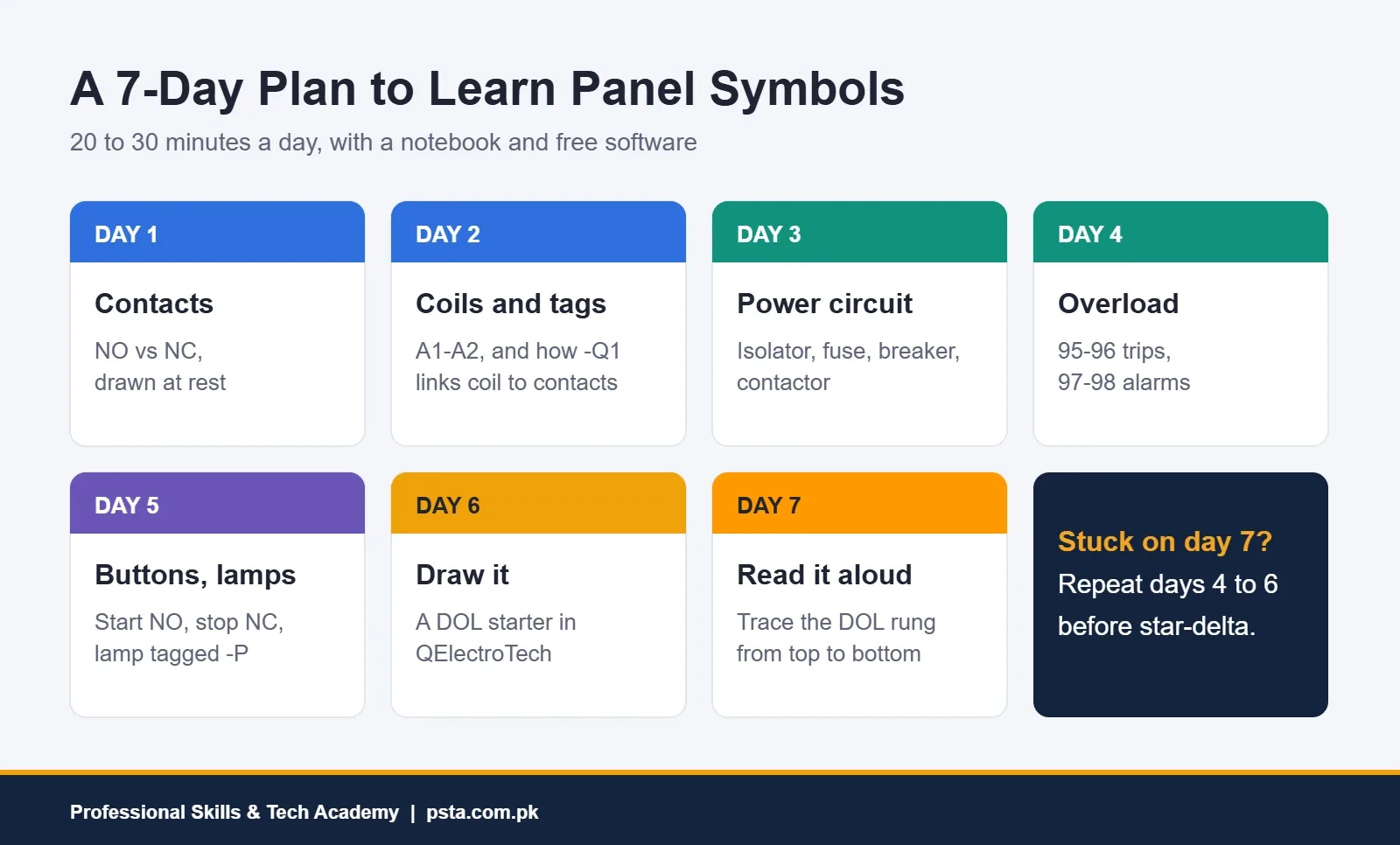
By day 7 you should be able to read a DOL rung aloud from top to bottom without looking anything up. If you can't yet, repeat days 4 to 6 before moving to star-delta or forward-reverse drawings.
Practicing Panel Drawings in PSTA's Industrial Automation Course
Reading drawings is one of the first things a panel or maintenance supervisor will test you on, and it's the first outcome listed for PSTA's Master Industrial Automation course: interpreting industrial schematics, symbols and ladder diagrams to IEC standards.
Here's what the course page lists at the time of writing:
- Duration: 3 months (12 weeks), beginner level.
- Fee: Rs. 28,000, shown on the course page down from Rs. 35,000.
- Modules: 8, starting with electrical safety and control components, moving through hardwired starters, sensors, VFDs and soft starters, then an introduction to PLCs and HMIs, troubleshooting and a final certification project.
- Hands-on wiring: you build DOL, reversing and star-delta starter circuits on live training rigs, set up a VFD and write basic PLC logic.
- Study options: on campus in Abbottabad, live online anywhere in Pakistan, or a mix of both, with a new batch each month and classes between 9:00 AM and 9:30 PM, Monday to Saturday.
The course is aimed at DAE and B.Tech graduates, electricians moving into industry, engineering students preparing final year projects and maintenance staff in places like Hattar Industrial Estate and Gadoon Amazai. If you're preparing for job interviews, our PLC interview questions post is a good companion. To see what else PSTA teaches, browse the full course list, and when you feel ready, the admission page lets you reserve a seat in the next batch.
Your First Exercise: Redraw One Panel Door
Pick any small panel you can safely look at with the power off: a water pump starter, a shop's changeover box or a training board. Note every device on the door and inside, then redraw it as a schematic with IEC electrical symbols and 81346-2 tags.
Don't worry if your first attempt is messy. The moment you draw a seal-in contact beside a start button yourself, the symbol stops being a picture and starts meaning something. Bring your sketch to class or send it to a PSTA trainer on WhatsApp at +92 314 5424399, and we'll go through it with you.
Frequently asked questions
What is the difference between IEC and ANSI electrical symbols?
Both show the same devices with different pictures. IEC 60617-style drawings show relay and contactor coils as rectangles and are common on international and export machinery. ANSI/IEEE-style drawings, linked to North American documentation, usually show coils as circles with letters such as M or CR. Always read the legend sheet, because a drawing can follow either style or a company variation.
Why do some drawings tag a contactor K1 and others Q1?
It depends on which lettering system the drawing follows. Under IEC 81346-2, a contactor is a controlling object and gets the letter Q, so you see -Q1. The older IEC 750 system used K for both contactors and relays, and many CAD libraries still use it. Both are valid as long as the whole drawing stays consistent.
What do A1 and A2 mean on a contactor?
A1 and A2 are the two coil terminals. When the control voltage appears across them, the coil pulls in and every contact on that contactor changes state. On the schematic, A1 and A2 are printed beside the rectangle that represents the coil. For DC coils on some brands, A1 is positive and A2 is negative, so check the datasheet.
Is 95-96 on an overload relay normally open or normally closed?
On common IEC overload relays such as Schneider TeSys LRD, 95-96 is the normally closed trip contact. It sits in series with the contactor coil, so when the motor overheats it opens and stops the motor. 97-98 is the normally open contact, usually wired to a trip lamp or alarm. Confirm on the relay label before wiring.
Where can I get electrical symbols for free?
QElectroTech is a free, open-source schematic editor for Windows and Linux. Its current stable version, 0.100, includes a library of over 8,200 symbols, title blocks and PDF export. It is a drawing tool, not a simulator, so it will not test your circuit, but it is enough to practice drawing DOL, forward-reverse and star-delta starters.
Do I need to buy the IEC 60617 database as a student?
No. The IEC 60617 database is a paid subscription aimed at companies that produce drawings, listed at CHF 710 for a single user in its first year. As a trainee, you only need to recognize the common symbols, which a glossary, your course notes and free software like QElectroTech cover well.
How long does it take to learn to read panel drawings?
If you practice 20 to 30 minutes a day, you can expect to recognize the common symbols within a week or two. Reading full machine drawings with confidence takes longer, because you also need to understand how contactors, overloads, timers and PLCs behave. Wiring the same circuits on a training rig while reading the drawing is the fastest way to connect the two.
Sources & references
- IEC 60617:2026 DB, IEC Webstore webstore.iec.ch
- IEC 81346, Wikipedia en.wikipedia.org
- Electrical Drawing Letter Codes: IEC 81346-2 Reference Guide, Industrial Monitor Direct industrialmonitordirect.com
- IEC Contactor Terminal Numbering Convention Explained, Industrial Monitor Direct industrialmonitordirect.com
- ABB contactor installation and operating instructions library.e.abb.com
- Terminal Markings on Built-In CA7 Contactor Auxiliaries, Sprecher + Schuh sprecherschuh.com
- Electrical Symbols Chart, VIOX Electric viox.com
- QElectroTech source repository, GitHub github.com
Last reviewed & updated on by Umar Qureshi. Written by the PSTA team in Abbottabad, Pakistan.

Umar Qureshi

Master Industrial Automation: Single & Three-Phase Panel Wiring, PLC & VFD Certification
Turn this guide into a career: hands-on training with real projects, online across Pakistan or on-campus in Abbottabad · 3 Months (12 Weeks).
Comments
No comments yet — ask a question or share your experience.