Quick answer
A professional logo design process has seven steps: write a one-page brief, study competitors, sketch 20 or more thumbnails, rebuild the best ideas as a black vector logo, add type and color, present two or three concepts on mockups, then export full-color, one-color and reversed versions in AI, EPS, SVG, PNG and JPG.
Key takeaways
- • Get the client to approve a one-page brief before you sketch anything.
- • Sketch at thumbnail size first, because ideas that fail small also fail as profile pictures.
- • Build the final logo in vector so it scales from a business card to a billboard.
- • Add color last and check that the logo still reads in grayscale.
- • Logos built from Canva templates are non-exclusive and can't be registered as trademarks.
- • Hand over a full package: editable master, print, web and social files in three color versions.
Table of contents 12 sections
- The Logo Design Process at a Glance: How Long Does Each Step Take?
- Step 1: Write a One-Page Logo Design Brief
- Step 2: Study the Client's Competitors
- Step 3: Sketch Rough Ideas Before Touching Software
- Step 4: Rebuild Your Best Sketches as a Vector Logo
- Step 5: Pick Typography and Color After the Shape Works
- Step 6: Test, Present and Revise the Concepts
- Step 7: Export Logo File Formats the Client Will Actually Use
- Which Software Should You Use for Logo Design?
- Can You Trademark a Logo Made in Canva?
- Practicing Real Briefs in PSTA's Graphic Design Course
- Try It Tonight: One Brief, Ten Thumbnails
Here is an example of a job you could get in your first month. A bakery owner in Abbottabad, let's call the shop Saffron Crust, messages you on WhatsApp: "I need a logo by Friday, something modern." He sends no colors, no reference and no budget. A beginner opens Canva and starts dragging icons around. A working designer follows a logo design process instead, and that process is what this guide teaches.
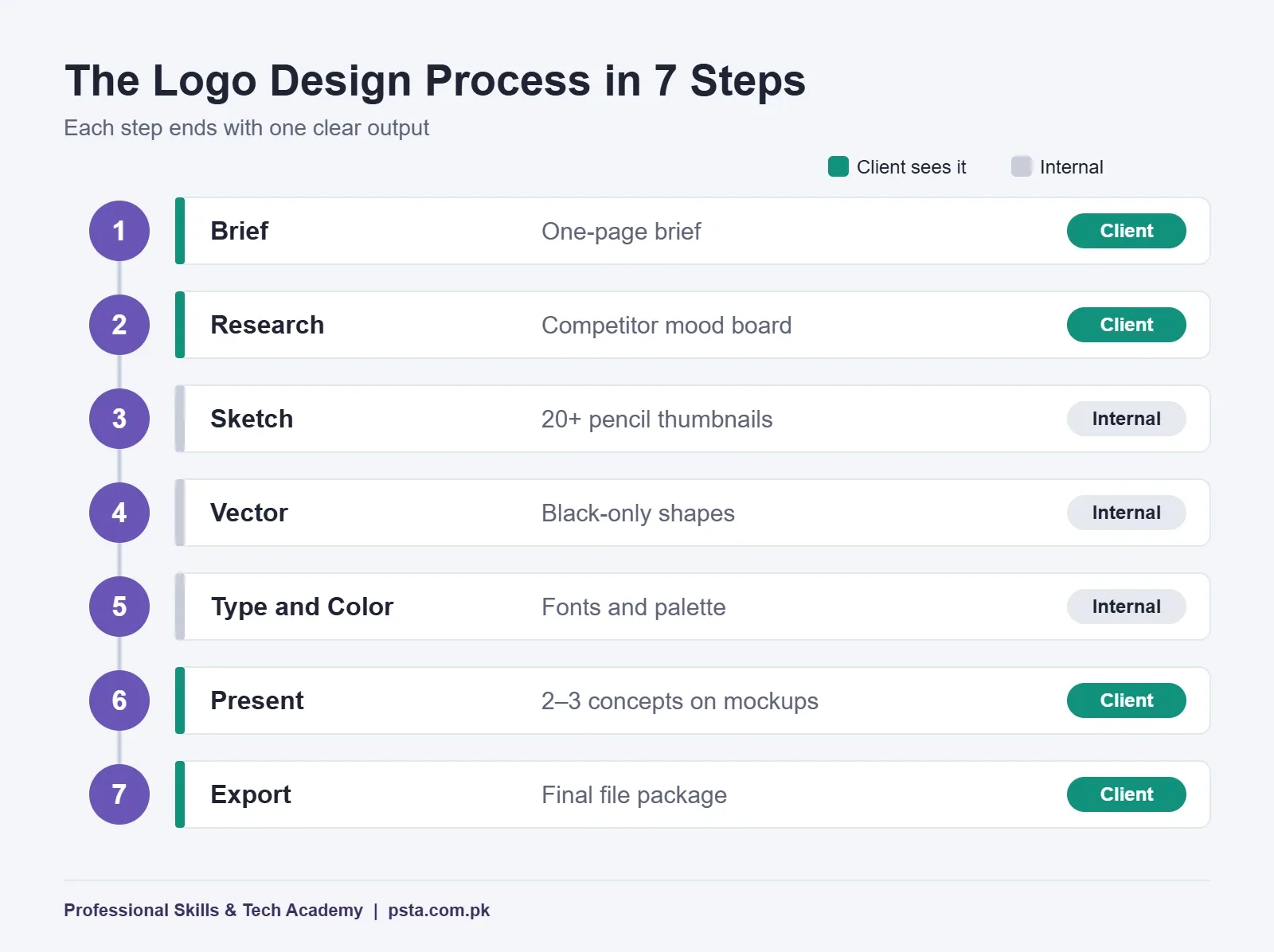
The logo design process below is the one I use with students in class. It has seven steps, from a written brief to a folder of final files. Each step ends with one clear output, so you never get stuck in endless "make it pop" revisions. If you have ever wondered how to design a logo for a paying client rather than for practice, this is the order to follow.
Work through this guide and you will be able to:
- Write a one-page brief that stops vague requests before they start
- Turn rough pencil thumbnails into a clean vector logo
- Choose fonts and colors that survive a black-and-white photocopy
- Present concepts and handle revisions without losing the client's trust
- Hand over the right logo file formats for print, web and social media
The Logo Design Process at a Glance: How Long Does Each Step Take?
The table shows the seven steps, what each one produces, and a realistic time range for a small local business logo. These ranges are my classroom guideline, not an industry standard. A bank or a national brand needs far more research and many more rounds.
| Step | What You Do | What You Hand the Client | Typical Time |
|---|---|---|---|
| 1. Brief | Ask questions and write answers down | One-page brief to approve | 1–2 hours |
| 2. Research | Collect competitor logos and note patterns | Short mood board | 2–3 hours |
| 3. Sketch | Draw 20 or more small thumbnails | Nothing yet (internal) | 2–4 hours |
| 4. Vector | Rebuild the best 3–5 sketches in software | Nothing yet (internal) | 1 day |
| 5. Type and Color | Test fonts and a small palette | Nothing yet (internal) | Half a day |
| 6. Present and Revise | Show 2–3 concepts on mockups | Concept PDF, then revisions | 2–5 days with feedback |
| 7. Export | Save every version and format | Final file package and color sheet | 2–3 hours |
Notice that in this logo design process the client sees nothing between Step 2 and Step 6. That gap is deliberate. Clients who see half-finished sketches tend to fall in love with the weakest idea, so you filter first and present later.
Step 1: Write a One-Page Logo Design Brief
A logo design brief is the first document in the logo design process: a short page that records what the client wants before you draw a single line. Send the questions on WhatsApp or ask them on a call, then write the answers in your own words and get a "yes, that's right" back. That message becomes your reference when the client changes their mind later.
Keep it to these eight questions:
- What is the exact business name, including spelling in Urdu if it will appear on signs?
- What does the business sell, and to whom?
- Which three words should people feel when they see the logo (for example: fresh, family, affordable)?
- Who are the two or three main competitors nearby or online?
- Where will the logo be used most: shop board, packaging, Facebook page, delivery bags?
- Are there colors the owner loves or refuses to use?
- Is a tagline needed, and is it final?
- What is the deadline, and how many revision rounds are included?
Question 5 matters more than most beginners think. A logo printed on a paper bag by a local press has different needs from one that only lives on Instagram. If you skip it, you may hand over a delicate gradient that the printer can't reproduce.
Step 2: Study the Client's Competitors
Search for the competitors named in the brief, plus similar businesses in Lahore, Karachi and abroad. Screenshot 10 to 15 logos and put them on one page. At this point in the logo design process, you are not collecting ideas to copy. You are looking for patterns to avoid.
In the Saffron Crust example, you might find that almost every bakery logo nearby uses a chef's hat, a wheat stalk or brown script lettering. That tells you something useful: a fourth chef's hat will disappear in the crowd. Write down two or three directions that would stand apart, such as a geometric bread shape or a bold, simple wordmark in a warm color.
Save this page as a mood board. If the client asks why you didn't use a chef's hat, you can show it and explain your choice in one sentence.
Step 3: Sketch Rough Ideas Before Touching Software
Sketching is the most skipped stage of logo design for beginners, and often the most useful. Take a plain A4 sheet and draw small boxes, about the size of a matchbox. Fill 20 or more of them with quick ideas in pencil. Each sketch should take a minute or two. Don't erase. Bad ideas on paper are cheap, and they often lead to the good one.
Try these angles to keep your ideas varied:
- Wordmark: the name alone, with a custom detail in one letter
- Lettermark: initials only, useful for long names
- Symbol: a simple shape tied to the product or the city
- Combination: a symbol beside or above the name
- Emblem: the name inside a badge or seal shape
Then circle your best three to five. A good test: does the idea still read when the box is the size of your thumbnail? If you can't tell what it is at that size, it will fail as a WhatsApp profile picture too.
Step 4: Rebuild Your Best Sketches as a Vector Logo
Now the logo design process moves to software. Scan or photograph your circled sketches, place them in the background, and trace them with the Pen tool and basic shapes. Work in black only at this stage. Color hides weak shapes, so keep it out until Step 5.
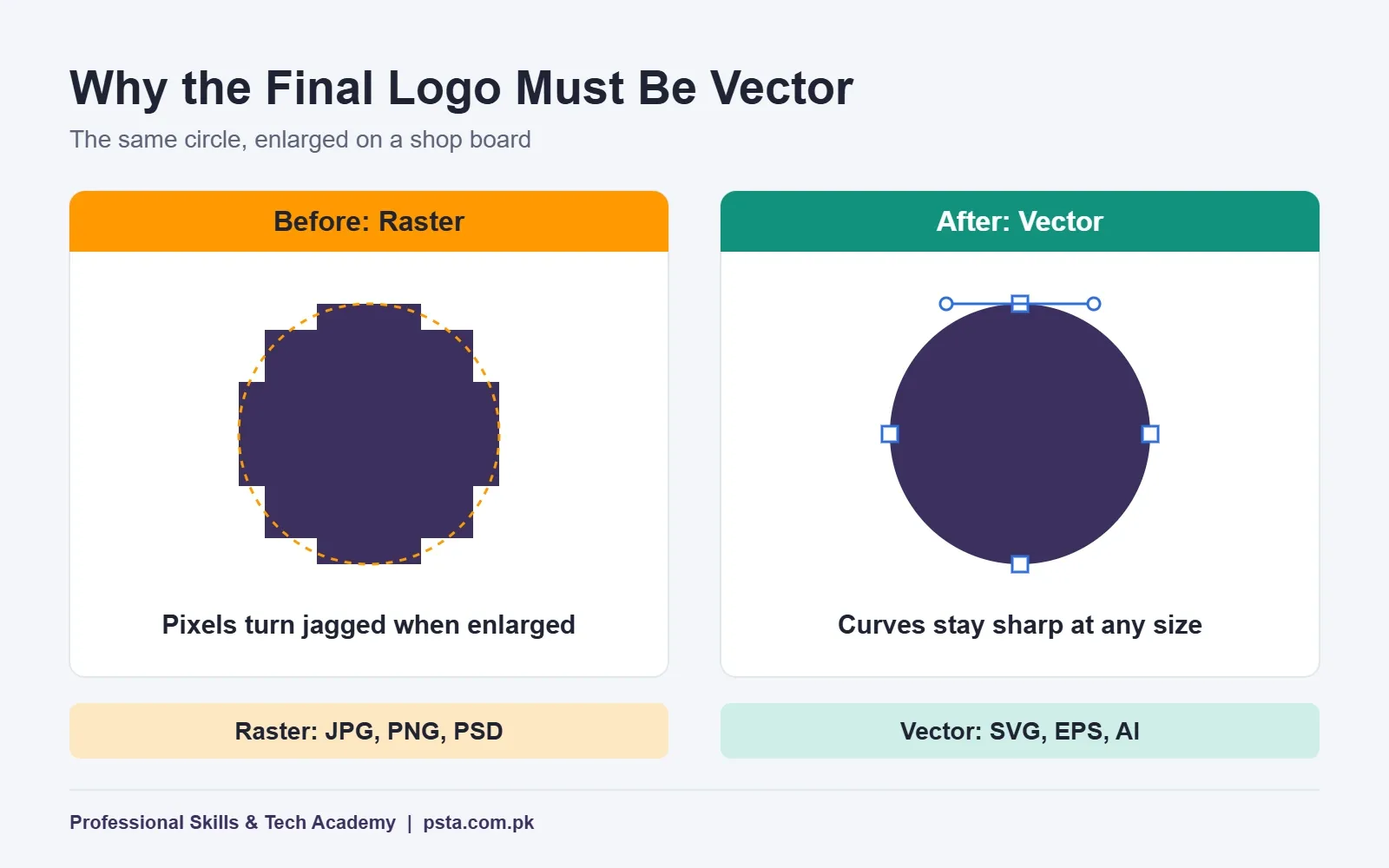
Always build the final logo as a vector logo. Adobe's own raster vs vector guide explains why: raster images are made of pixels and blur when enlarged, while vector images use mathematical curves and can be resized without losing quality. Adobe uses the exact case you will meet in Pakistan, one logo that must fit a business card and a billboard.
Some habits that save hours later:
- Use as few anchor points as you can. Smooth curves need fewer points, not more.
- Snap shapes to a grid or guides so spacing stays even.
- Convert text to outlines only in a copy of the file, and keep an editable master.
- Name your layers and artboards (for example "primary-horizontal" and "icon-only").
Not sure which program to install? Read our beginner's software guide, which weighs each option for students in Pakistan.
Step 5: Pick Typography and Color After the Shape Works
Once a concept works in black, test it with two or three typefaces. Pick one that matches the three words from your brief. A rounded sans-serif feels friendly. A tall serif feels traditional. Avoid using more than two fonts in one logo, and check the font's license before you use it for a client.
For color, start with one main color and one supporting color. Then run the photocopy test: print the logo in grayscale or convert it on screen. If the symbol and the name still separate clearly, your contrast is fine.
Accessibility rules do not force this on you, which surprises many students. The W3C's guidance on contrast says text that is part of a logo or brand name has no contrast requirement. That exemption covers the rule, not the reader. A pale yellow name on white will still be unreadable on a shop board in the afternoon sun, so test it anyway.
Prepare color values for both screen and print: HEX or RGB for digital use and CMYK for the printer. If those terms are new, read our explainer on RGB vs CMYK color modes before you build the color sheet.
Step 6: Test, Present and Revise the Concepts
This is the step where the logo design process finally meets the client. Before they see anything, test each concept at three sizes: as a 32-pixel icon, on a mock business card, and on a mock shop board. Drop any concept that breaks at small size.
Present two or three concepts, not ten. Put each one on its own page with a single line explaining the idea behind it and how it answers the brief. Show it on simple mockups, like a paper bag or a Facebook profile picture, so the owner can picture it in real use.
When feedback arrives, sort it before acting:
- Clear changes ("make the name bigger") can be done right away.
- Vague feelings ("it needs more energy") need one follow-up question, such as "Is it the color or the shape that feels flat?"
- New requests outside the brief ("can you also design a menu?") are a separate job with a separate price.
Count revision rounds against what you agreed in Step 1. The brief protects both you and the client here.
Step 7: Export Logo File Formats the Client Will Actually Use
Many beginners skip the last stage of the logo design process: they send one PNG and call the job done. Two months later the client asks for a file the printer can use, and you have to rebuild the logo from memory. Hand over a complete package once, and you look professional from day one.
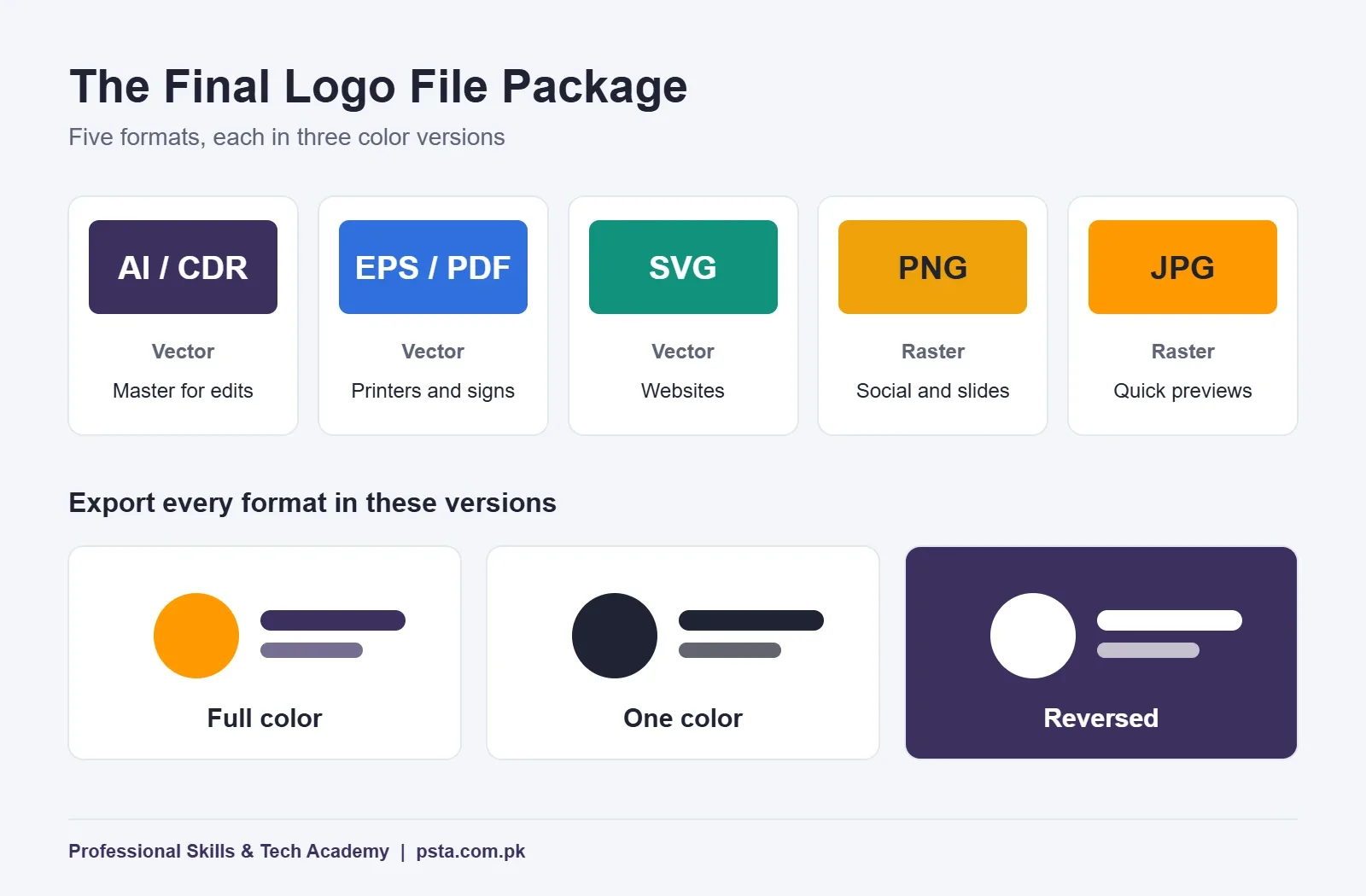
According to Adobe's comparison, common vector types include SVG, EPS and AI, while JPEG, PNG and PSD are raster formats. A solid package mixes both:
| File | Type | Best Use |
|---|---|---|
| AI or CDR (master) | Vector, editable | Future edits by a designer |
| EPS or PDF | Vector | Printers, sign makers, embroidery |
| SVG | Vector | Websites and web apps |
| PNG (transparent) | Raster | Social media, slides, documents |
| JPG | Raster | Quick previews and WhatsApp sharing |
Export each format in three versions: full color, one color (black) and reversed (white, for dark backgrounds). Add the primary horizontal layout and an icon-only version for profile pictures. Finish with a one-page color sheet listing HEX, RGB and CMYK values, and the font names.
Which Software Should You Use for Logo Design?
Any serious vector editor can produce a professional logo. The tool matters less than the logo design process above. Still, the software you pick affects cost and the file types clients and printers expect.
| Software | Cost | Where It Fits |
|---|---|---|
| Adobe Illustrator | Paid subscription | Agencies and international freelance clients |
| CorelDRAW | Paid | Common in local print shops and sign making |
| Affinity by Canva | Free core app | Full vector, photo and layout work on Windows and Mac |
| Inkscape | Free, open source | Learning vector drawing on older laptops |
| Canva | Free and paid plans | Mockups and social posts, with limits for logos |
Affinity's change is worth knowing about. As 80.lv reported on November 3, 2025, Canva relaunched Affinity as one free app combining vector, photo and layout tools, with only its AI features tied to a paid Canva plan. Inkscape remains a free, GPL-licensed vector editor. So cost is no longer a reason to skip vector work.
Can You Trademark a Logo Made in Canva?
Not if you build it from Canva's templates or stock graphics. Canva's help page on logos and trademarks explains that any user may customize the same logo templates, which leaves you with only non-exclusive rights, and you can't register the result as a trademark. The same applies to stock photos and graphics inside a logo.
Canva does allow you to build an original logo from simple lines and shapes in its free library, plus its fonts. But for client work, the safer habit is to draw the mark yourself in a vector editor, so every element belongs to the client.
This matters if your client plans to register the brand. In Pakistan, trademark applications go through IPO-Pakistan, which launched an online trademark filing system with PITB in June 2023. A logo built on a shared template can cause trouble at that stage, and you don't want to be the reason.
Practicing Real Briefs in PSTA's Graphic Design Course
Reading about a logo design process is one thing. Running it against a real deadline, with an instructor checking your curves, is how it sticks. PSTA's Graphic Designing course spends Week 3 on logos, icons and typography in Illustrator, and Week 9 on full branding projects: a logo, an identity kit and a client presentation.
The course runs for 12 weeks at beginner level and also covers Photoshop, CorelDRAW, Canva, InPage for Urdu work, and AI tools such as Adobe Firefly. Fees change, so check the course page before you apply. This week it shows a discounted Rs. 18,000 (the regular price is Rs. 20,000), with an option to pay in 2 installments. Abbottabad students sit at a lab computer in Mandian, opposite FIMS College. If you live elsewhere, you join the same lessons live from home, and some learners switch between the two.
Weeks 10 and 11 turn your logo projects into a Behance portfolio and Fiverr-ready samples. If freelancing is your goal, pair this with our guides on graphic design portfolio mistakes and creating a Fiverr gig. To check batch timings, see the admission page or browse all PSTA courses.
Try It Tonight: One Brief, Ten Thumbnails
Pick a real shop on your street, one you pass every day. Write its one-page brief from what you can see: name, product, customers and competitors. Then sketch ten thumbnails in 20 minutes, circle two, and rebuild one in black in a free vector editor. You'll have finished half the logo design process in a single evening, and you'll know exactly where you need practice.
Frequently asked questions
How many logo concepts should I show a client?
Two or three is usually enough. One concept gives the client no real choice, and more than three makes the decision harder while suggesting you couldn't pick the strongest ideas yourself. Explain each concept in one line tied to the brief, and show it on simple mockups so the client judges it in real use.
Can I design a logo in Photoshop?
You can sketch ideas or build mockups in Photoshop, but avoid it for the final logo. Photoshop works mainly with pixels, so a logo made there can blur when a printer enlarges it for a shop board or banner. Build the final version in a vector editor such as Illustrator, CorelDRAW, Affinity or Inkscape.
Do I need drawing skills to design logos?
No. Your pencil sketches only need to be clear enough for you to read. Logo work depends more on simple shapes, spacing, typography and listening to the client than on artistic drawing. Most strong small-business logos are built from circles, lines and well-chosen letters, and the Pen tool becomes comfortable with steady practice.
What size should a logo be?
A vector logo has no fixed size, which is the whole point of building it in vector. Keep the master file in vector and export PNG copies at the sizes each platform needs, such as a square version for profile pictures. Always check that the icon-only version still reads clearly at around 32 pixels.
Is it okay to use an AI logo generator for client work?
AI tools can help you explore directions quickly, but be careful with client logos. Your client usually needs a mark that is distinctive and fully theirs, especially if they plan to register a trademark. Treat AI output as rough inspiration at most, then sketch and build the final logo yourself so you know every element is original.
What is the difference between a logo and a brand identity?
A logo is one mark: a symbol, a wordmark or both. A brand identity is the full system around it, including colors, fonts, business cards, social media templates and rules for how the logo is used. Small clients often start with a logo and color sheet, then expand to a full identity kit as the business grows.
How do I send final logo files to a client?
Put everything in one clearly named folder with subfolders for print, web and social. Include the editable master, EPS or PDF, SVG, transparent PNG and JPG, each in full color, one color and reversed. Add a one-page color sheet with HEX, RGB and CMYK values plus font names, then share it as one ZIP file or cloud link.
Sources & references
- Raster vs Vector: What's the Difference? adobe.com
- Understanding Success Criterion 1.4.3: Contrast (Minimum), W3C w3.org
- Trademarks and Logos, Canva Help Center canva.com
- Affinity Returns as Free All-in-One Design Suite, 80.lv 80.lv
- Download Inkscape inkscape.org
- IPO-Pakistan & PITB Introduce Online Trademark Filing System pitb.gov.pk
Last reviewed & updated on by Umar Qureshi. Written by the PSTA team in Abbottabad, Pakistan.

Umar Qureshi
Ultimate Graphic Designing Course in Pakistan: Master Photoshop, Illustrator, CorelDRAW & AI Tools (Practical & Beginner Friendly)
Turn this guide into a career: hands-on training with real projects, online across Pakistan or on-campus in Abbottabad · 12 Weeks.
Comments
No comments yet — ask a question or share your experience.