Quick answer
Rawalpindi learners can take PSTA's Office Automation course from home through live online classes with session recordings. It covers typing, Word, Excel and PowerPoint over 12 weeks for Rs. 12,000, paid in 2 installments. As Punjab offices switch to digital files, these skills matter for both government and private desk jobs.
Key takeaways
- • Punjab told public offices to move fully to digital filing by July 1, 2026, and RDA adopted e-FOAS in 2024.
- • Office tests in Rawalpindi usually check typing, letter formatting, Excel formulas and file handling.
- • PSTA's Office Automation course runs 12 weeks, live online, for Rs. 12,000 in 2 installments.
- • Every online session is recorded, which helps when power cuts interrupt a class.
- • GIIT Rawalpindi and NAVTTC programs are fair alternatives if you prefer a classroom or have full weekdays free.
Table of contents 15 sections
- Rawalpindi Office-Skills Fact Sheet
- Why Paperless Files in Punjab Change the Office Job in Rawalpindi
- Who Needs Office Staff in Rawalpindi?
- Is an MS Office Course in Rawalpindi Worth It if You Already Use a Phone?
- What Office Tests in Rawalpindi Usually Ask You to Do
- Inside PSTA's 12-Week Office Automation Course
- Modules in Order
- Fee, Timings and Format
- Projects the Course Page Lists
- Can You Join PSTA's Office Automation Classes From Rawalpindi?
- A Sample Study Week for Working Learners in Pindi
- GIIT, NAVTTC or Live Online: Which Route Suits You?
- Courses That Pair Well With MS Office
- Practice Ideas That Show an Employer You Are Ready
- Retype One Real Form Tonight
The myth: an MS Office course in Rawalpindi is only for people who have never used a computer. The reality in Rawalpindi, Punjab, looks different in 2026. Provincial offices now move files on a digital system, and private employers still screen new staff on Word, Excel and typing. PSTA (Professional Skills & Tech Academy) teaches its 12-week Office Automation course through live online classes, so you can study from home in Rawalpindi without a trip to Abbottabad.
This guide is for clerks, fresh graduates, shop staff and anyone in Pindi who wants office skills that hold up in a real test. Here is what you will find:
- How Punjab's paperless filing push changes what offices in Rawalpindi expect from staff.
- Which local employers need Word, Excel and PowerPoint, and what their tests tend to check.
- What PSTA's Office Automation course covers, what it costs and how long it takes, read from the course page today.
- A sample weekly plan that fits around work or college hours in Rawalpindi.
- A fair comparison with public options such as GIIT Rawalpindi and NAVTTC programs.
Rawalpindi Office-Skills Fact Sheet
| Question | Answer for a Rawalpindi learner |
|---|---|
| Place | Rawalpindi city and district, Punjab |
| How you join | Live online classes from home; hybrid or campus study only if you can reach Abbottabad |
| Main course | Office Automation: MS Office & Computer Basics |
| Length and level | 12 weeks, beginner |
| Fee shown today | Rs. 12,000 (regular Rs. 15,000), payable in 2 installments |
| Courses that pair well | English & Urdu Typing, Power BI, DIT |
| Certificate check | Anyone can verify it at /certificate |
| How to apply | Online form at /admission |
| Questions | WhatsApp +92 314 5424399 |
Why Paperless Files in Punjab Change the Office Job in Rawalpindi
For decades, an office job in Pindi meant moving paper folders from desk to desk. That habit is ending. In May 2024, the Rawalpindi Development Authority adopted the e-Filing and Office Automation System (e-FOAS), and the Punjab Information Technology Board trained RDA heads of department and deputy and assistant directors from admin, audit, finance, engineering and HR on it.
The wider province moved too. In October 2025, The Express Tribune reported that the Civil Secretariat had shifted its paperwork onto e-FOAS and planned to scrap over 80% of the government's stationery budget. Then, on June 2, 2026, the same paper reported that the Punjab Chief Secretary had told public offices, including regional and district offices, to move fully to digital filing by July 1.
Training has not kept pace. A February 2025 Tribune report said more than 5,000 officers and employees had not yet been trained for the new system. That gap matters to you. A digital file still needs a well-formatted letter, a clean spreadsheet and a scanned document named properly. Staff who can do that without help stand out.

e-FOAS itself is a government system, and no private course teaches it. What a good office course gives you is the base underneath: typing, Word formatting, Excel tables and file management. Those habits carry over to any software an office adopts.
Who Needs Office Staff in Rawalpindi?
Rawalpindi is a large market for desk work. The district counted 6,118,911 people in the 2023 census, according to City Population's table of PBS data, with Rawalpindi tehsil alone at 3,744,590. A population that size needs schools, clinics, banks, property offices and wholesale traders, and each of them keeps records.
The private side is broad as well. The Rawalpindi Chamber of Commerce and Industry, set up in 1952, says it serves more than 8,000 members, from large manufacturers to home-based businesses. Many of these firms run small offices where one person handles letters, invoices and stock sheets.
When you browse job boards such as Rozee.pk for "office assistant Rawalpindi" or "data entry Rawalpindi", read the requirements line closely. Make a note of every software name and typing speed you see. That list becomes your study target. If you are weighing a short Excel course in Rawalpindi against a full office automation course in Rawalpindi, the ads usually settle it: most office jobs in Rawalpindi ask for Word, Excel and typing together.

Is an MS Office Course in Rawalpindi Worth It if You Already Use a Phone?
Yes, for most office jobs. A phone teaches you to message and browse, but office work happens on a keyboard and a large screen. Employers in Rawalpindi expect you to format a letter, build an Excel table with formulas and type at a steady speed. Those skills only come from practice on a computer with feedback.
Phone habits can even slow you down. People who learn on touch screens often look for a menu where a shortcut would do, or save every file as "New Document". A structured course corrects that early, before the habit sets in.
The other reason is proof. A certificate an employer can check online carries more weight than "good computer skills" written on a CV. An employer in Rawalpindi can confirm a PSTA certificate in under a minute through PSTA's certificate checker, using the Student ID or certificate serial.
What Office Tests in Rawalpindi Usually Ask You to Do
Private employers and government departments test office skills in different ways, but the tasks repeat. The table below lists common test tasks and what to practice for each. Treat it as a practice guide, not a promise of what any one employer will ask.
| Common test task | Skill behind it | What to practice |
|---|---|---|
| Type a passage in a set time | English and Urdu typing | Daily timed drills with accuracy first, then speed |
| Format an official letter | Word page setup and styles | Margins, letterhead, numbered paragraphs, a clean signature block |
| Build a salary or stock sheet | Excel formulas | SUM, AVERAGE, IF and simple percentage columns |
| Make a chart from data | Excel charts | Pick the right chart type and label it clearly |
| Prepare 5 slides for a meeting | PowerPoint | Consistent layout, short text, one idea per slide |
| Find and save files correctly | File management | Folders, naming rules, USB transfer and PDF export |
If a government computer operator test is your goal, PSTA's guide to computer operator test preparation lists typical question types. For private interviews, the Excel interview questions post gives practice answers with formulas.
Inside PSTA's 12-Week Office Automation Course
PSTA's Office Automation course is the main option for this MS Office course in Rawalpindi guide. Everything below is taken from the course page on psta.com.pk as it reads today.
Modules in Order
- Introduction to computers and the operating system
- File management, USB, printing and internet basics
- English and Urdu typing with speed practice
- Microsoft Word: letters, CVs, formatting and page setup
- Microsoft Excel: tables, formulas, formatting and charts
- Microsoft PowerPoint: slide design, transitions and presentations
- Office tasks: reports, data entry and record formatting
- Computer maintenance basics: installing and updating software
- Final practical exam and certificate
Fee, Timings and Format
The course runs for 12 weeks at beginner level. The page lists a fee of Rs. 12,000 against a regular Rs. 15,000, paid in 2 installments: half at admission and half mid-course. A new batch starts every month. Morning, afternoon, evening and weekend slots are offered, and you confirm yours on WhatsApp. The trainer listed is Umar Qureshi.
Online students attend live classes through PSTA's learning portal and can watch a recording of every session afterwards. At the end, they take the identical practical exam that campus learners take, and the certificate they earn is the same one.
Projects the Course Page Lists
You build a CV and job application letter in Word, a monthly expense or sales sheet in Excel with a chart, a short PowerPoint deck, a multi-page office report and a timed data entry task. These five pieces make a small portfolio you can show at an interview in Saddar or Bahria Town.
Can You Join PSTA's Office Automation Classes From Rawalpindi?
Yes. PSTA's only campus is in Abbottabad, at Mandian on Old College Road, and it has no branch in Rawalpindi. Learners in Rawalpindi join the Office Automation course through live online classes on PSTA's portal, attend with the trainer in real time and get recordings of every session. Fees and the final exam match campus study.
Taking MS Office classes online this way follows a short set of steps:
- Open the admission form and choose Punjab as your province and Rawalpindi as your city. The page says the form takes about 5 minutes and is free.
- Pick "Online" as your study mode and Office Automation as your course.
- Add an email address. According to the admission page, that inbox is where PSTA sends your login details, class links and fee receipts.
- Message +92 314 5424399 to confirm your batch date and time slot.
- Test your laptop or desktop, headphones and internet before the first class.
A desktop or laptop matters here. You can watch a lecture on a phone, but Word and Excel practice needs a keyboard. Keep a UPS or a mobile hotspot ready for power cuts, and use the recordings if you miss part of a class.
A Sample Study Week for Working Learners in Pindi
Many people searching for a computer course in Rawalpindi already have a job or college timetable. The plan below is an example, not a PSTA schedule. Swap the days to match the slot you confirm.
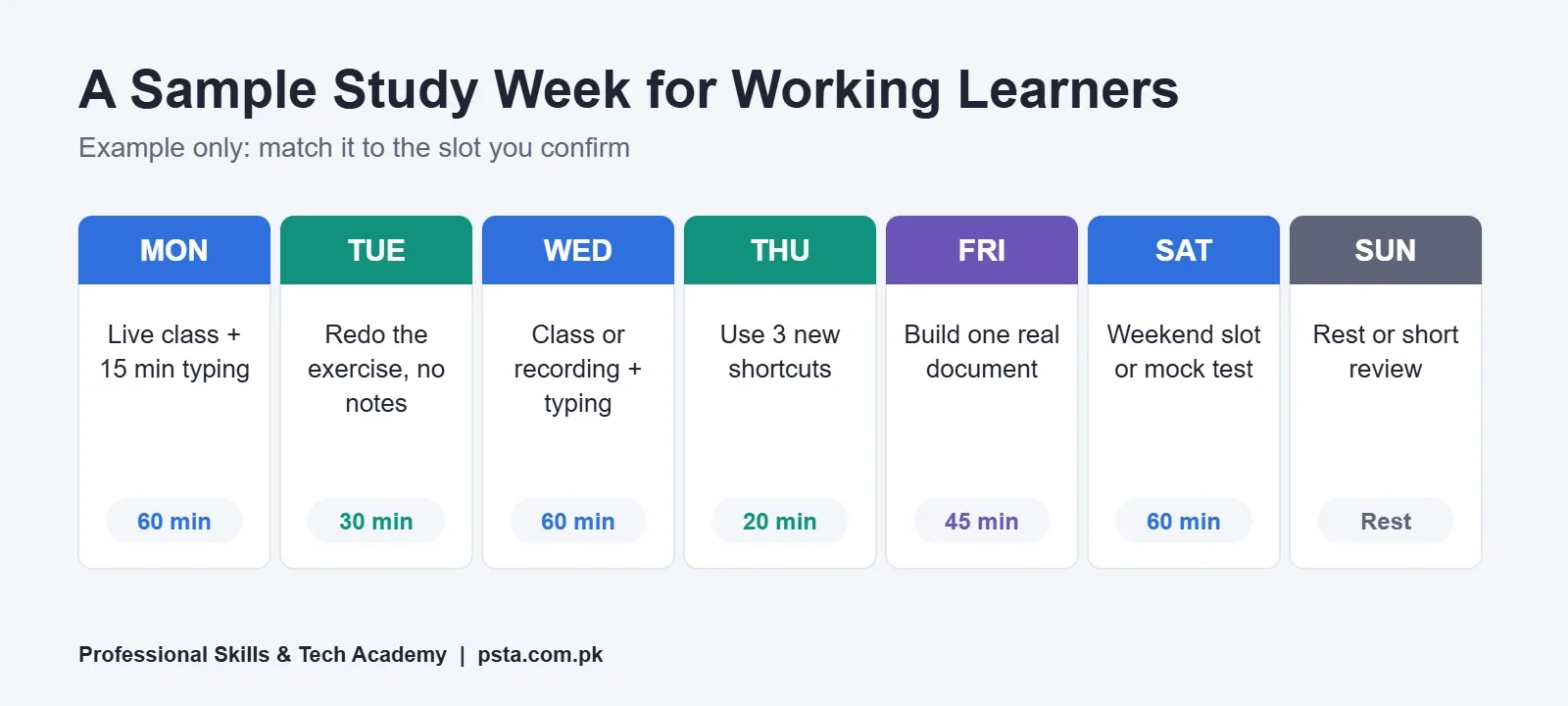
| Day | Time | Task |
|---|---|---|
| Monday | Evening, 60 minutes | Live class, then 15 minutes of typing drills |
| Tuesday | Before work, 30 minutes | Redo the class exercise without notes |
| Wednesday | Evening, 60 minutes | Live class or recording, plus typing |
| Thursday | Lunch break, 20 minutes | Write down 3 shortcuts and use them |
| Friday | Evening, 45 minutes | Build one real document for home or work |
| Saturday | Morning, 60 minutes | Weekend slot or a timed mock test |
| Sunday | Rest | Rest, or a short review of the week |
The pattern matters more than the hours. Short, regular practice beats one long Sunday session, because typing speed and shortcut recall build through repetition.
GIIT, NAVTTC or Live Online: Which Route Suits You?
You have more than one good choice when picking an MS Office course in Rawalpindi, and the right one depends on your time and goal.
A public institute. The Government Institute of Information Technology in Kohati Bazar is a public institution. Campus.pk lists courses there including a Diploma in Office Management, a Certificate in Computer Application and a Diploma in Computer Operator. If you want a classroom near home and can attend on fixed days, check its current admission dates.
A free federal program. NAVTTC has published a six-month Computer Application & Office Management course outline under the Prime Minister's Hunarmand Pakistan program, with 4 hours a day, 5 days a week. It suits someone who can give 20 hours a week and wants a longer program. Check whether a batch is open near you.
Live online with PSTA. This fits you better if you work, study or live far from a training center, need evening or weekend slots, or want recordings to review. The 12-week length is shorter than a six-month program.
| Factor | Public institute | NAVTTC program | PSTA live online |
|---|---|---|---|
| Where | Classroom in Rawalpindi | Partner center, if a batch runs nearby | Your home |
| Weekly time | Fixed class days | About 20 hours | Slot you confirm, plus practice |
| Length | Varies by course | 6 months | 12 weeks |
| Recordings | Check with the institute | Check with the center | Every session, per the course page |
| Best for | Learners who like a local classroom | Learners with full weekdays free | Working learners and students with tight hours |
Courses That Pair Well With MS Office
An MS Office course in Rawalpindi is a starting point, not the finish line. Depending on the job you want, one of these can follow:
- English & Urdu Typing (4 weeks): useful if your target post has a typing test, which many clerical posts do. Read typing speed for jobs in Pakistan for the speeds ads ask for.
- Power BI (8 weeks): for office staff who already handle Excel reports and want dashboards for managers.
- DIT (1 year): a broader diploma for students after Matric or Intermediate who want office skills plus networking, programming and design.
- English Spoken & Grammar (12 weeks): for front desk and reception roles where you speak with clients.
You can see every option on the courses page. For a wider view of skills in the city, read PSTA's short courses in Rawalpindi guide, and nearby learners can see the Taxila guide.
Practice Ideas That Show an Employer You Are Ready
These are ideas for your own practice, built around Rawalpindi life. None of them are PSTA projects or real client work.
- A shop invoice template. Make an Excel invoice for a Raja Bazaar style wholesale shop with item, quantity, rate and a total formula.
- A school fee register. Track 30 students, paid and unpaid months, with conditional formatting to flag dues.
- A tenant notice letter. Format a formal notice in Word with a letterhead, date, reference number and signature block.
- A clinic appointment log. Build a daily sheet with patient token numbers, times and a count of visits.
- A 5-slide meeting deck. Summarize a month of the clinic log in PowerPoint with one chart.
Save each one as a PDF too. When an interviewer asks what you can do, open the files and show them.
Retype One Real Form Tonight
Take a printed form from your home or office, such as a fee slip or an application, and retype it in Word so it looks the same. Time yourself. If it takes over an hour or the layout keeps breaking, a structured MS Office course in Rawalpindi will save you time. When you are ready, apply at /admission or tell the team on WhatsApp at +92 314 5424399 that you are in Rawalpindi and which time slot suits you.
Frequently asked questions
Do I have to travel to Abbottabad for the MS Office course?
No. PSTA's only campus is in Abbottabad, but the Office Automation course is also taught through live online classes on PSTA's portal. Learners in Rawalpindi attend from home, watch recordings afterwards and sit the same final practical exam as campus students. Travel is only needed if you choose hybrid or campus study.
What computer do I need at home in Rawalpindi for live classes?
A laptop or desktop with Microsoft Office or a compatible office suite, a working keyboard, headphones and a stable internet connection. A phone can play the lecture, but Word and Excel practice needs a proper keyboard. Keep a UPS or mobile hotspot ready in case power or Wi-Fi drops during class.
Does the course teach the e-FOAS system used in Punjab offices?
No. e-FOAS is a government system, and PSTA's course does not claim to teach it. The course covers the skills underneath it: typing, Word letters and reports, Excel sheets, file management and saving documents correctly. Those habits make it easier to learn any office software an employer gives you.
Can I pay the Office Automation fee in parts?
Yes. The course page lists the fee as Rs. 12,000 against a regular Rs. 15,000, payable in 2 installments: half at admission and half in the middle of the course. Confirm the current fee and your batch date on WhatsApp before you pay, since offers can change.
Will employers in Rawalpindi accept a PSTA certificate?
Each employer decides for itself, so no academy can promise acceptance. What helps is that anyone can check a PSTA certificate online at psta.com.pk/certificate using your Student ID or serial number. Most employers also give a practical test, so your typing speed and Excel work will matter as much as the paper.
What if load-shedding makes me miss a live class?
The course page says online students can watch a recording of every session on the learning portal. If you miss part of a class, watch the recording the same day and redo the exercise. A UPS for your router or a backup mobile data package also reduces the chance of dropping out mid-class.
Is this course right for me if I already know some Excel?
The Office Automation course starts at beginner level, so it suits people who want a complete, structured base. If you already build formulas and charts comfortably, the 8-week Power BI course may fit you better. Send your current skills on WhatsApp and ask which batch suits your level.
Sources & references
- RDA Implements e-FOAS (PITB) pitb.gov.pk
- No more files: Punjab govt offices go fully digital (Express Tribune) tribune.com.pk
- Public offices directed to shift to digital filing (Express Tribune) tribune.com.pk
- State officers unprepared for paperless filing (Express Tribune) tribune.com.pk
- Rawalpindi District Population, PBS 2023 Census (City Population) citypopulation.de
- About RCCI (Rawalpindi Chamber of Commerce and Industry) rcci.org.pk
- Govt Institute of Information Technology Rawalpindi (Campus.pk) campus.pk
- Computer Application & Office Management Course Content (NAVTTC) navttc.gov.pk
Last reviewed & updated on by Umar Qureshi. Written by the PSTA team in Abbottabad, Pakistan.

Umar Qureshi
Certified Office Automation Course: Master MS Office & Computer Basics
Turn this guide into a career: hands-on training with real projects, online across Pakistan or on-campus in Abbottabad · 12 Weeks.



Comments
No comments yet — ask a question or share your experience.