Quick answer
Office Home 2024 costs Rs. 39,599 once on Microsoft's Pakistan store and covers one PC or Mac with no new features. Microsoft 365 Personal costs Rs. 22,999 a year for five signed-in devices, 1 TB storage and Copilot. One laptop kept for years favours Office 2024; several devices or a family favour Microsoft 365.
Key takeaways
- • Microsoft 365 Personal is Rs. 22,999 a year; Office Home 2024 is Rs. 39,599 once.
- • By the second year, Personal has cost more than Office Home 2024.
- • The Family plan covers up to six people for Rs. 28,999 a year.
- • Free web apps and Office 365 A1 cover most student coursework.
- • Office 2016 and 2019 lost support in October 2025, and Office 2021 in October 2026.
- • Only Home & Business 2024 includes commercial-use rights.
Table of contents 17 sections
- Office 2024 vs Microsoft 365: The Short Difference
- What Each Option Costs in Pakistan
- When Does a Subscription Cost More Than Buying Once?
- What Do You Give Up With a One-Time Purchase?
- Is the Free Version of Microsoft Office Enough?
- Can Students Get Microsoft 365 Free?
- Still Using Office 2016, 2019 or 2021?
- Office 2024 vs Microsoft 365: Which One Should You Buy?
- You're a Student With a University Email
- You Use One Laptop and Keep It for Years
- You Work Across a Laptop, a Phone and a Tablet
- Several People at Home Need Office
- You Run a Shop or Small Office
- Buying Safely: Keys, Payment and Activation
- Does the Version Matter for Learning or Jobs?
- Where PSTA's Office Automation Course Fits
- Check What You Already Have Before You Pay
A lot of people buying a laptop in Pakistan assume that "genuine Office" means paying once and getting every future update for free. That isn't how it works. The Office 2024 vs Microsoft 365 choice is really a choice between a fixed set of apps you own on one computer and a yearly plan that keeps changing, adds cloud storage and covers several devices.
Neither is automatically the better deal. It depends on how many devices you use, how long you keep a laptop and whether a free option already covers your work.
In this comparison, you'll find out:
- What each option costs on Microsoft's Pakistan store, in rupees
- The month when a subscription starts costing more than buying once
- What the free web version can and can't do for students and office staff
- Which older Office versions no longer get security fixes
- A simple way to pick the right option for your situation
Office 2024 vs Microsoft 365: The Short Difference
Office 2024 is a one-time purchase. Microsoft's Office 2024 FAQ says Office Home 2024 includes the classic desktop versions of Word, Excel, PowerPoint and OneNote, installed on one PC or Mac. Office Home & Business 2024 adds Outlook. The apps get security fixes, but the Windows version stays "locked in time," so no new features arrive.
Microsoft 365 is a subscription. You pay every month or every year, and the apps keep changing. The Personal plan page on Microsoft's Pakistan store lists 1 TB of cloud storage, Copilot features in the apps and sign-in on 5 devices at once, across PCs, Macs, phones and tablets.
So the trade is simple to state. Office 2024 costs more on day one and nothing after that. Microsoft 365 costs less on day one and keeps charging you for as long as you want the desktop apps.
What Each Option Costs in Pakistan
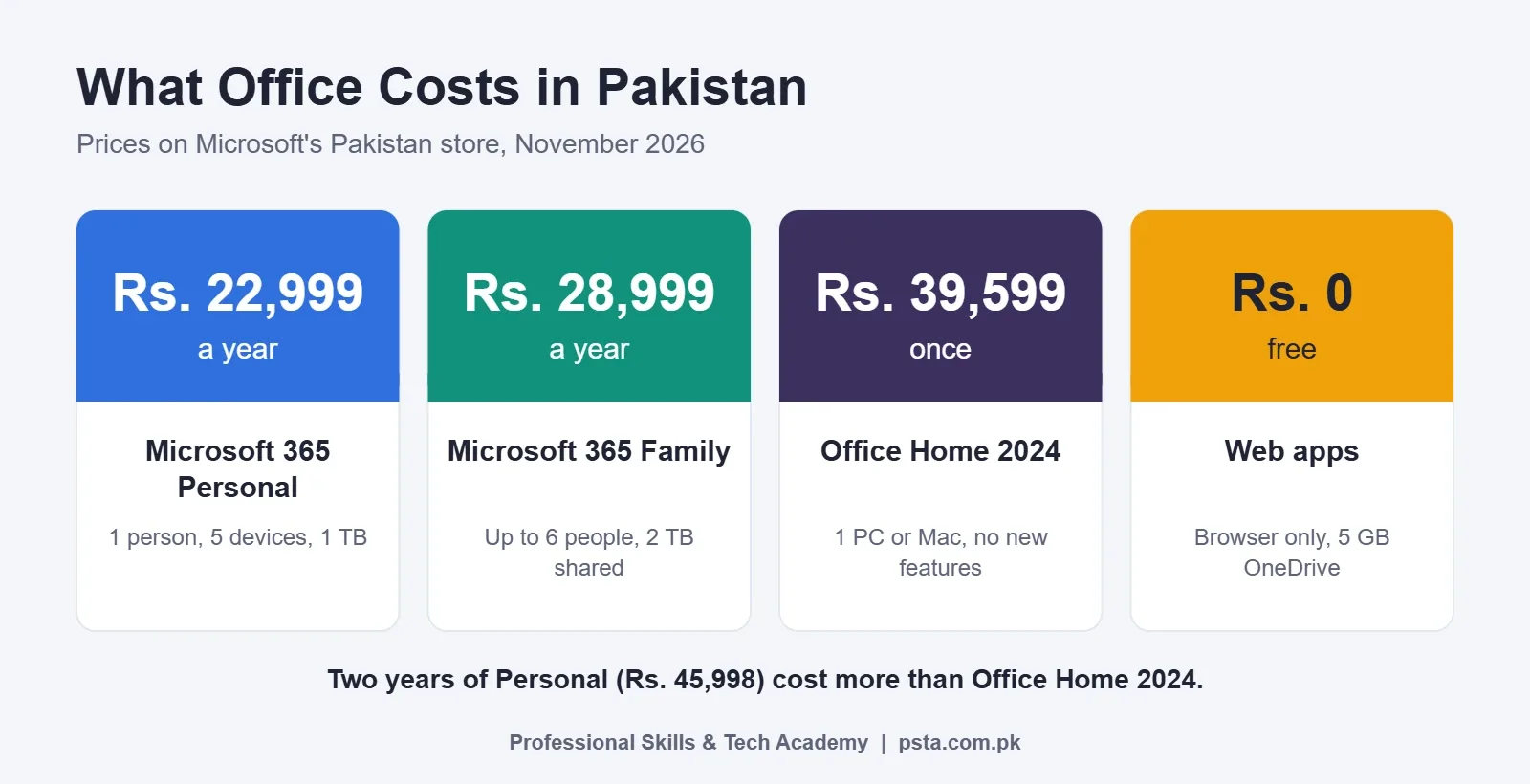
Microsoft now shows rupee prices on its Pakistan store, so checking the Microsoft 365 price in Pakistan no longer means converting dollars yourself. These are the figures we saw on the official product pages in November 2026. Prices can change, so check the page again on the day you pay.
| Option | Price on Microsoft's Pakistan store | Who it covers | What you get |
|---|---|---|---|
| Microsoft 365 Personal | Rs. 22,999 a year or Rs. 2,299 a month | 1 person, 5 devices signed in at once | Desktop and mobile apps, 1 TB storage, Copilot features |
| Microsoft 365 Family | Rs. 28,999 a year or Rs. 2,899 a month | 1 to 6 people (AI features for the owner only) | Same apps, 2 TB of shared storage |
| Office Home 2024 | Rs. 39,599 once | 1 PC or Mac | Word, Excel, PowerPoint, OneNote; no cloud storage |
| Office Home & Business 2024 | No rupee price shown when checked | 1 PC or Mac | Adds Outlook and commercial-use rights |
| Free web apps | Rs. 0 | Anyone with a Microsoft account | Word, Excel and PowerPoint in a browser, 5 GB OneDrive |
Two details are easy to miss. First, the Family plan page for Pakistan lists 2 TB of shared storage for up to six people, while Microsoft's US page lists 1 TB per person. Read the storage line for your own region instead of trusting a foreign review. Second, the Office Home 2024 page licenses one computer only. If you replace your laptop, plan on moving the licence rather than adding a second machine.
When Does a Subscription Cost More Than Buying Once?
Cost is where the Office 2024 vs Microsoft 365 decision usually gets settled. Here is the arithmetic with the Pakistan prices above. It ignores price changes and bank charges, so treat it as a guide, not a quote.
- Year one: Microsoft 365 Personal costs Rs. 22,999. Office Home 2024 costs Rs. 39,599. The subscription is Rs. 16,600 cheaper.
- Month 21: Rs. 39,599 divided by Rs. 22,999 is about 1.7 years. Somewhere around the 21st month, the two options have cost you roughly the same.
- Year two: two annual payments come to Rs. 45,998, now Rs. 6,399 more than Office Home 2024.
- Year four: four annual payments add up to Rs. 91,996, more than double the one-time price.
Paying monthly makes the gap wider. Twelve monthly payments of Rs. 2,299 total Rs. 27,588, which is Rs. 4,589 more than the annual plan. If you know you'll keep the subscription for a full year, pay annually.
The Family plan changes the picture for households. At Rs. 28,999 a year shared by six people, each person's share is about Rs. 4,833 a year. Three siblings and their parents would pay less per head than one person buying Office Home 2024, and each of them would get the desktop apps on their own devices.
What Do You Give Up With a One-Time Purchase?
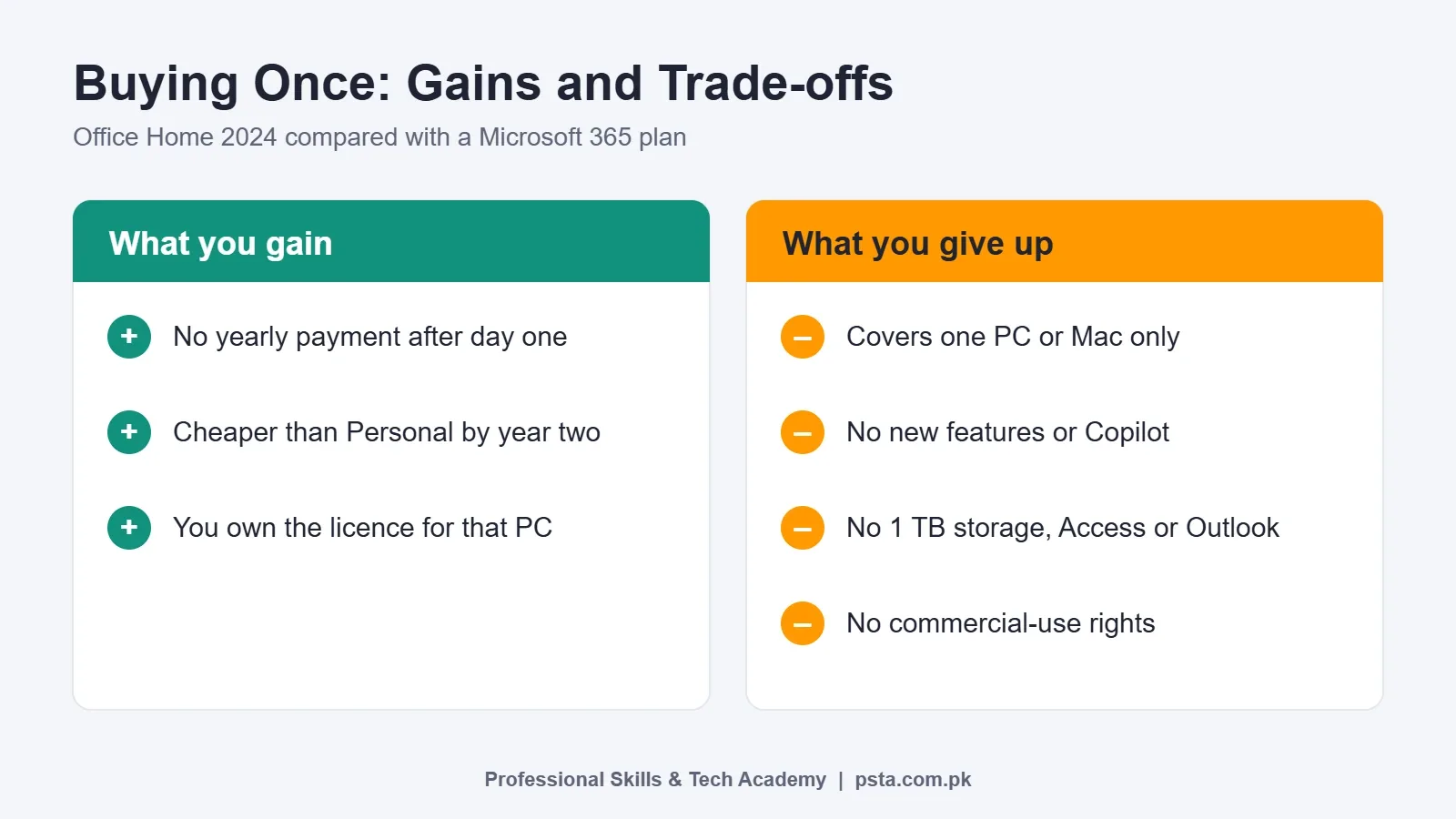
The lower long-term cost of Office 2024 comes with limits that matter in daily work:
- One computer. Your phone and a second laptop aren't covered by the desktop licence.
- No new features. Microsoft's FAQ is clear that Office 2024 for Windows won't gain features after release. If Excel adds a new function next year, you won't get it.
- No 1 TB cloud storage. You still get the free 5 GB that comes with any Microsoft account, but not the subscription's storage.
- No Access database app. The FAQ lists Access with Microsoft 365 on PC, not with Office 2024. If a course asks you to build an Access database, you'll need another option.
- Outlook only in the business edition. Office Home 2024 doesn't include the desktop Outlook app.
There's also a licensing point for shop owners and small offices. Microsoft's Office 2024 launch announcement says only the Home & Business edition includes the rights to use the apps for commercial purposes. If your files are invoices and stock sheets for a business, the cheaper Home edition isn't the right licence.
Is the Free Version of Microsoft Office Enough?
For many students, yes, and it's worth testing before you spend anything on the Office 2024 vs Microsoft 365 question. Microsoft's support page on paid plans versus the free web apps says a free Microsoft account gives you Word, Excel and PowerPoint in the browser, plus 5 GB of OneDrive storage. Files save to OneDrive automatically, which also protects you when a hard drive fails before an assignment deadline.
The same page lists what you don't get:
- No installed desktop apps, so you need a working internet connection to edit
- Security updates only, with no new features and no Copilot
- No Access or Publisher
- Basic editing on mobile only for phones and tablets smaller than 10.1 inches
- No technical support from Microsoft
In practice, these browser apps, long known as Office for the web, handle letters, CVs, simple formula sheets and class presentations. They feel limited when you need Power Query, heavy pivot tables, macros or long reports with complex formatting. If you're preparing for a computer operator test or an office job, practise on the desktop apps at least some of the time, because that's what most offices install.
Can Students Get Microsoft 365 Free?
Sometimes, through their school or university rather than through Microsoft's shop. That's the most dependable route to free Microsoft Office for students. The Office 365 Education page says students and teachers with an eligible education email address can get Office 365 A1 free. A1 includes the web versions of Word, Excel, PowerPoint, OneNote and Outlook, plus PC-only Access and Publisher. Full desktop apps sit in the paid A3 plan, which your institution would have to buy.
Three things to know before you count on it:
- Your institution has to be eligible, and your email must come from it. A Gmail address won't work.
- Approval is often instant, but Microsoft says some institutions take up to a month.
- When you graduate or leave, the plan can end. Microsoft says expired plans drop to a mode where you can view files but not edit them, so move your work to a personal account before your last semester ends.
Still Using Office 2016, 2019 or 2021?
Many shop-installed laptops in Pakistan still run older Office versions. Microsoft's end-of-support notice confirms that Office 2016 and Office 2019 stopped getting support on October 14, 2025. The same notice set October 13, 2026 as the end date for Office LTSC 2021, and heise reported the same date for Office 2021. In other words, Office 2021 end of support has already arrived.
End of support means no security fixes, no bug fixes and no technical help from Microsoft. The apps may still open, but every document from an unknown sender becomes a bigger risk. If your copy is one of these versions, this is a good time to decide between the options in this guide.
Office 2024 has a clock too. The FAQ says Office LTSC 2024 and Office 2024 for Mac go out of support on October 9, 2029. The Windows consumer edition follows Microsoft's Modern Lifecycle Policy instead of a fixed date.
Office 2024 vs Microsoft 365: Which One Should You Buy?
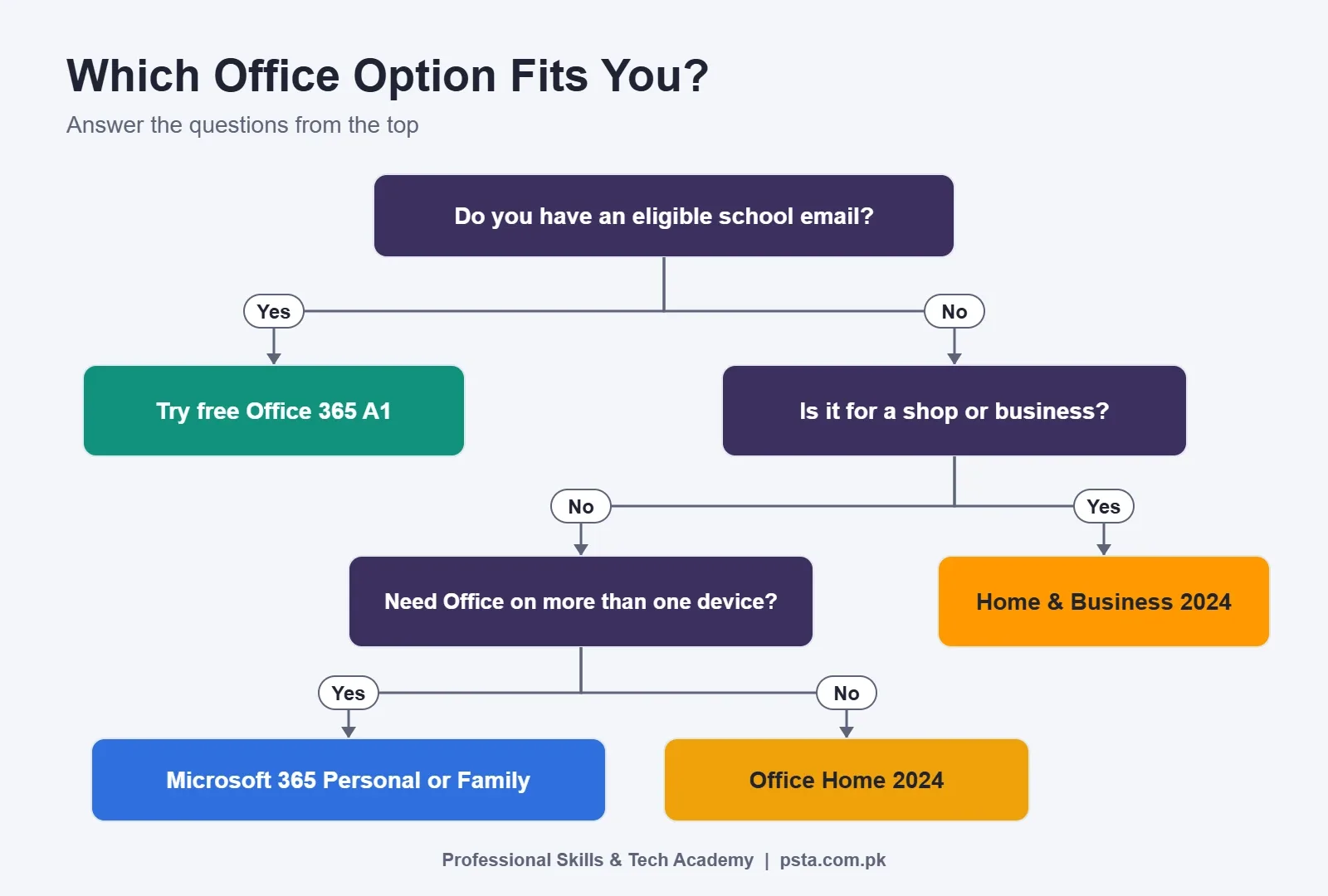
Run through these five situations. Most readers fit one of them clearly.
You're a Student With a University Email
Try Office 365 A1 first. If your university isn't eligible, the free web apps will carry you through most coursework. Spend money only when a subject needs desktop features.
You Use One Laptop and Keep It for Years
Office Home 2024 usually wins. If you'll use the same computer for three or four years and don't need cloud storage or new features, the one-time price works out cheaper by the second year.
You Work Across a Laptop, a Phone and a Tablet
Microsoft 365 Personal fits better. Five devices signed in at once and 1 TB of storage mean your files follow you, which suits freelancers and anyone who edits on the move.
Several People at Home Need Office
Microsoft 365 Family is the cheapest per person once three or more people share it. Each member uses their own Microsoft account.
You Run a Shop or Small Office
Skip Office Home 2024, because it doesn't carry commercial-use rights. Look at Office Home & Business 2024 or one of Microsoft's business plans, and confirm the licence terms with the seller before you pay.
Buying Safely: Keys, Payment and Activation
A few habits will save you money and trouble:
- Be suspicious of "lifetime Microsoft 365" keys. Microsoft 365 is a subscription by design, so a lifetime version of it doesn't match how Microsoft sells the product. Very cheap keys from marketplace sellers can stop working later, with no refund.
- Buy from Microsoft or an authorised reseller, and keep the receipt and the account the key is linked to.
- Check your card's foreign-transaction charges. Your bank may add its own fees or taxes to an online software payment, so look at the final amount on your statement, not just the store price.
- Plan for activation. Microsoft's FAQ says Office 2024 needs internet access to activate and to receive security updates, even though you own the licence.
- Turn off auto-renew if you only need one year. Subscriptions renew unless you change the setting in your Microsoft account.
Does the Version Matter for Learning or Jobs?
Less than most people think. For learning, Office 2024 vs Microsoft 365 is mostly a question of cost, not skill. The ribbon, the core formulas, page setup, mail merge and slide design work the same way in Office 2024, Microsoft 365 and, for the most part, the web apps. An employer testing you on a computer operator post will check whether you can format a letter, total a column and build a chart, not which licence you used to practise.
Where the version shows up is in newer features. Some recent Excel functions and Copilot tools exist only in Microsoft 365. If you're aiming for an analyst role, practise on Microsoft 365 when you can. Our Google Sheets vs Excel comparison covers how much of your skill carries across tools, and the MOS certification guide explains how Microsoft's own Office exams work.
Where PSTA's Office Automation Course Fits
Whichever version you choose, the skills are what employers pay for. The Certified Office Automation Course at PSTA is a 12-week beginner program. You can sit in the Mandian classroom, log in to the live sessions from home if you're outside Abbottabad, or combine both. According to the course page, a new batch starts each month and the current fee of Rs. 12,000 (normally Rs. 15,000) can be split into two instalments.
The outline moves from computer and file basics through English and Urdu typing to Word, Excel and PowerPoint, then into office tasks and software installation and updates. That last module is useful here, because installing Office, signing in and checking a licence are part of the practical work. Projects include a CV and application letter, an Excel expense or sales sheet with a chart, a presentation and a multi-page report.
If typing speed is your weak point, the English and Urdu typing course pairs well with it. For a broader one-year qualification, the DIT diploma includes office automation alongside other IT subjects. Other options sit on the PSTA courses page, and seats for the next batch are booked through online admission.
Check What You Already Have Before You Pay
Open Word on your laptop, click File, then Account. The Product Information panel tells you whether you have Office 2016, 2019, 2021, 2024 or Microsoft 365, and whether it's activated. If it shows a version past its support date, or no licence at all, you can settle Office 2024 vs Microsoft 365 for your own budget and devices. Spend five minutes on that check today, before anyone sells you a key you don't need.
Frequently asked questions
Is Office 2024 a lifetime licence?
You pay once and can keep using Office 2024 on the computer it's activated on, but it isn't a lifetime of updates. Microsoft says the Windows version won't gain new features after release. It gets security fixes until its support period ends, and the next major version would need a new purchase.
How much is Microsoft 365 in Pakistan?
When we checked Microsoft's Pakistan store in November 2026, Microsoft 365 Personal was Rs. 22,999 a year or Rs. 2,299 a month, and Microsoft 365 Family was Rs. 28,999 a year or Rs. 2,899 a month. Prices can change, so confirm on the official page and check your bank's charges before paying.
Can I use Microsoft Word and Excel for free?
Yes. Anyone with a free Microsoft account can use Word, Excel and PowerPoint in a web browser and gets 5 GB of OneDrive storage. The free versions need an internet connection, don't include Access or Publisher, and don't get new features or Copilot. Phones and tablets under 10.1 inches also get basic editing.
Do university students in Pakistan get Microsoft 365 free?
Only if their institution is eligible. Microsoft offers Office 365 A1 free to students and teachers with an eligible education email address. A1 includes the web apps plus PC versions of Access and Publisher. Full desktop apps need the paid A3 plan, which your university would have to provide.
Can I install Office Home 2024 on two laptops?
No. Microsoft licenses Office Home 2024 and Office Home & Business 2024 for one PC or Mac. If you need Office on a laptop and a desktop, or on a phone and tablet as well, Microsoft 365 Personal allows five devices signed in at once.
Is Office 2019 still safe to use?
Office 2016 and Office 2019 stopped receiving support on October 14, 2025, which means no more security fixes from Microsoft. The apps may still open, but documents from unknown senders become riskier over time. Plan to move to a supported version or to Microsoft 365.
Which is better for learning MS Office for jobs?
Either works for learning. Formatting, formulas, charts, mail merge and slide design behave the same way in Office 2024 and Microsoft 365. Microsoft 365 gets newer features and Copilot first, so it suits learners aiming at analyst roles. For most office and computer operator jobs, practical skill matters more than the licence.
Sources & references
- Microsoft 365 Personal (Pakistan store) microsoft.com
- Microsoft 365 Family (Pakistan store) microsoft.com
- Office Home 2024 (Pakistan store) microsoft.com
- Office 2024 and Office LTSC 2024 FAQ support.microsoft.com
- Microsoft 365 subscription vs free web apps support.microsoft.com
- Office 365 Education microsoft.com
- Office 2016/2019 support ends, LTSC 2021 next techcommunity.microsoft.com
- Office 2024 for consumers available October 1 microsoft.com
Last reviewed & updated on by Umar Qureshi. Written by the PSTA team in Abbottabad, Pakistan.

Umar Qureshi
Certified Office Automation Course: Master MS Office & Computer Basics
Turn this guide into a career: hands-on training with real projects, online across Pakistan or on-campus in Abbottabad · 12 Weeks.
Comments
No comments yet — ask a question or share your experience.